Sitzen Ihre Rechnungen lange nach dem Fälligkeitsdatum unbezahlt? Verspätete Zahlungen sind eines der häufigsten Cashflow-Probleme, mit denen Unternehmen konfrontiert sind – und ein wesentlicher Faktor ist einfach die Reibung beim Bezahlen. Dieser Leitfaden zeigt Ihnen, wie das Hinzufügen eines QR-Codes zu Ihren Rechnungen diese Reibung beseitigt und Geld schneller auf Ihr Konto bringt.
Warum verspätete Rechnungszahlungen ein echtes Geschäftsproblem sind
Die Zahlen sind schwer zu ignorieren. 56% der US-amerikanischen Kleinunternehmen berichten, dass ihnen Geld aus unbezahlten oder verspäteten Rechnungen geschuldet wird, und im Durchschnitt tragen diese Unternehmen jeweils mehr als $17.000 an ausstehenden Forderungen. Zahlungen kommen typischerweise 8,2 Tage nach der vereinbarten Frist an – nicht weil Kunden nicht zahlen wollen, sondern weil traditionelle Rechnungs-zu-Zahlungs-Workflows zu viele Schritte haben.
Kunden erhalten eine Papierrechnung oder PDF-Rechnung, müssen dann Ihre Bankverbindung finden, zu einem Zahlungsportal navigieren oder daran denken, einen Scheck auszustellen. Jeder zusätzliche Schritt ist eine Gelegenheit für Verzögerungen. Je einfacher Sie das Bezahlen gestalten, desto schneller werden Sie bezahlt.
Wie QR-Codes auf Rechnungen funktionieren
Ein Zahlungs-QR-Code auf einer Rechnung kodiert eine URL, die direkt zu einer sicheren Zahlungsseite führt. Wenn ein Kunde den Code mit seiner Smartphone-Kamera scannt, öffnet sich die Zahlungsseite automatisch in seinem Browser. Er bestätigt den Betrag, wählt seine Zahlungsmethode – Kreditkarte, Banküberweisung, digitale Geldbörse – und schließt die Transaktion in Sekunden ab.
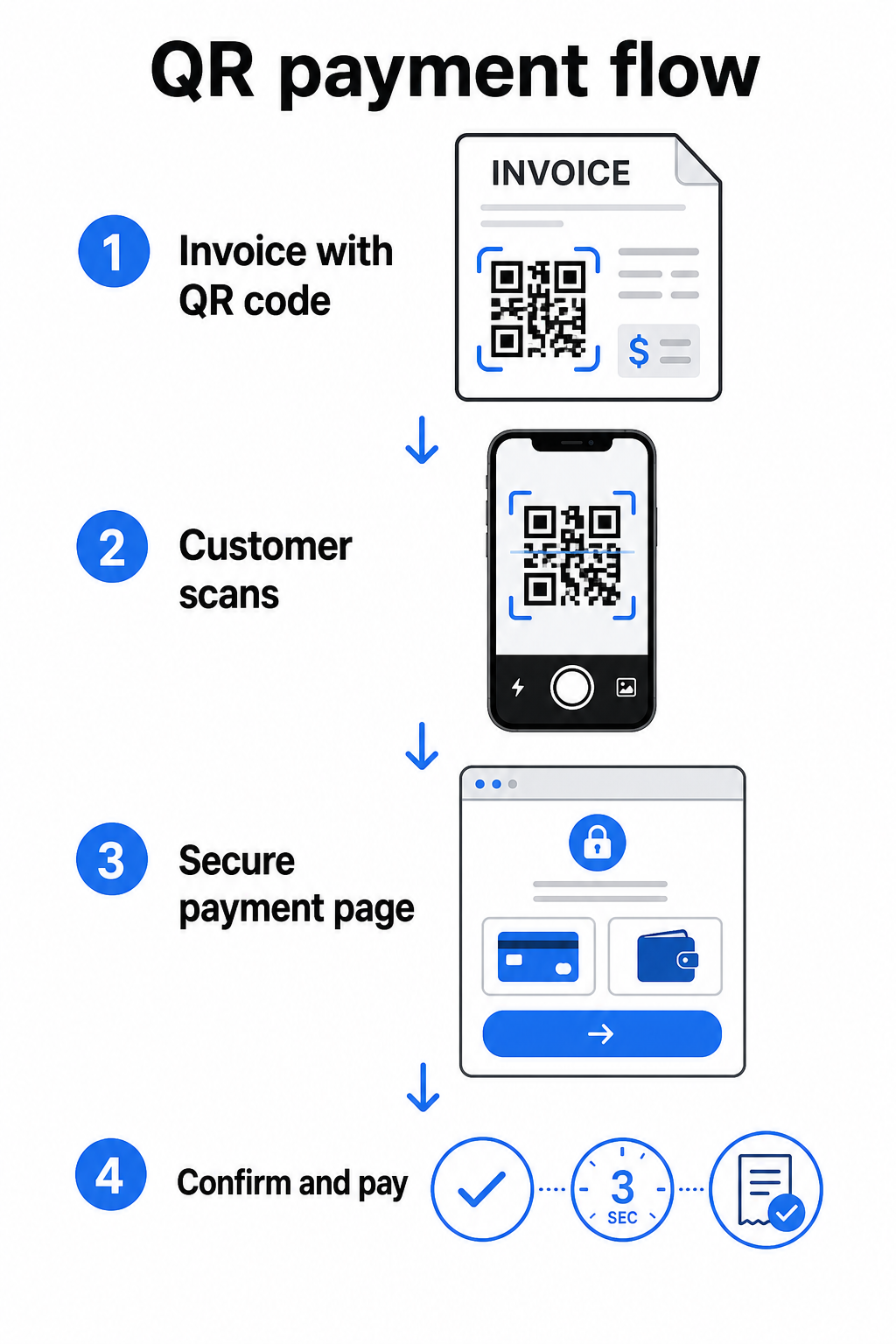
Der FedNow-Dienst der Federal Reserve beschreibt genau diesen Workflow: Digital gesendete Rechnungen mit einem eingebetteten QR-Code ermöglichen es Kunden, zu scannen und die Zahlung einzuleiten, anstatt auf Papierauszüge zu warten oder manuell nach Zahlungsportalen zu suchen. Kunden können sogar einen QR-Code scannen, der eine Zahlungsaufforderung (RfP) enthält, um eine Sofortzahlung direkt über FedNow einzuleiten.
Der allgemeine Prozess funktioniert so:
- Erzeugen Sie einen Zahlungslink über Ihren Zahlungsanbieter (wie PayPal, Stripe oder Square)
- Konvertieren Sie diesen Link mit einem QR-Code-Generator in einen QR-Code
- Platzieren Sie den QR-Code auf Ihrer Rechnung, PDF oder Abrechnung
- Der Kunde scannt, überprüft den Betrag und bezahlt – oft innerhalb von Sekunden
Große US-Zahlungsanbieter, einschließlich PayPal, Stripe und Square, unterstützen alle Zahlungslinks, die als QR-Codes geteilt werden können, sodass auf keiner Seite spezielle Hardware oder Software erforderlich ist.
Bereit, einen Zahlungs-QR-Code zu erstellen? Verwandeln Sie jeden Zahlungslink in einen scannbaren QR-Code, den Ihre Kunden direkt von Ihrer Rechnung verwenden können. Nutzen Sie Pageloot’s PayPal QR-Code Generator oder der allgemeine QR-Code-Generator um in wenigen Minuten loszulegen.
Womit Sie Ihren Rechnungs-QR-Code verlinken sollten
Der QR-Code selbst ist nur der Übermittlungsmechanismus. Womit Sie ihn verlinken, bestimmt, wie reibungslos das Zahlungserlebnis tatsächlich ist.
Eine Zahlungsseite oder ein Checkout-Link ist die direkteste Option. Erzeugen Sie einen Zahlungslink aus dem Dashboard Ihres Anbieters – mit vorausgefülltem Rechnungsbetrag, Beschreibung und Ihren Geschäftsdaten – und konvertieren Sie ihn in einen QR-Code. Kunden gelangen auf eine bezahlbereite Seite ohne manuelle Dateneingabe. Pageloot’s Leitfaden für Zahlungs-QR-Codes erklärt, wie dies mit Anbietern wie PayPal und Stripe funktioniert.
Ein PDF der vollständigen Rechnung ist nützlich, wenn Sie Kunden Zugang zu detaillierten Angaben, Bedingungen oder unterstützenden Dokumenten neben der Zahlungsoption geben möchten. Ein PDF QR-Code Link führt direkt zum Dokument, sodass Kunden es sofort öffnen oder herunterladen können, ohne ihren Posteingang zu durchsuchen.
Ein Zahlungsportal oder eine Self-Service-Seite funktioniert gut für Unternehmen mit wiederkehrenden Kunden. Ein Link-QR-Code Link kann auf eine Anmeldeseite oder ein Konten-Dashboard verweisen, wo Kunden alle ihre Rechnungen an einem Ort verwalten.
Die richtige Wahl hängt von Ihrem Abrechnungs-Workflow ab, aber für die meisten Unternehmen, die versuchen, die Tage bis zur Zahlung zu reduzieren, erzeugt ein direkter Zahlungslink-QR-Code den kürzesten Weg von der Rechnung zur Begleichung.
Statische vs. dynamische QR-Codes: Welche sollten Sie verwenden?
Beim Erstellen eines QR-Codes für Rechnungen haben Sie zwei Optionen: statisch und dynamisch. Für Abrechnungszwecke, bieten dynamische QR-Codes bedeutsame praktische Vorteile.
| FUNKTION | Statischer QR-Code | Dynamischer QR-Code |
|---|---|---|
| Ziel nach dem Drucken bearbeiten | Nein | Ja |
| Scan-Daten verfolgen | Nein | Ja |
| Zahlungslink aktualisieren, falls er sich ändert | Erfordert Neudruck | Im Dashboard aktualisieren |
| Überwachen, wer die Rechnung geöffnet hat | Nein | Ja |
| Bei Bedarf deaktivieren | Nein | Ja |
Mit einem dynamischen QR-Code können Sie die Ziel-URL aktualisieren, ohne einen neuen Code zu erstellen oder Ihre Rechnungs-Vorlage neu zu drucken. Wenn sich Ihr Zahlungsanbieter ändert, Ihr Rechnungs-Layout aktualisiert wird oder Sie zu einer anderen Zahlungsmethode für einen bestimmten Kunden umleiten möchten, tritt die Änderung sofort in Kraft – der gedruckte oder digitale QR-Code bleibt derselbe.
Dynamische Codes bieten Ihnen auch Scan-Analysen: Zeitstempel, Gerätetypen und geografische Daten, die Ihnen verraten, ob ein Kunde seine Rechnung geöffnet und damit interagiert hat. Wenn eine große Rechnung eine Woche vor dem Fälligkeitsdatum null Scans aufweist, ist das ein nützliches Frühwarnsignal, um proaktiv nachzufassen.
So fügen Sie einen QR-Code zu Ihren Rechnungen hinzu
Das Hinzufügen eines QR-Codes zu einem bestehenden Rechnungs workflow ist unkompliziert und erfordert kein vollständiges Neuaufsetzen Ihrer Abrechnungseinrichtung.
Schritt 1: Generieren Sie Ihren Zahlungs link. Melden Sie sich bei Ihrem Zahlungsanbieter (PayPal, Stripe, Square oder einem anderen US-Anbieter) an und erstellen Sie einen Zahlungs link. Fügen Sie den Rechnungsbetrag, Ihren Firmennamen und eine Referenznummer oder Beschreibung hinzu, damit die Zahlung leicht abgeglichen werden kann.
Schritt 2: Konvertieren Sie den Link in einen QR-Code. Fügen Sie die Zahlungs-URL in Pageloots QR-Code-Generator oder PayPal QR-Code Generator. ein. Wählen Sie einen dynamischen QR-Code, wenn Sie Bearbeitungs- und Tracking-Funktionen wünschen.
Schritt 3: Passen Sie den Code an. Fügen Sie Ihr Logo hinzu, wenden Sie Ihre Markenfarben an und fügen Sie eine kurze Handlungsaufforderung wie “Scannen zum Bezahlen” hinzu. Marken codes schaffen Kundenvertrauen und sind schwerer zu fälschen – eine wichtige Überlegung angesichts der Risiken, die bösartige QR-Codes in Zahlungsszenarien darstellen.
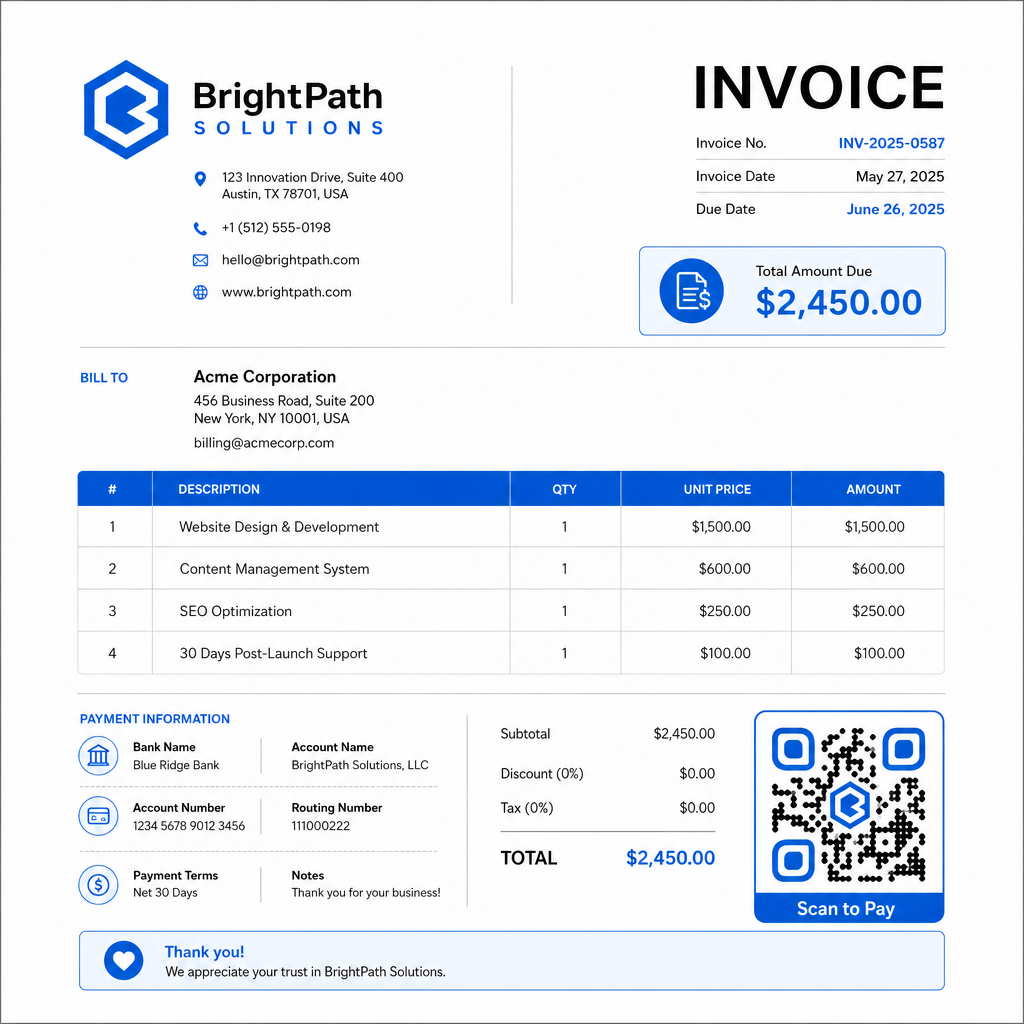
Schritt 4: Im richtigen Format herunterladen. Exportieren Sie den QR-Code als SVG- oder EPS-Datei für Rechnungen, die gedruckt werden, oder als hochauflösendes PNG für PDF- oder digitale Rechnungen. Vektorformate verhindern Pixelbildung und erhalten die Scannbarkeit in jeder Größe.
Schritt 5: Platzieren und testen Sie vor dem Versand. Fügen Sie den QR-Code in Ihre Rechnungs vorlage ein. Testen Sie ihn auf mindestens zwei verschiedenen Geräten und bestätigen Sie, dass die Zahlungsseite korrekt geladen wird, der Betrag stimmt und der Bestätigungsablauf durchgängig funktioniert.
Rechnungsinteraktion in Echtzeit verfolgen Wissen Sie, ob Ihr Kunde Ihre Rechnung vor dem Fälligkeitsdatum gescannt hat. Pageloots dynamische QR-Codes liefern Ihnen Scan-Zahlen, Gerätedaten und Zeitstempel von einem einzigen Dashboard aus. Erstellen Sie einen dynamischen QR-Code um mit dem Tracking zu beginnen.
QR-Code-Designstandards für gedruckte und digitale Rechnungen
Ein QR-Code, der nicht zuverlässig scannt, verfehlt seinen Zweck. Beachten Sie diese Standards, wenn Sie Codes auf Rechnungen platzieren:
- Mindestgröße: Drucken Sie QR-Codes mindestens 2×2 cm groß für das Scannen aus nächster Nähe. Für Rechnungen, bei denen der Code von einer gedruckten Seite gescannt werden kann, ist 1×1 Zoll oder größer eine zuverlässige Basisgröße.
- Kontrast: Verwenden Sie dunkle Muster auf hellem Hintergrund mit einem Kontrastverhältnis von mindestens 4:1. Vermeiden Sie es, den Code auf farbigen Hintergründen, gemusterten Flächen oder Wasserzeichen zu platzieren.
- Ruhezone: Halten Sie einen klaren, leeren Rand um den gesamten Code ein. Kein Text, Logos oder Designelemente sollten in diesen Rand eindringen.
- Dateiformat: Verwenden Sie SVG oder EPS für den Druck. Diese Vektorformate bleiben bei jeder Auflösung scharf, im Gegensatz zu gerasterten PNG-Dateien, die von einem kleinen Original hochskaliert wurden.
- Proportionalität: Dehnen oder komprimieren Sie den QR-Code niemals. Skalieren Sie ihn proportional, um die quadratische Form zu erhalten.
- Fehlerkorrektur: Verwenden Sie eine hohe Fehlerkorrekturstufe (Q oder H), wenn Sie ein Logo in den Code einfügen. Halten Sie jedes eingebettete Logo zentriert und lassen Sie es nicht mehr als 30% der Codefläche bedecken.
- Beschriftung: Fügen Sie eine kurze Anweisung in der Nähe des Codes ein, z. B. “Scannen Sie, um Ihre Rechnung zu bezahlen.” Dies hilft Kunden, die mit dem Prozess nicht vertraut sind, und unterstützt auch die Barrierefreiheit.
Für vollständige Anleitungen zur Barrierefreiheit – einschließlich Größenempfehlungen und Optionen für mehrsprachige Anweisungen – siehe Pageloots Best Practices für die Barrierefreiheit von QR-Code-Zahlungen.
Sicherheitsaspekte für QR-Codes zur Rechnungszahlung
Zahlungs-QR-Codes auf Rechnungen sind ein Kontext mit hohem Vertrauen – Kunden werden gebeten, Geld zu senden. Das macht Sicherheitspraktiken nicht verhandelbar.
Verwenden Sie nur HTTPS-Zahlungs links. Jede URL, auf die Ihr QR-Code verweist, sollte HTTPS verwenden. Ein ungesicherter Link ist ein Warnsignal für Kunden und ein echtes Risiko für abgefangene Daten.
Überprüfen Sie den Link, bevor Sie Rechnungen verteilen. Bevor Sie einen Stapel Rechnungen versenden, scannen Sie den Code selbst und bestätigen Sie, dass er zur korrekten, funktionierenden Zahlungsseite führt. Dies fängt Fehler in der URL ab und bestätigt, dass der Zahlungsablauf wie erwartet funktioniert.
Verwenden Sie dynamische Codes, damit Sie auf Probleme reagieren können. Wenn ein Zahlungs link kompromittiert ist oder geändert werden muss, können Sie mit einem dynamischen QR-Code das Ziel sofort aktualisieren oder deaktivieren, ohne die Rechnung neu auszustellen. Statische Codes können nach dem Drucken oder Versenden nicht mehr geändert werden.
Branden Sie Ihre QR-Codes sichtbar. Das Einfügen Ihres Logos in den QR-Code erschwert es Betrügern, einen gefälschten Code zu ersetzen, und gibt Kunden einen visuellen Hinweis darauf, dass sie etwas Legitimes scannen. Lesen Sie mehr über die Verwaltung der Zahlungssicherheit in Pageloots Leitfaden zur Sicherheit und Geschwindigkeit von QR-Code-Zahlungen und der PCI-DSS-Konformitätsleitfaden für QR-Code-Zahlungen.
Branchen, die von Rechnungs-QR-Codes profitieren
QR-Code-Zahlungsrechnungen finden Anwendung in einer Vielzahl von Geschäftstypen. Einige gängige Anwendungsfälle veranschaulichen, wo dieser Ansatz die deutlichste Wirkung hat:
- Freiberufler und Dienstleister – Ein QR-Code auf einer PDF-Rechnung ermöglicht es Kunden, von ihrem Telefon aus zu bezahlen, sobald sie das Dokument öffnen, anstatt sich Tage später in ein Portal einzuloggen.
- Außendienst- und Lieferunternehmen – Techniker oder Fahrer können eine Rechnung mit einem QR-Code am Ort der Dienstleistung vorlegen, wodurch die Zahlung sofort ermöglicht wird, bevor sie gehen.
- Anwaltskanzleien und professionelle Dienstleistungen – Monatliche Abrechnungen mit eingebetteten QR-Codes reduzieren das Hin und Her von Zahlungsanweisungen und erleichtern es Kunden, sofort zu bezahlen.
- Arztpraxen – Patientenabrechnungen mit einem QR-Code ermöglichen es Patienten, nach ihrem Termin von zu Hause aus zu bezahlen, wodurch die Zahlungsabwicklung am Empfang reduziert wird.
- Bauwesen und Vertragsarbeiten – Abschlagsrechnungen mit QR-Codes bieten Kunden einen klaren, reibungslosen Zahlungsweg, der an jeden Meilenstein gebunden ist.
Pageloots Branchenlösungen-Seite behandelt zusätzliche branchenspezifische Anwendungen für QR-Codes in Geschäftsprozessen.
Verspätete Zahlungen kosten Unternehmen Zeit, Liquidität und administrativen Aufwand. Das Hinzufügen eines QR-Codes zu Ihren Rechnungen ist einer der direktesten Schritte, die Sie unternehmen können, um die Lücke zwischen dem Versenden einer Rechnung und dem Erhalt der Zahlung zu verkürzen. Je weniger Schritte ein Kunde ausführen muss, desto wahrscheinlicher ist es, dass er pünktlich bezahlt. Richten Sie Ihren ersten Zahlungs-QR-Code mit Pageloot’s QR-Code-Generator oder dem dedizierten PayPal QR-Code Generator, und beginnen Sie, Ergebnisse von Ihrer ersten Rechnung zu verfolgen.
Häufig gestellte Fragen
Es hängt von Ihrer Zahlungseinrichtung ab. Wenn Sie eine einzige Zahlungsseite verwenden, auf der Kunden den Betrag manuell eingeben, kann ein QR-Code für alle Rechnungen funktionieren. Wenn Sie bestimmte Beträge für jede Rechnung vorab ausfüllen möchten, benötigen Sie individuelle Zahlungslinks – und somit individuelle QR-Codes pro Rechnung. Dynamische QR-Codes ermöglichen es Ihnen, das Ziel zu aktualisieren, wenn sich Ihr Zahlungslink ändert, ohne den Code neu zu generieren oder neu zu drucken.
Fügen Sie immer eine Fallback-Option neben dem QR-Code hinzu – eine Klartext-Zahlungs-URL, Ihre Bankverbindungsdaten oder eine Telefonnummer für Abrechnungsanfragen. Nicht jeder Kunde wird ein Smartphone haben oder sich mit der Verwendung von QR-Codes wohlfühlen, und die Bereitstellung alternativer Zahlungsoptionen stellt sicher, dass keine Rechnung aufgrund einer technischen Barriere unbezahlt bleibt. Pageloot’s Best Practices für die Zugänglichkeit von QR-Code-Zahlungen behandeln zusätzliche Alternativen im Detail.
Ja, vorausgesetzt, Sie befolgen die Best Practices für Sicherheit. Verwenden Sie HTTPS-Zahlungslinks, versehen Sie Ihre QR-Codes mit Ihrem Logo, damit Kunden die Quelle visuell überprüfen können, und verwenden Sie dynamische QR-Codes, damit Sie einen Code sofort deaktivieren oder aktualisieren können, falls etwas schiefgeht. Vermeiden Sie statische QR-Codes für Zahlungszwecke, da sie nicht geändert werden können, wenn die verknüpfte Seite kompromittiert wird. Testen Sie immer den gesamten Zahlungsfluss, bevor Sie Rechnungen versenden, und weisen Sie Kunden an, die URL zu überprüfen, die nach dem Scannen erscheint, bevor sie Zahlungsdetails eingeben.