Er fakturaene dine ubetalte lenge etter forfallsdatoen? For sene betalinger er et av de vanligste kontantstrømproblemene bedrifter står overfor – og en betydelig årsak er rett og slett friksjonen involvert i å betale. Denne guiden viser deg hvordan det å legge til en QR-kode på fakturaene dine fjerner den friksjonen og setter penger inn på kontoen din raskere.
Hvorfor sene fakturabetalinger er et reelt forretningsproblem
Tallene er vanskelige å ignorere. 56% av amerikanske småbedrifter rapporterer at de skyldes penger fra ubetalte eller for sene fakturaer, og i gjennomsnitt bærer disse bedriftene mer enn $17 000 i utestående fordringer hver. Betalinger ankommer vanligvis 8,2 dager etter avtalt frist – ikke fordi kunder ikke har til hensikt å betale, men fordi tradisjonelle faktura-til-betaling-arbeidsflyter har for mange trinn.
Kunder mottar en papir- eller PDF-faktura, må deretter finne bankdetaljene dine, navigere til en betalingsportal, eller huske å skrive en sjekk. Hvert ekstra trinn er en mulighet for forsinkelse. Jo enklere du gjør betalingen, jo raskere får du betalt.
Hvordan QR-koder på fakturaer fungerer
En betalings-QR-kode på en faktura koder en URL som fører direkte til en sikker betalingsside. Når en kunde skanner koden med smarttelefonkameraet sitt, åpnes betalingssiden automatisk i nettleseren deres. De bekrefter beløpet, velger betalingsmetode – kredittkort, bankoverføring, digital lommebok – og fullfører transaksjonen på sekunder.
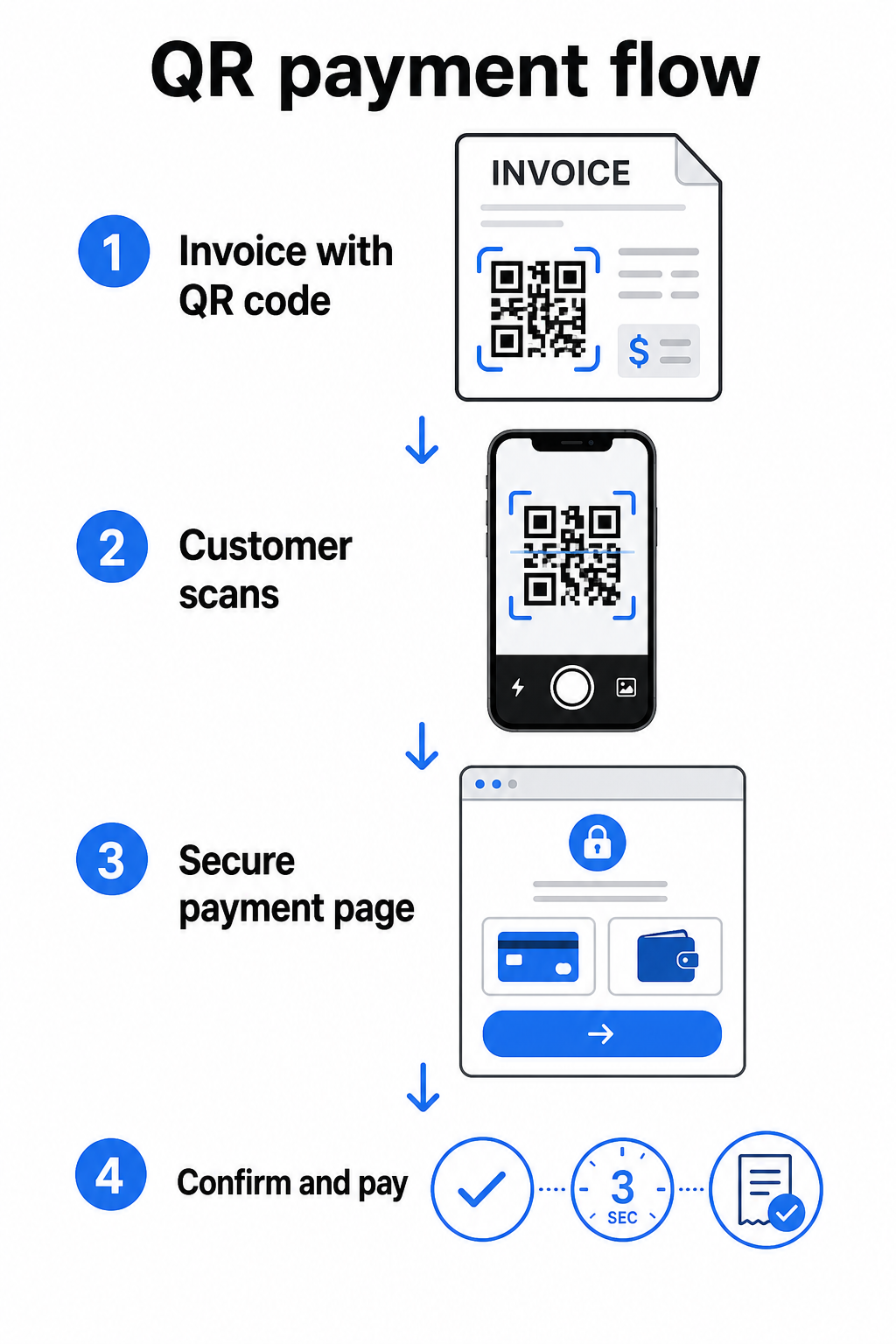
Federal Reserves FedNow-tjeneste beskriver denne nøyaktige arbeidsflyten: regninger sendt digitalt med en innebygd QR-kode lar kunder skanne og starte betaling i stedet for å vente på papirutskrifter eller manuelt søke etter betalingsportaler. Kunder kan til og med skanne en QR-kode som inneholder en Forespørsel om betaling (RfP) for å initiere en øyeblikkelig betaling direkte via FedNow.
Den generelle prosessen fungerer slik:
- Generer en betalingslenke gjennom betalingsleverandøren din (som PayPal, Stripe eller Square)
- Konverter den lenken til en QR-kode ved hjelp av en QR-kodegenerator
- Plasser QR-koden på fakturaen, PDF-en eller fakturaoversikten din
- Kunden skanner, gjennomgår beløpet og betaler – ofte innen sekunder
Store amerikanske betalingsleverandører, inkludert PayPal, Stripe og Square, støtter alle betalingslenker som kan deles som QR-koder, så ingen spesiell maskinvare eller programvare er nødvendig i noen ende.
Klar til å opprette en betalings-QR-kode? Gjør enhver betalingslenke om til en skannbar QR-kode som kundene dine kan bruke direkte fra fakturaen din. Bruk Pageloots PayPal QR-kode generator eller den generelle QR-kodegenerator for å komme i gang på minutter.
Hva du skal lenke fakturaens QR-kode til
Selve QR-koden er bare leveringsmekanismen. Hva du lenker den til, bestemmer hvor smidig betalingsopplevelsen faktisk er.
En betalingsside eller kasselink er det mest direkte alternativet. Generer en betalingslenke fra leverandørens dashbord – med fakturabeløp, beskrivelse og bedriftsdetaljer forhåndsutfylt – og konverter den til en QR-kode. Kunder kommer til en klar-til-å-betale-side uten behov for manuell dataregistrering. Pageloots guide til betalings-QR-koder går gjennom hvordan dette fungerer med leverandører som PayPal og Stripe.
En PDF av hele fakturaen er nyttig når du vil gi kunder tilgang til spesifiserte detaljer, vilkår eller støttedokumentasjon sammen med betalingsalternativet. En PDF QR-kode lenker direkte til dokumentet slik at kunder kan åpne eller laste ned det umiddelbart uten å søke i innboksen sin.
En betalingsportal eller selvbetjeningsside fungerer bra for bedrifter med gjentakende kunder. En lenke-QR-kode kan peke til en innloggingsside eller kontodashbord der kunder administrerer alle fakturaene sine på ett sted.
Det riktige valget avhenger av faktureringsarbeidsflyten din, men for de fleste bedrifter som prøver å redusere dager til betaling, gir en direkte betalingslenke QR-kode den korteste veien fra faktura til oppgjør.
Statiske vs. dynamiske QR-koder: Hvilken bør du bruke?
Når du genererer en QR-kode for fakturaer, har du to alternativer: statisk og dynamisk. For faktureringsformål, dynamiske QR-koder tilbyr betydelige praktiske fordeler.
| FUNKSJON | Statisk QR-kode | Dynamisk QR-kode |
|---|---|---|
| Rediger destinasjon etter utskrift | Nei | Ja |
| Spor skannedata | Nei | Ja |
| Oppdater betalingslenke hvis den endres | Krever ny utskrift | Oppdater i dashbord |
| Overvåk hvem som åpnet fakturaen | Nei | Ja |
| Deaktiver om nødvendig | Nei | Ja |
Med en dynamisk QR-kode kan du oppdatere destinasjons-URL-en uten å opprette en ny kode eller skrive ut fakturamalen din på nytt. Hvis betalingsleverandøren din endres, fakturaoppsettet ditt oppdateres, eller du vil omdirigere til en annen betalingsmetode for en spesifikk klient, trer endringen i kraft umiddelbart – den trykte eller digitale QR-koden forblir den samme.
Dynamiske koder gir deg også skanneanalyse: tidsstempler, enhetstyper og geografiske data som forteller deg om en klient har åpnet og interagert med fakturaen sin. Hvis en stor faktura viser null skanninger en uke før forfallsdatoen, er det et nyttig tidlig signal for å følge opp proaktivt.
Hvordan legge til en QR-kode til fakturaene dine
Å legge til en QR-kode til en eksisterende fakturaflyt er enkelt og krever ikke at du bygger opp faktureringsoppsettet ditt fra bunnen av.
Trinn 1: Generer betalingslenken din. Logg inn til betalingsleverandøren din (PayPal, Stripe, Square, eller en annen amerikansk leverandør) og opprett en betalingslenke. Inkluder fakturabeløpet, firmanavnet ditt, og et referansenummer eller en beskrivelse slik at betalingen er enkel å avstemme.
Trinn 2: Konverter lenken til en QR-kode. Lim inn betalings-URL-en i Pageloot’s QR-kodegenerator eller PayPal QR-kode generator. Velg en dynamisk QR-kode hvis du ønsker redigerings- og sporingsmuligheter.
Trinn 3: Tilpass koden. Legg til logoen din, bruk merkevarefargene dine, og inkluder en kort handlingsfremmende etikett som “Skann for å betale”. Merkede koder bygger kundetillit og er vanskeligere å forfalske – en viktig vurdering gitt risikoene som ondsinnede QR-koder utgjør i betalingssammenhenger.
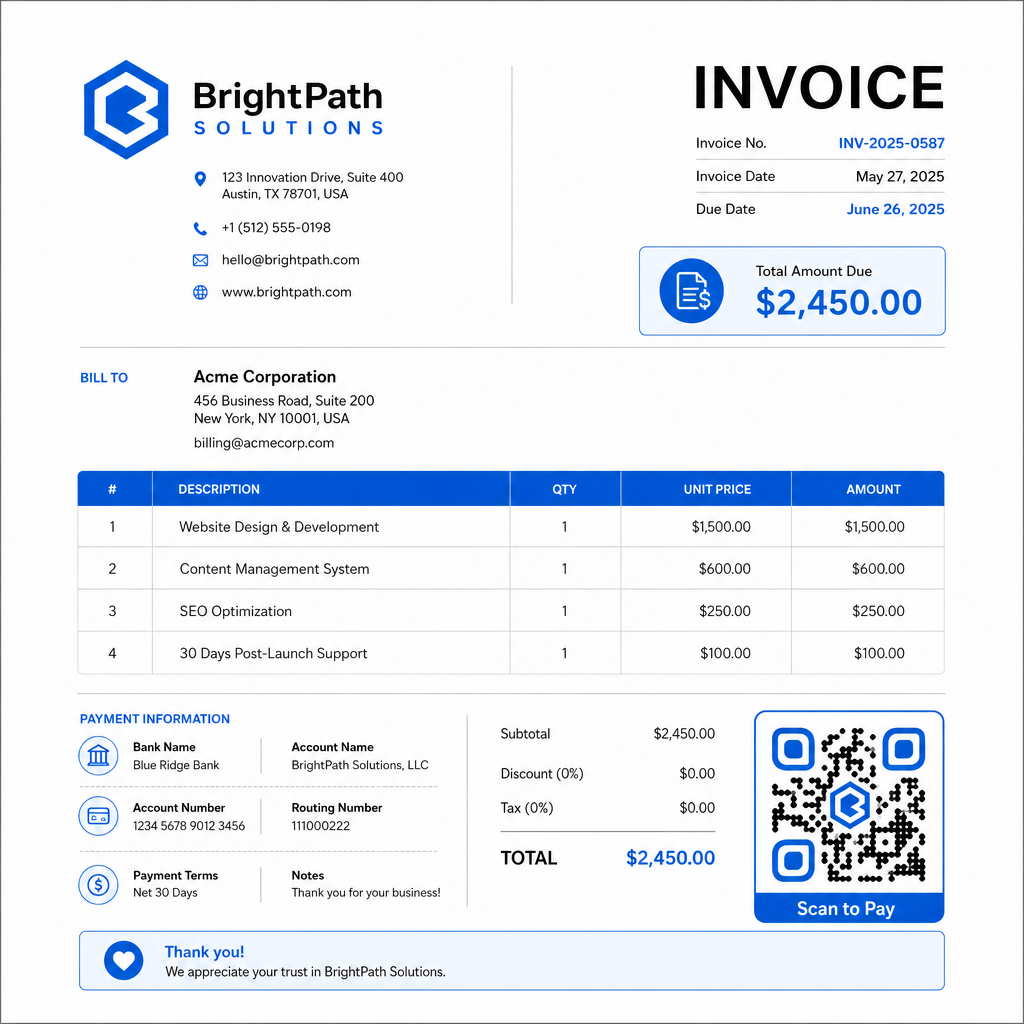
Trinn 4: Last ned i riktig format. Eksporter QR-koden som en SVG- eller EPS-fil for fakturaer som skal skrives ut, eller som en høyoppløselig PNG for PDF- eller digitale fakturaer. Vektorformater forhindrer pikselering og opprettholder skannbarhet i alle størrelser.
Trinn 5: Plasser og test før sending. Sett inn QR-koden i fakturamalen din. Test den på minst to forskjellige enheter og bekreft at betalingssiden lastes riktig, beløpet er nøyaktig, og bekreftelsesflyten fungerer fra ende til ende.
Spor fakturaengasjement i sanntid Vit om klienten din har skannet fakturaen din før forfallsdatoen. Pageloot’s dynamiske QR-koder gir deg skanningstall, enhetsdata og tidsstempler fra et enkelt dashbord. Lag en dynamisk QR-kode for å starte sporing.
QR-kode designstandarder for utskrevne og digitale fakturaer
En QR-kode som ikke skanner pålitelig, ødelegger formålet. Husk disse standardene når du plasserer koder på fakturaer:
- Minimumsstørrelse: Skriv ut QR-koder på minst 2×2 cm for skanning på nært hold. For fakturaer der koden kan skannes fra en utskrevet side, er 1×1 tomme eller større en pålitelig grunnlinje.
- Kontrast: Bruk mørke mønstre på en lys bakgrunn med et kontrastforhold på minst 4:1. Unngå å plassere koden på fargede bakgrunner, mønstrede områder eller vannmerker.
- Stille sone: Oppretthold en klar tom kant rundt hele koden. Ingen tekst, logoer eller designelementer skal trenge inn i denne margen.
- Filformat: Bruk SVG eller EPS for utskrift. Disse vektorformatene holder seg skarpe i enhver oppløsning, i motsetning til rasteriserte PNG-filer skalert opp fra en liten original.
- Proporsjonalitet: Aldri strekk eller komprimer QR-koden. Skaler den proporsjonalt for å bevare den kvadratiske formen.
- Feilretting: Bruk et høyt feilrettingsnivå (Q eller H) hvis du legger til en logo inne i koden. Hold eventuell innebygd logo sentrert og dekk ikke mer enn 30% av kodeområdet.
- Etikett: Inkluder en kort instruksjon nær koden, for eksempel “Skann for å betale fakturaen din”. Dette hjelper kunder som er ukjente med prosessen og støtter også tilgjengelighet.
For full veiledning om tilgjengelighet – inkludert størrelsesanbefalinger og flerspråklige instruksjonsalternativer – se Pageloot’s beste praksis for tilgjengelighet for QR-kodebetaling.
Sikkerhetshensyn for fakturabetaling QR-koder
Betalings-QR-koder på fakturaer er en kontekst med høy tillit – kunder blir bedt om å sende penger. Det gjør sikkerhetspraksis ikke-forhandlingsbar.
Bruk kun HTTPS-betalingslenker. Hver URL QR-koden din peker til, bør bruke HTTPS. En usikret lenke er et rødt flagg for kunder og en reell risiko for avlyttede data.
Verifiser lenken før du distribuerer fakturaer. Før du sender ut en bunke fakturaer, skann koden selv og bekreft at den fører til riktig, fungerende betalingsside. Dette fanger opp feil i URL-en og bekrefter at betalingsflyten fungerer som forventet.
Bruk dynamiske koder slik at du kan svare på problemer. Hvis en betalingslenke er kompromittert eller må endres, lar en dynamisk QR-kode deg oppdatere eller deaktivere destinasjonen umiddelbart uten å utstede fakturaen på nytt. Statiske koder kan ikke endres når de er skrevet ut eller sendt.
Merk QR-kodene dine synlig. Å inkludere logoen din i QR-koden gjør det vanskeligere for svindlere å erstatte en falsk kode, og gir kundene et visuelt signal om at de skanner noe legitimt. Les mer om å administrere betalingssikkerhet i Pageloot’s QR-kode betalingssikkerhet og hastighetsguide og den PCI-DSS samsvarsguide for QR-kode betalinger.
Bransjer som drar nytte av faktura QR-koder
QR-kodebetalingsfakturaer gjelder for et bredt spekter av forretningstyper. Noen vanlige bruksområder illustrerer hvor denne tilnærmingen har størst effekt:
- Frilansere og tjenesteleverandører – En QR-kode på en PDF-faktura lar kunder betale fra telefonen sin i det øyeblikket de åpner dokumentet, i stedet for å logge inn på en portal dager senere.
- Feltservice- og leveringsbedrifter – Teknikere eller sjåfører kan presentere en faktura med en QR-kode på stedet for tjenesten, noe som muliggjør betaling på stedet før de drar.
- Advokatfirmaer og profesjonelle tjenester – Månedlige fakturaer med innebygde QR-koder reduserer frem og tilbake med betalingsinstruksjoner og gjør det enklere for kunder å betale umiddelbart.
- Helsepraksiser – Pasientfakturaer med en QR-kode lar pasienter betale hjemmefra etter avtalen sin, noe som reduserer betalingshåndtering i resepsjonen.
- Bygg og anlegg – Fremdriftsfakturaer med QR-koder gir kunder en klar, friksjonsfri betalingsvei knyttet til hver milepæl.
Pageloots side for bransjeløsninger dekker ytterligere sektorspesifikke applikasjoner for QR-koder i forretningsarbeidsflyter.
Sene betalinger koster bedrifter tid, kontantstrøm og administrativ innsats. Å legge til en QR-kode på fakturaene dine er et av de mest direkte skrittene du kan ta for å forkorte gapet mellom å sende en regning og motta betaling. Jo færre trinn en kunde må fullføre, desto mer sannsynlig er det at de betaler raskt. Sett opp din første betalings-QR-kode med Pageloot’s QR-kodegenerator eller den dedikerte PayPal QR-kode generator, og begynn å spore resultater fra din første faktura.
Ofte stilte spørsmål
Det avhenger av betalingsoppsettet ditt. Hvis du bruker en enkelt betalingsside der kunder legger inn beløpet manuelt, kan én QR-kode fungere på tvers av alle fakturaer. Hvis du vil forhåndsutfylle spesifikke beløp for hver faktura, trenger du individuelle betalingslenker – og derfor individuelle QR-koder per faktura. Dynamiske QR-koder lar deg oppdatere destinasjonen hvis betalingslenken din endres, uten å regenerere eller skrive ut koden på nytt.
Inkluder alltid et reservealternativ ved siden av QR-koden – en ren tekstbetalings-URL, bankoverføringsdetaljene dine, eller et telefonnummer for fakturahenvendelser. Ikke alle kunder vil ha en smarttelefon eller føle seg komfortable med å bruke QR-koder, og å opprettholde alternative betalingsalternativer sikrer at ingen faktura forblir ubetalt på grunn av en teknisk barriere. Pageloot’s beste praksis for tilgjengelighet for QR-kodebetaling dekker ytterligere alternativer i detalj.
Ja, forutsatt at du følger sikkerhetsmessige beste praksiser. Bruk HTTPS-betalingslenker, merk dine QR-koder med din logo så kunder kan visuelt verifisere kilden, og bruk dynamiske QR-koder så du kan deaktivere eller oppdatere en kode umiddelbart hvis noe går galt. Unngå statiske QR-koder for betalingsformål, siden de ikke kan endres hvis den lenkede siden blir kompromittert. Test alltid hele betalingsflyten før du sender fakturaer, og instruer kunder til å sjekke URL-en som vises etter skanning før de legger inn betalingsdetaljer.