هل فواتيرك غير مدفوعة بعد فترة طويلة من تاريخ الاستحقاق؟ تعد المدفوعات المتأخرة واحدة من أكثر مشاكل التدفق النقدي شيوعًا التي تواجهها الشركات – ومحرك رئيسي لذلك هو ببساطة الاحتكاك المتضمن في الدفع. يوضح لك هذا الدليل كيف أن إضافة رمز QR إلى فواتيرك يزيل هذا الاحتكاك ويضع المال في حسابك بشكل أسرع.
لماذا تعد مدفوعات الفواتير المتأخرة مشكلة حقيقية للشركات
الأرقام يصعب تجاهلها. تفيد 56% من الشركات الصغيرة الأمريكية بأنها مدينة بأموال من فواتير غير مدفوعة أو متأخرة، وفي المتوسط تحمل تلك الشركات أكثر من 17,000 دولار في مستحقات غير مدفوعة لكل منها. تصل المدفوعات عادةً بعد 8.2 يوم من الموعد النهائي المتفق عليه – ليس لأن العملاء لا ينوون الدفع، ولكن لأن سير عمل الفاتورة إلى الدفع التقليدي يحتوي على الكثير من الخطوات.
يتلقى العملاء فاتورة ورقية أو بصيغة PDF، ثم يتعين عليهم تحديد تفاصيلك المصرفية، أو الانتقال إلى بوابة دفع، أو تذكر كتابة شيك. كل خطوة إضافية هي فرصة للتأخير. كلما بسّطت عملية الدفع، كلما حصلت على أموالك بشكل أسرع.
كيف تعمل رموز QR على الفواتير
يشفر رمز QR للدفع على الفاتورة عنوان URL يقود مباشرة إلى صفحة دفع آمنة. عندما يمسح العميل الرمز بكاميرا هاتفه الذكي، تفتح صفحة الدفع تلقائيًا في متصفحهم. يؤكدون المبلغ، ويختارون طريقة الدفع الخاصة بهم – بطاقة ائتمان، تحويل بنكي، محفظة رقمية – ويكملون المعاملة في ثوانٍ.
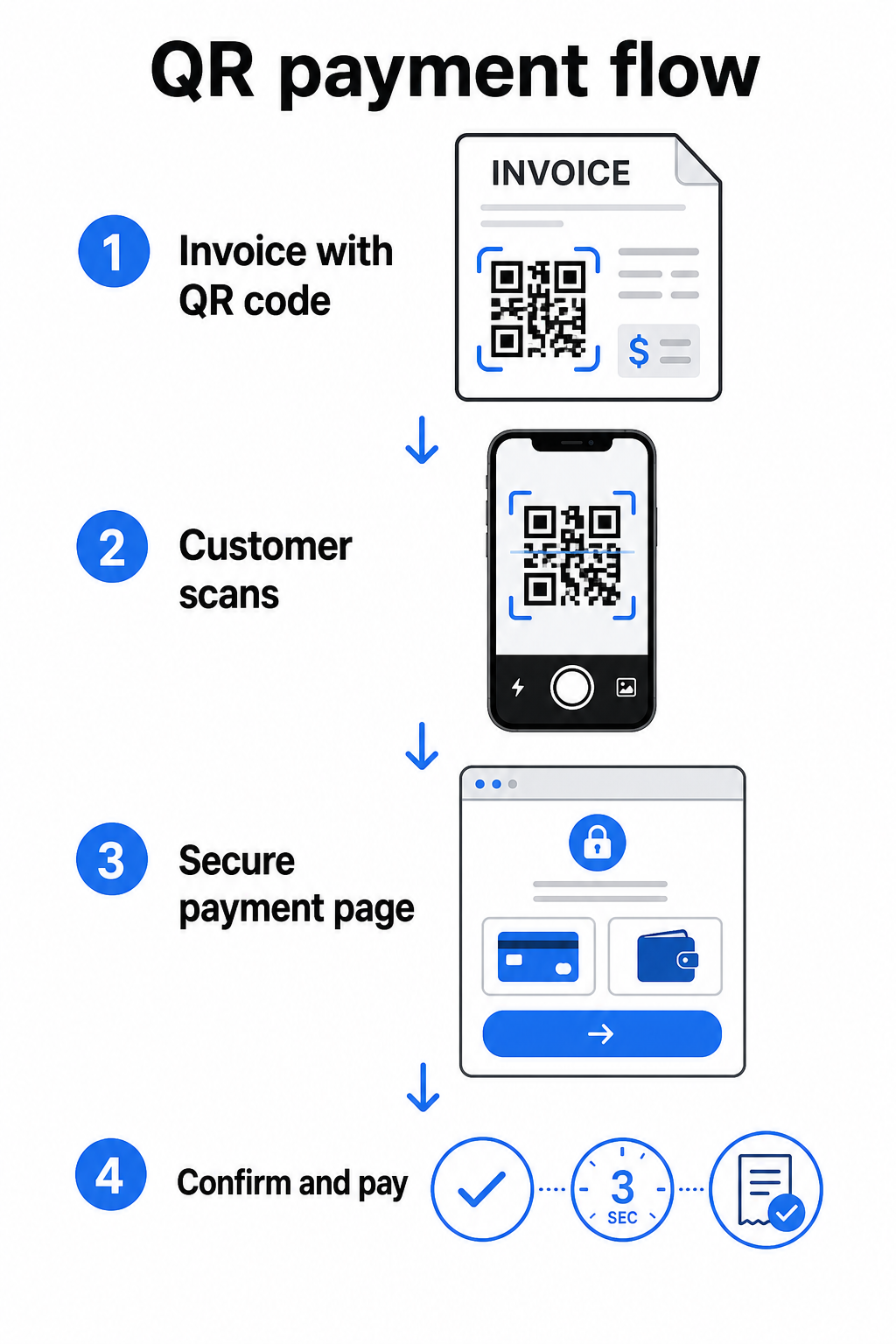
تصف خدمة FedNow التابعة للاحتياطي الفيدرالي سير العمل هذا بالضبط: الفواتير المرسلة رقميًا مع رمز QR مضمن تسمح للعملاء بالمسح وبدء الدفع بدلاً من انتظار الكشوف الورقية أو البحث يدويًا عن بوابات الدفع. يمكن للعملاء حتى مسح رمز QR يحتوي على طلب دفع (RfP) لبدء دفع فوري مباشرة عبر FedNow.
تعمل العملية العامة على النحو التالي:
- أنشئ رابط دفع من خلال مزود الدفع الخاص بك (مثل PayPal أو Stripe أو Square)
- حوّل هذا الرابط إلى رمز QR باستخدام مولد رمز QR
- ضع رمز QR على فاتورتك أو ملف PDF أو كشف حسابك
- يمسح العميل، يراجع المبلغ، ويدفع – غالبًا في غضون ثوانٍ
يدعم جميع مزودي الدفع الرئيسيين في الولايات المتحدة، بما في ذلك PayPal و Stripe و Square، روابط الدفع التي يمكن مشاركتها كرموز QR، لذلك لا يلزم وجود أجهزة أو برامج خاصة في أي من الطرفين.
هل أنت مستعد لإنشاء رمز QR للدفع؟ حوّل أي رابط دفع إلى رمز QR قابل للمسح يمكن لعملائك استخدامه مباشرة من فاتورتك. استخدم Pageloot’s مولد باركود QR لـ PayPal أو العام مولد رمز الاستجابة السريعة للبدء في دقائق.
ما الذي يجب ربط رمز QR الخاص بفاتورتك به
رمز QR نفسه هو مجرد آلية التسليم. ما تربطه به يحدد مدى سلاسة تجربة الدفع بالفعل.
صفحة دفع أو رابط دفع هو الخيار الأكثر مباشرة. أنشئ رابط دفع من لوحة تحكم مزودك – مع تعبئة مبلغ الفاتورة والوصف وتفاصيل عملك مسبقًا – وحوّله إلى رمز QR. يصل العملاء إلى صفحة جاهزة للدفع دون الحاجة إلى إدخال بيانات يدويًا. Pageloot’s دليل لرموز QR للدفع يشرح كيف يعمل هذا مع مزودين مثل PayPal و Stripe.
ملف PDF للفاتورة الكاملة مفيد عندما تريد منح العملاء إمكانية الوصول إلى تفاصيل مفصلة أو شروط أو وثائق داعمة جنبًا إلى جنب مع خيار الدفع. أ PDF رمز الاستجابة السريعة يربط مباشرة بالوثيقة حتى يتمكن العملاء من فتحها أو تنزيلها على الفور دون البحث في صندوق الوارد الخاص بهم.
بوابة دفع أو صفحة خدمة ذاتية يعمل بشكل جيد للشركات التي لديها عملاء متكررون. أ باركود الرابط يمكن أن يشير إلى صفحة تسجيل دخول أو لوحة تحكم حساب حيث يدير العملاء جميع فواتيرهم في مكان واحد.
يعتمد الاختيار الصحيح على سير عمل الفواتير الخاص بك، ولكن بالنسبة لمعظم الشركات التي تحاول تقليل أيام الدفع، ينتج رمز QR لرابط دفع مباشر أقصر مسار من الفاتورة إلى التسوية.
رموز QR الثابتة مقابل الديناميكية: أيهما يجب أن تستخدم؟
عند إنشاء رمز QR للفواتير، لديك خياران: ثابت وديناميكي. لأغراض الفوترة،, تقدم رموز QR الديناميكية مزايا عملية ذات مغزى.
| ميزة | رمز الاستجابة السريعة الثابت | رمز الاستجابة السريعة الديناميكي |
|---|---|---|
| تعديل الوجهة بعد الطباعة | لا | نعم |
| تتبع بيانات المسح | لا | نعم |
| تحديث رابط الدفع إذا تغير | يتطلب إعادة الطباعة | التحديث في لوحة التحكم |
| مراقبة من فتح الفاتورة | لا | نعم |
| إلغاء التفعيل إذا لزم الأمر | لا | نعم |
باستخدام رمز QR ديناميكي، يمكنك تحديث عنوان URL الوجهة دون إنشاء رمز جديد أو إعادة طباعة قالب فاتورتك. إذا تغير مزود الدفع الخاص بك، أو تم تحديث تخطيط فاتورتك، أو كنت ترغب في إعادة التوجيه إلى طريقة دفع مختلفة لعميل معين، يسري التغيير على الفور – يظل رمز QR المطبوع أو الرقمي كما هو.
تمنحك الرموز الديناميكية أيضًا تحليلات المسح: الطوابع الزمنية، وأنواع الأجهزة، والبيانات الجغرافية التي تخبرك ما إذا كان العميل قد فتح فاتورته وتفاعل معها. إذا أظهرت فاتورة كبيرة صفر عمليات مسح قبل أسبوع من تاريخ الاستحقاق، فهذه إشارة مبكرة مفيدة للمتابعة بشكل استباقي.
كيفية إضافة رمز QR إلى فواتيرك
تعد إضافة رمز QR إلى سير عمل الفواتير الحالي أمرًا مباشرًا ولا يتطلب إعادة بناء إعداد الفواتير الخاص بك من الصفر.
الخطوة 1: أنشئ رابط الدفع الخاص بك. سجل الدخول إلى مزود الدفع الخاص بك (PayPal، Stripe، Square، أو أي مزود أمريكي آخر) وأنشئ رابط دفع. قم بتضمين مبلغ الفاتورة، واسم عملك، ورقم مرجعي أو وصف بحيث يكون الدفع سهل التسوية.
الخطوة 2: حول الرابط إلى رمز QR. الصق عنوان URL للدفع في Pageloot’s مولد رمز الاستجابة السريعة أو مولد باركود QR لـ PayPal. اختر رمز QR ديناميكيًا إذا كنت تريد إمكانيات التحرير والتتبع.
الخطوة 3: خصص الرمز. أضف شعارك، وطبق ألوان علامتك التجارية، وقم بتضمين تسمية قصيرة تحث على اتخاذ إجراء مثل “امسح للدفع”. الرموز ذات العلامة التجارية تبني ثقة العملاء ويصعب تزويرها – اعتبار مهم بالنظر إلى المخاطر التي تشكلها رموز QR الضارة في سياقات الدفع.
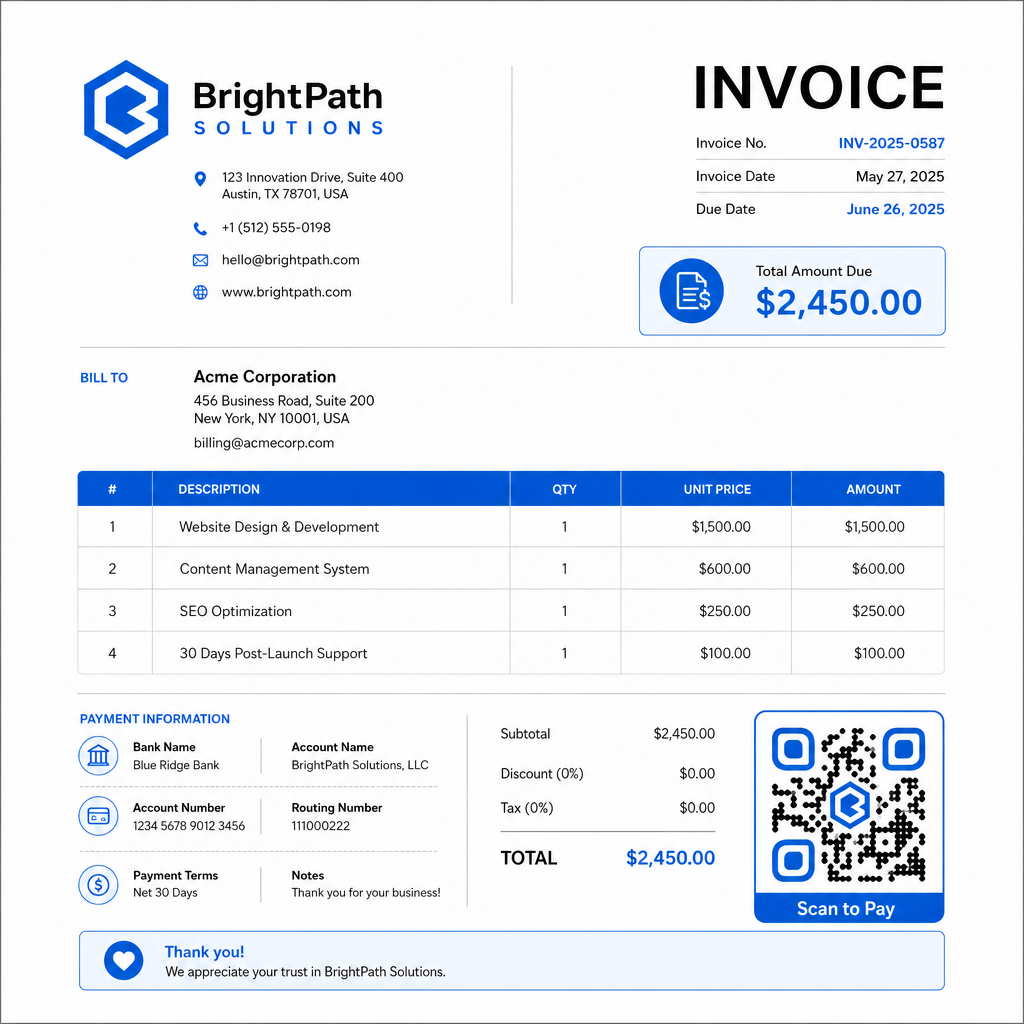
الخطوة 4: قم بالتنزيل بالتنسيق الصحيح. قم بتصدير رمز QR كملف SVG أو EPS للفواتير التي ستتم طباعتها، أو كملف PNG عالي الدقة لفواتير PDF أو الفواتير الرقمية. تمنع تنسيقات المتجهات التكسير وتحافظ على قابلية المسح بأي حجم.
الخطوة 5: ضع واختبر قبل الإرسال. أدخل رمز QR في قالب فاتورتك. اختبره على جهازين مختلفين على الأقل وتأكد من تحميل صفحة الدفع بشكل صحيح، وأن المبلغ دقيق، وأن تدفق التأكيد يعمل من البداية إلى النهاية.
تتبع تفاعل الفواتير في الوقت الفعلي اعرف ما إذا كان عميلك قد قام بمسح فاتورتك قبل تاريخ الاستحقاق. تمنحك رموز QR الديناميكية من Pageloot عدد عمليات المسح وبيانات الجهاز والطوابع الزمنية من لوحة تحكم واحدة. إنشاء رمز QR ديناميكي لبدء التتبع.
معايير تصميم رمز QR للفواتير المطبوعة والرقمية
رمز QR الذي لا يمكن مسحه بشكل موثوق به يهزم الغرض. ضع هذه المعايير في الاعتبار عند وضع الرموز على الفواتير:
- الحد الأدنى للحجم: اطبع رموز QR بحجم 2×2 سم على الأقل للمسح من مسافة قريبة. بالنسبة للفواتير التي قد يتم مسح الرمز منها من صفحة مطبوعة، 1×1 بوصة أو أكبر هو خط أساس موثوق به.
- التباين: استخدم أنماطًا داكنة على خلفية فاتحة بنسبة تباين لا تقل عن 4:1. تجنب وضع الرمز على خلفيات ملونة، أو مناطق منقوشة، أو علامات مائية.
- المنطقة الهادئة: حافظ على حدود فارغة واضحة حول الرمز بالكامل. لا ينبغي لأي نص أو شعارات أو عناصر تصميم أن تتعدى هذا الهامش.
- تنسيق الملف: استخدم SVG أو EPS للطباعة. تظل تنسيقات المتجهات هذه حادة بأي دقة، على عكس ملفات PNG النقطية التي يتم تكبيرها من أصل صغير.
- التناسب: لا تقم أبدًا بتمديد أو ضغط رمز QR. قم بتغيير حجمه بشكل متناسب للحفاظ على الشكل المربع.
- تصحيح الأخطاء: استخدم مستوى تصحيح أخطاء عاليًا (Q أو H) إذا كنت تضيف شعارًا داخل الرمز. حافظ على أي شعار مضمن في المنتصف ولا يغطي أكثر من 30% من مساحة الرمز.
- التسمية: قم بتضمين تعليمات موجزة بالقرب من الرمز، مثل “امسح لدفع فاتورتك.” هذا يساعد العملاء غير المعتادين على العملية ويدعم أيضًا إمكانية الوصول.
للحصول على إرشادات كاملة حول إمكانية الوصول – بما في ذلك توصيات الحجم وخيارات التعليمات متعددة اللغات – راجع Pageloot’s أفضل ممارسات إمكانية الوصول لمدفوعات رمز QR.
اعتبارات الأمان لرموز QR لدفع الفواتير
رموز QR للدفع على الفواتير هي سياق يتطلب ثقة عالية – يُطلب من العملاء إرسال الأموال. وهذا يجعل ممارسات الأمان غير قابلة للتفاوض.
استخدم روابط دفع HTTPS فقط. يجب أن يستخدم كل عنوان URL يشير إليه رمز QR الخاص بك HTTPS. الرابط غير الآمن هو علامة حمراء للعملاء وخطر حقيقي للبيانات المعترضة.
تحقق من الرابط قبل توزيع الفواتير. قبل إرسال مجموعة من الفواتير، امسح الرمز بنفسك وتأكد من أنه يؤدي إلى صفحة الدفع الصحيحة والفعالة. هذا يكتشف الأخطاء في عنوان URL ويؤكد أن تدفق الدفع يعمل كما هو متوقع.
استخدم الرموز الديناميكية حتى تتمكن من الاستجابة للمشكلات. إذا تم اختراق رابط دفع أو احتاج إلى التغيير، يتيح لك رمز QR الديناميكي تحديث الوجهة أو إلغاء تنشيطها على الفور دون إعادة إصدار الفاتورة. لا يمكن تغيير الرموز الثابتة بمجرد طباعتها أو إرسالها.
ضع علامتك التجارية على رموز QR الخاصة بك بشكل واضح. إن تضمين شعارك في رمز QR يجعل من الصعب على المحتالين استبدال رمز مزيف، ويمنح العملاء إشارة بصرية بأنهم يمسحون شيئًا شرعيًا. اقرأ المزيد حول إدارة أمان الدفع في Pageloot’s دليل أمان وسرعة مدفوعات رمز QR و دليل الامتثال لمعيار PCI-DSS لمدفوعات رمز QR.
الصناعات التي تستفيد من رموز QR للفواتير
تنطبق فواتير مدفوعات رمز الاستجابة السريعة على مجموعة واسعة من أنواع الأعمال. توضح بعض حالات الاستخدام الشائعة أين يكون لهذا النهج التأثير الأوضح:
- المستقلون ومقدمو الخدمات – يتيح رمز QR على فاتورة PDF للعملاء الدفع من هواتفهم لحظة فتح المستند، بدلاً من تسجيل الدخول إلى بوابة بعد أيام.
- أعمال الخدمات الميدانية والتوصيل – يمكن للفنيين أو السائقين تقديم فاتورة تحتوي على رمز QR في نقطة الخدمة، مما يتيح الدفع الفوري قبل مغادرتهم.
- مكاتب المحاماة والخدمات المهنية – تقلل كشوف الفواتير الشهرية مع رموز QR المدمجة من تبادل تعليمات الدفع وتجعل من السهل على العملاء الدفع فورًا.
- ممارسات الرعاية الصحية – تسمح كشوف فواتير المرضى مع رمز QR للمرضى بالدفع من المنزل بعد موعدهم، مما يقلل من معالجة المدفوعات في مكتب الاستقبال.
- الإنشاءات والمقاولات – تمنح فواتير الدفع المرحلي مع رموز QR العملاء مسار دفع واضحًا وسلسًا مرتبطًا بكل مرحلة.
Pageloot صفحة حلول الصناعة تغطي تطبيقات إضافية خاصة بالقطاع لرموز QR في سير عمل الأعمال.
تكلف المدفوعات المتأخرة الشركات الوقت والتدفق النقدي والجهد الإداري. إضافة رمز QR إلى فواتيرك هي إحدى الخطوات الأكثر مباشرة التي يمكنك اتخاذها لتقصير الفجوة بين إرسال الفاتورة واستلام الدفع. كلما قل عدد الخطوات التي يتعين على العميل إكمالها، زادت احتمالية دفعه في الوقت المحدد. قم بإعداد أول رمز QR للدفع الخاص بك باستخدام Pageloot’s مولد رمز الاستجابة السريعة أو المخصص مولد باركود QR لـ PayPal, ، وابدأ في تتبع النتائج من فاتورتك الأولى.
الأسئلة الشائعة
يعتمد ذلك على إعداد الدفع الخاص بك. إذا كنت تستخدم صفحة دفع واحدة حيث يدخل العملاء المبلغ يدويًا، فيمكن لرمز QR واحد أن يعمل عبر جميع الفواتير. إذا كنت ترغب في ملء مبالغ محددة مسبقًا لكل فاتورة، فستحتاج إلى روابط دفع فردية – وبالتالي رموز QR فردية لكل فاتورة. تتيح لك رموز QR الديناميكية تحديث الوجهة إذا تغير رابط الدفع الخاص بك، دون إعادة إنشاء الرمز أو إعادة طباعته.
قم دائمًا بتضمين خيار احتياطي بجانب رمز QR – عنوان URL للدفع بنص عادي، أو تفاصيل التحويل المصرفي الخاص بك، أو رقم هاتف لاستفسارات الفواتير. لن يكون لدى كل عميل هاتف ذكي أو يشعر بالراحة عند استخدام رموز QR، ويضمن الحفاظ على خيارات دفع بديلة عدم بقاء أي فاتورة غير مدفوعة بسبب عائق فني. تغطي أفضل ممارسات إمكانية الوصول لمدفوعات رمز QR من Pageloot بدائل إضافية بالتفصيل.
نعم، شريطة أن تتبع أفضل ممارسات الأمان. استخدم روابط دفع HTTPS، وقم بتمييز رموز QR الخاصة بك بشعارك حتى يتمكن العملاء من التحقق بصريًا من المصدر، واستخدم رموز QR ديناميكية حتى تتمكن من إلغاء تنشيط أو تحديث رمز على الفور إذا حدث خطأ ما. تجنب رموز QR الثابتة لأغراض الدفع، نظرًا لأنه لا يمكن تغييرها إذا تم اختراق الصفحة المرتبطة. اختبر دائمًا تدفق الدفع الكامل قبل إرسال الفواتير، واطلب من العملاء التحقق من عنوان URL الذي يظهر بعد المسح الضوئي قبل إدخال أي تفاصيل دفع.