Da li vaše fakture stoje neplaćene dugo nakon roka dospeća? Zakašnela plaćanja su jedan od najčešćih problema sa novčanim tokom sa kojima se preduzeća suočavaju – a značajan pokretač je jednostavno trenje uključeno u plaćanje. Ovaj vodič vam pokazuje kako dodavanje QR koda na vaše fakture uklanja to trenje i brže stavlja novac na vaš račun.
Zašto su zakašnela plaćanja faktura pravi poslovni problem
Brojke je teško ignorisati. 56% malih preduzeća u SAD-u prijavljuje da im se duguje novac od neplaćenih ili zakašnelih faktura, a u proseku ta preduzeća nose više od $17,000 neizmirenih potraživanja svako. Plaćanja obično stižu 8.2 dana nakon dogovorenog roka – ne zato što kupci ne nameravaju da plate, već zato što tradicionalni tokovi rada od fakture do plaćanja imaju previše koraka.
Kupci dobijaju papirnu ili PDF fakturu, zatim moraju da pronađu vaše bankovne podatke, da se kreću do portala za plaćanje, ili da se sete da napišu ček. Svaki dodatni korak je prilika za kašnjenje. Što jednostavnije učinite plaćanje, brže ćete biti plaćeni.
Kako funkcionišu QR kodovi na fakturama
QR kod za plaćanje na fakturi kodira URL koji vodi direktno do sigurne stranice za plaćanje. Kada kupac skenira kod kamerom svog pametnog telefona, stranica za plaćanje se automatski otvara u njegovom pretraživaču. On potvrđuje iznos, bira svoj način plaćanja – kreditna kartica, bankovni transfer, digitalni novčanik – i završava transakciju za nekoliko sekundi.
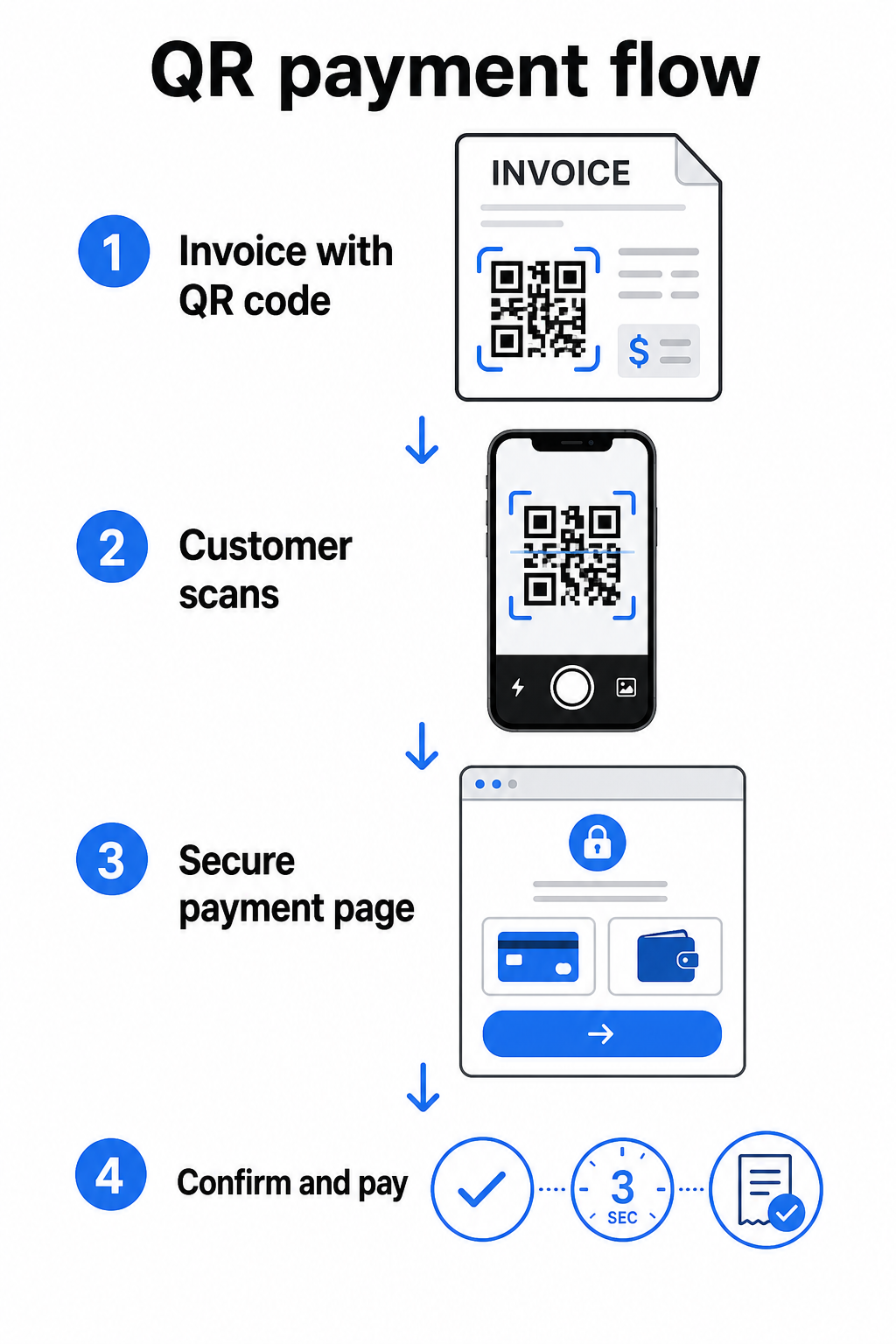
FedNow servis Federalnih rezervi opisuje ovaj tačan tok rada: računi poslati digitalno sa ugrađenim QR kodom omogućavaju kupcima da skeniraju i pokrenu plaćanje umesto da čekaju papirne izvode ili ručno pretražuju portale za plaćanje. Klijenti mogu čak skenirati QR kod koji sadrži Zahtev za plaćanje (RfP) da pokrenu instant plaćanje direktno putem FedNow-a.
Opšti proces funkcioniše ovako:
- Generišite link za plaćanje putem vašeg provajdera plaćanja (kao što su PayPal, Stripe ili Square)
- Pretvorite taj link u QR kod koristeći generator QR kodova
- Postavite QR kod na vašu fakturu, PDF ili izvod računa
- Kupac skenira, pregleda iznos i plaća – često u roku od nekoliko sekundi
Glavni američki provajderi plaćanja, uključujući PayPal, Stripe i Square, svi podržavaju linkove za plaćanje koji se mogu deliti kao QR kodovi, tako da nije potreban poseban hardver ili softver ni na jednom kraju.
Spremni da kreirate QR kod za plaćanje? Pretvorite bilo koji link za plaćanje u skenirajući QR kod koji vaši kupci mogu koristiti direktno sa vaše fakture. Koristite Pageloot-ov PayPal QR kod generator ili opšti Генератор QR kodova da započnete za nekoliko minuta.
Na šta povezati vaš QR kod fakture
Sam QR kod je samo mehanizam isporuke. Na šta ga povežete određuje koliko je zapravo glatko iskustvo plaćanja.
Stranica za plaćanje ili link za naplatu je najdirektnija opcija. Generišite link za plaćanje sa kontrolne table vašeg provajdera – sa unapred popunjenim iznosom fakture, opisom i detaljima vašeg poslovanja – i pretvorite ga u QR kod. Kupci stižu na stranicu spremnu za plaćanje bez potrebe za ručnim unosom podataka. Pageloot-ov vodič za QR kodove za plaćanje objašnjava kako ovo funkcioniše sa provajderima kao što su PayPal i Stripe.
PDF cele fakture je koristan kada želite da kupcima omogućite pristup detaljnim stavkama, uslovima ili pratećoj dokumentaciji pored opcije plaćanja. A ПДФ КР код povezuje direktno sa dokumentom tako da kupci mogu odmah da ga otvore ili preuzmu bez pretraživanja svog prijemnog sandučeta.
Portal za plaćanje ili stranica za samousluživanje dobro funkcioniše za preduzeća sa stalnim klijentima. A QR kod za link može ukazivati na stranicu za prijavu ili kontrolnu tablu naloga gde klijenti upravljaju svim svojim fakturama na jednom mestu.
Pravi izbor zavisi od vašeg toka rada naplate, ali za većinu preduzeća koja pokušavaju da smanje dane do plaćanja, QR kod sa direktnim linkom za plaćanje proizvodi najkraći put od fakture do poravnanja.
Statički naspram dinamičkih QR kodova: Koje bi trebalo da koristite?
Prilikom generisanja QR koda za fakture, imate dve opcije: statički i dinamički. Za potrebe fakturisanja, dinamički QR kodovi nude značajne praktične prednosti.
| FUNKCIJA | Статички КР код | Динамички КР код |
|---|---|---|
| Uredite odredište nakon štampanja | Не | да |
| Pratite podatke o skeniranju | Не | да |
| Ažurirajte link za plaćanje ako se promeni | Zahteva ponovno štampanje | Ažurirajte na kontrolnoj tabli |
| Pratite ko je otvorio fakturu | Не | да |
| Deaktivirajte ako je potrebno | Не | да |
Sa dinamičkim QR kodom, možete ažurirati odredišni URL bez kreiranja novog koda ili ponovnog štampanja šablona fakture. Ako se vaš provajder plaćanja promeni, vaš izgled fakture se ažurira, ili želite da preusmerite na drugi način plaćanja za određenog klijenta, promena stupa na snagu odmah – štampani ili digitalni QR kod ostaje isti.
Dinamički kodovi vam takođe daju analitikom skeniranja: vremenske oznake, tipovi uređaja i geografski podaci koji vam govore da li je klijent otvorio i interagovao sa svojom fakturom. Ako velika faktura pokazuje nula skeniranja nedelju dana pre roka plaćanja, to je koristan rani signal za proaktivno praćenje.
Kako dodati QR kod na vaše fakture
Dodavanje QR koda u postojeći tok rada fakturisanja je jednostavno i ne zahteva ponovnu izgradnju vašeg sistema naplate od nule.
Korak 1: Generišite svoj link za plaćanje. Prijavite se kod svog provajdera plaćanja (PayPal, Stripe, Square, ili drugog američkog provajdera) i kreirajte link za plaćanje. Uključite iznos fakture, naziv vaše firme, i referentni broj ili opis kako bi plaćanje bilo lako za usaglašavanje.
Korak 2: Pretvorite link u QR kod. Nalepite URL za plaćanje u Pageloot-ov Генератор QR kodova или PayPal QR kod generator. Izaberite dinamički QR kod ako želite mogućnosti uređivanja i praćenja.
Korak 3: Prilagodite kod. Dodajte svoj logo, primenite boje vašeg brenda, i uključite kratku oznaku poziva na akciju kao što je “Skeniraj za plaćanje”. Brendirani kodovi grade poverenje kupaca i teže ih je lažirati – važno razmatranje s obzirom na rizike koje zlonamerni QR kodovi predstavljaju u kontekstu plaćanja.
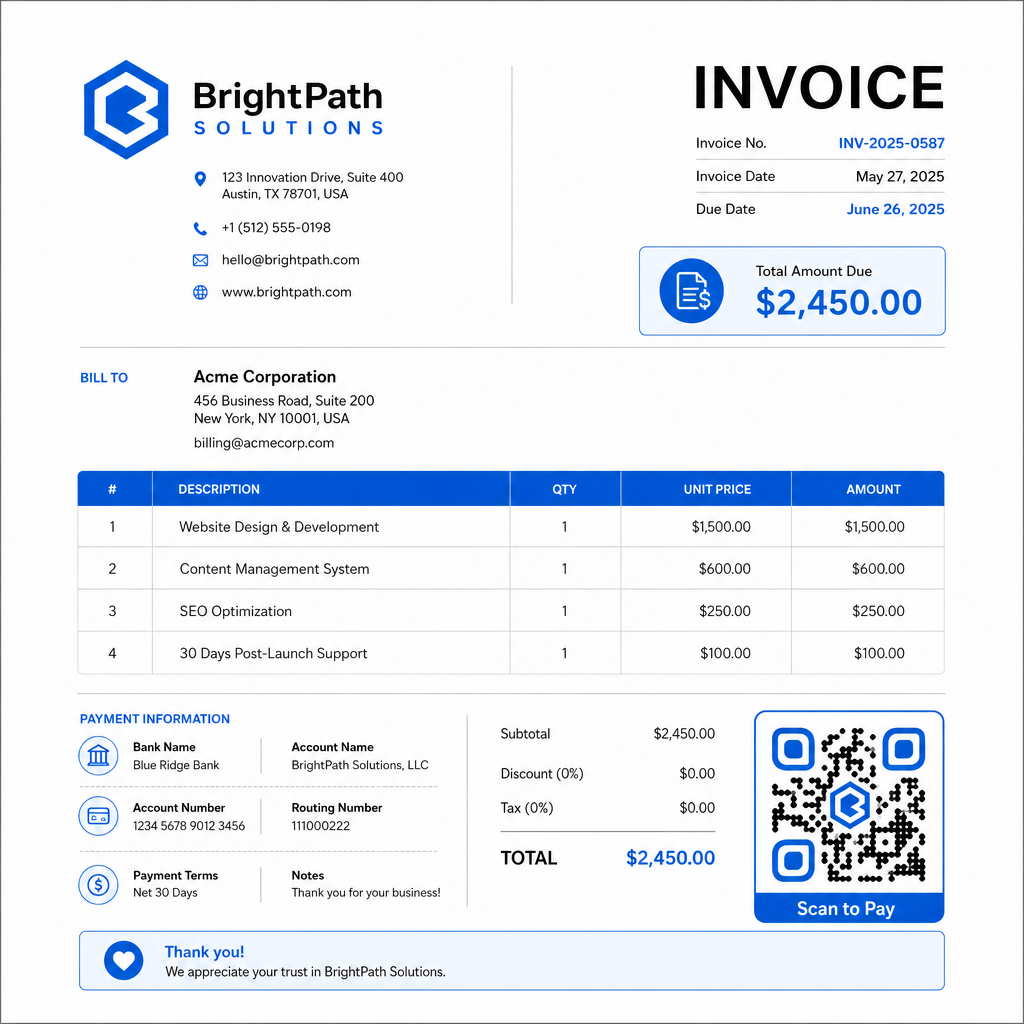
Korak 4: Preuzmite u pravom formatu. Izvezite QR kod kao SVG ili EPS datoteku za fakture koje će biti štampane, ili kao PNG visoke rezolucije za PDF ili digitalne fakture. Vektorski formati sprečavaju pikselizaciju i održavaju mogućnost skeniranja u bilo kojoj veličini.
Korak 5: Postavite i testirajte pre slanja. Umetnite QR kod u vaš šablon fakture. Testirajte ga na najmanje dva različita uređaja i potvrdite da se stranica za plaćanje ispravno učitava, da je iznos tačan, i da tok potvrde radi od početka do kraja.
Pratite angažovanje faktura u realnom vremenu Znajte da li je vaš klijent skenirao vašu fakturu pre roka plaćanja. Pageloot-ovi dinamički QR kodovi daju vam broj skeniranja, podatke o uređaju i vremenske oznake sa jedne kontrolne table. Направите динамички КР код za početak praćenja.
Standardi dizajna QR koda za štampane i digitalne fakture
QR kod koji se ne skenira pouzdano gubi svrhu. Imajte na umu ove standarde prilikom postavljanja kodova na fakture:
- Minimalna veličina: Štampajte QR kodove najmanje 2×2 cm za skeniranje izbliza. Za fakture gde se kod može skenirati sa štampane stranice, 1×1 inč ili veći je pouzdana osnova.
- Kontrast: Koristite tamne šare na svetloj pozadini sa kontrastnim odnosom od najmanje 4:1. Izbegavajte postavljanje koda na obojene pozadine, šarene površine ili vodene žigove.
- Tiha zona: Održavajte jasan prazan okvir oko celog koda. Nikakav tekst, logotipi ili elementi dizajna ne bi trebalo da zadiru u ovu marginu.
- Format datoteke: Koristite SVG ili EPS za štampu. Ovi vektorski formati ostaju oštri u bilo kojoj rezoluciji, za razliku od rasterizovanih PNG datoteka uvećanih iz malog originala.
- Proporcionalnost: Nikada nemojte rastezati ili kompresovati QR kod. Skalirajte ga proporcionalno da biste sačuvali kvadratni oblik.
- Korekcija greške: Koristite visok nivo korekcije grešaka (Q ili H) ako dodajete logo unutar koda. Držite bilo koji ugrađeni logo centriranim i da ne pokriva više od 30% površine koda.
- Oznaka: Uključite kratko uputstvo blizu koda, kao što je “Skeniraj za plaćanje fakture.” Ovo pomaže korisnicima koji nisu upoznati sa procesom i takođe podržava pristupačnost.
Za potpune smernice o pristupačnosti – uključujući preporuke za veličinu i opcije višejezičnih uputstava – pogledajte Pageloot-ov najboljih praksi za pristupačnost plaćanja QR kodom.
Bezbednosna razmatranja za QR kodove za plaćanje faktura
QR kodovi za plaćanje na fakturama su kontekst visokog poverenja – od kupaca se traži da pošalju novac. To čini bezbednosne prakse neupitnim.
Koristite samo HTTPS linkove za plaćanje. Svaki URL na koji vaš QR kod pokazuje treba da koristi HTTPS. Nezaštićeni link je crvena zastavica za kupce i stvarni rizik za presretnute podatke.
Proverite link pre distribucije faktura. Pre slanja serije faktura, skenirajte kod sami i potvrdite da vodi do ispravne, funkcionalne stranice za plaćanje. Ovo hvata greške u URL-u i potvrđuje da tok plaćanja radi kako se očekuje.
Koristite dinamičke kodove kako biste mogli da reagujete na probleme. Ako je link za plaćanje kompromitovan ili ga treba promeniti, dinamički QR kod vam omogućava da odmah ažurirate ili deaktivirate odredište bez ponovnog izdavanja fakture. Statički kodovi se ne mogu menjati nakon štampanja ili slanja.
Vidljivo brendirajte svoje QR kodove. Uključivanje vašeg logotipa u QR kod otežava prevarantima da zamene lažni kod, i daje kupcima vizuelni znak da skeniraju nešto legitimno. Pročitajte više o upravljanju bezbednošću plaćanja u Pageloot-ovom vodiču za bezbednost i brzinu plaćanja QR kodom and the Vodič za usklađenost sa PCI-DSS za plaćanja QR kodom.
Industrije koje imaju koristi od QR kodova na fakturama
Fakture za plaćanje QR kodom primenjuju se u širokom spektru tipova poslovanja. Nekoliko uobičajenih slučajeva upotrebe ilustruje gde ovaj pristup ima najjasniji uticaj:
- Frilenseri i pružaoci usluga – QR kod na PDF fakturi omogućava klijentima da plate sa svog telefona onog trenutka kada otvore dokument, umesto da se prijavljuju na portal danima kasnije.
- Terenske usluge i dostavna preduzeća – Tehničari ili vozači mogu predstaviti fakturu sa QR kodom na mestu pružanja usluge, omogućavajući plaćanje na licu mesta pre nego što odu.
- Advokatske kancelarije i profesionalne usluge – Mesečni izvodi računa sa ugrađenim QR kodovima smanjuju povratnu komunikaciju oko instrukcija za plaćanje i olakšavaju klijentima da plate odmah.
- Zdravstvene ustanove – Izvodi računa pacijenata sa QR kodom omogućavaju pacijentima da plate od kuće nakon pregleda, smanjujući rukovanje plaćanjima na recepciji.
- Građevinarstvo i ugovaranje – Fakture za progresivno plaćanje sa QR kodovima daju klijentima jasan, besprekoran put plaćanja vezan za svaku prekretnicu.
Pageloot-ov stranica rešenja za industriju pokriva dodatne aplikacije specifične za sektor za QR kodove u poslovnim tokovima.
Zakašnela plaćanja koštaju preduzeća vremena, novčanog toka i administrativnog napora. Dodavanje QR koda na vaše fakture je jedan od najdirektnijih koraka koje možete preduzeti da skratite jaz između slanja računa i primanja uplate. Što manje koraka kupac mora da završi, to je verovatnije da će platiti na vreme. Podesite svoj prvi QR kod za plaćanje uz Pageloot-ov Генератор QR kodova ili posvećeni PayPal QR kod generator, i počnite da pratite rezultate od vaše prve fakture.
Često postavljana pitanja
Zavisi od vašeg podešavanja plaćanja. Ako koristite jednu stranicu za plaćanje gde kupci ručno unose iznos, jedan QR kod može funkcionisati za sve fakture. Ako želite da unapred popunite određene iznose za svaku fakturu, biće vam potrebni pojedinačni linkovi za plaćanje – a samim tim i pojedinačni QR kodovi po fakturi. Dinamički QR kodovi vam omogućavaju da ažurirate odredište ako se vaš link za plaćanje promeni, bez ponovnog generisanja ili štampanja koda.
Uvek uključite rezervnu opciju pored QR koda – URL za plaćanje u običnom tekstu, detalje vašeg bankovnog transfera ili telefonski broj za upite o naplati. Neće svaki kupac imati pametni telefon ili se osećati prijatno koristeći QR kodove, a održavanje alternativnih opcija plaćanja osigurava da nijedna faktura ne ostane neplaćena zbog tehničke prepreke. Najbolje prakse Pageloot-a za pristupačnost plaćanja QR kodom pokrivaju dodatne alternative detaljno.
Da, pod uslovom da pratite najbolje bezbednosne prakse. Koristite HTTPS linkove za plaćanje, brendirajte svoje QR kodove sa svojim logotipom tako da kupci mogu vizuelno da provere izvor, i koristite dinamičke QR kodove tako da možete odmah da deaktivirate ili ažurirate kod ako nešto krene naopako. Izbegavajte statičke QR kodove za svrhe plaćanja, budući da se ne mogu promeniti ako je povezana stranica kompromitovana. Uvek testirajte ceo tok plaćanja pre slanja faktura, i uputite kupce da provere URL koji se pojavi nakon skeniranja pre unosa bilo kakvih detalja za plaćanje.