Faturalarınız son ödeme tarihinden çok sonra ödenmeden mi duruyor? Geç ödemeler, işletmelerin karşılaştığı en yaygın nakit akışı sorunlarından biridir – ve önemli bir nedeni, ödemede yaşanan sürtünmedir. Bu rehber, faturalarınıza bir QR kodu eklemenin bu sürtünmeyi nasıl ortadan kaldırdığını ve hesabınıza daha hızlı para yatırdığını gösterir.
Geç Fatura Ödemeleri Neden Gerçek Bir İş Sorunudur?
Rakamlar göz ardı edilemez. ABD'deki küçük işletmelerin 'sı ödenmemiş veya gecikmiş faturalardan dolayı para alacaklı olduğunu bildiriyor ve ortalama olarak bu işletmelerin her biri 17.000 dolardan fazla vadesi geçmiş alacak taşıyor. Ödemeler genellikle kararlaştırılan son teslim tarihinden 8,2 gün sonra gelir – müşterilerin ödeme niyeti olmadığı için değil, geleneksel fatura-ödeme iş akışları çok fazla adım içerdiği için.
Müşteriler kağıt veya PDF fatura alır, ardından banka bilgilerinizi bulmak, bir ödeme portalına gitmek veya çek yazmayı hatırlamak zorunda kalır. Her ek adım, gecikme için bir fırsattır. Ödemeyi ne kadar basitleştirirseniz, o kadar hızlı ödeme alırsınız.
Faturalardaki QR Kodları Nasıl Çalışır?
Bir faturadaki ödeme QR kodu, doğrudan güvenli bir ödeme sayfasına yönlendiren bir URL'yi kodlar. Bir müşteri kodu akıllı telefon kamerasıyla taradığında, ödeme sayfası tarayıcısında otomatik olarak açılır. Tutarı onaylar, ödeme yöntemini seçer – kredi kartı, banka havalesi, dijital cüzdan – ve işlemi saniyeler içinde tamamlar.
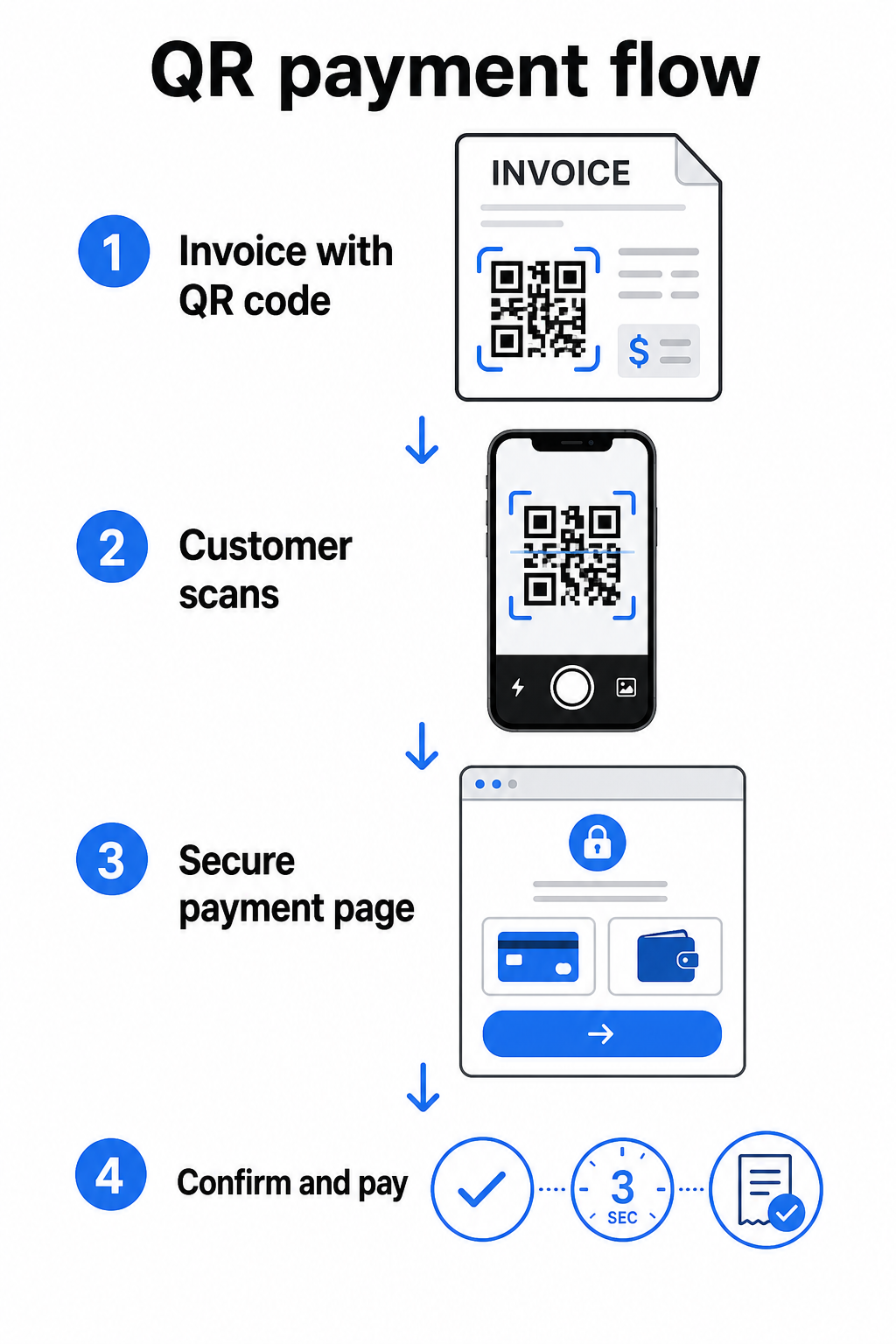
Federal Rezerv'in FedNow Hizmeti bu tam iş akışını tanımlar: gömülü bir QR kodu ile dijital olarak gönderilen faturalar, müşterilerin kağıt ekstreleri beklemek veya ödeme portallarını manuel olarak aramak yerine tarayarak ödeme başlatmasına olanak tanır. Müşteriler, içinde bir Ödeme Talebi (RfP) bulunan bir QR kodunu tarayarak doğrudan FedNow aracılığıyla anında ödeme başlatabilir.
Genel süreç şöyle işler:
- Ödeme sağlayıcınız (PayPal, Stripe veya Square gibi) aracılığıyla bir ödeme bağlantısı oluşturun
- Bu bağlantıyı bir QR kodu oluşturucu kullanarak bir QR koduna dönüştürün
- QR kodunu faturanıza, PDF'inize veya hesap özetinize yerleştirin
- Müşteri tarar, tutarı inceler ve öder – genellikle saniyeler içinde
PayPal, Stripe ve Square dahil olmak üzere büyük ABD ödeme sağlayıcıları, QR kodları olarak paylaşılabilecek ödeme bağlantılarını destekler, bu nedenle her iki uçta da özel donanım veya yazılım gerekmez.
Bir Ödeme QR Kodu Oluşturmaya Hazır mısınız? Herhangi bir ödeme bağlantısını, müşterilerinizin faturanızdan doğrudan kullanabileceği taranabilir bir QR koduna dönüştürün. Dakikalar içinde başlamak için Pageloot'un PayPal QR Kod Oluşturucu veya genel QR Kod Oluşturucu kullanın.
Fatura QR Kodunuzu Neye Bağlayacaksınız?
QR kodunun kendisi sadece teslimat mekanizmasıdır. Neyi bağladığınız, ödeme deneyiminin gerçekte ne kadar sorunsuz olduğunu belirler.
Bir ödeme sayfası veya ödeme bağlantısı en doğrudan seçenektir. Sağlayıcınızın kontrol panelinden – fatura tutarı, açıklaması ve işletme bilgileriniz önceden doldurulmuş olarak – bir ödeme bağlantısı oluşturun ve bunu bir QR koduna dönüştürün. Müşteriler, manuel veri girişi gerektirmeden ödemeye hazır bir sayfaya ulaşır. Pageloot'un ödeme QR kodları rehberi bunun PayPal ve Stripe gibi sağlayıcılarla nasıl çalıştığını açıklar.
Tam faturanın bir PDF'i ödeme seçeneğinin yanı sıra müşterilere kalem kalem detaylara, şartlara veya destekleyici belgelere erişim sağlamak istediğinizde kullanışlıdır. Bir PDF QR kodu doğrudan belgeye bağlantı verir, böylece müşteriler gelen kutularını aramadan anında açabilir veya indirebilir.
Bir ödeme portalı veya self-servis sayfası tekrar eden müşterileri olan işletmeler için iyi çalışır. Bir için taramaları takip edin ve artırın müşterilerin tüm faturalarını tek bir yerden yönettiği bir giriş sayfasına veya hesap paneline yönlendirebilir.
Doğru seçim faturalandırma iş akışınıza bağlıdır, ancak ödeme günlerini azaltmaya çalışan çoğu işletme için, doğrudan ödeme bağlantısı QR kodu faturadan ödemeye en kısa yolu sağlar.
Statik ve Dinamik QR Kodları: Hangisini Kullanmalısınız?
Faturalar için bir QR kodu oluştururken, iki seçeneğiniz vardır: statik ve dinamik. Faturalandırma amaçları için, dinamik QR kodları anlamlı pratik avantajlar sunar.
| ÖZELLİK | Statik QR Kodu | Dinamik QR Kodu |
|---|---|---|
| Yazdırdıktan sonra hedefi düzenle | Hayır | Evet |
| Tarama verilerini takip et | Hayır | Evet |
| Değişirse ödeme bağlantısını güncelle | Yeniden basım gerektirir | Panoda güncelle |
| Faturayı kimin açtığını izle | Hayır | Evet |
| Gerekirse devre dışı bırak | Hayır | Evet |
Dinamik bir QR kodu ile, yeni bir kod oluşturmadan veya fatura şablonunuzu yeniden yazdırmadan hedef URL'yi güncelleyebilirsiniz. Ödeme sağlayıcınız değişirse, fatura düzeniniz güncellenirse veya belirli bir müşteri için farklı bir ödeme yöntemine yönlendirmek isterseniz, değişiklik hemen yürürlüğe girer – basılı veya dijital QR kodu aynı kalır.
Dinamik kodlar ayrıca size tarama analizi: müşterinin faturasını açıp açmadığını ve onunla etkileşimde bulunup bulunmadığını gösteren zaman damgaları, cihaz türleri ve coğrafi veriler. Büyük bir fatura, son ödeme tarihinden bir hafta önce sıfır tarama gösteriyorsa, bu proaktif olarak takip etmek için faydalı bir erken sinyaldir.
Faturalarınıza QR Kodu Nasıl Eklenir
Mevcut bir fatura iş akışına bir QR kodu eklemek basittir ve faturalandırma kurulumunuzu sıfırdan yeniden oluşturmayı gerektirmez.
Adım 1: Ödeme bağlantınızı oluşturun. Ödeme sağlayıcınıza (PayPal, Stripe, Square veya başka bir ABD sağlayıcısı) giriş yapın ve bir ödeme bağlantısı oluşturun. Fatura tutarını, işletme adınızı ve ödemenin mutabakatını kolaylaştıracak bir referans numarası veya açıklama ekleyin.
Adım 2: Bağlantıyı bir QR koduna dönüştürün. Ödeme URL'sini Pageloot'un içine yapıştırın QR Kod Oluşturucu veya PayPal QR Kod Oluşturucu. Düzenleme ve izleme yetenekleri istiyorsanız dinamik bir QR kodu seçin.
Adım 3: Kodu özelleştirin. Logonuzu ekleyin, marka renklerinizi uygulayın ve “Ödemek için Tara” gibi kısa bir harekete geçirici mesaj etiketi ekleyin. Markalı kodlar müşteri güveni oluşturur ve taklit edilmesi daha zordur – kötü amaçlı QR kodlarının ödeme bağlamlarında oluşturduğu riskler göz önüne alındığında önemli bir husustur.
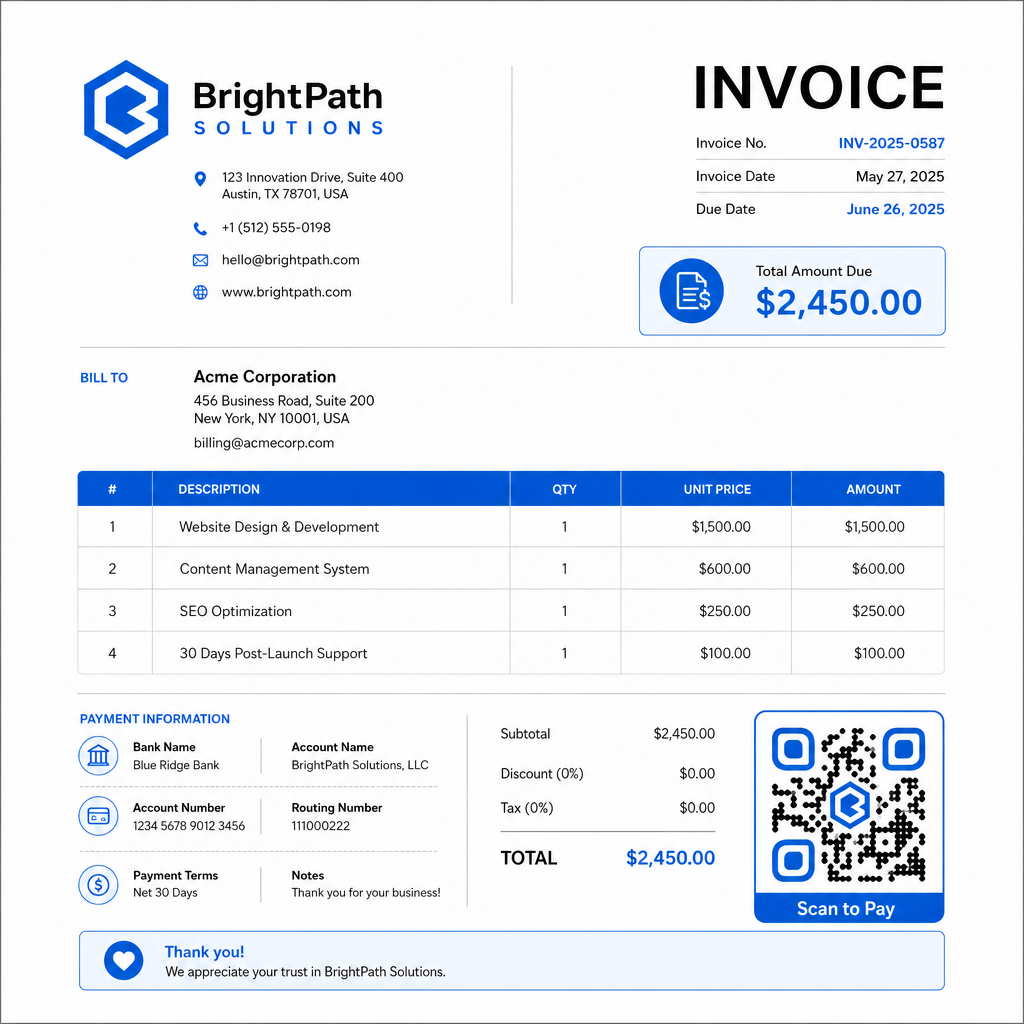
Adım 4: Doğru formatta indirin. QR kodunu, basılacak faturalar için bir SVG veya EPS dosyası olarak ya da PDF veya dijital faturalar için yüksek çözünürlüklü bir PNG olarak dışa aktarın. Vektör formatları pikselleşmeyi önler ve her boyutta taranabilirliği korur.
Adım 5: Göndermeden önce yerleştirin ve test edin. QR kodunu fatura şablonunuza ekleyin. En az iki farklı cihazda test edin ve ödeme sayfasının doğru yüklendiğini, tutarın doğru olduğunu ve onay akışının baştan sona çalıştığını onaylayın.
Fatura Etkileşimini Gerçek Zamanlı Takip Edin Müşterinizin faturanızı son ödeme tarihinden önce tarayıp taramadığını öğrenin. Pageloot'un dinamik QR kodları size tek bir gösterge panosundan tarama sayıları, cihaz verileri ve zaman damgaları verir. Dinamik bir QR kodu oluşturun izlemeye başlamak için.
Basılı ve Dijital Faturalar İçin QR Kodu Tasarım Standartları
Güvenilir bir şekilde taranmayan bir QR kodu amacına ulaşmaz. Faturalara kod yerleştirirken bu standartları aklınızda bulundurun:
- Minimum boyut: Yakın mesafeden tarama için QR kodlarını en az 2×2 cm boyutunda yazdırın. Kodun basılı bir sayfadan taranabileceği faturalar için 1×1 inç veya daha büyük güvenilir bir temeldir.
- Kontrast: Açık bir arka plan üzerinde en az 4:1 kontrast oranına sahip koyu desenler kullanın. Kodu renkli arka planlara, desenli alanlara veya filigranlara yerleştirmekten kaçının.
- Sessiz bölge: Tüm kodun etrafında net, boş bir kenarlık bırakın. Hiçbir metin, logo veya tasarım öğesi bu kenar boşluğuna girmemelidir.
- Dosya formatı: Baskı için SVG veya EPS kullanın. Bu vektör formatları, küçük bir orijinalden büyütülmüş rasterleştirilmiş PNG dosyalarının aksine, her çözünürlükte keskin kalır.
- Orantılılık: QR kodunu asla germeyin veya sıkıştırmayın. Kare şeklini korumak için orantılı olarak ölçeklendirin.
- Hata düzeltme: Kodun içine bir logo ekliyorsanız yüksek bir hata düzeltme seviyesi (Q veya H) kullanın. Gömülü logoyu ortalanmış tutun ve kod alanının 'undan fazlasını kaplamayacak şekilde ayarlayın.
- Etiket: Kodun yakınına “Faturanızı ödemek için tarayın” gibi kısa bir talimat ekleyin. Bu, sürece aşina olmayan müşterilere yardımcı olur ve ayrıca erişilebilirliği destekler.
Boyutlandırma önerileri ve çok dilli talimat seçenekleri dahil olmak üzere tam erişilebilirlik rehberliği için Pageloot'un QR kod ödeme erişilebilirlik en iyi uygulamalarını.
Fatura Ödeme QR Kodları İçin Güvenlik Hususları
Faturalardaki ödeme QR kodları yüksek güven gerektiren bir bağlamdır – müşterilerden para göndermeleri isteniyor. Bu, güvenlik uygulamalarını müzakere edilemez kılar.
Yalnızca HTTPS ödeme bağlantıları kullanın. QR kodunuzun işaret ettiği her URL HTTPS kullanmalıdır. Güvenli olmayan bir bağlantı, müşteriler için bir kırmızı bayraktır ve ele geçirilen veriler için gerçek bir risktir.
Faturaları dağıtmadan önce bağlantıyı doğrulayın. Bir grup fatura göndermeden önce, kodu kendiniz tarayın ve doğru, çalışan ödeme sayfasına yönlendirdiğini onaylayın. Bu, URL'deki hataları yakalar ve ödeme akışının beklendiği gibi çalıştığını doğrular.
Sorunlara yanıt verebilmek için dinamik kodlar kullanın. Bir ödeme bağlantısı tehlikeye girerse veya değişmesi gerekirse, dinamik bir QR kodu, faturayı yeniden düzenlemeden hedefi anında güncellemenize veya devre dışı bırakmanıza olanak tanır. Statik kodlar basıldıktan veya gönderildikten sonra değiştirilemez.
QR kodlarınızı görünür şekilde markalayın. Logonuzu QR koduna dahil etmek, dolandırıcıların sahte bir kodu değiştirmesini zorlaştırır ve müşterilere meşru bir şeyi taradıklarına dair görsel bir ipucu verir. Ödeme güvenliğini yönetme hakkında daha fazla bilgiyi Pageloot'un QR kodu ödemeleri güvenlik ve hız rehberi ve QR kodu ödemeleri için PCI-DSS uyumluluk rehberi.
Fatura QR Kodlarından Fayda Sağlayan Sektörler
QR kodlu ödeme faturaları, çok çeşitli iş türlerinde uygulanır. Birkaç yaygın kullanım durumu, bu yaklaşımın en net etkiye sahip olduğu yerleri göstermektedir:
- Serbest çalışanlar ve hizmet sağlayıcılar – Bir PDF faturasındaki bir QR kodu, müşterilerin günler sonra bir portala giriş yapmak yerine, belgeyi açtıkları anda telefonlarından ödeme yapmasını sağlar.
- Saha hizmeti ve teslimat işletmeleri – Teknisyenler veya sürücüler, hizmet noktasında bir QR kodlu fatura sunarak, ayrılmadan önce anında ödeme yapılmasını sağlayabilir.
- Hukuk büroları ve profesyonel hizmetler – Gömülü QR kodlarına sahip aylık faturalandırma ekstreleri, ödeme talimatlarının gidip gelmesini azaltır ve müşterilerin anında ödeme yapmasını kolaylaştırır.
- Sağlık hizmeti uygulamaları – Bir QR koduna sahip hasta faturalandırma ekstreleri, hastaların randevularından sonra evden ödeme yapmasına olanak tanıyarak, ön büro ödeme işlemlerini azaltır.
- İnşaat ve müteahhitlik – QR kodlu ilerleme faturaları, müşterilere her dönüm noktasına bağlı net, sürtünmesiz bir ödeme yolu sunar.
Pageloot'un sektör çözümleri sayfası iş akışlarındaki QR kodları için ek sektöre özel uygulamaları kapsar.
Geç ödemeler işletmelere zaman, nakit akışı ve idari çaba maliyeti getirir. Faturalarınıza bir QR kodu eklemek, bir fatura gönderme ile ödeme alma arasındaki boşluğu kısaltmak için atabileceğiniz en doğrudan adımlardan biridir. Bir müşterinin tamamlaması gereken adımlar ne kadar az olursa, o kadar çabuk ödeme yapma olasılıkları artar. İlk ödeme QR kodunuzu Pageloot’un QR Kod Oluşturucu veya özel PayPal QR Kod Oluşturucu, ve ilk faturanızdan itibaren sonuçları takip etmeye başlayın.
Sıkça sorulan sorular
Ödeme kurulumunuza bağlıdır. Müşterilerin tutarı manuel olarak girdiği tek bir ödeme sayfası kullanıyorsanız, tek bir QR kodu tüm faturalarda çalışabilir. Her fatura için belirli tutarları önceden doldurmak istiyorsanız, bireysel ödeme bağlantılarına – ve dolayısıyla fatura başına bireysel QR kodlarına ihtiyacınız olacaktır. Dinamik QR kodları, ödeme bağlantınız değişirse, kodu yeniden oluşturmadan veya yeniden yazdırmadan hedefi güncellemenize olanak tanır.
QR kodunun yanında her zaman bir yedek seçenek ekleyin – düz metin bir ödeme URL'si, banka havalesi bilgileriniz veya faturalandırma sorguları için bir telefon numarası. Her müşterinin akıllı telefonu olmayacak veya QR kodlarını kullanmaktan rahat hissetmeyecektir ve alternatif ödeme seçeneklerini sürdürmek, teknik bir engel nedeniyle hiçbir faturanın ödenmeden kalmamasını sağlar. Pageloot’un QR kodlu ödeme erişilebilirliği en iyi uygulamaları, ek alternatifleri ayrıntılı olarak kapsar.
Evet, güvenlik en iyi uygulamalarına uymanız koşuluyla. HTTPS ödeme bağlantıları kullanın, QR kodlarınızı logonuzla markalayın böylece müşteriler kaynağı görsel olarak doğrulayabilir, ve dinamik QR kodları kullanın böylece bir şeyler ters giderse bir kodu hemen devre dışı bırakabilir veya güncelleyebilirsiniz. Ödeme amaçları için statik QR kodlarından kaçının, çünkü bağlantılı sayfa tehlikeye girerse değiştirilemezler. Faturaları göndermeden önce her zaman tam ödeme akışını test edin ve müşterilere taradıktan sonra görünen URL'yi herhangi bir ödeme ayrıntısı girmeden önce kontrol etmelerini söyleyin.