Zitten uw facturen lang na de vervaldatum onbetaald? Te late betalingen zijn een van de meest voorkomende cashflowproblemen waarmee bedrijven worden geconfronteerd – en een belangrijke oorzaak is simpelweg de wrijving die gepaard gaat met betalen. Deze gids laat u zien hoe het toevoegen van een QR-code aan uw facturen die wrijving wegneemt en geld sneller op uw rekening stort.
Waarom Te Late Factuurbetalingen een Echt Bedrijfsprobleem Zijn
De cijfers zijn moeilijk te negeren. 56% van de Amerikaanse kleine bedrijven meldt dat er geld verschuldigd is van onbetaalde of te late facturen, en gemiddeld dragen die bedrijven elk meer dan $17.000 aan openstaande vorderingen. Betalingen komen doorgaans 8,2 dagen na de afgesproken deadline aan – niet omdat klanten niet van plan zijn te betalen, maar omdat traditionele factuur-naar-betaling workflows te veel stappen bevatten.
Klanten ontvangen een papieren of PDF-factuur, moeten vervolgens uw bankgegevens opzoeken, naar een betaalportaal navigeren, of eraan denken een cheque uit te schrijven. Elke extra stap is een gelegenheid voor vertraging. Hoe eenvoudiger u het betalen maakt, hoe sneller u betaald krijgt.
Hoe QR-codes op Facturen Werken
Een betalings-QR-code op een factuur codeert een URL die direct leidt naar een beveiligde betaalpagina. Wanneer een klant de code scant met de camera van zijn smartphone, opent de betaalpagina automatisch in zijn browser. Ze bevestigen het bedrag, kiezen hun betaalmethode – creditcard, bankoverschrijving, digitale portemonnee – en voltooien de transactie in seconden.
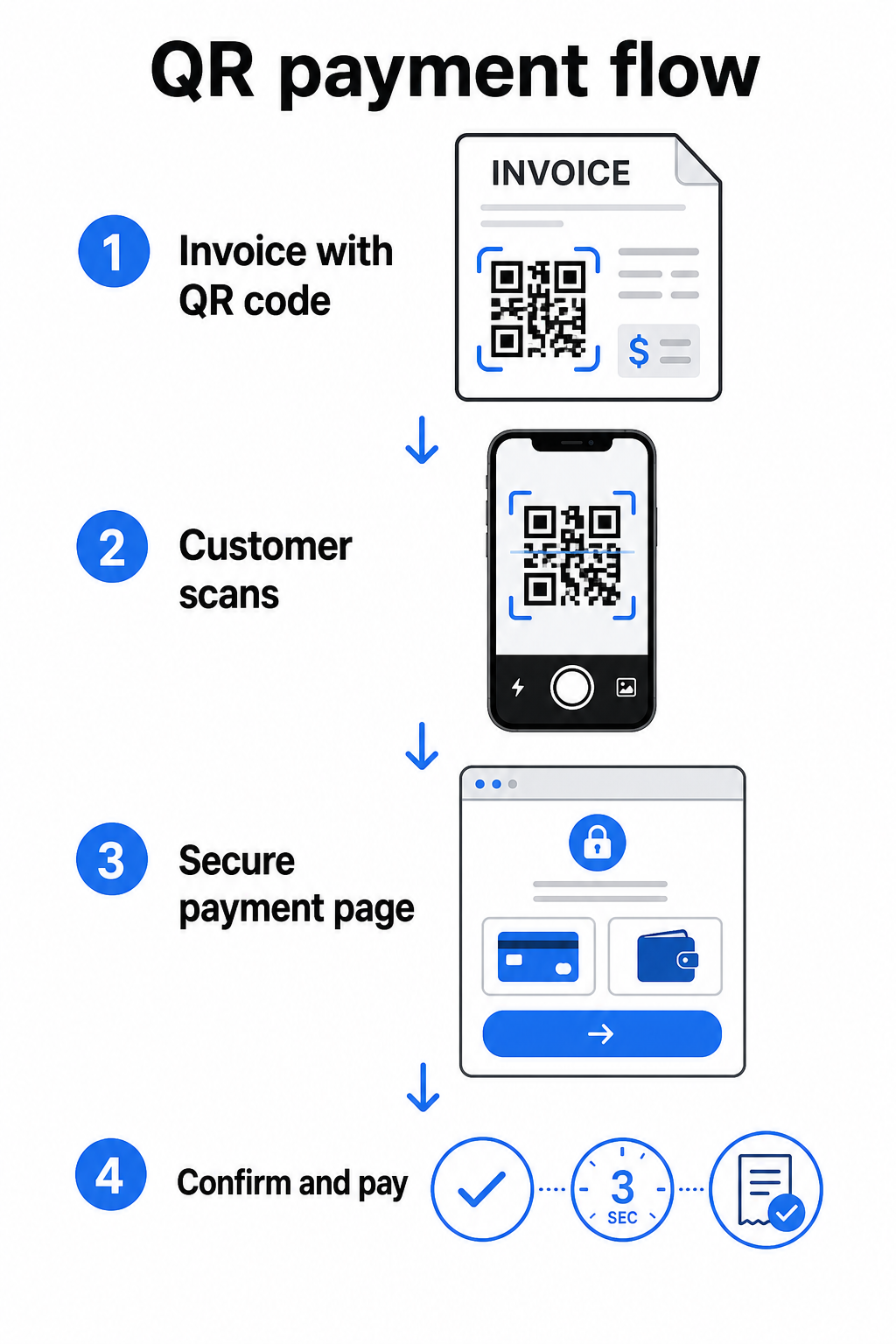
De FedNow Service van de Federal Reserve beschrijft deze exacte workflow: digitaal verzonden rekeningen met een ingebedde QR-code stellen klanten in staat om te scannen en de betaling te initiëren in plaats van te wachten op papieren afschriften of handmatig te zoeken naar betaalportalen. Klanten kunnen zelfs een QR-code scannen die een Verzoek om Betaling (RfP) om een directe betaling via FedNow te initiëren.
Het algemene proces werkt als volgt:
- Genereer een betaallink via uw betalingsprovider (zoals PayPal, Stripe of Square)
- Converteer die link naar een QR-code met behulp van een QR-codegenerator
- Plaats de QR-code op uw factuur, PDF of afschrift
- De klant scant, controleert het bedrag en betaalt – vaak binnen seconden
Grote Amerikaanse betalingsproviders, waaronder PayPal, Stripe en Square, ondersteunen allemaal betaallinks die als QR-codes kunnen worden gedeeld, dus er is geen speciale hardware of software vereist aan beide zijden.
Klaar om een Betalings-QR-code te Maken? Verander elke betaallink in een scanbare QR-code die uw klanten direct vanaf uw factuur kunnen gebruiken. Gebruik Pageloot's PayPal QR code maken of de algemene QR-codegenerator om binnen enkele minuten aan de slag te gaan.
Waar u uw Factuur-QR-code aan moet Koppelen
De QR-code zelf is slechts het leveringsmechanisme. Waar u deze aan koppelt, bepaalt hoe soepel de betalingservaring daadwerkelijk is.
Een betaalpagina of afrekenlink is de meest directe optie. Genereer een betaallink vanuit het dashboard van uw provider – met het factuurbedrag, de beschrijving en uw bedrijfsgegevens vooraf ingevuld – en converteer deze naar een QR-code. Klanten komen op een kant-en-klare betaalpagina zonder dat handmatige gegevensinvoer nodig is. Pageloot's gids voor betalings-QR-codes legt uit hoe dit werkt met providers zoals PayPal en Stripe.
Een PDF van de volledige factuur is handig wanneer u klanten toegang wilt geven tot gespecificeerde details, voorwaarden of ondersteunende documentatie naast de betalingsoptie. Een PDF QR-code linkt direct naar het document, zodat klanten het direct kunnen openen of downloaden zonder hun inbox te doorzoeken.
Een betaalportaal of zelfbedieningspagina werkt goed voor bedrijven met terugkerende klanten. Een link-QR-code kan verwijzen naar een inlogpagina of accountdashboard waar klanten al hun facturen op één plek beheren.
De juiste keuze hangt af van uw factureringsworkflow, maar voor de meeste bedrijven die de dagen tot betaling willen verkorten, levert een directe betaallink QR-code het kortste pad van factuur naar afwikkeling op.
Statische versus dynamische QR-codes: welke moet u gebruiken?
Bij het genereren van een QR-code voor facturen heeft u twee opties: statisch en dynamisch. Voor factureringsdoeleinden, dynamische QR-codes bieden zinvolle praktische voordelen.
| FUNCTIE | Statische QR Code | Dynamische QR-code |
|---|---|---|
| Bestemming bewerken na afdrukken | Geen | Ja |
| Scan gegevens bijhouden | Geen | Ja |
| Betaallink bijwerken als deze verandert | Vereist herdruk | Bijwerken in dashboard |
| Monitoren wie de factuur heeft geopend | Geen | Ja |
| Deactiveren indien nodig | Geen | Ja |
Met een dynamische QR-code kunt u de bestemmings-URL bijwerken zonder een nieuwe code te maken of uw factuursjabloon opnieuw af te drukken. Als uw betalingsprovider verandert, uw factuurlay-out wordt bijgewerkt, of u wilt omleiden naar een andere betaalmethode voor een specifieke klant, wordt de wijziging onmiddellijk van kracht – de afgedrukte of digitale QR-code blijft hetzelfde.
Dynamische codes geven u ook scananalyses: tijdstempels, apparaattypen en geografische gegevens die u vertellen of een klant hun factuur heeft geopend en ermee heeft geïnteracteerd. Als een grote factuur een week voor de vervaldatum nul scans vertoont, is dat een nuttig vroeg signaal om proactief op te volgen.
Hoe voeg je een QR-code toe aan je facturen
Een QR-code toevoegen aan een bestaande factuurworkflow is eenvoudig en vereist geen herbouw van je factureringsinstellingen vanaf nul.
Stap 1: Genereer je betaallink. Log in bij je betalingsprovider (PayPal, Stripe, Square, of een andere Amerikaanse provider) en maak een betaallink aan. Vermeld het factuurbedrag, je bedrijfsnaam en een referentienummer of beschrijving, zodat de betaling eenvoudig kan worden afgestemd.
Stap 2: Converteer de link naar een QR-code. Plak de betalings-URL in Pageloot's QR-codegenerator of PayPal QR code maken. Kies een dynamische QR-code als je bewerkings- en trackingmogelijkheden wilt.
Stap 3: Pas de code aan. Voeg je logo toe, pas je merkkleuren toe en voeg een korte call-to-action-label toe, zoals “Scan om te betalen.” Branded codes bouwen klantvertrouwen op en zijn moeilijker te vervalsen – een belangrijke overweging gezien de risico's die kwaadaardige QR-codes vormen in betalingscontexten.
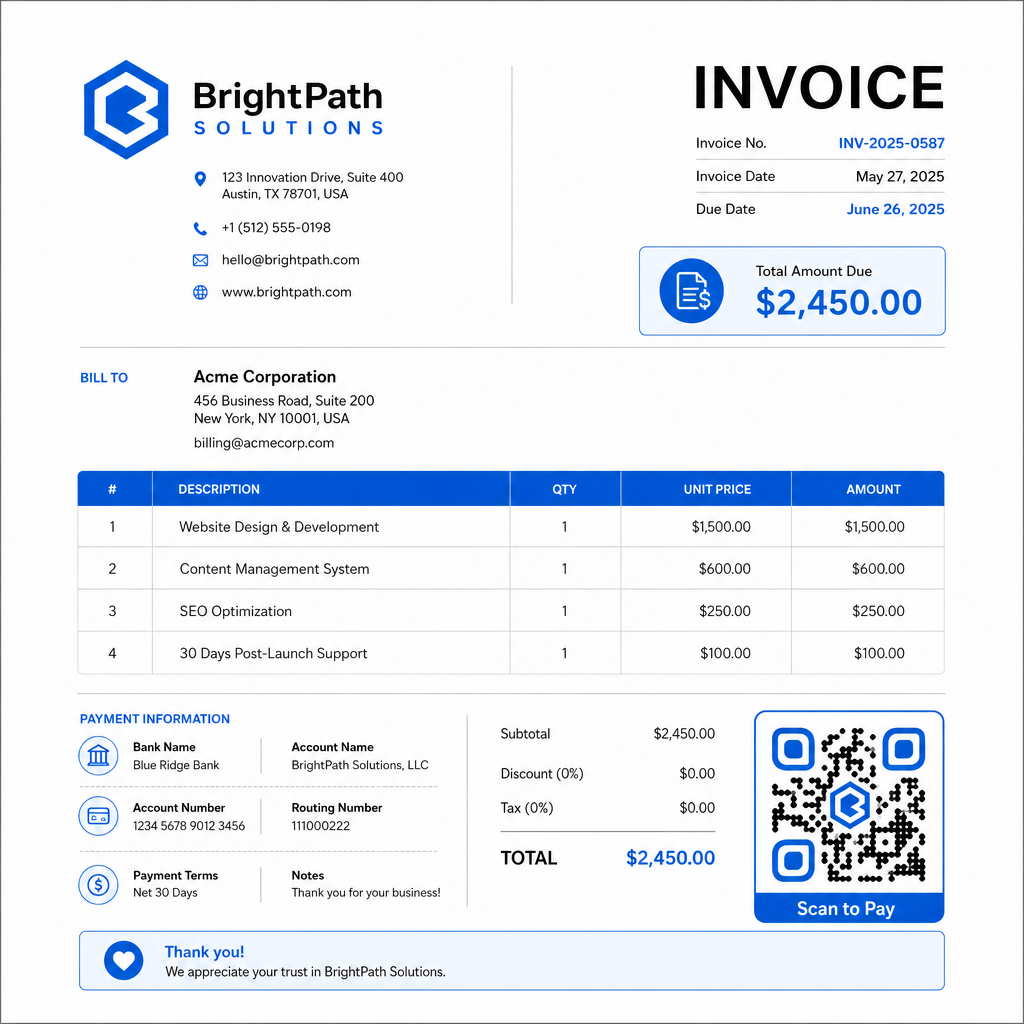
Stap 4: Download in het juiste formaat. Exporteer de QR-code als een SVG- of EPS-bestand voor facturen die worden afgedrukt, of als een PNG met hoge resolutie voor PDF- of digitale facturen. Vectorformaten voorkomen pixelatie en behouden de scanbaarheid op elk formaat.
Stap 5: Plaats en test voordat je verzendt. Voeg de QR-code in je factuursjabloon. Test het op minstens twee verschillende apparaten en bevestig dat de betaalpagina correct laadt, het bedrag nauwkeurig is en de bevestigingsstroom van begin tot eind werkt.
Volg factuurinteractie in realtime Weet of je klant je factuur heeft gescand vóór de vervaldatum. Pageloot's dynamische QR-codes geven je scanaantallen, apparaatgegevens en tijdstempels vanuit één dashboard. Maak een dynamische QR-code om te beginnen met volgen.
Ontwerpstandaarden voor QR-codes voor afgedrukte en digitale facturen
Een QR-code die niet betrouwbaar scant, mist zijn doel. Houd deze standaarden in gedachten bij het plaatsen van codes op facturen:
- Minimale grootte: Print QR-codes van minimaal 2×2 cm voor scannen op korte afstand. Voor facturen waarbij de code vanaf een afgedrukte pagina kan worden gescand, is 1×1 inch of groter een betrouwbare basislijn.
- Contrast: Gebruik donkere patronen op een lichte achtergrond met een contrastverhouding van minimaal 4:1. Vermijd het plaatsen van de code op gekleurde achtergronden, patronen of watermerken.
- Stille zone: Houd een duidelijke lege rand rond de hele code aan. Geen tekst, logo's of ontwerpelementen mogen deze marge binnendringen.
- Bestandsformaat: Gebruik SVG of EPS voor afdrukken. Deze vectorformaten blijven scherp op elke resolutie, in tegenstelling tot gerasterde PNG-bestanden die zijn opgeschaald vanaf een klein origineel.
- Proportionaliteit: Rek of comprimeer de QR-code nooit. Schaal het proportioneel om de vierkante vorm te behouden.
- Foutcorrectie: Gebruik een hoog foutcorrectieniveau (Q of H) als je een logo in de code toevoegt. Houd elk ingebed logo gecentreerd en bedek niet meer dan 30% van het codegebied.
- Label: Voeg een korte instructie toe bij de code, zoals “Scan om je factuur te betalen.” Dit helpt klanten die onbekend zijn met het proces en ondersteunt ook de toegankelijkheid.
Voor volledige toegankelijkheidsrichtlijnen – inclusief aanbevelingen voor formaat en meertalige instructieopties – zie Pageloot's beste praktijken voor toegankelijkheid van QR-codebetalingen.
Beveiligingsoverwegingen voor factuurbetaling QR-codes
Betaling QR-codes op facturen zijn een context met hoog vertrouwen – klanten wordt gevraagd geld te sturen. Dat maakt beveiligingspraktijken niet-onderhandelbaar.
Gebruik alleen HTTPS-betaallinks. Elke URL waarnaar je QR-code verwijst, moet HTTPS gebruiken. Een onbeveiligde link is een rode vlag voor klanten en een reëel risico voor onderschepte gegevens.
Controleer de link voordat je facturen distribueert. Voordat je een reeks facturen verzendt, scan de code zelf en bevestig dat deze naar de juiste, functionerende betaalpagina leidt. Dit vangt fouten in de URL op en bevestigt dat de betalingsstroom werkt zoals verwacht.
Gebruik dynamische codes zodat je op problemen kunt reageren. Als een betaallink is gecompromitteerd of moet worden gewijzigd, stelt een dynamische QR-code je in staat de bestemming onmiddellijk bij te werken of te deactiveren zonder de factuur opnieuw uit te geven. Statische codes kunnen niet worden gewijzigd zodra ze zijn afgedrukt of verzonden.
Brand je QR-codes zichtbaar. Het opnemen van je logo in de QR-code maakt het moeilijker voor fraudeurs om een valse code te vervangen, en geeft klanten een visuele aanwijzing dat ze iets legitiems scannen. Lees meer over het beheren van betalingsbeveiliging in Pageloot's Beveiligings- en snelheidshandleiding voor QR-codebetalingen en de PCI-DSS-nalevingshandleiding voor QR-codebetalingen.
Sectoren die profiteren van factuur QR-codes
QR-code betaalfacturen zijn van toepassing op een breed scala aan bedrijfstypen. Enkele veelvoorkomende gebruiksscenario's illustreren waar deze aanpak de duidelijkste impact heeft:
- Freelancers en dienstverleners – Een QR-code op een PDF-factuur laat klanten betalen vanaf hun telefoon op het moment dat ze het document openen, in plaats van dagen later in te loggen op een portaal.
- Buitendienst- en bezorgbedrijven – Technici of chauffeurs kunnen een factuur met een QR-code presenteren op het punt van service, waardoor betaling ter plaatse mogelijk is voordat ze vertrekken.
- Advocatenkantoren en professionele diensten – Maandelijkse factuuroverzichten met ingebedde QR-codes verminderen het heen en weer van betalingsinstructies en maken het gemakkelijker voor klanten om onmiddellijk te betalen.
- Zorgpraktijken – Patiëntfactuuroverzichten met een QR-code stellen patiënten in staat om thuis te betalen na hun afspraak, waardoor de afhandeling van betalingen aan de balie wordt verminderd.
- Bouw en aanneming – Voortgangsfacturen met QR-codes geven klanten een duidelijk, wrijvingsloos betalingspad gekoppeld aan elke mijlpaal.
Pageloot's pagina met brancheoplossingen behandelt aanvullende sectorspecifieke toepassingen voor QR-codes in bedrijfsworkflows.
Late betalingen kosten bedrijven tijd, cashflow en administratieve inspanning. Het toevoegen van een QR-code aan uw facturen is een van de meest directe stappen die u kunt nemen om de kloof tussen het versturen van een rekening en het ontvangen van betaling te verkleinen. Hoe minder stappen een klant hoeft te voltooien, hoe groter de kans dat ze snel betalen. Stel uw eerste betalings-QR-code in met Pageloot's QR-codegenerator of de speciale PayPal QR code maken, en begin met het bijhouden van resultaten vanaf uw eerste factuur.
Veelgestelde vragen
Het hangt af van uw betalingsinstellingen. Als u een enkele betaalpagina gebruikt waar klanten het bedrag handmatig invoeren, kan één QR-code werken voor alle facturen. Als u specifieke bedragen voor elke factuur wilt voorinvullen, heeft u individuele betaallinks nodig – en dus individuele QR-codes per factuur. Dynamische QR-codes laten u de bestemming bijwerken als uw betaallink verandert, zonder de code opnieuw te genereren of af te drukken.
Voeg altijd een terugvaloptie toe naast de QR-code – een betaal-URL in platte tekst, uw bankoverschrijvingsgegevens, of een telefoonnummer voor factuurvragen. Niet elke klant heeft een smartphone of voelt zich comfortabel met het gebruik van QR-codes, en het handhaven van alternatieve betaalopties zorgt ervoor dat geen enkele factuur onbetaald blijft vanwege een technische barrière. Pageloot's best practices voor toegankelijkheid van QR-codebetalingen behandelen aanvullende alternatieven in detail.
Ja, mits u de beste beveiligingspraktijken volgt. Gebruik HTTPS-betalingslinks, voorzie uw QR-codes van uw logo zodat klanten de bron visueel kunnen verifiëren, en gebruik dynamische QR-codes zodat u een code onmiddellijk kunt deactiveren of bijwerken als er iets misgaat. Vermijd statische QR-codes voor betalingsdoeleinden, aangezien deze niet kunnen worden gewijzigd als de gekoppelde pagina is gecompromitteerd. Test altijd de volledige betalingsstroom voordat u facturen verzendt, en instrueer klanten om de URL te controleren die verschijnt na het scannen voordat ze betalingsgegevens invoeren.