Ovatko laskusi maksamatta kauan eräpäivän jälkeen? Myöhästyneet maksut ovat yksi yleisimmistä kassavirtaongelmista, joita yritykset kohtaavat – ja merkittävä syy on yksinkertaisesti maksamiseen liittyvä kitka. Tämä opas näyttää, miten QR-koodin lisääminen laskuihisi poistaa tuon kitkan ja siirtää rahat tilillesi nopeammin.
Miksi myöhästyneet laskumaksut ovat todellinen liiketoimintaongelma
Lukuja on vaikea sivuuttaa. 56 % yhdysvaltalaisista pienyrityksistä ilmoittaa, että niille on velkaa maksamattomista tai myöhästyneistä laskuista, ja keskimäärin näillä yrityksillä on yli 17 000 dollaria maksamattomia saatavia kukin. Maksut saapuvat tyypillisesti 8,2 päivää sovitun määräajan jälkeen – ei siksi, että asiakkaat eivät aio maksaa, vaan siksi, että perinteisissä laskusta maksuun -työnkuluissa on liian monta vaihetta.
Asiakkaat saavat paperi- tai PDF-laskun, sitten heidän on etsittävä pankkitietosi, siirryttävä maksuportaaliin tai muistettava kirjoittaa shekki. Jokainen lisävaihe on mahdollisuus viivästykseen. Mitä yksinkertaisemmaksi teet maksamisen, sitä nopeammin saat maksun.
Miten QR-koodit laskuissa toimivat
Laskussa oleva maksu-QR-koodi koodaa URL-osoitteen, joka johtaa suoraan turvalliselle maksusivulle. Kun asiakas skannaa koodin älypuhelimensa kameralla, maksusivu avautuu automaattisesti hänen selaimeensa. He vahvistavat summan, valitsevat maksutapansa – luottokortti, pankkisiirto, digitaalinen lompakko – ja suorittavat tapahtuman sekunneissa.
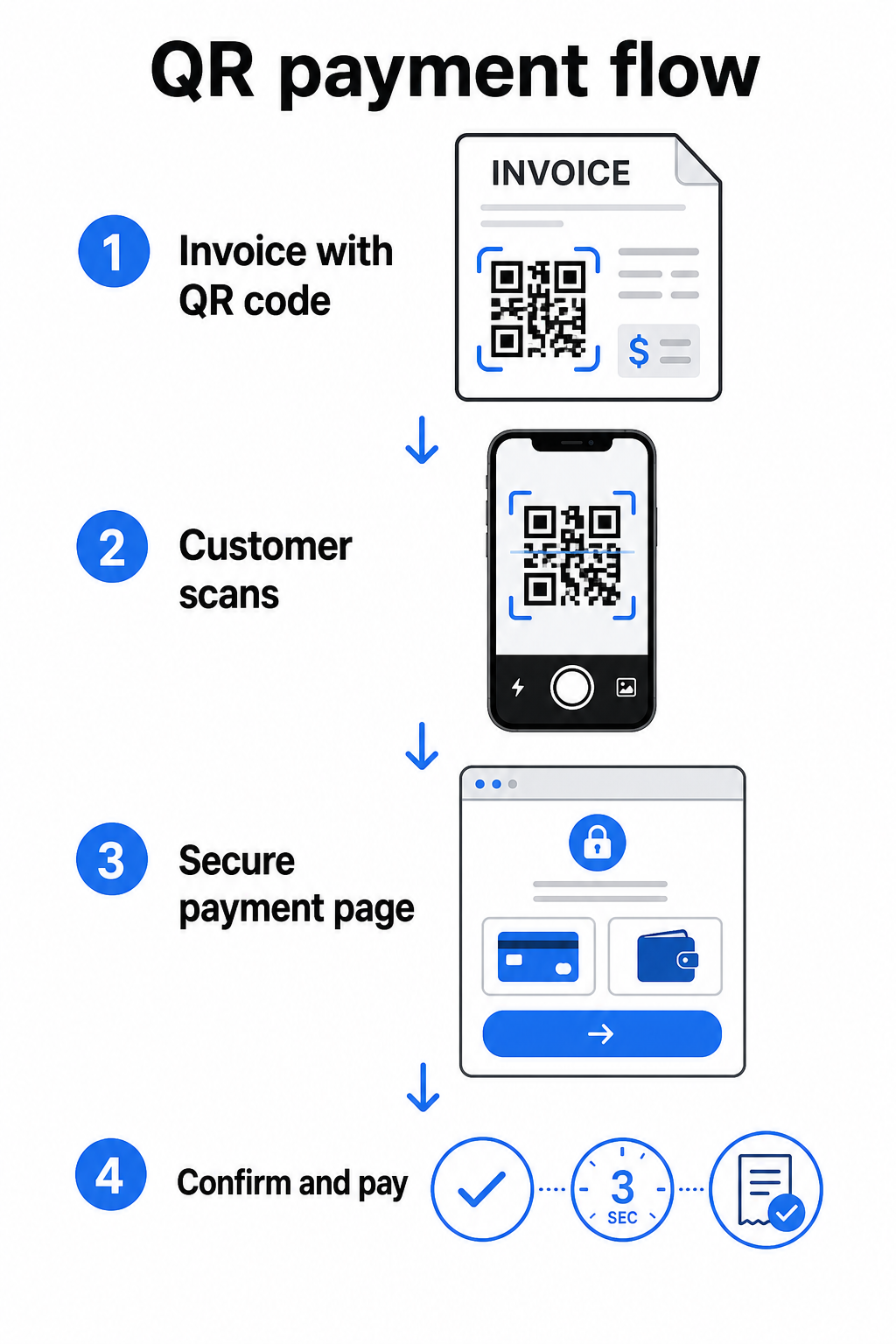
Federal Reserven FedNow-palvelu kuvaa tämän tarkan työnkulun: digitaalisesti lähetetyt laskut, joissa on upotettu QR-koodi, antavat asiakkaille mahdollisuuden skannata ja aloittaa maksun sen sijaan, että he odottaisivat paperisia tiliotteita tai etsisivät manuaalisesti maksuportaaleja. Asiakkaat voivat jopa skannata QR-koodin, joka sisältää Maksupyyntö (RfP) aloittaakseen välittömän maksun suoraan FedNow'n kautta.
Yleinen prosessi toimii näin:
- Luo maksulinkki maksupalveluntarjoajasi kautta (kuten PayPal, Stripe tai Square)
- Muunna linkki QR-koodiksi käyttämällä QR-koodigeneraattoria
- Aseta QR-koodi laskuusi, PDF-tiedostoosi tai laskutusotteeseesi
- Asiakas skannaa, tarkistaa summan ja maksaa – usein sekunneissa
Suuret yhdysvaltalaiset maksupalveluntarjoajat, kuten PayPal, Stripe ja Square, tukevat kaikki maksulinkkejä, jotka voidaan jakaa QR-koodeina, joten kummassakaan päässä ei tarvita erityistä laitteistoa tai ohjelmistoa.
Oletko valmis luomaan maksu-QR-koodin? Muunna mikä tahansa maksulinkki skannattavaksi QR-koodiksi, jota asiakkaasi voivat käyttää suoraan laskustasi. Käytä Pagelootin PayPal QR-koodi generaattori tai yleinen QR-koodigeneraattori aloittaaksesi muutamassa minuutissa.
Mihin linkittää laskusi QR-koodi
QR-koodi itsessään on vain toimitusmekanismi. Se, mihin sen linkität, määrittää, kuinka sujuva maksukokemus todella on.
Maksusivu tai kassalinkki on suorin vaihtoehto. Luo maksulinkki palveluntarjoajasi hallintapaneelista – laskun summa, kuvaus ja yrityksesi tiedot esitäytettyinä – ja muunna se QR-koodiksi. Asiakkaat saapuvat valmiille maksusivulle ilman manuaalista tietojen syöttöä. Pagelootin opas maksu-QR-koodeihin käy läpi, miten tämä toimii PayPalin ja Stripen kaltaisten palveluntarjoajien kanssa.
Koko laskun PDF-tiedosto on hyödyllinen, kun haluat antaa asiakkaille pääsyn eriteltyihin tietoihin, ehtoihin tai tukidokumentaatioon maksuvaihtoehdon ohella. PDF QR-koodi linkittää suoraan asiakirjaan, jotta asiakkaat voivat avata tai ladata sen välittömästi etsimättä sitä postilaatikostaan.
Maksuportaali tai itsepalvelusivu toimii hyvin yrityksille, joilla on toistuvia asiakkaita. linkin QR-koodi voi osoittaa kirjautumissivulle tai tilitietojen hallintapaneeliin, jossa asiakkaat voivat hallita kaikkia laskujaan yhdessä paikassa.
Oikea valinta riippuu laskutusprosessistasi, mutta useimmille yrityksille, jotka pyrkivät lyhentämään maksuaikaa, suora maksulinkki-QR-koodi tarjoaa lyhimmän polun laskusta suoritukseen.
Staattiset vs. dynaamiset QR-koodit: Kumpi sinun tulisi käyttää?
Kun luot QR-koodia laskuja varten, sinulla on kaksi vaihtoehtoa: staattinen ja dynaaminen. Laskutustarkoituksiin, dynaamiset QR-koodit tarjoavat merkittäviä käytännön etuja.
| OMINAISUUS | Staattinen QR-koodi | Dynaaminen QR-koodi |
|---|---|---|
| Muokkaa kohdetta tulostuksen jälkeen | Ei | Kyllä |
| Seuraa skannaustietoja | Ei | Kyllä |
| Päivitä maksulinkki, jos se muuttuu | Vaatii uudelleenpainatuksen | Päivitä hallintapaneelissa |
| Seuraa, kuka avasi laskun | Ei | Kyllä |
| Poista käytöstä tarvittaessa | Ei | Kyllä |
Dynaamisella QR-koodilla voit päivittää kohde-URL-osoitteen luomatta uutta koodia tai tulostamatta laskupohjaasi uudelleen. Jos maksupalveluntarjoajasi vaihtuu, laskun ulkoasu päivittyy tai haluat ohjata toiseen maksutapaan tietylle asiakkaalle, muutos astuu voimaan välittömästi – tulostettu tai digitaalinen QR-koodi pysyy samana.
Dynaamiset koodit antavat sinulle myös skannausanalytiikan: aikaleimat, laitetyypit ja maantieteelliset tiedot, jotka kertovat, onko asiakas avannut ja käyttänyt laskuaan. Jos suuri lasku näyttää nolla skannausta viikkoa ennen eräpäivää, se on hyödyllinen varhainen merkki proaktiiviseen seurantaan.
Kuinka lisätä QR-koodi laskuihisi
QR-koodin lisääminen olemassa olevaan laskutusprosessiin on suoraviivaista eikä vaadi laskutusjärjestelmän uudelleenrakentamista alusta alkaen.
Vaihe 1: Luo maksulinkki. Kirjaudu maksupalveluntarjoajaasi (PayPal, Stripe, Square tai muu yhdysvaltalainen palveluntarjoaja) ja luo maksulinkki. Sisällytä laskun summa, yrityksesi nimi ja viitenumero tai kuvaus, jotta maksu on helppo täsmäyttää.
Vaihe 2: Muunna linkki QR-koodiksi. Liitä maksun URL-osoite Pagelootin QR-koodigeneraattori tai PayPal QR-koodi generaattori. Valitse dynaaminen QR-koodi, jos haluat muokkaus- ja seurantatoimintoja.
Vaihe 3: Mukauta koodia. Lisää logosi, käytä brändisi värejä ja sisällytä lyhyt toimintakehotus, kuten “Skannaa maksaaksesi”. Brändätyt koodit rakentavat asiakkaiden luottamusta ja niitä on vaikeampi väärentää – tärkeä huomio ottaen huomioon riskit, joita haitalliset QR-koodit aiheuttavat maksukonteksteissa.
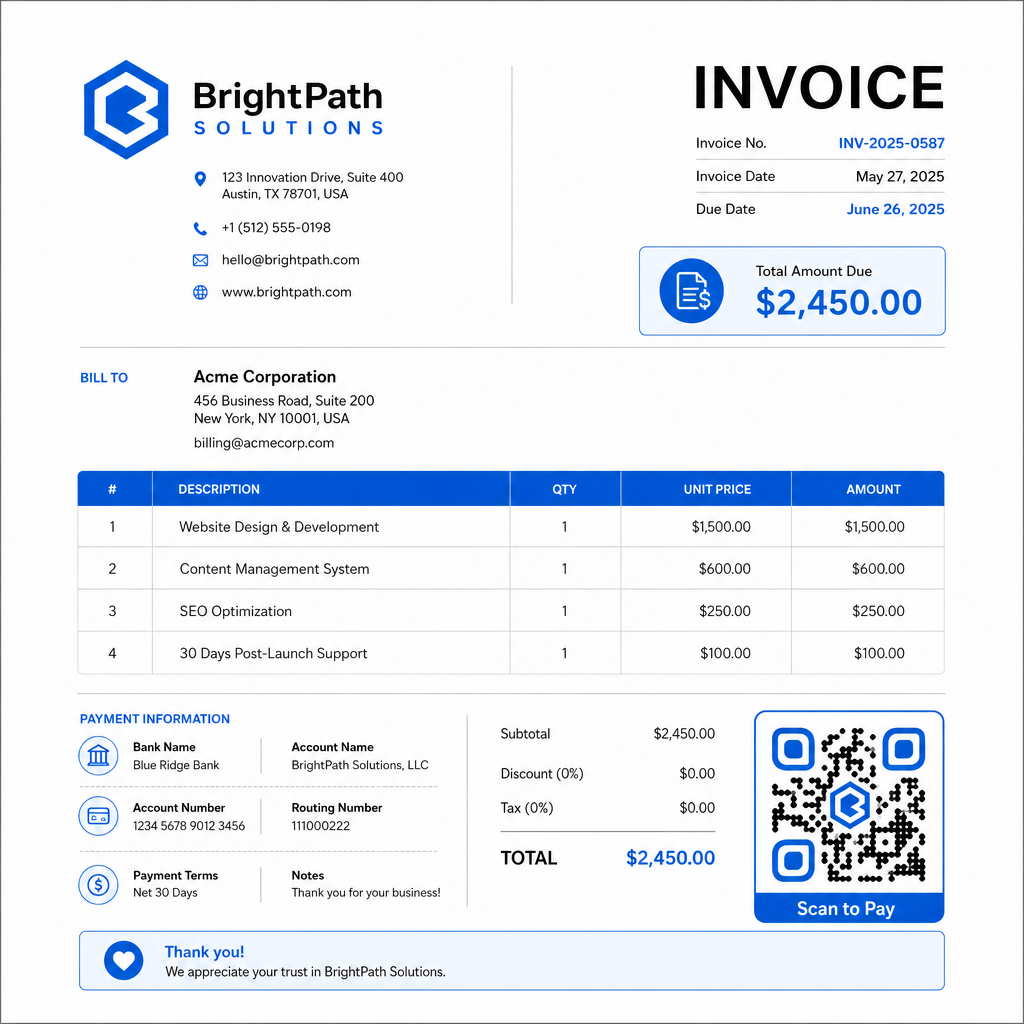
Vaihe 4: Lataa oikeassa muodossa. Vie QR-koodi SVG- tai EPS-tiedostona tulostettavia laskuja varten tai korkearesoluutioisena PNG-tiedostona PDF- tai digitaalisia laskuja varten. Vektorimuodot estävät pikselöitymisen ja säilyttävät skannattavuuden missä tahansa koossa.
Vaihe 5: Sijoita ja testaa ennen lähettämistä. Lisää QR-koodi laskupohjaasi. Testaa sitä vähintään kahdella eri laitteella ja varmista, että maksusivu latautuu oikein, summa on oikea ja vahvistusprosessi toimii alusta loppuun.
Seuraa laskun sitoutumista reaaliaikaisesti Tiedä, onko asiakkaasi skannannut laskusi ennen eräpäivää. Pagelootin dynaamiset QR-koodit antavat sinulle skannausmäärät, laitetiedot ja aikaleimat yhdestä hallintapaneelista. Luo dynaaminen QR-koodi aloittaaksesi seurannan.
QR-koodin suunnittelustandardit painetuille ja digitaalisille laskuille
QR-koodi, joka ei skannaa luotettavasti, menettää tarkoituksensa. Pidä nämä standardit mielessä, kun sijoitat koodeja laskuihin:
- Minimikoko: Tulosta QR-koodit vähintään 2×2 cm kokoisina lähiskannausta varten. Laskuissa, joissa koodi voidaan skannata painetulta sivulta, 1×1 tuumaa tai suurempi on luotettava perusmitta.
- Kontrasti: Käytä tummia kuvioita vaalealla taustalla vähintään 4:1 kontrastisuhteella. Vältä koodin sijoittamista värillisille taustoille, kuvioiduille alueille tai vesileimoihin.
- Hiljainen vyöhyke: Säilytä selkeä tyhjä reunus koko koodin ympärillä. Mikään teksti, logo tai suunnitteluelementti ei saa tunkeutua tähän marginaaliin.
- Tiedostomuoto: Käytä SVG- tai EPS-muotoa tulostukseen. Nämä vektorimuodot pysyvät terävinä missä tahansa resoluutiossa, toisin kuin rasteroidut PNG-tiedostot, jotka on skaalattu ylös pienestä alkuperäisestä.
- Suhteellisuus: Älä koskaan venytä tai pakkaa QR-koodia. Skaalaa se suhteellisesti säilyttääksesi neliön muodon.
- Virheenkorjaus: Käytä korkeaa virheenkorjaustasoa (Q tai H), jos lisäät logon koodin sisään. Pidä kaikki upotetut logot keskitettyinä ja peittämässä enintään 30 % koodialueesta.
- Merkintä: Sisällytä lyhyt ohje koodin lähelle, kuten “Skannaa maksaaksesi laskusi.” Tämä auttaa asiakkaita, jotka eivät tunne prosessia, ja tukee myös saavutettavuutta.
Täydelliset saavutettavuusohjeet – mukaan lukien koko-suositukset ja monikieliset ohjevaihtoehdot – katso Pagelootin QR-koodimaksamisen saavutettavuuden parhaita käytäntöjä.
Turvallisuusnäkökohdat laskujen maksu-QR-koodeille
Laskujen maksu-QR-koodit ovat korkean luottamuksen konteksti – asiakkaita pyydetään lähettämään rahaa. Tämä tekee turvallisuuskäytännöistä tinkimättömiä.
Käytä vain HTTPS-maksulinkkejä. Jokaisen URL-osoitteen, johon QR-koodisi osoittaa, tulisi käyttää HTTPS:ää. Suojaamaton linkki on punainen lippu asiakkaille ja todellinen riski siepatuille tiedoille.
Tarkista linkki ennen laskujen jakelua. Ennen laskuerän lähettämistä skannaa koodi itse ja varmista, että se johtaa oikealle, toimivalle maksusivulle. Tämä havaitsee virheet URL-osoitteessa ja varmistaa, että maksuvirta toimii odotetusti.
Käytä dynaamisia koodeja, jotta voit reagoida ongelmiin. Jos maksulinkki vaarantuu tai sitä on muutettava, dynaaminen QR-koodi antaa sinun päivittää tai deaktivoida kohteen välittömästi ilman laskun uudelleenlähetystä. Staattisia koodeja ei voi muuttaa, kun ne on tulostettu tai lähetetty.
Brändää QR-koodisi näkyvästi. Logosi sisällyttäminen QR-koodiin vaikeuttaa huijareiden väärennetyn koodin korvaamista ja antaa asiakkaille visuaalisen vihjeen siitä, että he skannaavat jotain laillista. Lue lisää maksuturvallisuuden hallinnasta Pagelootin QR-koodimaksujen turvallisuus- ja nopeusopas ja PCI-DSS-yhteensopivuusopas QR-koodimaksuihin.
Toimialat, jotka hyötyvät laskujen QR-koodeista
QR-koodimaksulaskut soveltuvat monenlaisiin yritystyyppeihin. Muutama yleinen käyttötapaus havainnollistaa, missä tällä lähestymistavalla on selkein vaikutus:
- Freelancerit ja palveluntarjoajat – QR-koodi PDF-laskussa antaa asiakkaiden maksaa puhelimellaan heti, kun he avaavat asiakirjan, sen sijaan, että he kirjautuisivat portaaliin päiviä myöhemmin.
- Kenttäpalvelu- ja toimitusyritykset – Teknikot tai kuljettajat voivat esittää laskun QR-koodilla palvelupisteessä, mahdollistaen maksun paikan päällä ennen lähtöään.
- Asianajotoimistot ja asiantuntijapalvelut – Kuukausittaiset laskutusilmoitukset upotetuilla QR-koodeilla vähentävät maksutietojen edestakaista viestintää ja helpottavat asiakkaiden välitöntä maksamista.
- Terveydenhuollon toimipisteet – Potilaslaskut QR-koodilla antavat potilaiden maksaa kotoa käsin tapaamisen jälkeen, vähentäen vastaanoton maksunkäsittelyä.
- Rakentaminen ja urakointi – Edistymislaskut QR-koodeilla antavat asiakkaille selkeän, kitkattoman maksuväylän sidottuna jokaiseen virstanpylvääseen.
Pagelootin toimialakohtaisten ratkaisujen sivu kattaa lisäksi toimialakohtaisia sovelluksia QR-koodeille liiketoiminnan työnkuluissa.
Myöhästyneet maksut maksavat yrityksille aikaa, kassavirtaa ja hallinnollista vaivaa. QR-koodin lisääminen laskuihisi on yksi suorimmista toimenpiteistä, joilla voit lyhentää laskun lähettämisen ja maksun vastaanottamisen välistä aikaa. Mitä vähemmän vaiheita asiakkaan on suoritettava, sitä todennäköisemmin he maksavat nopeasti. Määritä ensimmäinen maksu-QR-koodisi Pagelootin QR-koodigeneraattori tai omistetun PayPal QR-koodi generaattori, ja aloita tulosten seuranta ensimmäisestä laskustasi.
Usein kysytyt kysymykset
Se riippuu maksujärjestelmästäsi. Jos käytät yhtä maksusivua, jolla asiakkaat syöttävät summan manuaalisesti, yksi QR-koodi voi toimia kaikissa laskuissa. Jos haluat esitäyttää tietyt summat jokaiselle laskulle, tarvitset yksittäisiä maksulinkkejä – ja siten yksittäisiä QR-koodeja per lasku. Dynaamiset QR-koodit antavat sinun päivittää kohdetta, jos maksulinkkisi muuttuu, ilman koodin uudelleenluomista tai uudelleen tulostamista.
Sisällytä aina varavaihtoehto QR-koodin rinnalle – pelkkä tekstimuotoinen maksulinkki, pankkisiirron tiedot tai puhelinnumero laskutuskyselyihin. Kaikilla asiakkailla ei ole älypuhelinta tai he eivät tunne oloaan mukavaksi käyttäessään QR-koodeja, ja vaihtoehtoisten maksuvaihtoehtojen ylläpitäminen varmistaa, ettei yksikään lasku jää maksamatta teknisen esteen vuoksi. Pagelootin QR-koodimaksamisen saavutettavuuden parhaat käytännöt kattavat lisävaihtoehtoja yksityiskohtaisesti.
Kyllä, edellyttäen että noudatatte tietoturvan parhaita käytäntöjä. Käytä HTTPS-maksulinkkejä, brändää QR-koodisi logollasi, jotta asiakkaat voivat visuaalisesti varmistaa lähteen, ja käytä dynaamisia QR-koodeja, jotta voitte deaktivoida tai päivittää koodin välittömästi, jos jokin menee pieleen. Vältä staattisia QR-koodeja maksutarkoituksiin, koska niitä ei voi muuttaa, jos linkitetty sivu on vaarantunut. Testaa aina koko maksuvirta ennen laskujen lähettämistä, ja ohjeista asiakkaita tarkistamaan URL-osoite, joka ilmestyy skannauksen jälkeen, ennen maksutietojen syöttämistä.