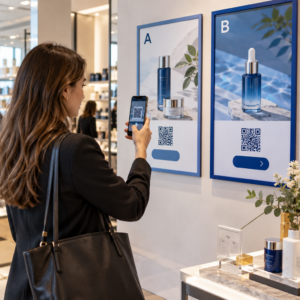
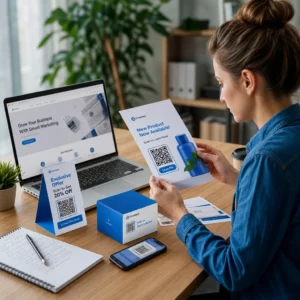
Számlái kifizetetlenül hevernek jóval az esedékesség után? A késedelmes fizetések az egyik leggyakoribb pénzforgalmi probléma, amellyel a vállalkozások szembesülnek – és jelentős mozgatórugója egyszerűen a fizetéssel járó súrlódás. Ez az útmutató megmutatja, hogyan szünteti meg a QR-kód hozzáadása a számláihoz ezt a súrlódást, és juttatja gyorsabban pénzt a számlájára.
Miért jelentenek a késedelmes számlafizetések valós üzleti problémát
A számokat nehéz figyelmen kívül hagyni. Az amerikai kisvállalkozások 56%-a arról számol be, hogy kifizetetlen vagy késedelmes számlákból pénzzel tartoznak nekik, és átlagosan ezek a vállalkozások több mint $17,000 kintlévőséget visznek magukkal. A fizetések jellemzően 8,2 nappal a megbeszélt határidő után érkeznek meg – nem azért, mert az ügyfelek nem szándékoznak fizetni, hanem azért, mert a hagyományos számla-fizetés munkafolyamatok túl sok lépést tartalmaznak.
Az ügyfelek papír vagy PDF számlát kapnak, majd meg kell keresniük a banki adatait, navigálniuk kell egy fizetési portálra, vagy emlékezniük kell egy csekk megírására. Minden további lépés késleltetési lehetőséget rejt magában. Minél egyszerűbbé teszi a fizetést, annál gyorsabban kapja meg a pénzt.
Hogyan működnek a QR-kódok a számlákon
Egy fizetési QR-kód a számlán egy URL-t kódol, amely közvetlenül egy biztonságos fizetési oldalra vezet. Amikor egy ügyfél beolvassa a kódot okostelefonja kamerájával, a fizetési oldal automatikusan megnyílik a böngészőjében. Megerősítik az összeget, kiválasztják a fizetési módjukat – hitelkártya, banki átutalás, digitális pénztárca – és másodpercek alatt befejezik a tranzakciót.
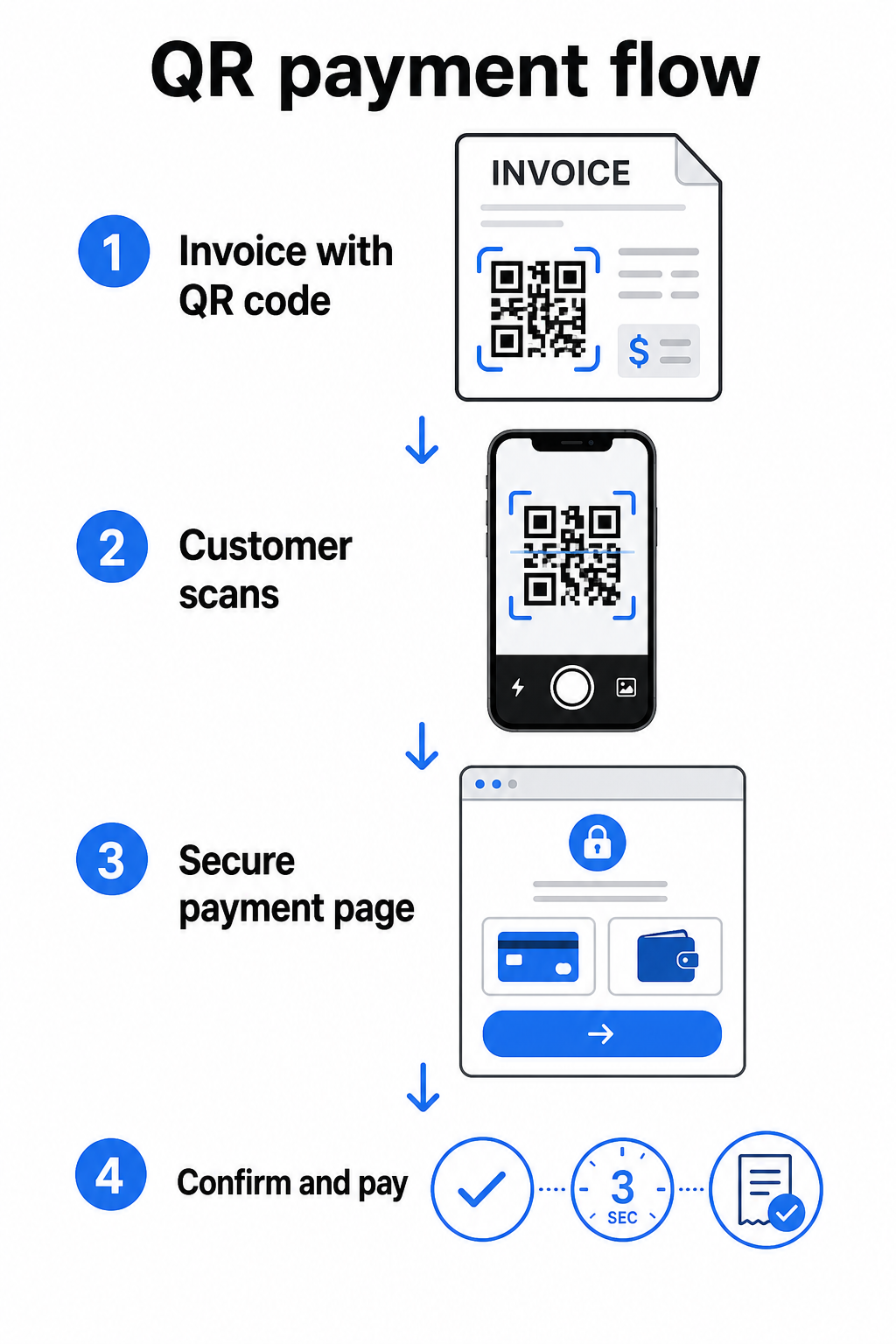
A Federal Reserve FedNow szolgáltatása pontosan ezt a munkafolyamatot írja le: a digitálisan, beágyazott QR-kóddal küldött számlák lehetővé teszik az ügyfelek számára a beolvasást és a fizetés kezdeményezését ahelyett, hogy papírkivonatokra várnának, vagy manuálisan keresnének fizetési portálokat. Az ügyfelek akár egy QR-kódot is beolvashatnak, amely tartalmaz egy Fizetési kérelmet (RfP) azonnali fizetés kezdeményezésére közvetlenül a FedNow-n keresztül.
Az általános folyamat így működik:
- Hozzon létre egy fizetési linket a fizetési szolgáltatóján keresztül (például PayPal, Stripe vagy Square)
- Alakítsa át azt a linket QR-kóddá egy QR-kód generátor segítségével
- Helyezze el a QR-kódot a számláján, PDF-jén vagy számlakivonatán
- Az ügyfél beolvassa, áttekinti az összeget, és fizet – gyakran másodperceken belül
A jelentős amerikai fizetési szolgáltatók, beleértve a PayPal-t, a Stripe-ot és a Square-t, mind támogatják a fizetési linkeket, amelyek QR-kódként megoszthatók, így egyik oldalon sincs szükség speciális hardverre vagy szoftverre.
Készen áll egy fizetési QR-kód létrehozására? Alakítson át bármilyen fizetési linket beolvasható QR-kóddá, amelyet ügyfelei közvetlenül a számlájáról használhatnak. Használja a Pageloot PayPal pénzfogadás QR kóddal vagy az általános QR Kód Generátor percek alatt elkezdheti.
Mire linkelje a számla QR-kódját
Maga a QR-kód csak a kézbesítési mechanizmus. Amit hozzá linkel, az határozza meg, hogy valójában mennyire zökkenőmentes a fizetési élmény.
Egy fizetési oldal vagy fizetési link a legközvetlenebb opció. Hozzon létre egy fizetési linket a szolgáltatója irányítópultjáról – előre kitöltött számlaösszeggel, leírással és üzleti adataival – és alakítsa át QR-kóddá. Az ügyfelek egy fizetésre kész oldalra érkeznek, kézi adatbevitel nélkül. A Pageloot útmutató a fizetési QR-kódokhoz bemutatja, hogyan működik ez olyan szolgáltatókkal, mint a PayPal és a Stripe.
A teljes számla PDF-je hasznos, ha hozzáférést szeretne biztosítani az ügyfeleknek tételes részletekhez, feltételekhez vagy támogató dokumentációhoz a fizetési opció mellett. Egy PDF QR-kód közvetlenül a dokumentumra mutat, így az ügyfelek azonnal megnyithatják vagy letölthetik anélkül, hogy a beérkező leveleik között keresgélnének.
Egy fizetési portál vagy önkiszolgáló oldal jól működik olyan vállalkozások számára, amelyek ismétlődő ügyfelekkel rendelkeznek. Egy link QR-kóddal mutathat egy bejelentkezési oldalra vagy fiók irányítópultra, ahol az ügyfelek egy helyen kezelhetik az összes számlájukat.
A helyes választás a számlázási munkafolyamatától függ, de a legtöbb vállalkozás számára, amely a fizetési napok csökkentésére törekszik, egy közvetlen fizetési link QR-kód biztosítja a legrövidebb utat a számlától a kiegyenlítésig.
Statikus vs. Dinamikus QR-kódok: Melyiket érdemes használni?
Számlákhoz QR-kód generálásakor két lehetősége van: statikus és dinamikus. Számlázási célokra, a dinamikus QR-kódok jelentős gyakorlati előnyöket kínálnak.
| FUNKCIÓ | Statikus QR-kód | Dinamikus QR-kód |
|---|---|---|
| Cél szerkesztése nyomtatás után | Nem | Igen |
| Szkennelési adatok nyomon követése | Nem | Igen |
| Fizetési link frissítése, ha megváltozik | Újranyomtatást igényel | Frissítés az irányítópulton |
| Figyelje, ki nyitotta meg a számlát | Nem | Igen |
| Szükség esetén deaktiválás | Nem | Igen |
Dinamikus QR-kóddal frissítheti a cél URL-t anélkül, hogy új kódot hozna létre vagy újranyomtatná a számlasablont. Ha a fizetési szolgáltatója megváltozik, a számla elrendezése frissül, vagy átirányítani szeretne egy másik fizetési módra egy adott ügyfél számára, a változás azonnal életbe lép – a nyomtatott vagy digitális QR-kód változatlan marad.
A dinamikus kódok emellett biztosítják Önnek szkennelési analitika: időbélyegek, eszköz típusok és földrajzi adatok, amelyek megmondják, hogy egy ügyfél megnyitotta-e és interakcióba lépett-e a számlájával. Ha egy nagy összegű számla nulla beolvasást mutat egy héttel a fizetési határidő előtt, az hasznos korai jelzés a proaktív utánkövetésre.
Hogyan adjunk QR-kódot a számláinkhoz
QR-kód hozzáadása egy meglévő számlázási munkafolyamathoz egyszerű, és nem igényli a számlázási rendszer alapoktól való újraépítését.
lépés: Generálja a fizetési linket. Jelentkezzen be fizetési szolgáltatójához (PayPal, Stripe, Square vagy más amerikai szolgáltató), és hozzon létre egy fizetési linket. Adja meg a számla összegét, cégnevét, valamint egy hivatkozási számot vagy leírást, hogy a fizetés könnyen egyeztethető legyen.
lépés: Alakítsa át a linket QR-kóddá. Illessze be a fizetési URL-t a Pageloot QR Kód Generátor vagy PayPal pénzfogadás QR kóddal. Válasszon dinamikus QR-kódot, ha szerkesztési és nyomon követési funkciókat szeretne.
lépés: Szabja testre a kódot. Adja hozzá logóját, alkalmazza márkaszíneit, és mellékeljen egy rövid cselekvésre ösztönző feliratot, például “Szkenneljen a fizetéshez”. A márkás kódok növelik az ügyfelek bizalmát, és nehezebb hamisítani őket – ez fontos szempont, figyelembe véve a rosszindulatú QR-kódok által a fizetési környezetben jelentett kockázatokat.
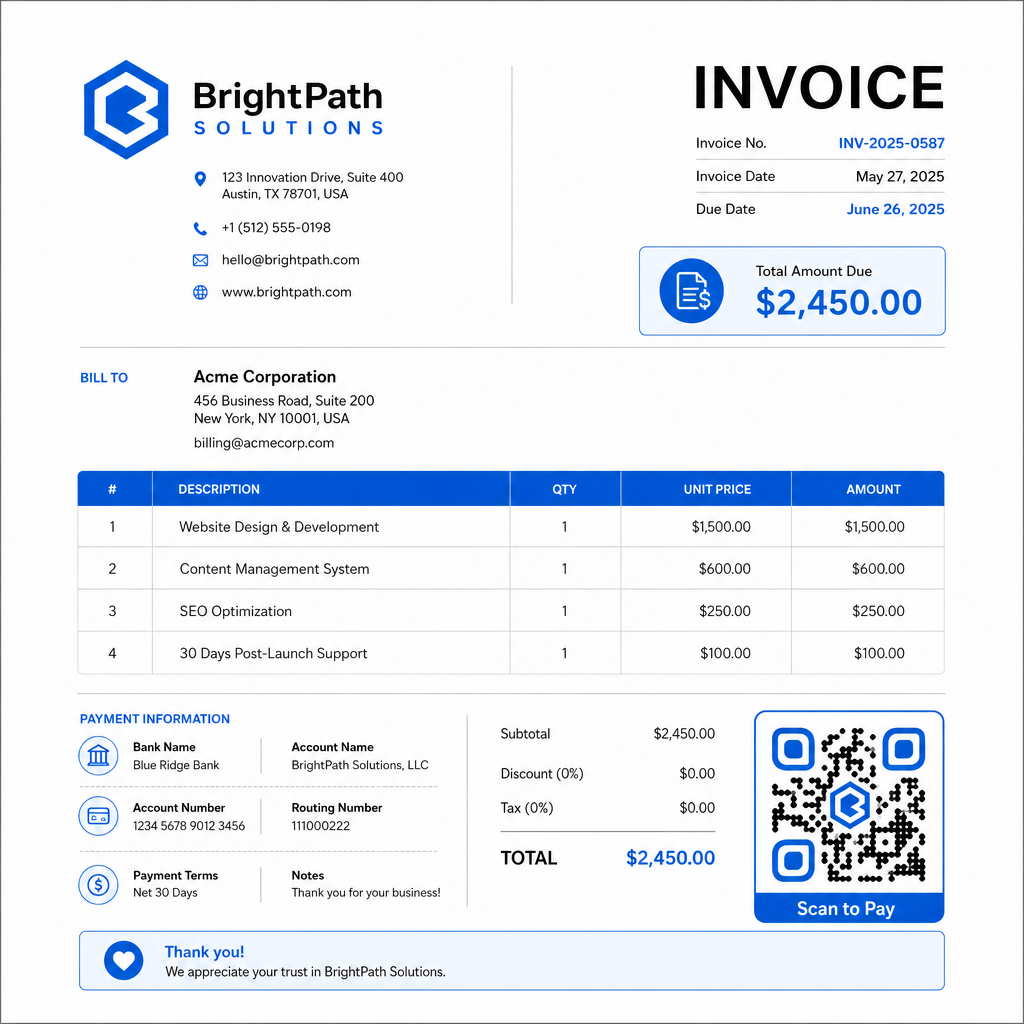
lépés: Töltse le a megfelelő formátumban. Exportálja a QR-kódot SVG vagy EPS fájlként a nyomtatandó számlákhoz, vagy nagy felbontású PNG-ként PDF vagy digitális számlákhoz. A vektoros formátumok megakadályozzák a pixelesedést és megőrzik a szkennelhetőséget bármilyen méretben.
lépés: Helyezze el és tesztelje küldés előtt. Illessze be a QR-kódot a számlasablonjába. Tesztelje legalább két különböző eszközön, és ellenőrizze, hogy a fizetési oldal helyesen töltődik-e be, az összeg pontos-e, és a visszaigazolási folyamat végig működik-e.
Kövesse nyomon a számla interakciókat valós időben Tudja meg, hogy ügyfele beolvasta-e a számláját a fizetési határidő előtt. A Pageloot dinamikus QR-kódjai egyetlen irányítópultról biztosítanak beolvasási számokat, eszközadatokat és időbélyegeket. Hozzon létre egy dinamikus QR-kódot a nyomon követés megkezdéséhez.
QR-kód tervezési szabványok nyomtatott és digitális számlákhoz
Egy megbízhatatlanul nem szkennelhető QR-kód értelmét veszti. Tartsa szem előtt ezeket a szabványokat, amikor kódokat helyez el a számlákon:
- Minimális méret: Nyomtasson QR-kódokat legalább 2×2 cm-es méretben közeli szkenneléshez. Számlák esetén, ahol a kód nyomtatott oldalról szkennelhető, az 1×1 hüvelyk vagy nagyobb méret megbízható alapméret.
- Kontraszt: Használjon sötét mintázatot világos háttéren, legalább 4:1 kontrasztaránnyal. Kerülje a kód elhelyezését színes háttereken, mintás területeken vagy vízjeleken.
- Csendes zóna: Tartson fenn tiszta, üres szegélyt a teljes kód körül. Szöveg, logók vagy design elemek nem hatolhatnak be ebbe a margóba.
- Fájlformátum: Nyomtatáshoz használjon SVG vagy EPS formátumot. Ezek a vektoros formátumok bármilyen felbontásban élesek maradnak, ellentétben a kis eredetiből felnagyított raszteres PNG fájlokkal.
- Arányosság: Soha ne nyújtsa vagy tömörítse a QR-kódot. Méretezze arányosan, hogy megőrizze a négyzet alakját.
- Hibajavítás: Használjon magas hibajavítási szintet (Q vagy H), ha logót helyez el a kódon belül. Tartsa a beágyazott logót középen, és ne fedjen le többet a kód területének 30%-ánál.
- Címke: Helyezzen el egy rövid utasítást a kód közelében, például “Szkennelje be a számla kifizetéséhez.” Ez segít azoknak az ügyfeleknek, akik nem ismerik a folyamatot, és támogatja az akadálymentességet is.
A teljes akadálymentességi útmutatóért – beleértve a méretezési ajánlásokat és a többnyelvű utasítási lehetőségeket – lásd a Pageloot QR-kódos fizetési akadálymentességi legjobb gyakorlatok.
Biztonsági megfontolások a számlafizetési QR-kódokhoz
A számlákon lévő fizetési QR-kódok nagy bizalmi kontextust jelentenek – az ügyfeleket pénz küldésére kérik. Ezért a biztonsági gyakorlatok nem alkuképesek.
Csak HTTPS fizetési linkeket használjon. Minden URL-nek, amelyre a QR-kódja mutat, HTTPS-t kell használnia. Egy nem biztonságos link vörös zászló az ügyfelek számára, és valós kockázatot jelent az elfogott adatokra nézve.
Ellenőrizze a linket a számlák terjesztése előtt. Mielőtt számlaköteget küldene, szkennelje be a kódot saját maga, és győződjön meg róla, hogy a helyes, működő fizetési oldalra vezet. Ez kiszűri az URL-hibákat, és megerősíti, hogy a fizetési folyamat a várt módon működik.
Használjon dinamikus kódokat, hogy reagálni tudjon a problémákra. Ha egy fizetési link kompromittálódott vagy módosításra szorul, egy dinamikus QR-kód lehetővé teszi, hogy azonnal frissítse vagy deaktiválja a célállomást anélkül, hogy újra ki kellene állítania a számlát. A statikus kódok nem módosíthatók, miután kinyomtatták vagy elküldték őket.
Márkázza meg QR-kódjait láthatóan. A logó beillesztése a QR-kódba megnehezíti a csalók számára, hogy hamis kódot helyettesítsenek be, és vizuális jelzést ad az ügyfeleknek arról, hogy valami jogszerűt szkennelnek. Olvasson többet a fizetési biztonság kezeléséről a Pageloot QR-kódos fizetések biztonsági és sebességi útmutatója és a PCI-DSS megfelelőségi útmutató QR-kódos fizetésekhez.
Iparágak, amelyek profitálnak a számla QR-kódokból
A QR kódos fizetési számlák az üzlettípusok széles körében alkalmazhatók. Néhány gyakori felhasználási eset illusztrálja, hol van a legtisztább hatása ennek a megközelítésnek:
- Szabadúszók és szolgáltatók – Egy QR kód egy PDF számlán lehetővé teszi az ügyfeleknek, hogy telefonjukról fizessenek abban a pillanatban, amikor megnyitják a dokumentumot, ahelyett, hogy napokkal később bejelentkeznének egy portálra.
- Helyszíni szolgáltató és kézbesítő vállalkozások – Technikusok vagy sofőrök bemutathatnak egy számlát QR kóddal a szolgáltatás helyszínén, lehetővé téve az azonnali fizetést, mielőtt elmennek.
- Ügyvédi irodák és professzionális szolgáltatások – Beágyazott QR kódokkal ellátott havi számlakivonatok csökkentik a fizetési utasítások oda-vissza küldözgetését, és megkönnyítik az ügyfelek számára az azonnali fizetést.
- Egészségügyi praxisok – QR kóddal ellátott betegszámlák lehetővé teszik a betegeknek, hogy otthonról fizessenek a találkozójuk után, csökkentve a recepciós fizetéskezelést.
- Építőipar és szerződéses munkák – QR kódokkal ellátott részszámlák világos, súrlódásmentes fizetési utat biztosítanak az ügyfeleknek, minden mérföldkőhöz kötve.
A Pageloot ipari megoldások oldal további ágazatspecifikus alkalmazásokat fed le a QR kódok számára az üzleti munkafolyamatokban.
A késedelmes fizetések időt, pénzforgalmat és adminisztratív erőfeszítést jelentenek a vállalkozásoknak. QR kód hozzáadása a számláihoz az egyik legközvetlenebb lépés, amit tehet a számla elküldése és a fizetés beérkezése közötti időszak lerövidítésére. Minél kevesebb lépést kell az ügyfélnek elvégeznie, annál valószínűbb, hogy azonnal fizet. Állítsa be első fizetési QR kódját a Pageloot QR Kód Generátor vagy a dedikált PayPal pénzfogadás QR kóddal, és kezdje el nyomon követni az eredményeket az első számlájától.
Gyakori kérdések
Ez a fizetési beállításaitól függ. Ha egyetlen fizetési oldalt használ, ahol az ügyfelek manuálisan írják be az összeget, egy QR kód minden számlán működhet. Ha előre ki szeretné tölteni az egyes számlákhoz tartozó összegeket, egyedi fizetési linkekre lesz szüksége – és így egyedi QR kódokra számlánként. A dinamikus QR kódok lehetővé teszik a cél frissítését, ha a fizetési linkje megváltozik, anélkül, hogy újra generálná vagy kinyomtatná a kódot.
Mindig mellékeljen egy tartalék opciót a QR kód mellé – egy egyszerű szöveges fizetési URL-t, banki átutalási adatait, vagy egy telefonszámot számlázási kérdésekhez. Nem minden ügyfélnek lesz okostelefonja, vagy nem érzi magát kényelmesen a QR kódok használatával, és az alternatív fizetési lehetőségek fenntartása biztosítja, hogy egyetlen számla se maradjon kifizetetlen technikai akadály miatt. A Pageloot QR kódos fizetési akadálymentesítési legjobb gyakorlatai részletesen tárgyalják a további alternatívákat.
Igen, feltéve, ha követi a biztonsági bevált gyakorlatokat. Használjon HTTPS fizetési linkeket, márkázza QR-kódjait a logójával, így az ügyfelek vizuálisan ellenőrizhetik a forrást, és használjon dinamikus QR-kódokat, így azonnal deaktiválhat vagy frissíthet egy kódot, ha valami rosszul sül el. Kerülje a statikus QR-kódokat fizetési célokra, mivel ezek nem módosíthatók, ha a hivatkozott oldal kompromittálódik. Mindig tesztelje a teljes fizetési folyamatot a számlák kiküldése előtt, és utasítsa az ügyfeleket, hogy ellenőrizzék a beolvasás után megjelenő URL-t, mielőtt bármilyen fizetési adatot megadnak.