Hóa đơn của bạn có đang bị bỏ quên chưa thanh toán rất lâu sau ngày đáo hạn không? Thanh toán trễ hạn là một trong những vấn đề dòng tiền phổ biến nhất mà các doanh nghiệp phải đối mặt – và một yếu tố thúc đẩy đáng kể chỉ đơn giản là sự phức tạp liên quan đến việc thanh toán. Hướng dẫn này chỉ cho bạn cách thêm mã QR vào hóa đơn của bạn sẽ loại bỏ sự phức tạp đó và đưa tiền vào tài khoản của bạn nhanh hơn.
Tại Sao Thanh Toán Hóa Đơn Trễ Hạn Là Một Vấn Đề Kinh Doanh Thực Sự
Những con số thật khó bỏ qua. 56% các doanh nghiệp nhỏ của Hoa Kỳ báo cáo bị nợ tiền từ các hóa đơn chưa thanh toán hoặc trễ hạn, và trung bình các doanh nghiệp đó đang mang hơn $17.000 đô la các khoản phải thu chưa thanh toán mỗi doanh nghiệp. Thanh toán thường đến 8,2 ngày sau thời hạn đã thỏa thuận – không phải vì khách hàng không có ý định thanh toán, mà vì quy trình làm việc từ hóa đơn đến thanh toán truyền thống có quá nhiều bước.
Khách hàng nhận được hóa đơn giấy hoặc PDF, sau đó phải tìm thông tin ngân hàng của bạn, điều hướng đến cổng thanh toán, hoặc nhớ viết séc. Mỗi bước bổ sung là một cơ hội để trì hoãn. Bạn càng làm cho việc thanh toán đơn giản, bạn càng được thanh toán nhanh hơn.
Cách Mã QR Trên Hóa Đơn Hoạt Động
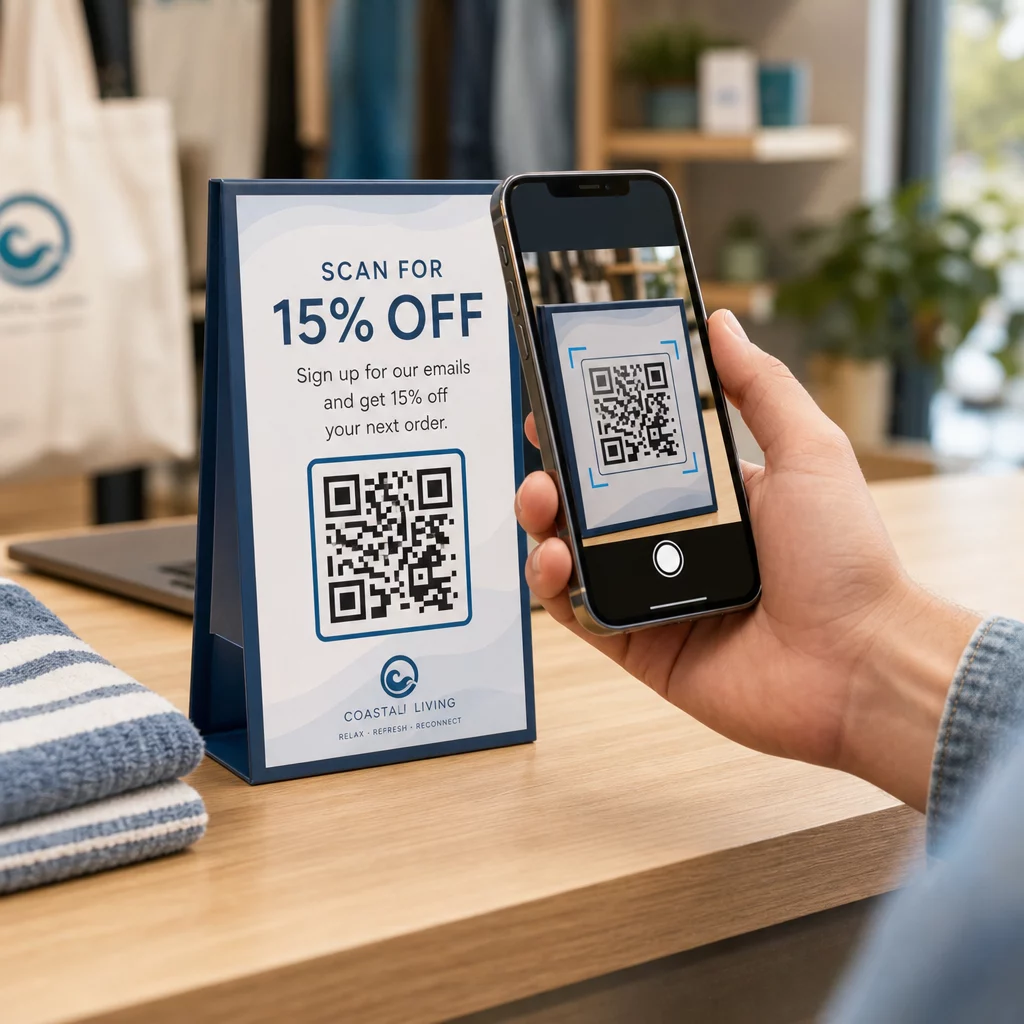
Một mã QR thanh toán trên hóa đơn mã hóa một URL dẫn trực tiếp đến một trang thanh toán an toàn. Khi khách hàng quét mã bằng camera điện thoại thông minh của họ, trang thanh toán tự động mở trong trình duyệt của họ. Họ xác nhận số tiền, chọn phương thức thanh toán của họ – thẻ tín dụng, chuyển khoản ngân hàng, ví điện tử – và hoàn tất giao dịch trong vài giây.
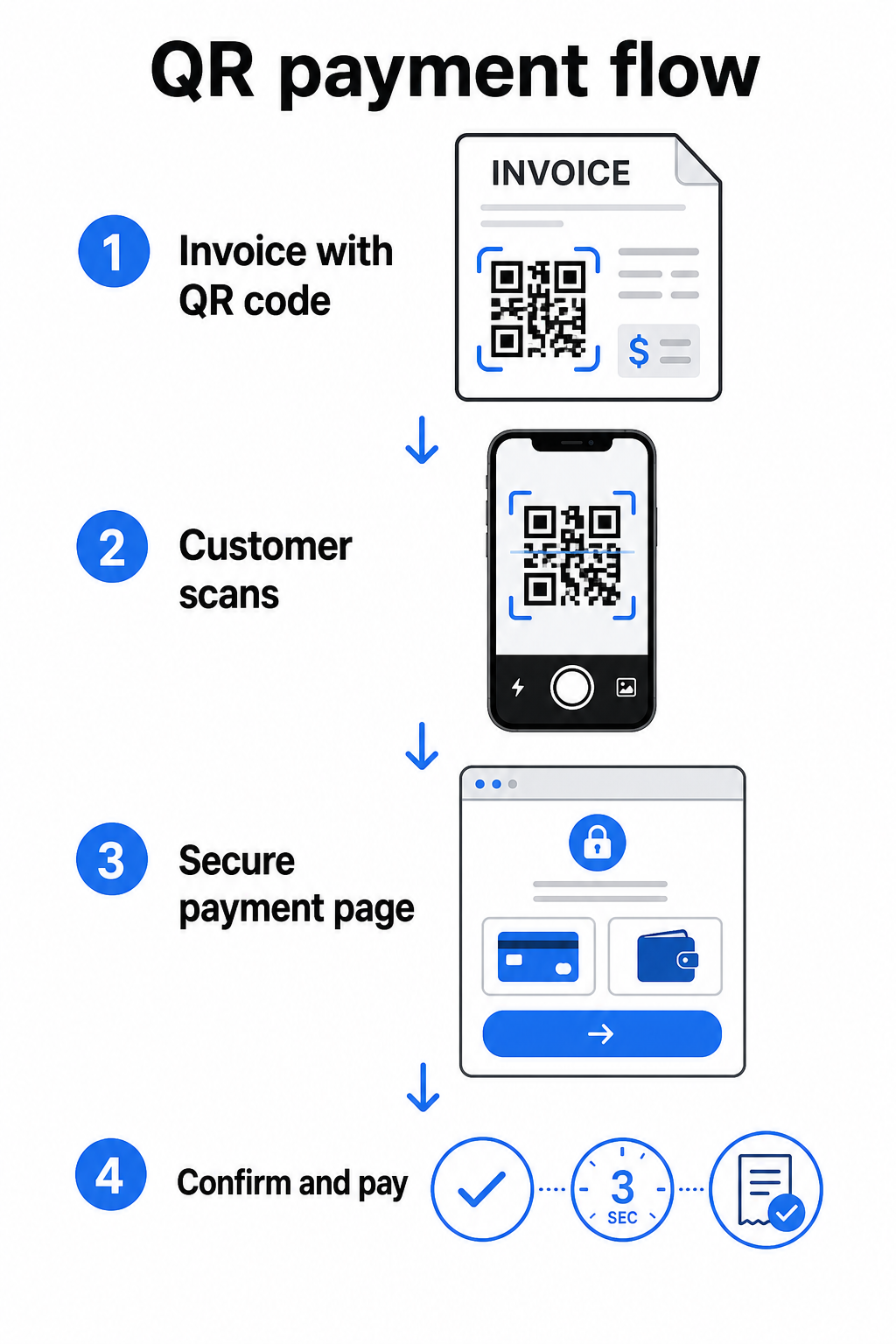
Dịch vụ FedNow của Cục Dự trữ Liên bang mô tả quy trình làm việc chính xác này: hóa đơn được gửi kỹ thuật số với một mã QR được nhúng cho phép khách hàng quét và bắt đầu thanh toán thay vì chờ đợi sao kê giấy hoặc tìm kiếm thủ công các cổng thanh toán. Khách hàng thậm chí có thể quét mã QR chứa một Yêu cầu thanh toán (RfP) để bắt đầu thanh toán tức thì trực tiếp qua FedNow.
Quy trình chung hoạt động như sau:
- Tạo một liên kết thanh toán thông qua nhà cung cấp dịch vụ thanh toán của bạn (chẳng hạn như PayPal, Stripe hoặc Square)
- Chuyển đổi liên kết đó thành mã QR bằng cách sử dụng trình tạo mã QR
- Đặt mã QR trên hóa đơn, PDF hoặc sao kê thanh toán của bạn
- Khách hàng quét, xem lại số tiền và thanh toán – thường trong vài giây
Các nhà cung cấp dịch vụ thanh toán lớn của Hoa Kỳ bao gồm PayPal, Stripe và Square đều hỗ trợ các liên kết thanh toán có thể được chia sẻ dưới dạng mã QR, vì vậy không cần phần cứng hoặc phần mềm đặc biệt ở cả hai đầu.
Sẵn sàng tạo mã QR thanh toán? Biến bất kỳ liên kết thanh toán nào thành mã QR có thể quét được mà khách hàng của bạn có thể sử dụng trực tiếp từ hóa đơn của bạn. Sử dụng của Pageloot Mã QR PayPal hoặc cái chung Trình tạo mã QR để bắt đầu trong vài phút.
Liên kết mã QR hóa đơn của bạn đến đâu
Bản thân mã QR chỉ là cơ chế phân phối. Bạn liên kết nó đến đâu sẽ xác định trải nghiệm thanh toán thực sự mượt mà đến mức nào.
Một trang thanh toán hoặc liên kết thanh toán là lựa chọn trực tiếp nhất. Tạo một liên kết thanh toán từ bảng điều khiển của nhà cung cấp của bạn – với số tiền hóa đơn, mô tả và thông tin doanh nghiệp của bạn được điền sẵn – và chuyển đổi nó thành mã QR. Khách hàng đến một trang sẵn sàng thanh toán mà không yêu cầu nhập dữ liệu thủ công. Hướng dẫn của Pageloot hướng dẫn về mã QR thanh toán giải thích cách hoạt động này với các nhà cung cấp như PayPal và Stripe.
Một PDF của hóa đơn đầy đủ hữu ích khi bạn muốn cung cấp cho khách hàng quyền truy cập vào chi tiết từng mục, điều khoản hoặc tài liệu hỗ trợ cùng với tùy chọn thanh toán. Một Mã QR PDF liên kết trực tiếp đến tài liệu để khách hàng có thể mở hoặc tải xuống ngay lập tức mà không cần tìm kiếm trong hộp thư đến của họ.
Một cổng thanh toán hoặc trang tự phục vụ hoạt động tốt cho các doanh nghiệp có khách hàng thường xuyên. Một mã QR link có thể trỏ đến một trang đăng nhập hoặc bảng điều khiển tài khoản nơi khách hàng quản lý tất cả các hóa đơn của họ ở một nơi.
Lựa chọn đúng đắn phụ thuộc vào quy trình thanh toán của bạn, nhưng đối với hầu hết các doanh nghiệp đang cố gắng giảm số ngày thanh toán, một mã QR liên kết thanh toán trực tiếp tạo ra con đường ngắn nhất từ hóa đơn đến thanh toán.
Mã QR tĩnh so với mã QR động: Bạn nên sử dụng loại nào?
Khi tạo mã QR cho hóa đơn, bạn có hai lựa chọn: tĩnh và động. Đối với mục đích lập hóa đơn, mã QR động mang lại những lợi thế thực tế đáng kể.
| TÍNH NĂNG | Mã QR tĩnh | Mã QR động |
|---|---|---|
| Chỉnh sửa đích sau khi in | KHÔNG | Đúng |
| Theo dõi dữ liệu quét | KHÔNG | Đúng |
| Cập nhật liên kết thanh toán nếu nó thay đổi | Yêu cầu in lại | Cập nhật trong bảng điều khiển |
| Giám sát ai đã mở hóa đơn | KHÔNG | Đúng |
| Hủy kích hoạt nếu cần | KHÔNG | Đúng |
Với mã QR động, bạn có thể cập nhật URL đích mà không cần tạo mã mới hoặc in lại mẫu hóa đơn của bạn. Nếu nhà cung cấp dịch vụ thanh toán của bạn thay đổi, bố cục hóa đơn của bạn cập nhật, hoặc bạn muốn chuyển hướng đến một phương thức thanh toán khác cho một khách hàng cụ thể, thay đổi có hiệu lực ngay lập tức – mã QR đã in hoặc kỹ thuật số vẫn giữ nguyên.
Mã động cũng cung cấp cho bạn phân tích quét: dấu thời gian, loại thiết bị và dữ liệu địa lý cho bạn biết liệu khách hàng đã mở và tương tác với hóa đơn của họ hay chưa. Nếu một hóa đơn lớn không có lượt quét nào một tuần trước ngày đáo hạn, đó là một tín hiệu sớm hữu ích để chủ động theo dõi.
Cách thêm mã QR vào hóa đơn của bạn
Thêm mã QR vào quy trình làm việc hóa đơn hiện có rất đơn giản và không yêu cầu xây dựng lại hệ thống thanh toán của bạn từ đầu.
Bước 1: Tạo liên kết thanh toán của bạn. Đăng nhập vào nhà cung cấp thanh toán của bạn (PayPal, Stripe, Square, hoặc một nhà cung cấp khác của Hoa Kỳ) và tạo một liên kết thanh toán. Bao gồm số tiền hóa đơn, tên doanh nghiệp của bạn và số tham chiếu hoặc mô tả để việc thanh toán dễ dàng đối chiếu.
Bước 2: Chuyển đổi liên kết thành mã QR. Dán URL thanh toán vào Pageloot’s Trình tạo mã QR hoặc là Mã QR PayPal. Chọn một mã QR động nếu bạn muốn có khả năng chỉnh sửa và theo dõi.
Bước 3: Tùy chỉnh mã. Thêm logo của bạn, áp dụng màu sắc thương hiệu của bạn và bao gồm một nhãn kêu gọi hành động ngắn gọn như “Quét để thanh toán.” Mã có thương hiệu xây dựng lòng tin của khách hàng và khó giả mạo hơn – một yếu tố quan trọng cần xem xét do rủi ro mà các mã QR độc hại gây ra trong bối cảnh thanh toán.
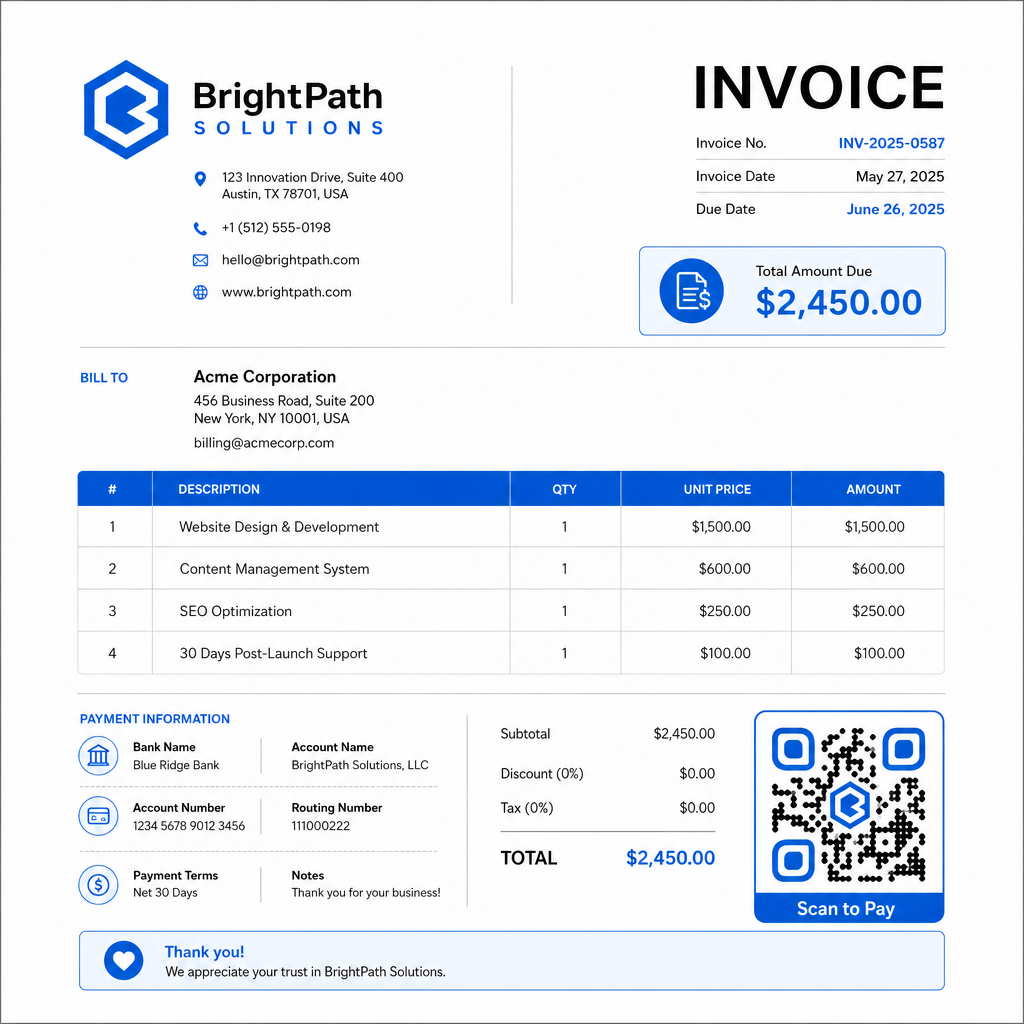
Bước 4: Tải xuống ở định dạng phù hợp. Xuất mã QR dưới dạng tệp SVG hoặc EPS cho các hóa đơn sẽ được in, hoặc dưới dạng PNG độ phân giải cao cho hóa đơn PDF hoặc kỹ thuật số. Định dạng vector ngăn ngừa hiện tượng vỡ pixel và duy trì khả năng quét ở mọi kích thước.
Bước 5: Đặt và kiểm tra trước khi gửi. Chèn mã QR vào mẫu hóa đơn của bạn. Kiểm tra nó trên ít nhất hai thiết bị khác nhau và xác nhận trang thanh toán tải đúng cách, số tiền chính xác và quy trình xác nhận hoạt động từ đầu đến cuối.
Theo dõi mức độ tương tác của hóa đơn trong thời gian thực Biết liệu khách hàng của bạn đã quét hóa đơn của bạn trước ngày đáo hạn hay chưa. Mã QR động của Pageloot cung cấp cho bạn số lượt quét, dữ liệu thiết bị và dấu thời gian từ một bảng điều khiển duy nhất. Tạo mã QR động để bắt đầu theo dõi.
Tiêu chuẩn thiết kế mã QR cho hóa đơn in và kỹ thuật số
Một mã QR không quét được đáng tin cậy sẽ làm mất đi mục đích. Hãy ghi nhớ các tiêu chuẩn này khi đặt mã trên hóa đơn:
- Kích thước tối thiểu: In mã QR có kích thước ít nhất 2×2 cm để quét ở cự ly gần. Đối với các hóa đơn mà mã có thể được quét từ một trang in, 1×1 inch hoặc lớn hơn là một tiêu chuẩn đáng tin cậy.
- Độ tương phản: Sử dụng các mẫu tối trên nền sáng với tỷ lệ tương phản ít nhất 4:1. Tránh đặt mã trên nền màu, khu vực có hoa văn hoặc hình mờ.
- Vùng yên tĩnh: Duy trì một đường viền trống rõ ràng xung quanh toàn bộ mã. Không có văn bản, logo hoặc yếu tố thiết kế nào được xâm phạm vào lề này.
- Định dạng tệp: Sử dụng SVG hoặc EPS để in. Các định dạng vector này giữ được độ sắc nét ở mọi độ phân giải, không giống như các tệp PNG được raster hóa được phóng to từ một bản gốc nhỏ.
- Tỷ lệ: Không bao giờ kéo giãn hoặc nén mã QR. Thu phóng nó theo tỷ lệ để giữ nguyên hình vuông.
- Sửa lỗi: Sử dụng mức độ sửa lỗi cao (Q hoặc H) nếu bạn đang thêm logo vào bên trong mã. Giữ bất kỳ logo nhúng nào ở giữa và không che quá 30% diện tích mã.
- Nhãn: Bao gồm một hướng dẫn ngắn gọn gần mã, như “Quét để thanh toán hóa đơn của bạn.” Điều này giúp những khách hàng không quen thuộc với quy trình và cũng hỗ trợ khả năng tiếp cận.
Để có hướng dẫn đầy đủ về khả năng tiếp cận – bao gồm các khuyến nghị về kích thước và tùy chọn hướng dẫn đa ngôn ngữ – xem của Pageloot các phương pháp hay nhất về khả năng tiếp cận thanh toán bằng mã QR.
Các cân nhắc về bảo mật đối với mã QR thanh toán hóa đơn
Mã QR thanh toán trên hóa đơn là một bối cảnh có độ tin cậy cao – khách hàng được yêu cầu gửi tiền. Điều đó làm cho các thực hành bảo mật không thể thương lượng.
Chỉ sử dụng liên kết thanh toán HTTPS. Mọi URL mà mã QR của bạn trỏ đến đều phải sử dụng HTTPS. Một liên kết không an toàn là một dấu hiệu đáng báo động đối với khách hàng và một rủi ro thực sự đối với dữ liệu bị chặn.
Xác minh liên kết trước khi phân phối hóa đơn. Trước khi gửi một loạt hóa đơn, hãy tự quét mã và xác nhận rằng nó dẫn đến trang thanh toán chính xác, hoạt động. Điều này giúp phát hiện lỗi trong URL và xác nhận quy trình thanh toán hoạt động như mong đợi.
Sử dụng mã động để bạn có thể phản ứng với các vấn đề. Nếu một liên kết thanh toán bị xâm phạm hoặc cần thay đổi, một mã QR động cho phép bạn cập nhật hoặc hủy kích hoạt đích ngay lập tức mà không cần phát hành lại hóa đơn. Mã tĩnh không thể thay đổi sau khi đã in hoặc gửi.
Gắn thương hiệu cho mã QR của bạn một cách rõ ràng. Bao gồm logo của bạn trong mã QR làm cho những kẻ lừa đảo khó thay thế một mã giả hơn, và cung cấp cho khách hàng một tín hiệu trực quan rằng họ đang quét một thứ hợp pháp. Đọc thêm về quản lý bảo mật thanh toán trong của Pageloot hướng dẫn bảo mật và tốc độ thanh toán bằng mã QR và hướng dẫn tuân thủ PCI-DSS cho thanh toán bằng mã QR.
Các ngành được hưởng lợi từ mã QR hóa đơn
Hóa đơn thanh toán mã QR áp dụng cho nhiều loại hình doanh nghiệp. Một vài trường hợp sử dụng phổ biến minh họa nơi cách tiếp cận này có tác động rõ ràng nhất:
- Người làm nghề tự do và nhà cung cấp dịch vụ – Một mã QR trên hóa đơn PDF cho phép khách hàng thanh toán từ điện thoại của họ ngay khi họ mở tài liệu, thay vì đăng nhập vào một cổng thông tin vài ngày sau đó.
- Doanh nghiệp dịch vụ tại chỗ và giao hàng – Kỹ thuật viên hoặc tài xế có thể xuất trình hóa đơn có mã QR tại điểm dịch vụ, cho phép thanh toán ngay tại chỗ trước khi họ rời đi.
- Công ty luật và dịch vụ chuyên nghiệp – Bảng sao kê thanh toán hàng tháng có mã QR nhúng giảm bớt sự qua lại của hướng dẫn thanh toán và giúp khách hàng dễ dàng thanh toán ngay lập tức.
- Phòng khám y tế – Bảng sao kê thanh toán của bệnh nhân có mã QR cho phép bệnh nhân thanh toán tại nhà sau cuộc hẹn của họ, giảm việc xử lý thanh toán tại quầy lễ tân.
- Xây dựng và hợp đồng – Hóa đơn thanh toán theo tiến độ có mã QR cung cấp cho khách hàng một lộ trình thanh toán rõ ràng, không ma sát gắn liền với từng cột mốc.
Của Pageloot trang giải pháp ngành bao gồm các ứng dụng bổ sung dành riêng cho từng ngành cho mã QR trong quy trình làm việc của doanh nghiệp.
Thanh toán trễ hạn khiến doanh nghiệp tốn thời gian, dòng tiền và công sức quản lý. Thêm mã QR vào hóa đơn của bạn là một trong những bước trực tiếp nhất bạn có thể thực hiện để rút ngắn khoảng cách giữa việc gửi hóa đơn và nhận thanh toán. Khách hàng càng phải hoàn thành ít bước, họ càng có nhiều khả năng thanh toán kịp thời. Thiết lập mã QR thanh toán đầu tiên của bạn với Pageloot’s Trình tạo mã QR hoặc chuyên dụng Mã QR PayPal, và bắt đầu theo dõi kết quả từ hóa đơn đầu tiên của bạn.
Câu hỏi thường gặp
Điều đó phụ thuộc vào thiết lập thanh toán của bạn. Nếu bạn sử dụng một trang thanh toán duy nhất nơi khách hàng nhập số tiền thủ công, một mã QR có thể hoạt động trên tất cả các hóa đơn. Nếu bạn muốn điền trước các số tiền cụ thể cho mỗi hóa đơn, bạn sẽ cần các liên kết thanh toán riêng – và do đó là các mã QR riêng cho mỗi hóa đơn. Mã QR động cho phép bạn cập nhật đích đến nếu liên kết thanh toán của bạn thay đổi, mà không cần tạo lại hoặc in lại mã.
Luôn bao gồm một tùy chọn dự phòng bên cạnh mã QR – một URL thanh toán văn bản thuần túy, chi tiết chuyển khoản ngân hàng của bạn, hoặc số điện thoại cho các yêu cầu thanh toán. Không phải mọi khách hàng đều có điện thoại thông minh hoặc cảm thấy thoải mái khi sử dụng mã QR, và việc duy trì các tùy chọn thanh toán thay thế đảm bảo không có hóa đơn nào không được thanh toán do rào cản kỹ thuật. Các phương pháp hay nhất về khả năng tiếp cận thanh toán mã QR của Pageloot bao gồm các lựa chọn thay thế bổ sung một cách chi tiết.
Có, miễn là bạn tuân thủ các biện pháp bảo mật tốt nhất. Sử dụng các liên kết thanh toán HTTPS, gắn thương hiệu mã QR của bạn bằng logo của bạn để khách hàng có thể xác minh trực quan nguồn gốc, và sử dụng mã QR động để bạn có thể hủy kích hoạt hoặc cập nhật một mã ngay lập tức nếu có sự cố xảy ra. Tránh sử dụng mã QR tĩnh cho mục đích thanh toán, vì chúng không thể thay đổi nếu trang được liên kết bị xâm phạm. Luôn kiểm tra toàn bộ quy trình thanh toán trước khi gửi hóa đơn, và hướng dẫn khách hàng kiểm tra URL xuất hiện sau khi quét trước khi nhập bất kỳ chi tiết thanh toán nào.