Bạn đang gặp khó khăn trong việc chứng minh chiến dịch in ấn hoặc trưng bày tại cửa hàng nào thực sự thúc đẩy doanh số? Việc đầu tư ngân sách vào các kênh ngoại tuyến mà không có sự phân bổ rõ ràng khiến việc biện minh chi phí hoặc tối ưu hóa chiến lược trở nên bất khả thi. Bằng cách kết hợp mã QR có thể theo dõi với thông số UTM và phân tích web, bạn có thể kết nối trực tiếp các điểm chạm vật lý với chuyển đổi kỹ thuật số và đo lường chính xác lợi tức đầu tư của mình.
Tại sao các chiến dịch ngoại tuyến cần phân bổ động
Tài liệu in ấn, thư trực tiếp và bảng hiệu vật lý là những công cụ tiếp thị thiết yếu, nhưng việc đo lường hiệu quả tài chính của chúng trong lịch sử lại là một thách thức. Khi ai đó nhìn thấy một màn hình trưng bày tại cửa hàng hoặc nhận được một tấm bưu thiếp và sau đó truy cập trang web của bạn, phân tích web tiêu chuẩn sẽ phân loại khách truy cập đó là lưu lượng truy cập trực tiếp hoặc tìm kiếm tự nhiên. Do đó, điểm chạm vật lý không nhận được bất kỳ tín dụng nào cho doanh số bán hàng đó.
Mã QR có thể theo dõi thu hẹp khoảng cách này bằng cách chuyển đổi các điểm chạm vật lý thành các điểm vào kỹ thuật số có thể đo lường được. Khi khách hàng quét mã trên tài liệu in, nền tảng phân tích của bạn sẽ ghi lại sự kiện quét và theo dõi hành trình của người dùng đó thông qua các biểu mẫu khách hàng tiềm năng, đăng ký hoặc mua hàng thương mại điện tử.
Để nắm bắt dữ liệu phân bổ chính xác, bạn phải hiểu sự khác biệt chính trong hoạt động giữa mã tĩnh và mã động:
- Mã QR tĩnh mã hóa trực tiếp một URL đích cố định vào mẫu pixel. Chúng không cung cấp khả năng theo dõi và không thể cập nhật sau khi in.
- Mã QR động chuyển hướng người quét qua một liên kết ngắn linh hoạt đến trang đích cuối cùng của bạn. Chúng ghi lại dữ liệu quét trong thời gian thực – bao gồm thời gian quét, vị trí và loại thiết bị – và cho phép bạn cập nhật các liên kết đích bất cứ lúc nào mà không cần in lại. Việc dựa vào mã QR động cho tiếp thị cung cấp nền tảng cần thiết để đo lường chiến dịch đầy đủ.
Xây dựng thông số UTM tùy chỉnh cho các điểm chạm vật lý
Các thông số UTM (Urchin Tracking Module) là các thẻ văn bản được tiêu chuẩn hóa, được thêm vào cuối URL đích. Khi camera điện thoại thông minh quét mã chứa các thẻ này, các công cụ phân tích web như Google Analytics 4 (GA4) sẽ đọc các thông số và gán phiên người dùng cho nguồn ngoại tuyến cụ thể đó. Nếu không có thẻ UTM, các nền tảng phân tích sẽ nhóm lưu lượng truy cập mã QR vào lưu lượng trực tiếp chung, khiến người quản lý chiến dịch không thể biết được tờ rơi, áp phích hay quảng cáo in ấn nào đã thúc đẩy lượt truy cập.
Cấu trúc liên kết theo dõi của bạn
Một liên kết theo dõi ngoại tuyến mạnh mẽ dựa vào các trường thông số cụ thể:
| Tham số | Mục đích | Định dạng ngoại tuyến được đề xuất | Giá trị Ví dụ |
|---|---|---|---|
| “utm_source” | Xác định kênh vật lý hoặc địa điểm | Ấn phẩm in cụ thể hoặc địa điểm trưng bày | “directmailpostcard” |
| “utm_medium” | Xác định phương tiện tiếp thị tổng thể | Thẻ kênh được tiêu chuẩn hóa như “qr” hoặc “offline” | “qr” |
| “utm_campaign” | Xác định chương trình khuyến mãi hoặc ưu đãi cụ thể | Tên chương trình khuyến mãi và năm | “springsale2025″ |
| “utm_content” | Phân biệt các biến thể thiết kế hoặc vị trí | Chi tiết vị trí hoặc biến thể sáng tạo | “fronttrangqr” |
| “utm_term” | Theo dõi các phân khúc đối tượng mục tiêu | Phân khúc nhân khẩu học hoặc mã danh sách gửi thư | “existing_customers” |
Chuẩn hóa quy ước đặt tên
Để giữ cho phân tích web của bạn gọn gàng và ngăn chặn báo cáo bị phân mảnh, hãy tuân thủ các quy tắc định dạng tiêu chuẩn:
- Luôn sử dụng chữ cái viết thường: Các công cụ phân tích xử lý các thẻ viết hoa và viết thường một cách riêng biệt, tạo ra các mục kênh trùng lặp cho “QR” và “qr”.
- Phân tách các từ bằng dấu gạch dưới: Avoid spaces, which create percent-encoding symbols (“%20”) that clutter tracking URLs.
- Duy trì thẻ phương tiện thống nhất: Áp dụng một giá trị phương tiện duy nhất trên tất cả các tài liệu in để tất cả lưu lượng quét được hợp nhất dưới một nhóm kênh trong chế độ xem báo cáo.
Để có thêm hướng dẫn về cách cấu trúc các URL theo dõi cho các nền tảng phân tích web, hãy xem xét các mẹo chi tiết này về cách sử dụng các thông số UTM cho mã QR.
Chuyển đổi URL theo dõi thành mã QR động
Khi bạn đã xây dựng một URL được gắn thẻ, hãy chuyển đổi nó thành một mã có thể quét được. Sử dụng một công cụ chuyên biệt trình tạo mã QR liên kết hoặc một nền tảng toàn diện Tạo mã QR động, nhập URL được gắn thẻ đầy đủ của bạn (ví dụ: “https://yourwebsite.com/promo?utmsource=springflyer&utmmedium=qr&utmcampaign=retail_expansion”).
Các phương pháp hay nhất để triển khai bản in
Để duy trì khả năng quét cao và đảm bảo thu thập dữ liệu đáng tin cậy trên các phương tiện vật lý:
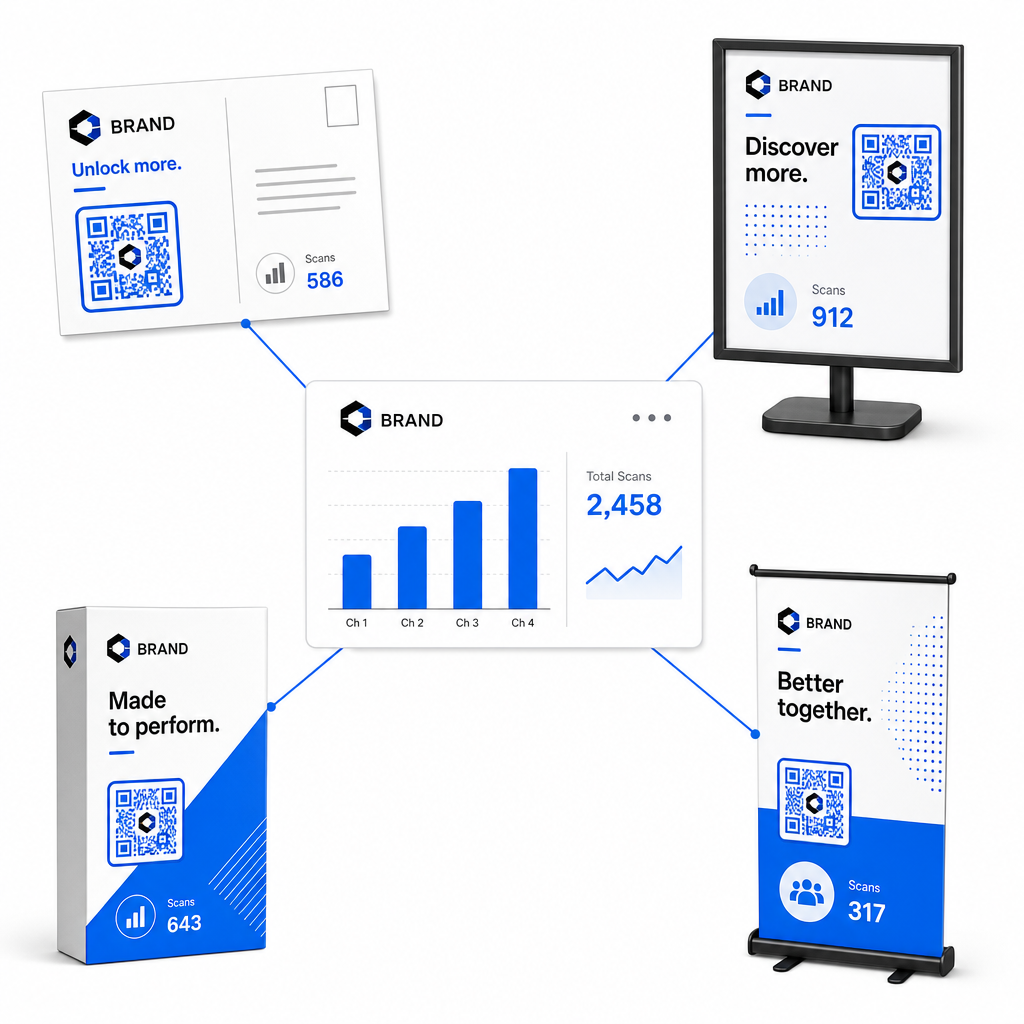
- Chỉ định mã duy nhất cho mỗi vị trí vật lý: Tạo các mã QR động riêng biệt với các giá trị “utm” độc đáosource” hoặc “utmcontent” cho mỗi vị trí vật lý. Việc sử dụng các mã riêng biệt cho áp phích cửa hàng và tờ rơi tại quầy giúp bạn so sánh trực tiếp hiệu suất của từng vị trí.
- Duy trì độ tương phản hình ảnh mạnh mẽ: Đặt các mô-đun mã QR tối trên nền sáng đơn giản. Độ tương phản cao giúp camera điện thoại nhận diện và giải mã các mẫu pixel ngay lập tức.
- Áp dụng các hướng dẫn về kích thước in phù hợp: Các tài liệu in được quét ở khoảng cách ngang tầm tay, chẳng hạn như quảng cáo Tờ rơi hoặc thư trực tiếp bưu thiếp, yêu cầu kích thước tối thiểu là 0.8 × 0.8 inch (2 × 2 cm). Đối với biển hiệu lớn hơn, hãy duy trì tỷ lệ 10:1 giữa khoảng cách quét và chiều rộng mã.
- Xuất thiết kế ở định dạng tệp vector: Luôn tải xuống đồ họa mã QR cuối cùng ở định dạng vector (.SVG hoặc .PDF) thay vì hình ảnh raster như JPEG để ngăn chặn hiện tượng vỡ ảnh trong quá trình in chuyên nghiệp.
Bắt đầu theo dõi các chiến dịch in ấn của bạn Ngừng đoán kênh ngoại tuyến nào chuyển đổi. Hãy sử dụng [công cụ/tính năng] của Pageloot Tạo mã QR động để tạo mã QR có thể theo dõi, cung cấp phân tích quét tức thì và báo cáo ROI liền mạch.
Giám sát lượt quét và phân tích dữ liệu chuyển đổi
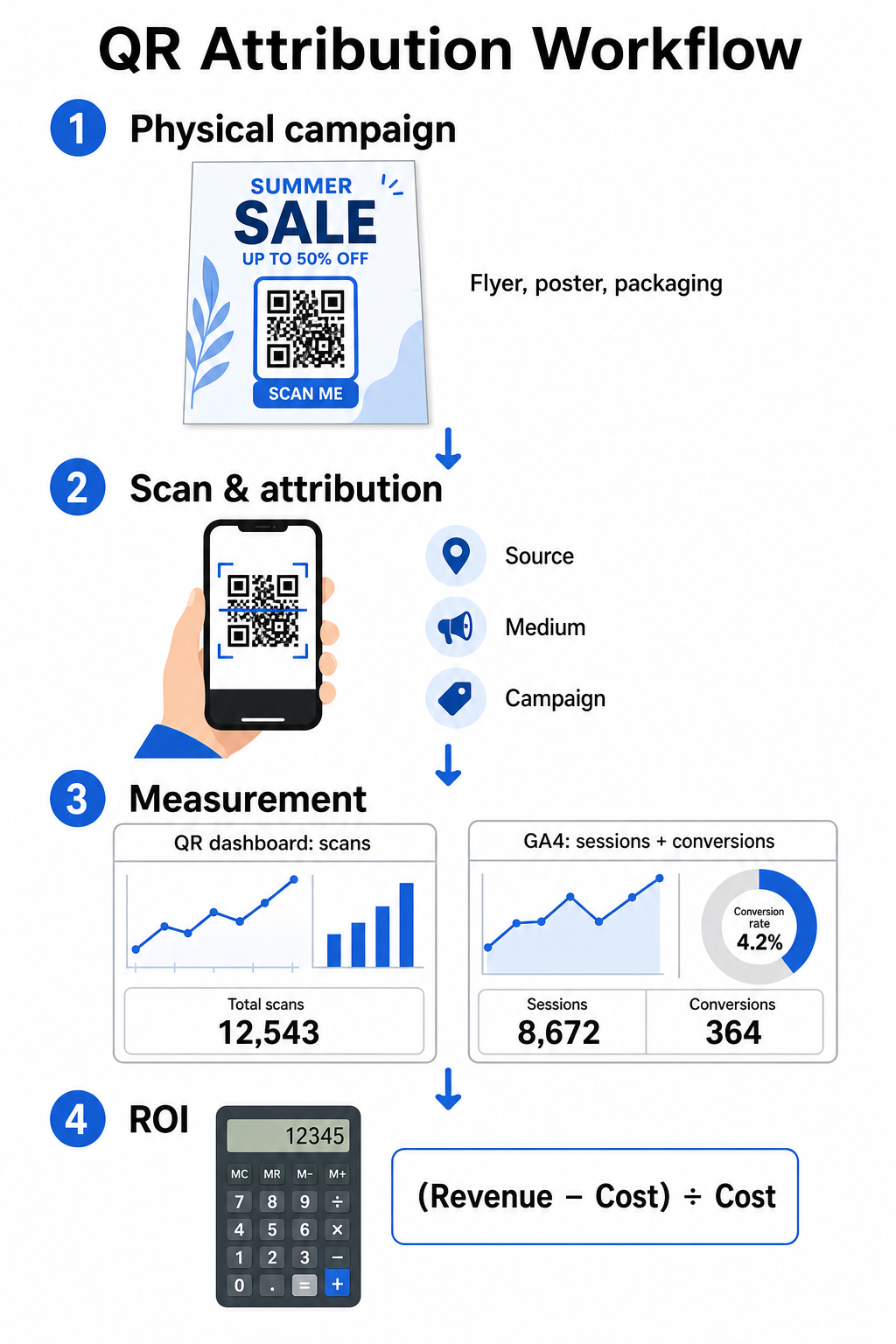
Đo lường ROI đòi hỏi phải kết nối các tương tác vật lý ở đầu kênh với các chuyển đổi kỹ thuật số ở cuối kênh. Bạn sẽ thu thập dữ liệu chiến dịch trên hai môi trường tích hợp: bảng điều khiển quản lý mã QR và phần mềm phân tích trang web của bạn.
Thu thập dữ liệu đầu kênh trong bảng điều khiển của bạn
Nền tảng quản lý mã QR của bạn ghi lại dữ liệu tương tác quét vật lý ngay lập tức. Khi bạn theo dõi lượt quét mã QR theo thời gian thực, bảng điều khiển của bạn hiển thị các chỉ số tương tác quan trọng:
- Tổng số lượt quét so với lượt quét duy nhất: Tổng số lượt quét ghi lại mọi lần quét, trong khi lượt quét duy nhất tách biệt các tương tác từ thiết bị riêng lẻ.
- Phân bố lượt quét theo địa lý: Bản đồ xác định các thành phố và khu vực bưu chính hoạt động hiệu quả nhất.
- Xu hướng thời gian tương tác: Phân bố lượt quét theo giờ và hàng ngày tiết lộ các khung giờ hoạt động cao điểm cho đối tượng mục tiêu.
- Hệ điều hành thiết bị: Các chỉ số hệ điều hành đảm bảo các trang đích hoạt động liền mạch trên các thiết bị iOS và Android.
Sử dụng một bảng điều khiển phân tích mã QR của bạn cung cấp phản hồi hiệu suất tức thì cho người quản lý chiến dịch mà không cần chờ đợi sự chậm trễ trong quá trình xử lý của phân tích trang web.
Đánh giá chuyển đổi trong Google Analytics 4
Trong khi bảng điều khiển quét của bạn đo lường các tương tác vật lý, GA4 theo dõi hành vi người dùng sau khi khách truy cập đến trang web của bạn.
Để đánh giá lưu lượng truy cập chiến dịch trong GA4:
- Điều hướng đến Báo cáo > Thu nạp > Thu nạp lưu lượng truy cập.
- Thay đổi thứ nguyên báo cáo chính thành Nguồn / phương tiện phiên hoặc là Chiến dịch phiên.
- Tìm kiếm thẻ phương tiện tùy chỉnh của bạn (chẳng hạn như “qr”).
- Phân tích các chỉ số hiệu suất chính, bao gồm Phiên tương tác, Tỷ lệ tương tác, và Các sự kiện chính (chuyển đổi).
Khi các hành động trực tuyến – như mua hàng thương mại điện tử, gửi biểu mẫu hoặc đăng ký nhận bản tin – được chỉ định là các sự kiện chính trong GA4, nền tảng sẽ trực tiếp gán các chuyển đổi đó cho các tham số nguồn của chiến dịch in ấn của bạn.
Tính toán ROI và các chỉ số hiệu suất của chiến dịch
Khi chi phí chiến dịch được ghi lại và doanh thu được gán được theo dõi trong phân tích trang web, bạn có thể tính toán chính xác Lợi tức đầu tư (ROI) bằng cách sử dụng các công thức tài chính tiêu chuẩn.
Công thức tính ROI
Tính toán ROI của chiến dịch bằng cách sử dụng phương trình tiêu chuẩn:
Lợi tức đầu tư (ROI) (%) = [(Doanh thu đóng góp − Tổng chi phí chiến dịch) ÷ Tổng chi phí chiến dịch] × 100
Ví dụ thực tế về tính toán ROI
Hãy xem xét một chiến dịch tờ rơi gửi thư trực tiếp được tạo ra để tạo ra các lượt đặt dịch vụ trực tuyến:
- Tổng chi phí chiến dịch: 2.500 USD (bao gồm thiết kế đồ họa, in ấn và bưu phí).
- Tổng số lượt quét mã QR: 800 lượt quét tổng cộng (650 lượt quét duy nhất).
- Lượt chuyển đổi web được phân bổ: 50 lượt đặt chỗ hoàn tất có nguồn gốc từ “utmsource=directmail_flyer”.
- Tổng doanh thu được phân bổ: 6.000 USD doanh thu bán hàng trực tiếp.
Áp dụng công thức tính toán:
ROI = [($6.000 − $2.500) ÷ $2.500] × 100 = ($3.500 ÷ $2.500) × 100 = 140%
Chiến dịch đã tạo ra 140% lợi tức đầu tư ròng.
Các chỉ số hiệu quả thứ cấp
Để so sánh hiệu quả giữa các tài liệu và vị trí vật lý khác nhau, hãy theo dõi các chỉ số hiệu suất hỗ trợ sau:
- Chi phí mỗi lượt quét (CPS): Chia tổng chi phí chiến dịch cho tổng số lượt quét (2.500 USD ÷ 800 = 3,12 USD mỗi lượt quét).
- Tỷ lệ quét chuyển đổi: Chia số lượt chuyển đổi được phân bổ cho số lượt quét duy nhất và nhân với 100 ((50 ÷ 650) × 100 = 7,69%).
- Chi phí mỗi lượt chuyển đổi (CPA): Chia tổng chi phí chiến dịch cho số lượt chuyển đổi được phân bổ (2.500 USD ÷ 50 = 50,00 USD mỗi lượt chuyển đổi).
- Doanh thu mỗi lượt quét (RPS): Chia tổng doanh thu được phân bổ cho tổng số lượt quét (6.000 USD ÷ 800 = 7,50 USD mỗi lượt quét).
So sánh hiệu suất giữa các phương tiện truyền thông ngoại tuyến
Đánh giá hiệu suất trên các vị trí vật lý giúp phân bổ ngân sách in ấn trong tương lai cho các loại tài liệu có hiệu suất cao.
| Tài liệu tiếp thị | KPI mục tiêu | Chiến lược tối ưu hóa |
|---|---|---|
| Thư trực tiếp & Bưu thiếp | Tỷ lệ chuyển đổi & CPA | Đặt một ưu đãi hoặc chiết khấu rõ ràng ngay cạnh mã. |
| Áp phích & Màn hình hiển thị trong cửa hàng | Khối lượng quét & Tốc độ quét | Điều chỉnh chiều cao hiển thị và di chuyển mã về phía các điểm tập trung ở tầm mắt có lưu lượng truy cập cao. |
| Bao bì sản phẩm | Lượt quét lặp lại & Tỷ lệ tương tác | Hướng dẫn người dùng đến các hướng dẫn sử dụng kỹ thuật số, biểu mẫu kích hoạt bảo hành hoặc chiết khấu đặt hàng lại. |
| Biển hiệu sự kiện & Biểu ngữ | Tỷ lệ thu hút khách hàng tiềm năng | Cung cấp tài nguyên có thể tải xuống hoặc quà tặng khuyến mãi để đổi lấy thông tin liên hệ. |
Để khám phá các chiến lược bổ sung nhằm triển khai mã trên các phương tiện in ấn truyền thống, hãy xem hướng dẫn này về theo dõi mã QR.
Hướng dẫn tối đa hóa lượt quét chiến dịch ngoại tuyến
Để tối đa hóa tỷ lệ chuyển đổi và duy trì dữ liệu chiến dịch chính xác, hãy tuân thủ các tiêu chuẩn vận hành cốt lõi sau:
- Bao gồm văn bản rõ ràng, định hướng hành động: Tránh in các mã độc lập mà không có ngữ cảnh. Đặt các lời kêu gọi hành động rõ ràng bên cạnh khung mã, chẳng hạn như “Quét để được giảm 15% khi mua hàng của bạn” hoặc là “Quét để xem toàn bộ thực đơn”.
- Tối ưu hóa trang đích di động: Việc quét chỉ diễn ra trên thiết bị di động. Đảm bảo các trang đích tải trong vòng dưới hai giây và có thiết kế bố cục thân thiện với ngón tay cái.
- Kiểm tra URL theo dõi trước khi phân phối hàng loạt: Thực hiện các thử nghiệm quét trực tiếp trên nhiều thiết bị hệ điều hành di động để xác nhận rằng tất cả các thẻ UTM được truyền sạch sẽ đến trang đích và ghi lại trong phân tích thời gian thực.
- Cập nhật quản lý động liên kết đích: Nếu các liên kết trang đích thay đổi hoặc các chương trình khuyến mãi được cập nhật, hãy sử dụng bảng điều khiển quản trị của bạn để thay đổi URL đích mà không cần in lại tài liệu. Tìm hiểu thêm về cách thực hiện hiệu quả trong tài liệu này về cách sử dụng mã QR.
Kết hợp các tính năng quản lý động với các liên kết UTM có cấu trúc biến phương tiện in thành một kênh tăng trưởng có thể dự đoán, đo lường được. Tạo mã động tùy chỉnh với Trình tạo mã QR Pageloot để có được phép đo lường hoàn chỉnh về khoản đầu tư tiếp thị in ấn của bạn.
Câu hỏi thường gặp
Có, các nền tảng quản lý mã QR động tự động theo dõi lượng quét, hệ điều hành thiết bị, thời gian quét và vị trí địa lý. Tuy nhiên, việc thêm các thông số UTM vào liên kết đích cho phép các nền tảng phân tích web và CRM gán các phiên truy cập trang web tiếp theo, giao dịch mua hàng và gửi biểu mẫu khách hàng tiềm năng trở lại chiến dịch vật lý cụ thể của bạn.
Nếu bạn đã tạo mã QR động, bạn có thể cập nhật URL đích và các thông số UTM bất cứ lúc nào thông qua bảng điều khiển quản lý của mình mà không cần in lại tác phẩm nghệ thuật vật lý của bạn. Mã QR tĩnh mã hóa địa chỉ web mục tiêu vĩnh viễn vào thiết kế in và không thể sửa đổi sau khi in.
Gán một mã QR động duy nhất với các tham số UTM khác biệt (chẳng hạn như “utmcontent=windowposter” so với “utmcontent=checkoutflyer”) cho mỗi vị trí thực tế hoặc loại tài liệu quảng cáo. Thiết lập này cho phép bạn cô lập số lượng quét, tỷ lệ chuyển đổi và doanh thu được quy về từng vị trí riêng lẻ trong báo cáo phân tích của bạn.