ホーム > ガイド > How to Track Offline Marketing ROI with QR Codes
Tracking offline campaign ROI

How to Track Offline Marketing ROI with QR Codes

Learn how to track offline marketing ROI by pairing dynamic QR codes with UTM parameters and web analytics to measure print campaign conversions accurately.
Updated on 7月 28, 2026
目次

Are you struggling to prove which print campaigns or store displays actually drive sales? Investing budget in offline channels without clear attribution makes it impossible to justify costs or optimize your strategy. By pairing trackable QR codes with UTM parameters and web analytics, you can connect physical touchpoints directly to digital conversions and measure your exact return on investment.

Why Offline Campaigns Require Dynamic Attribution

Printed collateral, direct mail, and physical signage are essential marketing tools, but measuring their financial performance historically presented a challenge. When someone sees a store display or receives a postcard and later visits your website, standard web analytics classify that visitor as direct traffic or organic search. As a result, the physical touchpoint gets zero credit for the resulting sale.

Trackable QR codes bridge this gap by converting physical touchpoints into measurable digital entry points. When a customer scans a code on printed material, your analytics platform logs the scan event and tracks that user’s journey through lead forms, signups, or e-commerce purchases.

To capture accurate attribution data, you must understand the key operational differences between static and dynamic codes:

  • 静的QRコード encode a fixed destination URL directly into the pixel pattern. They offer no tracking capabilities and cannot be updated after printing.
  • ダイナミックQRコード route the scanner through a flexible short link to your final landing page. They log scan data in real time – including scan time, location, and device type – and allow you to update destination links at any time without reprinting. Relying on マーケティング用ダイナミックQRコード provides the foundation required for full campaign measurement.

Building Custom UTM Parameters for Physical Touchpoints

UTM (Urchin Tracking Module) parameters are standardized text tags added to the end of a destination URL. When a smartphone camera scans a code containing these tags, web analytics tools like Google Analytics 4 (GA4) read the parameters and attribute the user session to the specific offline source. Without UTM tags, analytics platforms group QR code traffic under generic direct traffic, leaving campaign managers without visibility into which flyer, poster, or print ad drove the visit.

Structuring Your Tracking Links

A robust offline tracking link relies on specific parameter fields:

パラメーター 目的 Recommended Offline Formatting Example Value
“utm_source” Identifies the physical channel or location Specific print item or display site “directmailpostcard”
“utm_medium” Identifies the overarching marketing medium Standardized channel tag like “qr” or “offline” “qr”
“utm_campaign” Identifies the specific promotion or offer Name of the promotion and year “springsale2025″
“utm_content” Distinguishes design or placement variations Placement detail or creative variant “frontページqr”
“utm_term” Tracks target audience segments Demographic segment or mailing list code “existing_customers”

Standardizing Naming Conventions

To keep your web analytics clean and prevent fragmented reporting, follow standard formatting rules:

  • Use lowercase letters consistently: Analytics tools treat uppercase and lowercase tags separately, creating duplicate channel entries for “QR” and “qr”.
  • Separate words with underscores: Avoid spaces, which create percent-encoding symbols (“%20”) that clutter tracking URLs.
  • Maintain uniform medium tags: Apply a single medium value across all print materials so all scan traffic consolidates under one channel group in report views.

For further guidance on structuring tracking URLs for web analytics platforms, review these detailed tips on using QRコード用のUTMパラメータ.

Converting Tracking URLs into Dynamic QR Codes

Once you build a tagged URL, convert it into a scannable code. Using a specialized リンクQRコードジェネレーター or a comprehensive ダイナミックQRコードジェネレーター, input your complete tagged URL (e.g., “https://yourwebsite.com/promo?utmsource=springflyer&utmmedium=qr&utmcampaign=retail_expansion”).

Best Practices for Print Deployment

To maintain high scannability and ensure reliable data capture across physical media:

  • Assign unique codes per physical placement: Generate distinct dynamic QR codes with unique “utmsource” or “utmcontent” values for every physical location. Using separate codes for storefront posters and register flyers allows you to compare location performance directly.
  • Maintain strong visual contrast: Position dark QR code modules against a plain light background. High contrast enables phone cameras to identify and decode pixel patterns instantly.
  • Apply proper print sizing guidelines: Printed materials scanned at arm’s length, such as promotional チラシ or direct mail postcards, require a minimum size of 0.8 × 0.8 inches (2 × 2 cm). For larger signage, maintain a 10:1 ratio between scanning distance and code width.
  • Export designs in vector file formats: Always download final QR code graphics in vector formats (.SVG or .PDF) instead of raster images like JPEGs to prevent pixelation during professional printing.

Start Tracking Your Print Campaigns Stop guessing which offline channels convert. Use Pageloot’s ダイナミックQRコードジェネレーター to create trackable QR codes that deliver instant scan analytics and seamless ROI reporting.

Monitoring Scans and Analyzing Conversion Data

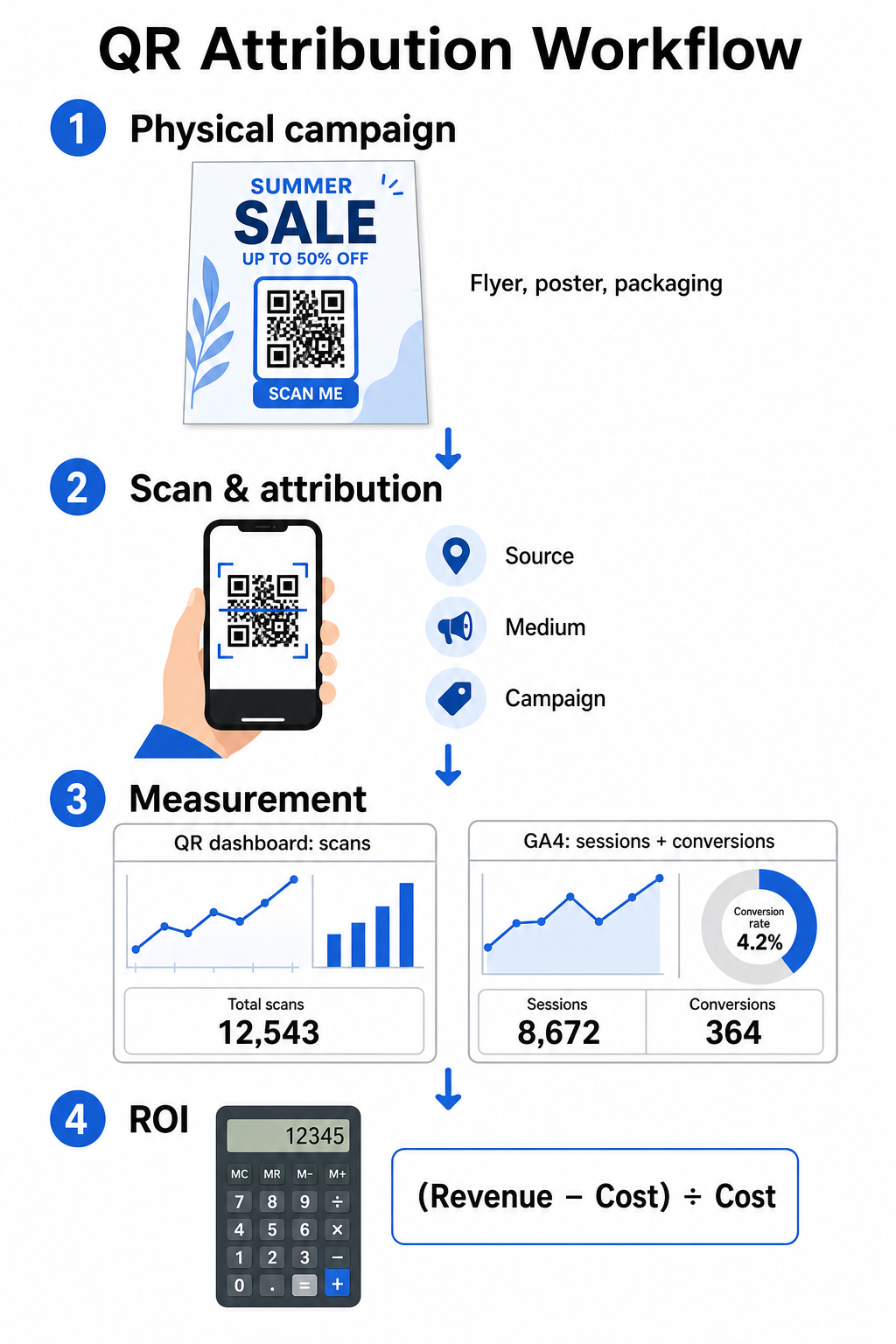
Measuring ROI requires connecting top-of-funnel physical interactions with bottom-of-funnel digital conversions. You will gather campaign data across two integrated environments: your QR management dashboard and your web analytics software.

QR attribution workflow infographic

Capturing Top-of-Funnel Data in Your Dashboard

Your QR management platform records physical scan interaction data immediately. When you QRコードのスキャンをリアルタイムで追跡する, your dashboard displays critical engagement metrics:

  • Total vs. unique scans: Total scans record every scan instance, while unique scans isolate individual device interactions.
  • Geographic scan distribution: Maps pinpoint top-performing cities and postal regions.
  • Engagement timing trends: Hourly and daily scan distributions reveal peak activity windows for target audiences.
  • Device operating systems: Operating system metrics ensure landing pages function seamlessly across iOS and Android devices.

Using a central QRコード分析ダッシュボード gives campaign managers immediate performance feedback without waiting for web analytics processing delays.

Evaluating Conversions in Google Analytics 4

While your scan dashboard measures physical interactions, GA4 tracks user behavior after visitors arrive on your website.

To evaluate campaign traffic in GA4:

  • Navigate to Reports > Acquisition > Traffic acquisition.
  • Change the primary reporting dimension to Session source / medium 或いは Session campaign.
  • Search for your custom medium tag (such as “qr”).
  • Analyze key performance indicators, including Engaged sessions, Engagement rateとしています。 Key events (conversions).

When online actions – such as e-commerce purchases, form submissions, or newsletter signups – are designated as key events in GA4, the platform attributes those conversions directly back to your print campaign source parameters.

Calculating Campaign ROI and Performance Metrics

Once campaign expenditure is recorded and attributed revenue is tracked in web analytics, you can calculate exact Return on Investment (ROI) using standard financial formulas.

The ROI Calculation Formula

Calculate campaign ROI using the standard equation:

ROI (%) = [(Attributed Revenue − Total Campaign Cost) ÷ Total Campaign Cost] × 100

Practical ROI Calculation Example

Consider a direct mail flyer campaign created to generate online service bookings:

  • Total Campaign Cost: $2,500 (covering graphic design, printing, and postage).
  • Total QR Scans: 800 total scans (650 unique scans).
  • Attributed Web Conversions: 50 completed bookings originating from “utmsource=directmail_flyer”.
  • Total Attributed Revenue: $6,000 in direct sales revenue.

Applying the calculation formula:

ROI = [($6,000 − $2,500) ÷ $2,500] × 100 = ($3,500 ÷ $2,500) × 100 = 140%

The campaign generated a 140% net return on investment.

Secondary Efficiency Metrics

To compare efficiency across different physical materials and placements, monitor these supporting performance indicators:

  • Cost per Scan (CPS): Divide total campaign cost by total scans ($2,500 ÷ 800 = $3.12 per scan).
  • Scan-to-Conversion Rate: Divide attributed conversions by unique scans and multiply by 100 ((50 ÷ 650) × 100 = 7.69%).
  • Cost Per Acquisition (CPA): Divide total campaign cost by attributed conversions ($2,500 ÷ 50 = $50.00 per conversion).
  • Revenue Per Scan (RPS): Divide total attributed revenue by total scans ($6,000 ÷ 800 = $7.50 per scan).

Comparing Performance Across Offline Media

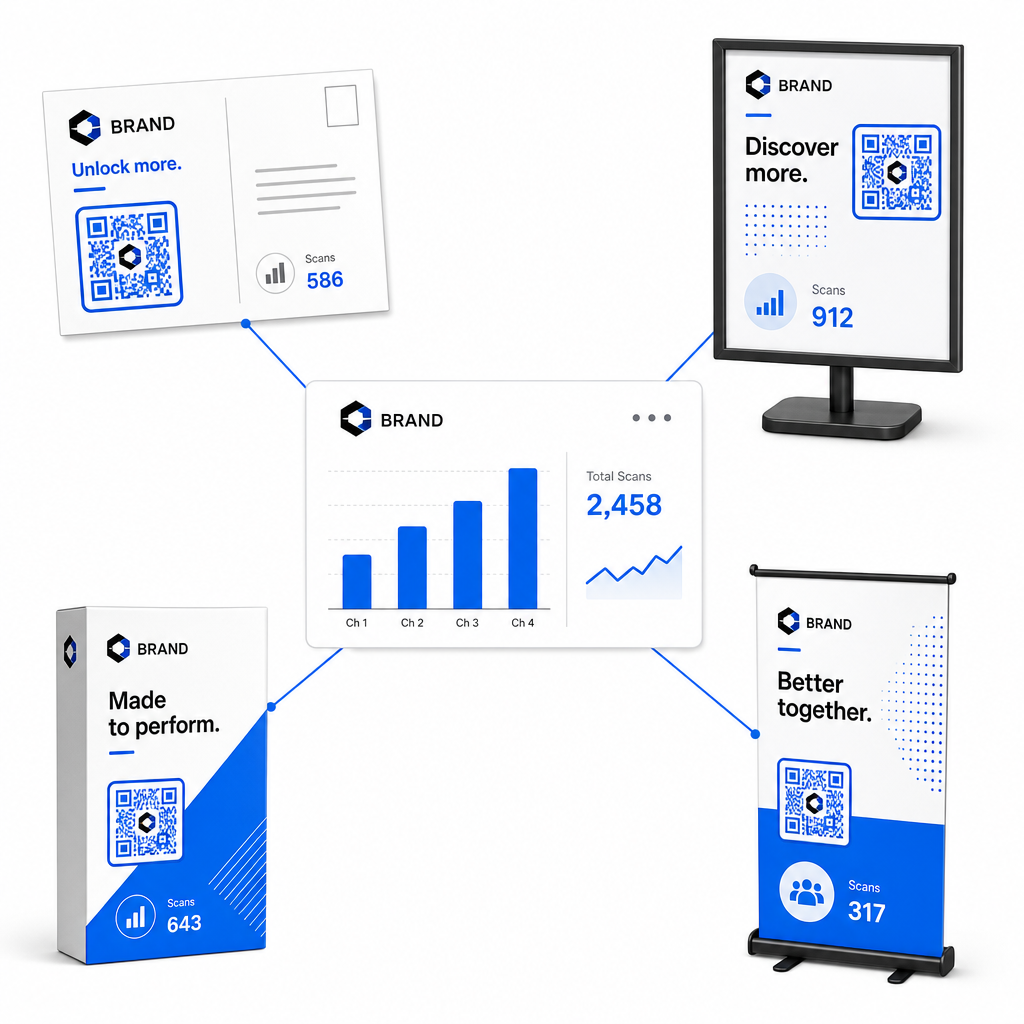
Evaluating performance across physical placements helps allocate future print budgets toward high-yielding collateral types.

Comparing offline QR placements
Marketing Material Target KPI Optimization Strategy
Direct Mail & Postcards Conversion Rate & CPA Position a clear incentive or discount offer directly adjacent to the code.
In-Store Posters & Displays Scan Volume & Scan Velocity Adjust display height and move codes toward high-traffic eye-level focal points.
製品包装 Repeat Scans & Engagement Rate Direct users to digital instruction manuals, warranty activation forms, or reorder discounts.
Event Signage & Banners Lead Capture Rate Offer downloadable resources or promotional giveaways in exchange for contact information.

To explore additional strategies for implementing codes across traditional print media, review this guide on トラッキングQRコード.

Guidelines for Maximizing Offline Campaign Scans

To maximize conversion rates and maintain accurate campaign data, follow these core operational standards:

  • Include clear action-oriented text: Avoid printing standalone codes without context. Place explicit calls-to-action beside the code frame, such as “Scan to unlock 15% off your purchase” 或いは “Scan to view full menu”.
  • Optimize mobile landing pages: Scanning occurs exclusively on mobile devices. Ensure target pages load in under two seconds and feature thumb-friendly layout designs.
  • Test tracking URLs prior to mass distribution: Perform live scan tests across multiple mobile OS devices to confirm that all UTM tags pass cleanly to the landing page and record in real-time analytics.
  • Update destination links dynamic management: If landing page links change or promotions update, use your administrative dashboard to change destination URLs without reprinting collateral. Learn more about effective execution in this resource on QRコードの使い方.

Combining dynamic management features with structured UTM links transforms print media into a predictable, measurable growth channel. Create custom dynamic codes with the Pageloot QRコードジェネレータ to gain complete measurement over your print marketing investment.

よくある質問

Can I track QR code scans without using UTM parameters?

Yes, dynamic QR code management platforms automatically track scan volume, device operating systems, scan timestamps, and geographic locations. However, appending UTM parameters to destination links allows web analytics and CRM platforms to attribute downstream website sessions, purchases, and lead form submissions back to your specific physical campaign.

What happens if I need to update the landing page after printing my codes?

If you generated dynamic QR codes, you can update the destination URL and UTM parameters at any time through your management dashboard without reprinting your physical artwork. Static QR codes encode the target web address permanently into the print design and cannot be modified once printed.

How do I compare the performance of different print placements?

Assign a unique dynamic QR code with distinct UTM parameters (such as “utmcontent=windowposter” vs “utmcontent=checkoutflyer”) to each physical location or collateral type. This setup allows you to isolate scan volumes, conversion rates, and attributed revenue across individual placements in your analytics reporting.

著者について

Siim KostabiはPagelootのコンテンツリードです。Pagelootの革新的なQRコード生成サービスについて執筆しています。5年以上にわたるQRコードに関する深い専門知識を持つSiimは、この分野の専門家です。QRテクノロジーを活用してデジタルインタラクションを簡素化・拡張する上で、大きな進歩を遂げています。.

カテゴリー
について詳しくはこちら
✅ QRコードの#1ソリューション

オンラインでQRコードを作成する必要がある場合は QRコードを作る ここで無料で
ページルートは #1のGo-Toソリューション でQRコードを作成してスキャンすることができます。

BL-0353

ブログジェネ

売上、レビュー、フォロワーを増やすために 20,000 を超えるブランドから信頼されています。

クライアントのロゴ
トップブランドから信頼される
5 のうち 4.8 と評価しました

4.86 / 5つ星評価

ユーゴ・ローラン
ユーゴ・ローラン
レストランオーナー
最も簡単で信頼性の高いQRコードジェネレータです。PDFファイルを即座にアップロードできます。レストランのメニューがデジタル化されました。
ルーカス・ジャンセン
ルーカス・ジャンセン
不動産開発業者
これは優れたツールで、QRコードでちょうど欲しいところに連れて行ってくれます。私たちは位置情報のQRコードしか使っていませんが、とても便利な機能がたくさんあります。
エマ・モレッティ
エマ・モレッティ
小売製品
使いやすいし、早い。素晴らしい機能で、完璧な画像を作成してくれるので、社員は私のvCardをダウンロードすることができます。
ユーゴ・ローラン
ユーゴ・ローラン
レストランオーナー
最も簡単で信頼性の高いQRコードジェネレータです。PDFファイルを即座にアップロードできます。レストランのメニューがデジタル化されました。
ルーカス・ジャンセン
ルーカス・ジャンセン
不動産開発業者
これは優れたツールで、QRコードでちょうど欲しいところに連れて行ってくれます。私たちは位置情報のQRコードしか使っていませんが、とても便利な機能がたくさんあります。
エマ・モレッティ
エマ・モレッティ
小売製品
使いやすいし、早い。素晴らしい機能で、完璧な画像を作成してくれるので、社員は私のvCardをダウンロードすることができます。
QRコードをもっと見る
あらゆるものをデジタル体験に変えよう 3分以内に。

14日間の無料トライアル。

クレジットカードは必要ありません。

初回購入で30%オフ

次のコードを使用してください:

MP3ファイルを共有

PDF QRコードを作成するにはサインアップしてください

必要なものをすべてアップロードして表示する。

  • オーディオファイル
  • ポッドキャスト
  • 音楽

サインアップで14日間無料トライアル。.
トライアル終了後、QRコードは期限切れになります。.

オーディオmp3 QRコードを作成するにはサインアップしてください

フレームでより多くのスキャンを獲得

QRコードにフレームを追加するにはサインアップしてください

コールトゥアクションフレームは、お客様が簡単にQRコードと対話できるようにします。ぜひお試しください。

サインアップで14日間無料トライアル。.
トライアル終了後、QRコードは期限切れになります。.

QRコードにフレームを追加するにはサインアップしてください

シェイプでスタイルを追加

より多くの図形を作成するにはサインアップしてください

QRコードは四角いものである必要はありません。あなたのブランドのイメージに合わせて変えてみてください。

サインアップで14日間無料トライアル。.
トライアル終了後、QRコードは期限切れになります。.

より多くの図形を作成するにはサインアップしてください

QRコードにロゴを追加

QRコードにロゴを追加するにはサインアップしてください

QRコードにロゴやブランドを入れることで、目立たせることができます。

サインアップで14日間無料トライアル。.
トライアル終了後、QRコードは期限切れになります。.

QRコードにロゴを追加するにはサインアップしてください

スマートなApp Storeリダイレクト

アプリストアのQRコードを作成するにはサインアップしてください

スマートなApp StoreのQRコードに、あなたのアプリのリンクを追加します。ユーザーは、デバイスに応じてリダイレクトされます。

サインアップで14日間無料トライアル。.
トライアル終了後、QRコードは期限切れになります。.

アプリストアのQRコードを作成するにはサインアップしてください

QRコードに画像をアップロード

画像QRコードを作成するにはサインアップしてください

画像を簡単に共有できます。どんな画像も、数秒でダイナミックに変化します。

サインアップで14日間無料トライアル。.
トライアル終了後、QRコードは期限切れになります。.

画像QRコードを作成するにはサインアップしてください

PDFファイルを共有

PDF QRコードを作成するにはサインアップしてください

必要なものをすべてアップロードして表示する。

  • メニュー&プライスリスト
  • 指示
  • 任意の書類

サインアップで14日間無料トライアル。.
トライアル終了後、QRコードは期限切れになります。.

PDF QRコードを作成するにはサインアップしてください

印刷せずに後で編集

再度印刷せずにQRコードを編集するにはサインアップしてください

ダイナミックQRコードは、新たにQRコードを印刷することなく、QRコードの内容を変更することができます。

サインアップで14日間無料トライアル。.
トライアル終了後、QRコードは期限切れになります。.

再度印刷せずにQRコードを編集するにはサインアップしてください

いつ?どこで?QRコードのスキャンを追跡

QRコードを追跡するにはサインアップしてください

どのQRコードが最も多くスキャンされ、何が最も顧客を喜ばせているのかを知ることができます。

サインアップで14日間無料トライアル。.
トライアル終了後、QRコードは期限切れになります。.

QRコードを追跡するにはサインアップしてください

印刷可能なファイルが利用可能

PDFやSVGのようなベクターQRコードを作成するにはサインアップしてください

.eps、.pdf、.svg

QRコードをHD解像度でダウンロードしたいですか?すぐに印刷できるベクターまたはピクセル形式を入手しましょう。

サインアップで14日間無料トライアル。.
トライアル終了後、QRコードは期限切れになります。.

PDFやSVGのようなベクターQRコードを作成するにはサインアップしてください

しばらくお待ちください。あなたのQRコードは ロード... ロード...

あなただけのものに

サインアップしてQRコードを後で保存してください

異なる色、ロゴ、コールトゥアクションフレームで素晴らしいQRコードを作成することで、より多くのスキャンを得ることができます。

サインアップで14日間無料トライアル。.
トライアル終了後、QRコードは期限切れになります。.

サインアップしてQRコードを後で保存してください