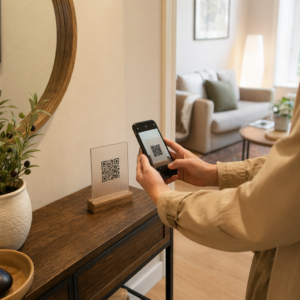
Ali se trudite dokazati, katere tiskane kampanje ali razstavni prostori dejansko povečujejo prodajo? Vlaganje proračuna v offline kanale brez jasne atribucije onemogoča upravičevanje stroškov ali optimizacijo vaše strategije. Z združevanjem sledljivih QR kod s parametri UTM in spletno analitiko lahko fizične točke stika neposredno povežete z digitalnimi konverzijami in izmerite svojo natančno donosnost naložbe.
Zakaj offline kampanje zahtevajo dinamično atribucijo
Tiskani materiali, direktna pošta in fizične oznake so bistvena marketinška orodja, vendar je merjenje njihove finančne uspešnosti v preteklosti predstavljalo izziv. Ko nekdo vidi razstavni prostor v trgovini ali prejme razglednico in kasneje obišče vaše spletno mesto, standardna spletna analitika tega obiskovalca razvrsti kot direktni promet ali organsko iskanje. Posledično fizična točka stika ne dobi nobene zasluge za nastalo prodajo.
Sledljive QR kode premostijo to vrzel tako, da fizične točke stika pretvorijo v merljive digitalne vstopne točke. Ko stranka skenira kodo na tiskanem materialu, vaša analitična platforma zabeleži dogodek skeniranja in sledi poti tega uporabnika skozi obrazce za potencialne stranke, prijave ali e-trgovinske nakupe.
Za zajemanje natančnih podatkov o atribuciji morate razumeti ključne operativne razlike med statičnimi in dinamičnimi kodami:
- Statične kode QR fiksni ciljni URL kodirajo neposredno v vzorec pikslov. Ne ponujajo zmožnosti sledenja in jih ni mogoče posodobiti po tiskanju.
- Dinamične kode QR preusmerijo skener skozi prilagodljivo kratko povezavo na vašo končno pristajalno stran. Podatke o skeniranju beležijo v realnem času – vključno s časom skeniranja, lokacijo in vrsto naprave – in omogočajo posodabljanje ciljnih povezav kadar koli brez ponovnega tiskanja. Zanašanje na dinamične QR kode za trženje zagotavlja temelj, potreben za celovito merjenje kampanje.
Gradnja parametrov UTM po meri za fizične točke stika
Parametri UTM (Urchin Tracking Module) so standardizirane besedilne oznake, dodane na konec ciljnega URL-ja. Ko kamera pametnega telefona skenira kodo, ki vsebuje te oznake, orodja za spletno analitiko, kot je Google Analytics 4 (GA4), preberejo parametre in pripišejo uporabniško sejo določenemu viru brez povezave. Brez oznak UTM analitične platforme združujejo promet QR kod pod generičnim direktnim prometom, kar vodjem kampanj onemogoča vpogled v to, kateri letak, plakat ali tiskana reklama je spodbudila obisk.
Strukturiranje vaših sledilnih povezav
Zanesljiva sledilna povezava brez povezave se zanaša na specifična polja parametrov:
| Parameter | Namen | Priporočeno oblikovanje za brez povezave | Primer vrednosti |
|---|---|---|---|
| “utm_source” | Identificira fizični kanal ali lokacijo | Specifični tiskani element ali mesto prikaza | “directmailpostcard” |
| “utm_medium” | Identificira celovit marketinški medij | Standardizirana oznaka kanala, kot sta “qr” ali “offline” | “qr” |
| “utm_campaign” | Identificira specifično promocijo ali ponudbo | Ime promocije in leto | “springsale2025″ |
| “utm_content” | Razlikuje različice oblikovanja ali umestitve | Podrobnost umestitve ali kreativna različica | “frontstraniqr” |
| “utm_term” | Sledi segmentom ciljnega občinstva | Demografski segment ali koda poštnega seznama | “existing_customers” |
Standardizacija konvencij poimenovanja
Da bi vaša spletna analitika ostala čista in preprečili razdrobljeno poročanje, sledite standardnim pravilom oblikovanja:
- Dosledno uporabljajte male črke: Analitična orodja obravnavajo oznake z velikimi in malimi črkami ločeno, kar ustvarja podvojene vnose kanalov za “QR” in “qr”.
- Besede ločite s podčrtaji: Avoid spaces, which create percent-encoding symbols (“%20”) that clutter tracking URLs.
- Ohranite enotne oznake medija: Uporabite eno samo vrednost medija za vse tiskane materiale, tako da se ves skenirani promet združi pod eno skupino kanalov v pogledih poročil.
Za nadaljnje smernice o strukturiranju sledilnih URL-jev za spletne analitične platforme, preglejte te podrobne nasvete o uporabi parametrov UTM za QR kode.
Pretvarjanje sledilnih URL-jev v dinamične kode QR
Ko ustvarite označen URL, ga pretvorite v kodo, ki jo je mogoče skenirati. Z uporabo specializiranega generator QR kod za povezave ali celovitega QR generator za dinamične QR kode, vnesite svoj celoten označen URL (npr. “https://yourwebsite.com/promo?utmvir=pomladletak&utmmedij=qr&utmkampanja=maloprodajna_širitev”).
Najboljše prakse za uporabo v tisku
Za ohranjanje visoke skenljivosti in zagotavljanje zanesljivega zajemanja podatkov na fizičnih medijih:
- Določite edinstvene kode za vsako fizično postavitev: Ustvarite različne dinamične kode QR z edinstvenimi “utmvir” ali “utmvsebina” vrednostmi za vsako fizično lokacijo. Uporaba ločenih kod za plakate v izložbah in letake na blagajnah vam omogoča neposredno primerjavo uspešnosti lokacij.
- Ohranite močan vizualni kontrast: Temne module kode QR postavite na enostavno svetlo ozadje. Visok kontrast omogoča kameram telefonov, da takoj prepoznajo in dekodirajo vzorce pikslov.
- Uporabite ustrezne smernice za velikost tiskanja: Tiskani materiali, skenirani na razdalji roke, kot so promocijski Letaki ali neposredna pošta razglednice, zahtevajo minimalno velikost 0,8 × 0,8 palcev (2 × 2 cm). Za večje označbe ohranite razmerje 10:1 med razdaljo skeniranja in širino kode.
- Izvozite dizajne v vektorskih datotečnih formatih: Vedno prenesite končno grafiko kode QR v vektorskih formatih (.SVG ali .PDF) namesto rastrskih slik, kot so JPEG, da preprečite pikselizacijo med profesionalnim tiskanjem.
Začnite slediti svojim tiskarskim kampanjam Ne ugibajte več, kateri kanali brez povezave se pretvorijo. Uporabite Pagelootov QR generator za dinamične QR kode za ustvarjanje sledljivih kod QR, ki zagotavljajo takojšnje analize skeniranja in brezhibno poročanje o ROI.
Spremljanje skeniranj in analiza podatkov o konverzijah
Merjenje ROI zahteva povezovanje fizičnih interakcij na vrhu lijaka z digitalnimi konverzijami na dnu lijaka. Podatke o kampanji boste zbirali v dveh integriranih okoljih: vaši nadzorni plošči za upravljanje QR in vaši programski opremi za spletno analitiko.
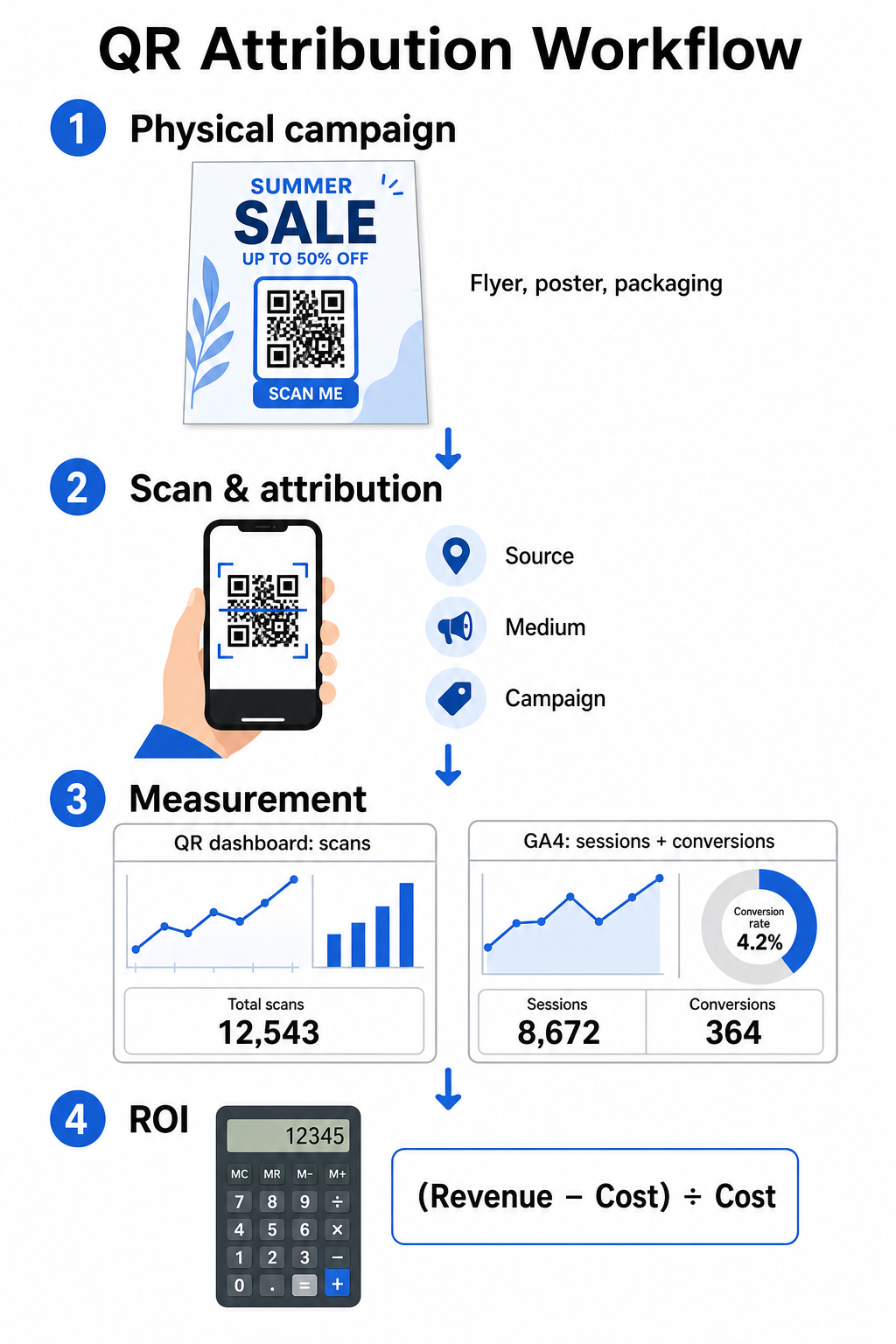
Zbiranje podatkov na vrhu lijaka v vaši nadzorni plošči
Vaša platforma za upravljanje QR takoj beleži podatke o fizičnih interakcijah skeniranja. Ko vi sledenja skeniranjem QR kod v realnem času, vaša nadzorna plošča prikazuje ključne metrike angažiranosti:
- Skupno število vs. edinstvenih skeniranj: Skupno število skeniranj beleži vsak posamezen primer skeniranja, medtem ko edinstvena skeniranja izolirajo interakcije posameznih naprav.
- Geografska porazdelitev skeniranj: Zemljevidi natančno določajo najbolj uspešna mesta in poštne regije.
- Trendi časovnega razporeda angažiranosti: Urna in dnevna porazdelitev skeniranj razkriva okna največje aktivnosti za ciljne skupine.
- Operacijski sistemi naprav: Metrike operacijskih sistemov zagotavljajo brezhibno delovanje pristajalnih strani na napravah iOS in Android.
Uporaba centralne nadzorna plošča za analitiko QR kod zagotavlja vodjem kampanj takojšnje povratne informacije o uspešnosti, ne da bi čakali na zakasnitve obdelave spletne analitike.
Ocenjevanje konverzij v Google Analytics 4
Medtem ko vaša nadzorna plošča za skeniranje meri fizične interakcije, GA4 sledi vedenju uporabnikov, potem ko obiskovalci pridejo na vaše spletno mesto.
Za oceno prometa kampanje v GA4:
- Pojdite na Poročila > Pridobitev > Pridobitev prometa.
- Spremenite glavno dimenzijo poročanja v Vir seje / medij ali Kampanja seje.
- Poiščite svojo oznako po meri za medij (kot je “qr”).
- Analizirajte ključne kazalnike uspešnosti, vključno z Angažirane seje, Stopnja angažiranosti, in Ključni dogodki (konverzije).
Ko so spletna dejanja – kot so nakupi v e-trgovini, oddaje obrazcev ali prijave na novice – označena kot ključni dogodki v GA4, platforma te konverzije pripiše neposredno nazaj parametrom vira vaše tiskane kampanje.
Izračunavanje ROI kampanje in meritev uspešnosti
Ko so zabeleženi stroški kampanje in pripisani prihodki sledeni v spletni analitiki, lahko izračunate natančno donosnost naložbe (ROI) z uporabo standardnih finančnih formul.
Formula za izračun ROI
Izračunajte ROI kampanje z uporabo standardne enačbe:
ROI (%) = [(Pripisani prihodek − Skupni stroški kampanje) ÷ Skupni stroški kampanje] × 100
Primer izračuna praktičnega ROI
Razmislite o kampanji z letaki po direktni pošti, ustvarjeni za generiranje spletnih rezervacij storitev:
- Skupni stroški kampanje: 2.500 $ (pokriva grafično oblikovanje, tisk in poštnino).
- Skupno število skeniranj QR: 800 skeniranj skupaj (650 edinstvenih skeniranj).
- Pripisane spletne konverzije: 50 dokončanih rezervacij, ki izvirajo iz „utmsource=directmail_flyer“.
- Skupni pripisani prihodek: 6.000 $ neposrednega prihodka od prodaje.
Uporaba formule za izračun:
ROI = [(6.000 $ − 2.500 $) ÷ 2.500 $] × 100 = (3.500 $ ÷ 2.500 $) × 100 = 140 %
Kampanja je ustvarila 140 % neto donosnost naložbe.
Sekundarne metrike učinkovitosti
Za primerjavo učinkovitosti med različnimi fizičnimi materiali in umestitvami spremljajte te podporne kazalnike uspešnosti:
- Cena na skeniranje (CPS): Skupne stroške kampanje delite s skupnim številom skeniranj (2.500 $ ÷ 800 = 3,12 $ na skeniranje).
- Stopnja skeniranja v konverzijo: Pripisane konverzije delite z edinstvenimi skeniranji in pomnožite s 100 ((50 ÷ 650) × 100 = 7,69 %).
- Cena na pridobitev (CPA): Skupne stroške kampanje delite s pripisanimi konverzijami (2.500 $ ÷ 50 = 50,00 $ na konverzijo).
- Prihodek na skeniranje (RPS): Skupni pripisani prihodek delite s skupnim številom skeniranj (6.000 $ ÷ 800 = 7,50 $ na skeniranje).
Primerjava uspešnosti med mediji brez povezave
Vrednotenje uspešnosti fizičnih umestitev pomaga pri dodeljevanju prihodnjih proračunov za tisk v smeri visoko donosnih vrst materialov.
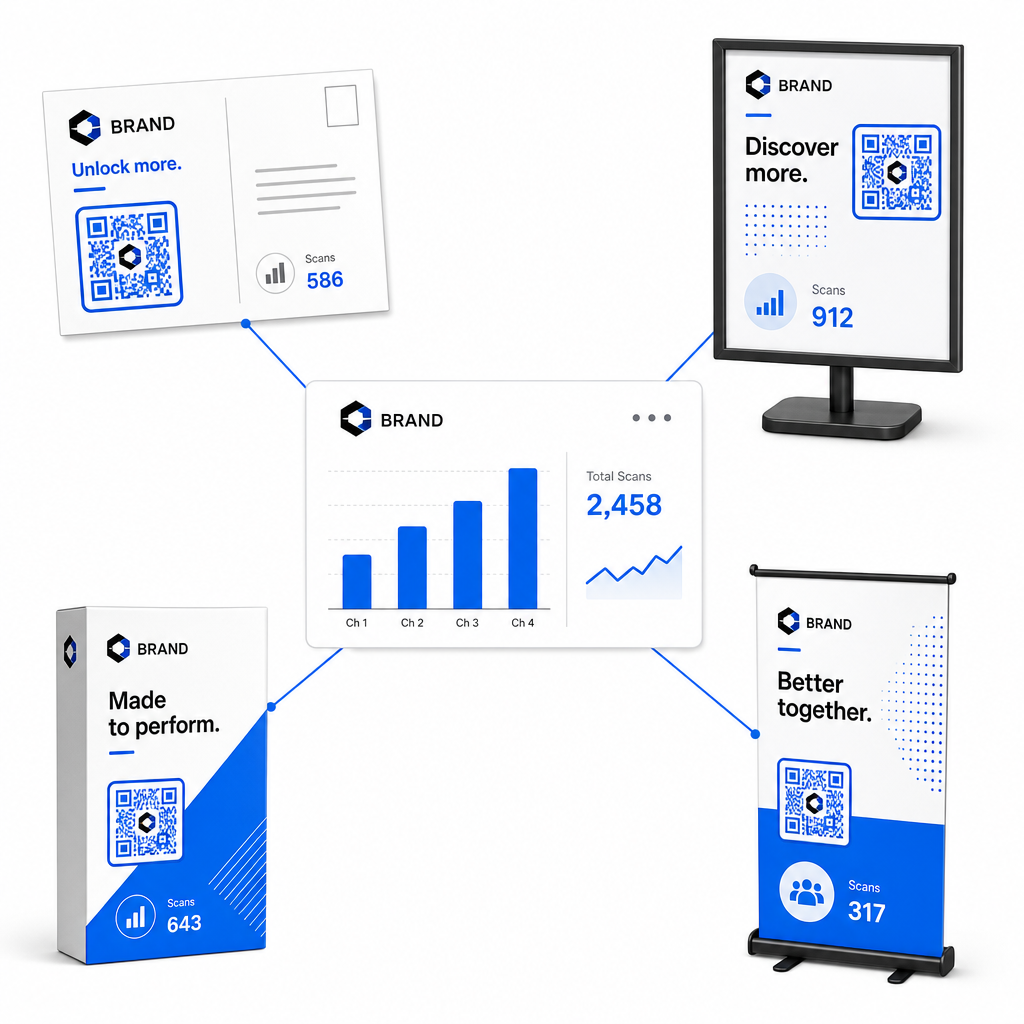
| Marketinški material | Ciljni KPI | Strategija optimizacije |
|---|---|---|
| Direktna pošta in razglednice | Stopnja konverzije in CPA | Jasno spodbudo ali ponudbo popusta postavite neposredno ob kodo. |
| Plakati in prikazovalniki v trgovini | Obseg skeniranja in hitrost skeniranja | Prilagodite višino prikazovalnika in premaknite kode proti osrednjim točkam v višini oči z velikim prometom. |
| Embalaža izdelka | Ponovna skeniranja in stopnja angažiranosti | Uporabnike usmerite na digitalne priročnike z navodili, obrazce za aktivacijo garancije ali popuste za ponovno naročanje. |
| Označbe in transparenti za dogodke | Stopnja pridobivanja potencialnih strank | Ponudite vire za prenos ali promocijske nagrade v zameno za kontaktne podatke. |
Če želite raziskati dodatne strategije za implementacijo kod v tradicionalnih tiskanih medijih, preglejte ta vodnik o sledenje QR kodam.
Smernice za maksimiranje skeniranj kampanj brez povezave
Za maksimiranje stopenj konverzije in ohranjanje natančnih podatkov o kampanji upoštevajte te ključne operativne standarde:
- Vključite jasno besedilo, usmerjeno v akcijo: Izogibajte se tiskanju samostojnih kod brez konteksta. Postavite eksplicitne pozive k dejanju poleg okvira kode, kot so “Skenirajte za 15 % popusta na vaš nakup” ali “Skenirajte za ogled celotnega menija”.
- Optimizirajte mobilne pristajalne strani: Skeniranje poteka izključno na mobilnih napravah. Zagotovite, da se ciljne strani naložijo v manj kot dveh sekundah in imajo uporabniku prijazno (prilagojeno palcu) zasnovo.
- Preizkusite sledilne URL-je pred množično distribucijo: Izvedite teste skeniranja v živo na več mobilnih napravah z različnimi OS-i, da potrdite, da se vse UTM oznake pravilno prenesejo na pristajalno stran in se beležijo v analitiki v realnem času.
- Posodobite dinamično upravljanje ciljnih povezav: Če se povezave pristajalnih strani spremenijo ali se posodobijo promocije, uporabite svojo skrbniško nadzorno ploščo za spreminjanje ciljnih URL-jev, ne da bi ponovno tiskali gradivo. Več o učinkoviti izvedbi si preberite v tem viru o kako uporabljati QR kode.
Združevanje funkcij dinamičnega upravljanja s strukturiranimi UTM povezavami pretvori tiskane medije v predvidljiv, merljiv kanal rasti. Ustvarite prilagojene dinamične kode z Generator QR kode Pageloot za pridobitev popolne merljivosti vaše naložbe v tiskano trženje.
Pogosta vprašanja
Da, platforme za upravljanje dinamičnih QR kod samodejno sledijo številu skenov, operacijskim sistemom naprav, časovnim žigom skenov in geografskim lokacijam. Vendar pa dodajanje parametrov UTM ciljnim povezavam omogoča platformam za spletno analitiko in CRM, da spletne seje, ki sledijo, nakupi in oddaje obrazcev za potencialne stranke pripisujejo nazaj vaši specifični fizični kampanji.
Če ste ustvarili dinamične QR kode, lahko kadar koli posodobite ciljni URL in parametre UTM prek svoje nadzorne plošče za upravljanje, ne da bi ponovno tiskali svoje fizično umetniško delo. Statične QR kode trajno kodirajo ciljni spletni naslov v tiskarsko zasnovo in jih ni mogoče spreminjati, ko so enkrat natisnjene.
Vsaki fizični lokaciji ali vrsti gradiva dodelite edinstveno dinamično QR kodo z distinctnimi UTM parametri (na primer “utmcontent=windowposter” proti “utmcontent=checkoutflyer”). Ta nastavitev vam omogoča izolacijo obsega skeniranj, stopenj konverzije in pripisanega prihodka med posameznimi umestitvami v vašem poročilu analitike.