Sliter du med å bevise hvilke trykkampanjer eller butikkutstillinger som faktisk driver salg? Å investere budsjett i offlinekanaler uten tydelig attribuering gjør det umulig å rettferdiggjøre kostnader eller optimalisere strategien din. Ved å koble sporbare QR-koder med UTM-parametere og nettanalyser, kan du koble fysiske kontaktpunkter direkte til digitale konverteringer og måle din nøyaktige avkastning på investeringen.
Hvorfor offlinekampanjer krever dynamisk attribuering
Trykt materiell, direktereklame og fysisk skilting er essensielle markedsføringsverktøy, men å måle deres økonomiske ytelse har historisk sett vært en utfordring. Når noen ser en butikkutstilling eller mottar et postkort og senere besøker nettstedet ditt, klassifiserer standard nettanalyser den besøkende som direkte trafikk eller organisk søk. Som et resultat får det fysiske kontaktpunktet null kreditt for det resulterende salget.
Sporbare QR-koder bygger bro over dette gapet ved å konvertere fysiske kontaktpunkter til målbare digitale inngangspunkter. Når en kunde skanner en kode på trykt materiell, logger analyseplattformen din skanningshendelsen og sporer brukerens reise gjennom skjemaer for potensielle kunder, registreringer eller e-handelkjøp.
For å fange nøyaktige attribueringsdata, må du forstå de viktigste operasjonelle forskjellene mellom statiske og dynamiske koder:
- Statiske QR-koder koder en fast destinasjons-URL direkte inn i pikselmønsteret. De tilbyr ingen sporingsmuligheter og kan ikke oppdateres etter utskrift.
- Dynamiske QR-koder ruter skanneren gjennom en fleksibel kortlenke til din endelige landingsside. De logger skannedata i sanntid – inkludert skannetid, sted og enhetstype – og lar deg oppdatere destinasjonslenker når som helst uten å måtte trykke på nytt. Å stole på dynamiske QR-koder for markedsføring gir grunnlaget som kreves for full kampanjemåling.
Bygge tilpassede UTM-parametere for fysiske kontaktpunkter
UTM-parametere (Urchin Tracking Module) er standardiserte tekstmerker som legges til slutten av en destinasjons-URL. Når et smarttelefonkamera skanner en kode som inneholder disse merkene, leser webanalyseprogrammer som Google Analytics 4 (GA4) parameterne og tilskriver brukersesjonen til den spesifikke offlinekilden. Uten UTM-merker grupperer analyseplattformer QR-kode-trafikk under generell direkttrafikk, noe som gjør at kampanjeansvarlige mangler innsikt i hvilken flyer, plakat eller trykt annonse som drev besøket.
Strukturering av sporingslenkene dine
En robust offline sporingslenke er avhengig av spesifikke parameterfelt:
| Parameter | Hensikt | Anbefalt offline formatering | Eksempelverdi |
|---|---|---|---|
| utm_source | Identifiserer den fysiske kanalen eller plasseringen | Spesifikk trykksak eller visningssted | directmailpostcard |
| utm_medium | Identifiserer det overordnede markedsføringsmediet | Standardisert kanaltagg som "qr" eller "offline" | qr |
| utm_campaign | Identifiserer den spesifikke kampanjen eller tilbudet | Navn på kampanjen og år | springsale2025 |
| utm_content | Skiller design- eller plasseringsvariasjoner | Plasseringsdetalj eller kreativ variant | frontsideqr |
| utm_term | Sporer målgruppesegmenter | Demografisk segment eller postlistekode | existing_customers |
Standardisering av navnekonvensjoner
For å holde webanalysen ren og forhindre fragmentert rapportering, følg standard formateringsregler:
- Bruk små bokstaver konsekvent: Analyseverktøy behandler store og små bokstaver separat, noe som skaper duplikate kanaloppføringer for "QR" og "qr".
- Skill ord med understrek: Avoid spaces, which create percent-encoding symbols (“%20”) that clutter tracking URLs.
- Oppretthold ensartede medium-tagger: Bruk en enkelt medium-verdi på tvers av alt trykt materiale slik at all skanningstrafikk konsolideres under én kanalgruppe i rapportvisninger.
For ytterligere veiledning om strukturering av sporings-URL-er for nettanalytiske plattformer, se disse detaljerte tipsene om bruk av UTM parameters for QR codes.
Konvertere sporings-URL-er til dynamiske QR-koder
Når du har bygget en tagget URL, konverterer du den til en skannbar kode. Ved å bruke en spesialisert lenke QR-kodegenerator eller en omfattende Dynamisk QR-kode generator, skriv inn din komplette taggede URL (f.eks., “https://yourwebsite.com/promo?utmsource=springflyer&utmmedium=qr&utmcampaign=retail_expansion”).
Beste praksis for utplassering på trykk
For å opprettholde høy skannbarhet og sikre pålitelig datainnsamling på tvers av fysiske medier:
- Tildel unike koder per fysisk plassering: Generer distinkte dynamiske QR-koder med unike “utmsource” eller “utmcontent” verdier for hvert fysiske sted. Ved å bruke separate koder for butikkplakater og kassaflyere kan du sammenligne steders ytelse direkte.
- Oppretthold sterk visuell kontrast: Plasser mørke QR-kodemoduler mot en enkel lys bakgrunn. Høy kontrast gjør at telefonkameraer kan identifisere og dekode pikselmønstre umiddelbart.
- Anvend riktige retningslinjer for utskriftsstørrelse: Trykt materiale skannet på armlengdes avstand, for eksempel salgsfremmende Flyers eller direktepost postkort, krever en minimumsstørrelse på 0.8 × 0.8 tommer (2 × 2 cm). For større skilting, oppretthold et forhold på 10:1 mellom skanneavstand og kodebredde.
- Eksporter design i vektorfilformater: Last alltid ned ferdige QR-kodegrafikker i vektorformater (.SVG eller .PDF) i stedet for rasterbilder som JPEG for å forhindre pikselering under profesjonell utskrift.
Begynn å spore dine utskriftskampanjer Slutt å gjette hvilke offline-kanaler som konverterer. Bruk Pageloots Dynamisk QR-kode generator for å lage sporbare QR-koder som leverer øyeblikkelig skanneanalyse og sømløs ROI-rapportering.
Overvåke skanninger og analysere konverteringsdata
Måling av ROI krever at man kobler fysiske interaksjoner øverst i trakten med digitale konverteringer nederst i trakten. Du vil samle kampanjedata på tvers av to integrerte miljøer: ditt QR-administrasjonsdashbord og din webanalyseprogramvare.
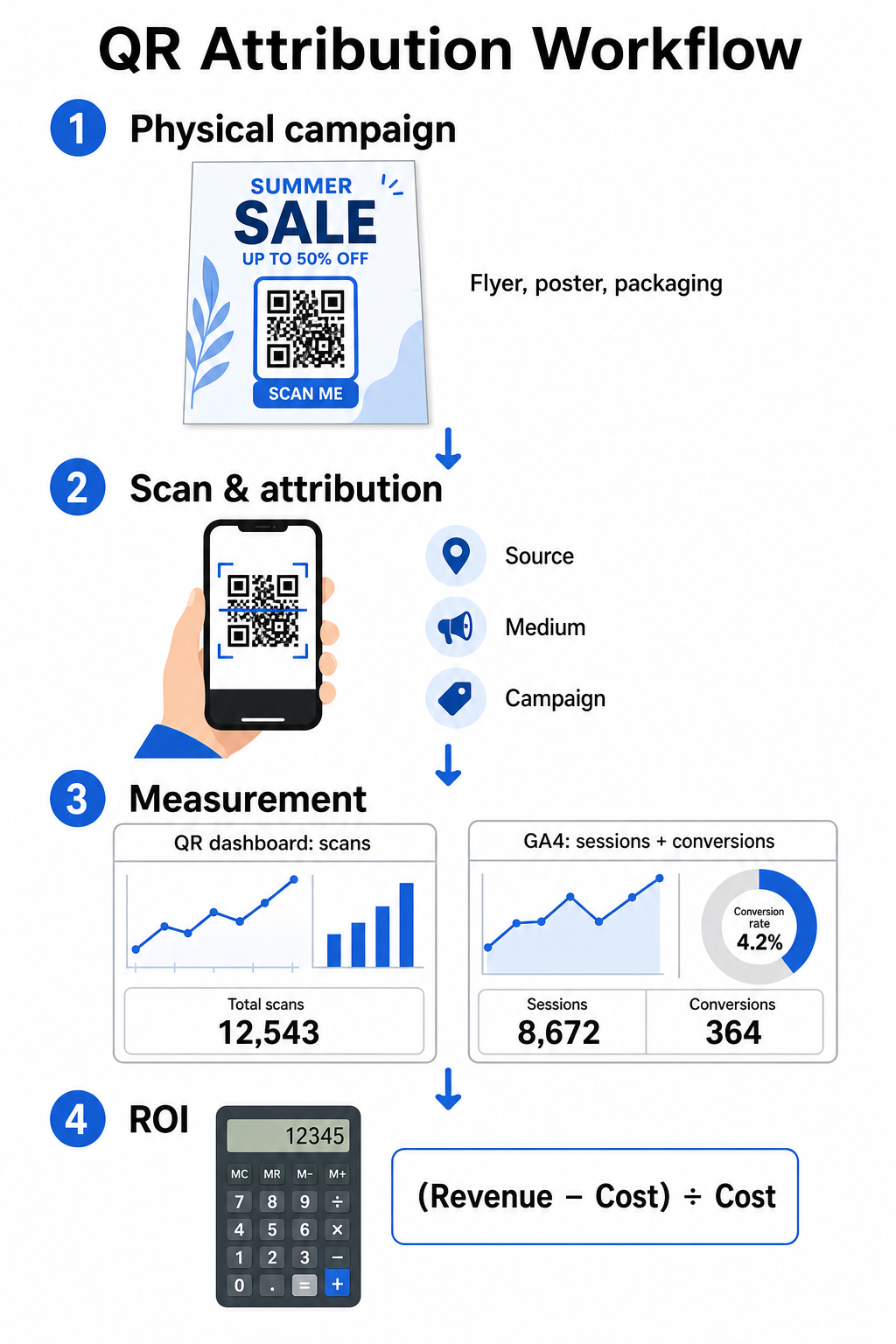
Innfanging av data øverst i trakten i dashbordet ditt
Din QR-administrasjonsplattform registrerer fysiske skanneinteraksjonsdata umiddelbart. Når du spore QR-kodeskanninger i sanntid, viser dashbordet ditt viktige engasjementsmålinger:
- Totalt antall vs. unike skanninger: Totalt antall skanninger registrerer hver skanneforekomst, mens unike skanninger isolerer individuelle enhetsinteraksjoner.
- Geografisk skannedistribusjon: Kart identifiserer toppytende byer og postområder.
- Engasjementstimingstrender: Tidsfordeling for skanninger per time og dag avslører toppaktivitetsvinduer for målgrupper.
- Enhetsoperativsystemer: Målinger av operativsystem sikrer at landingssider fungerer sømløst på tvers av iOS- og Android-enheter.
Ved å bruke et sentralt QR-kode analysepanel gir kampanjeledere umiddelbar tilbakemelding på ytelse uten å vente på forsinkelser i webanalysebehandlingen.
Evaluering av konverteringer i Google Analytics 4
Mens skannedashbordet ditt måler fysiske interaksjoner, sporer GA4 brukeratferd etter at besøkende ankommer nettstedet ditt.
Slik evaluerer du kampanjetrafikk i GA4:
- Naviger til Rapporter > Anskaffelse > Trafikkanskaffelse.
- Endre den primære rapporteringsdimensjonen til Øktkilde / medium eller Øktkampanje.
- Søk etter din tilpassede medium-tag (for eksempel “qr”).
- Analyser sentrale ytelsesindikatorer, inkludert Engasjerte økter, Engasjementsrate, og Nøkkelhendelser (konverteringer).
Når nettbaserte handlinger – som e-handelskjøp, skjema innsendinger eller nyhetsbrevpåmeldinger – er definert som nøkkelhendelser i GA4, tilskriver plattformen disse konverteringene direkte tilbake til kilde-parametrene for din trykte kampanje.
Beregning av kampanje-ROI og ytelsesmålinger
Når kampanjeutgifter er registrert og tilskrevne inntekter spores i webanalyse, kan du beregne nøyaktig avkastning på investeringen (ROI) ved hjelp av standard finansielle formler.
ROI-beregningsformelen
Beregn kampanje-ROI ved hjelp av standardligningen:
ROI (%) = [(Tilskrevet inntekt − Total kampanjekostnad) ÷ Total kampanjekostnad] × 100
Praktisk eksempel på ROI-beregning
Vurder en direkte post-flyerkampanje laget for å generere online tjenestebestillinger:
- Total kampanjekostnad: $2 500 (dekker grafisk design, trykking og porto).
- Totalt antall QR-skanninger: 800 totale skanninger (650 unike skanninger).
- Tilskrevne nettkonverteringer: 50 fullførte bestillinger som stammer fra “utmsource=directmail_flyer”.
- Total tilskrevet inntekt: $6 000 i direkte salgsinntekter.
Anvendelse av beregningsformelen:
ROI = [($6 000 − $2 500) ÷ $2 500] × 100 = ($3 500 ÷ $2 500) × 100 = 140%
Kampanjen genererte en 140 % netto avkastning på investeringen.
Sekundære effektivitetsmålinger
For å sammenligne effektivitet på tvers av ulike fysiske materialer og plasseringer, overvåk disse støttende ytelsesindikatorene:
- Kostnad per skanning (CPS): Del total kampanjekostnad på totalt antall skanninger ($2 500 ÷ 800 = $3,12 per skanning).
- Skann-til-konverteringsrate: Del tilskrevne konverteringer på unike skanninger og multipliser med 100 ((50 ÷ 650) × 100 = 7,69 %).
- Kostnad per anskaffelse (CPA): Del total kampanjekostnad på tilskrevne konverteringer ($2 500 ÷ 50 = $50,00 per konvertering).
- Inntekt per skanning (RPS): Del total tilskrevet inntekt på totalt antall skanninger ($6 000 ÷ 800 = $7,50 per skanning).
Sammenligne ytelse på tvers av offline medier
Evaluering av ytelse på tvers av fysiske plasseringer hjelper til med å tildele fremtidige trykkbudsjetter til materialtyper med høy avkastning.
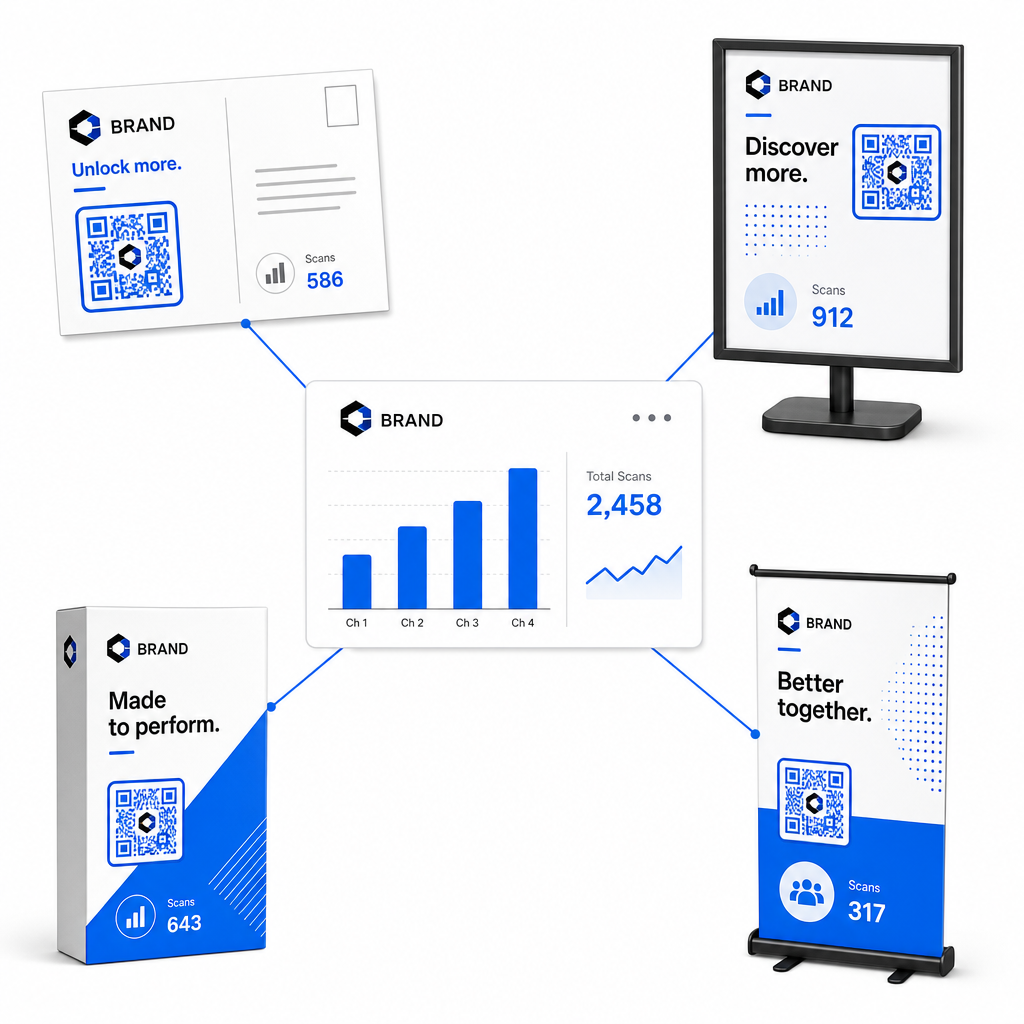
| Markedsføringsmateriell | Mål-KPI | Optimaliseringsstrategi |
|---|---|---|
| Direktepost & Postkort | Konverteringsrate & CPA | Plasser et tydelig insentiv eller rabatttilbud rett ved siden av koden. |
| Butikkplakater & Skjermer | Skanningsvolum & Skanningshastighet | Juster skjermhøyden og flytt koder mot iøynefallende fokuspunkt på øyehøyde med mye trafikk. |
| Produktemballasje | Gjenta skanninger & Engasjementsrate | Veiled brukere til digitale bruksanvisninger, skjemaer for garantiaktivering eller rabatter for gjenbestilling. |
| Arrangementsskilt & Bannere | Rate for kundeemnefangst | Tilby nedlastbare ressurser eller salgsfremmende gaver i bytte mot kontaktinformasjon. |
For å utforske ytterligere strategier for implementering av koder i tradisjonelle trykte medier, se denne guiden om sporing av QR-koder.
Retningslinjer for maksimering av skanninger fra offlinekampanjer
For å maksimere konverteringsfrekvenser og opprettholde nøyaktige kampanjedata, følg disse sentrale driftsstandardene:
- Inkluder tydelig handlingsorientert tekst: Unngå å trykke frittstående koder uten kontekst. Plasser tydelige oppfordringer til handling ved siden av koderammen, for eksempel “Skann for å låse opp 15 % rabatt på kjøpet ditt” eller “Skann for å se hele menyen”.
- Optimaliser mobile landingssider: Skanning skjer utelukkende på mobile enheter. Sørg for at målsider lastes inn på under to sekunder og har tommelfingervennlige design.
- Test sporings-URL-er før massedistribusjon: Utfør live skanningstester på tvers av flere mobile OS-enheter for å bekrefte at alle UTM-tagger overføres rent til landingssiden og registreres i sanntidsanalyse.
- Oppdater destinasjonslenker dynamisk styring: Hvis lenker til landingssider endres eller kampanjer oppdateres, bruk administrasjonsdashbordet ditt til å endre destinasjons-URL-er uten å trykke nytt materiell. Lær mer om effektiv utførelse i denne ressursen om hvordan du bruker QR-koder.
Ved å kombinere dynamiske styringsfunksjoner med strukturerte UTM-lenker, forvandles trykte medier til en forutsigbar, målbar vekstkanal. Opprett tilpassede dynamiske koder med Pageloot QR-kodegenerator for å få fullstendig måling over din investering i trykt markedsføring.
Ofte stilte spørsmål
Ja, dynamiske plattformer for QR-kodebehandling sporer automatisk skannevolum, operativsystemer for enheter, skannetidspunkter og geografiske plasseringer. Imidlertid gjør det å legge til UTM-parametere i destinasjonslenker det mulig for nettanalytikk- og CRM-plattformer å tilskrive påfølgende nettstedøkter, kjøp og innsendinger av skjemaer for potensielle kunder tilbake til din spesifikke fysiske kampanje.
Hvis du genererte dynamiske QR-koder, kan du når som helst oppdatere destinasjons-URL-en og UTM-parametere via ditt administrasjonspanel uten å måtte trykke opp ditt fysiske kunstverk på nytt. Statiske QR-koder koder inn mål-nettadressen permanent i trykkdesignet og kan ikke endres når de er trykt.
Tilordne en unik dynamisk QR-kode med distinkte UTM-parametere (som “utmcontent=windowposter” vs “utmcontent=checkoutflyer”) til hvert fysiske sted eller materielltype. Dette oppsettet lar deg isolere skannevolumer, konverteringsfrekvenser og tilskrevne inntekter på tvers av individuelle plasseringer i analyserapportene dine.