Yoğun bir tesiste tıbbi ekipmanı yönetmek kulağa geldiğinden daha zordur. Cihazlar kaybolduğunda, bakım kayıtları geride kaldığında veya personel kritik araçları aramakla zaman kaybettiğinde, hasta bakımı zarar görür. Bu kılavuz, doğru platformu seçmekten etiketleri korumaya ve uyumlu kalmaya kadar tıbbi ekipman için QR kod takibinin nasıl uygulanacağını açıklamaktadır.
Tıbbi Ekipman İçin QR Kod Takibi Neden Mantıklıdır?
Manuel envanter süreçleri – panolar, elektronik tablolar, kağıt bakım kayıtları – boşluklar yaratır. Ekipman yanlış yere konulur, bakım pencereleri kaçırılır ve uyumluluk belgelerini hızlı bir şekilde doğrulamak zorlaşır. QR kodları, her fiziksel cihazı, personelin standart bir akıllı telefonla saniyeler içinde erişebileceği canlı bir dijital kayda bağlayarak bu boşlukları giderir.
Geleneksel barkodların aksine, bir QR kodu kompakt bir formatta çok daha fazla bilgi depolayabilir. Bir ventilatöre, infüzyon pompasına veya taşınabilir monitöre yerleştirildiğinde, bir QR kodu anında şunları gösterebilir:
- Cihazın bakım geçmişi ve bir sonraki planlı servis tarihi
- Kalibrasyon kayıtları ve uyumluluk belgeleri
- Kullanım kılavuzları veya kurulum videoları
- Mevcut konum ve atandığı departman
- Arızalar veya gerekli değiştirmeler için uyarılar
Bu tür anında erişim, tam olarak hastane ve sağlık hizmetleri için QR kodları uygulama modelinin desteklemek üzere tasarlandığı şeydir.
Uyumluluk açısından, Medicare ve Medicaid Hizmetleri Merkezleri (CMS), kritik ekipmanların – yaşam destek cihazları, temel resüsitasyon ekipmanları, kritik izleme cihazları – üretici programlarına göre bakımının yapılmasını ve tüm bakımların nitelikli personel tarafından gerçekleştirilmesini ve eksiksiz bir şekilde belgelenmesini gerektirir. QR kod sistemleri, bu gereksinimleri denetimler sırasında yönetmeyi ve göstermeyi kolaylaştıran doğal bir denetim izi oluşturur.
Sağlık Hizmetleri İçin Bir QR Kod Platformu Seçmek
Her QR kod aracı klinik bir ortamın talepleri için tasarlanmamıştır. Platformları değerlendirirken aşağıdakilere öncelik verin:
Güvenlik ve HIPAA uyumluluğu. Korunan sağlık bilgilerini (PHI) işleyen herhangi bir platform, HIPAA'nın Gizlilik, Güvenlik ve İhlal Bildirimi Kurallarına uymalıdır. Şifreli veri iletimi, güvenli bulut depolama, rol tabanlı erişim kontrolleri ve otomatik oturum zaman aşımları arayın. Platform ayrıca, PHI'nin akışı durumunda iş ortağı sözleşmelerini de desteklemelidir.
Dinamik QR kodları. Statik kodların aksine, dinamik QR kodları basıldıktan sonra güncellenebilir. Pageloot'un açıkladığı gibi, dinamik bir kod “oluşturulduktan ve basıldıktan sonra bile değiştirilebilir,” bu da fiziksel etiketi değiştirmeden bağlantılı içeriği veya hedef URL'leri istediğiniz zaman değiştirmenize olanak tanır. Sık yazılım güncellemeleri, program değişiklikleri veya düzenleyici revizyonlardan geçen tıbbi ekipmanlar için bu çok önemlidir.
Gerçek zamanlı analizler. Kodların ne zaman ve nerede tarandığını takip etme yeteneği, biyomedikal ekiplere ekipman kullanım modelleri hakkında görünürlük sağlar, dikkat gerektirebilecek cihazları işaretlemeye yardımcı olur ve kaynak tahsisi kararlarını destekler. Tarama sayısı, konum ve cihaz türü gibi metrikler, daha akıllı bakım planlamasına katkıda bulunur.
Sistem entegrasyonu. Platform, mevcut Elektronik Sağlık Kayıtları (EHR) sisteminiz, Bilgisayarlı Bakım Yönetim Sistemi (CMMS) veya varlık veritabanınızla API aracılığıyla bağlantı kurmalıdır. Bir biyomedikal mühendisi bir infüzyon pompası üzerinde bakımı tamamladığında, bu güncelleme otomatik olarak yayılmalıdır – yinelenen giriş gerekmez.
Kullanıcı dostu arayüz. Sağlık çalışanları, minimum eğitim gerektiren araçlara ihtiyaç duyar. Personelin iş akışlarını bozmadan kodları oluşturmasına, güncellemesine ve yönetmesine olanak tanıyan temiz bir kontrol paneli önceliklendirilmeye değerdir.
Her Varlığı Tek Bir Kontrol Panelinden Takip Edin Kullan Dinamik QR Kod Oluşturucu tıbbi ekipmanlarınız için düzenlenebilir, izlenebilir kodlar oluşturmak ve tüm güncellemeleri tek bir yerden yönetmek için.
Klinik Ortamlarda Çalışan QR Kodları Tasarlamak
Hastanelerdeki QR kodları, standart bir etiketi hızla bozacak koşullarla karşılaşır: hastane sınıfı dezenfektanlar, sık kullanım, buhar ve değişken aydınlatma. İyi tasarım, tek bir etiket basılmadan önce tüm bunları hesaba katar.
Boyut ve Kontrast
Çok küçük bir QR kodu, özellikle personel eldiven giyerken veya düşük ışıkta çalışırken güvenilir bir şekilde taranamayacaktır. Şu boyutlandırma yönergelerini izleyin:
- Minimum boyut: URL gibi basit veriler için 0.8 x 0.8 inç (2 x 2 cm)
- Karmaşık veriler için önerilen boyut: en az 1.2 x 1.2 inç (3 x 3 cm)
- Tarama mesafesi oranı: 10:1 kuralını uygulayın – eğer kod 10 inç uzaktan taranacaksa, en az 1 inç genişliğinde olmalıdır
Kontrast için, açık arka planlar üzerinde koyu desenler kullanın ve kod ile arka planı arasında en az 4:1 kontrast oranını koruyun. Floresan aydınlatma altında veya sınırlı dinamik aralığa sahip bir kamera aracılığıyla bakıldığında okunabilirliği azaltan renk kombinasyonlarından kaçının. Ek rehberliği Pageloot’un sayfasında bulabilirsiniz QR kodu okunabilirliği için en iyi uygulamaları.
Sessiz Alanlar ve Logo Yerleşimi
Kodun etrafında, bir modülün genişliğinin en az dört katı kadar net bir kenar boşluğu – “sessiz alan” olarak adlandırılır – bırakın. Bu, çevredeki metinlerin, ekipman etiketlerinin veya yüzey dokularının tarayıcının kodu okuma yeteneğini engellemesini önler.
Bir hastane logosu eklerseniz, kod alanının 'sinden fazlasını kaplamamasına dikkat edin ve merkezi olarak konumlandırın. Logo eklerken yüksek hata düzeltme seviyesi (Q veya H) kullanın, çünkü bu seviyeler kodun bir kısmı gizlenmiş olsa bile okunabilir kalmasını sağlar.
Dayanıklı Etiket Malzemeleri
Standart kağıt etiketler hastane kullanımı için uygun değildir. Temizlik kimyasallarına, neme ve sürekli kullanıma maruz kaldıklarında bozulurlar. Bunun yerine şunları kullanın:
- Polyester etiketler: sert dezenfektanlara ve -40°F ila 300°F arasındaki sıcaklıklara dayanıklıdır
- Tıbbi sınıf yapıştırıcılı vinil etiketler: mükemmel kimyasal direnç; paslanmaz çelik, plastik ve boyalı metal yüzeylere kalkmadan yapışacak şekilde tasarlanmıştır
- Lamine etiketler: çizilme ve neme karşı direnç ekler, ancak laminatın taramayı engelleyen parlama oluşturmadığını doğrulayın
Tam bir sipariş vermeden önce, iki haftalık bir saha testi yapın: temsili cihazlara örnek etiketler uygulayın, onları standart temizlik protokollerinize tabi tutun ve solma, soyulma veya tarama bozulması olup olmadığını kontrol edin.
Renk Kodlu Sistemler
Ekipmanı bir bakışta kategorize etmek için kenarlık renkleri kullanmayı düşünün – örneğin, acil durum cihazları için kırmızı kenarlıklar, teşhis ekipmanı için mavi ve genel sarf malzemeleri için yeşil. Bu görsel katman, personelin metin etiketlerini okumak için yavaşlamadan doğru ekipman türünü hızlı bir şekilde bulmasına yardımcı olur.
Varlık Yönetimi İçin Dinamik QR Kodları Kurma
Dinamik QR kodları, bir cihazla ilişkili veriler sürekli değiştiği için tıbbi ekipman için özellikle uygundur. Bakım tamamlanır, kalibrasyon tarihleri yenilenir, bellenim güncellenir ve uyumluluk belgeleri revize edilir. Dinamik bir kodla, cihaz üzerindeki fiziksel etiket aynı kalır – yalnızca bağlantılı içerik değişir.
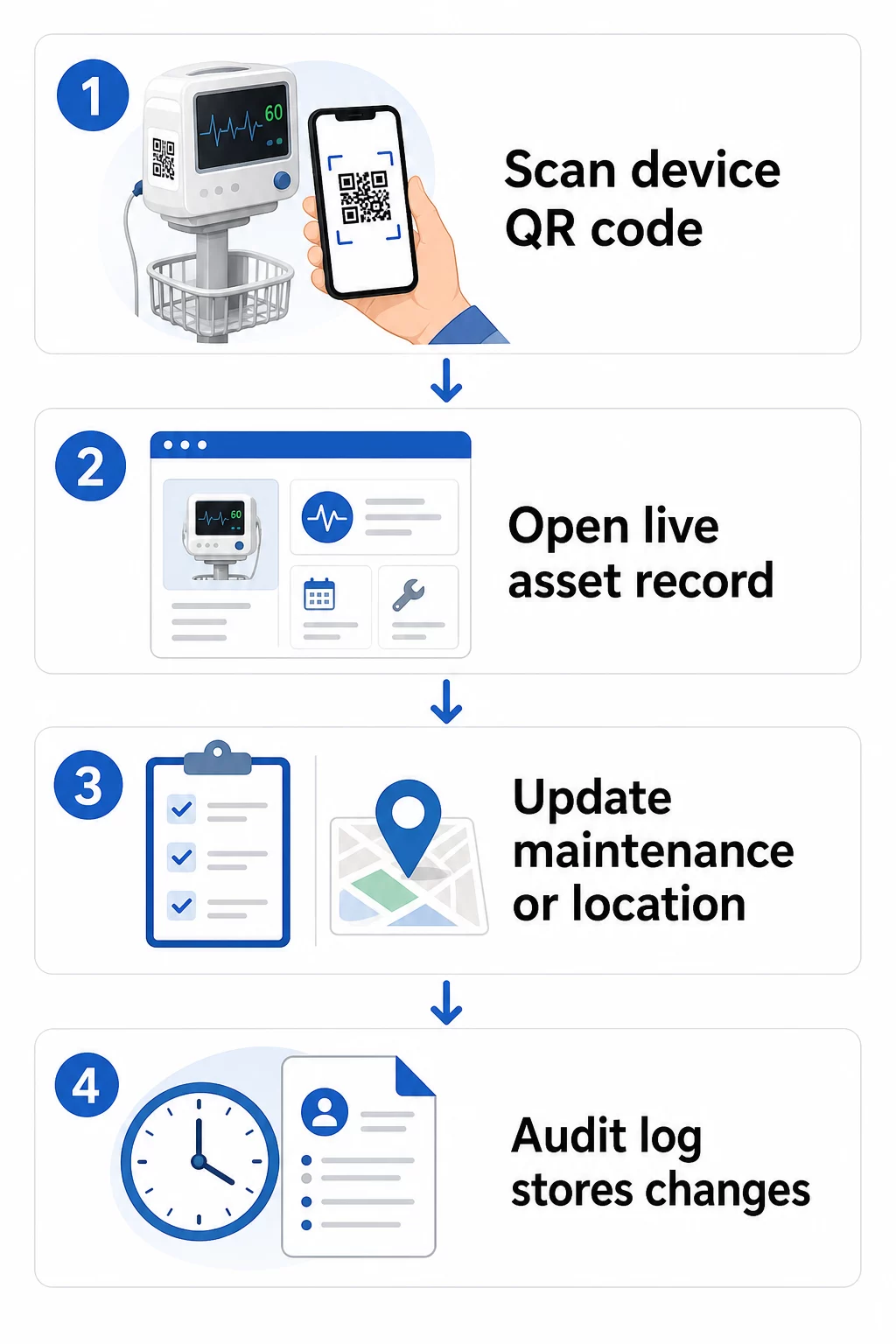
Ekipman kayıtlarını güncel tutmak için pratik bir iş akışı:
- Yönetim panonuza giriş yapın ve cihazın ekipman kimliğini veya departman filtresini kullanarak kodu bulun
- Bağlantılı bilgileri düzenleyin – bakım günlüklerini, kalibrasyon kayıtlarını, bir sonraki servis tarihlerini veya bağlantılı belgeleri güncelleyin
- Değişiklikler anında uygulanır, böylece kodu daha sonra tarayan herhangi bir personel güncel verileri görür
- Doğrulamak için kodu tarayın kayıttan çıkmadan önce güncellenmiş bilgilerin doğru görüntülendiğini
- Otomatik denetim günlüğünü inceleyin, her değişikliği zaman damgasıyla işaretler ve bunu yapan kullanıcıyı kaydeder
Dinamik kodların sık güncellemeleri nasıl ele aldığına daha derinlemesine bakmak için bkz. ürün envanteri için QR kodları nasıl kullanılır ve genel bakış Ürün yaşam döngüsü takibi için QR kodları, her ikisi de sağlık varlık yönetimine uygulanabilir güncelleme iş akışlarını kapsar.
Ekipman Kayıtlarını Yeniden Basmadan Güncel Tutun Bu Dinamik QR Kod Oluşturucu biyomedikal ekibinizin bir web panosundan herhangi bir cihaz kaydına anında güncelleme göndermesine olanak tanır – yeni etiketlere gerek kalmaz.
QR Kodlarını Envanter ve Bakım Sistemlerinize Bağlama
QR kodları, bağımsız bir katman olarak çalışmak yerine verileri daha geniş varlık yönetimi altyapınıza beslediklerinde en yüksek değeri sunar. Dikkate alınması gereken entegrasyon noktaları şunlardır:
CMMS entegrasyonu. Bir teknisyen bakımı tamamladıktan sonra bir cihazı taradığında, CMMS kaydı otomatik olarak güncellenmelidir. Bu, manuel veri girişini ortadan kaldırır ve bakım günlüğünün her zaman güncel olmasını sağlar.
EHR ve hasta güvenliği iş akışları. Bir cihaz bir hasta odasına veya bakım alanına bağlıysa, ekipmanın QR kodunu taramak, mevcut klinik sistemler içinde ilgili güvenlik uyarılarını, geri çağırma durumunu veya uyumluluk bayraklarını ortaya çıkarabilir.
Konum takibi. Her tarama, tarama cihazının konumunu yakalar ve yöneticilere mobil ekipmanın gerçekte nerede olduğuna dair sürekli bir resim sunar; kaydedildiği yerin aksine. Bu, cihaz aramak için harcanan zamanı azaltır ve departmanlar arası ekipman hareketindeki kalıpları belirlemeye yardımcı olur.
Otomatik uyarılar. Bir cihazın kalibrasyon süresi geçtiğinde, yüksek değerli bir varlık alışılmadık derecede uzun bir süredir taranmadığında veya geri çağrılan bir cihaz popülasyonunun hızla bulunması gerektiğinde bildirimleri tetiklemek için tarama verilerini bağlayın.
Karmaşık varlık ortamlarında QR kodlarının izlenebilirliği nasıl desteklediğine dair daha geniş bir bağlam için, Tedarik zinciri takibi için QR kodları kılavuz, doğrudan hastane varlık iş akışlarına çevrilebilen entegrasyon ilkelerini kapsar.
Tüm Varlık Envanterinizi Etiketleme
Bir QR kod takip sistemi, kapsama alanı kadar kullanışlıdır. Yüksek değerli ve yüksek riskli cihazlarla başlayın – MRI makineleri, cerrahi robotlar, ventilatörler, hasta monitörleri – ardından daha küçük mobil ekipmanlara ve sonunda sarf malzemeleri ile yedek parçalara genişletin.
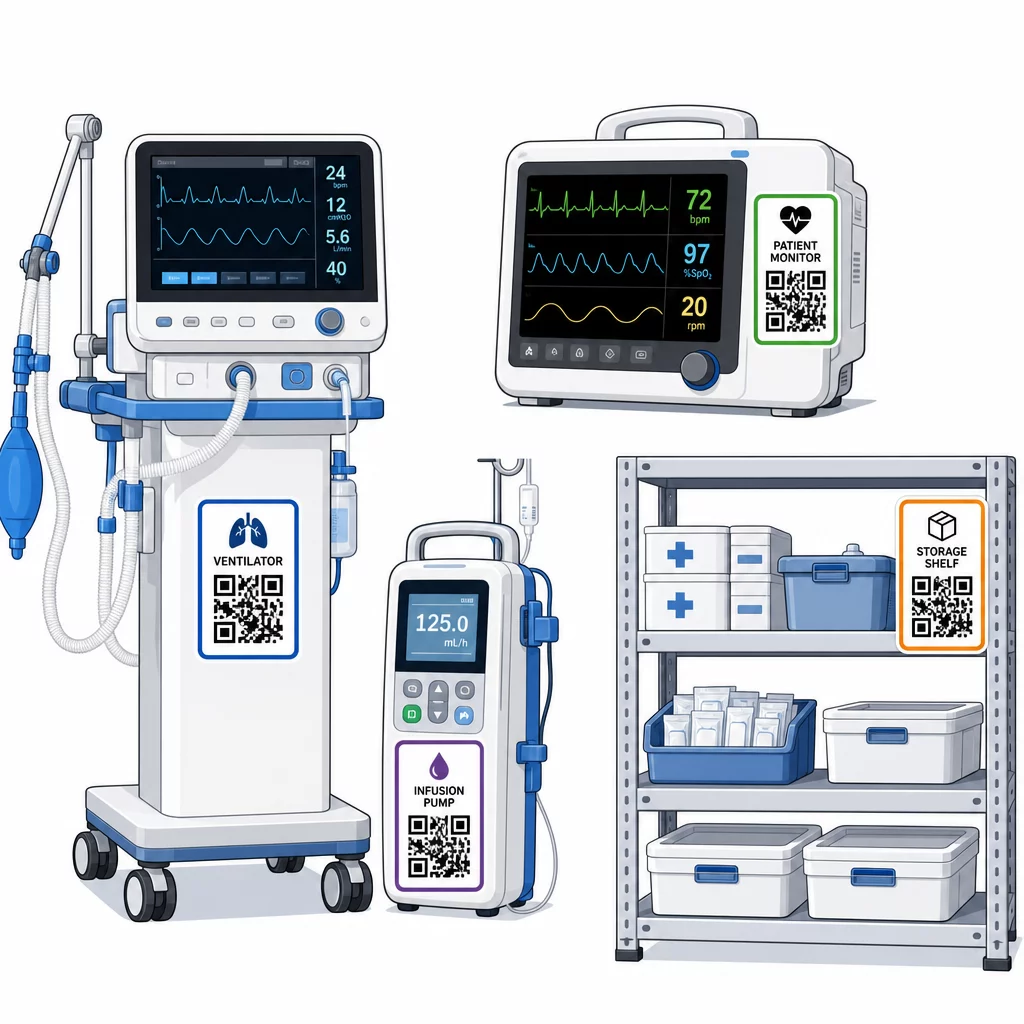
Yerleştirme tutarlılığı önemlidir. Her ekipman kategorisi için standart bir konum seçin: mobil yataklar ve IV direkleri için başlık rayları, duvara monte monitörler için göz hizası, taşınabilir cihazlarda görünür düz bir yüzey. Tutarlılık, personelin yabancı bir cihazdaki kodu bulmak için harcadığı süreyi azaltır.
Yedek parçalar ve bileşenler. Kritik yedek parçaları, envanter seviyelerine, son kullanma tarihlerine ve uyumluluk bilgilerine bağlanan kodlarla etiketleyin. Bu, bileşenlerin hizmet ömrünü aşarak kullanılmasını veya uyumsuz ekipmanlara uygulanmasını önler.
Depolama konumları. Depolama odalarına, ekipman bölmelerine ve malzeme dolaplarına kodlar ekleyin. Personel bir depolama konumu kodunu taradığında, orada ne olması gerektiğini, neyin eksik olduğunu ve varlıkların en son ne zaman taşındığını anında görebilir. Bu, daha hızlı acil durum müdahalesini destekleyen ve fazla sipariş vermeyi azaltan tesis varlıklarının dijital bir haritasını oluşturur.
Fiziksel varlıkları büyük ölçekte etiketleme konusunda ek rehberlik için, sağlık sektörü için QR kodları nihai rehberi birden fazla sağlık hizmeti kullanım durumunda uygulamayı kapsar.
Personeli QR Kod Sistemlerini Etkili Kullanma Konusunda Eğitme
Teknoloji ancak onu kullanan insanlar ona güvenir ve nasıl kullanacaklarını bilirse işe yarar. Rol tabanlı eğitim, her ekip üyesinin iş akışlarıyla alakasız özelliklerle bunalmadan gerçekten ihtiyaç duydukları şeyi öğrenmesini sağlar.
- Hemşireler ve teknisyenler ekipman durumunu kontrol etmek, bakım uyarılarını görüntülemek ve sorunları bildirmek için kodları nasıl tarayacaklarını bilmelidir.
- Biyomedikal mühendisleri bakım kayıtlarını güncellemesi, transferleri yönetmesi ve uyumluluk raporları oluşturması gerekir
- Bakım personeli tamamlanan hizmetleri kaydetmek ve teknik belgelere erişmek için kodları kullanır
- İdari ekipler raporlama, kullanıcı izin yönetimi ve sistem denetimine odaklanır
En yaygın eylemler için (bakım programını kontrol etme, arıza bildirme, kullanım kılavuzuna erişme) hızlı başvuru kartları sağlayın ve bunları tarama istasyonlarının veya ekipman depolama alanlarının yakınına asın.
Her departmanda QR kodu yöneticileri belirleyin: tarama sorunlarını giderebilecek, güncellemeleri onaylayabilecek ve meslektaşlarından gelen soruları yanıtlayabilecek ekip üyeleri. İş akışları geliştikçe personelin sorunları bildirebilmesi veya ek eğitim talep edebilmesi için basit bir geri bildirim kanalı kurun.
Analiz, Güvenlik ve Uyumluluk
Operasyonları İyileştirmek için Tarama Verilerini Kullanma
Her tarama veri üretir. İyi kullanıldığında, bu veriler varlık yönetimini reaktiften prediktife taşır. Analizler size yardımcı olabilir:
- Bir vardiya sırasında hangi cihazların alışılmadık derecede sık tarandığını belirlemek – potansiyel bir performans sorunu sinyali
- Bir departmanda sürekli boşta duran ekipmanı, başka bir departman eksiklik yaşarken tespit etmek, böylece eksiklik bakımı etkilemeden önce yeniden tahsisi sağlamak
- Yeterli bakım geçmişi mevcut olduğunda CMS'nin izin verdiği gibi, kritik olmayan ekipmanlar için servis aralıklarında ayarlamaları haklı çıkaracak bir bakım geçmişi oluşturmak
- Ekipman kullanımını tedarik ve bakım maliyetlerine göre izleyerek yatırım getirisini değerlendirmek
Güvenlik Hususları
Klinik ortamlardaki QR kodları, dikkatli bir şekilde ele alınması gereken güvenlik riskleri taşır. Saldırganlar, meşru kodların üzerine sahte QR etiketleri yerleştirerek personeli veya hastaları kötü amaçlı hedeflere yönlendirebilirler – bu uygulamaya “quishing” denir. Bir QR kodunun hedefi taranmadan önce görünmediği için, kullanıcılar bu değişikliği fark edemeyebilirler.
Bu riskleri azaltmak için:
- Yalnızca yetkili personelin hassas kayıtlara erişebilmesi veya düzenleyebilmesi için rol tabanlı erişim kontrolleri kullanın
- Kodlar, mobil cihazlar ve hastane sistemleri arasında değiş tokuş edilen tüm verilerin HTTPS üzerinden şifrelendiğinden emin olun
- Tarama için kullanılan cihazlarda mobil cihaz yönetimi (MDM) politikalarını – ekran kilitleri, uzaktan silme, kısıtlı uygulama yüklemeleri – uygulayın
- Kapsamlı denetim günlükleri tutun: her tarama ve her veri değişikliği zaman damgalı olmalı ve belirli bir kullanıcıya atfedilmelidir
- PHI (Kişisel Sağlık Bilgileri) söz konusuysa, iş ortağı sözleşmeleri sunan onaylı platformlarla QR kod yönetimini sınırlayın
PHI'yi (Kişisel Sağlık Bilgileri) QR kodunun içine düz metin olarak gömmeyin. Tarayıcısı olan herkes bunu çözebilir. Bunun yerine, görüntülemek için kimlik bilgileri gerektiren, kimliği doğrulanmış, erişim kontrollü kayıtlara bağlantı verin.
QR Kod Etiketlerinin Bakımı ve Denetimi
Rutin Denetimler
Fiziksel etiketler zamanla bozulur. Etiket denetimini düzenli ekipman kontrollerine dahil edin: çizikleri, solmayı, kenarların soyulmasını ve dezenfektanlardan kaynaklanan kimyasal aşınmayı kontrol edin. Sık sterilizasyona tabi tutulan cihazlar – cerrahi aletler, yoğun bakım monitörleri – daha sık kontrol edilmelidir. Bir etiket hasar görmüşse ve kod artık düzgün taranmıyorsa, kritik bir anda arızalanmadan önce derhal değiştirilmesi için işaretleyin.
Etiketleri sadece üretici spesifikasyonlarına göre değil, kendi gerçek temizlik protokollerinize göre test edin. Belirli bir dezenfektan sürekli olarak erken etiket arızasına neden oluyorsa, ya daha dayanıklı bir malzemeye geçin ya da enfeksiyon kontrol standartlarını korurken etiketli yüzeyler için temizlik yaklaşımını ayarlayın.
Etiket ömrünü ekipman kategorisine göre takip edin. Yoğun bakım ünitenizdeki ventilatör etiketleri genellikle altı ayda bir değiştirilmesi gerekiyorsa, arızaları beklemek yerine bu değişimi proaktif olarak planlayın.
Envanter Denetimleri
Fiziksel etiket bütünlüğü ve veri doğruluğu, ayrı kontroller gerektiren farklı sorunlardır. Ekipman devir hızının yüksek olduğu yoğun bakım üniteleri, acil servisler ve ameliyathanelerde daha sık nokta kontrolleri ile en az üç ayda bir envanter denetimleri yapın.
Yaygın denetim bulguları arasında yanlış konum verileri, bir servis ziyaretinden sonra güncellenmemiş bakım kayıtları ve sistemde hala listelenen ancak transfer edilmiş veya hurdaya ayrılmış varlıklar yer alır. Tutarsızlıklar bulunduğunda, kayıtları derhal güncelleyin ve düzeltmeyi bir zaman damgası ile belgeleyin.
Kapsamlı denetim dokümantasyonu iki amaca hizmet eder: düzenleyici denetimleri destekler ve ek eğitim veya süreç ayarlamalarıyla giderilebilecek (örneğin tarama protokollerini sürekli atlayan bir departman gibi) sistemik sorunları ortaya çıkarır.
Başlarken
QR kod takibi, kademeli olarak tanıtıldığında en iyi sonucu verir. En yüksek öncelikli ekipmanlarınızla – bakım eksikliği veya konum boşluğunun en büyük hasta güvenliği riskini oluşturduğu cihazlarla – başlayın ve ekibiniz sistemle aşinalık kazandıkça kapsamı genişletin.
Öncelikle etiketleri doğru yapmaya odaklanın: dayanıklı malzemeler, doğru boyutlandırma, tutarlı yerleşim ve gerçek çalışma koşullarınız altında test edilmiş taranabilirlik. Fiziksel katman sağlamlaştığında, CMMS ve envanter sistemlerinizle entegre edin, ardından analitik ve otomatik uyarıları ekleyin.
Kullan Ücretsiz QR Kod Oluşturucu etiketleri prototiplemek ve tam bir dağıtıma geçmeden önce iş akışlarını test etmek için ve şunu kullanın QR Kod Okuyucu kodların personelinizin her gün kullandığı cihazlarda güvenilir bir şekilde tarandığını doğrulamak için.
Dinamik QR Kodları ile Tıbbi Ekipman Takibine Başlayın Tesisinizdeki her varlık için şununla düzenlenebilir, takip edilebilir kodlar oluşturun Dinamik QR Kod Oluşturucu – kayıtları gerçek zamanlı olarak güncelleyin, yeniden yazdırmaya gerek yok.
Sıkça sorulan sorular
Statik bir QR kodu, basıldıktan sonra değiştirilemeyen sabit bir hedefi kodlar. Dinamik bir QR kodu, herhangi bir zamanda güncellenebilen bir yönlendirme bağlantısına işaret eder – böylece fiziksel etiket cihazda kalırken, bağlantılı bakım kayıtları, kalibrasyon verileri veya dokümantasyon dijital olarak revize edilebilir. Tıbbi ekipmanlar için dinamik kodlar şiddetle tercih edilir, çünkü cihaz kayıtları sık sık değişir ve her bilgi güncellendiğinde etiketleri yeniden basmak pratik olmaz ve maliyetli olurdu.
CMS, kritik tıbbi ekipmanların üretici tarafından önerilen programlara göre bakımının yapılmasını ve tüm bakımların nitelikli personel tarafından gerçekleştirilmesini ve eksiksiz bir şekilde belgelenmesini gerektirir. QR kodları, her taramanın, her bakım güncellemesinin ve her kayıt değişikliğinin zaman damgalı bir denetim izi oluşturarak bunu destekler. Bir müfettiş belirli bir cihazın bakım geçmişini sorduğunda, personel kağıt dosyaları veya birden fazla bağlantısız sistemi aramak yerine tek bir tarama ile bunu sunabilir.
Başlıca önlemler arasında, QR bağlantılı sistemler aracılığıyla değiş tokuş edilen tüm veriler için şifreli HTTPS bağlantıları kullanmak, personelin yalnızca kendi rolleriyle ilgili bilgileri görmesini sağlayacak rol tabanlı erişim kontrolleri uygulamak, korunan sağlık bilgilerini asla QR kodunun içine düz metin olarak gömmemek, tarama cihazlarında mobil cihaz yönetimi politikalarını uygulamak ve kurcalanma veya meşru kodların üzerine yerleştirilmiş sahte etiketleri kontrol etmek için QR kodu etiketlerinin düzenli denetimlerini yapmak yer alır. Kullanılan herhangi bir üçüncü taraf QR platformu, KSB (Korunan Sağlık Bilgileri) işliyorsa bir iş ortağı sözleşmesine sahip olmalıdır.