Ищете практические способы модернизировать ваш гольф-объект? Бумажные процессы, устаревшие вывески и упущенные возможности для взаимодействия стоят гольф-клубам времени и доходов каждый сезон. Это руководство проведет вас через наиболее эффективные способы использования QR-кодов на вашем объекте – от цифровых счетных карточек и маркеров лунок до платежей и обратной связи с игроками.
Почему гольф-клубы внедряют QR-коды
Участие в гольфе в США достигло рекордного уровня в 48,1 миллиона участников в 2025 году, увеличившись на 50% за последнее десятилетие. Приблизительно 16 000 полей, конкурирующих за этот спрос, опыт игрока стал ключевым отличием – и QR-коды предлагают недорогой, но эффективный способ его улучшения.
QR-коды работают путем кодирования URL-адреса, документа или другого назначения в сканируемое изображение. Когда игрок наводит камеру своего смартфона на код, он мгновенно открывает любой связанный вами контент – для большинства современных устройств загрузка приложения не требуется. Гольф-объекты могут размещать эти коды на печатных материалах, вывесках, гольф-карах и маркерах лунок, чтобы связать физическое поле с цифровыми ресурсами.
Настоящее операционное преимущество исходит от динамические QR-коды – кодов, которые позволяют обновлять связанный контент в любое время без перепечатки физического кода. Если ссылка на вашу счетную карточку меняется, ваше меню обновляется или карта поля пересматривается, вы просто меняете назначение в своей панели управления. Для полного объяснения того, как это работает, см. различий между статическими и динамическими QR-кодами.
Цифровые счетные карточки через QR-код
Одно из самых практичных применений для любого гольф-объекта – замена бумажных счетных карточек на цифровые версии, доступные по QR-коду.
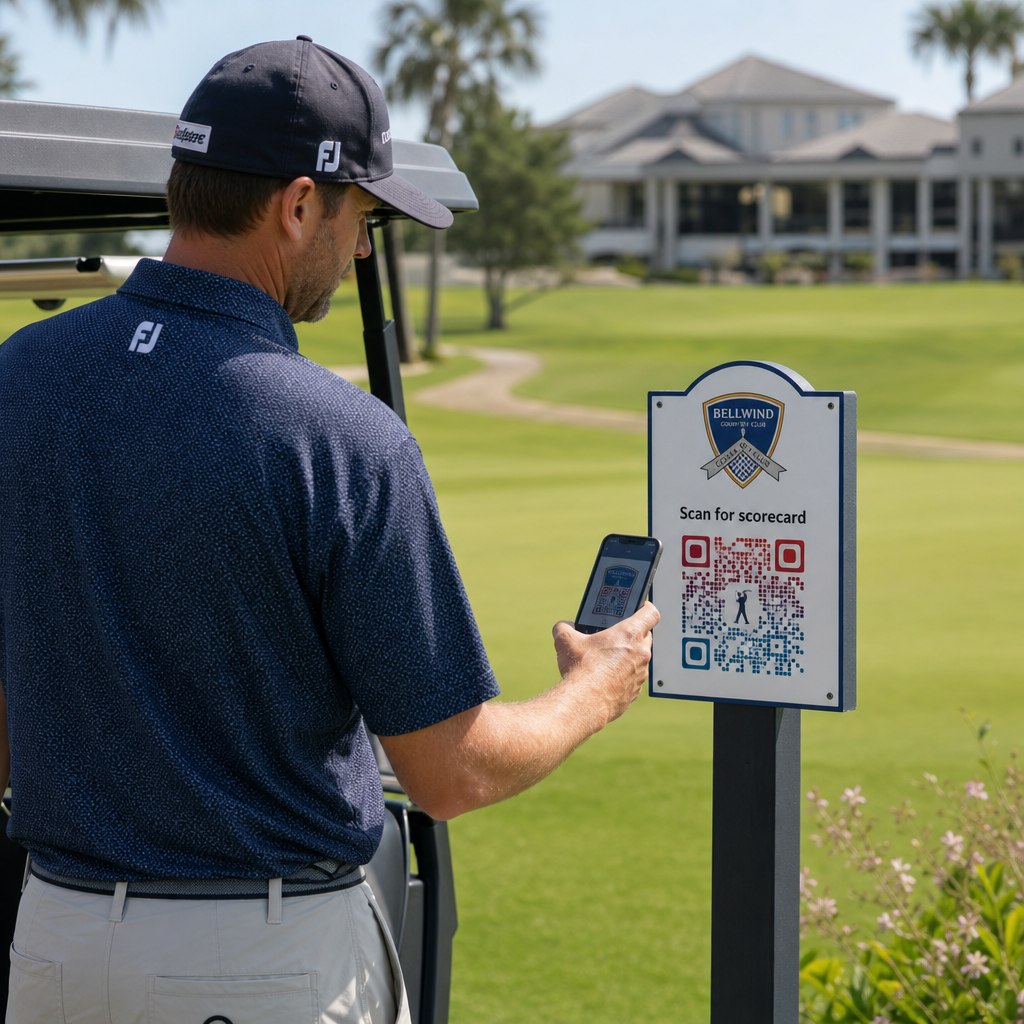
Цифровая счетная карточка – это любой мобильный интерфейс, который позволяет игрокам записывать свой счет по лункам на своем смартфоне. Игроки сканируют QR-код на первой лунке, в про-шопе или на гольф-каре, и счетная карточка открывается прямо в их браузере – без бумаги, без карандаша, без повторной раздачи после раундов.
Правила гольфа USGA подтверждают, что оценочная карточка может быть в любой бумажной или электронной форме, одобренной Комитетом, при условии, что она позволяет вводить очки за каждую лунку, заверяется игроком и маркером и правильно идентифицирует каждую лунку. Комитеты могут даже требовать от игроков использовать электронную оценочную карточку вместо бумажной. Это дает вашему объекту полную гибкость для официального перехода как для соревнований, так и для обычных раундов.
С операционной точки зрения, цифровые оценочные карточки уменьшают послераундовую бумажную волокиту, дают персоналу видимость хода раунда в реальном времени и пополняют живые таблицы лидеров во время турниров. Игроки получают выгоду от встроенного отслеживания очков, истории раундов и игровой статистики, которые бумага никогда не предлагала.
Чтобы настроить это, привяжите URL вашей платформы цифровых оценочных карточек к QR-кода ссылки и разместите этот код на:
- Вывески на первом ти
- Гольф-кары (наклейки на карах или ламинированные карточки)
- Печатные оценочные карточки в качестве дополнения
- Стойка регистрации в про-шопе
Использование динамического QR-кода здесь особенно практично – если вы меняете поставщика оценочных карточек или обновляете URL, вы обновляете ссылку в своей панели управления, и каждый напечатанный код продолжает работать.
Переход на цифровые оценочные карточки без перепечатки Создайте динамический QR-код для ссылки на вашу оценочную карточку и обновляйте пункт назначения в любое время, не затрагивая ваши печатные материалы. Попробуйте Генератор QR-кодов бесплатно в течение 14 дней.
QR-коды маркеров ти и информации о лунке
QR-коды на маркерах ти дают игрокам мгновенный доступ к схемам лунок, таблицам расстояний, местным правилам и советам по игре – контенту, который в противном случае потребовал бы печатных вкладышей или дисплеев в клубном доме.
Распространенный подход заключается в том, чтобы привязать QR-код каждого маркера ти к мобильному PDF-файлу или целевой странице, специфичной для этой лунки. Игроки сканируют на ти, видят схему лунки, понимают оптимальную линию и играют быстрее и увереннее. Это особенно ценно для посетителей, впервые проходящих незнакомое поле.
Вы можете создать их, используя QR код на пдф файл если ваши руководства по лункам являются PDF-документами, или генератор QR-кодов ссылок если вы размещаете контент на веб-странице или целевой странице. Операторы, ориентированные на устойчивое развитие, также использовали QR-коды на маркерах ти для получения информации о местных правилах по принципу “Сканируй и учись”, заменяя печатные листы правил и сокращая административное время на поле.
Меню про-шопа и клубного дома
Если ваш клубный дом или кафе на повороте подает еду и напитки, меню с QR-кодом устраняет затраты и хлопоты по перепечатке физических меню всякий раз, когда меняются позиции или цены. Игроки сканируют код у бара, окна гаража для гольф-каров или за столом в обеденной зоне и просматривают актуальное цифровое меню. Когда ваша кухня меняет предложения на сезон, вы обновляете связанный контент – а не сам QR-код.
Pageloot’s Создать QR код меню поддерживает как PDF-меню, так и веб-меню, и позволяет добавить логотип вашего клуба и фирменные цвета, чтобы код соответствовал визуальной идентичности вашего объекта. Для размещения QR-код на настольная палатка в обеденной зоне является одним из самых эффективных форматов – игроки видят его на уровне глаз и имеют естественный момент для сканирования, сидя.
Бесконтактные платежи на поле
QR-коды могут упростить оплату в нескольких точках контакта: про-шоп, тележка с напитками, тренировочная зона и регистрация на турнир. Игроки сканируют платежный QR-код, связанный с вашим платежным процессором, и завершают транзакцию на своем телефоне, не используя наличные или карточный терминал.
Вы можете создать QR-код, связанный с платежом, используя Создать QR код для оплаты PayPal или стандартный QR-кода ссылки указывающий на вашу платежную страницу. Они хорошо работают на тележках с напитками, витринах с товарами и везде, где физический терминал непрактичен.
Навигация по полю и QR-коды местоположения
Для крупных объектов игрокам часто нужна помощь в поиске конкретных удобств – тренировочная зона, дом на полпути, спутниковый про-шоп или вход в клубный дом с парковки. А QR-код Google Maps открывает местоположение вашего объекта или конкретную точку на территории непосредственно в приложении карт игрока одним сканированием.
Они полезны на:
- Указатели направления у входов на поле
- Приветственные пакеты для турниров
- Контактные страницы веб-сайта для игроков, перемещающихся извне
Доступ к Wi-Fi для игроков и персонала
Предлагаете Wi-Fi в клубном доме, раздевалке или обеденной зоне? QR-код Wi-Fi позволяет игрокам мгновенно подключиться без необходимости персоналу диктовать пароль. Игроки сканируют код и подключаются автоматически – ручной ввод не требуется. Вы можете создать его, используя генератор QR-кодов введя имя вашей сети, тип безопасности и пароль, затем разместив полученный код в клубном доме или зоне подготовки тележек.
Отзывы игроков и отзывы Google
После раунда игроки часто настроены оставить отзыв или заполнить форму обратной связи – но трение убивает доведение до конца. QR-код на карточке счета, чеке или вывеске у выхода полностью устраняет это трение.
- A QR-кода отзывов Google отправляет игроков непосредственно на страницу отзывов вашего Google Business, делая это действием в одно касание.
- A QR-код для обратной связи с клиентами может ссылаться на опрос, где игроки оценивают темп игры, состояние поля, персонал и удобства.
Разместите эти коды там, где игроки естественно останавливаются после завершения – стол счетчика, зона сдачи сумок, бар – и сопроводите их простым вопросом, например: “Как прошел ваш раунд сегодня?”
Вывески, маркетинг и продвижение мероприятий
QR-коды работают практически на любой печатной поверхности вашего объекта. Вывески и листовки для входа на турнир могут ссылаться непосредственно на страницу онлайн-регистрации. Баннеры клубного дома и тренировочного поля могут указывать на целевую страницу запроса членства. Спонсорские вывески на ти-боксах могут ссылаться на веб-сайт спонсора, делая спонсорские пакеты более измеримыми и ценными для партнеров. Сезонные акции особенно легко управлять – обновляйте место назначения размещенного QR-кода при изменении предложений, и новая печать не требуется.
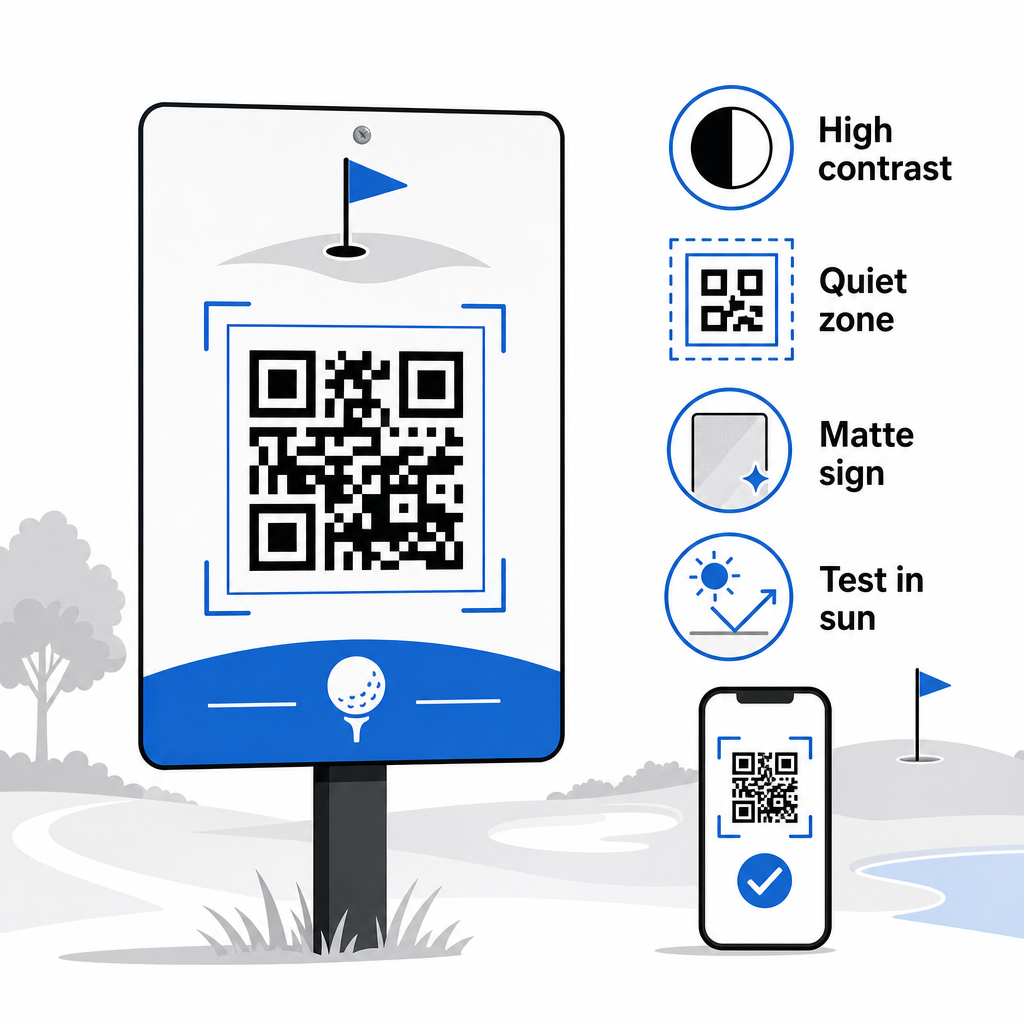
Для наружных вывесок следуйте рекомендациям по размещению QR-кодов и размещайте коды на высоте от 3,5 до 5,5 футов от земли на уровне глаз, с чистым, высококонтрастным фоном. Коды, размещенные на отражающих или изогнутых поверхностях, плохо сканируются, поэтому по возможности выбирайте плоские подложки с матовым покрытием.
Отслеживание эффективности QR-кодов
Одно преимущество, которое никогда не предлагали бумажные вывески, — это измеримое вовлечение. Динамические QR-коды записывают каждое сканирование с данными, включая местоположение, тип устройства, время суток, общее количество сканирований и уникальные сканирования. Это показывает, какие ти-боксы получают наибольшую активность по карточкам счета, какие станции меню генерируют наибольшее количество заказов еды и какие маркетинговые материалы генерируют реальный трафик.
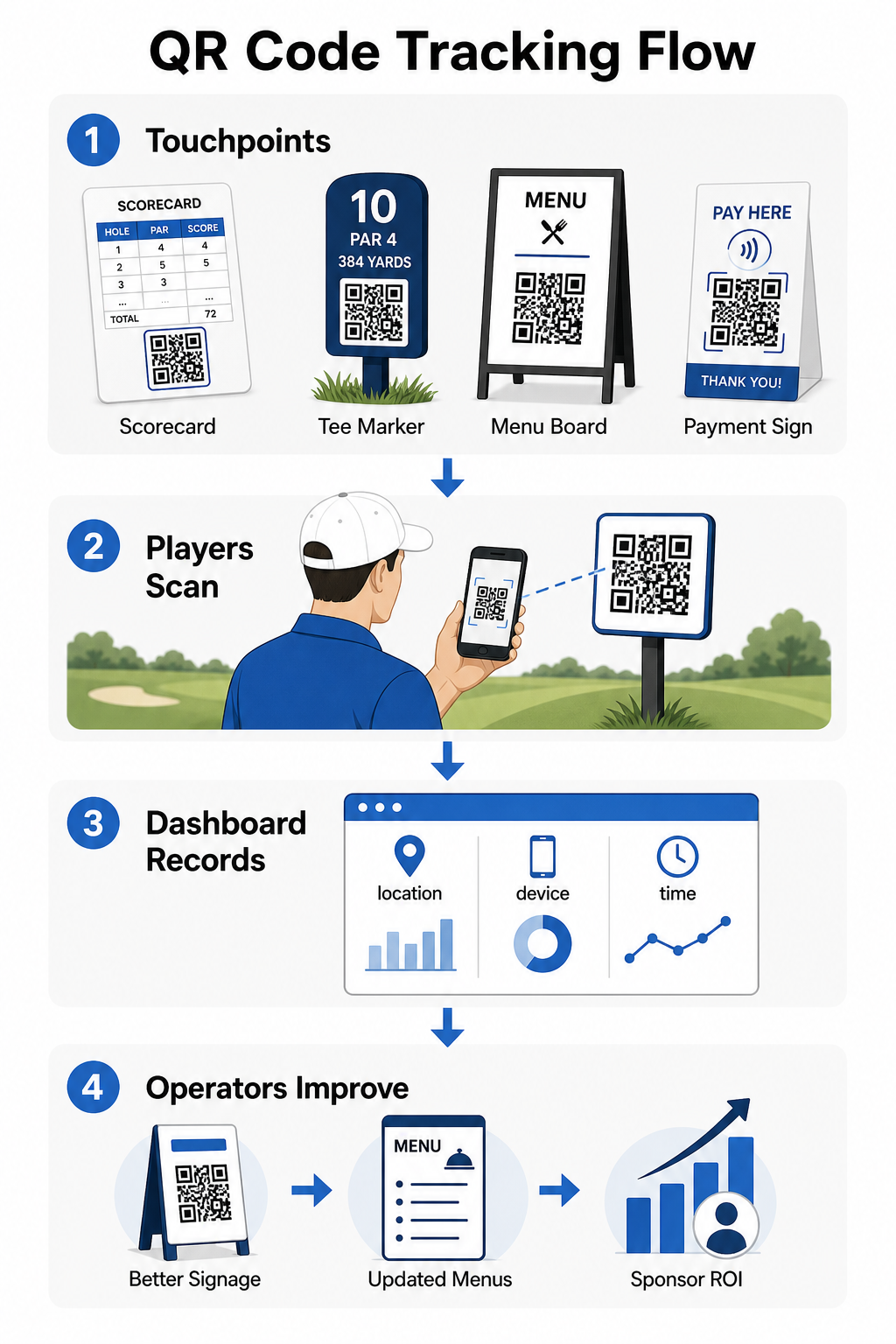
Вы можете использовать эти данные для уточнения размещения, улучшения неэффективных вывесок и демонстрации рентабельности инвестиций в спонсорские активации. Узнайте больше о как работает отслеживание QR-кодов и какие метрики отслеживать на вашем объекте.
Посмотрите, где именно взаимодействуют игроки Отслеживайте сканирования по местоположению, устройству и времени по всему вашему объекту с одной панели управления. Начните с решений Pageloot для QR-кодов и получите доступ к аналитике в реальном времени по каждому развернутому вами коду.
Основы дизайна и размещения для гольф-среды
Перед печатью QR-кодов для использования на открытом воздухе или в местах с высокой проходимостью, несколько технических соображений имеют большое значение для реальной производительности.
Контраст является наиболее критическим фактором. Используйте темный цвет модуля на светлом фоне и стремитесь к коэффициенту контрастности не менее 4:1 между темным узором и его фоном. Это обеспечивает надежное сканирование в различных условиях наружного освещения, от пасмурного утра до яркого послеполуденного солнца.
Размер должен соответствовать ожидаемому расстоянию сканирования. Для маркеров ти или кодов, установленных на тележках, сканируемых с расстояния вытянутой руки, 2 × 2 см — это минимальная базовая линия, но для использования на открытом воздухе всегда лучше больше. Практическое правило: на каждые 10 см ожидаемого расстояния сканирования увеличивайте ширину кода на 1 см.
Тихая зона относится к четкому белому полю вокруг QR-кода. Загромождение кода текстом или графикой, расположенными непосредственно рядом, приведет к сбоям сканирования, поэтому сохраняйте эту границу со всех сторон.
Логотипы могут улучшить Рекомендации Pageloot по читаемости QR-кодов.
Тестирование всегда должны проводиться перед массовой печатью. Сканируйте каждый код на нескольких устройствах и в реальных условиях – при ярком солнечном свете на улице, в условиях низкой освещенности в помещении и при бликах – чтобы убедиться, что он работает должным образом. Узнайте больше о как эффективно использовать QR-коды перед вашим первым развертыванием.
QR-коды предоставляют операторам гольф-клубов практичный, обновляемый способ связать каждую физическую точку контакта на поле с полезным цифровым контентом. Наиболее эффективные объекты используют их постоянно на табло, вывесках, в меню и для взаимодействия с игроками – и отслеживают производительность для постоянного улучшения. Начните с одного или двух высокоэффективных вариантов использования, измерьте результаты и расширяйтесь. Посетите Pageloot’s генератор QR-кодов чтобы создать свой первый код, или изучите отраслевых решений для QR-кодов чтобы найти подходящий формат для вашего объекта.
Часто задаваемые вопросы
Да. Правила гольфа USGA гласят, что оценочная карточка может быть в любой бумажной или электронной форме, утвержденной Комитетом, при условии, что она позволяет вводить очки за каждую лунку, быть заверенной игроком и маркером, и правильно идентифицированной для каждой лунки. Комитеты могут даже требовать электронные оценочные карточки вместо бумажных. Всегда подтверждайте одобрение с вашим турнирным комитетом перед использованием.
Если вы используете динамический QR-код, вы обновляете целевой URL в вашей панели управления, и существующие напечатанные коды автоматически перенаправляются на новый контент – не требуется повторная печать маркеров лунок, наклеек для тележек или вывесок. Статические QR-коды кодируют URL постоянно, поэтому любое изменение ссылки требует изготовления новых печатных материалов.
Используйте высококонтрастные цвета – темные модули на светлом фоне с коэффициентом контрастности не менее 4:1. Размеры кодов для ожидаемого расстояния сканирования, используя правило 10:1: 1 см ширины кода на каждые 10 см расстояния. Выбирайте плоские материалы с матовым покрытием, чтобы избежать бликов, и тестируйте каждый код при фактическом наружном освещении перед развертыванием. Полные рекомендации по читаемости QR-кодов охватывают дополнительные детали по размеру, контрастности и тихим зонам.