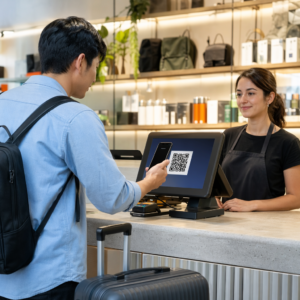
Adakah pelanggan melangkau proses pendaftaran produk anda kerana ia terasa seperti terlalu banyak kerja? Kadar pendaftaran yang rendah bermakna data pemilikan tidak lengkap, respons penarikan balik yang lebih perlahan, dan peluang yang terlepas untuk membina hubungan selepas jualan. Halaman ini menunjukkan kepada anda bagaimana kod QR menghilangkan geseran itu dan menjadikan pendaftaran sebagai imbasan yang cepat dan lancar.
Mengapa Pendaftaran Produk Tradisional Gagal
Kad waranti kertas mempunyai kadar penyelesaian yang terkenal rendah. Pelanggan menerima kad, mengetepikannya, dan jarang menghantarnya kembali. Malah borang berasaskan web hanya sedikit meningkatkan keadaan jika pelanggan perlu menaip URL yang panjang secara manual atau mencari melalui pembungkusan untuk mencari pautan pendaftaran.
Hasilnya adalah jurang data. Anda menghantar produk tetapi mempunyai sedikit keterlihatan tentang siapa yang memilikinya. Apabila isu keselamatan atau penarikan balik timbul, pemberitahuan langsung menjadi sukar atau mustahil. Bagi pengeluar produk bayi atau kanak-kanak tahan lama, ini bukan sekadar masalah perniagaan – 16 CFR Bahagian 1130 menghendaki penyimpanan rekod maklumat hubungan pengguna dan mewajibkan pilihan pendaftaran elektronik secara khusus kerana CPSC mengiktiraf bahawa kadar respons penarikan balik adalah cabaran yang didokumenkan.
Walaupun di luar kategori terkawal, kos operasi pendaftaran yang rendah adalah nyata: penipuan waranti lebih sukar dikesan, permintaan perkhidmatan lebih sukar disahkan, dan data kitaran hayat produk kekal tipis.
Bagaimana Kod QR Menyelesaikan Masalah Pendaftaran
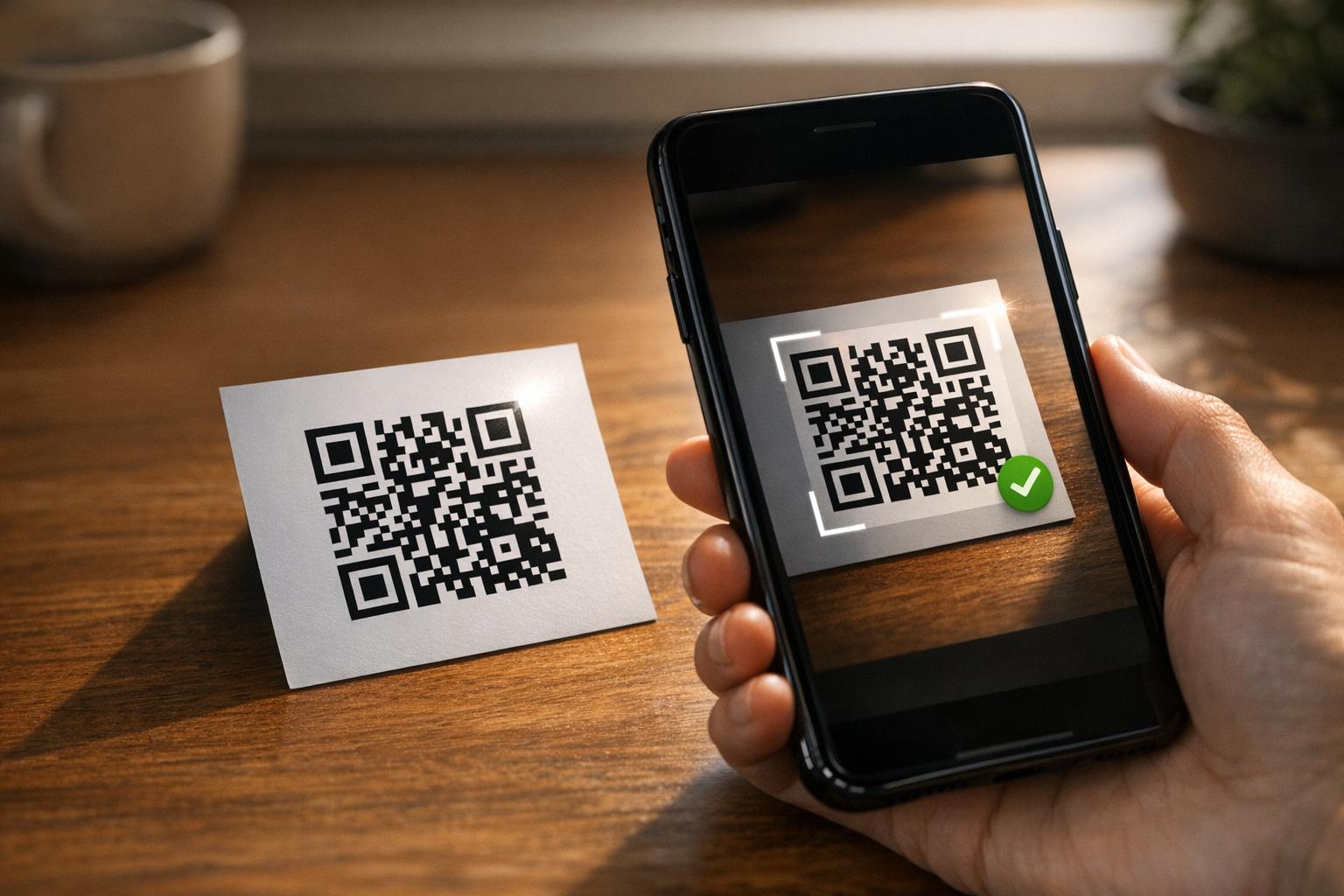
Kod QR yang dicetak pada pembungkusan, kad sisipan, atau produk itu sendiri memberikan pelanggan laluan tanpa geseran untuk mendaftar. Mereka membuka kamera telefon mereka, mengimbas kod, dan mendarat terus pada borang pendaftaran atau halaman pendaratan berjenama – tiada penaipan, tiada pencarian, tiada mel.
Sebaik sahaja mereka menghantar borang, anda menerima data pemilikan berstruktur: nama, maklumat hubungan, tarikh pembelian, dan sebarang medan tersuai yang anda konfigurasikan. Maklumat itu disalurkan terus ke dalam rekod anda tanpa kemasukan data manual di kedua-dua belah pihak.
Pendekatan ini sejajar dengan anjakan yang lebih luas dalam pembungkusan produk ke arah menghubungkan item fizikal dengan kandungan digital. Pengiktirafan seluruh industri bahawa kod QR pada pembungkusan boleh berfungsi sebagai gerbang berterusan kepada maklumat produk, butiran waranti, dan pendaftaran mencerminkan fungsi yang melangkaui apa yang boleh dibawa oleh kod bar tradisional. Kod QR pada pembungkusan produk boleh membawa pautan pendaftaran ini terus ke tangan pelanggan sebaik sahaja mereka membuka kotak.
Bersedia untuk Menambah Kod QR Pendaftaran pada Produk Anda? Cipta kod QR yang boleh dijejak, boleh diedit untuk pembungkusan atau sisipan anda menggunakan Penjana dynamic QR code. Kemas kini destinasi borang yang dipautkan pada bila-bila masa – tiada pencetakan semula diperlukan.
Memilih Jenis Kod QR yang Tepat untuk Pendaftaran
Tidak semua kod QR berfungsi dengan baik untuk aliran kerja pendaftaran waranti. Perbezaan kritikal adalah antara kod statik dan dinamik.
A kod QR statik mengekod URL tetap secara langsung ke dalam coraknya. Setelah dicetak, anda tidak boleh mengubah ke mana ia menunjuk. Jika URL borang pendaftaran anda berubah, kod pada ribuan unit menjadi tidak berguna.
A kod QR dinamik mengekod URL pengalihan pendek yang anda kawal dari papan pemuka. Anda boleh mengemas kini destinasi pada bila-bila masa tanpa menyentuh kod yang dicetak. Ini penting untuk pendaftaran waranti kerana borang pendaftaran dipindahkan antara platform, halaman bermusim atau khusus barisan produk ditukar, dan anda mungkin perlu mengalihkan imbasan ke halaman notis semasa kemas kini produk atau penarikan balik.
Untuk pendaftaran produk, kod QR dinamik adalah lalai praktikal. Keupayaan untuk mengedit destinasi selepas mencetak – digabungkan dengan analitik imbasan – menjadikannya jauh lebih berguna untuk pengumpulan data pemilikan berterusan. Anda boleh meneroka pecahan penuh keupayaan dalam perbandingan kod QR statik vs. dinamik.
Menyiapkan Aliran Kerja Pendaftaran Kod QR
Membina sistem pendaftaran dan pengaktifan waranti yang didorong QR adalah lebih mudah daripada yang disangka. Langkah-langkah berikut merangkumi persediaan lengkap dari pemilihan borang hingga penjejakan selepas pelancaran.
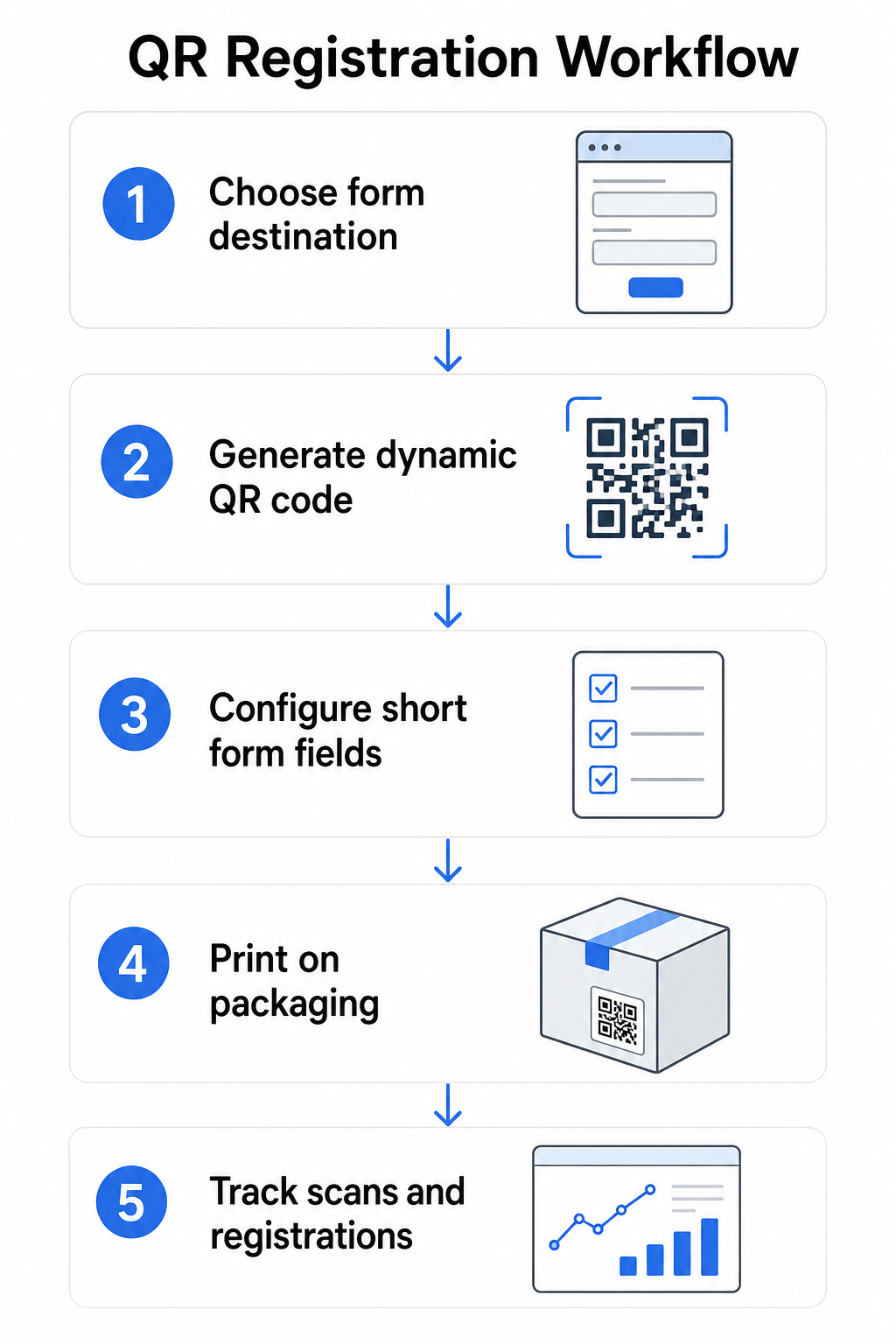
Langkah 1: Pilih destinasi borang anda
Anda mempunyai dua pilihan utama untuk apa yang dipautkan oleh kod QR. A Google Form cepat disediakan dan berfungsi dengan baik untuk mengumpul medan berstruktur. Gunakan Cara buat QR code untuk Google Form untuk menukar pautan kongsi borang anda menjadi kod yang boleh diimbas.
A halaman pendaratan berjenama adalah halaman yang dioptimumkan untuk mudah alih yang membentangkan borang pendaftaran anda bersama butiran produk, terma waranti, dan visual jenama. Pageloot’s Ciri Halaman Pendaratan membolehkan anda membina dan mengemas kini halaman ini tanpa bantuan teknikal. Pilihan halaman pendaratan cenderung untuk berprestasi lebih baik untuk pengalaman pelanggan kerana anda mengawal reka bentuk penuh, boleh memaparkan terma waranti dengan jelas, dan boleh menyertakan pelbagai pautan atau seruan bertindak – seperti pautan ke manual produk bersama borang pendaftaran.
Langkah 2: Jana kod QR dinamik
Cipta kod QR menggunakan Pageloot Penjana dynamic QR code dan halakannya ke destinasi pilihan anda. Tambah logo jenama dan warna anda untuk menjadikan kod itu mudah dikenali pada pembungkusan. Kekalkan logo dalam 30% daripada kawasan kod untuk mengekalkan kebolehimbasan, dan gunakan tahap pembetulan ralat yang tinggi (Q atau H) apabila menambah penjenamaan visual.
Langkah 3: Konfigurasi medan borang pendaftaran
Kumpul apa yang anda benar-benar perlukan untuk tujuan waranti dan pemilikan. Medan biasa termasuk:
- Nama pelanggan dan alamat e-mel
- Tarikh pembelian
- Tempat pembelian (peruncit atau saluran)
- Nombor siri produk (jika tidak diisi terlebih dahulu)
- Pilihan: maklum balas produk atau kaedah hubungan pilihan
Peminimuman data bukan sahaja amalan terbaik privasi – ia juga meningkatkan kadar penyiapan. Borang yang lebih pendek mendapat lebih banyak penyerahan.
Langkah 4: Letakkan kod QR pada pembungkusan atau sisipan
Untuk pengimbasan yang boleh dipercayai, penempatan pada pembungkusan produk mengikut beberapa prinsip yang konsisten:
- Saiz kod sekurang-kurangnya 1 inci (2.5 cm) lebar
- Cetak pada permukaan rata, licin – elakkan lipatan, jahitan, atau kawasan melengkung
- Gunakan kontras tinggi (hitam pada putih berfungsi paling baik; kekalkan nisbah kontras sekurang-kurangnya 3:1)
- Tinggalkan zon senyap yang jelas – margin kosong – di sekeliling kod
- Uji kod yang dicetak pada substrat sebenar sebelum memuktamadkan larian pengeluaran
Untuk melihat lebih mendalam pertimbangan khusus label, lihat panduan kod QR pada label produk dan cara mencetak kod QR pada label.
Langkah 5: Jejaki pendaftaran dan data imbasan
Setelah kod itu aktif, papan pemuka Pageloot anda menunjukkan kiraan imbasan, lokasi geografi imbasan, jenis peranti, dan masa dalam sehari. Ini memberitahu anda bukan sahaja berapa ramai pelanggan yang mendaftar, tetapi bila dan di mana mereka terlibat – berguna untuk mengenal pasti sama ada penempatan pembungkusan berfungsi dan sama ada pasaran atau saluran tertentu mempunyai kadar pendaftaran yang lebih rendah daripada yang lain.
Lihat Siapa yang Mendaftar – dan Siapa yang Tidak Gunakan Penjejakan imbasan kod QR untuk memantau penglibatan pendaftaran mengikut wilayah, peranti, dan masa. Kenal pasti penurunan awal dan kemas kini destinasi borang anda tanpa mencetak semula.
Data Apa yang Boleh Anda Kumpul – dan Apa yang Patut Anda Kumpul
Kod QR menyokong dua lapisan pengumpulan data yang berbeza, dan memahami perbezaan itu membantu anda menyediakan program anda dengan betul dari awal.
Data peringkat imbasan dikumpul secara automatik apabila seseorang mengimbas kod QR dinamik. Ini termasuk kiraan imbasan, lokasi imbasan (negara dan wilayah), jenis peranti (iOS atau Android), dan cap masa. Data ini dikumpul tanpa pelanggan memberikan sebarang maklumat peribadi – ia mencerminkan penglibatan dengan kod itu sendiri. Untuk pecahan penuh tentang apa yang ditangkap, lihat data apa yang dikumpul oleh kod QR dinamik.
Data pendaftaran – nama, alamat e-mel, tarikh pembelian, dan butiran hubungan – dikumpul hanya apabila pelanggan dengan rela hati melengkapkan borang pada halaman yang dipautkan. Ini adalah data pihak pertama, disediakan secara langsung dan dengan kesedaran oleh pelanggan. Platform Pageloot menyokong model ini: pelanggan berkongsi maklumat melalui borang atau halaman pendaratan selepas mengimbas, memastikan pengumpulan data berasaskan persetujuan dan telus.
Untuk tujuan waranti dan pemilikan, anda memerlukan data pendaftaran. Untuk memahami sama ada program pendaftaran anda berfungsi pada skala, data peringkat imbasan menyediakan konteks yang berharga.
Pertimbangan Privasi dan Undang-undang
Pengumpulan data pendaftaran produk membawa obligasi pematuhan yang berbeza mengikut kategori produk dan bidang kuasa.
Untuk produk bayi atau kanak-kanak tahan lama dikawal selia di bawah 16 CFR Bahagian 1130, CPSC menghendaki anda:
- Sediakan kad pendaftaran fizikal berbayar pos dengan setiap unit
- Tawarkan pilihan pendaftaran elektronik (laman web atau e-mel) sebagai tambahan – bukan pengganti – untuk kad fizikal
- Kekalkan rekod nama pendaftar, alamat, dan alamat e-mel
- Gunakan data pendaftaran hanya untuk amaran keselamatan dan penarikan balik, bukan untuk tujuan pemasaran
Kod QR yang memaut ke borang pendaftaran dalam talian anda memenuhi keperluan pendaftaran elektronik di bawah rangka kerja ini, tetapi ia tidak menggantikan keperluan kad fizikal untuk produk yang dilindungi.
Untuk pendaftaran waranti secara lebih meluas, Akta Waranti Magnuson-Moss membezakan antara waranti penuh dan terhad. Produk dengan waranti “penuh” tidak boleh memerlukan pendaftaran sebagai syarat perlindungan. Produk dengan waranti “terhad” mungkin memerlukan pendaftaran hanya jika keperluan itu didedahkan dengan jelas sebelum pembelian. Sebarang syarat pendaftaran mesti muncul dalam terma waranti yang boleh diakses pengguna sebelum jualan.
Untuk privasi data, perniagaan A.S. yang mengumpul maklumat peribadi melalui borang pendaftaran dalam talian harus menyediakan notis privasi pada atau sebelum titik pengumpulan yang menerangkan data apa yang dikumpul, mengapa, dan berapa lama ia akan disimpan. Di bawah CPRA California, pengumpulan dan penyimpanan mesti terhad kepada apa yang munasabah diperlukan untuk tujuan yang didedahkan. Jika produk anda mungkin sampai kepada keluarga dengan kanak-kanak di bawah 13 tahun, pastikan borang dalam talian anda mematuhi keperluan COPPA untuk persetujuan ibu bapa yang boleh disahkan sebelum mengumpul data peribadi daripada kumpulan umur itu.
Untuk butiran lanjut mengenai kewajipan privasi data kod QR merentasi bidang kuasa, lihat Undang-undang Privasi Kod QR: Peraturan Utama.
Menggunakan Kod QR Merentasi Kitaran Hayat Produk
Pendaftaran waranti adalah satu bahagian daripada peluang yang lebih luas. Kod QR yang sama pada produk anda boleh memenuhi pelbagai fungsi merentasi keseluruhan perjalanan pemilikan:
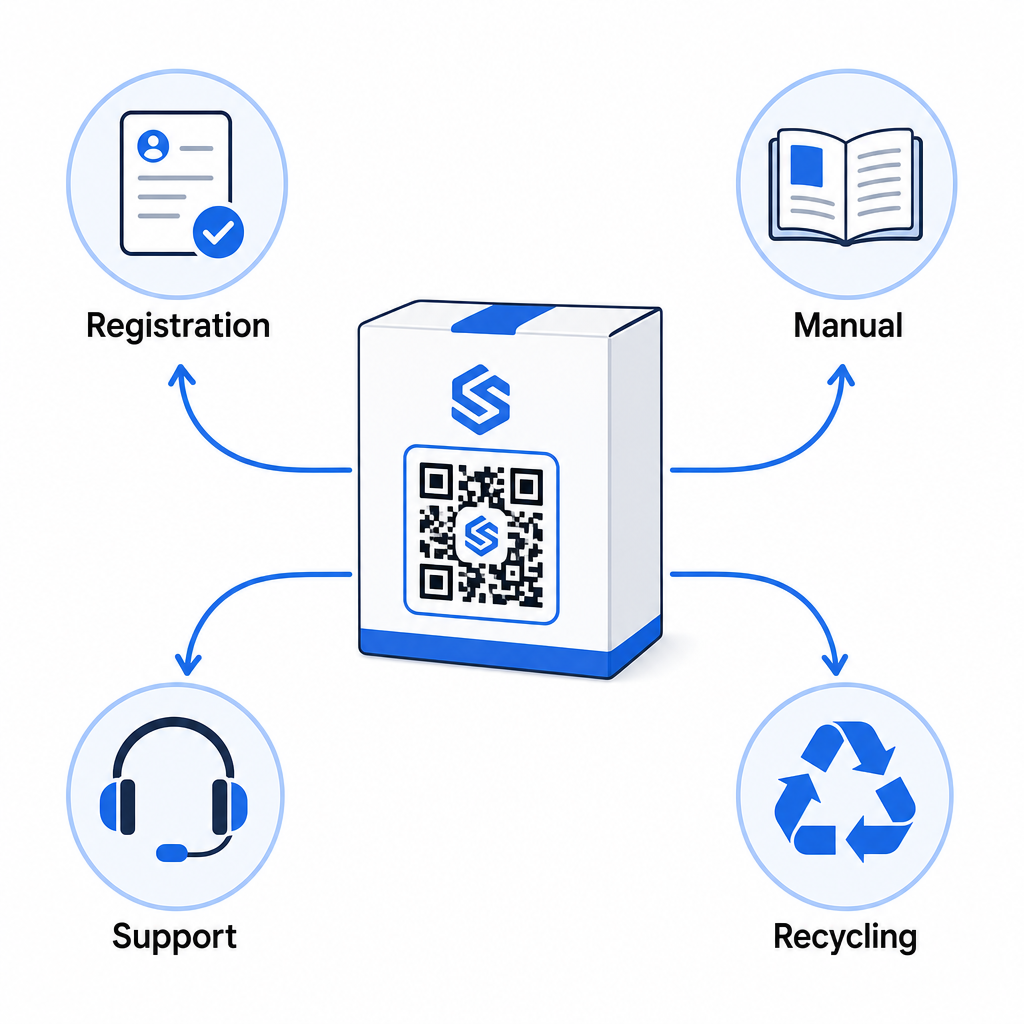
- Semasa pembukaan kotak: mengarahkan ke borang pendaftaran dan pengaktifan waranti
- Semasa pemilikan: memaut ke manual produk, Soalan Lazim, atau video cara-cara
- Untuk sokongan: menghubungkan ke borang permintaan perkhidmatan atau sembang langsung
- Pada akhir hayat: menyediakan arahan kitar semula atau tukar beli
Kerana kod QR dinamik membolehkan anda mengemas kini destinasi tanpa mencetak semula, anda boleh mengembangkan fungsi kod itu dari semasa ke semasa. Kod yang dicetak hari ini untuk pendaftaran boleh kemudian menunjuk ke halaman kemas kini perisian tegar, notis panggil balik, atau program kesetiaan – tanpa sebarang perubahan pada pembungkusan fizikal.
Pendekatan kitaran hayat ini diterokai lebih lanjut dalam Kod QR untuk Penjejakan Kitaran Hayat Produk dan Kod QR dalam Pembuatan: Menjejak Bahan dan Produk.
Untuk pengeluar yang mengurus pendaftaran produk merentasi pelbagai SKU atau barisan produk, papan pemuka pengurusan kod QR berpusat menjadi penting. Lihat Alat Pengurusan Kod QR Perusahaan untuk panduan mengenai pengurusan kod QR secara besar-besaran, termasuk penjanaan pukal dan analitik setiap kod.
Memulakan
Kod QR untuk pendaftaran produk bukanlah projek teknikal – ia adalah keputusan pembungkusan. Anda menjana kod dinamik, halakannya ke borang pendaftaran atau halaman pendaratan anda, cetaknya pada sisipan atau kotak, dan mula mengumpul data pemilikan sebaik sahaja produk sampai kepada pelanggan.
Perbezaan antara kad pendaftaran fizikal dan kod QR adalah perbezaan antara meminta seseorang menghantar surat dan menghulurkan telefon kepada mereka. Pelanggan yang tidak akan mengembalikan kad akan mengimbas kod dalam masa kurang dari 10 saat.
Mulakan dengan satu barisan produk. Cipta kod QR dinamik menggunakan Penjana Kod Pageloot QR, pautkannya ke borang pendaftaran anda, dan jejak bagaimana kadar imbasan dan penyerahan berbanding dengan kaedah pendaftaran anda sebelumnya. Sebaik sahaja anda melihat perbezaan dalam penglibatan, mengembangkan ke katalog penuh anda adalah mudah.
Soalan lazim
Tidak. Di bawah 16 CFR Bahagian 1130, pengeluar dan pengimport produk bayi atau kanak-kanak tahan lasak mesti menyertakan kad pendaftaran fizikal berbayar pos dengan setiap unit. Pendaftaran dalam talian melalui kod QR memenuhi pilihan pendaftaran elektronik yang diperlukan tetapi mesti melengkapkan kad fizikal tersebut, bukan menggantikannya. Kedua-duanya diperlukan.
Jika anda menggunakan kod QR dinamik, anda boleh mengemas kini URL destinasi dari papan pemuka anda pada bila-bila masa tanpa mencetak semula atau mengubah suai kod fizikal. Ini adalah salah satu sebab utama kod QR dinamik disyorkan untuk pendaftaran produk – ia melindungi anda daripada pautan rosak apabila borang dipindahkan atau dikemas kini. Kod QR statik tidak boleh diubah selepas dicetak.
Kumpul hanya apa yang anda benar-benar perlukan untuk memenuhi tujuan pendaftaran – biasanya nama pelanggan, alamat e-mel, tarikh pembelian, tempat pembelian, dan nombor siri produk. Di bawah prinsip minimalisasi data yang diperlukan oleh undang-undang seperti CPRA California, pengumpulan harus terhad kepada apa yang munasabah diperlukan untuk tujuan yang dinyatakan. Medan yang lebih sedikit juga meningkatkan kadar penyiapan borang, jadi borang yang ringkas memenuhi kedua-dua matlamat pematuhan dan perniagaan.