ホーム > 産業 > QR Codes for Warranty Registration and Product Activation
製品のQRコードをスキャン

QR Codes for Warranty Registration and Product Activation

Improve product registration rates using QR codes. Learn how to set up dynamic warranty activation, collect ownership data, and simplify the recall process.
Updated on 7月 2, 2026
目次

Are customers skipping your product registration process because it feels like too much work? Low registration rates mean incomplete ownership data, slower recall responses, and missed opportunities to build post-sale relationships. This page shows you how QR codes remove that friction and turn registration into a quick, seamless scan.

Why Traditional Product Registration Falls Short

Paper warranty cards have a notoriously poor completion rate. Customers receive a card, set it aside, and rarely mail it back. Even web-based forms improve things only slightly if customers have to manually type a long URL or dig through packaging to find a registration link.

The result is a data gap. You ship products but have little visibility into who owns them. When a safety issue or recall arises, direct notification becomes difficult or impossible. For manufacturers of durable infant or toddler products, this is not just a business problem – 16 CFR Part 1130 requires maintaining records of consumer contact information and mandates an electronic registration option specifically because the CPSC recognizes that recall response rates are a documented challenge.

Even outside regulated categories, the operational cost of low registration is real: warranty fraud is harder to detect, service requests are harder to validate, and product lifecycle data stays thin.

How a QR Code Solves the Registration Problem

A QR code printed on packaging, an insert card, or the product itself gives customers a frictionless path to register. They open their phone camera, scan the code, and land directly on a registration form or branded landing page – no typing, no searching, no mail.

The moment they submit the form, you receive structured ownership data: name, contact information, purchase date, and any custom fields you configure. That information feeds directly into your records without manual data entry on either side.

This approach aligns with the broader shift in product packaging toward connecting physical items to digital content. Industry-wide recognition that QR codes on packaging can serve as persistent gateways to product information, warranty details, and registration reflects a function that goes well beyond what a traditional barcode can carry. QR codes on product packaging can carry this registration link right to the customer’s hands the moment they open the box.

Ready to Add Registration QR Codes to Your Products? Create trackable, editable QR codes for your packaging or inserts using the ダイナミックQRコードジェネレーター. Update the linked form destination anytime – no reprinting required.

Choosing the Right QR Code Type for Registration

Not all QR codes serve a warranty registration workflow equally well. The critical distinction is between static and dynamic codes.

静的QRコード encodes a fixed URL directly into its pattern. Once printed, you cannot change where it points. If your registration form URL changes, the code on thousands of units becomes useless.

ダイナミックQRコード encodes a short redirect URL that you control from a dashboard. You can update the destination anytime without touching the printed code. This matters for warranty registration because registration forms get migrated between platforms, seasonal or product-line-specific pages get swapped out, and you may need to redirect scans to a notice page during a product update or recall.

For product registration, dynamic QR codes are the practical default. The ability to edit destinations after printing – combined with scan analytics – makes them far more useful for ongoing ownership data collection. You can explore the full breakdown of capabilities in the comparison of static vs. dynamic QR codes.

Setting Up a QR Code Registration Workflow

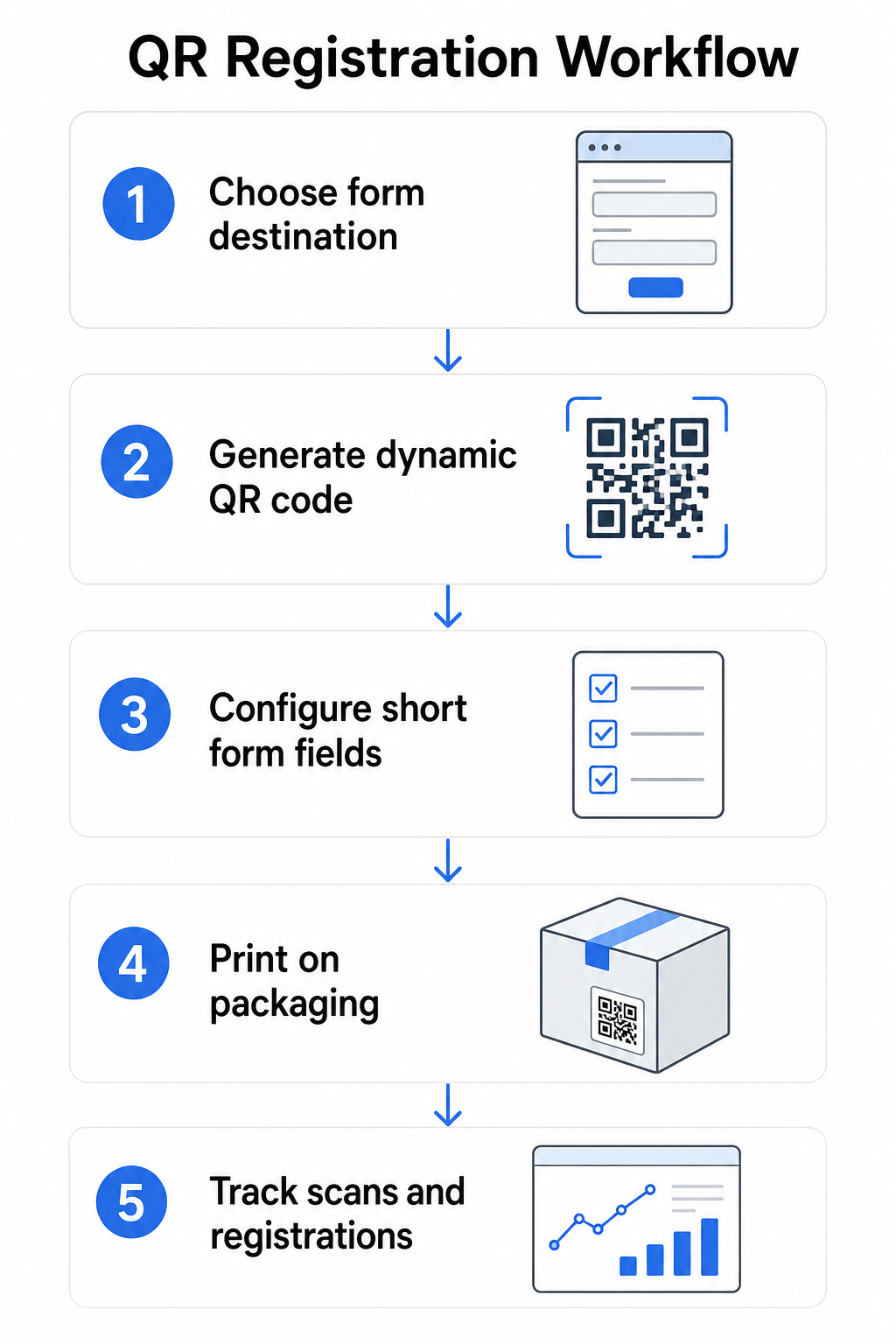
Building a QR-driven registration and warranty activation system is more straightforward than it might seem. The following steps cover the full setup from form selection to post-launch tracking.

QR registration workflow

Step 1: Choose your form destination

You have two primary options for what the QR code links to. A Googleフォーム is quick to set up and works well for collecting structured fields. Use the GoogleフォームQRコードジェネレーター to convert your form’s share link into a scannable code.

branded landing page is a mobile-optimized page that presents your registration form alongside product details, warranty terms, and brand visuals. Pageloot’s Landing Pages feature lets you build and update these pages without technical help. The landing page option tends to perform better for customer experience because you control the full design, can display warranty terms clearly, and can include multiple links or calls to action – such as a link to the product manual alongside the registration form.

Step 2: Generate a dynamic QR code

Create the QR code using Pageloot’s ダイナミックQRコードジェネレーター and point it to your chosen destination. Add your brand logo and colors to make the code recognizable on packaging. Keep the logo within 30% of the code area to preserve scannability, and use a high error correction level (Q or H) when adding visual branding.

Step 3: Configure the registration form fields

Collect what you actually need for warranty and ownership purposes. Typical fields include:

  • Customer name and email address
  • Purchase date
  • Place of purchase (retailer or channel)
  • Product serial number (if not pre-filled)
  • Optional: product feedback or preferred contact method

Data minimization is not just a privacy best practice – it also improves completion rates. Shorter forms get more submissions.

Step 4: Place the QR code on packaging or inserts

For reliable scanning, placement on product packaging follows a few consistent principles:

  • Size the code at least 1 inch (2.5 cm) wide
  • Print on a flat, smooth surface – avoid folds, seams, or curved areas
  • Use high contrast (black on white works best; maintain at least a 3:1 contrast ratio)
  • Leave a clear quiet zone – an empty margin – around the code
  • Test the printed code on the actual substrate before finalizing production runs

For a deeper look at label-specific considerations, see the guide to QR codes on product labels そして how to print a QR code on a label.

Step 5: Track registrations and scan data

Once the code is live, your Pageloot dashboard shows scan counts, geographic location of scans, device type, and time of day. This tells you not just how many customers registered, but when and where they engaged – useful for identifying whether packaging placement is working and whether certain markets or channels have lower registration rates than others.

See Who’s Registering – and Who Isn’t 使用 QR code scan tracking to monitor registration engagement by region, device, and time. Spot drop-offs early and update your form destination without reprinting.

What Data You Can Collect – and What You Should

QR codes support two distinct layers of data collection, and understanding the difference helps you set up your program correctly from the start.

Scan-level data is collected automatically when someone scans a dynamic QR code. This includes scan count, scan location (country and region), device type (iOS or Android), and timestamp. This data is collected without the customer providing any personal information – it reflects engagement with the code itself. For a full breakdown of what is captured, see 動的QRコードが収集するデータ.

Registration data – names, email addresses, purchase dates, and contact details – is collected only when a customer willingly completes the form on the linked page. This is first-party data, provided directly and with awareness by the customer. Pageloot’s platform supports this model: customers share information through forms or landing pages after scanning, keeping the data collection consent-based and transparent.

For warranty and ownership purposes, you need registration data. For understanding whether your registration program is working at scale, scan-level data provides valuable context.

Privacy and Legal Considerations

Product registration data collection carries compliance obligations that vary by product category and jurisdiction.

のために durable infant or toddler products regulated under 16 CFR Part 1130, the CPSC requires that you:

  • Provide a postage-paid physical registration card with each unit
  • Offer an electronic registration option (website or email) as a supplement – not a replacement – for the physical card
  • Maintain records of registrant names, addresses, and email addresses
  • Use registration data only for safety alerts and recalls, not for marketing purposes

A QR code linking to your online registration form satisfies the electronic registration requirement under this framework, but it does not replace the physical card requirement for covered products.

For warranty registration more broadly, the Magnuson-Moss Warranty Act distinguishes between full and limited warranties. Products with a “full” warranty cannot require registration as a condition of coverage. Products with a “limited” warranty may require registration only if the requirement is clearly disclosed before purchase. Any registration condition must appear in warranty terms consumers can access prior to sale.

For data privacy, U.S. businesses collecting personal information via online registration forms should provide a privacy notice at or before the point of collection describing what data is collected, why, and how long it will be retained. Under California’s CPRA, collection and retention must be limited to what is reasonably necessary for the disclosed purpose. If your products may reach families with children under 13, ensure your online form complies with COPPA’s requirements for verifiable parental consent before collecting personal data from that age group.

For more detail on QR code data privacy obligations across jurisdictions, see QR Code Privacy Laws: Key Regulations.

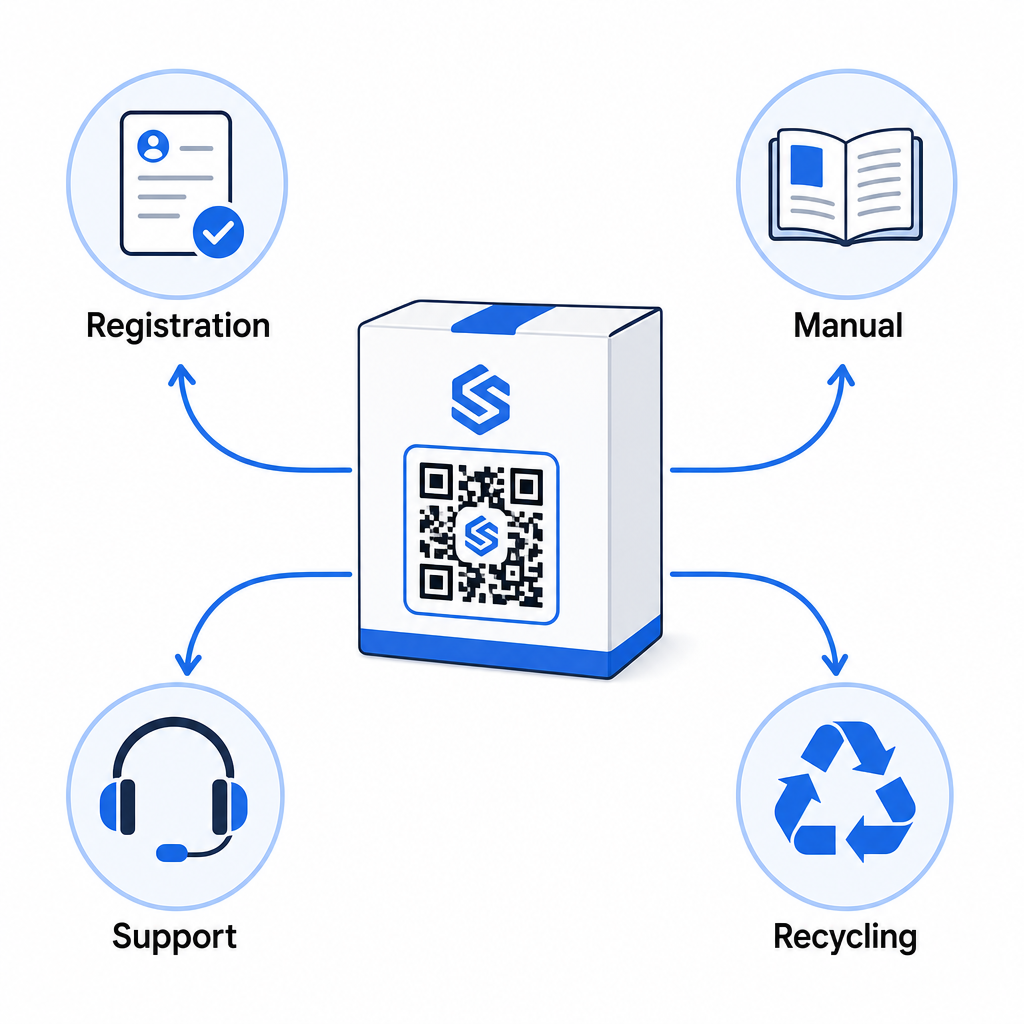
Using QR Codes Across the Product Lifecycle

Warranty registration is one part of a broader opportunity. The same QR code on your product can serve multiple functions across the entire ownership journey:

Product lifecycle QR code
  • At unboxing: directs to the registration form and warranty activation
  • During ownership: links to the product manual, FAQs, or how-to videos
  • For support: connects to a service request form or live chat
  • At end of life: provides recycling or trade-in instructions

Because dynamic QR codes let you update the destination without reprinting, you can evolve what the code does over time. A code printed today for registration can later point to a firmware update page, a recall notice, or a loyalty program – without any change to the physical packaging.

This lifecycle approach is explored further in QR Codes for Product Lifecycle Tracking そして QR Codes in Manufacturing: Tracking Materials and Products.

For manufacturers managing product registration across multiple SKUs or product lines, a centralized QR code management dashboard becomes essential. See Enterprise QR Code Management Tools for guidance on managing QR codes at scale, including bulk generation and per-code analytics.

始めるにあたって

A QR code for product registration is not a technical project – it is a packaging decision. You generate a dynamic code, point it to your registration form or landing page, print it on the insert or box, and begin collecting ownership data the moment products reach customers.

The difference between a physical registration card and a QR code is the difference between asking someone to mail a letter and handing them a phone. Customers who would never return a card will scan a code in under 10 seconds.

Start with one product line. Create a dynamic QR code using the Pageloot QRコードジェネレータ, link it to your registration form, and track how scan and submission rates compare to your previous registration method. Once you see the difference in engagement, expanding to your full catalog is straightforward.

よくある質問

Can a QR code replace the physical registration card required for infant and toddler products?

No. Under 16 CFR Part 1130, manufacturers and importers of durable infant or toddler products must include a postage-paid physical registration card with each unit. Online registration via a QR code satisfies the required electronic registration option but must supplement the physical card, not replace it. Both are required.

What happens if I need to change my registration form URL after products are already in the market?

If you use a dynamic QR code, you can update the destination URL from your dashboard at any time without reprinting or modifying the physical code. This is one of the primary reasons dynamic QR codes are recommended for product registration – it protects you from broken links when forms are migrated or updated. Static QR codes cannot be changed after printing.

What personal data fields should I include on a warranty registration form?

Collect only what you genuinely need to fulfill the registration purpose – typically customer name, email address, purchase date, place of purchase, and product serial number. Under data minimization principles required by laws like California’s CPRA, collection should be limited to what is reasonably necessary for the stated purpose. Fewer fields also improve form completion rates, so a lean form serves both compliance and business goals.

著者について

Siim KostabiはPagelootのコンテンツリードです。Pagelootの革新的なQRコード生成サービスについて執筆しています。5年以上にわたるQRコードに関する深い専門知識を持つSiimは、この分野の専門家です。QRテクノロジーを活用してデジタルインタラクションを簡素化・拡張する上で、大きな進歩を遂げています。.

カテゴリー
について詳しくはこちら
ウェブサイトのQRコードをスキャン中
QRコードの ウェブサイト
✅ QRコードの#1ソリューション

オンラインでQRコードを作成する必要がある場合は QRコードを作る ここで無料で
ページルートは #1のGo-Toソリューション でQRコードを作成してスキャンすることができます。

BL-0292

ブログジェネ

売上、レビュー、フォロワーを増やすために 20,000 を超えるブランドから信頼されています。

クライアントのロゴ
トップブランドから信頼される
5 のうち 4.8 と評価しました

4.86 / 5つ星評価

ユーゴ・ローラン
ユーゴ・ローラン
レストランオーナー
最も簡単で信頼性の高いQRコードジェネレータです。PDFファイルを即座にアップロードできます。レストランのメニューがデジタル化されました。
ルーカス・ジャンセン
ルーカス・ジャンセン
不動産開発業者
これは優れたツールで、QRコードでちょうど欲しいところに連れて行ってくれます。私たちは位置情報のQRコードしか使っていませんが、とても便利な機能がたくさんあります。
エマ・モレッティ
エマ・モレッティ
小売製品
使いやすいし、早い。素晴らしい機能で、完璧な画像を作成してくれるので、社員は私のvCardをダウンロードすることができます。
ユーゴ・ローラン
ユーゴ・ローラン
レストランオーナー
最も簡単で信頼性の高いQRコードジェネレータです。PDFファイルを即座にアップロードできます。レストランのメニューがデジタル化されました。
ルーカス・ジャンセン
ルーカス・ジャンセン
不動産開発業者
これは優れたツールで、QRコードでちょうど欲しいところに連れて行ってくれます。私たちは位置情報のQRコードしか使っていませんが、とても便利な機能がたくさんあります。
エマ・モレッティ
エマ・モレッティ
小売製品
使いやすいし、早い。素晴らしい機能で、完璧な画像を作成してくれるので、社員は私のvCardをダウンロードすることができます。
QRコードをもっと見る
顧客がQRコードをスキャン
QRコードは 2024年に死亡?
マーケティングQRコードのスキャン
QRコード 基礎知識
あらゆるものをデジタル体験に変えよう 3分以内に。

14日間の無料トライアル。

クレジットカードは必要ありません。

初回購入で30%オフ

次のコードを使用してください:

MP3ファイルを共有

PDF QRコードを作成するにはサインアップしてください

必要なものをすべてアップロードして表示する。

  • オーディオファイル
  • ポッドキャスト
  • 音楽

サインアップで14日間無料トライアル。.
トライアル終了後、QRコードは期限切れになります。.

オーディオmp3 QRコードを作成するにはサインアップしてください

フレームでより多くのスキャンを獲得

QRコードにフレームを追加するにはサインアップしてください

コールトゥアクションフレームは、お客様が簡単にQRコードと対話できるようにします。ぜひお試しください。

サインアップで14日間無料トライアル。.
トライアル終了後、QRコードは期限切れになります。.

QRコードにフレームを追加するにはサインアップしてください

シェイプでスタイルを追加

より多くの図形を作成するにはサインアップしてください

QRコードは四角いものである必要はありません。あなたのブランドのイメージに合わせて変えてみてください。

サインアップで14日間無料トライアル。.
トライアル終了後、QRコードは期限切れになります。.

より多くの図形を作成するにはサインアップしてください

QRコードにロゴを追加

QRコードにロゴを追加するにはサインアップしてください

QRコードにロゴやブランドを入れることで、目立たせることができます。

サインアップで14日間無料トライアル。.
トライアル終了後、QRコードは期限切れになります。.

QRコードにロゴを追加するにはサインアップしてください

スマートなApp Storeリダイレクト

アプリストアのQRコードを作成するにはサインアップしてください

スマートなApp StoreのQRコードに、あなたのアプリのリンクを追加します。ユーザーは、デバイスに応じてリダイレクトされます。

サインアップで14日間無料トライアル。.
トライアル終了後、QRコードは期限切れになります。.

アプリストアのQRコードを作成するにはサインアップしてください

QRコードに画像をアップロード

画像QRコードを作成するにはサインアップしてください

画像を簡単に共有できます。どんな画像も、数秒でダイナミックに変化します。

サインアップで14日間無料トライアル。.
トライアル終了後、QRコードは期限切れになります。.

画像QRコードを作成するにはサインアップしてください

PDFファイルを共有

PDF QRコードを作成するにはサインアップしてください

必要なものをすべてアップロードして表示する。

  • メニュー&プライスリスト
  • 指示
  • 任意の書類

サインアップで14日間無料トライアル。.
トライアル終了後、QRコードは期限切れになります。.

PDF QRコードを作成するにはサインアップしてください

印刷せずに後で編集

再度印刷せずにQRコードを編集するにはサインアップしてください

ダイナミックQRコードは、新たにQRコードを印刷することなく、QRコードの内容を変更することができます。

サインアップで14日間無料トライアル。.
トライアル終了後、QRコードは期限切れになります。.

再度印刷せずにQRコードを編集するにはサインアップしてください

いつ?どこで?QRコードのスキャンを追跡

QRコードを追跡するにはサインアップしてください

どのQRコードが最も多くスキャンされ、何が最も顧客を喜ばせているのかを知ることができます。

サインアップで14日間無料トライアル。.
トライアル終了後、QRコードは期限切れになります。.

QRコードを追跡するにはサインアップしてください

印刷可能なファイルが利用可能

PDFやSVGのようなベクターQRコードを作成するにはサインアップしてください

.eps、.pdf、.svg

QRコードをHD解像度でダウンロードしたいですか?すぐに印刷できるベクターまたはピクセル形式を入手しましょう。

サインアップで14日間無料トライアル。.
トライアル終了後、QRコードは期限切れになります。.

PDFやSVGのようなベクターQRコードを作成するにはサインアップしてください

しばらくお待ちください。あなたのQRコードは ロード... ロード...

あなただけのものに

サインアップしてQRコードを後で保存してください

異なる色、ロゴ、コールトゥアクションフレームで素晴らしいQRコードを作成することで、より多くのスキャンを得ることができます。

サインアップで14日間無料トライアル。.
トライアル終了後、QRコードは期限切れになります。.

サインアップしてQRコードを後で保存してください