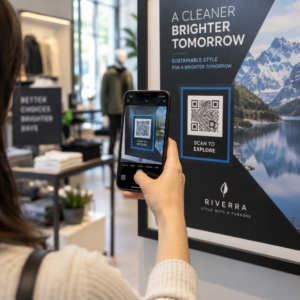
Czy klienci pomijają proces rejestracji produktu, ponieważ wydaje im się to zbyt dużym wysiłkiem? Niskie wskaźniki rejestracji oznaczają niekompletne dane o własności, wolniejsze reakcje na wycofania produktów i utracone możliwości budowania relacji posprzedażowych. Ta strona pokazuje, jak kody QR eliminują to tarcie i zamieniają rejestrację w szybkie, płynne skanowanie.
Dlaczego tradycyjna rejestracja produktu zawodzi
Papierowe karty gwarancyjne mają notorycznie niski wskaźnik wypełnienia. Klienci otrzymują kartę, odkładają ją na bok i rzadko odsyłają pocztą. Nawet formularze internetowe poprawiają sytuację tylko nieznacznie, jeśli klienci muszą ręcznie wpisywać długi adres URL lub przeszukiwać opakowanie, aby znaleźć link do rejestracji.
Rezultatem jest luka w danych. Wysyłasz produkty, ale masz niewielką wiedzę na temat tego, kto jest ich właścicielem. Gdy pojawia się problem bezpieczeństwa lub wycofanie produktu, bezpośrednie powiadomienie staje się trudne lub niemożliwe. Dla producentów trwałych produktów dla niemowląt lub małych dzieci, to nie tylko problem biznesowy – 16 CFR Część 1130 wymaga prowadzenia rejestrów danych kontaktowych konsumentów i nakazuje elektroniczną opcję rejestracji, w szczególności dlatego, że CPSC uznaje, że wskaźniki odpowiedzi na wycofania produktów są udokumentowanym wyzwaniem.
Nawet poza kategoriami regulowanymi, koszt operacyjny niskiej rejestracji jest realny: oszustwa gwarancyjne są trudniejsze do wykrycia, zgłoszenia serwisowe są trudniejsze do zweryfikowania, a dane dotyczące cyklu życia produktu pozostają skąpe.
Jak kod QR rozwiązuje problem rejestracji
Kod QR wydrukowany na opakowaniu, karcie wkładce lub samym produkcie zapewnia klientom bezproblemową ścieżkę do rejestracji. Otwierają aparat w telefonie, skanują kod i trafiają bezpośrednio na formularz rejestracyjny lub markową stronę docelową – bez wpisywania, bez wyszukiwania, bez poczty.
W momencie przesłania formularza otrzymujesz ustrukturyzowane dane o własności: imię i nazwisko, dane kontaktowe, datę zakupu oraz wszelkie niestandardowe pola, które skonfigurujesz. Te informacje trafiają bezpośrednio do Twoich rejestrów bez ręcznego wprowadzania danych po żadnej ze stron.
To podejście jest zgodne z szerszą zmianą w opakowaniach produktów w kierunku łączenia fizycznych przedmiotów z treściami cyfrowymi. Ogólnobranżowe uznanie, że kody QR na opakowaniach mogą służyć jako trwałe bramy do informacji o produkcie, szczegółów gwarancji i rejestracji, odzwierciedla funkcję, która wykracza daleko poza to, co może przenosić tradycyjny kod kreskowy. Kody QR na opakowaniach produktów mogą przenieść ten link rejestracyjny bezpośrednio w ręce klienta w momencie otwarcia pudełka.
Gotowy, aby dodać kody QR do rejestracji do swoich produktów? Twórz śledzalne, edytowalne kody QR dla swoich opakowań lub wkładek, używając Generator dynamicznych kodów QR. Zaktualizuj docelowy formularz w dowolnym momencie – nie jest wymagane ponowne drukowanie.
Wybór odpowiedniego typu kodu QR do rejestracji
Nie wszystkie kody QR równie dobrze sprawdzają się w procesie rejestracji gwarancji. Kluczowe rozróżnienie dotyczy kodów statycznych i dynamicznych.
A statyczny kod QR koduje stały adres URL bezpośrednio w swoim wzorze. Po wydrukowaniu nie można zmienić miejsca, do którego wskazuje. Jeśli adres URL formularza rejestracyjnego ulegnie zmianie, kod na tysiącach jednostek staje się bezużyteczny.
A dynamiczny kod QR koduje krótki adres URL przekierowania, który kontrolujesz z pulpitu nawigacyjnego. Możesz zaktualizować miejsce docelowe w dowolnym momencie, nie dotykając wydrukowanego kodu. Ma to znaczenie dla rejestracji gwarancji, ponieważ formularze rejestracyjne są migrowane między platformami, strony sezonowe lub specyficzne dla linii produktów są zmieniane, a także może być konieczne przekierowanie skanów na stronę powiadomień podczas aktualizacji produktu lub wycofania.
Do rejestracji produktu, dynamiczne kody QR są praktycznym standardem. Możliwość edycji miejsc docelowych po wydrukowaniu – w połączeniu z analityką skanowania – czyni je znacznie bardziej użytecznymi do bieżącego zbierania danych o własności. Możesz zapoznać się z pełnym zestawieniem możliwości w porównanie statycznych i dynamicznych kodów QR.
Konfigurowanie przepływu pracy rejestracji za pomocą kodu QR
Budowanie systemu rejestracji i aktywacji gwarancji opartego na kodach QR jest prostsze, niż mogłoby się wydawać. Poniższe kroki obejmują pełną konfigurację, od wyboru formularza po śledzenie po uruchomieniu.
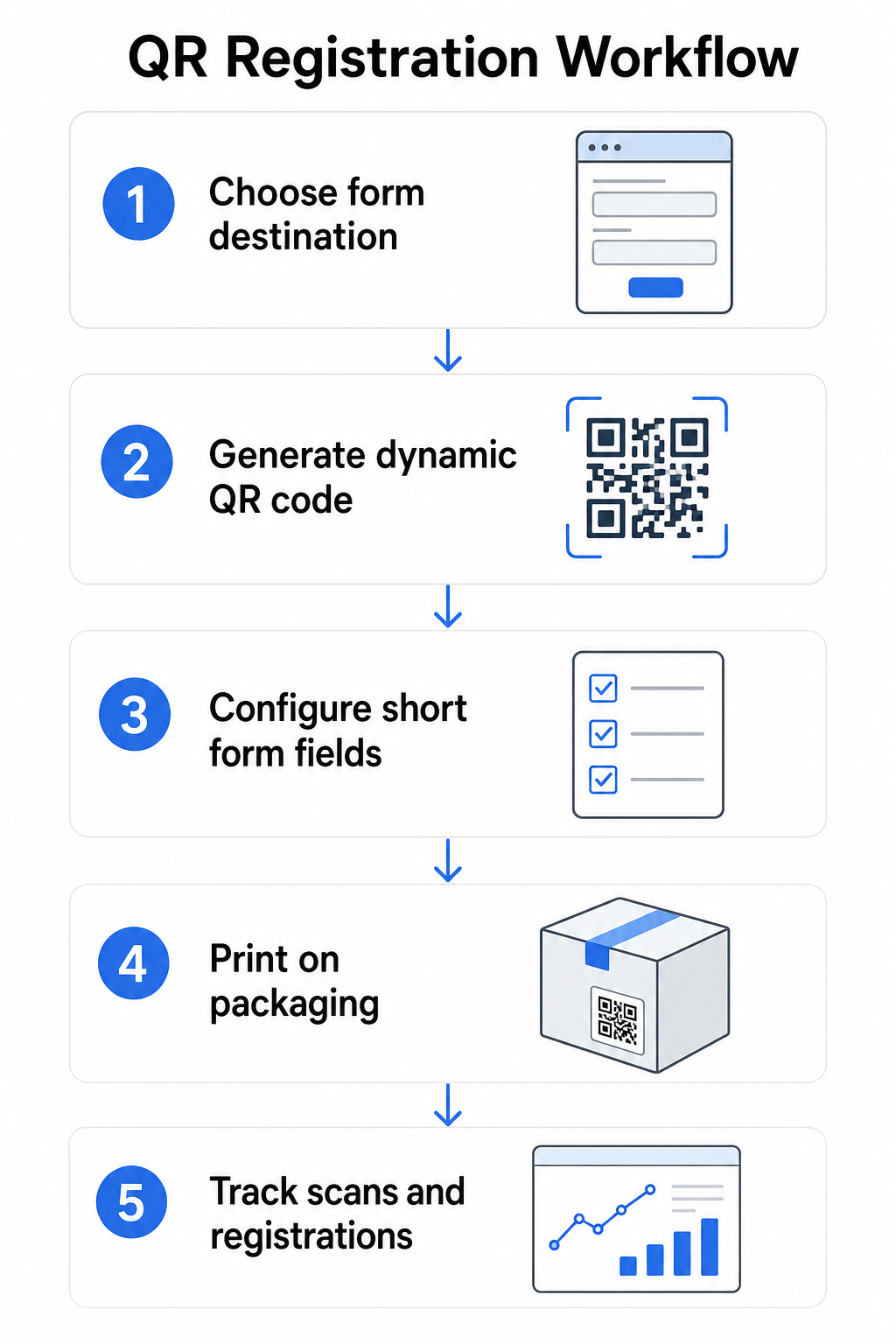
Krok 1: Wybierz miejsce docelowe formularza
Masz dwie główne opcje dotyczące tego, do czego prowadzi link z kodu QR. A Formularz Google jest szybki w konfiguracji i dobrze sprawdza się w zbieraniu ustrukturyzowanych pól. Użyj Generator kodów QR do Google Forms aby przekształcić link udostępniania formularza w kod do zeskanowania.
A markowej strony docelowej to strona zoptymalizowana pod kątem urządzeń mobilnych, która prezentuje formularz rejestracyjny wraz ze szczegółami produktu, warunkami gwarancji i wizualizacjami marki. Funkcja Pageloot Strony docelowe pozwala budować i aktualizować te strony bez pomocy technicznej. Opcja strony docelowej zazwyczaj działa lepiej dla doświadczenia klienta, ponieważ kontrolujesz cały projekt, możesz jasno wyświetlać warunki gwarancji i możesz zawierać wiele linków lub wezwań do działania – takich jak link do instrukcji produktu obok formularza rejestracyjnego.
Krok 2: Wygeneruj dynamiczny kod QR
Utwórz kod QR za pomocą Pageloot’s Generator dynamicznych kodów QR i skieruj go do wybranego miejsca docelowego. Dodaj logo i kolory swojej marki, aby kod był rozpoznawalny na opakowaniu. Zachowaj logo w obrębie 30% obszaru kodu, aby zachować możliwość skanowania, i użyj wysokiego poziomu korekcji błędów (Q lub H) podczas dodawania wizualnego brandingu.
Krok 3: Skonfiguruj pola formularza rejestracyjnego
Zbierz to, czego faktycznie potrzebujesz do celów gwarancyjnych i własnościowych. Typowe pola to:
- Imię i nazwisko klienta oraz adres e-mail
- Data zakupu
- Miejsce zakupu (sprzedawca detaliczny lub kanał)
- Numer seryjny produktu (jeśli nie jest wstępnie wypełniony)
- Opcjonalnie: opinie o produkcie lub preferowana metoda kontaktu
Minimalizacja danych to nie tylko najlepsza praktyka w zakresie prywatności – poprawia również wskaźniki ukończenia. Krótsze formularze otrzymują więcej zgłoszeń.
Krok 4: Umieść kod QR na opakowaniu lub wkładkach
Dla niezawodnego skanowania, umieszczenie na opakowaniu produktu przestrzega kilku spójnych zasad:
- Rozmiar kodu co najmniej 1 cal (2,5 cm) szerokości
- Drukuj na płaskiej, gładkiej powierzchni – unikaj zagięć, szwów lub zakrzywionych obszarów
- Użyj wysokiego kontrastu (czarny na białym działa najlepiej; zachowaj co najmniej współczynnik kontrastu 3:1)
- Pozostaw wyraźną strefę ciszy – pusty margines – wokół kodu
- Przetestuj wydrukowany kod na rzeczywistym podłożu przed sfinalizowaniem serii produkcyjnych
Aby uzyskać głębsze spojrzenie na kwestie specyficzne dla etykiet, zobacz przewodnik po kodach QR na etykietach produktów oraz Jak wydrukować kod QR na etykiecie.
Krok 5: Śledź rejestracje i dane skanowania
Gdy kod jest aktywny, Twój pulpit nawigacyjny Pageloot pokazuje liczbę skanów, lokalizację geograficzną skanów, typ urządzenia i porę dnia. To mówi Ci nie tylko, ilu klientów się zarejestrowało, ale także kiedy i gdzie się zaangażowali – przydatne do identyfikacji, czy umieszczenie opakowania działa i czy niektóre rynki lub kanały mają niższe wskaźniki rejestracji niż inne.
Zobacz, kto się rejestruje – a kto nie Użyj Śledzenie skanów kodów QR aby monitorować zaangażowanie w rejestrację według regionu, urządzenia i czasu. Wcześnie wykrywaj spadki i aktualizuj miejsce docelowe formularza bez ponownego drukowania.
Jakie dane możesz zbierać – i jakie powinieneś
Kody QR obsługują dwie odrębne warstwy zbierania danych, a zrozumienie różnicy pomaga prawidłowo skonfigurować program od samego początku.
Dane na poziomie skanowania są zbierane automatycznie, gdy ktoś skanuje dynamiczny kod QR. Obejmuje to liczbę skanów, lokalizację skanowania (kraj i region), typ urządzenia (iOS lub Android) oraz znacznik czasu. Dane te są zbierane bez podawania przez klienta jakichkolwiek danych osobowych – odzwierciedlają zaangażowanie w sam kod. Aby uzyskać pełne zestawienie tego, co jest przechwytywane, zobacz jakie dane zbierają dynamiczne kody QR.
Dane rejestracyjne – imiona i nazwiska, adresy e-mail, daty zakupu i dane kontaktowe – są zbierane tylko wtedy, gdy klient dobrowolnie wypełni formularz na połączonej stronie. Są to dane własne, dostarczone bezpośrednio i świadomie przez klienta. Platforma Pageloot obsługuje ten model: klienci udostępniają informacje za pośrednictwem formularzy lub stron docelowych po zeskanowaniu, utrzymując zbieranie danych oparte na zgodzie i przejrzyste.
Do celów gwarancyjnych i własnościowych potrzebujesz danych rejestracyjnych. Aby zrozumieć, czy Twój program rejestracji działa na dużą skalę, dane na poziomie skanowania dostarczają cennego kontekstu.
Kwestie prywatności i prawne
Zbieranie danych rejestracyjnych produktów wiąże się z obowiązkami zgodności, które różnią się w zależności od kategorii produktu i jurysdykcji.
Dla trwałych produktów dla niemowląt lub małych dzieci regulowane zgodnie z 16 CFR Part 1130, CPSC wymaga, abyś:
- Dostarczył fizyczną kartę rejestracyjną z opłaconą przesyłką pocztową z każdą jednostką
- Oferował elektroniczną opcję rejestracji (strona internetowa lub e-mail) jako uzupełnienie – a nie zastępstwo – fizycznej karty
- Prowadził rejestry imion i nazwisk, adresów i adresów e-mail rejestrujących się
- Używał danych rejestracyjnych wyłącznie do alertów bezpieczeństwa i wycofań produktów, a nie do celów marketingowych
Kod QR łączący się z Twoim internetowym formularzem rejestracyjnym spełnia wymóg rejestracji elektronicznej w ramach tych ram, ale nie zastępuje wymogu fizycznej karty dla objętych produktów.
W przypadku rejestracji gwarancji w szerszym ujęciu, Ustawa Magnuson-Mossa o gwarancjach rozróżnia między pełnymi a ograniczonymi gwarancjami. Produkty z “pełną” gwarancją nie mogą wymagać rejestracji jako warunku objęcia ochroną. Produkty z “ograniczoną” gwarancją mogą wymagać rejestracji tylko wtedy, gdy wymóg ten jest jasno ujawniony przed zakupem. Wszelkie warunki rejestracji muszą być zawarte w warunkach gwarancji, do których konsumenci mają dostęp przed sprzedażą.
W kwestii prywatności danych, amerykańskie firmy zbierające dane osobowe za pośrednictwem formularzy rejestracji online powinny udostępnić politykę prywatności w momencie lub przed momentem zbierania danych, opisując, jakie dane są zbierane, dlaczego i jak długo będą przechowywane. Zgodnie z kalifornijską ustawą CPRA, zbieranie i przechowywanie danych musi być ograniczone do tego, co jest rozsądnie konieczne dla ujawnionego celu. Jeśli Twoje produkty mogą dotrzeć do rodzin z dziećmi poniżej 13 roku życia, upewnij się, że Twój formularz online jest zgodny z wymogami COPPA dotyczącymi weryfikowalnej zgody rodziców przed zbieraniem danych osobowych od tej grupy wiekowej.
Aby uzyskać więcej szczegółów na temat obowiązków związanych z prywatnością danych kodów QR w różnych jurysdykcjach, zobacz Prawa dotyczące prywatności kodów QR: Kluczowe regulacje.
Wykorzystanie kodów QR w całym cyklu życia produktu
Rejestracja gwarancji to tylko jedna część szerszej możliwości. Ten sam kod QR na Twoim produkcie może pełnić wiele funkcji w całym cyklu posiadania:
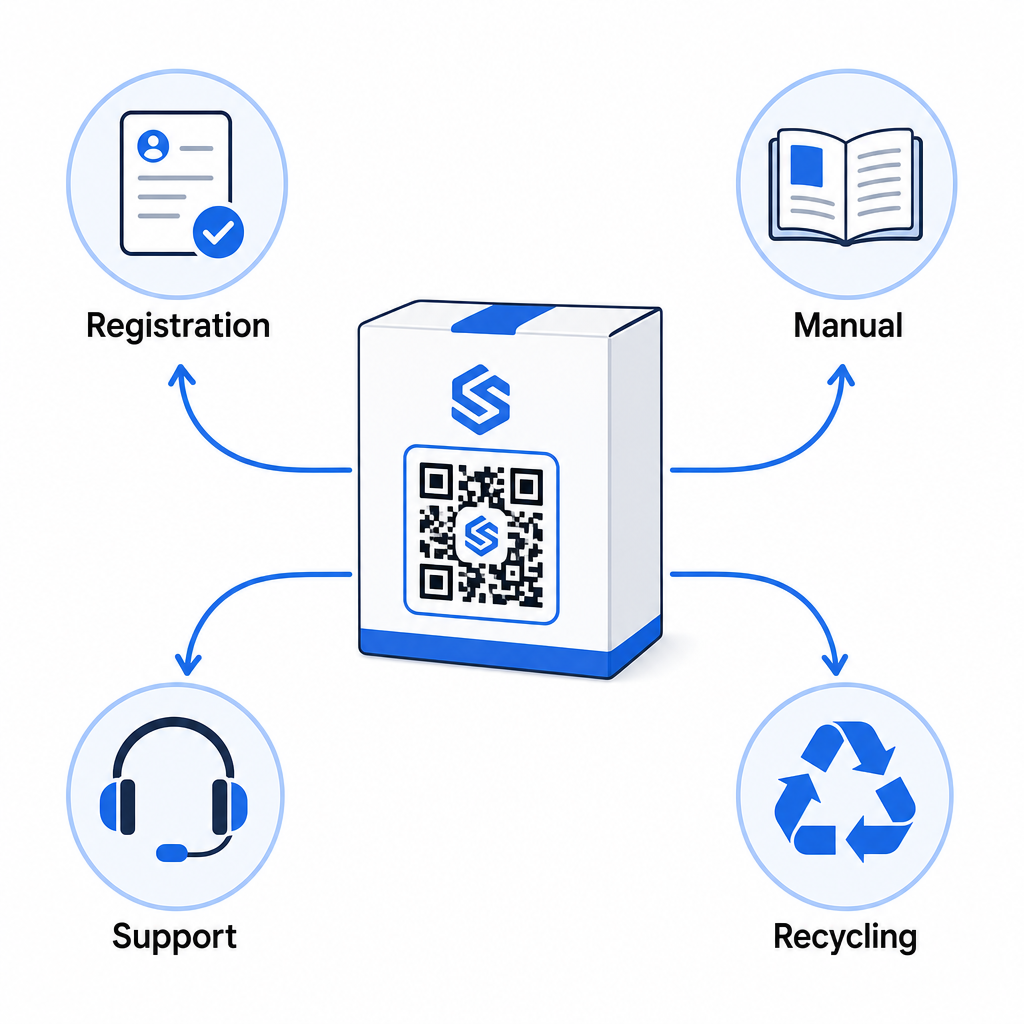
- Podczas rozpakowywania: kieruje do formularza rejestracji i aktywacji gwarancji
- Podczas posiadania: linkuje do instrukcji produktu, często zadawanych pytań (FAQ) lub filmów instruktażowych
- W celu uzyskania wsparcia: łączy z formularzem zgłoszenia serwisowego lub czatem na żywo
- Pod koniec życia produktu: zawiera instrukcje dotyczące recyklingu lub wymiany
Ponieważ dynamiczne kody QR pozwalają aktualizować miejsce docelowe bez ponownego drukowania, możesz zmieniać funkcje kodu w czasie. Kod wydrukowany dzisiaj do rejestracji może później wskazywać na stronę aktualizacji oprogramowania układowego, powiadomienie o wycofaniu produktu lub program lojalnościowy – bez żadnych zmian w fizycznym opakowaniu.
To podejście cyklu życia jest szerzej omówione w Kody QR do śledzenia cyklu życia produktu oraz Kody QR w produkcji: Śledzenie materiałów i produktów.
Dla producentów zarządzających rejestracją produktów w wielu SKU lub liniach produktów, scentralizowany pulpit zarządzania kodami QR staje się niezbędny. Zobacz Narzędzia do zarządzania kodami QR dla przedsiębiorstw aby uzyskać wskazówki dotyczące zarządzania kodami QR na dużą skalę, w tym generowania masowego i analizy dla poszczególnych kodów.
Rozpoczęcie pracy
Kod QR do rejestracji produktu to nie projekt techniczny – to decyzja dotycząca opakowania. Generujesz dynamiczny kod, kierujesz go do formularza rejestracji lub strony docelowej, drukujesz na wkładce lub pudełku i zaczynasz zbierać dane o posiadaniu w momencie, gdy produkty dotrą do klientów.
Różnica między fizyczną kartą rejestracyjną a kodem QR to różnica między proszeniem kogoś o wysłanie listu a wręczeniem mu telefonu. Klienci, którzy nigdy nie odesłaliby karty, zeskanują kod w mniej niż 10 sekund.
Zacznij od jednej linii produktów. Utwórz dynamiczny kod QR, używając Pageloot Generator kodów QR, połącz go z formularzem rejestracji i śledź, jak wskaźniki skanowania i przesyłania danych porównują się z Twoją poprzednią metodą rejestracji. Gdy zobaczysz różnicę w zaangażowaniu, rozszerzenie na cały katalog jest proste.
Najczęściej zadawane pytania
Nie. Zgodnie z 16 CFR Part 1130, producenci i importerzy trwałych produktów dla niemowląt lub małych dzieci muszą dołączyć fizyczną kartę rejestracyjną z opłaconą przesyłką do każdej jednostki. Rejestracja online za pośrednictwem kodu QR spełnia wymaganą opcję rejestracji elektronicznej, ale musi uzupełniać kartę fizyczną, a nie ją zastępować. Obie są wymagane.
Jeśli używasz dynamicznego kodu QR, możesz zaktualizować docelowy adres URL ze swojego pulpitu nawigacyjnego w dowolnym momencie bez ponownego drukowania lub modyfikowania fizycznego kodu. Jest to jeden z głównych powodów, dla których dynamiczne kody QR są zalecane do rejestracji produktów – chroni Cię to przed uszkodzonymi linkami, gdy formularze są migrowane lub aktualizowane. Statyczne kody QR nie mogą być zmienione po wydrukowaniu.
Zbieraj tylko to, co jest naprawdę potrzebne do realizacji celu rejestracji – zazwyczaj imię i nazwisko klienta, adres e-mail, data zakupu, miejsce zakupu i numer seryjny produktu. Zgodnie z zasadami minimalizacji danych wymaganymi przez przepisy takie jak kalifornijska CPRA, zbieranie danych powinno być ograniczone do tego, co jest rozsądnie konieczne dla określonego celu. Mniejsza liczba pól poprawia również wskaźniki wypełniania formularzy, więc uproszczony formularz służy zarówno celom zgodności, jak i biznesowym.