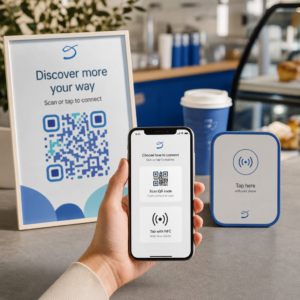
Er kunderne ved at springe din produktregistreringsproces over, fordi det føles som for meget arbejde? Lave registreringsrater betyder ufuldstændige ejerskabsdata, langsommere tilbagekaldelsesrespons og forpassede muligheder for at opbygge relationer efter salget. Denne side viser dig, hvordan QR-koder fjerner den friktion og forvandler registrering til en hurtig, problemfri scanning.
Hvorfor traditionel produktregistrering kommer til kort
Papirgarantikort har en notorisk dårlig udfyldelsesrate. Kunder modtager et kort, lægger det til side og sender det sjældent tilbage. Selv webbaserede formularer forbedrer kun tingene en smule, hvis kunderne manuelt skal indtaste en lang URL eller grave gennem emballagen for at finde et registreringslink.
Resultatet er et datahul. Du sender produkter, men har ringe indsigt i, hvem der ejer dem. Når et sikkerhedsproblem eller en tilbagekaldelse opstår, bliver direkte meddelelse vanskelig eller umulig. For producenter af holdbare spædbarns- eller småbørnsprodukter, er dette ikke kun et forretningsproblem – 16 CFR Part 1130 kræver opretholdelse af optegnelser over forbrugerkontaktinformation og påbyder en elektronisk registreringsmulighed specifikt fordi CPSC anerkender, at tilbagekaldelsesresponsrater er en dokumenteret udfordring.
Selv uden for regulerede kategorier er den operationelle omkostning ved lav registrering reel: garantisvindel er sværere at opdage, serviceanmodninger er sværere at validere, og produktlivscyklusdata forbliver sparsomme.
Hvordan en QR-kode løser registreringsproblemet
En QR-kode trykt på emballage, et indstikskort eller selve produktet giver kunderne en friktionsfri vej til at registrere sig. De åbner deres telefonkamera, scanner koden og lander direkte på en registreringsformular eller en brandet landingsside – ingen indtastning, ingen søgning, ingen post.
I det øjeblik de indsender formularen, modtager du strukturerede ejerskabsdata: navn, kontaktoplysninger, købsdato og eventuelle brugerdefinerede felter, du konfigurerer. Disse oplysninger føres direkte ind i dine optegnelser uden manuel dataindtastning fra nogen af siderne.
Denne tilgang stemmer overens med den bredere tendens inden for produktemballage mod at forbinde fysiske genstande med digitalt indhold. Den branchebrede anerkendelse af, at QR-koder på emballage kan fungere som vedvarende gateways til produktinformation, garantidetaljer og registrering, afspejler en funktion, der rækker langt ud over, hvad en traditionel stregkode kan bære. QR-koder på produktemballage kan bære dette registreringslink direkte til kundens hænder i det øjeblik, de åbner æsken.
Klar til at tilføje registrerings-QR-koder til dine produkter? Opret sporbare, redigerbare QR-koder til din emballage eller indstik ved hjælp af Dynamisk QR-kode generator. Opdater den linkede formulardestination når som helst – ingen genudskrivning påkrævet.
Valg af den rigtige QR-kodetype til registrering
Ikke alle QR-koder tjener en garantiregistreringsworkflow lige godt. Den afgørende forskel er mellem statiske og dynamiske koder.
EN statisk QR-kode indkoder en fast URL direkte i sit mønster. Når den er udskrevet, kan du ikke ændre, hvor den peger hen. Hvis din registreringsformulars URL ændres, bliver koden på tusindvis af enheder ubrugelig.
EN dynamisk QR-kode indkoder en kort omdirigerings-URL, som du styrer fra et dashboard. Du kan opdatere destinationen når som helst uden at røre den udskrevne kode. Dette er vigtigt for garantiregistrering, fordi registreringsformularer migreres mellem platforme, sæsonbestemte eller produktlinjespecifikke sider udskiftes, og du kan have brug for at omdirigere scanninger til en meddelelsesside under en produktopdatering eller tilbagekaldelse.
Til produktregistrering, er dynamiske QR-koder den praktiske standard. Evnen til at redigere destinationer efter udskrivning – kombineret med scanningsanalyse – gør dem langt mere nyttige til løbende indsamling af ejerskabsdata. Du kan udforske den fulde oversigt over funktioner i sammenligning af statiske vs. dynamiske QR-koder.
Opsætning af en QR-kode registreringsworkflow
At bygge et QR-drevet registrerings- og garantiaktiveringssystem er mere ligetil, end det måske ser ud. De følgende trin dækker hele opsætningen fra valg af formular til sporing efter lancering.
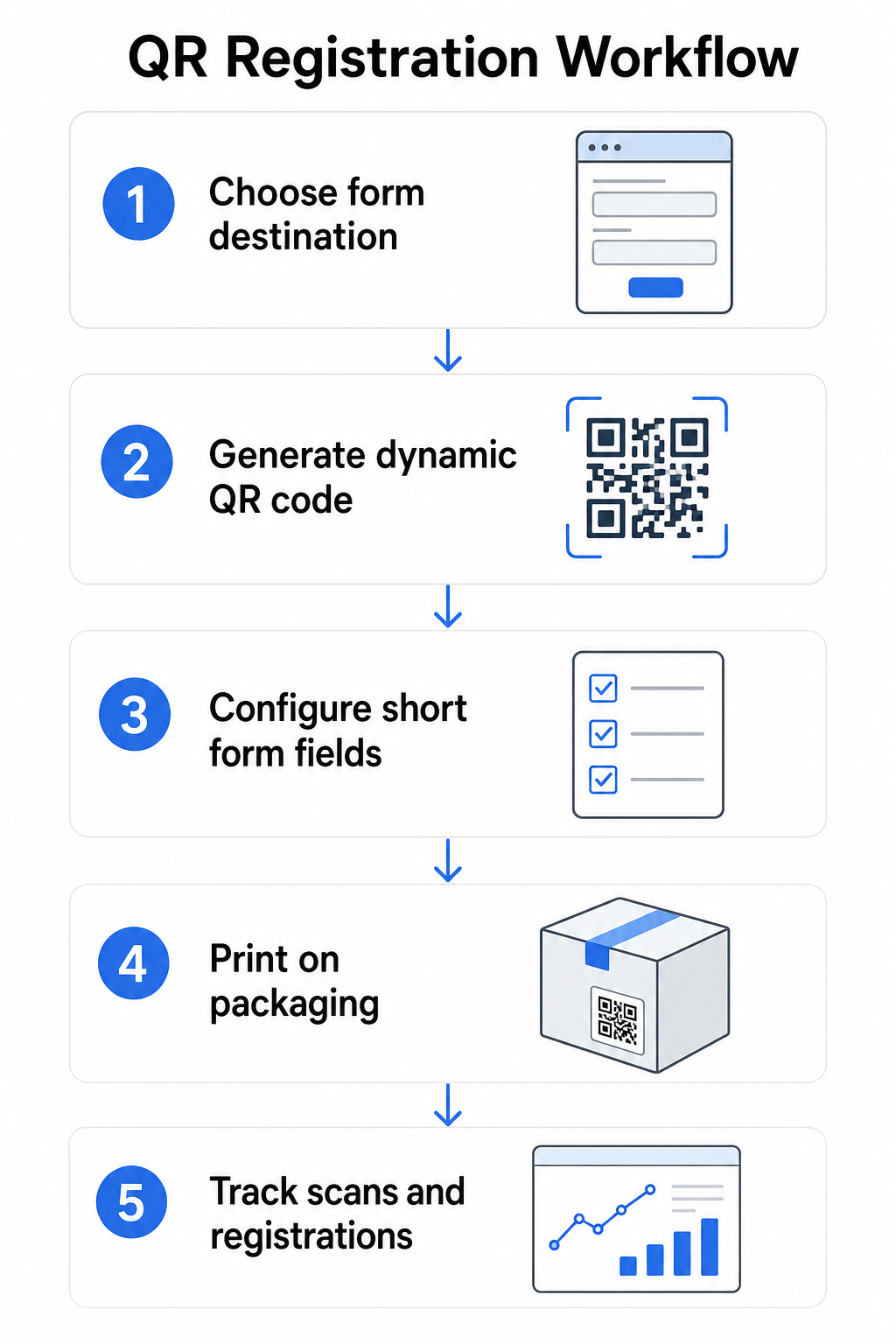
Trin 1: Vælg din formulardestination
Du har to primære muligheder for, hvad QR-koden linker til. En Google Form er hurtig at sætte op og fungerer godt til indsamling af strukturerede felter. Brug Google Form QR-kode generator til at konvertere din formulars delingslink til en scannbar kode.
EN brandet landingsside er en mobiloptimeret side, der præsenterer din registreringsformular sammen med produktdetaljer, garantibetingelser og brandvisuals. Pageloots Landingssider-funktion giver dig mulighed for at bygge og opdatere disse sider uden teknisk hjælp. Landingsside-muligheden har tendens til at fungere bedre for kundeoplevelsen, fordi du kontrollerer det fulde design, kan vise garantibetingelser tydeligt og kan inkludere flere links eller opfordringer til handling – såsom et link til produktmanualen sammen med registreringsformularen.
Trin 2: Generer en dynamisk QR-kode
Opret QR-koden ved hjælp af Pageloot's Dynamisk QR-kode generator og peg den mod din valgte destination. Tilføj dit brandlogo og farver for at gøre koden genkendelig på emballagen. Hold logoet inden for 30% af kodeområdet for at bevare scanningsmuligheden, og brug et højt fejlkorrektionsniveau (Q eller H), når du tilføjer visuel branding.
Trin 3: Konfigurer registreringsformularens felter
Indsaml det, du faktisk har brug for til garanti- og ejerskabsformål. Typiske felter inkluderer:
- Kundens navn og e-mailadresse
- Købsdato
- Købssted (forhandler eller kanal)
- Produktets serienummer (hvis ikke forududfyldt)
- Valgfrit: produktfeedback eller foretrukken kontaktmetode
Dataminimering er ikke kun en bedste praksis for privatlivets fred – det forbedrer også udfyldelsesraterne. Kortere formularer får flere indsendelser.
Trin 4: Placer QR-koden på emballage eller indlæg
For pålidelig scanning, placering på produktemballage følger et par konsekvente principper:
- Størrelse koden mindst 1 tomme (2,5 cm) bred
- Print på en flad, glat overflade – undgå folder, sømme eller buede områder
- Brug høj kontrast (sort på hvidt fungerer bedst; oprethold mindst et 3:1 kontrastforhold)
- Efterlad en klar stillezone – en tom margen – omkring koden
- Test den printede kode på det faktiske substrat, før produktionskørslerne færdiggøres
For et dybere kig på etiket-specifikke overvejelser, se guide til QR-koder på produktetiketter og Sådan printer du en QR-kode på en etiket.
Trin 5: Spor registreringer og scanningsdata
Når koden er live, viser dit Pageloot-dashboard scanningsantal, geografisk placering af scanninger, enhedstype og tidspunkt på dagen. Dette fortæller dig ikke kun, hvor mange kunder der registrerede sig, men hvornår og hvor de interagerede – nyttigt til at identificere, om emballageplaceringen fungerer, og om visse markeder eller kanaler har lavere registreringsrater end andre.
Se hvem der registrerer sig – og hvem der ikke gør Brug QR-kode scanningssporing for at overvåge registreringsengagement efter region, enhed og tid. Opdag frafald tidligt og opdater din formulardestination uden at genprinte.
Hvilke data du kan indsamle – og hvilke du bør
QR-koder understøtter to forskellige lag af dataindsamling, og forståelse af forskellen hjælper dig med at opsætte dit program korrekt fra starten.
Scanningsdata indsamles automatisk, når nogen scanner en dynamisk QR-kode. Dette inkluderer scanningsantal, scanningsplacering (land og region), enhedstype (iOS eller Android) og tidsstempel. Disse data indsamles uden at kunden giver personlige oplysninger – det afspejler engagement med selve koden. For en fuld oversigt over, hvad der indsamles, se hvilke data dynamiske QR-koder indsamler.
Registreringsdata – navne, e-mailadresser, købsdatoer og kontaktoplysninger – indsamles kun, når en kunde frivilligt udfylder formularen på den linkede side. Dette er førstepartsdata, leveret direkte og med bevidsthed af kunden. Pageloot's platform understøtter denne model: kunder deler information via formularer eller landingssider efter scanning, hvilket holder dataindsamlingen samtykkebaseret og gennemsigtig.
Til garanti- og ejerskabsformål har du brug for registreringsdata. For at forstå, om dit registreringsprogram fungerer i stor skala, giver scanningsdata værdifuld kontekst.
Privatlivs- og juridiske overvejelser
Indsamling af produktregistreringsdata medfører overholdelsesforpligtelser, der varierer efter produktkategori og jurisdiktion.
Til holdbare spædbarns- eller småbørnsprodukter reguleret under 16 CFR Part 1130, kræver CPSC, at du:
- Lever en portofrit fysisk registreringskort med hver enhed
- Tilbyd en elektronisk registreringsmulighed (hjemmeside eller e-mail) som et supplement – ikke en erstatning – for det fysiske kort
- Vedligehold optegnelser over registrantens navne, adresser og e-mailadresser
- Brug registreringsdata kun til sikkerhedsadvarsler og tilbagekaldelser, ikke til markedsføringsformål
En QR-kode, der linker til din online registreringsformular, opfylder kravet om elektronisk registrering under denne ramme, men den erstatter ikke kravet om et fysisk kort for dækkede produkter.
For garantiregistrering mere bredt, Magnuson-Moss Garanti-loven skelner mellem fulde og begrænsede garantier. Produkter med en “fuld” garanti kan ikke kræve registrering som en betingelse for dækning. Produkter med en “begrænset” garanti kan kun kræve registrering, hvis kravet er tydeligt oplyst før køb. Enhver registreringsbetingelse skal fremgå af garantibetingelser, som forbrugere kan få adgang til før salg.
For databeskyttelse, bør amerikanske virksomheder, der indsamler personlige oplysninger via online registreringsformularer, give en fortrolighedserklæring ved eller før indsamlingstidspunktet, der beskriver, hvilke data der indsamles, hvorfor, og hvor længe de vil blive opbevaret. I henhold til Californiens CPRA skal indsamling og opbevaring begrænses til det, der er rimeligt nødvendigt for det oplyste formål. Hvis dine produkter kan nå familier med børn under 13 år, skal du sikre, at din online formular overholder COPPA's krav om verificerbart forældresamtykke, før du indsamler personlige data fra denne aldersgruppe.
For flere detaljer om QR-kode databeskyttelsesforpligtelser på tværs af jurisdiktioner, se QR-kode Privatlivslove: Nøgleforordninger.
Brug af QR-koder på tværs af produktets livscyklus
Garanti registrering er en del af en bredere mulighed. Den samme QR-kode på dit produkt kan tjene flere funktioner på tværs af hele ejerskabsrejsen:
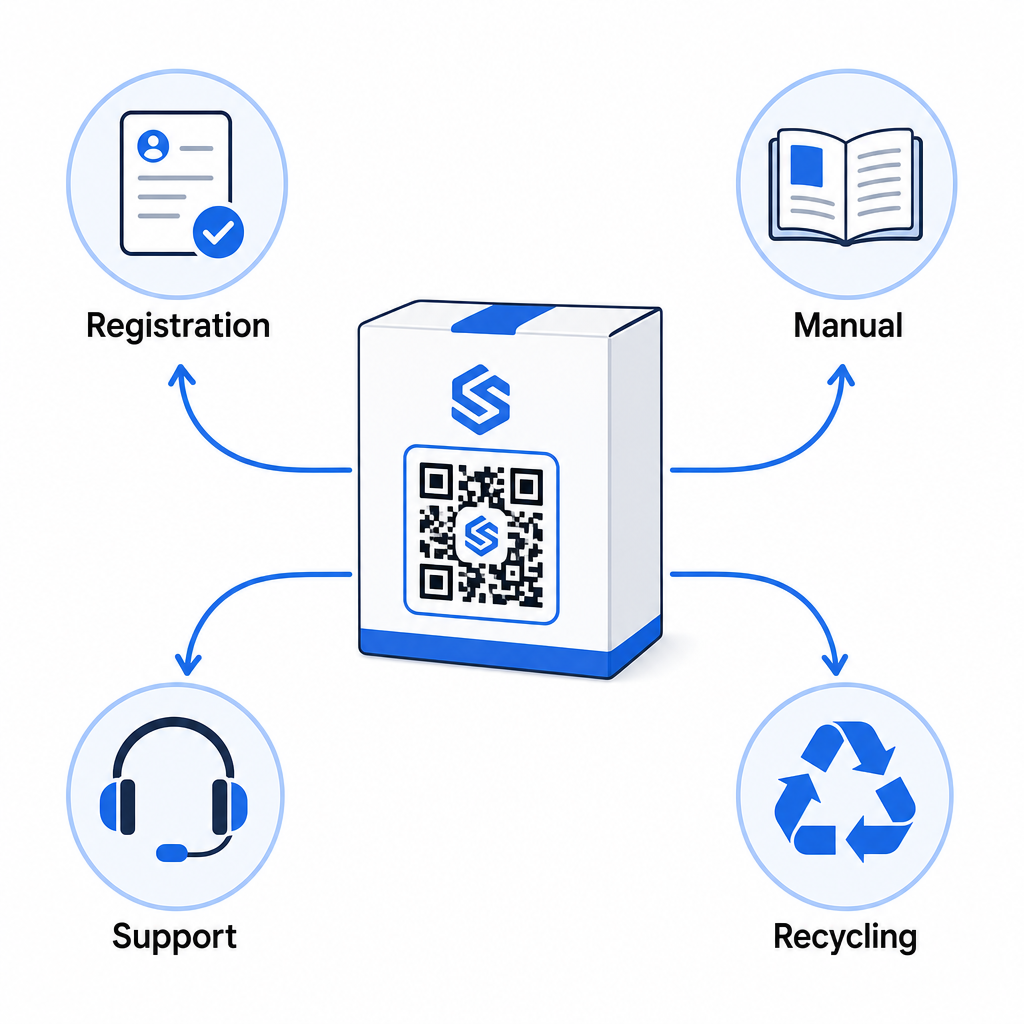
- Ved udpakning: dirigerer til registreringsformularen og garantiaktivering
- Under ejerskab: linker til produktmanualen, ofte stillede spørgsmål (FAQ'er) eller instruktionsvideoer
- For support: forbinder til en serviceanmodningsformular eller live chat
- Ved endt levetid: giver genbrugs- eller bytteinstruktioner
Fordi dynamiske QR-koder lader dig opdatere destinationen uden genoptryk, kan du udvikle, hvad koden gør over tid. En kode, der er trykt i dag til registrering, kan senere pege på en firmwareopdateringsside, en tilbagekaldelsesmeddelelse eller et loyalitetsprogram – uden nogen ændring af den fysiske emballage.
Denne livscyklus-tilgang udforskes yderligere i QR-koder til sporing af produktets livscyklus og QR-koder i produktion: Sporing af materialer og produkter.
For producenter, der administrerer produktregistrering på tværs af flere SKU'er eller produktlinjer, bliver et centraliseret dashboard til QR-kodehåndtering essentielt. Se Virksomheds QR-kodehåndteringsværktøjer for vejledning om håndtering af QR-koder i stor skala, herunder bulkgenerering og analyse pr. kode.
Kom godt i gang
En QR-kode til produktregistrering er ikke et teknisk projekt – det er en emballagebeslutning. Du genererer en dynamisk kode, peger den på din registreringsformular eller landingsside, printer den på indlægget eller æsken, og begynder at indsamle ejerskabsdata i det øjeblik produkter når kunderne.
Forskellen mellem et fysisk registreringskort og en QR-kode er forskellen mellem at bede nogen om at sende et brev og at give dem en telefon. Kunder, der aldrig ville returnere et kort, vil scanne en kode på under 10 sekunder.
Start med én produktlinje. Opret en dynamisk QR-kode ved hjælp af Pageloot QR-kodegenerator, link den til din registreringsformular, og spor hvordan scannings- og indsendelsesrater sammenlignes med din tidligere registreringsmetode. Når du ser forskellen i engagement, er det ligetil at udvide til hele dit katalog.
Ofte stillede spørgsmål
Nej. I henhold til 16 CFR del 1130 skal producenter og importører af holdbare spædbarns- eller småbørnsprodukter inkludere et forudbetalt fysisk registreringskort med hver enhed. Onlineregistrering via en QR-kode opfylder den krævede elektroniske registreringsmulighed, men skal supplere det fysiske kort, ikke erstatte det. Begge er påkrævet.
Hvis du bruger en dynamisk QR-kode, kan du opdatere destinations-URL'en fra dit dashboard til enhver tid uden at genudskrive eller ændre den fysiske kode. Dette er en af de primære grunde til, at dynamiske QR-koder anbefales til produktregistrering – det beskytter dig mod ødelagte links, når formularer migreres eller opdateres. Statiske QR-koder kan ikke ændres efter udskrivning.
Indsaml kun det, du reelt har brug for til at opfylde registreringsformålet – typisk kundens navn, e-mailadresse, købsdato, købssted og produktets serienummer. I henhold til dataminimeringsprincipper, der kræves af love som Californiens CPRA, bør indsamling begrænses til det, der er rimeligt nødvendigt for det angivne formål. Færre felter forbedrer også formularudfyldelsesraterne, så en slank formular tjener både overholdelse og forretningsmål.