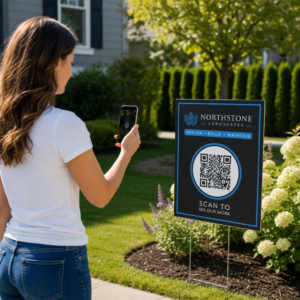
Menguruskan pengenalan ahli dengan kad kertas atau senarai daftar masuk manual melambatkan anda? Kad hilang, barisan panjang, dan tiada cara untuk mengesahkan status keahlian dalam masa nyata mencipta geseran sebenar untuk kakitangan dan ahli. Panduan ini membimbing anda cara melaksanakan kad keahlian digital dengan kod QR – daripada menjana kod unik hingga mengimbasnya di pintu dan memastikan data ahli selamat.
Mengapa Kod QR Berfungsi dengan Baik untuk Kad Keahlian
Kad keahlian plastik atau kertas tradisional berkongsi masalah tetap: ia membawa maklumat statik, haus, hilang, dan tidak memberi anda sebarang pandangan tentang cara ahli menggunakannya. Kod QR pada kad keahlian digital menyelesaikan semua itu.
Apabila seorang ahli menunjukkan kad mereka – pada telefon mereka, dalam aplikasi dompet mereka, atau bahkan dicetak di atas kertas – kakitangan hanya mengimbas kod QR. Pengimbas membaca pengecam unik yang dikaitkan dengan rekod ahli tersebut dalam sistem anda, mengesahkan status mereka, dan mencatat daftar masuk. Keseluruhan proses mengambil masa beberapa saat.
Kira-kira 99.5 juta pengguna telefon pintar di Amerika Syarikat mengimbas kod QR pada tahun 2025, peningkatan 19% berbanding tahun 2022. Ahli anda hampir pasti sudah tahu cara menggunakannya. Selain kemudahan, kad keahlian berasaskan QR memberi anda sesuatu yang tidak pernah dapat diberikan oleh kad fizikal: data. Anda boleh menjejaki bila ahli mendaftar masuk, kekerapan mereka melawat, dan lokasi atau acara mana yang mereka hadiri – maklumat yang membantu anda membuat keputusan yang lebih baik tentang kakitangan, pengaturcaraan, dan penglibatan ahli.
Bagaimana Proses Pengesahan Berfungsi
Memahami aliran membantu anda mereka bentuk sistem yang sesuai dengan organisasi anda. Berikut adalah apa yang berlaku dari saat seorang ahli masuk hingga saat mereka dibenarkan masuk.
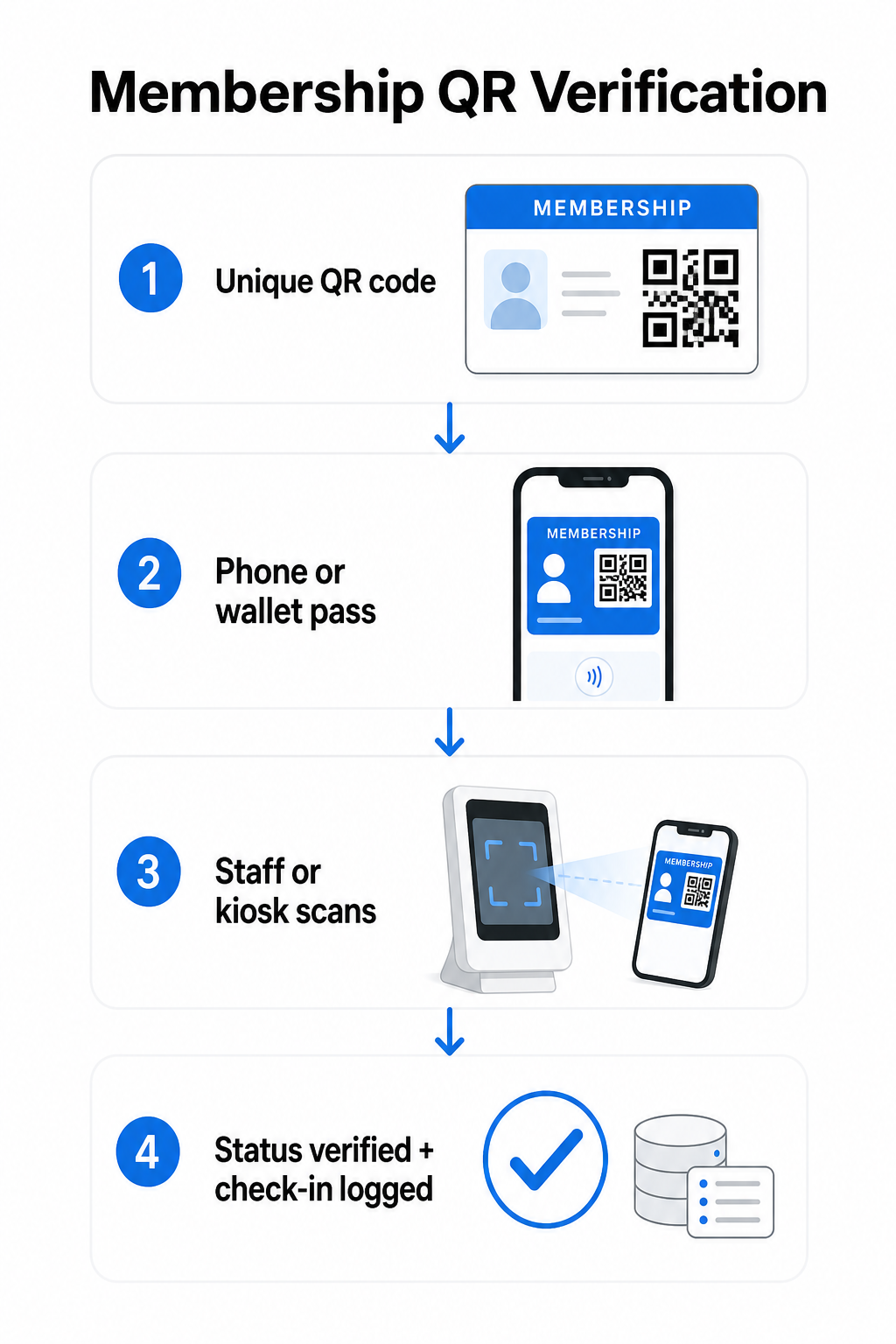
Kod QR unik diberikan kepada setiap ahli semasa pendaftaran atau orientasi. Kod ini mengekod pengecam selamat – bukan maklumat peribadi ahli secara langsung, tetapi rujukan yang boleh dicari oleh sistem anda. Ahli menunjukkan kod QR mereka dengan membuka kad digital mereka pada telefon, menunjukkan kad bercetak, atau memaparkan pas dari Apple Wallet atau Google Wallet. Kakitangan atau kiosk kemudian mengimbas kod menggunakan kamera telefon pintar, pengimbas kod bar khusus, atau alat seperti the Pengimbas Kod QR Pageloot.
Sistem mengesahkan kelayakan – mengesahkan status keahlian, tahap akses, tarikh luput, atau sebarang kebenaran lain yang telah anda konfigurasikan – sebelum memberikan atau menandakan kemasukan dan merekodkan daftar masuk dalam pangkalan data keahlian anda. Anda juga boleh melapiskan peraturan berasaskan masa atau khusus kawasan, contohnya membenarkan akses hanya semasa waktu perniagaan atau menyekat tahap ahli tertentu ke kemudahan khusus.
Proses ini berfungsi sama ada anda mengendalikan gim, persatuan profesional, kelab, atau mana-mana organisasi yang perlu mengesahkan siapa yang masuk melalui pintu.
Mula Menjana Kod QR Keahlian Cipta kod QR unik, boleh dijejak untuk setiap ahli dengan the Penjana Kod Pageloot QR. Percubaan percuma 14 hari, tiada kad kredit diperlukan.
Memilih Antara Kod QR Statik dan Dinamik
Tidak semua kod QR berkelakuan sama, dan perbezaan itu penting untuk pengurusan keahlian.
Kod QR statik mengekod maklumat secara kekal pada masa penciptaan. Setelah dicetak, data di dalamnya tidak boleh berubah. Ia berfungsi untuk kes penggunaan mudah, tetapi jika status ahli berubah – katakan, keahlian mereka luput atau mereka menaik taraf ke tahap yang lebih tinggi – anda tidak boleh mengemas kini kod tersebut. Anda perlu mengeluarkan yang baharu sepenuhnya.
Kod QR dinamik menyimpan pengalihan pendek secara dalaman dan menunjuk ke destinasi yang boleh anda kemas kini pada bila-bila masa, tanpa mencetak semula kod tersebut. Untuk kad keahlian, ini bermakna anda boleh mengubah apa yang dikembalikan oleh imbasan – tahap akses yang dikemas kini, tarikh luput yang diperbaharui, atau profil ahli yang disemak semula – tanpa mengeluarkan kad baharu. Kod QR dinamik juga boleh dijejak, memberikan anda analitik tahap imbasan termasuk masa, lokasi, dan data peranti. Untuk organisasi yang menguruskan puluhan atau ratusan ahli, keterlihatan itu benar-benar berguna.
| CIRI | Kod QR Statik | Kod QR Dinamik |
|---|---|---|
| Boleh dikemas kini selepas dicetak | Tidak | ya |
| Analitik imbasan | Tidak | ya |
| Berfungsi jika status ahli berubah | Memerlukan pengeluaran semula | Kemas kini destinasi, kod yang sama |
| kos | Percuma | Langganan berbayar diperlukan |
Untuk kebanyakan program keahlian, kod QR dinamik adalah pilihan yang tepat. Kod statik boleh diterima hanya jika butiran keahlian anda tidak pernah berubah dan anda tidak memerlukan penjejakan.
Cara Mencipta Kod QR Keahlian dengan Pageloot
Berikut adalah pendekatan langkah demi langkah praktikal untuk menjana dan mengedarkan kod QR untuk ahli anda.
Langkah 1: Pilih jenis kod QR anda. Log masuk ke Pageloot dan pilih jenis kod QR yang sepadan dengan apa yang anda mahu ahli akses – URL yang memaut ke profil ahli mereka, vCard dengan butiran hubungan dan keahlian, atau borang untuk pengesahan daftar masuk. Pageloot menyokong lebih daripada 25 jenis kod QR, supaya anda boleh memadankan format dengan aliran kerja sedia ada anda.
Langkah 2: Masukkan maklumat khusus ahli. Setiap ahli memerlukan kod yang unik. Jika anda memaut ke profil ahli individu atau ID, pastikan setiap kod QR menunjuk kepada pengecam unik dan bukannya kandungan kongsi generik.
Langkah 3: Sesuaikan reka bentuk. Tambah logo organisasi anda dan warna jenama. Reka bentuk kad yang boleh dikenali membina kepercayaan ahli dan mengurangkan kemungkinan penipuan. Pastikan kod QR itu sendiri mempunyai kontras tinggi – latar depan gelap pada latar belakang cerah – dan pastikan ia memenuhi saiz cetakan minimum 0.8 × 0.8 inci untuk pengimbasan jarak dekat.
Langkah 4: Muat turun dan edarkan. Pageloot menyediakan fail sedia cetak dalam format .SVG, .PDF, dan .EPS. Anda boleh membenamkan kod QR ke dalam reka bentuk kad digital, menghantarnya terus melalui e-mel kepada ahli, atau meminta mereka menambahkannya ke Apple Wallet atau Google Wallet sebagai pas.
Langkah 5: Susun kod anda. Gunakan Pageloot’s Folder kod QR untuk mengumpulkan kod ahli mengikut peringkat keahlian, lokasi, atau kitaran pembaharuan. Ini memastikan papan pemuka anda mudah diurus apabila senarai ahli anda bertambah.
Jejaki Setiap Daftar Masuk Ahli Pantau data imbasan merentasi keseluruhan keahlian anda dari satu papan pemuka. The Penjana Kod Pageloot QR membolehkan anda mencipta kod dinamik yang boleh dijejak dan mengemas kininya pada bila-bila masa tanpa mencetak semula.
Mengedarkan Kad kepada Ahli
Setelah anda menjana kod, anda mempunyai beberapa pilihan untuk memberikannya kepada ahli.
- Penghantaran e-mel: Hantar setiap ahli imej kad digital atau PDF yang mengandungi kod QR unik mereka. Ini berfungsi serta-merta dan tidak memerlukan kos untuk diedarkan.
- Apple Wallet dan Google Wallet: Ahli boleh menambah pas keahlian terus ke aplikasi dompet telefon mereka. Apple Wallet menyimpan pas dalam format `.pkpass`, yang boleh merangkumi kod QR dan butiran ahli. Google Wallet menyokong fungsi serupa melalui API Pasnya. Setelah ditambah, ahli membuka pas dan menunjukkan kod QR untuk diimbas di pintu.
- Kad bercetak: Untuk ahli yang lebih suka kad fizikal, atau untuk titik masuk di mana telefon tidak praktikal, anda boleh mencetak kod QR pada kad standard. Gunakan percetakan berkualiti tinggi untuk mengekalkan kebolehimbasan.
- Paparan dalam aplikasi atau portal: Jika organisasi anda mempunyai portal ahli atau aplikasi, paparkan kod QR terus di dalamnya supaya ahli sentiasa mempunyai akses tanpa memuat turun fail berasingan.
Untuk program yang berfokuskan kehadiran – kelas, bengkel, atau acara berulang – sebuah sistem kehadiran kod QR membolehkan ahli mengimbas diri mereka sendiri dan bukannya menunggu kakitangan mengimbas kad mereka, yang boleh mengurangkan masa masuk dengan ketara.
Keperluan Reka Bentuk Kod QR untuk Pengimbasan yang Boleh Dipercayai
Kod QR kad keahlian yang gagal diimbas di pintu masuk menimbulkan masalah dan menghakis keyakinan ahli. Ikuti keperluan teknikal ini untuk memastikan prestasi yang konsisten.
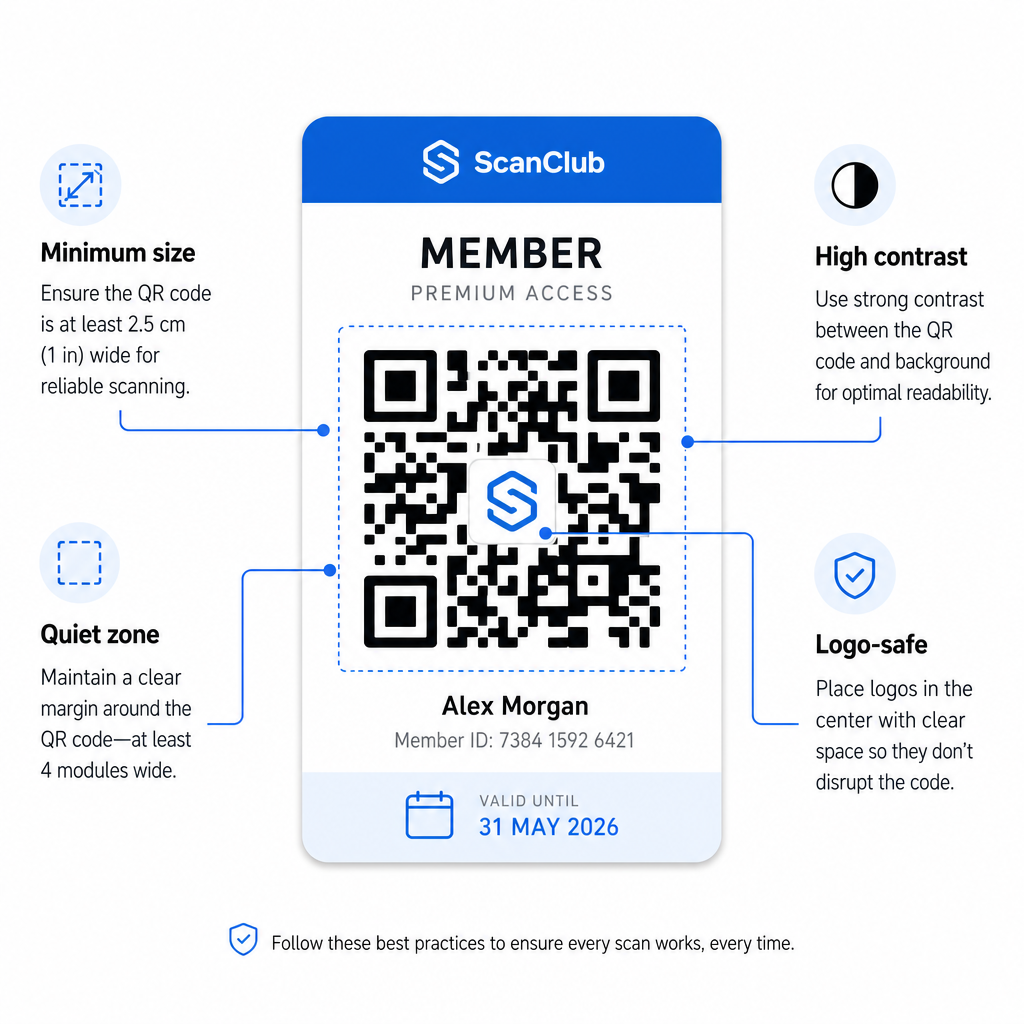
- Saiz minimum: Cetak kod QR tidak lebih kecil daripada 0.8 × 0.8 inci (2 cm × 2 cm) untuk pengimbasan jarak dekat. Gunakan peraturan 10:1 untuk jarak – untuk setiap 10 inci antara pengimbas dan kod, kod tersebut hendaklah sekurang-kurangnya 1 inci lebar.
- Zon senyap: Kekalkan sekurang-kurangnya 4 modul ruang kosong di semua sisi kod QR. Margin ini membolehkan pengimbas mengesan di mana kod bermula dan berakhir.
- Berbeza: Gunakan latar depan gelap pada latar belakang cerah dengan nisbah kontras minimum 4:1. Elakkan meletakkan kod QR di atas imej atau corak sibuk yang mengurangkan kebolehbacaan.
- Pembetulan ralat: Jika anda menyertakan logo organisasi anda di dalam kod QR, gunakan pembetulan ralat Tahap H, yang menyediakan kapasiti pemulihan sehingga 30%. Ini mengimbangi bahagian kod yang dilindungi secara visual oleh logo.
- Uji sebelum mengedarkan: Imbas setiap templat kod pada pelbagai peranti dan di bawah keadaan pencahayaan yang berbeza sebelum melancarkannya kepada ahli.
Prinsip yang sama ini terpakai di seluruh lokasi fizikal. The kod QR untuk gim dan panduan kesejahteraan meliputi bagaimana kemudahan kecergasan secara khusus mengendalikan persekitaran pengimbasan volum tinggi.
Pertimbangan Keselamatan untuk Kod QR Ahli
Kad keahlian sering memberikan hak akses sebenar – ke kemudahan, acara, atau diskaun – jadi keselamatan bukanlah pilihan. Sistem QR yang direka dengan buruk boleh disalin, difoto, atau dikongsi.
- Enkod pengecam selamat, bukan data peribadi. Kod QR harus mengandungi rujukan legap – seperti ID ahli yang dihash secara kriptografi – dan bukannya nama, alamat e-mel, atau maklumat peribadi lain. Jika seseorang memfoto kod QR, mereka tidak seharusnya mendapat akses langsung kepada data ahli.
- Gunakan kod terhad masa atau sekali guna untuk senario keselamatan tinggi. Untuk acara atau situasi akses sekali sahaja, jana kod yang tamat tempoh selepas tempoh singkat atau menjadi tidak sah selepas satu imbasan. Ini menghalang penyalinan atau pemajuan kod.
- Gunakan kod QR dinamik untuk keahlian berterusan. Oleh kerana kod dinamik menunjuk ke destinasi sebelah pelayan, anda boleh membatalkan keahlian yang luput atau terjejas serta-merta – tiada kad baharu diperlukan.
- Kekalkan jejak audit. Log setiap imbasan dengan cap masa dan lokasi. Ini membantu anda mengenal pasti corak luar biasa, seperti satu kod diimbas dari dua lokasi secara serentak.
- Patuhi peraturan perlindungan data. Jika kad keahlian atau log imbasan anda mengandungi maklumat peribadi, pastikan sistem anda selaras dengan undang-undang privasi yang berkenaan. Bekerja dengan vendor yang mengamalkan minimalisasi data dan mempunyai dasar pengekalan data yang jelas.
Bagi organisasi yang mengendalikan data keahlian sensitif, panduan keselamatan adalah konsisten: kod QR yang digunakan untuk pengesahan harus mengandungi hanya pengecam legap, bukan maklumat peribadi, dan kod harus dihadkan masa serta dijana secara dinamik di mana mungkin.
Menghubungkan Kad Keahlian QR ke Program Kesetiaan
Kad keahlian dan program kesetiaan sering bertindih. Jika organisasi anda memberi ganjaran kepada penglibatan ahli – melalui mata, pencapaian lawatan, atau faedah berperingkat – kad berasaskan QR boleh berfungsi kedua-dua fungsi secara serentak.
Apabila seorang ahli mengimbas masuk, peristiwa itu boleh mencetuskan kredit mata, mengemas kini kiraan lawatan mereka, atau membuka kunci peringkat faedah baharu. Ini menghapuskan keperluan untuk kad kesetiaan yang berasingan sepenuhnya. Panduan mengenai cara menyediakan program kesetiaan kod QR menerangkan cara menyusun ganjaran bersama sistem keahlian. Untuk perbandingan bersebelahan pendekatan digital dan fizikal, perincian kod QR berbanding kad kesetiaan tradisional meliputi pertukaran praktikal secara terperinci.
Jika program anda termasuk acara bertiket, infrastruktur QR yang sama juga terpakai di sana. panduan kod QR untuk tiket acara menerangkan cara untuk melanjutkan persediaan anda untuk meliputi akses dan daftar masuk khusus acara.
Kad keahlian digital dengan kod QR mengurangkan overhed pentadbiran, memberikan ahli pengalaman yang lebih mudah, dan menyediakan organisasi anda dengan data sebenar tentang penglibatan dan kehadiran. Keputusan utama – kod statik berbanding dinamik, imbasan sendiri berbanding imbasan kakitangan, integrasi dompet berbanding penghantaran e-mel – bergantung pada jumlah ahli dan persediaan operasi anda, tetapi alat asas boleh diakses tanpa mengira saiz organisasi. Mulakan dengan kod dinamik, reka bentuk untuk kebolehimbasan, dan bina kaedah pengedaran anda berdasarkan cara ahli anda sebenarnya berkelakuan.
Bina Sistem Kad Keahlian Anda Jana, sesuaikan, dan urus kod QR untuk setiap ahli dari satu papan pemuka. Cuba Penjana Kod Pageloot QR percuma selama 14 hari – tiada kad kredit diperlukan.
Soalan lazim
Ya. Ahli boleh menyimpan kod QR mereka sebagai pas dalam Apple Wallet atau Google Wallet, yang tidak memerlukan aplikasi pihak ketiga. Sebagai alternatif, anda boleh menghantar e-mel kepada mereka imej kad digital yang mereka buka terus dari pustaka foto telefon mereka atau klien e-mel. Kakitangan mengimbas kod QR yang dipaparkan pada skrin menggunakan mana-mana kamera standard atau Pengimbas Kod QR Pageloot.
Dengan kod QR dinamik, anda mengemas kini destinasi atau status keahlian dalam papan pemuka anda dengan serta-merta. Kad fizikal atau digital itu sendiri tidak berubah, tetapi pada kali seterusnya ia diimbas, sistem anda mengembalikan status yang dikemas kini – tamat tempoh, digantung, atau diperbaharui – tanpa mengeluarkan kad baharu kepada ahli.
Pageloot membolehkan anda mencipta dan mengurus kod QR secara pukal, disusun ke dalam folder mengikut peringkat keahlian, lokasi, atau tempoh pembaharuan. Papan pemuka berpusat menyediakan analitik imbasan dan alat pengurusan untuk semua kod anda di satu tempat. Lawati halaman Penjana Kod QR Pageloot untuk butiran mengenai had dan ciri khusus pelan.