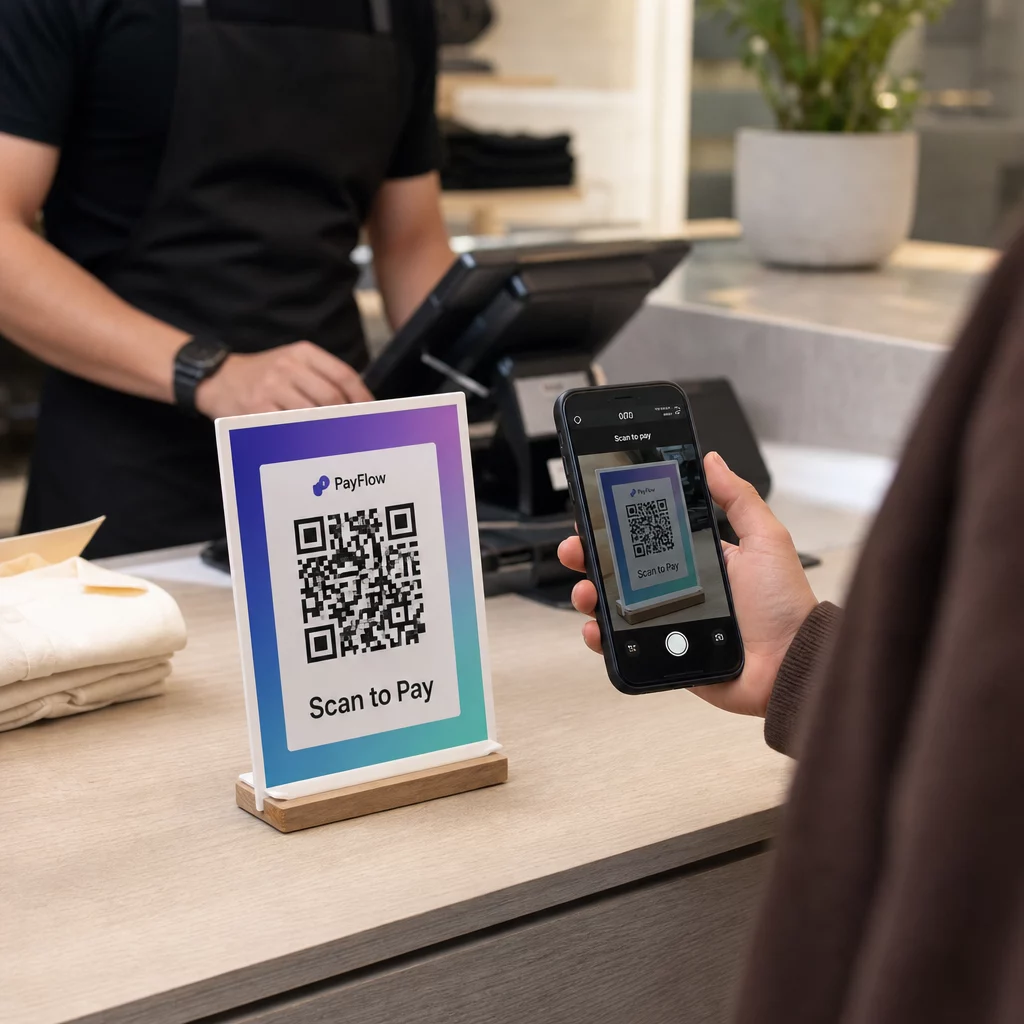
Adakah anda kehilangan pelanggan di kaunter pembayaran kerana proses pembayaran anda terlalu perlahan atau rumit? Barisan panjang dan terminal yang menyusahkan mengecewakan pembeli dan merugikan jualan anda. Panduan ini akan membimbing anda dengan tepat cara untuk menyediakan dan menerima pembayaran kod QR di kedai runcit anda – meliputi teknologi, langkah-langkah persediaan, penempatan, dan amalan keselamatan.
Apa Itu Pembayaran Kod QR dan Cara Ia Berfungsi
A kod QR pembayaran ialah kod yang boleh diimbas yang menghubungkan telefon pintar pelanggan terus ke halaman pembayaran atau portal pembayaran anda. Daripada meleret kad atau mengira wang tunai, pelanggan menghalakan kamera mereka ke kod tersebut, mengesahkan jumlah, dan menyelesaikan transaksi melalui aplikasi pembayaran pilihan mereka.
Terdapat dua mod pembayaran QR dalam peruncitan:
- Mod yang dibentangkan oleh pedagang (MPM): Anda memaparkan kod QR di tempat jualan – pada skrin, papan tanda bercetak, atau resit. Pelanggan mengimbasnya dengan telefon mereka untuk membuka halaman pembayaran dan menyelesaikan pembelian.
- Mod yang dibentangkan oleh pengguna (CPM): Pelanggan menjana kod QR dalam aplikasi pembayaran mereka (seperti PayPal atau Venmo), dan ahli kakitangan atau pengimbas membacanya di daftar tunai.
Kebanyakan persediaan runcit A.S. menggunakan pendekatan yang dibentangkan oleh pedagang kerana ia tidak memerlukan perkakasan khas di pihak pelanggan – mana-mana telefon pintar dengan kamera berfungsi.
Setelah pelanggan mengimbas, alirannya biasanya: imbas kod → mendarat di halaman pembayaran atau daftar keluar → masukkan atau sahkan butiran pembayaran → transaksi selesai. Penyedia pembayaran (PayPal, Stripe, Square, atau pemproses lain) mengendalikan pemprosesan kewangan dari sana.
Kod QR yang digunakan untuk pembayaran datang dalam dua jenis teknikal:
- Kod QR statik menyimpan URL tetap atau pautan pembayaran. Ia percuma untuk dijana tetapi tidak boleh dikemas kini tanpa mencetak semula, dan ia tidak menyediakan analitik imbasan.
- Kod QR dinamik menyimpan pautan pendek yang mengubah hala ke destinasi yang boleh anda kemas kini pada bila-bila masa. Ia boleh tamat tempoh selepas satu transaksi, menjejaki data imbasan, dan dinyahaktifkan serta-merta jika terjejas – menjadikannya pilihan yang lebih baik untuk kebanyakan aplikasi pembayaran runcit.
Untuk melihat dengan lebih mendalam bagaimana kod QR pembayaran berfungsi dalam amalan, termasuk kaedah pembayaran yang disokong seperti dompet mudah alih, aplikasi bank, dan mata wang kripto, lihat panduan pembayaran khusus Pageloot.
Apa Yang Anda Perlukan Sebelum Bermula
Menyediakan pembayaran kod QR tidak memerlukan pelaburan perkakasan yang besar. Keperluan praktikal adalah:
- Akaun pembayaran dengan penyedia yang menyokong pembayaran berasaskan QR (PayPal, Square, Stripe, Venmo Business, atau pemproses yang serupa)
- Peranti yang mampu memaparkan atau mencetak kod QR anda – telefon, tablet, skrin POS, atau papan tanda bercetak semuanya berfungsi
- Penjana kod QR untuk mencipta kod pembayaran anda
- Halaman pembayaran mesra mudah alih yang pelanggan akan tiba selepas mengimbas
Jika anda sudah menerima pembayaran digital melalui mana-mana pemproses arus perdana, anda mungkin sudah mempunyai kebanyakan apa yang anda perlukan. Kod QR hanya menjadi titik masuk kepada aliran pembayaran sedia ada anda.
Mula Menerima Pembayaran QR Hari Ini Cipta kod QR pembayaran berjenama, boleh dijejak dalam beberapa minit menggunakan Penjana Kod Pageloot QR. Tiada pengekodan diperlukan – hanya tampal pautan pembayaran anda dan sesuaikan.
Cara Menyediakan Kod QR Pembayaran Langkah demi Langkah
Proses persediaan asas mengikuti urutan yang mudah:
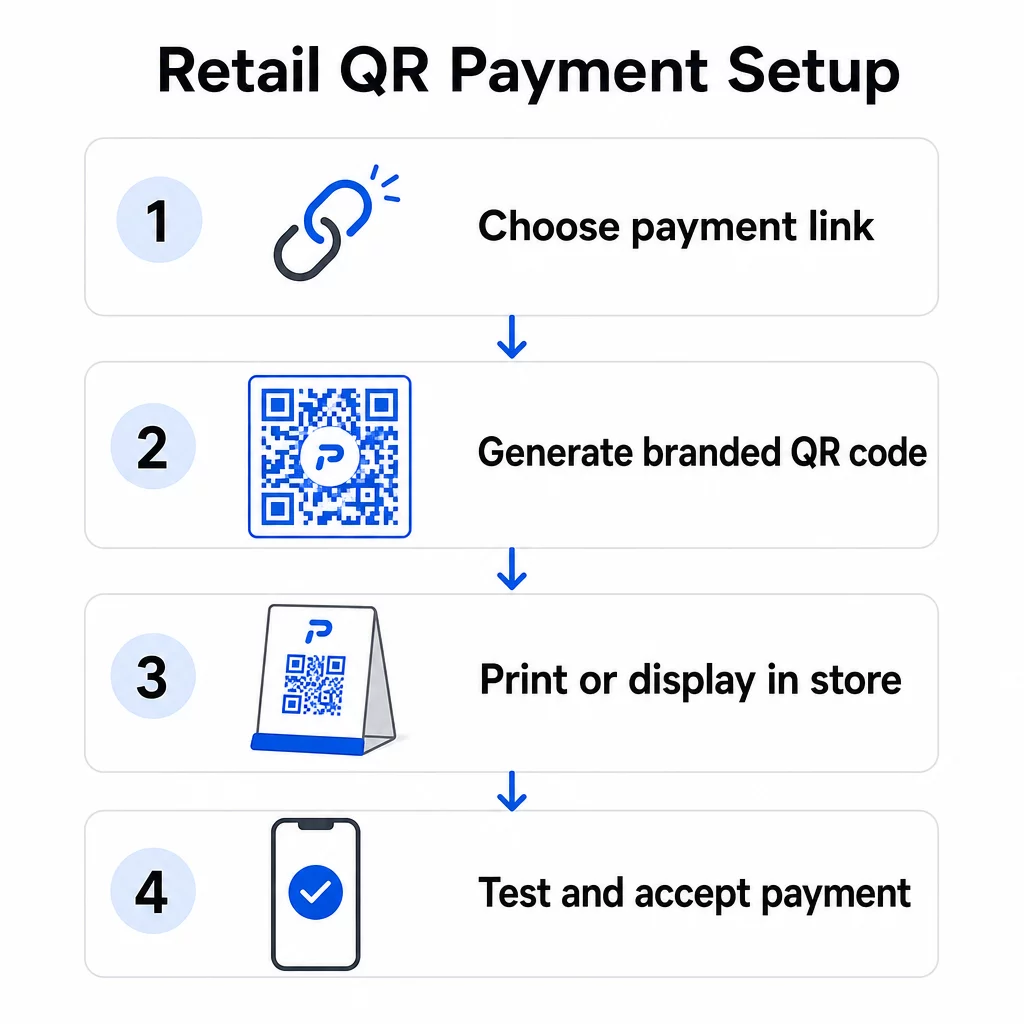
- Buka Penjana Kod Pageloot QR atau papan pemuka penyedia pembayaran anda
- Salin URL halaman pembayaran atau pautan pembayaran anda (pautan PayPal.me anda, halaman pembayaran Square, URL pembayaran Stripe, dsb.)
- Tampal pautan ke dalam penjana dan pilih jenis kod QR anda
- Sesuaikan reka bentuk – tambah logo anda, laraskan warna agar sepadan dengan penjenamaan anda, dan pilih bingkai dengan seruan tindakan yang jelas seperti “Imbas untuk Bayar”
- Muat turun kod yang telah siap dalam format sedia cetak (SVG, PDF, atau PNG)
- Uji kod pada peranti iOS dan Android sebelum menggunakannya di kedai
Untuk PayPal secara khusus, Buat QR untuk pembayaran PayPal membolehkan anda menjana kod berjenama terus dari pautan PayPal.me anda. Pelanggan mengimbasnya, memasukkan jumlah pembayaran, dan transaksi disalurkan dengan selamat melalui PayPal tanpa mana-mana pihak perlu berkongsi butiran akaun secara manual.
Keseluruhan proses biasanya mengambil masa kurang dari sejam untuk persediaan asas. Kod QR dinamik menambah beberapa minit untuk dikonfigurasi tetapi berbaloi untuk fleksibiliti dan penjejakan yang mereka sediakan.
Menghubungkan Kod QR ke Sistem Pembayaran Anda
Kod QR anda hanya berguna seperti aliran pembayaran yang ditujunya. Apabila menghubungkan kod anda ke sistem pembayaran, anda mempunyai beberapa pilihan integrasi:
- Pautan langsung: Tampal URL pembayaran yang dihoskan oleh penyedia pembayaran anda ke dalam penjana. Kod QR membuka halaman tersebut dalam pelayar pelanggan. Ini adalah pendekatan paling mudah dan memastikan data kad tidak berada dalam sistem anda sama sekali.
- Integrasi API: Sambungkan platform kod QR anda ke POS atau pemproses pembayaran anda melalui API untuk penjanaan kod automatik, khusus transaksi. Platform seperti Square, Shopify, dan Stripe menyokong ini secara asli.
- Kod yang dijana penyedia: Sesetengah sistem POS (Square, Clover, Toast) menjana kod QR terus dari papan pemuka mereka, yang kemudiannya boleh anda cetak atau paparkan pada skrin.
Satu kod QR boleh menyokong pelbagai kaedah pembayaran secara serentak. Pelanggan yang mengimbas kod yang sama boleh memilih daripada dompet digital (Apple Pay, Google Pay, Samsung Pay), PayPal, kad kredit, atau pilihan lain – bergantung pada apa yang disokong oleh halaman pembayaran anda. Fleksibiliti ini mengurangkan geseran dan mengelakkan pengecualian pelanggan berdasarkan kaedah pembayaran pilihan mereka.
Jika perniagaan anda melayani pelanggan berbahasa Cina, Integrasi kod QR Alipay dan WeChat Pay mengikuti proses persediaan yang serupa tetapi memerlukan akaun pedagang yang berasingan dengan penyedia tersebut dan pematuhan dengan peraturan AML dan KYC yang berkaitan.
Di Mana untuk Memaparkan Kod QR di Kedai Anda
Penempatan secara langsung mempengaruhi kekerapan pelanggan sebenarnya menggunakan pilihan pembayaran QR anda. Penempatan strategik di titik sentuh runcit utama membuat perbezaan antara kod yang diabaikan dan kod yang melancarkan proses pembayaran anda.
Di tempat jualan: Paparkan kod QR pembayaran anda dengan jelas di kaunter, skrin daftar, atau dirian bercetak. Letakkannya supaya pelanggan boleh dengan mudah menghalakan kamera telefon mereka ke arahnya tanpa sudut yang janggal. Sertakan arahan yang jelas seperti “Imbas untuk Bayar” supaya pelanggan tahu apa yang perlu dilakukan.
Pada resit bercetak: Menambah kod QR pada resit membolehkan pelanggan membayar bil mereka dari peranti mereka sendiri – model yang digunakan oleh Square dengan ciri “Imbas untuk Bayar”nya. Ini membebaskan kakitangan semasa tempoh sibuk dan mengurangkan penumpukan barisan.
Pada label rak dan tag harga: Kod QR pada tag harga membolehkan pelanggan membayar item terus di rak, mengurangkan masa yang dihabiskan di daftar untuk pembelian yang mudah.
Pada papan tanda dan poster dalam kedai: Kod QR yang lebih besar pada poster atau paparan tingkap boleh mempromosikan pilihan pembayaran tertentu, pendaftaran program kesetiaan, atau pembayaran tanpa sentuh untuk pelanggan yang ingin membayar sebelum sampai ke kaunter yang berstaf.
Untuk kod bercetak, ikuti garis panduan ini untuk memastikan pengimbasan yang boleh dipercayai:
- Saiz minimum 2 × 2 cm (0.8 × 0.8 in) untuk imbasan jarak dekat; tingkatkan kepada sekurang-kurangnya 5 × 5 cm untuk kod yang diimbas dari jarak 50 cm atau lebih jauh
- Latar depan gelap pada latar belakang cerah – elakkan reka bentuk terbalik atau latar depan merah/oren, yang sukar dibaca oleh banyak aplikasi kamera
- Zon senyap yang jelas (margin putih) sekurang-kurangnya empat modul di sekeliling kod pada semua sisi
- Uji pada pelbagai peranti dan di bawah keadaan pencahayaan yang berbeza sebelum digunakan
Setiap kod QR yang dipaparkan harus mempunyai konteks yang jelas menerangkan fungsinya dan cara menggunakannya. Pelanggan lebih cenderung untuk mengimbas apabila mereka melihat arahan mudah berbanding kod tanpa penjelasan.
Untuk pecahan penuh strategi penempatan mengikut kawasan kedai, halaman penyelesaian kod QR runcit merangkumi contoh praktikal merentasi papan tanda, resit, pembungkusan, dan banyak lagi.
Faedah Perniagaan Pembayaran Kod QR
Kos Lebih Rendah dan Operasi Lebih Mudah
Pembayaran kod QR biasanya mempunyai yuran transaksi yang lebih rendah berbanding pemprosesan kad tradisional. Yuran boleh serendah 1% setiap transaksi, berbanding julat 2–3% yang biasa dengan rangkaian kad kredit. Bagi perniagaan yang memproses $10,000 sebulan, perbezaan itu menambah ratusan dolar dalam penjimatan tahunan.
Selain yuran transaksi, pembayaran QR mengurangkan keperluan untuk perkakasan pembayaran khusus. Kod QR bercetak atau tablet yang memaparkan kod menggantikan keperluan untuk terminal kad kendiri di setiap titik pembayaran. Pengendalian tunai yang berkurangan juga menurunkan risiko keselamatan dan menjimatkan masa kakitangan pada akhir setiap syif.
Resit digital yang dicetuskan oleh imbasan QR seterusnya memudahkan operasi – pelanggan menerima rekod pembelian terus ke e-mel mereka, manakala anda mengurangkan penggunaan kertas dan penyimpanan rekod manual.
Peningkatan Pengalaman Pelanggan
Pembayaran QR menangani beberapa kekecewaan pembayaran biasa. Pelanggan tidak perlu membawa kad fizikal atau mengingati butiran akaun. Satu imbasan dari dompet digital pilihan mereka melengkapkan transaksi dalam beberapa saat. Kelajuan ini amat ketara semasa waktu puncak apabila barisan pembayaran tradisional cepat bertambah.
Sifat tanpa sentuh pembayaran QR juga memenuhi pilihan pelanggan yang berterusan untuk kebersihan dan kemudahan. Tiada sentuhan fizikal dengan perkakasan kongsi diperlukan, dan pembayaran dibenarkan melalui peranti pelanggan sendiri menggunakan tetapan keselamatan sedia ada mereka (cap jari, ID muka, atau PIN).
Kod QR di pembayaran juga membuka pintu kepada integrasi program kesetiaan. Daripada menguruskan kad kesetiaan yang berasingan, pelanggan boleh memperoleh mata, menebus ganjaran, dan mengakses tawaran eksklusif melalui imbasan yang sama yang melengkapkan pembayaran mereka – dengan sejarah pembelian dikemas kini secara automatik.
Analitik dan Wawasan Pelanggan
Kod QR dinamik melakukan lebih daripada memudahkan pembayaran – ia menjana data. Setiap imbasan merekodkan masa, lokasi, dan jenis peranti, memberikan anda pandangan masa nyata tentang tingkah laku pelanggan. Papan pemuka analitik Pageloot membolehkan anda menjejaki waktu imbasan puncak, memantau titik sentuh pembayaran mana yang paling banyak digunakan, dan mengenal pasti corak yang memaklumkan keputusan inventori dan promosi.
Data ini juga menyokong ujian A/B. Anda boleh menjalankan dua versi kod QR promosi di kawasan kedai yang berbeza dan membandingkan kadar penukaran untuk memahami penempatan atau tawaran mana yang berprestasi lebih baik.
Jejaki Prestasi Pembayaran QR Anda Gunakan kod QR dinamik Pageloot untuk memantau jumlah imbasan, data peranti, dan penglibatan dalam masa nyata – semuanya dari satu papan pemuka.
Keperluan Keselamatan untuk Pembayaran QR Runcit
Keselamatan bukan pilihan apabila menerima pembayaran. Beberapa lapisan perlindungan terpakai untuk transaksi runcit berasaskan QR.
Pematuhan PCI DSS
Peruncit A.S. yang menerima pembayaran kad melalui kod QR mesti mematuhi Piawaian Keselamatan Data Industri Kad Pembayaran (PCI DSS). Kewajipan khusus anda bergantung pada tahap pedagang anda dan bagaimana aliran pembayaran anda distrukturkan. Peruncit yang mengalihkan pelanggan ke halaman pembayaran yang dihoskan pihak ketiga biasanya layak untuk Soal Selidik Penilaian Kendiri (SAQ A) yang dipermudahkan, kerana data kad tidak pernah menyentuh sistem mereka secara langsung.
Semak kontrak pemprosesan anda dengan teliti untuk memahami tanggungjawab PCI DSS mana yang menjadi milik anda berbanding penyedia pembayaran anda. Untuk pecahan terperinci, panduan pematuhan PCI DSS pembayaran kod QR meliputi keperluan mengikut tahap pedagang dan menerangkan bagaimana kod QR dinamik menyokong pematuhan melalui jejak audit dan kawalan masa nyata.
Pencegahan Penipuan dan Keselamatan Fizikal
Kod QR yang digunakan dalam peruncitan fizikal terdedah kepada jenis penipuan tertentu: penyerang boleh meletakkan pelekat dengan kod QR berniat jahat di atas kod QR sah anda, mengalihkan pembayaran pelanggan ke tapak penipuan. Risiko ini nyata – kes yang didokumenkan termasuk kod QR palsu yang diletakkan di terminal pembayaran awam di beberapa bandar A.S.
Pertahanan praktikal termasuk:
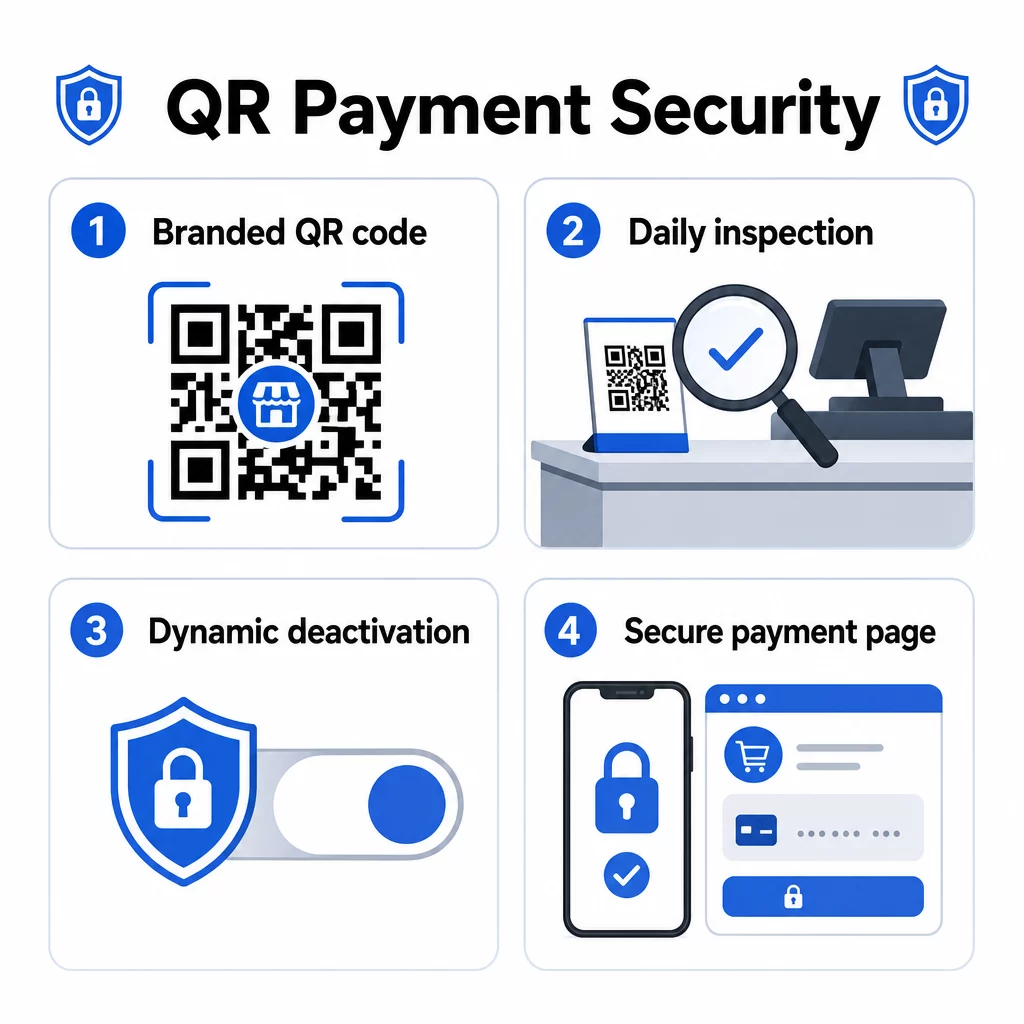
- Memeriksa semua kod QR yang dipaparkan pada permulaan setiap hari perniagaan sebagai sebahagian daripada senarai semak pembukaan anda
- Menggunakan kod QR berjenama dengan logo dan warna anda supaya pelanggan dapat mengesahkan ketulenan secara visual sebelum mengimbas
- Menggunakan kod QR dinamik yang boleh dinyahaktifkan serta-merta jika pengubahan dikesan
- Melatih kakitangan untuk mengenali tanda-tanda tindanan atau penggantian kod QR
Untuk melihat secara menyeluruh tentang risiko pembayaran kod QR dan cara mengurangkannya, termasuk corak serangan pancingan data dan senarai semak mitigasi, lihat panduan keselamatan khusus Pageloot.
Keselamatan Peringkat Transaksi
Kod QR dinamik menambah keselamatan pada peringkat transaksi. Setiap kod boleh dikonfigurasi untuk tamat tempoh selepas sekali penggunaan atau selepas tempoh masa yang ditetapkan, menghalang penggunaan semula atau serangan ulangan. Aplikasi pembayaran di pihak pelanggan menambah lapisan lain melalui pengesahan biometrik (cap jari atau pengecaman muka) dan pengesahan pelbagai faktor sebelum membenarkan sebarang transaksi.
Gabungan pautan pembayaran yang disulitkan, data transaksi yang ditokenkan, dan pengesahan peringkat peranti menjadikan pembayaran QR jauh lebih tahan terhadap penipuan berbanding kad jalur magnetik, yang boleh dicuri tanpa pengetahuan pemegang kad.
Untuk maklumat lanjut tentang 15. bagaimana pembayaran kod QR meningkatkan keselamatan dan kelajuan berbanding kaedah tradisional, termasuk pecahan teknikal penyulitan dan tokenisasi, lihat panduan perbandingan penuh.
Kebolehcapaian dan Reka Bentuk Inklusif
Tidak setiap pelanggan mengimbas kod QR dengan kemudahan yang sama. Mereka bentuk persediaan pembayaran QR anda untuk kebolehcapaian meluaskan siapa yang boleh menggunakannya dan mengelakkan pengecualian pelanggan dengan batasan penglihatan atau fizikal.
Amalan utama daripada garis panduan kebolehcapaian pembayaran kod QR termasuk:
- Mencetak kod pada saiz minimum 2 × 2 inci (5 × 5 cm) untuk pengimbasan yang boleh dipercayai
- Memasang kod yang dipaparkan di dinding antara 15 dan 48 inci dari lantai untuk menampung pengguna kerusi roda
- Menggunakan reka bentuk kontras tinggi (modul gelap pada latar belakang putih) untuk keterlihatan dalam pelbagai keadaan pencahayaan
- Menyediakan arahan imbasan langkah demi langkah dalam bahasa mudah di sebelah setiap kod (“Imbas → Semak → Sahkan”)
- Menawarkan arahan berbilang bahasa di mana pangkalan pelanggan anda termasuk penutur bukan bahasa Inggeris
- Mengekalkan pilihan pembayaran tradisional (tunai, terminal kad) di samping kod QR supaya semua pelanggan mempunyai laluan yang boleh dilaksanakan untuk pembayaran
Kebolehcapaian juga praktikal: arahan yang jelas meningkatkan kadar imbasan merentasi semua segmen pelanggan, bukan sahaja mereka yang mempunyai keperluan kebolehcapaian.
Menyesuaikan Kod QR untuk Runcit
Kod QR berjenama melakukan dua perkara yang tidak dapat dilakukan oleh kod hitam-putih biasa: ia membina kepercayaan, dan ia menjadikan pengubahan kelihatan. Apabila pelanggan melihat logo dan warna jenama anda di dalam kod QR, mereka mempunyai titik rujukan visual untuk ketulenan. Kod yang tidak mempunyai penjenamaan anda serta-merta mencurigakan.
Penjana kod QR Pageloot menyokong muat naik logo sehingga 1MB, skema warna tersuai, dan templat bingkai yang direka secara profesional dengan seruan tindakan terbina dalam. Pilihan ini membolehkan anda menyelaraskan kod pembayaran dengan identiti jenama anda yang lebih luas tanpa memerlukan kepakaran reka bentuk.
Kod QR dinamik melanjutkan fleksibiliti ini melangkaui estetika. Oleh kerana URL destinasi disimpan di sisi pelayan dan bukannya dikodkan dalam kod fizikal, anda boleh:
- Kemas kini destinasi pembayaran jika anda menukar pemproses
- Laraskan tawaran promosi yang dikaitkan dengan kempen bermusim tanpa mencetak semula
- Jalankan ujian A/B pada aliran pembayaran atau mesej tawaran yang berbeza
- Nyahaktifkan kod yang terjejas dan gantikannya serta-merta
Bagi peruncit yang menjalankan program kesetiaan, kempen rujukan, atau promosi bermusim, kebolehsuaian ini diterjemahkan secara langsung kepada kos operasi yang lebih rendah dan pelaksanaan kempen yang lebih pantas.
Soalan lazim
Tiada perkakasan khusus diperlukan.
Kod QR statik mengandungi pautan pembayaran tetap yang tidak boleh diubah selepas dicetak. Jika butiran pembayaran anda berubah, anda perlu mencetak semula kod tersebut. Kod QR dinamik menyimpan URL pengalihan yang boleh anda kemas kini pada bila-bila masa tanpa menyentuh kod fizikal. Kod dinamik juga menyediakan analitik imbasan, boleh tamat tempoh selepas sekali penggunaan, dan boleh dinyahaktifkan serta-merta jika terjejas – menjadikannya pilihan yang disyorkan untuk kegunaan pembayaran runcit.
Gunakan kod QR berjenama yang menyertakan logo dan warna anda supaya pelanggan dapat mengesan penggantian yang tidak dibenarkan. Periksa semua kod yang dipaparkan pada permulaan setiap hari perniagaan untuk pelekat atau lapisan. Gunakan kod QR dinamik supaya anda boleh menyahaktifkan mana-mana kod yang terjejas serta-merta. Latih kakitangan untuk memeriksa tanda-tanda gangguan dan melaporkan apa-apa yang mencurigakan. Untuk senarai semak penuh, rujuk panduan mengenai risiko kod QR dalam pembayaran dan cara mengurangkannya.