Administrere medlemsidentifikasjon med papirkort eller manuelle innsjekkingslister som bremser deg? Tapte kort, lange køer og ingen måte å verifisere medlemsstatus i sanntid skaper reell friksjon for både ansatte og medlemmer. Denne guiden tar deg gjennom hvordan du implementerer digitale medlemskort med QR-koder – fra å generere unike koder til å skanne dem ved døren og holde medlemsdata sikre.
Hvorfor QR-koder fungerer bra for medlemskort
Tradisjonelle medlemskort i plast eller papir deler et fast problem: de inneholder statisk informasjon, slites ut, blir borte og gir deg null innsikt i hvordan medlemmer bruker dem. En QR-kode på et digitalt medlemskort løser alt dette.
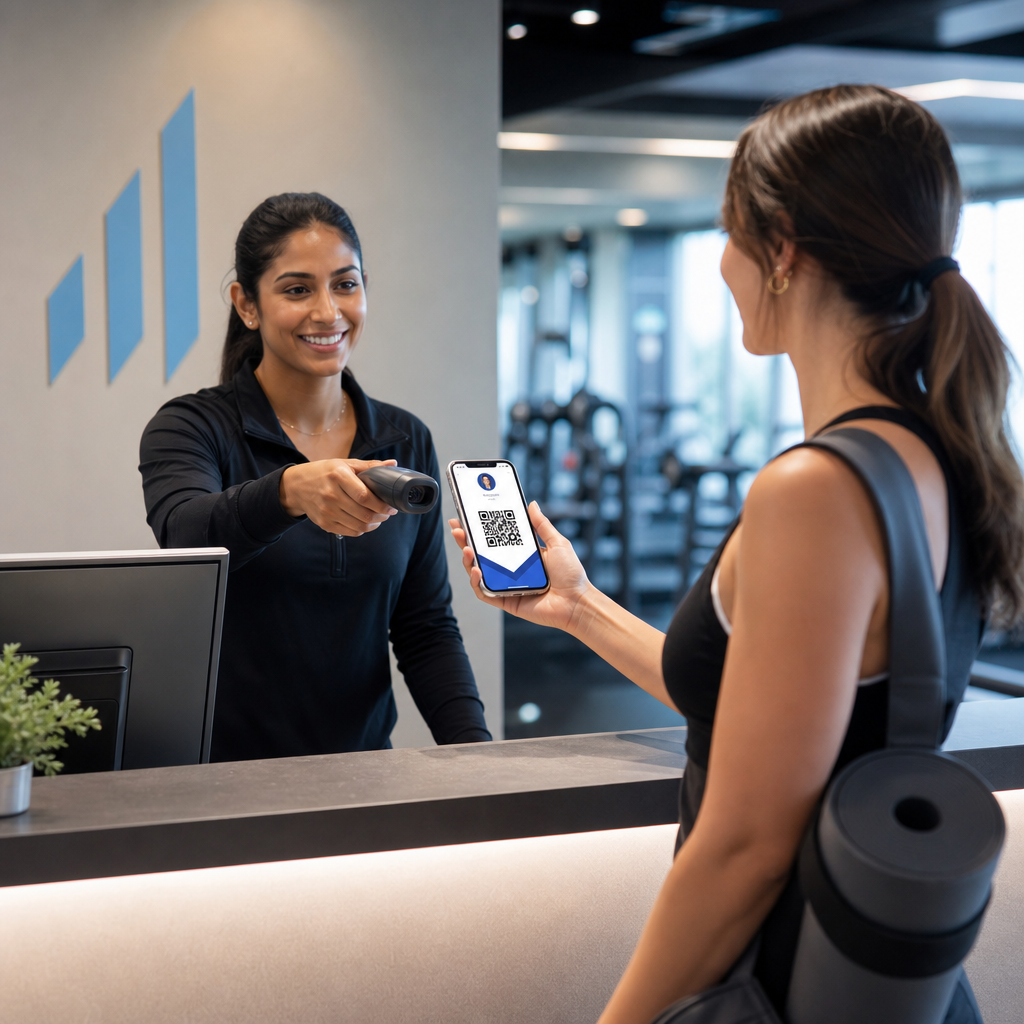
Når et medlem presenterer kortet sitt – på telefonen, i lommebokappen eller til og med trykt på papir – skanner personalet ganske enkelt QR-koden. Skanneren leser en unik identifikator knyttet til medlemmets post i systemet ditt, bekrefter statusen deres og logger innsjekkingen. Hele prosessen tar sekunder.
Omtrent 99,5 millioner smarttelefonbrukere i USA skannet QR-koder i 2025, en økning på 19% sammenlignet med 2022. Medlemmene dine vet nesten helt sikkert allerede hvordan de skal bruke en. Utover bekvemmelighet gir QR-baserte medlemskort deg noe fysiske kort aldri kunne: data. Du kan spore når medlemmer sjekker inn, hvor ofte de besøker, og hvilke steder eller arrangementer de deltar på – informasjon som hjelper deg med å ta bedre beslutninger om bemanning, programmering og medlemsengasjement.
Slik fungerer verifiseringsprosessen
Å forstå flyten hjelper deg med å designe et system som passer din organisasjon. Her er hva som skjer fra det øyeblikket et medlem går inn til det øyeblikket de får adgang.
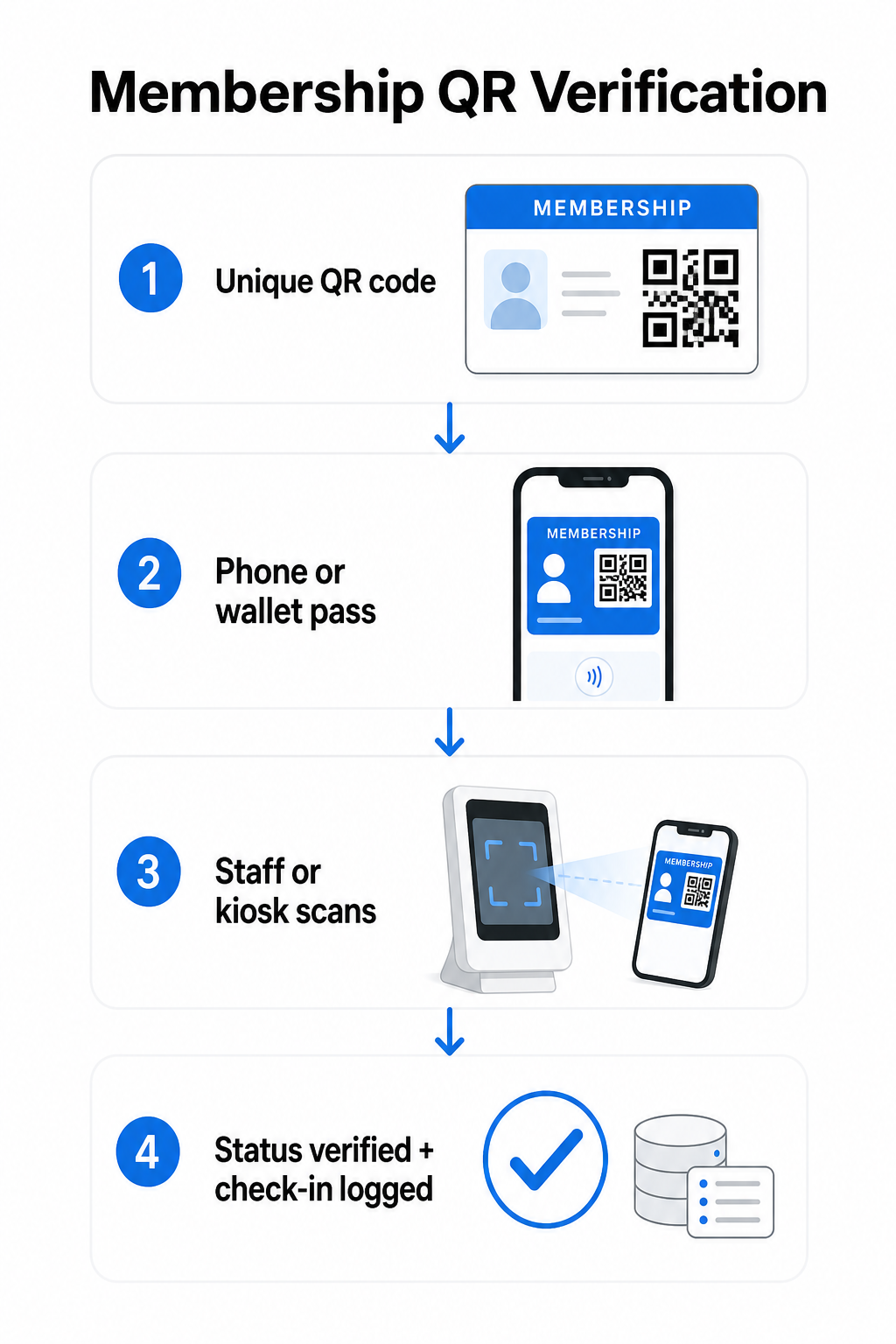
En unik QR-kode tildeles hvert medlem under registrering eller onboarding. Denne koden koder en sikker identifikator – ikke medlemmets personlige informasjon direkte, men en referanse som systemet ditt kan slå opp. Medlemmet presenterer sin QR-kode ved å åpne sitt digitale kort på en telefon, vise et trykt kort, eller vise et pass fra Apple Wallet eller Google Wallet. Ansatte eller en kiosk skanner deretter koden ved hjelp av et smarttelefonkamera, en dedikert strekkodeskanner, eller et verktøy som Pageloot QR-kodeskanner.
Systemet validerer legitimasjonen – bekrefter medlemsstatus, tilgangsnivå, utløpsdato, eller andre tillatelser du har konfigurert – før adgang gis eller flagges og innsjekkingen registreres i medlemsdatabasen din. Du kan også legge inn tidsbaserte eller områdespesifikke regler, for eksempel tillate tilgang kun i åpningstider eller begrense visse medlemsnivåer til spesifikke fasiliteter.
Denne prosessen fungerer enten du driver et treningsstudio, en fagforening, en klubb, eller en hvilken som helst organisasjon som trenger å verifisere hvem som kommer inn døren.
Begynn å generere medlems-QR-koder Lag unike, sporbare QR-koder for hvert medlem med Pageloot QR-kodegenerator. Gratis 14-dagers prøveperiode, ingen kredittkort kreves.
Velge mellom statiske og dynamiske QR-koder
Ikke alle QR-koder oppfører seg på samme måte, og skillet er viktig for medlemsadministrasjon.
Statiske QR-koder koder informasjon permanent ved opprettelsen. Når de er trykt, kan dataene inni ikke endres. De fungerer for enkle bruksområder, men hvis et medlems status endres – for eksempel at medlemskapet utløper eller de oppgraderer til et høyere nivå – kan du ikke oppdatere koden. Du måtte utstede en helt ny.
Dynamiske QR-koder lagrer en kort omdirigering internt og peker til en destinasjon du kan oppdatere når som helst, uten å trykke koden på nytt. For medlemskort betyr dette at du kan endre hva en skanning returnerer – oppdaterte tilgangsnivåer, en fornyet utløpsdato, eller en revidert medlemsprofil – uten å utstede et nytt kort. Dynamiske QR-koder er også sporbare, og gir deg skanningsnivåanalyser inkludert tid, sted og enhetsdata. For organisasjoner som administrerer dusinvis eller hundrevis av medlemmer, er denne synligheten genuint nyttig.
| FUNKSJON | Statisk QR-kode | Dynamisk QR-kode |
|---|---|---|
| Oppdaterbar etter utskrift | Nei | Ja |
| Skanningsanalyse | Nei | Ja |
| Fungerer hvis medlemsstatus endres | Krever ny utstedelse | Oppdater destinasjon, samme kode |
| Koste | Gratis | Betalt abonnement kreves |
For de fleste medlemsprogrammer er dynamiske QR-koder det riktige valget. Statiske koder er kun akseptable hvis medlemsdetaljene dine aldri endres og du ikke har behov for sporing.
Slik lager du medlems-QR-koder med Pageloot
Her er en praktisk trinnvis tilnærming for å generere og distribuere QR-koder til medlemmene dine.
Trinn 1: Velg din QR-kodetype. Logg inn på Pageloot og velg QR-kodetypen som samsvarer med hva du vil at medlemmer skal få tilgang til – en URL som lenker til deres medlemsprofil, et vCard med kontakt- og medlemsdetaljer, eller et skjema for innsjekkingsbekreftelse. Pageloot støtter mer enn 25 QR-kodetyper, slik at du kan matche formatet til din eksisterende arbeidsflyt.
Trinn 2: Skriv inn medlemsspesifikk informasjon. Hvert medlem trenger en unik kode. Hvis du lenker til individuelle medlemsprofiler eller ID-er, sørg for at hver QR-kode peker til en unik identifikator i stedet for generisk delt innhold.
Trinn 3: Tilpass designet. Legg til organisasjonens logo og merkevarefarger. Et gjenkjennelig kortdesign bygger medlemstillit og reduserer sannsynligheten for svindel. Hold selve QR-koden med høy kontrast – mørk forgrunn på lys bakgrunn – og sørg for at den oppfyller minimum utskriftsstørrelse på 0,8 × 0,8 tommer for nærbilde-skanning.
Trinn 4: Last ned og distribuer. Pageloot tilbyr utskriftsklare filer i .SVG, .PDF og .EPS-formater. Du kan bygge inn QR-koden i et digitalt kortdesign, sende den direkte til medlemmer via e-post, eller la dem legge den til Apple Wallet eller Google Wallet som et pass.
Trinn 5: Organiser kodene dine. Bruk Pageloot’s QR-kodemapper for å gruppere medlemskoder etter medlemskapsnivå, sted eller fornyelsessyklus. Dette holder dashbordet ditt håndterbart etter hvert som medlemslisten din vokser.
Spor hver medlemsinnsjekking Overvåk skannedata på tvers av hele medlemskapet ditt fra ett enkelt dashbord. Den Pageloot QR-kodegenerator lar deg lage dynamiske, sporbare koder og oppdatere dem når som helst uten å skrive ut på nytt.
Distribuere kort til medlemmer
Når du har generert kodene, har du flere alternativer for å få dem i hendene på medlemmene.
- E-postlevering: Send hvert medlem et digitalt kortbilde eller en PDF som inneholder deres unike QR-kode. Dette fungerer umiddelbart og koster ingenting å distribuere.
- Apple Wallet og Google Wallet: Medlemmer kan legge til et medlemskort direkte i telefonens lommebok-app. Apple Wallet lagrer pass i `.pkpass`-formatet, som kan inkludere en QR-kode og medlemsdetaljer. Google Wallet støtter lignende funksjonalitet gjennom sin Passes API. Når det er lagt til, åpner medlemmet passet og presenterer QR-koden for skanning ved døren.
- Trykte kort: For medlemmer som foretrekker et fysisk kort, eller for inngangspunkter der telefoner ikke er praktiske, kan du skrive ut QR-koden på et standardkort. Bruk utskrift av høy kvalitet for å bevare skannbarheten.
- Visning i app eller portal: Hvis organisasjonen din har en medlemsportal eller app, vis QR-koden direkte i den slik at medlemmer alltid har tilgang uten å laste ned en separat fil.
For oppmøtefokuserte programmer – kurs, workshops eller gjentakende arrangementer – en dedikert QR-kode oppmøtesystem lar medlemmer skanne seg inn selv i stedet for å vente på at ansatte skal skanne kortene deres, noe som kan redusere inngangstiden betydelig.
Krav til QR-kodedesign for pålitelig skanning
En QR-kode på et medlemskort som ikke skanner ved døren, skaper friksjon og svekker medlemmenes tillit. Følg disse tekniske kravene for å sikre konsekvent ytelse.
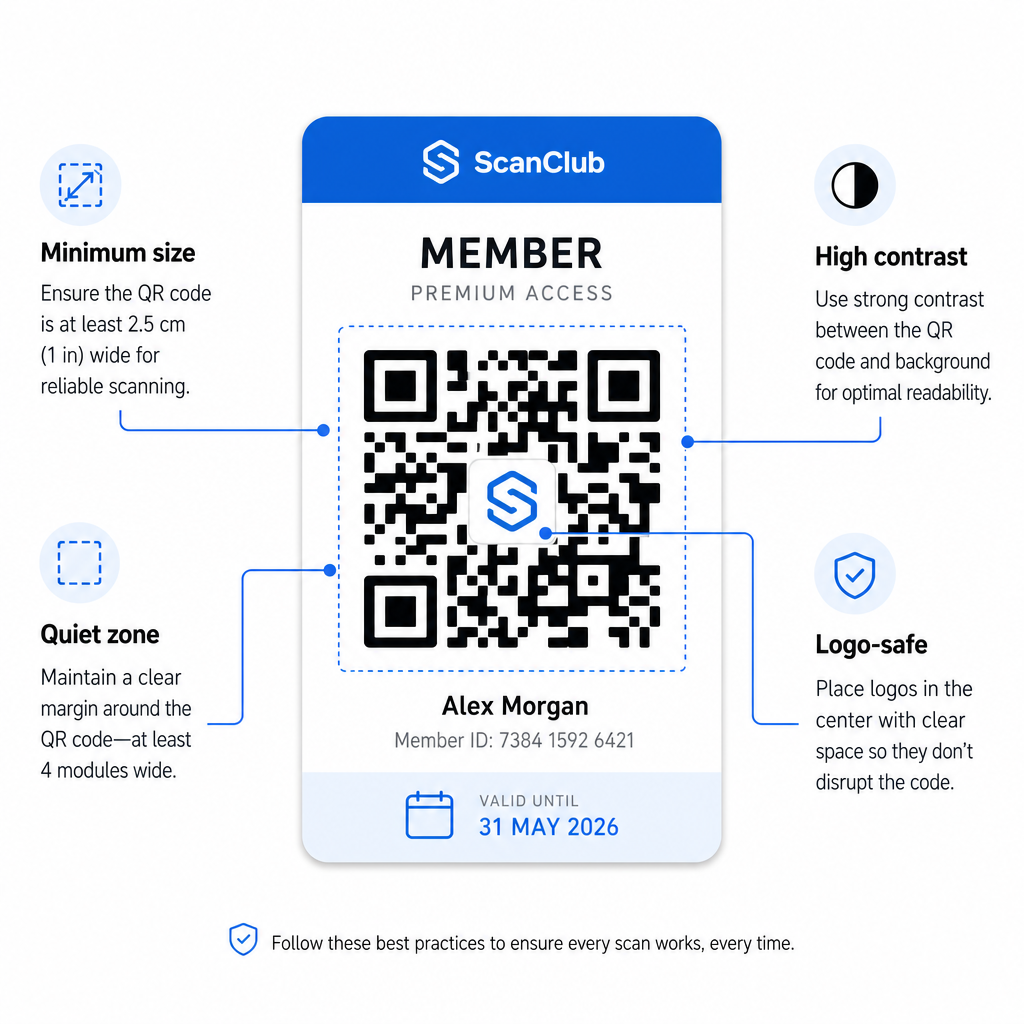
- Minimumsstørrelse: Skriv ut QR-koder på ikke mindre enn 0,8 × 0,8 tommer (2 cm × 2 cm) for nærbilde-skanning. Anvend 10:1-regelen for avstand – for hver 10 tommer mellom skanneren og koden, bør koden være minst 1 tomme bred.
- Stille sone: Oppretthold minst 4 moduler med blank plass på alle sider av QR-koden. Denne margen lar skannere oppdage hvor koden begynner og slutter.
- Kontrast: Bruk en mørk forgrunn på en lys bakgrunn med et minimum kontrastforhold på 4:1. Unngå å plassere QR-koden over bilder eller travle mønstre som reduserer lesbarheten.
- Feilretting: Hvis du inkluderer organisasjonens logo inne i QR-koden, bruk feilkorreksjon på nivå H, som gir opptil 30% gjenopprettingskapasitet. Dette kompenserer for den delen av koden som er visuelt dekket av logoen.
- Test før distribusjon: Skann hver kodemal på flere enheter og under forskjellige lysforhold før du ruller den ut til medlemmer.
Disse samme prinsippene gjelder på tvers av fysiske steder. Den QR-koder for treningssentre og velvære-guide dekker hvordan treningsfasiliteter spesifikt håndterer skannemiljøer med høyt volum.
Sikkerhetshensyn for medlems-QR-koder
Medlemskort gir ofte reelle tilgangsrettigheter – til fasiliteter, arrangementer eller rabatter – så sikkerhet er ikke valgfritt. Et dårlig designet QR-system kan kopieres, fotograferes eller deles.
- Krypter en sikker identifikator, ikke personlige data. QR-koden bør inneholde en ugjennomsiktig referanse – for eksempel en kryptografisk hashet medlems-ID – i stedet for et navn, e-postadresse eller annen personlig informasjon. Hvis noen fotograferer QR-koden, skal de ikke få direkte tilgang til medlemsdata.
- Bruk tidsbegrensede eller engangskoder for scenarier med høy sikkerhet. For arrangementer eller engangstilgangssituasjoner, generer koder som utløper etter et kort tidsrom eller blir ugyldige etter en enkelt skanning. Dette forhindrer kopiering eller videresending av koder.
- Bruk dynamiske QR-koder for løpende medlemskap. Fordi dynamiske koder peker til en server-side destinasjon, kan du umiddelbart ugyldiggjøre et utløpt eller kompromittert medlemskap – ingen nytt kort er nødvendig.
- Oppretthold en revisjonslogg. Loggfør hver skanning med tidsstempel og sted. Dette hjelper deg med å identifisere uvanlige mønstre, som for eksempel en enkelt kode som skannes fra to steder samtidig.
- Overhold databeskyttelsesforskrifter. Hvis medlemskortene eller skanneloggene dine inneholder personlig informasjon, sørg for at systemet ditt er i tråd med gjeldende personvernlover. Arbeid med leverandører som praktiserer dataminimering og har klare retningslinjer for datalagring.
For organisasjoner som håndterer sensitive medlemsdata, er sikkerhetsveiledningen konsistent: QR-koder brukt for autentisering bør kun inneholde ugjennomsiktige identifikatorer, ikke personlig informasjon, og koder bør være tidsbegrensede og dynamisk generert der det er mulig.
Koble QR-medlemskort til lojalitetsprogrammer
Medlemskort og lojalitetsprogrammer overlapper ofte. Hvis organisasjonen din belønner medlemsengasjement – gjennom poeng, besøksmilepæler eller nivåbaserte fordeler – kan et QR-basert kort tjene begge funksjonene samtidig.
Når et medlem skanner inn, kan den hendelsen utløse en poengsum, oppdatere besøkstallet deres, eller låse opp et nytt fordelingsnivå. Dette fjerner behovet for et separat lojalitetskort helt. Veiledningen om hvordan du setter opp QR-kode lojalitetsprogrammer går gjennom hvordan man strukturerer belønninger sammen med et medlemssystem. For en side-ved-side sammenligning av digitale og fysiske tilnærminger, dekker QR-koder vs. tradisjonelle lojalitetskort oversikt de praktiske avveiningene i detalj.
Hvis programmet ditt inkluderer billetterte arrangementer, gjelder den samme QR-infrastrukturen der også. Veiledningen QR-koder for arrangementsbilletter forklarer hvordan du utvider oppsettet ditt til å dekke arrangementsspesifikk tilgang og innsjekking.
Digitale medlemskort med QR-koder reduserer administrativt arbeid, gir medlemmer en mer praktisk opplevelse, og gir organisasjonen din reelle data om engasjement og oppmøte. Nøkkelbeslutningene – statiske versus dynamiske koder, selvskanning versus ansatt-skanning, lommebokintegrasjon versus e-postlevering – avhenger av medlemsvolumet og det operasjonelle oppsettet ditt, men de underliggende verktøyene er tilgjengelige uavhengig av organisasjonens størrelse. Start med dynamiske koder, design for skannbarhet, og bygg distribusjonsmetoden din rundt hvordan medlemmene dine faktisk oppfører seg.
Bygg ditt Medlemskortsystem Generer, tilpass og administrer QR-koder for hvert medlem fra ett dashbord. Prøv Pageloot QR-kodegenerator gratis i 14 dager – ingen kredittkort kreves.
Ofte stilte spørsmål
Ja. Medlemmer kan lagre QR-koden sin som et pass i Apple Wallet eller Google Wallet, som ikke krever en tredjepartsapp. Alternativt kan du sende dem et digitalt kortbilde via e-post som de åpner direkte fra telefonens bildebibliotek eller e-postklient. Ansatte skanner QR-koden som vises på skjermen ved hjelp av et hvilket som helst standardkamera eller Pageloot QR Code Scanner.
Med dynamiske QR-koder oppdaterer du destinasjonen eller medlemskapsstatusen i dashbordet ditt umiddelbart. Det fysiske eller digitale kortet i seg selv endres ikke, men neste gang det skannes, returnerer systemet ditt den oppdaterte statusen – utløpt, suspendert eller fornyet – uten å utstede et nytt kort til medlemmet.
Pageloot lar deg opprette og administrere QR-koder i bulk, organisert i mapper etter medlemskapsnivå, sted eller fornyelsesperiode. Det sentraliserte dashbordet gir skanneanalyser og administrasjonsverktøy på tvers av alle dine koder på ett sted. Besøk Pageloot QR Code Generator-siden for detaljer om planspesifikke grenser og funksjoner.