Adakah panggilan telemarketing anda menjana minat tetapi kehilangan momentum sebaik sahaja perbualan berakhir? Jurang antara panggilan telefon yang menjanjikan dan tindakan yang lengkap adalah di mana kebanyakan petunjuk terlepas. Panduan ini menunjukkan kepada anda cara menggunakan kod QR untuk merapatkan jurang itu – menghubungkan jangkauan langsung dengan susulan digital yang boleh dijejak.
Mengapa Telemarketing Memerlukan Jambatan Digital
Jangkauan berasaskan telefon masih berkesan, tetapi jarang sekali ia berjaya dengan sendirinya. Prospek mungkin berminat semasa panggilan tetapi gagal membuat susulan kerana langkah seterusnya memerlukan terlalu banyak usaha – menaip URL, mencari halaman pendaratan, atau menunggu e-mel.
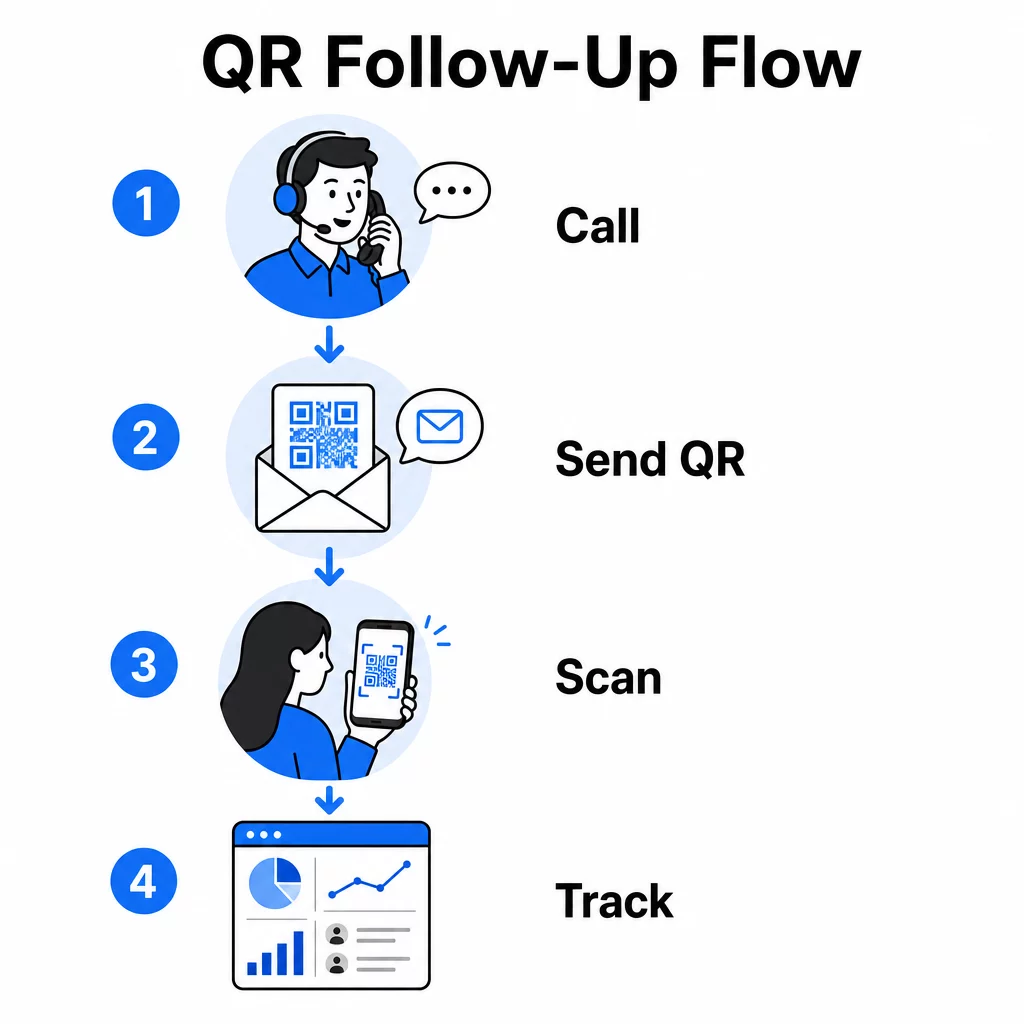
Kod QR menyelesaikan masalah ini dengan memberikan prospek laluan segera, tanpa geseran dari perbualan ke tindakan digital. Sama ada anda menghantar kod QR melalui SMS serta-merta selepas panggilan atau memasukkannya dalam bahan cetakan yang ditinggalkan, prospek boleh mengimbas dan bertindak mengikut jadual mereka sendiri. Kemudahan itu mengurangkan kadar berhenti dan mengekalkan penglibatan hidup lama selepas panggilan berakhir.
Kod QR juga memberikan pasukan anda sesuatu yang sentiasa kurang dalam telemarketing tradisional: data yang boleh diukur tentang apa yang berlaku selepas panggilan. Setiap imbasan adalah peristiwa yang boleh dijejak, memberikan anda keterlihatan tentang perbualan mana yang diterjemahkan kepada minat sebenar dan kempen mana yang memerlukan pelarasan.
Bagaimana Kod QR Sesuai dalam Aliran Kerja Telemarketing
Semasa dan Selepas Panggilan
Integrasi kod QR yang paling berkesan berlaku pada titik serah terima semula jadi dalam proses telemarketing. Berikut adalah titik sentuh utama di mana kod QR menambah nilai paling tinggi:
- Susulan SMS: Sejurus selepas panggilan, hantar teks yang mengandungi kod QR yang memaut ke halaman pendaratan yang relevan, gambaran keseluruhan produk, atau borang pendaftaran. Ini mengekalkan momentum sambil menghormati masa prospek.
- Susulan E-mel: Daripada melampirkan dokumen atau menyenaraikan pelbagai pautan, benamkan satu kod QR dalam e-mel susulan anda yang mengarahkan prospek ke halaman pendaratan yang diperibadikan. Pengalaman yang bersih dan fokus sentiasa mengatasi peti masuk yang berselerak.
- Bahan bercetak: Jika pasukan anda menggunakan brosur, satu muka surat, atau mel terus, sertakan kod QR yang dikaitkan dengan apa sahaja produk atau tawaran yang dibincangkan dalam panggilan. Prospek yang menyimpan bahan tersebut mempunyai cara cepat untuk berinteraksi semula.
- Maklum Balas dan Kelayakan: Kongsi kod QR yang membawa kepada borang ringkas di mana prospek boleh berkongsi keperluan, garis masa, atau soalan mereka mengikut kadar mereka sendiri. Ini memberikan pasukan jualan anda maklumat yang lebih baik sebelum titik sentuh seterusnya.
Prinsip utama adalah relevansi. Kod QR yang membawa terus kepada kandungan yang dibincangkan dalam panggilan terasa membantu. Kod QR generik yang menjatuhkan prospek ke halaman utama terasa seperti sesuatu yang difikirkan kemudian.
Cipta Kod QR Yang Sepadan Dengan Kempen Anda Menggunakan Penjana Kod QR Pautan untuk membina kod yang menghantar prospek terus ke halaman pendaratan, halaman tawaran atau borang tertentu – tiada lencongan halaman utama.
Memperibadikan Kod QR Mengikut Segmen Audiens
Salah satu kekuatan praktikal kod QR dalam telemarketing ialah keupayaan untuk menyesuaikannya mengikut kempen atau jenis audiens. Kod yang dihantar kepada prospek perniagaan kecil boleh membawa kepada sumber yang direka khusus untuk skala mereka, manakala kod berasingan untuk kenalan perusahaan menghala ke kajian kes dan harga perusahaan.
Segmentasi ini menjadikan pengalaman selepas panggilan terasa lebih peribadi dan memastikan prospek menerima kandungan yang benar-benar relevan dengan situasi mereka. Dengan kod QR dinamik, anda boleh mengemas kini destinasi mana-mana kod tanpa mencetak semula atau menghantar semula – jadi jika tawaran anda berubah di pertengahan kempen, kod tersebut kekal terkini secara automatik.
Mengukur Apa Yang Berlaku Selepas Setiap Panggilan
Data adalah di mana kod QR benar-benar mengubah telemarketing daripada aktiviti yang didorong oleh intuisi menjadi saluran yang boleh diukur. Setiap imbasan menjana titik data, dan dengan persediaan yang betul, titik data tersebut menceritakan kisah yang koheren tentang prestasi kempen.
Metrik teras untuk dijejaki termasuk:
- Jumlah imbasan berbanding imbasan unik: Membezakan aktiviti keseluruhan daripada minat prospek individu
- Masa imbasan: Mendedahkan bila prospek terlibat selepas panggilan, yang membantu memperhalusi masa susulan
- Data geografi: Menunjukkan di mana respons tertumpu, berguna untuk kempen serantau
- Jenis peranti: Mengesahkan sama ada halaman pendaratan anda dipaparkan dengan betul untuk peranti yang sebenarnya digunakan oleh audiens anda
Apabila anda melampirkan parameter UTM pada URL destinasi di sebalik kod QR anda, anda boleh menghantar data imbasan terus ke Google Analytics atau CRM anda. Ini membolehkan anda mengaitkan aktiviti saluran paip kembali kepada kempen telemarketing, panggilan, atau bahkan wakil individu tertentu.
Untuk pecahan penuh persediaan penjejakan dan metrik utama, lihat panduan mengenai menjejak imbasan kod QR dalam masa nyata.
Pantau Kempen Anda dalam Masa Nyata Ingin melihat dengan tepat di mana dan bila prospek anda berinteraksi selepas panggilan? Gunakan papan pemuka Analitik Kod QR untuk menjejak imbasan mengikut lokasi, peranti, dan masa – semuanya di satu tempat.
Kod QR Statik vs. Dinamik untuk Telepemasaran
Memilih jenis kod QR yang betul mempengaruhi kedua-dua fleksibiliti operasi dan keupayaan penjejakan anda. Perbezaannya terletak pada dua faktor: kebolehsuntingan dan analitik.
| CIRI | Kod QR Statik | Kod QR Dinamik |
|---|---|---|
| Destinasi boleh disunting selepas penciptaan | Tidak | ya |
| Penjejakan dan analisis imbasan | Tidak | ya |
| kos | Percuma | Langganan diperlukan |
| Terbaik untuk | Kandungan tetap, kekal | Kempen aktif, susulan |
Untuk kebanyakan aplikasi telepemasaran, kod QR dinamik adalah pilihan yang lebih baik. Kempen berkembang – tawaran berubah, halaman pendaratan dikemas kini, dan ujian A/B memerlukan destinasi baharu. Kod dinamik membolehkan anda membuat perubahan tersebut tanpa menghubungi setiap prospek lagi atau mencetak semula bahan. Jika SMS susulan telah dihantar, anda masih boleh mengemas kini ke mana kod QR itu membawa.
Kod QR statik berfungsi dengan baik untuk kandungan yang tidak pernah berubah, seperti halaman sokongan kekal atau helaian spesifikasi produk tetap. Untuk segala-galanya dalam kempen aktif, kod dinamik menyediakan fleksibiliti dan keupayaan pengukuran yang anda perlukan.
Untuk butiran lanjut tentang bila untuk menggunakan setiap jenis, lihat perbandingan kod QR statik lwn. dinamik.
Contoh Praktikal mengikut Jenis Kempen
Memahami di mana kod QR sesuai secara konsep adalah berguna, tetapi melihat bagaimana ia dipetakan kepada senario telepemasaran tertentu menjadikan pelaksanaan lebih mudah.
- Promosi webinar atau acara: Selepas panggilan mempromosikan webinar akan datang, hantar kod QR melalui SMS yang pautan terus ke halaman pendaftaran. Menghilangkan langkah mencari acara tersebut secara mendadak meningkatkan kadar pendaftaran.
- Tawaran masa terhad: Apabila jurujual telemarketing membincangkan diskaun sensitif masa, kod QR susulan boleh pautan terus ke halaman pembayaran atau tuntutan dengan tawaran yang telah dipra-aplikasi – mengubah minat yang dinyatakan menjadi transaksi yang lengkap.
- Kelayakan petunjuk: Kongsi kod QR yang memautkan ke borang penilaian keperluan ringkas. Prospek mengisinya mengikut keselesaan mereka, dan pasukan anda menggunakan respons tersebut untuk mengutamakan susulan dan menyesuaikan perbualan seterusnya.
- Pengumpulan maklum balas: Daripada menjalankan tinjauan telefon yang panjang, hantar kod QR ke borang maklum balas ringkas serta-merta selepas panggilan. Kadar respons meningkat apabila format menghormati masa prospek.
Setiap kes penggunaan ini mendapat manfaat daripada halaman pendaratan yang dioptimumkan untuk mudah alih. Memandangkan setiap imbasan berlaku pada telefon pintar, destinasi perlu dimuatkan dengan cepat dan berfungsi dengan bersih pada skrin kecil. The panduan amalan terbaik halaman pendaratan kod QR mudah alih merangkumi piawaian teknikal yang menjadikan pengalaman selepas imbasan berfungsi.
Membina Kod QR Yang Diimbas
Kod QR yang tiada siapa imbas tidak memberikan nilai. Memaksimumkan kadar imbasan dalam konteks telemarketing memerlukan perhatian kepada reka bentuk dan konteks.
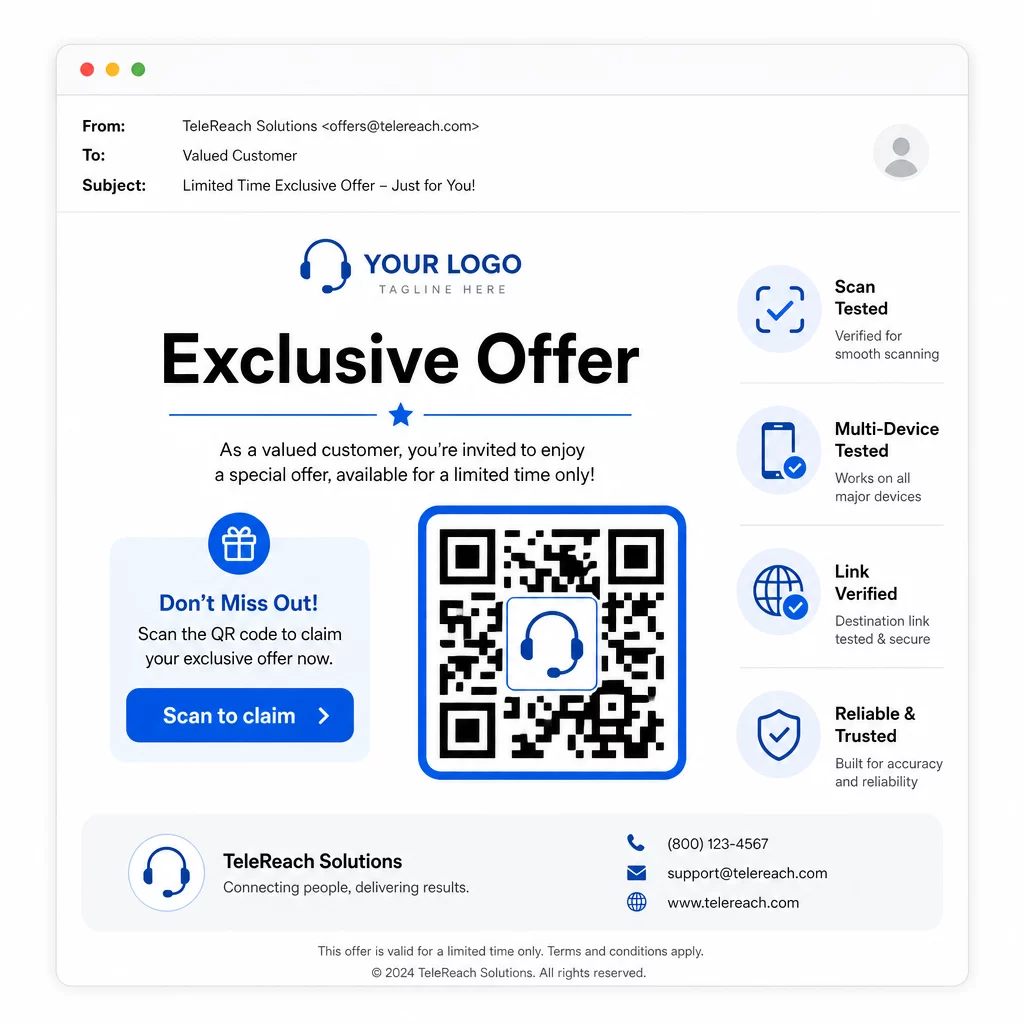
- Tambah logo jenama anda: A Kod QR dengan logo lebih menonjol secara visual dan membina kepercayaan dengan prospek yang sedang membuat keputusan sama ada untuk terlibat.
- Gunakan seruan tindakan yang jelas: Sertakan teks arahan ringkas berhampiran kod – sesuatu seperti “Imbas untuk tawaran eksklusif anda” atau “Imbas untuk mendaftar” – supaya prospek tahu dengan tepat apa yang akan mereka dapat.
- Pastikan kontras yang mencukupi: Modul gelap pada latar belakang cerah adalah asas untuk pengimbasan yang boleh dipercayai merentasi pelbagai keadaan pencahayaan dan kamera peranti.
- Uji sebelum menghantar: Imbas kod QR anda pada pelbagai peranti dan dalam format ia akan dihantar – sama ada dalam SMS, e-mel, atau bahan bercetak.
Jika anda ingin menguji reka bentuk atau destinasi mana yang berprestasi lebih baik dengan segmen khalayak tertentu, Ujian A/B kempen kod QR anda dengan kod dinamik membolehkan anda menjalankan versi selari dan membandingkan hasil tanpa mengedarkan pelbagai kod fizikal.
Untuk senarai semak pra-pelancaran yang komprehensif, Senarai semak pemasaran kod QR untuk perniagaan kecil merangkumi langkah-langkah utama dari penetapan matlamat hingga pelaksanaan kempen.
Pertimbangan Pematuhan untuk Telepemasaran
Menggunakan kod QR tidak mengubah rangka kerja undang-undang yang mengawal cara pasukan anda menghubungi prospek pada mulanya. Akta Perlindungan Pengguna Telefon (TCPA) memerlukan persetujuan bertulis yang jelas sebelum menghantar teks pemasaran atau menggunakan sistem pendailan automatik, dan Peraturan Jualan Telepemasaran FTC memerlukan panggilan dibuat hanya antara 8:00 pagi dan 9:00 malam waktu tempatan untuk penerima. Telepemasar juga mesti menghormati Daftar Jangan Panggil Kebangsaan dan mengekalkan senarai jangan panggil dalaman mereka sendiri.
Jika kod QR susulan anda dihantar melalui SMS, mesej itu tertakluk kepada keperluan TCPA yang sama seperti mana-mana teks pemasaran lain. Persetujuan harus diperoleh sebelum menghantar sebarang mesej yang mengandungi kod ke telefon bimbit.
Kod QR itu sendiri adalah mekanisme penghantaran neutral – implikasi pematuhannya bergantung sepenuhnya pada bagaimana dan kepada siapa ia diedarkan. Kod QR memberikan kempen telepemasaran sesuatu yang secara sejarahnya kurang: hubungan yang boleh diukur, fleksibel antara apa yang berlaku di telefon dan apa yang berlaku seterusnya. Apabila anda menggabungkan jangkauan yang kuat dengan susulan digital yang boleh dijejaki, anda mencipta gambaran lengkap prestasi kempen dan pengalaman yang lebih baik untuk orang yang anda cuba capai.
Mulakan dengan Penjana Kod QR untuk membina kod sedia kempen pertama anda, atau teroka penyelesaian kod QR mengikut industri untuk melihat bagaimana sektor lain menggunakan pendekatan yang sama.
Soalan lazim
Ya, jika anda menggunakan kod QR dinamik.
Kod QR Dinamik merekodkan data peringkat imbasan termasuk jumlah imbasan, kiraan imbasan unik, cap masa, lokasi geografi (biasanya peringkat bandar), dan jenis peranti (iOS, Android, desktop). Apabila anda menambah parameter UTM pada URL destinasi anda, data tersebut juga boleh mengalir ke Google Analytics atau CRM anda, membolehkan anda mengaitkan penukaran secara langsung kepada kempen atau panggilan tertentu.
Kod QR itu sendiri tidak dikawal selia, tetapi SMS yang mengandungi kod itu dikawal selia. Di bawah Akta Perlindungan Pengguna Telefon, menghantar mesej teks pemasaran ke telefon bimbit menggunakan sistem automatik memerlukan persetujuan bertulis yang jelas daripada penerima. Peraturan Jualan Telepemasaran FTC dan Daftar Jangan Panggil Kebangsaan juga terpakai. Jika aliran kerja susulan anda melibatkan penghantaran kod QR kepada prospek melalui teks, mesej itu mesti mematuhi peraturan yang sama seperti mana-mana teks pemasaran lain.