Вашите телемаркетинг обаждания генерират ли интерес, но губят инерция, след като разговорът приключи? Тази празнина между обещаващо телефонно обаждане и завършено действие е мястото, където повечето потенциални клиенти отпадат. Това ръководство ви показва как да използвате QR кодове, за да запълните тази празнина – свързвайки директния контакт с проследимо цифрово проследяване.
Защо телемаркетингът се нуждае от цифров мост
Телефонният контакт все още работи, но рядко води до приключване сам по себе си. Потенциален клиент може да прояви интерес по време на разговор, но да не успее да продължи, защото следващата стъпка изисква твърде много усилия – въвеждане на URL адрес, търсене на целева страница или чакане на имейл.
QR кодовете решават това, като предоставят на потенциалните клиенти незабавен, безпроблемен път от разговора до цифрово действие. Независимо дали изпращате QR код чрез SMS веднага след разговор, или го включвате в печатен материал за оставяне, потенциалният клиент може да сканира и да действа по свой собствен график. Това удобство намалява отпадането и поддържа ангажираността жива дълго след края на разговора.
QR кодовете също така дават на вашия екип нещо, което традиционният телемаркетинг винаги е липсвал: измерими данни за това какво се случва след разговора. Всяко сканиране е проследимо събитие, което ви дава видимост кои разговори са се превърнали в реален интерес и кои кампании се нуждаят от корекция.
Как QR кодовете се вписват в работните процеси на телемаркетинга
По време и след разговора
Най-ефективните интеграции на QR кодове се случват в естествените точки на предаване в процеса на телемаркетинг. Ето основните точки на контакт, където QR кодовете добавят най-голяма стойност:
- SMS проследяване: Веднага след разговор изпратете съобщение, съдържащо QR код, който води до подходяща целева страница, преглед на продукт или формуляр за регистрация. Това поддържа инерцията, като същевременно зачита времето на потенциалния клиент.
- Имейл проследяване: Вместо да прикачвате документи или да изброявате множество връзки, вградете един QR код във вашия имейл за проследяване, който насочва потенциалните клиенти към персонализирана целева страница. Изчистеното, фокусирано изживяване превъзхожда претрупаната пощенска кутия всеки път.
- Печатни материали: Ако вашият екип използва брошури, едностранични материали или директна поща, включете QR код, свързан с продукта или офертата, обсъдени по време на разговора. Потенциалните клиенти, които запазват материала, имат бърз начин да се ангажират отново.
- Обратна връзка и квалификация: Споделете QR код, който води до кратка форма, където потенциалните клиенти могат да споделят своите нужди, срокове или въпроси със собствено темпо. Това дава на вашия търговски екип по-добра информация преди следващата точка на контакт.
Ключовият принцип е уместността. QR код, който води директно до съдържанието, обсъдено по време на разговора, е полезен. Общ QR код, който насочва потенциалните клиенти към начална страница, изглежда като нещо второстепенно.
Създайте QR кодове, които отговарят на вашата кампания Използвай Генератор на QR кодове за връзки за изграждане на кодове, които изпращат потенциални клиенти директно към конкретни целеви страници, страници с оферти или формуляри – без заобикаляне през началната страница.
Персонализиране на QR кодове по сегмент от аудиторията
Едно от практическите предимства на QR кодовете в телемаркетинга е възможността да ги адаптирате според кампанията или типа аудитория. Код, изпратен до потенциални клиенти от малкия бизнес, може да доведе до ресурси, предназначени специално за техния мащаб, докато отделен код за корпоративни контакти насочва към казуси и корпоративни цени.
Това сегментиране прави преживяването след разговора по-лично и гарантира, че потенциалните клиенти получават съдържание, което е действително релевантно за тяхната ситуация. С динамични QR кодове, можете да актуализирате дестинацията на всеки код, без да го препечатвате или изпращате отново – така че ако офертата ви се промени по средата на кампанията, кодът остава актуален автоматично.
Измерване на случващото се след всеки разговор
Данните са мястото, където QR кодовете наистина трансформират телемаркетинга от дейност, водена от интуиция, в измерим канал. Всяко сканиране генерира точка от данни и с правилната настройка тези точки от данни разказват последователна история за ефективността на кампанията.
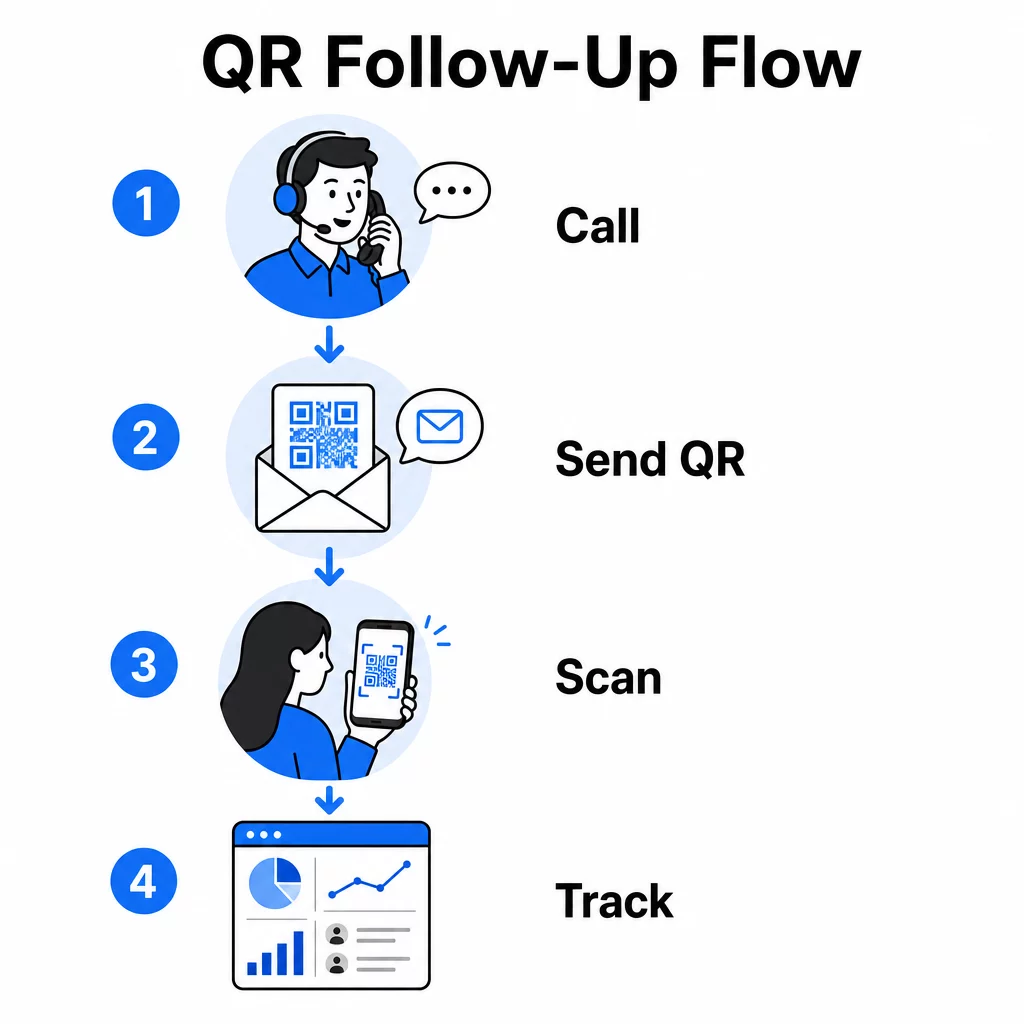
Основните показатели за проследяване включват:
- Общ брой сканирания срещу уникални сканирания: Разграничава общата активност от индивидуалния интерес на потенциалния клиент
- Време на сканиране: Разкрива кога потенциалните клиенти се ангажират след разговор, което помага за прецизиране на времето за последващи действия
- Географски данни: Показва къде са концентрирани отговорите, полезно за регионални кампании
- Тип устройство: Потвърждава дали вашите целеви страници се изобразяват правилно за устройствата, които вашата аудитория действително използва
Когато добавите UTM параметри към целевите URL адреси зад вашите QR кодове, можете да предавате данни от сканиране директно в Google Analytics или във вашия CRM. Това ви позволява да приписвате активността на фунията обратно на конкретни телемаркетинг кампании, разговори или дори отделни представители.
За пълна разбивка на настройката за проследяване и ключовите показатели, вижте ръководството за проследяване на сканирания на QR кодове в реално време.
Наблюдавайте кампанията си в реално време Искате ли да видите точно къде и кога вашите потенциални клиенти взаимодействат след разговори? Използвайте таблото за анализ на QR кодове за проследяване на сканирания по местоположение, устройство и време – всичко на едно място.
Статични срещу динамични QR кодове за телемаркетинг
Изборът на правилния тип QR код влияе както на вашата оперативна гъвкавост, така и на възможностите ви за проследяване. Разликата се свежда до два фактора: възможност за редактиране и анализ.
| ФУНКЦИЯ | Статичен QR код | Динамичен QR код |
|---|---|---|
| Дестинация, която може да се редактира след създаване | Не | Да |
| Проследяване и анализ на сканиране | Не | Да |
| Разходи | Безплатно | Изисква се абонамент |
| Най-добър за | Фиксирано, постоянно съдържание | Активни кампании, последващи действия |
За повечето телемаркетинг приложения, динамични QR кодове са по-добрият избор. Кампаниите се развиват – офертите се променят, целевите страници се актуализират, а A/B тестовете изискват нови дестинации. Динамичният код ви позволява да правите тези промени, без да се свързвате отново с всеки потенциален клиент или да препечатвате материали. Ако вече е изпратен последващ SMS, пак можете да актуализирате къде води този QR код.
Статичните QR кодове работят добре за съдържание, което никога не се променя, като например постоянна страница за поддръжка или фиксиран лист със спецификации на продукта. За всичко останало в активна кампания, динамичните кодове осигуряват гъвкавостта и възможностите за измерване, от които се нуждаете.
За повече подробности кога да използвате всеки тип, вижте сравнение на статични срещу динамични QR кодове.
Практически примери по тип кампания
Разбирането къде се вписват QR кодовете концептуално е полезно, но виждането как те се прилагат към конкретни сценарии за телемаркетинг прави внедряването по-лесно.
- Промоция на уебинар или събитие: След разговор, популяризиращ предстоящ уебинар, изпратете QR код чрез SMS, който води директно до страницата за регистрация. Премахването на стъпката за търсене на събитието драстично увеличава процента на записване.
- Ограничени във времето оферти: Когато телемаркетинг специалист обсъжда отстъпка с ограничен срок, последващ QR код може да води директно до страница за плащане или заявяване с предварително приложена оферта – превръщайки изразения интерес в завършена транзакция.
- Квалификация на потенциални клиенти: Споделете QR код, водещ до кратък формуляр за оценка на нуждите. Потенциалните клиенти го попълват, когато им е удобно, а вашият екип използва отговорите, за да приоритизира последващите действия и да адаптира следващия разговор.
- Събиране на обратна връзка: Вместо да провеждате дълго телефонно проучване, изпратете QR код към кратък формуляр за обратна връзка веднага след разговора. Процентът на отговори се подобрява, когато форматът зачита времето на потенциалния клиент.
Всеки от тези случаи на употреба се възползва от мобилно оптимизирани целеви страници. Тъй като всяко сканиране се случва на смартфон, дестинацията трябва да се зарежда бързо и да функционира безупречно на малки екрани. The ръководство за най-добри практики за мобилни целеви страници с QR код обхваща техническите стандарти, които правят преживяването след сканиране да работи.
Създаване на QR кодове, които се сканират
QR код, който никой не сканира, не носи никаква стойност. Максимизирането на процента на сканиране в контекста на телемаркетинга изисква внимание както към дизайна, така и към контекста.
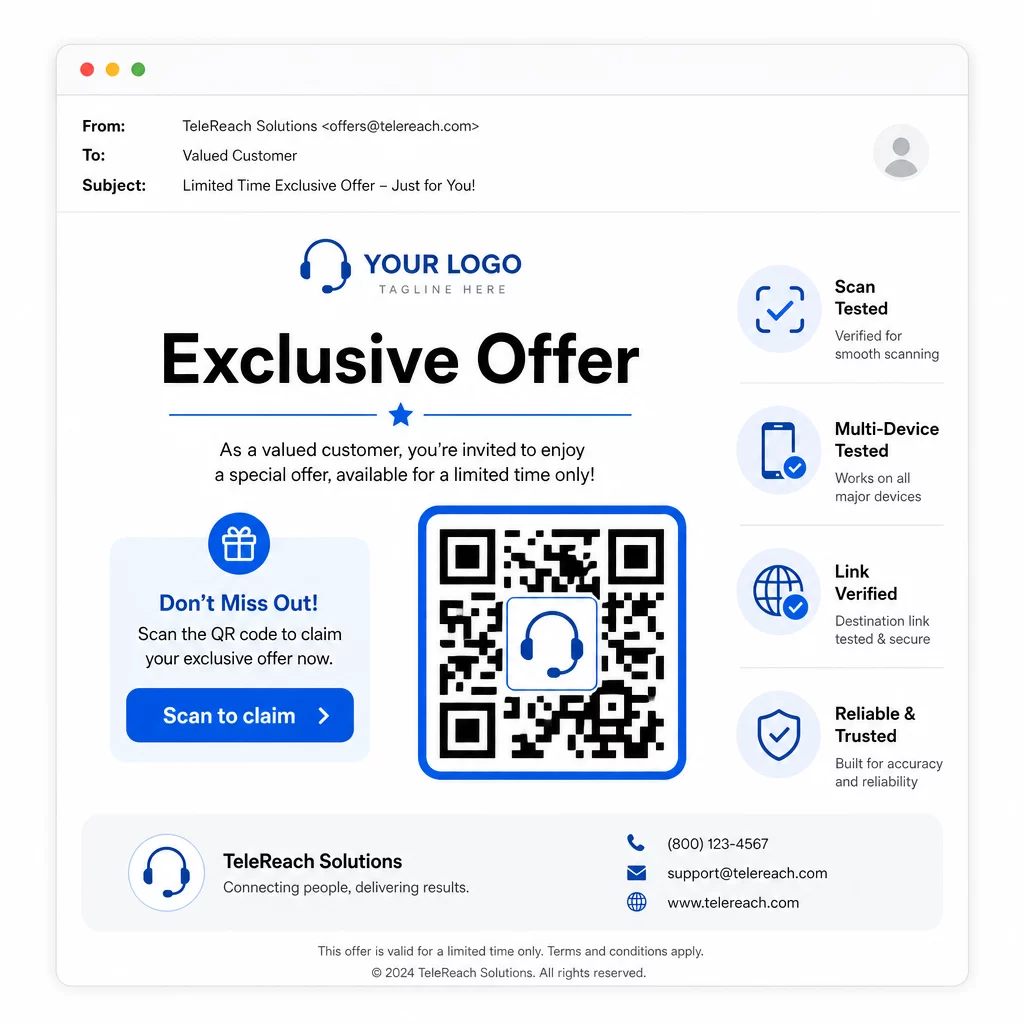
- Добавете логото на вашата марка: А QR код с лого е по-визуално отличително и изгражда доверие у потенциалните клиенти, които решават дали да се ангажират.
- Използвайте ясен призив за действие: Включете кратък инструктивен текст близо до кода – нещо като “Сканирайте за вашата ексклузивна оферта” или “Сканирайте за регистрация” – така че потенциалните клиенти да знаят точно какво ще получат.
- Осигурете достатъчен контраст: Тъмни модули на светъл фон са основата за надеждно сканиране при различни условия на осветление и камери на устройства.
- Тествайте преди изпращане: Сканирайте своя QR код на множество устройства и във формата, в който действително ще бъде доставен – независимо дали е в SMS, имейл или печатен материал.
Ако искате да тествате кой дизайн или дестинация се представя по-добре с даден сегмент от аудиторията, A/B тестване на вашите QR код кампании с динамични кодове ви позволява да стартирате паралелни версии и да сравнявате резултати, без да разпространявате множество физически кодове.
За изчерпателен предстартов контролен списък, QR код маркетингов контролен списък за малкия бизнес обхваща ключовите стъпки от поставянето на цели до изпълнението на кампанията.
Съображения за съответствие при телемаркетинга
Използването на QR кодове не променя правната рамка, която регулира начина, по който вашият екип контактува с потенциални клиенти. Законът за защита на потребителите на телефонни услуги (TCPA) изисква предварително изрично писмено съгласие преди изпращане на маркетингови текстови съобщения или използване на автоматизирани системи за набиране, а Правилото за продажби на телемаркетинг на FTC изисква обажданията да се извършват само между 8:00 ч. сутринта и 21:00 ч. местно време за получателя. Телемаркетьорите също така трябва да спазват Националния регистър „Не се обаждайте“ и да поддържат свои собствени вътрешни списъци „не се обаждайте“.
Ако вашият последващ QR код е доставен чрез SMS, това съобщение е предмет на същите изисквания на TCPA като всеки друг маркетингов текст. Съгласие трябва да бъде получено преди изпращане на каквито и да е съобщения, съдържащи код, до мобилни телефони.
Самите QR кодове са неутрален механизъм за доставка – техните последици за съответствие зависят изцяло от това как и на кого се разпространяват. QR кодовете дават на телемаркетинг кампаниите нещо, което исторически им е липсвало: измерима, гъвкава връзка между това, което се случва по телефона, и това, което следва. Когато съчетаете силно достигане с проследимо цифрово проследяване, вие създавате пълна картина на ефективността на кампанията и по-добро изживяване за хората, които се опитвате да достигнете.
Започнете с Генератор на QR кодове за да изградите първия си готов за кампания код, или проучете решения за QR кодове по индустрии за да видите как други сектори прилагат същия подход.
Често задавани въпроси
Да, ако използвате динамичен QR код. Динамичните кодове сочат към кратък URL адрес за пренасочване, който може да бъде променян по всяко време, дори след като кодът е бил разпространен чрез SMS, имейл или печат. Самият физически код остава същият – променя се само дестинацията. Това означава, че можете да актуализирате оферта, да поправите счупена връзка или да смените целева страница, без да се свързвате отново с потенциални клиенти.
Динамичните QR кодове регистрират данни на ниво сканиране, включително общия брой сканирания, брой уникални сканирания, времеви отпечатъци, географско местоположение (обикновено на ниво град) и тип устройство (iOS, Android, десктоп). Когато добавите UTM параметри към вашите целеви URL адреси, тези данни могат също да постъпват в Google Анализ или във вашата CRM система, което ви позволява да приписвате реализации директно на конкретни кампании или призиви.
Самият QR код не е регулиран, но SMS-ът, който го съдържа, е. Съгласно Закона за защита на потребителите на телефонни услуги, изпращането на маркетингово текстово съобщение до мобилен телефон с помощта на автоматизирана система изисква предварително изрично писмено съгласие от получателя. Прилагат се също така Правилото за продажби на телемаркетинг на FTC и Националният регистър „Не се обаждайте“. Ако вашият последващ работен процес включва изпращане на QR код до потенциални клиенти, това съобщение трябва да отговаря на същите правила като всеки друг маркетингов текст.