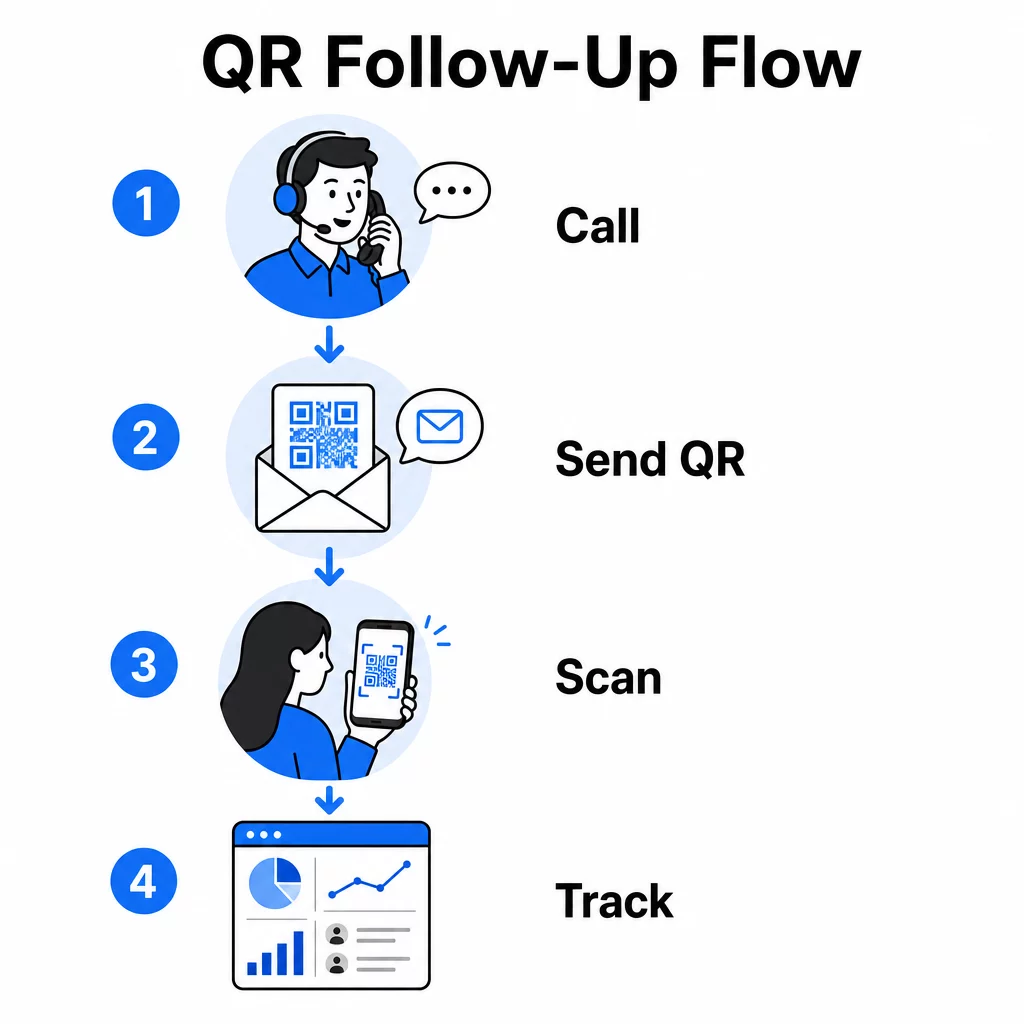
Vai jūsu telemārketinga zvani rada interesi, bet zaudē impulsu, tiklīdz saruna beidzas? Šī plaisa starp daudzsološu tālruņa zvanu un pabeigtu darbību ir vieta, kur lielākā daļa potenciālo klientu pazūd. Šī rokasgrāmata parāda, kā izmantot QR kodus, lai novērstu šo plaisu – savienojot tiešo saziņu ar izsekojamu digitālo pēcpārbaudi.
Kāpēc telemārketingam nepieciešams digitālais tilts
Uz tālruni balstīta saziņa joprojām darbojas, taču reti kad tā pati noslēdz darījumu. Potenciālais klients var būt ieinteresēts zvana laikā, taču nespēj veikt pēcpārbaudi, jo nākamais solis prasa pārāk daudz pūļu – URL ievadīšana, mērķlapas meklēšana vai e-pasta gaidīšana.
QR kodi to atrisina, nodrošinot potenciālajiem klientiem tūlītēju, bezberjeras ceļu no sarunas uz digitālu darbību. Neatkarīgi no tā, vai nosūtāt QR kodu ar SMS tūlīt pēc zvana vai iekļaujat to drukātā materiālā, potenciālais klients var skenēt un rīkoties pēc sava grafika. Šīs ērtības samazina atteikumu skaitu un uztur iesaisti dzīvu ilgi pēc zvana beigām.
QR kodi arī sniedz jūsu komandai kaut ko, kas tradicionālajam telemārketingam vienmēr ir trūcis: izmērāmus datus par to, kas notiek pēc zvana. Katra skenēšana ir izsekojams notikums, kas sniedz jums ieskatu par to, kuras sarunas pārvērtās reālā interesē un kuras kampaņas ir jāpielāgo.
Kā QR kodi iekļaujas telemārketinga darba plūsmās
Zvana laikā un pēc tā
Visefektīvākās QR kodu integrācijas notiek dabiskos nodošanas punktos telemārketinga procesā. Šeit ir galvenie saskares punkti, kur QR kodi pievieno vislielāko vērtību:
- SMS pēcpārbaude: Tūlīt pēc zvana nosūtiet īsziņu, kas satur QR kodu, kurš ved uz atbilstošu mērķlapu, produkta pārskatu vai reģistrācijas veidlapu. Tas uztur impulsu, vienlaikus respektējot potenciālā klienta laiku.
- E-pasta pēcpārbaude: Tā vietā, lai pievienotu dokumentus vai uzskaitītu vairākas saites, ieguliet vienu QR kodu savā pēcpārbaudes e-pastā, kas novirza potenciālos klientus uz personalizētu mērķlapu. Tīra, fokusēta pieredze vienmēr pārspēj pārpildītu iesūtni.
- Iespiestie materiāli: Ja jūsu komanda izmanto brošūras, vienas lapas materiālus vai tiešo pastu, iekļaujiet QR kodu, kas saistīts ar jebkuru produktu vai piedāvājumu, kas tika apspriests zvana laikā. Potenciālajiem klientiem, kuri saglabā materiālu, ir ātrs veids, kā atkal iesaistīties.
- Atsauksmes un kvalifikācija: Kopīgojiet QR kodu, kas ved uz īsu veidlapu, kurā potenciālie klienti var dalīties ar savām vajadzībām, termiņiem vai jautājumiem savā tempā. Tas sniedz jūsu pārdošanas komandai labāku informāciju pirms nākamā saskares punkta.
Galvenais princips ir atbilstība. QR kods, kas ved tieši uz zvana laikā apspriesto saturu, šķiet noderīgs. Vispārīgs QR kods, kas novirza potenciālos klientus uz mājaslapu, šķiet kā pēcapdoma.
Izveidojiet QR kodus, kas atbilst jūsu kampaņai Izmantojiet Saites QR koda ģenerators lai izveidotu kodus, kas potenciālos klientus nosūta tieši uz konkrētām galvenajām lapām, piedāvājumu lapām vai veidlapām – bez mājaslapas apvedceļiem.
QR kodu personalizēšana pēc auditorijas segmenta
Viena no QR kodu praktiskajām priekšrocībām telemārketingā ir spēja tos pielāgot pēc kampaņas vai auditorijas veida. Kods, kas nosūtīts mazo uzņēmumu potenciālajiem klientiem, var novest pie resursiem, kas īpaši izstrādāti viņu mērogam, savukārt atsevišķs kods korporatīvajiem kontaktiem novirza uz gadījumu izpētēm un korporatīvo cenu noteikšanu.
Šī segmentācija padara pēcpārrunu pieredzi personiskāku un nodrošina, ka potenciālie klienti saņem saturu, kas patiešām atbilst viņu situācijai. Ar dinamiskie QR kodi, jūs varat atjaunināt jebkura koda galamērķi bez atkārtotas drukāšanas vai nosūtīšanas – tādējādi, ja jūsu piedāvājums mainās kampaņas vidū, kods automātiski paliek aktuāls.
Mērīšana, kas notiek pēc katra zvana
Dati ir tas, kur QR kodi patiesi pārveido telemārketingu no uz intuīciju balstītas darbības par izmērāmu kanālu. Katra skenēšana ģenerē datu punktu, un ar pareizu iestatījumu šie datu punkti stāsta saskaņotu stāstu par kampaņas veiktspēju.
Galvenie rādītāji, kas jāseko, ir:
- Kopējās skenēšanas reizes pret unikālajām skenēšanas reizēm: Atšķir kopējo aktivitāti no individuālo potenciālo klientu intereses
- Skenēšanas laiks: Atklāj, kad potenciālie klienti iesaistās pēc zvana, kas palīdz precizēt turpmāko darbību laiku
- Ģeogrāfiskie dati: Parāda, kur koncentrējas atbildes, noderīgi reģionālajām kampaņām
- Ierīces tips: Apstiprina, vai jūsu galvenās lapas tiek pareizi attēlotas ierīcēs, ko jūsu auditorija patiešām izmanto
Kad pievienojat UTM parametrus galamērķa URL adresēm aiz jūsu QR kodiem, jūs varat nodot skenēšanas datus tieši Google Analytics vai jūsu CRM. Tas ļauj jums attiecināt piltuves aktivitāti atpakaļ uz konkrētām telemārketinga kampaņām, zvaniem vai pat individuāliem pārstāvjiem.
Lai iegūtu pilnīgu izsekošanas iestatīšanas un galveno rādītāju sadalījumu, skatiet ceļvedi par QR kodu skenēšanas izsekošanu reāllaikā.
Uzraugiet savu kampaņu reāllaikā Vēlaties precīzi redzēt, kur un kad jūsu potenciālie klienti iesaistās pēc zvaniem? Izmantojiet QR kodu analīzes informācijas paneli lai izsekotu skenējumus pēc atrašanās vietas, ierīces un laika – viss vienuviet.
Statiskie pret dinamiskajiem QR kodiem telemārketingam
Pareiza QR koda veida izvēle ietekmē gan jūsu darbības elastību, gan izsekošanas iespējas. Atšķirība ir saistīta ar diviem faktoriem: rediģējamību un analītiku.
| FUNKCIJA | Statiskais QR kods | Dinamiskais QR kods |
|---|---|---|
| Galamērķis rediģējams pēc izveides | Nē | Jā |
| Skenēšanas izsekošana un analītika | Nē | Jā |
| Izmaksas | Bezmaksas | Nepieciešams abonements |
| Labākais priekš | Fiksēts, pastāvīgs saturs | Aktīvās kampaņas, pēcpārbaudes |
Lielākajai daļai telemārketinga lietojumprogrammu, dinamiskie QR kodi ir labāka izvēle. Kampaņas attīstās – piedāvājumi mainās, galvenās lapas tiek atjauninātas, un A/B testiem ir nepieciešami jauni galamērķi. Dinamisks kods ļauj veikt šīs izmaiņas, atkārtoti nesazinoties ar katru potenciālo klientu vai nepārprintējot materiālus. Ja pēcpārbaudes SMS jau ir nosūtīta, jūs joprojām varat atjaunināt, uz kurieni ved šis QR kods.
Statiskie QR kodi labi darbojas saturam, kas nekad nemainās, piemēram, pastāvīgai atbalsta lapai vai fiksētai produkta specifikācijas lapai. Visam pārējam aktīvā kampaņā dinamiskie kodi nodrošina nepieciešamo elastību un mērīšanas iespējas.
Lai iegūtu sīkāku informāciju par to, kad izmantot katru veidu, skatiet statiskā vs. dinamiskā QR koda salīdzinājums.
Praktiski piemēri pēc kampaņas veida
Izpratne par to, kur QR kodi konceptuāli iederas, ir noderīga, taču, redzot, kā tie atbilst konkrētiem telemārketinga scenārijiem, ieviešana kļūst vienkāršāka.
- Veebināra vai pasākuma reklamēšana: Pēc zvana, kas reklamē gaidāmo tīmekļsemināru, nosūtiet QR kodu, izmantojot SMS, kas tieši ved uz reģistrācijas lapu. Novēršot pasākuma meklēšanas soli, ievērojami palielinās reģistrācijas rādītāji.
- Ierobežota laika piedāvājumi: Kad telemārketinga speciālists apspriež laika ziņā ierobežotu atlaidi, sekojošs QR kods var tieši novirzīt uz norēķinu vai pieteikšanās lapu ar jau piemērotu piedāvājumu – pārvēršot izrādīto interesi pabeigtā darījumā.
- Potenciālo klientu kvalifikācija: Kopīgojiet QR kodu, kas ved uz īsu vajadzību novērtēšanas veidlapu. Potenciālie klienti to aizpilda sev ērtā laikā, un jūsu komanda izmanto atbildes, lai noteiktu prioritātes turpmākajai saziņai un pielāgotu nākamo sarunu.
- Atsauksmju vākšana: Tā vietā, lai veiktu garu telefona aptauju, nosūtiet QR kodu uz īsu atsauksmju veidlapu tūlīt pēc zvana. Atbildes rādītāji uzlabojas, ja formāts respektē potenciālā klienta laiku.
Katrs no šiem lietošanas gadījumiem gūst labumu no mobilajām ierīcēm optimizētām galvenajām lapām. Tā kā katra skenēšana notiek viedtālrunī, galamērķim ir ātri jāielādējas un tīri jādarbojas mazos ekrānos. mobilā QR koda galvenās lapas labākās prakses ceļvedis aptver tehniskos standartus, kas nodrošina pēcsenēšanas pieredzes darbību.
QR kodu veidošana, kas tiek skenēti
QR kods, ko neviens neskenē, nesniedz nekādu vērtību. Skenēšanas rādītāju maksimāla palielināšana telemārketinga kontekstā prasa uzmanību gan dizainam, gan kontekstam.
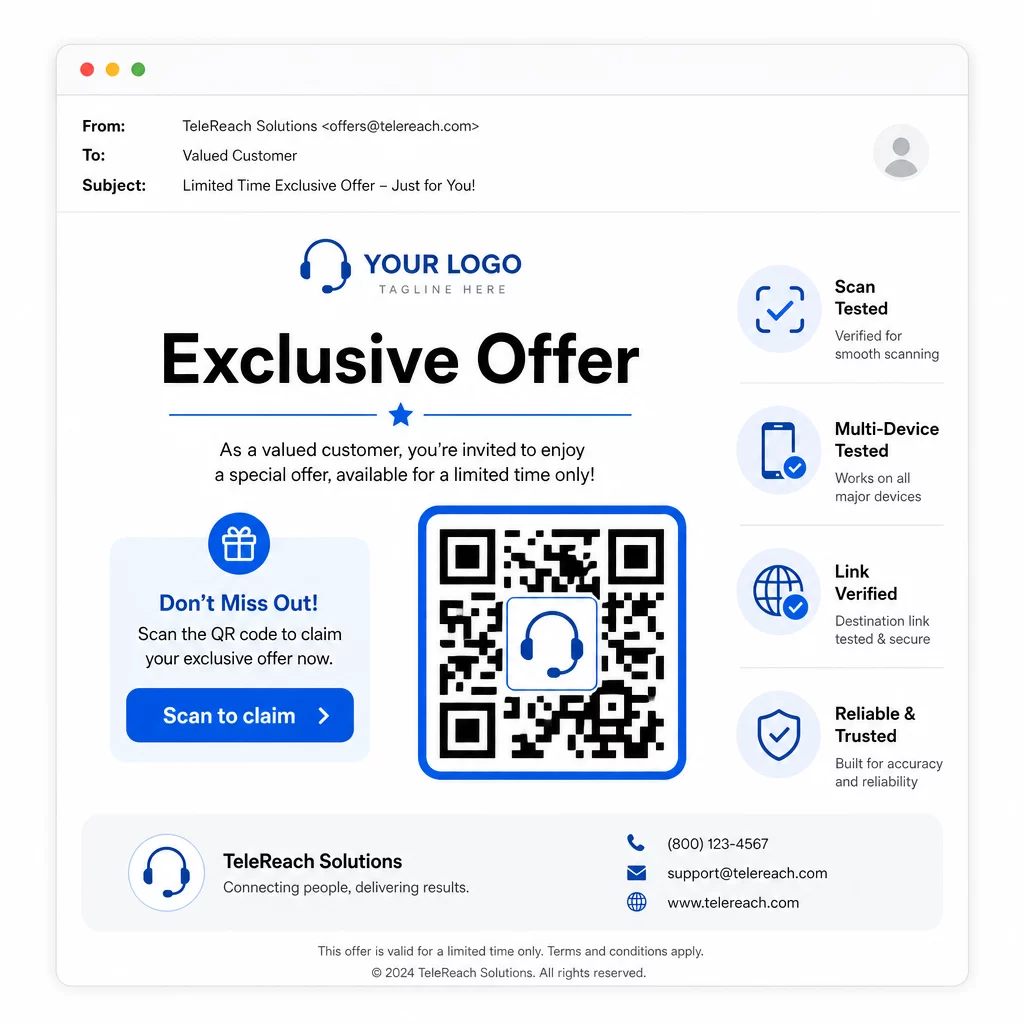
- Pievienojiet savu zīmola logotipu: A QR kods ar logotipu ir vizuāli atšķirīgāks un veido uzticību potenciālajiem klientiem, kuri lemj, vai iesaistīties.
- Izmantojiet skaidru aicinājumu uz darbību: Iekļaujiet īsu instrukciju tekstu pie koda – kaut ko līdzīgu “Skenējiet, lai saņemtu savu ekskluzīvo piedāvājumu” vai “Skenējiet, lai reģistrētos” – lai potenciālie klienti precīzi zinātu, ko viņi saņems.
- Nodrošiniet pietiekamu kontrastu: Tumši moduļi uz gaiša fona ir pamats uzticamai skenēšanai dažādos apgaismojuma apstākļos un ar dažādām ierīču kamerām.
- Pārbaudiet pirms nosūtīšanas: Skenējiet savu QR kodu vairākās ierīcēs un tādā formātā, kādā tas tiks faktiski piegādāts – vai tas būtu SMS, e-pasts vai drukāts materiāls.
Ja vēlaties pārbaudīt, kurš dizains vai galamērķis labāk darbojas ar noteiktu auditorijas segmentu, A/B testēšana jūsu QR kodu kampaņām ar dinamiskiem kodiem ļauj jums palaist paralēlas versijas un salīdzināt rezultātus, neizplatot vairākus fiziskus kodus.
Lai iegūtu visaptverošu pirms-palaišanas kontrolsarakstu, QR koda mārketinga kontrolsaraksts mazajiem uzņēmumiem aptver galvenos soļus no mērķu noteikšanas līdz kampaņas izpildei.
Atbilstības apsvērumi telemārketingam
QR kodu izmantošana nemaina tiesisko regulējumu, kas nosaka, kā jūsu komanda vispār sazinās ar potenciālajiem klientiem. Tālruņa patērētāju aizsardzības likums (TCPA) prasa iepriekšēju rakstisku piekrišanu pirms mārketinga īsziņu sūtīšanas vai automatizētu zvanīšanas sistēmu izmantošanas, un FTC Telemārketinga pārdošanas noteikumi prasa veikt zvanus tikai no pulksten 8:00 līdz 21:00 pēc saņēmēja vietējā laika. Telemārketinga speciālistiem ir arī jāievēro Nacionālais "Nesaukt" reģistrs un jāuztur savi iekšējie "nesaukt" saraksti.
Ja jūsu sekojošais QR kods tiek piegādāts, izmantojot SMS, uz šo ziņojumu attiecas tās pašas TCPA prasības kā uz jebkuru citu mārketinga īsziņu. Piekrišana jāsaņem pirms jebkādu kodu saturošu ziņojumu sūtīšanas uz mobilajiem tālruņiem.
Paši QR kodi ir neitrāls piegādes mehānisms – to atbilstības sekas pilnībā atkarīgas no tā, kā un kam tie tiek izplatīti. QR kodi sniedz telemārketinga kampaņām kaut ko, kas tām vēsturiski trūcis: izmērāmu, elastīgu saikni starp to, kas notiek pa tālruni, un to, kas notiek tālāk. Kad jūs apvienojat spēcīgu saziņu ar izsekojamu digitālo turpinājumu, jūs izveidojat pilnīgu priekšstatu par kampaņas veiktspēju un labāku pieredzi cilvēkiem, kurus mēģināt sasniegt.
Sāciet ar QR kodu ģenerators lai izveidotu savu pirmo kampaņai gatavo kodu, vai izpētiet QR kodu risinājumi pa nozarēm lai redzētu, kā citas nozares izmanto to pašu pieeju.
Biežāk uzdotie jautājumi
Jā, ja izmantojat dinamisku QR kodu.
Dinamiskie QR kodi reģistrē skenēšanas līmeņa datus, tostarp kopējo skenējumu skaitu, unikālo skenējumu skaitu, laika zīmogus, ģeogrāfisko atrašanās vietu (parasti pilsētas līmenī) un ierīces veidu (iOS, Android, galddators). Kad pievienojat UTM parametrus saviem galamērķa URL, šie dati var ieplūst arī Google Analytics vai jūsu CRM, ļaujot jums attiecināt konversijas tieši uz konkrētām kampaņām vai zvaniem.
Pats QR kods netiek regulēts, bet SMS, kas to satur, tiek regulēta. Saskaņā ar Tālruņa patērētāju aizsardzības likumu, mārketinga īsziņas sūtīšana uz mobilo tālruni, izmantojot automatizētu sistēmu, prasa iepriekšēju rakstisku piekrišanu no saņēmēja. Tiek piemēroti arī FTC Telemārketinga pārdošanas noteikumi un Nacionālais "Nesaukt" reģistrs. Ja jūsu sekojošā darba plūsma ietver QR koda sūtīšanu potenciālajiem klientiem, šim ziņojumam jāatbilst tiem pašiem noteikumiem kā jebkurai citai mārketinga īsziņai.