Telepazarlama aramalarınız ilgi uyandırıyor ancak konuşma bittikten sonra ivme mi kaybediyor? Umut vadeden bir telefon görüşmesi ile tamamlanmış bir eylem arasındaki bu boşluk, çoğu potansiyel müşterinin kaybolduğu yerdir. Bu kılavuz, canlı erişimi izlenebilir dijital takiple birleştirerek bu boşluğu kapatmak için QR kodlarını nasıl kullanacağınızı gösterir.
Telepazarlama Neden Dijital Bir Köprüye İhtiyaç Duyar?
Telefon tabanlı erişim hala işe yarıyor, ancak nadiren kendi başına kapanış sağlıyor. Bir potansiyel müşteri arama sırasında ilgilenebilir ancak bir URL yazmak, bir açılış sayfası aramak veya bir e-posta beklemek gibi bir sonraki adım çok fazla çaba gerektirdiği için takibi yapamayabilir.
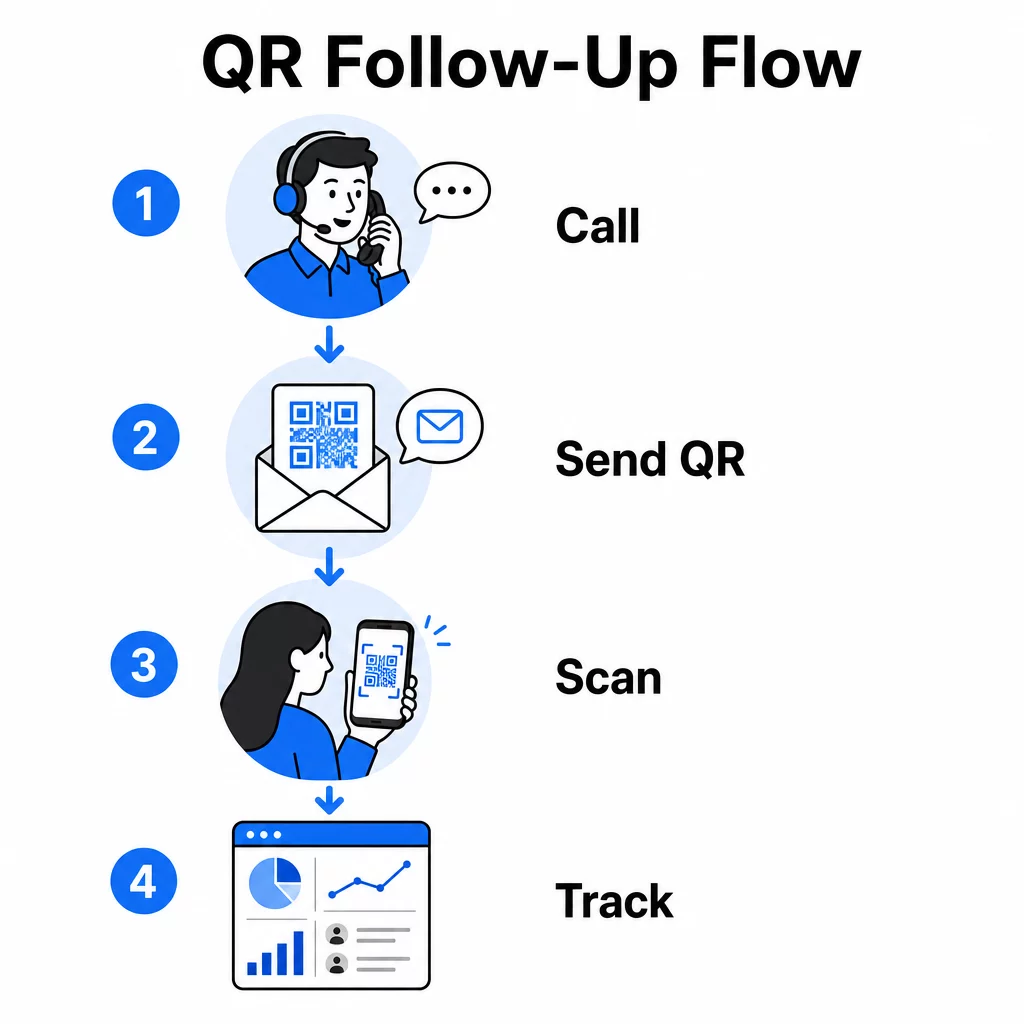
QR kodları, potansiyel müşterilere konuşmadan dijital bir eyleme anında, sürtünmesiz bir yol sunarak bunu çözer. Bir aramadan hemen sonra SMS yoluyla bir QR kodu gönderirseniz veya basılı bir materyale eklerseniz, potansiyel müşteri kendi programına göre tarayabilir ve harekete geçebilir. Bu kolaylık, bırakma oranını azaltır ve arama bittikten çok sonra bile etkileşimi canlı tutar.
QR kodları ayrıca ekibinize geleneksel telepazarlamanın her zaman eksik olduğu bir şeyi verir: aramadan sonra ne olduğuna dair ölçülebilir veriler. Her tarama izlenebilir bir olaydır ve hangi konuşmaların gerçek ilgiye dönüştüğünü ve hangi kampanyaların ayarlanması gerektiğini görmenizi sağlar.
QR Kodları Telepazarlama İş Akışlarına Nasıl Uyar?
Arama Sırasında ve Sonrasında
En etkili QR kodu entegrasyonları, telepazarlama sürecindeki doğal geçiş noktalarında gerçekleşir. İşte QR kodlarının en çok değer kattığı birincil temas noktaları:
- SMS takibi: Bir aramadan hemen sonra, ilgili bir açılış sayfasına, ürün genel bakışına veya kayıt formuna bağlantı veren bir QR kodu içeren bir metin gönderin. Bu, potansiyel müşterinin zamanına saygı duyarken ivmeyi devam ettirir.
- E-posta takibi: Belgeler eklemek veya birden fazla bağlantı listelemek yerine, takip e-postanıza potansiyel müşterileri kişiselleştirilmiş bir açılış sayfasına yönlendiren tek bir QR kodu yerleştirin. Temiz, odaklanmış bir deneyim, dağınık bir gelen kutusundan her zaman daha iyi performans gösterir.
- Basılı materyaller: Ekibiniz broşürler, tek sayfalık belgeler veya doğrudan posta kullanıyorsa, aramada konuşulan ürün veya teklifle ilgili bir QR kodu ekleyin. Materyali saklayan potansiyel müşteriler, yeniden etkileşim kurmak için hızlı bir yola sahip olurlar.
- Geri bildirim ve niteliklendirme: Potansiyel müşterilerin ihtiyaçlarını, zaman çizelgelerini veya sorularını kendi hızlarında paylaşabilecekleri kısa bir forma yönlendiren bir QR kodu paylaşın. Bu, satış ekibinize bir sonraki temas noktasından önce daha iyi bilgi sağlar.
Temel ilke alaka düzeyidir. Doğrudan aramada konuşulan içeriğe yönlendiren bir QR kodu faydalı hissettirir. Potansiyel müşterileri bir ana sayfaya bırakan genel bir QR kodu ise sonradan akla gelmiş gibi hissettirir.
Kampanyanıza Uygun QR Kodları Oluşturun Kullan Bağlantı QR Kod Oluşturucu potansiyel müşterileri doğrudan belirli açılış sayfalarına, teklif sayfalarına veya formlara gönderen kodlar oluşturmak için – ana sayfa sapmaları olmadan.
QR Kodlarını Kitle Segmentine Göre Kişiselleştirme
Telepazarlamada QR kodlarının pratik güçlerinden biri, onları kampanya veya kitle türüne göre uyarlayabilme yeteneğidir. Küçük işletme potansiyel müşterilerine gönderilen bir kod, özellikle onların ölçeği için tasarlanmış kaynaklara yönlendirebilirken, kurumsal kişiler için ayrı bir kod vaka çalışmalarına ve kurumsal fiyatlandırmaya yönlendirir.
Bu segmentasyon, çağrı sonrası deneyimi daha kişisel hale getirir ve potansiyel müşterilerin durumlarına gerçekten uygun içerik almasını sağlar. İle dinamik QR kodları, herhangi bir kodun hedefini yeniden yazdırmadan veya yeniden göndermeden güncelleyebilirsiniz – böylece teklifiniz kampanya ortasında değişirse, kod otomatik olarak güncel kalır.
Her Çağrıdan Sonra Ne Olduğunu Ölçme
Veriler, QR kodlarının telepazarlamayı sezgiye dayalı bir etkinlikten ölçülebilir bir kanala dönüştürdüğü yerdir. Her tarama bir veri noktası oluşturur ve doğru kurulumla bu veri noktaları kampanya performansı hakkında tutarlı bir hikaye anlatır.
İzlenecek temel metrikler şunlardır:
- Toplam tarama sayısı ve benzersiz tarama sayısı: Genel etkinliği bireysel potansiyel müşteri ilgisinden ayırır
- Tarama zamanlaması: Potansiyel müşterilerin bir çağrıdan sonra ne zaman etkileşime girdiğini ortaya çıkarır, bu da takip zamanlamasını iyileştirmeye yardımcı olur
- Coğrafi veriler: Yanıtların nerede yoğunlaştığını gösterir, bölgesel kampanyalar için faydalıdır
- Cihaz türü: Açılış sayfalarınızın hedef kitlenizin gerçekten kullandığı cihazlar için doğru şekilde işlenip işlenmediğini doğrular
Eklediğinizde UTM parametreleri QR kodlarınızın arkasındaki hedef URL'lere, tarama verilerini doğrudan Google Analytics'e veya CRM'inize aktarabilirsiniz. Bu, potansiyel müşteri hattı etkinliğini belirli telepazarlama kampanyalarına, çağrılara ve hatta bireysel temsilcilere atamanızı sağlar.
İzleme kurulumu ve temel metriklerin tam dökümü için, şu kılavuza bakın: QR kodu taramalarını gerçek zamanlı izleme.
Kampanyanızı Gerçek Zamanlı İzleyin Potansiyel müşterilerinizin aramalardan sonra tam olarak nerede ve ne zaman etkileşim kurduğunu görmek ister misiniz? Şunu kullanın: QR Kodu Analiz paneli taramaları konuma, cihaza ve zamana göre tek bir yerden izlemek için.
Telepazarlama için Statik ve Dinamik QR Kodları
Doğru QR kodu türünü seçmek hem operasyonel esnekliğinizi hem de izleme yeteneğinizi etkiler. Fark iki faktöre dayanır: düzenlenebilirlik ve analiz.
| ÖZELLİK | Statik QR Kodu | Dinamik QR Kodu |
|---|---|---|
| Oluşturulduktan sonra düzenlenebilir hedef | Hayır | Evet |
| Tarama takibi ve analizi | Hayır | Evet |
| Maliyet | Bedava | Abonelik gerekli |
| En iyisi | Sabit, kalıcı içerik | Aktif kampanyalar, takip aramaları |
Çoğu telepazarlama uygulaması için, dinamik QR kodları daha iyi bir seçimdir. Kampanyalar gelişir – teklifler değişir, açılış sayfaları güncellenir ve A/B testleri yeni hedefler gerektirir. Dinamik bir kod, bu değişiklikleri her potansiyel müşteriyle tekrar iletişime geçmeden veya materyalleri yeniden basmadan yapmanızı sağlar. Bir takip SMS'i zaten gönderilmiş olsa bile, o QR kodunun nereye yönlendirdiğini hala güncelleyebilirsiniz.
Statik QR kodları, kalıcı bir destek sayfası veya sabit bir ürün özellik sayfası gibi hiç değişmeyen içerikler için iyi çalışır. Aktif bir kampanyadaki diğer her şey için, dinamik kodlar ihtiyacınız olan esnekliği ve ölçüm yeteneğini sağlar.
Her türün ne zaman kullanılacağına dair daha fazla ayrıntı için, şuna bakın: statik ve dinamik QR kodu karşılaştırması.
Kampanya Türüne Göre Pratik Örnekler
QR kodlarının kavramsal olarak nereye oturduğunu anlamak faydalıdır, ancak bunların belirli telepazarlama senaryolarına nasıl eşleştiğini görmek uygulamayı daha basit hale getirir.
- Webinar veya etkinlik tanıtımı: Yaklaşan bir web seminerini tanıtan bir aramadan sonra, doğrudan kayıt sayfasına bağlanan bir QR kodunu SMS ile gönderin. Etkinliği arama adımını ortadan kaldırmak, kayıt oranlarını önemli ölçüde artırır.
- Sınırlı süreli teklifler: Bir tele pazarlamacı zamana duyarlı bir indirimi tartıştığında, takip eden bir QR kodu, teklifin önceden uygulandığı bir ödeme veya talep sayfasına doğrudan bağlanabilir – ifade edilen ilgiyi tamamlanmış bir işleme dönüştürür.
- Potansiyel müşteri nitelendirme: Kısa bir ihtiyaç değerlendirme formuna bağlanan bir QR kodu paylaşın. Potansiyel müşteriler formu istedikleri zaman doldurur ve ekibiniz yanıtları takip önceliğini belirlemek ve bir sonraki görüşmeyi kişiselleştirmek için kullanır.
- Geri bildirim toplama: Uzun bir telefon anketi yapmak yerine, aramadan hemen sonra kısa bir geri bildirim formuna yönlendiren bir QR kodu gönderin. Format, potansiyel müşterinin zamanına saygı duyduğunda yanıt oranları artar.
Bu kullanım durumlarının her biri mobil uyumlu açılış sayfalarından faydalanır. Her tarama bir akıllı telefonda gerçekleştiği için, hedefin küçük ekranlarda hızlı yüklenmesi ve sorunsuz çalışması gerekir. mobil QR kodu açılış sayfası en iyi uygulamalar rehberi tarama sonrası deneyimi çalıştıran teknik standartları kapsar.
Taranan QR Kodları Oluşturma
Kimsenin taramadığı bir QR kodu hiçbir değer sağlamaz. Tele pazarlama bağlamında tarama oranlarını en üst düzeye çıkarmak hem tasarıma hem de bağlama dikkat etmeyi gerektirir.
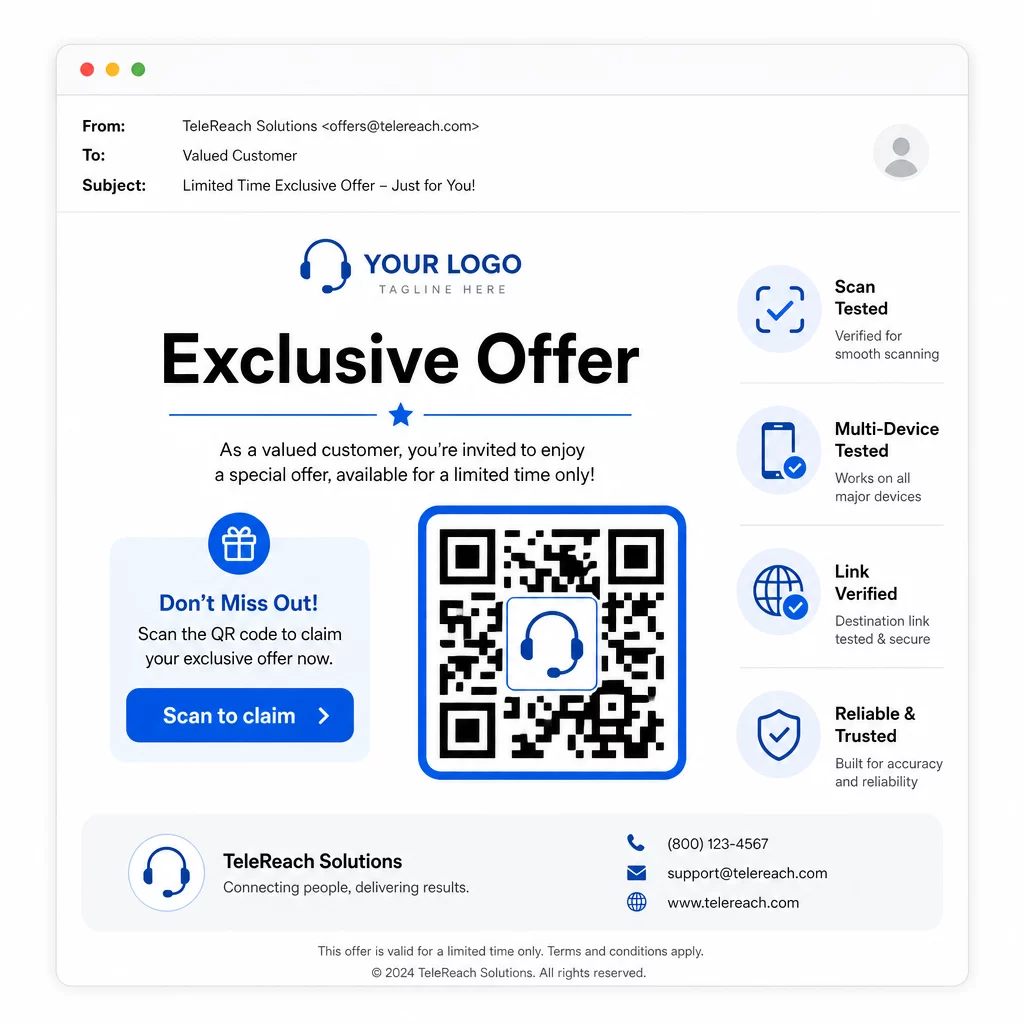
- Marka logonuzu ekleyin: Bir Logolu QR kodu görsel olarak daha ayırt edicidir ve etkileşime geçip geçmeyeceğine karar veren potansiyel müşterilerle güven oluşturur.
- Açık bir harekete geçirici mesaj kullanın: Kodun yakınına kısa bir talimat metni ekleyin – “Özel teklifiniz için tarayın” veya “Kaydolmak için tarayın” gibi – böylece potansiyel müşteriler tam olarak ne alacaklarını bilirler.
- Yeterli kontrast sağlayın: Açık arka plan üzerindeki koyu modüller, farklı aydınlatma koşullarında ve cihaz kameralarında güvenilir tarama için temel oluşturur.
- Göndermeden önce test edin: QR kodunuzu birden fazla cihazda ve gerçekte teslim edileceği formatta tarayın – ister SMS, e-posta veya basılı materyal olsun.
Belirli bir hedef kitle segmentinde hangi tasarımın veya hedefin daha iyi performans gösterdiğini test etmek isterseniz, QR kod kampanyalarınızı A/B testi yapmak dinamik kodlarla, birden fazla fiziksel kod dağıtmadan paralel versiyonlar çalıştırmanıza ve sonuçları karşılaştırmanıza olanak tanır.
Kapsamlı bir lansman öncesi kontrol listesi için, Küçük İşletmeler İçin QR Kod Pazarlama Kontrol Listesi hedef belirlemeden kampanya yürütmeye kadar temel adımları kapsar.
Telepazarlama İçin Uyumluluk Hususları
QR kodları kullanmak, ekibinizin potansiyel müşterilerle ilk etapta nasıl iletişim kurduğunu yöneten yasal çerçeveyi değiştirmez. Telefon Tüketiciyi Koruma Yasası (TCPA), pazarlama metinleri göndermeden veya otomatik arama sistemleri kullanmadan önce önceden açık yazılı onay gerektirir ve FTC'nin Telepazarlama Satış Kuralı, aramaların yalnızca alıcının yerel saatiyle sabah 8:00 ile akşam 9:00 arasında yapılmasını gerektirir. Telepazarlamacılar ayrıca Ulusal Rahatsız Etmeyin Kaydı'na uymalı ve kendi dahili rahatsız etmeyin listelerini tutmalıdır.
Takip QR kodunuz SMS yoluyla teslim edilirse, bu mesaj diğer pazarlama metinleriyle aynı TCPA gereksinimlerine tabidir. Cep telefonlarına kod içeren herhangi bir mesaj göndermeden önce onay alınmalıdır.
QR kodları kendileri tarafsız bir teslimat mekanizmasıdır – uyumluluk etkileri tamamen nasıl ve kime dağıtıldıklarına bağlıdır. QR kodları, telepazarlama kampanyalarına tarihsel olarak eksik olan bir şeyi verir: telefonda olanlar ile sonraki adımlar arasında ölçülebilir, esnek bir bağlantı. Güçlü erişimi izlenebilir dijital takiple birleştirdiğinizde, kampanya performansının eksiksiz bir resmini ve ulaşmaya çalıştığınız kişiler için daha iyi bir deneyim yaratırsınız.
ile başlayın QR Kod Oluşturucu ilk kampanya hazır kodunuzu oluşturmak için veya keşfetmek için sektöre göre QR kod çözümleri diğer sektörlerin aynı yaklaşımı nasıl kullandığını görmek için.
Sıkça sorulan sorular
Evet, dinamik bir QR kodu kullanırsanız. Dinamik kodlar, kod SMS, e-posta veya basılı olarak dağıtıldıktan sonra bile herhangi bir zamanda değiştirilebilen kısa bir yönlendirme URL'sine işaret eder. Fiziksel kodun kendisi aynı kalır – yalnızca hedef değişir. Bu, bir teklifi güncelleyebileceğiniz, bozuk bir bağlantıyı düzeltebileceğiniz veya potansiyel müşterilerle tekrar iletişime geçmeden bir açılış sayfasını değiştirebileceğiniz anlamına gelir.
Dinamik QR kodları, toplam tarama sayısı, benzersiz tarama sayıları, zaman damgaları, coğrafi konum (genellikle şehir düzeyinde) ve cihaz türü (iOS, Android, masaüstü) dahil olmak üzere tarama düzeyinde verileri kaydeder. Hedef URL'lerinize UTM parametreleri eklediğinizde, bu veriler Google Analytics'e veya CRM'inize de akabilir ve dönüşümleri doğrudan belirli kampanyalara veya çağrılara atfetmenizi sağlar.
QR kodunun kendisi düzenlenmemiştir, ancak onu içeren SMS düzenlenmiştir. Telefon Tüketiciyi Koruma Yasası uyarınca, otomatik bir sistem kullanarak bir cep telefonuna pazarlama metin mesajı göndermek, alıcıdan önceden açık yazılı onay gerektirir. FTC'nin Telepazarlama Satış Kuralı ve Ulusal Rahatsız Etmeyin Kaydı da geçerlidir. Takip iş akışınız potansiyel müşterilere bir QR kodu mesajı göndermeyi içeriyorsa, bu mesaj diğer pazarlama metinleriyle aynı kurallara uymalıdır.