Kas teie kliendid näevad vaeva abi leidmisega pärast ostu? Kehv ostujärgne tugi on üks kiiremaid viise korduvostja kaotamiseks – ja 52% tarbijatest ütleb, et halb teenindus on peamine põhjus, miks nad enam ei osta. See juhend selgitab praktilisi viise QR-koodide kasutamiseks, et muuta tugi, tagastused ja tellimuste jälgimine teie klientidele kiiremaks ja lihtsamaks.
Miks ostujärgne tugi on olulisem kui kunagi varem
Klientide ootused on muutunud. Kiire tarne, reaalajas jälgimine ja hõõrdumatud tagastused ei ole enam eelised – need on põhinõuded. Mõelge, mis on kaalul:
- 88% klientidest ostavad suurema tõenäosusega uuesti pärast suurepärast teeninduskogemust
- 70% ostjatest ütleb, et lihtne ja läbipaistev tagastusprotsess suurendab nende lojaalsust e-kaubanduse jaemüüjale
- 73% tarbijatest soovivad oma tellimusi kogu tarne vältel jälgida ja kui jälgimine on saadaval, kasutab seda 96% neist
Enamiku e-kaubanduse brändide väljakutse on see, et tugipunktid on hajutatud: kliendid peavad otsima kontaktlehti, navigeerima tagastusportaalides või kaevama läbi e-posti kinnituste, et leida tellimuse üksikasju. QR-koodid lahendavad selle, tuues toe otse sinna, kus kliendid juba on – pakendile nende käes, kviitungile nende postkastis või toote etiketile.
Kuhu paigutada QR-koodid ostujärgsel teekonnal
Kõige tõhusam QR-koodi strateegia kaardistab iga koodi kliendikogemuse konkreetsele hetkele. Siin on kõige suurema mõjuga paigutused:
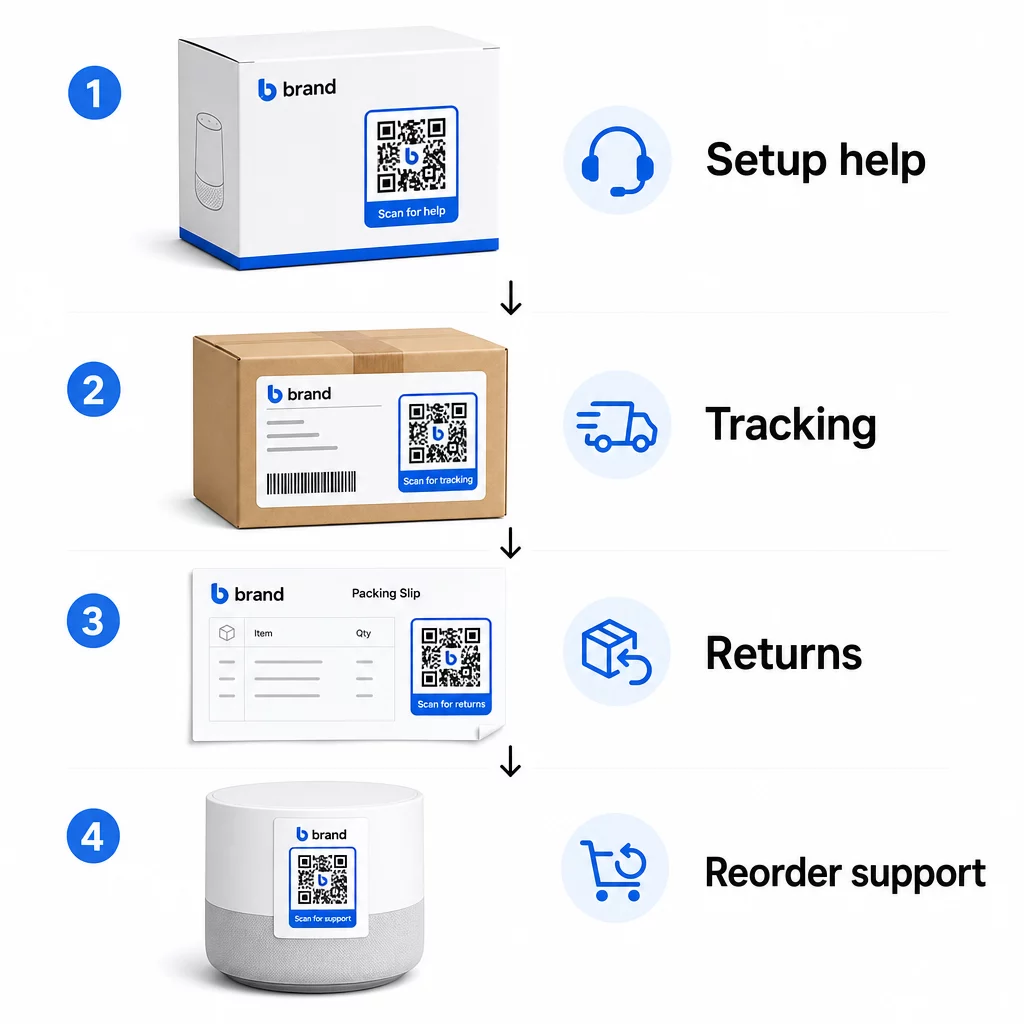
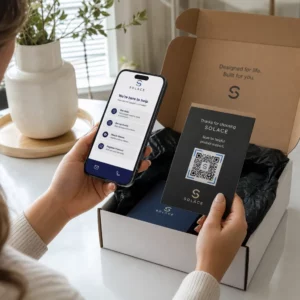
Tootepakend. QR-kood karbil või etiketil annab klientidele kohese juurdepääsu seadistusjuhenditele, garantiiteabele ja tõrkeotsingu abile kohe pärast lahtipakkimist. Vastupidavate kaupade, näiteks kodumasinate või tööriistade puhul, QR-koodi lisamine tootepakendile saab linkida ka õppevideotele, toote registreerimisele või varuosade juhenditele – kasulikud kuud pärast ostu.
Saatelehed ja jälgimislehed. 88% veebipoodide ostjatest ütleb, et reaalajas tarne jälgimine on positiivse kogemuse jaoks kriitilise tähtsusega ja 43% kontrollib oma jälgitavaid tellimusi iga päev kuni kohaletoimetamiseni. QR-kood saatelehel, mis lingib otse reaalajas jälgimislehele, eemaldab kontodele sisselogimise või kinnitusmeilide otsimise hõõrdumise.
Tellimuse kinnituse ja saatmisteavituse e-kirjad. Need on e-kirjad, mida kliendid tegelikult avavad. QR-koodi manustamine, mis lingib tellimusepõhisele tugikeskusele – jälgimise, KKK-de ja tagastamisjuhistega – hoiab kõik ühes skaneeringus.
Kviitungid ja pakkelehed. Pakkelehel olev QR-kood võib linkida tagastusportaalile, tagasisidevormile või tooteülevaate lehele. See on vähese vaevaga, suure väärtusega paigutus, mis muudab dokumendi, mida kliendid juba loevad, tugiväravaks.
Tootesildid. Tarbekaupade või korduvalt kasutatavate esemete puhul pakub sildil olev QR-kood pidevat juurdepääsu uuendatud juhistele, ohutusteabele või uuesti tellimise linkidele kaua pärast esialgset ostu.
Muutke oma tugipunktid jälgitavaks Kasuta Lingi QR-koodi generaator looma skaneeritavaid koode pakenditele, e-kirjadele ja saatmismaterjalidele – seejärel jälgima täpselt, milliseid tugiressursse kliendid kasutavad.
Peamised tugikasutusjuhud e-kaubanduses
QR-koodid on piisavalt paindlikud, et täita mitmeid erinevaid tugifunktsioone. Kõige tavalisemad, mida tasub oma töövoogu lisada:
Iseteeninduslik veaotsing. Linkige QR-koodid tootespetsiifilistele KKK lehtedele või videoõpetustele. Kliendid saavad ööpäevaringset abi tugiagenti ootamata ja teie vähendate sissetulevate piletite mahtu.
Tagastused ja vahetused. Jaemüüjad prognoosivad, et 2025. aastal tagastatakse 15,8% kogu aastasest müügist – ligi 850 miljardit dollarit. Algatamisprotsessi lihtsustamine on oluline. QR-kood, mis avab eeltäidetud tagastusvormi, genereerib saatelehe või pakub samm-sammult juhiseid, eemaldab tagastuskogemuse suurima hõõrdepunkti. Brändid nagu IKEA on juba üle läinud QR-põhistele tagastusprotsessidele, saates koode e-posti või SMS-i teel pärast tagastuse registreerimist.
Reaalajas vestlus ja otsekontakt. Selle asemel, et nõuda klientidelt vestlusvidina leidmist teie veebisaidilt, saab pakendil või kviitungil olev QR-kood avada vestlusakna, mis on eeltäidetud kliendi tellimuse üksikasjadega – kiirendades lahendusaega mõlemal poolel.
Garantii registreerimine ja toote registreerimine. Pakendil olev QR-kood, mis lingib otse registreerimisvormile, vähendab ostu ja registreerimise vahelisi samme, mis parandab nii täitmismäärasid kui ka teie võimet pakkuda asjakohast tuge.
Tagasiside ja arvustused. A kliendi tagasiside QR-kood asetamine kviitungitele, pakenditele või järelmeilidele teeb klientidele oma kogemuse jagamise lihtsaks. A Google'i arvustuse QR-koodile saadab nad ühe skaneerimisega otse teie arvustuste lehele. Selle tagasiside ennetav kogumine aitab teil ka toote- või täitmisküsimusi tabada enne, kui need süvenevad.
Mitmekeelne tugi. Dünaamilised QR-koodid suudavad tuvastada kliendi asukoha ja pakkuda sisu sobivas keeles – kasulik rahvusvahelistele müüjatele, kes peavad toetama erinevaid sihtrühmi, ilma et peaksid iga piirkonna jaoks eraldi trükimaterjale looma.
Koguge tagasisidet ilma lisatakistusteta Kasuta Google vorm: QR-koodi generaator luua skaneeritav tagasiside link ostujärgsetele e-kirjadele või pakkelehtedele ja hakata koguma teostatavaid teadmisi igast tellimusest.
Miks dünaamilised QR-koodid on toe jaoks õige valik
A dünaamiline QR-kood on selline, kus siht-URL-i saab muuta pärast koodi printimist – ilma koodi ennast muutmata. Klienditoe jaoks on see eristus olulisem, kui see esmapilgul tunduda võib.
Tugiresursid muutuvad regulaarselt. Tagastuspoliitikad uuendatakse, tõrkeotsingu juhendid vaadatakse üle ja kontaktmeetodid muutuvad. Staatilise QR-koodi puhul tähendab iga uuendus kogu pakendi, lisade või etikettide uuesti printimist. Dünaamilise koodiga uuendate sihtkohta oma juhtpaneelil ja iga olemasolev kood kajastab muutust koheselt.
Dünaamilised QR-koodid võimaldavad ka analüütikat. Saate jälgida, mitu korda koodi on skaneeritud, millistest asukohtadest, millistel seadmetüüpidel ja mis kellaaegadel. Need andmed näitavad, milliseid tugiresursse kliendid tegelikult kasutavad – ja millised puutepunktid genereerivad kõige rohkem päringuid. Näiteks võib tõrkeotsingu juhendi skaneerimiste järsk tõus viidata korduvale tooteveale, mida tasub ülesvoolu käsitleda. Saate uurida kuidas QR-koodid parandavad e-kaubanduse tarneid ja tuge et näha, kuidas teised kaubamärgid seda lähenemist rakendavad.
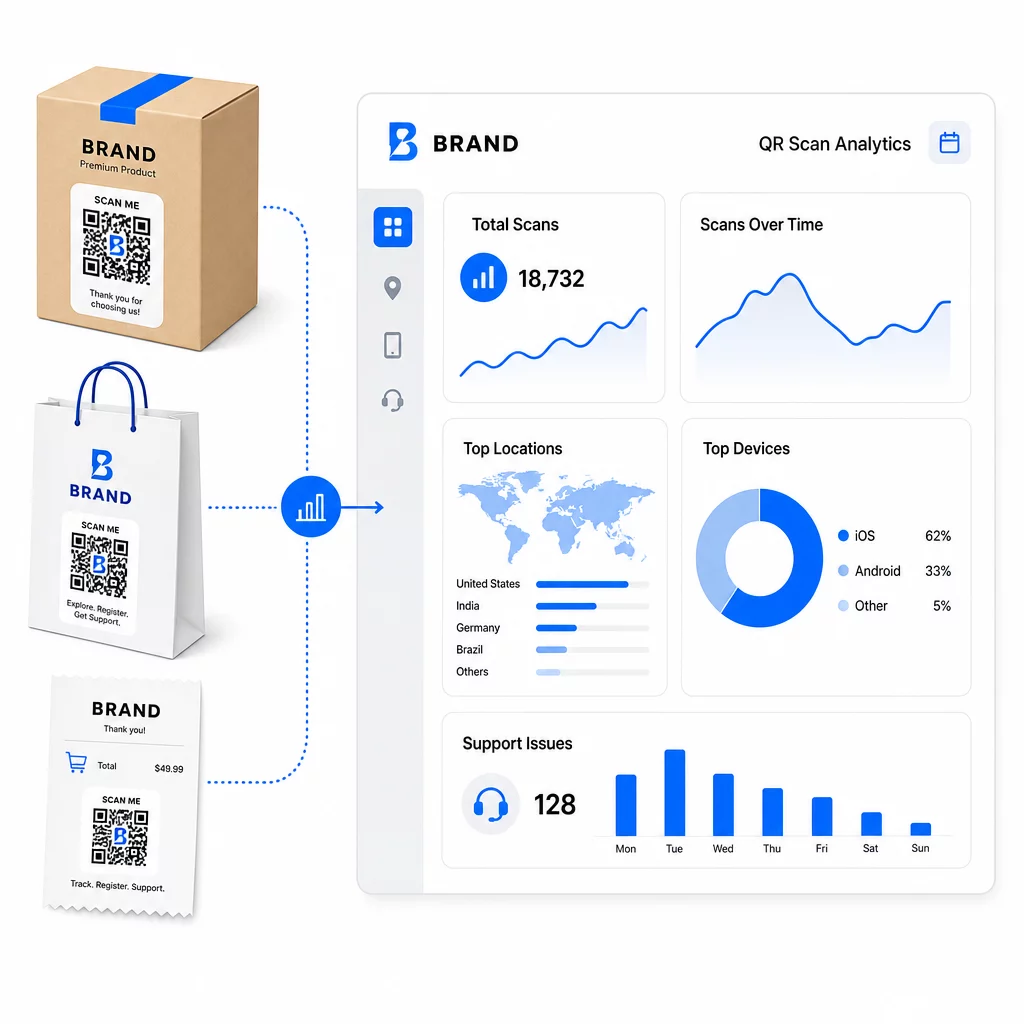
Hoidke tugilingid ajakohasena ilma uuesti printimata Kasutage Pagelooti QR-koodi generaator looma dünaamilisi koode oma pakenditele ja lisadele – värskendage sihtkohti igal ajal oma juhtpaneelilt, puudutamata trükitud materjali.
Isikupärastamine QR-koodide kaudu
Üks alakasutatud võimalus on pakkuda tugisisu, mis on kohandatud konkreetsele kliendile või tootele. Dünaamiliste QR-koodidega saate konfigureerida koode pakkuma erinevat sisu, tuginedes:
- Toote tüüp – Blenderi QR-kood viitab blenderi seadistusjuhendile ja garantiile, mitte üldisele tugilehele
- Ostude ajalugu – Naasvad kliendid saab suunata lojaalsuskeskusesse või isikupärastatud uuesti tellimise lehele
- Asukoht – Rahvusvahelised kliendid näevad piirkonnaspetsiifilist sisu või kohalikke tagastamisjuhiseid
See lähenemine muudab üldise tugipunkti millekski, mis tundub loodud individuaalsele kliendile – mis mõjutab otseselt seda, kas nad tagasi tulevad.
QR-koodi analüütika kasutamine toe parandamiseks
QR-koodi skaneerimistest kogutud andmed ei ole lihtsalt edevuse mõõdik – see on otsene signaal selle kohta, kus kliendid hätta jäävad. Hästi struktureeritud analüütika seadistus võib teile öelda:
- Millised tooted genereerivad kõige rohkem tugiskaneeringuid (võimalik kvaliteedi- või dokumentatsiooniprobleem)
- Milliste puutepunktidega kliendid kõige rohkem suhtlevad (pakend vs. e-post vs. kviitung)
- Millal ostujärgses ajaskaalas kliendid abi otsivad (kohe pärast tarnet vs. nädalaid hiljem)
- Geograafilised mustrid, mis võivad viidata piirkondlikele täitmise probleemidele
Platvormid, mis pakuvad QR-koodi jälgimine ja analüütika annavad teile reaalajas tagasisideahela, mis muidu nõuaks käsitsi kliendiküsitlusi või tugipiletite analüüsi. Hästi kasutatuna võimaldavad need andmed teil teha ennetavaid, mitte reaktiivseid parendusi.
Praktilised näpunäited rakendamiseks
Enne QR-koodide kasutuselevõttu klienditoe jaoks säästavad mõned juhised teid tavalistest probleemidest:
- Testige koode enne massilist printimist. Skannige iga koodi mitmel seadmel ja operatsioonisüsteemil, et veenduda selle õiges lahendamises.
- Hoidke sihtlehed mobiilile optimeeritud. Kliendid, kes skannivad QR-koodi, kasutavad oma telefone. Leht, mis laeb aeglaselt või ei kuvata mobiilis õigesti, kahjustab kogu kogemust.
- Mõõtke koodid pinnale sobivaks. Väikestel tootesiltidel olevad koodid peavad olema piisavalt suured, et neid saaks usaldusväärselt skannida. Vaadake üle QR-koodi kasutatavuse parimaid tavasid konkreetsete suuruse juhiste saamiseks vaatamiskauguse alusel.
- Lisage koodi lähedale lühike üleskutse tegevusele. “Skannige seadistusjuhendi saamiseks” või “Skannige tagastuse alustamiseks” eemaldab ebaselguse ja suurendab skannimissagedust.
- Kasutage bränditud, äratuntavaid kujundusi. Kliendid usaldavad ja skannivad tõenäolisemalt koodi, mis visuaalselt sobib teie brändiga. Logode ja brändivärvidega koodid toimivad paremini kui tavalised mustvalged ruudud.
- Kasutage dünaamilisi koode alati, kui sisu võib muutuda. Kui on mingi võimalus, et siht-URL vajab uuendamist, alustage dünaamilise koodiga.
Plussid ja miinused lühidalt
| Tegur | QR-koodi tugi | Traditsiooniline digitaalne tugi |
|---|---|---|
| Juurdepääsu kiirus | Kohene skaneerimise teel | Nõuab navigeerimist või otsingut |
| 24/7 saadavus | Jah | Erineb |
| Isikupärastamine | Kõrge (dünaamilised koodid) | Mõõdukas |
| Hooldus | Madal (dünaamilised uuendused) | Mõõdukas |
| STATISTIKA | Sisseehitatud | Nõuab eraldi seadistust |
| Juurdepääsetavus | Nõuab nutitelefoni | Töötab kõigis seadmetes |
| Trükisõltuvus | Vajab füüsilist paigutust | Ainult digitaalne |
Peamine piirang on digitaalne lõhe: kliendid, kellel pole nutitelefone või usaldusväärset internetiühendust, ei saa kasutada QR-põhist tuge. Nende klientide jaoks soovite paralleelset tugiteed – telefoninumbrit või trükitud juhiseid – et keegi ei jääks abita.
Turvalisus on samuti käsitlemist väärt. Kasutage HTTPS-linke, hoidke bränditud kujundused järjepidevad ja kaaluge klientidele eelnevalt teavitamist (pakenditeksti või tellimuse e-kirjade kaudu), kuhu teie QR-koodid viivad ja milliseid andmeid kogutakse. Läbipaistvus loob usalduse, mis paneb kliendid skannima.
Kõike kokku viies
QR-koodid toimivad klienditoe jaoks kõige paremini siis, kui need on paigutatud hetkedele, mil kliendid kõige rohkem abi vajavad – lahtipakkimine, saadetise jälgimine või tagastamise alustamine – ja kui need lingivad ressurssidele, mis on tõeliselt kasulikud, mitte lihtsalt kodulehele. Dünaamilised koodid muudavad selle jätkusuutlikuks: saate tugisisu värskendada ilma midagi uuesti printimata ja analüütika annab otse teavet selle kohta, kus kliendikogemus katkeb.
See QR-koodide juhtumiuuringud e-kaubanduses näitavad mõõdetavaid tulemusi, kui rakendamine on läbimõeldud. Alustage ühe või kahe suure hõõrdumisega kokkupuutepunktiga – tagastused ja tellimuste jälgimine on head kandidaadid – ja laiendage sealt edasi, kui õpite, mida kliendid tegelikult skannivad.
Alustage oma tugi-QR-koodide loomist Pagelooti QR-koodi generaator võimaldab teil luua dünaamilisi, bränditud koode ostujärgse teekonna igaks etapiks – jälgida skaneeringuid, värskendada sihtkohti ja pakkuda paremat tugikogemust ilma uuesti printimata.
Korduma kippuvad küsimused
Kõige tõhusamad kasutusviisid on lingid tellimuste jälgimise lehtedele, tagastamise algatamise vormid, tootepõhised veaotsingu juhendid, seadistusvideod, garantii registreerimine ja reaalajas vestlus. Sisu, mida kliendid vajavad kiiresti ja mobiilseadmes, sobib loomulikult. PDF-juhendid, Google'i vormid tagasiside jaoks ja otsetoega kontakti lehed töötavad samuti hästi, kui need on lingitud PDF-i QR-koodi või lingipõhise koodi kaudu.
Kasutage dünaamilisi QR-koode, mis võimaldavad teil muuta siht-URL-i juhtpaneelilt, muutmata trükitud koodi ennast. See tähendab, et saate uuendada tagastuspoliitikaid, vahetada välja veaotsingu juhendeid või suunata kliente uuele tugiportaalile igal ajal – ilma pakendeid, infolehti või silte uuesti trükkimata.
QR-koodi analüütika näitab iga koodi skaneerimismahtu, skaneerimise aega, geograafilist asukohta ja seadme tüüpi. Kui näete konkreetse veaotsingu juhendi puhul kõrgeid skaneerimismäärasid, on see märk korduvast toote probleemist. Madalad skaneerimismäärad tagastuskoodi puhul võivad tähendada halba paigutust või ebaselgeid juhiseid koodi ümber. Kasutage neid andmeid nii paigutuse kui ka sihtkoha sisu aja jooksul täiustamiseks.