Müşterileriniz bir satın alma işleminden sonra yardım bulmakta zorlanıyor mu? Kötü satın alma sonrası destek, tekrar eden bir alıcıyı kaybetmenin en hızlı yollarından biridir – ve tüketicilerin 'si kötü hizmetin tekrar satın almama nedenlerinin başında geldiğini söylüyor. Bu rehber, müşterileriniz için destek, iade ve sipariş takibini daha hızlı ve kolay hale getirmek için QR kodlarını kullanmanın pratik yollarını açıklıyor.
Satın Alma Sonrası Destek Neden Her Zamankinden Daha Önemli?
Müşteri beklentileri değişti. Hızlı kargo, gerçek zamanlı takip ve sorunsuz iadeler artık ayrıcalık değil – temel gereksinimlerdir. Risk altında olanları göz önünde bulundurun:
- Müşterilerin 'i, harika bir hizmet deneyiminden sonra başka bir satın alma yapma olasılığı daha yüksektir
- Alışveriş yapanların 'i, kolay, şeffaf bir iade sürecinin bir e-ticaret perakendecisine olan sadakatlerini artırdığını söylüyor
- Tüketicilerin 'ü teslimat boyunca siparişlerini takip etmek istiyor ve takip mevcut olduğunda, 'sı bunu kullanıyor
Çoğu e-ticaret markası için zorluk, destek temas noktalarının dağınık olmasıdır: müşterilerin iletişim sayfalarını araması, iade portallarında gezinmesi veya sipariş detaylarını bulmak için e-posta onaylarını karıştırması gerekir. QR kodları, desteği doğrudan müşterilerin zaten bulunduğu yere – ellerindeki pakete, gelen kutularındaki makbuza veya ürün üzerindeki etikete – getirerek bu sorunu çözer.
Satın Alma Sonrası Yolculukta QR Kodları Nereye Yerleştirilmeli
En etkili QR kodu stratejisi, her kodu müşteri deneyimindeki belirli bir ana eşler. İşte en yüksek etkili yerleşimler:
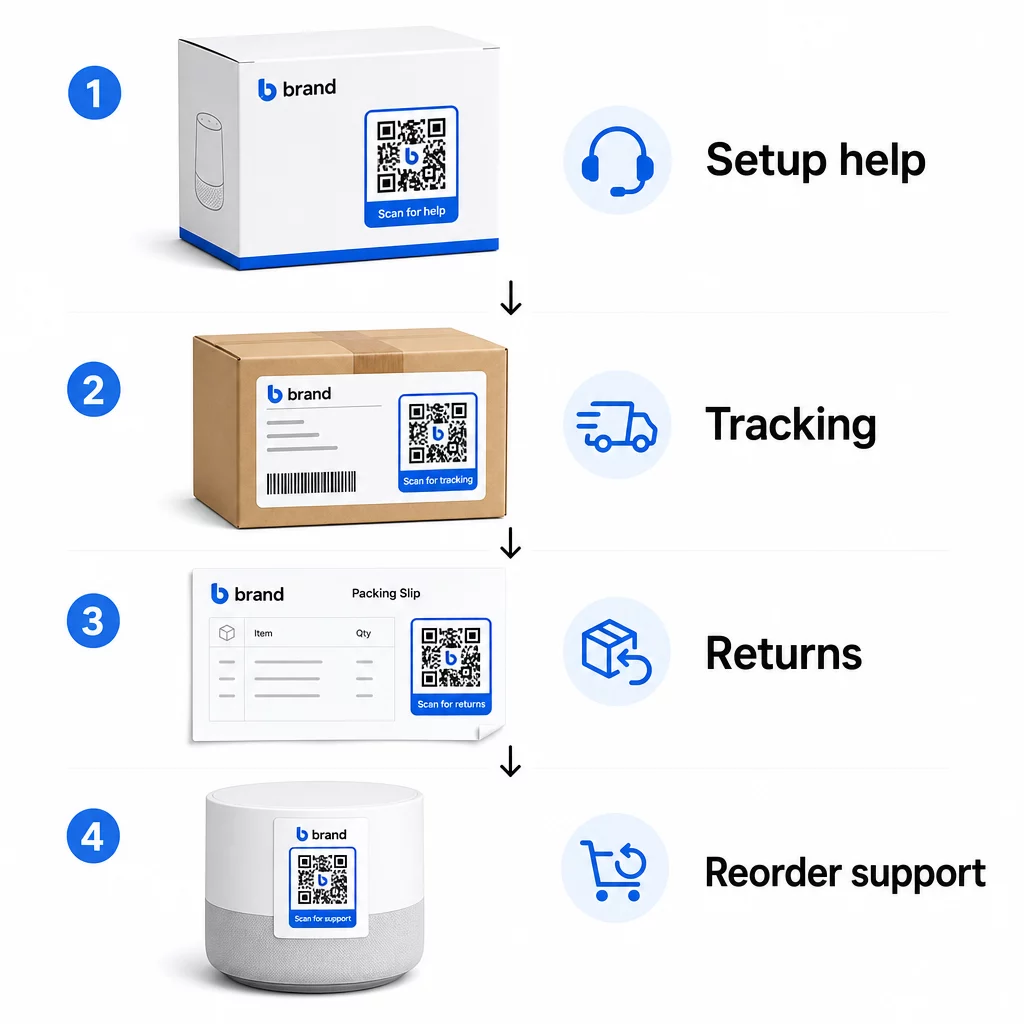
Ürün ambalajı. Kutu veya etiket üzerindeki bir QR kodu, müşterilere kutuyu açar açmaz kurulum kılavuzlarına, garanti detaylarına ve sorun giderme yardımına anında erişim sağlar. Beyaz eşya veya aletler gibi dayanıklı ürünler için, ürün ambalajına bir QR kodu eklemek ayrıca nasıl yapılır videolarına, ürün kaydına veya yedek parça kılavuzlarına bağlantı verebilir – satın almadan aylar sonra bile faydalıdır.
Kargo etiketleri ve takip sayfaları. Çevrimiçi alışveriş yapanların 'i gerçek zamanlı teslimat takibinin olumlu bir deneyim için kritik olduğunu söylüyor ve 'ü teslimata kadar takip ettikleri siparişlerini her gün kontrol ediyor. Canlı bir takip sayfasına doğrudan bağlantı veren kargo etiketindeki bir QR kodu, hesaplara giriş yapma veya onay e-postalarını arama zahmetini ortadan kaldırır.
Sipariş onayı ve kargo bildirim e-postaları. Bunlar müşterilerin gerçekten açtığı e-postalardır. Siparişe özel bir destek merkezine (takip, SSS ve iade talimatları içeren) bağlanan bir QR kodu eklemek, her şeyi tek bir taramada tutar.
Faturalar ve paketleme fişleri. Paketleme fişindeki bir QR kodu, bir iade portalına, bir geri bildirim formuna veya bir ürün inceleme sayfasına bağlanabilir. Bu, müşterilerin zaten okuduğu bir belgeyi bir destek geçidine dönüştüren, düşük çaba gerektiren, yüksek değerli bir yerleşimdir.
Ürün etiketleri. Tüketim malları veya tekrar tekrar kullanılan ürünler için, etiketteki bir QR kodu, orijinal satın alımdan çok sonra bile güncel talimatlara, güvenlik bilgilerine veya yeniden sipariş bağlantılarına sürekli erişim sağlar.
Destek Temas Noktalarınızı İzlenebilir Hale Getirin Kullan Bağlantı QR Kod Oluşturucu ambalaj, e-postalar ve kargo malzemeleri için taranabilir kodlar oluşturmak – ardından müşterilerin tam olarak hangi destek kaynaklarını kullandığını izlemek.
E-ticaret İçin Temel Destek Kullanım Durumları
QR kodları, birkaç farklı destek işlevine hizmet edebilecek kadar esnektir. İş akışınıza dahil etmeye değer en yaygın olanlar:
Self-servis sorun giderme. QR kodlarını ürüne özel SSS sayfalarına veya video eğitimlerine bağlayın. Müşteriler bir destek temsilcisi beklemek zorunda kalmadan 7/24 yardım alır ve siz de gelen bilet hacmini azaltırsınız.
İadeler ve değişimler. Perakendeciler, 2025 yılında toplam yıllık satışların ,8'inin iade edileceğini tahmin ediyor – bu neredeyse 850 milyar dolar. Başlatma sürecini basitleştirmek önemlidir. Önceden doldurulmuş bir iade formunu açan, bir kargo etiketi oluşturan veya adım adım talimatlar sağlayan bir QR kodu, iade deneyimindeki en büyük sürtünme noktasını ortadan kaldırır. IKEA gibi markalar, bir iade kaydedildikten sonra kodları e-posta veya SMS ile göndererek QR tabanlı iade iş akışlarına zaten geçiş yaptı.
Canlı sohbet ve doğrudan iletişim. Müşterilerin web sitenizde bir sohbet widget'ı bulmasını istemek yerine, ambalajdaki veya faturadaki bir QR kodu, müşterinin sipariş detaylarıyla önceden yüklenmiş bir sohbet penceresi açabilir – bu da her iki tarafta da çözüm süresini hızlandırır.
Garanti kaydı ve ürün kaydı. Ambalaj üzerindeki doğrudan bir kayıt formuna bağlanan bir QR kodu, satın alma ve kayıt arasındaki adımları azaltır, bu da hem tamamlama oranlarını hem de ilgili destekle takip etme yeteneğinizi geliştirir.
Geri bildirim ve incelemeler. Bir müşteri geri bildirim QR kodu makbuzlara, ambalajlara veya takip e-postalarına yerleştirilmesi, müşterilerin deneyimlerini paylaşmasını kolaylaştırır. Bir için daha fazla tarama nasıl alınır? tek bir taramayla onları doğrudan inceleme sayfanıza gönderir. Bu geri bildirimi proaktif olarak toplamak, ürün veya yerine getirme sorunlarını büyümeden önce yakalamanıza da yardımcı olur.
Çoklu dil desteği. Dinamik QR kodları, bir müşterinin konumunu algılayabilir ve içeriği uygun dilde sunabilir – her bölge için ayrı basılı materyaller oluşturmadan farklı kitleleri desteklemesi gereken uluslararası satıcılar için kullanışlıdır.
Ek Sürtünme Olmadan Geri Bildirim Toplayın Kullan Google Form QR Kod Oluşturucu satın alma sonrası e-postalar veya paketleme fişleri için taranabilir bir geri bildirim bağlantısı oluşturmak ve her siparişten eyleme geçirilebilir içgörüler toplamaya başlamak için.
Destek İçin Neden Dinamik QR Kodları Doğru Seçimdir?
Bir dinamik QR kodu kod zaten basıldıktan sonra hedef URL'nin düzenlenebildiği bir türdür – kodun kendisini değiştirmeden. Müşteri desteği için bu ayrım göründüğünden daha önemlidir.
Destek kaynakları düzenli olarak değişir. İade politikaları güncellenir, sorun giderme kılavuzları revize edilir ve iletişim yöntemleri değişir. Statik bir QR koduyla, herhangi bir güncelleme tüm ambalajlarınızı, eklerinizi veya etiketlerinizi yeniden basmak anlamına gelir. Dinamik bir kodla, hedefi kontrol panelinizde güncellersiniz ve mevcut her kod değişikliği anında yansıtır.
Dinamik QR kodları ayrıca analitikleri de etkinleştirir. Bir kodun kaç kez tarandığını, hangi konumlardan, hangi cihaz türlerinde ve hangi zamanlarda tarandığını takip edebilirsiniz. Bu veriler, müşterilerin hangi destek kaynaklarını gerçekten kullandığını ve hangi temas noktalarının en çok talep oluşturduğunu ortaya koyar. Örneğin, bir sorun giderme kılavuzundaki taramalardaki bir artış, yukarı akışta ele alınması gereken tekrarlayan bir ürün sorununu gösterebilir. Keşfedebilirsiniz QR kodlarının e-ticaret teslimatlarını ve desteğini nasıl iyileştirdiğini diğer markaların bu yaklaşımı nasıl uyguladığını görmek için.
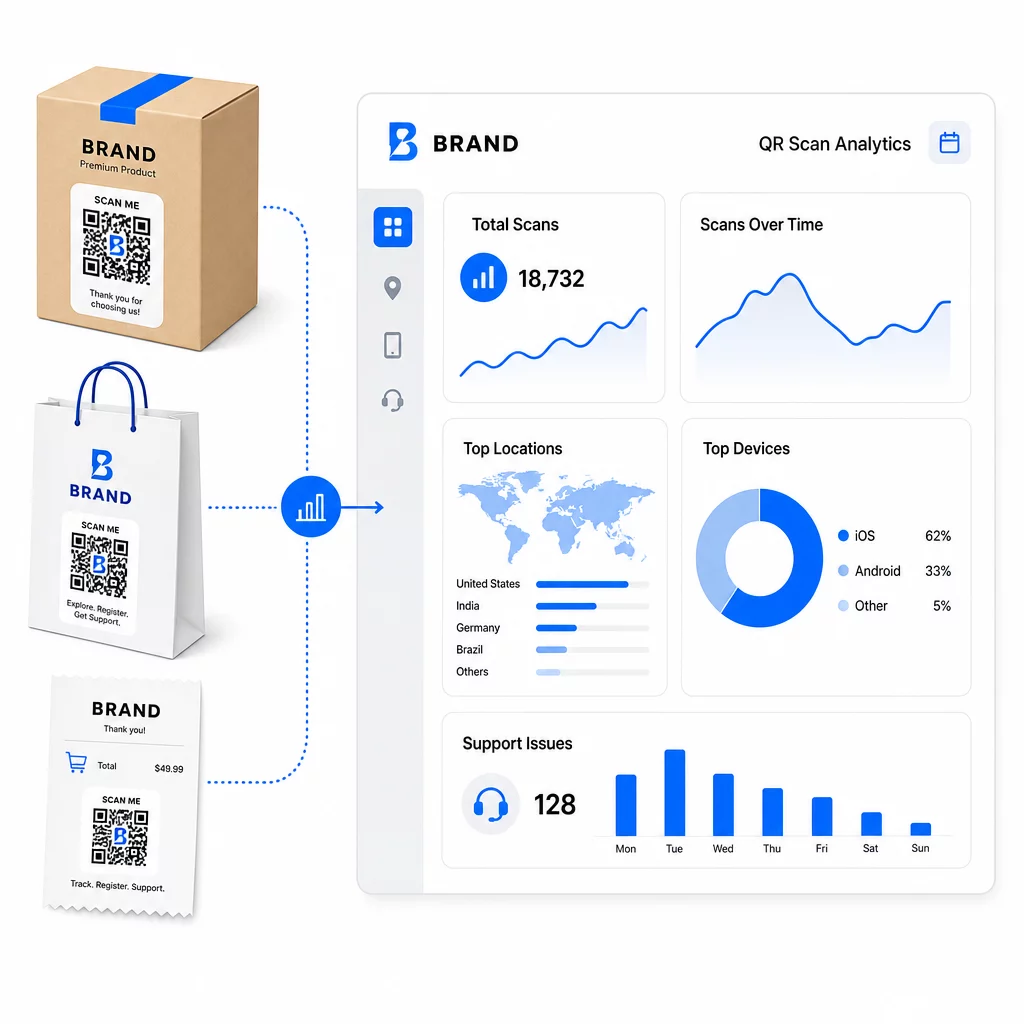
Destek Bağlantılarını Yeniden Basım Yapmadan Güncel Tutun Pageloot'un QR Kod Oluşturucu ambalajınız ve ekleriniz için dinamik kodlar oluşturmak – basılı materyale dokunmadan kontrol panelinizden hedefleri istediğiniz zaman güncelleyin.
QR Kodları Aracılığıyla Kişiselleştirme
Yeterince kullanılmayan bir yetenek, belirli müşteriye veya ürüne özel destek içeriği sunmaktır. Dinamik QR kodları ile kodları şunlara göre farklı içerik sunacak şekilde yapılandırabilirsiniz:
- Ürün tipi – Bir blender üzerindeki QR kodu, genel bir destek sayfasına değil, blenderın kurulum kılavuzuna ve garantisine bağlanır
- Satın alma geçmişi – Geri dönen müşteriler bir sadakat merkezine veya kişiselleştirilmiş yeniden sipariş sayfasına yönlendirilebilir
- yer – Uluslararası müşteriler bölgeye özel içerik veya yerel iade talimatlarını görür
Bu yaklaşım, genel bir destek temas noktasını, bireysel müşteri için tasarlanmış gibi hissettiren bir şeye dönüştürür – bu da müşterilerin geri dönüp dönmeyeceğini doğrudan etkiler.
Desteği İyileştirmek İçin QR Kod Analitiğini Kullanma
QR kodu taramalarından toplanan veriler sadece bir gösteriş ölçütü değildir – müşterilerin nerede zorlandığına dair doğrudan bir sinyaldir. İyi yapılandırılmış bir analitik kurulumu size şunları söyleyebilir:
- Hangi ürünlerin en çok destek taraması oluşturduğu (olası kalite veya dokümantasyon sorunu)
- Müşterilerin en çok hangi temas noktalarıyla etkileşim kurduğu (ambalaj vs. e-posta vs. fiş)
- Satın alma sonrası zaman çizelgesinde müşterilerin ne zaman yardım aradığı (teslimattan hemen sonra vs. haftalar sonra)
- Bölgesel gönderim sorunlarını gösterebilecek coğrafi desenler
Platformlar sunan QR kodu takibi ve analizi aksi takdirde manuel müşteri anketleri veya destek bileti analizi gerektirecek gerçek zamanlı bir geri bildirim döngüsü sağlar. İyi kullanıldığında, bu veriler reaktif yerine proaktif iyileştirmeler yapmanızı sağlar.
Uygulama İçin Pratik İpuçları
Müşteri desteği için QR kodlarını kullanıma sunmadan önce, birkaç yönerge sizi yaygın sorunlardan kurtaracaktır:
- Kodları büyük ölçekte yazdırmadan önce test edin. Doğru çözüldüğünü doğrulamak için her kodu birden fazla cihazda ve işletim sisteminde tarayın.
- Açılış sayfalarını mobil uyumlu tutun. QR kodu tarayan müşteriler telefonlarındadır. Yavaş yüklenen veya mobilde doğru görüntülenmeyen bir sayfa, tüm deneyimi baltalayacaktır.
- Kodları yüzeye uygun şekilde boyutlandırın. Küçük ürün etiketlerindeki kodların güvenilir bir şekilde taranabilmesi için yeterince büyük olması gerekir. İnceleyin QR kodu kullanılabilirlik en iyi uygulamaları görüntüleme mesafesine göre belirli boyutlandırma rehberliği için.
- Kodun yakınına kısa bir harekete geçirici mesaj ekleyin. “Kurulum kılavuzu için tarayın” veya “İade başlatmak için tarayın” belirsizliği ortadan kaldırır ve tarama oranlarını artırır.
- Markalı, tanınabilir tasarımlar kullanın. Müşteriler, markanızla görsel olarak eşleşen bir koda güvenme ve tarama olasılığı daha yüksektir. Logolu ve marka renkli kodlar, jenerik siyah-beyaz karelerden daha iyi performans gösterir.
- İçerik değişebileceği zaman dinamik kodlar kullanın. Hedef URL'nin güncellenmesi gerekme ihtimali varsa, dinamik bir kodla başlayın.
Bir Bakışta Artıları ve Eksileri
| Faktör | QR Kod Desteği | Geleneksel Dijital Destek |
|---|---|---|
| Erişim hızı | Tarama yoluyla anında | Navigasyon veya arama gerektirir |
| 7/24 erişilebilirlik | Evet | Değişir |
| Kişiselleştirme | Yüksek (dinamik kodlar) | Orta düzeyde |
| Bakım | Düşük (dinamik güncellemeler) | Orta düzeyde |
| ANALİZ | Yerleşik | Ayrı kurulum gerektirir |
| Erişilebilirlik | Akıllı telefon gerektirir | Cihazlar arası çalışır |
| Baskı bağımlılığı | Fiziksel yerleştirme gerektirir | Yalnızca dijital |
Ana sınırlama dijital uçurumdur: akıllı telefonu veya güvenilir internet erişimi olmayan müşteriler QR tabanlı desteği kullanamaz. Bu müşteriler için, kimsenin yardımsız kalmaması adına paralel bir destek yolu – bir telefon numarası veya basılı talimatlar – isteyeceksiniz.
Güvenlik de ele alınmaya değerdir. HTTPS bağlantıları kullanın, markalı tasarımları tutarlı tutun ve müşterilere QR kodlarınızın nereye yönlendirdiğini ve hangi verilerin toplandığını önceden (ambalaj metni veya sipariş e-postaları aracılığıyla) bildirmeyi düşünün. Şeffaflık, müşterilerin tarama yapmaya istekli olmasını sağlayan güveni inşa eder.
Bir Araya Getirmek
QR kodları, müşterilerin en çok yardıma ihtiyaç duyduğu anlarda – kutu açma, gönderi takibi veya iade başlatma gibi – yerleştirildiğinde ve sadece bir ana sayfaya değil, gerçekten faydalı kaynaklara bağlandığında müşteri desteği için en iyi şekilde çalışır. Dinamik kodlar bunu sürdürülebilir kılar: destek içeriğini hiçbir şeyi yeniden basmadan güncelleyebilir ve analizler doğrudan müşteri deneyiminin nerede aksadığını anlamanıza yardımcı olur.
Bu e-ticarette QR kodlarının vaka çalışmaları uygulama bilinçli olduğunda ölçülebilir sonuçlar gösterir. Bir veya iki yüksek sürtünmeli temas noktasından başlayın – iadeler ve sipariş takibi iyi adaylardır – ve müşterilerin gerçekten neyi taradığını öğrendikçe oradan genişletin.
Destek QR Kodlarınızı Oluşturmaya Başlayın Pageloot'un QR Kod Oluşturucu satın alma sonrası yolculuğun her aşaması için dinamik, markalı kodlar oluşturmanıza olanak tanır – taramaları takip edin, hedefleri güncelleyin ve yeniden baskı yapmadan daha iyi bir destek deneyimi sunun.
Sıkça sorulan sorular
En etkili kullanımlar; sipariş takip sayfalarına bağlantılar, iade başlatma formları, ürüne özel sorun giderme kılavuzları, kurulum videoları, garanti kaydı ve canlı sohbettir. Müşterilerin hızlıca ve mobil cihazda ihtiyaç duyduğu içerik doğal bir uyum sağlar. PDF kılavuzları, geri bildirim için Google Formları ve doğrudan destek iletişim sayfaları da bir PDF QR kodu veya bağlantı tabanlı bir kod aracılığıyla bağlandığında iyi çalışır.
Dinamik QR kodları kullanın, bu sayede basılı kodun kendisini değiştirmeden bir kontrol panelinden hedef URL'yi değiştirebilirsiniz. Bu, iade politikalarını güncelleyebileceğiniz, sorun giderme kılavuzlarını değiştirebileceğiniz veya müşterileri istediğiniz zaman yeni bir destek portalına yönlendirebileceğiniz anlamına gelir – ambalajları, ekleri veya etiketleri yeniden basmanıza gerek kalmadan.
QR kod analizleri size her kod için tarama hacmini, tarama zamanlamasını, coğrafi konumu ve cihaz türünü gösterir. Belirli bir sorun giderme kılavuzunda yüksek tarama oranları görürseniz, bu tekrarlayan bir ürün sorununun işaretidir. Bir iade kodundaki düşük tarama oranları, kötü yerleşim veya kod etrafındaki belirsiz talimatlar anlamına gelebilir. Bu verileri zamanla hem yerleşimi hem de hedef içeriği iyileştirmek için kullanın.