Haben Ihre Kunden Schwierigkeiten, nach einem Kauf Hilfe zu finden? Schlechter Support nach dem Kauf ist eine der schnellsten Möglichkeiten, einen wiederkehrenden Käufer zu verlieren – und 52 % der Verbraucher geben an, dass schlechter Service der Hauptgrund ist, warum sie nicht erneut kaufen werden. Dieser Leitfaden erklärt praktische Wege, QR-Codes zu nutzen, um Support, Rücksendungen und Sendungsverfolgung für Ihre Kunden schneller und einfacher zu gestalten.
Warum Support nach dem Kauf wichtiger ist denn je
Die Kundenerwartungen haben sich verschoben. Schneller Versand, Echtzeit-Sendungsverfolgung und reibungslose Rücksendungen sind keine Vorteile mehr – sie sind grundlegende Anforderungen. Bedenken Sie, was auf dem Spiel steht:
- 88 % der Kunden tätigen nach einem großartigen Serviceerlebnis eher einen weiteren Kauf
- 70 % der Käufer geben an, dass ein einfacher, transparenter Rückgabeprozess ihre Loyalität zu einem E-Commerce-Händler erhöht
- 73 % der Verbraucher möchten ihre Bestellungen während der gesamten Lieferung verfolgen, und wenn die Sendungsverfolgung verfügbar ist, nutzen 96 % von ihnen diese
Die Herausforderung für die meisten E-Commerce-Marken besteht darin, dass die Support-Kontaktpunkte verstreut sind: Kunden müssen nach Kontaktseiten suchen, Rücksendeportale navigieren oder E-Mail-Bestätigungen durchforsten, um Bestelldetails zu finden. QR-Codes lösen dies, indem sie den Support direkt dorthin bringen, wo die Kunden bereits sind – auf dem Paket in ihren Händen, der Quittung in ihrem Posteingang oder dem Etikett auf dem Produkt.
Wo QR-Codes in der Kundenreise nach dem Kauf platziert werden sollten
Die effektivste QR-Code-Strategie ordnet jeden Code einem bestimmten Moment im Kundenerlebnis zu. Hier sind die wirkungsvollsten Platzierungen:
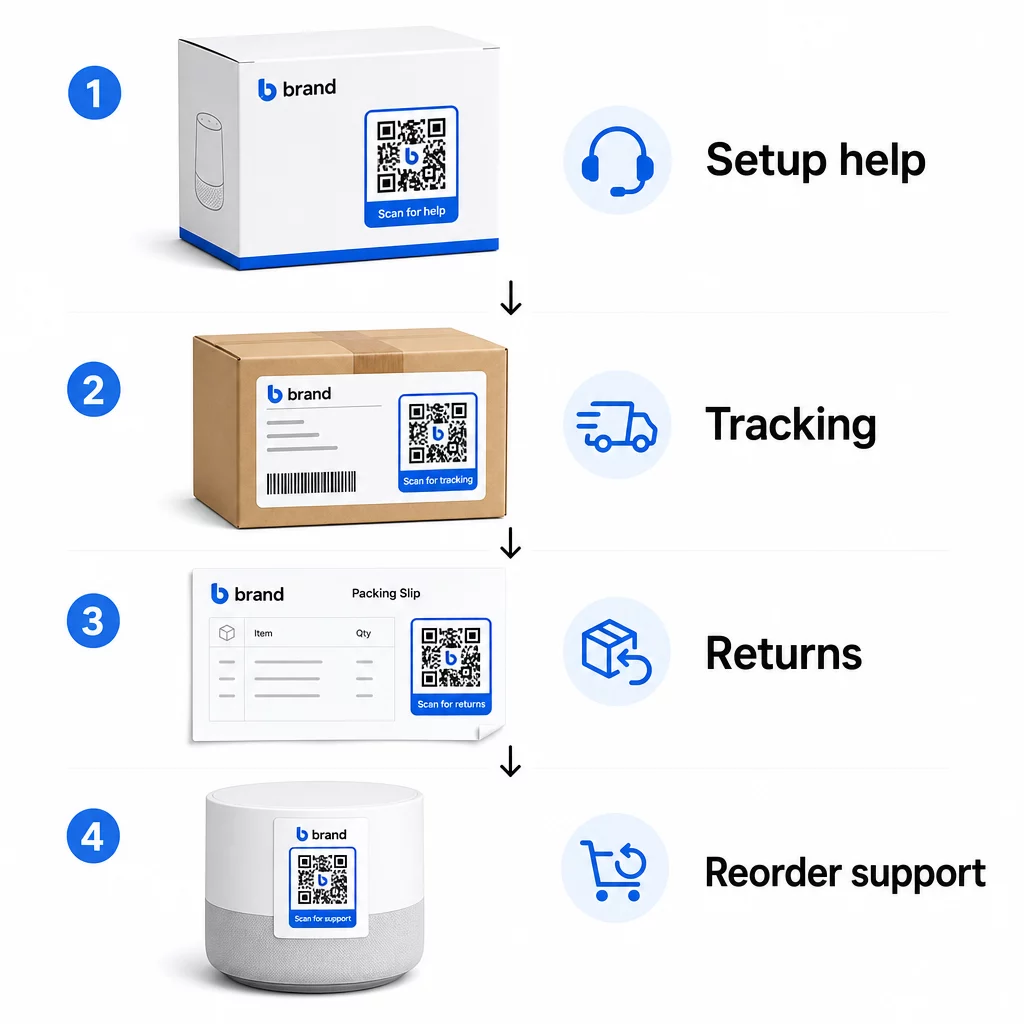
Produktverpackung. Ein QR-Code auf der Verpackung oder dem Etikett ermöglicht Kunden sofortigen Zugriff auf Einrichtungsanleitungen, Garantiedetails und Fehlerbehebungshilfe direkt beim Auspacken. Für langlebige Güter wie Haushaltsgeräte oder Werkzeuge, das Hinzufügen eines QR-Codes zur Produktverpackung kann auch auf Anleitungs-Videos, Produktregistrierung oder Ersatzteilführer verlinken – nützlich Monate nach dem Kauf.
Versandetiketten und Sendungsverfolgungsseiten. 88 % der Online-Käufer geben an, dass die Echtzeit-Lieferverfolgung für ein positives Erlebnis entscheidend ist, und 43 % überprüfen ihre verfolgten Bestellungen täglich bis zur Lieferung. Ein QR-Code auf dem Versandetikett, der direkt zu einer Live-Tracking-Seite verlinkt, beseitigt die Reibung beim Einloggen in Konten oder der Suche nach Bestätigungs-E-Mails.
Bestellbestätigungs- und Versandbenachrichtigungs-E-Mails. Dies sind E-Mails, die Kunden tatsächlich öffnen. Das Einbetten eines QR-Codes, der zu einem bestellspezifischen Support-Hub – mit Sendungsverfolgung, FAQs und Rücksendeanweisungen – führt, hält alles in einem Scan zusammen.
Quittungen und Lieferscheine. Ein QR-Code auf dem Lieferschein kann zu einem Retourenportal, einem Feedback-Formular oder einer Produktbewertungsseite führen. Dies ist eine platzsparende, hochwertige Platzierung, die ein Dokument, das Kunden bereits lesen, in ein Support-Gateway verwandelt.
Produktetiketten. Für Verbrauchsmaterialien oder wiederholt verwendete Artikel bietet ein QR-Code auf dem Etikett auch lange nach dem ursprünglichen Kauf fortlaufenden Zugriff auf aktualisierte Anweisungen, Sicherheitsinformationen oder Nachbestellungslinks.
Machen Sie Ihre Support-Kontaktpunkte nachverfolgbar Verwenden Sie die Link QR-Code-Generator um scannbare Codes für Verpackungen, E-Mails und Versandmaterialien zu erstellen – und dann genau zu verfolgen, welche Support-Ressourcen Kunden nutzen.
Wichtige Support-Anwendungsfälle für den E-Commerce
QR-Codes sind flexibel genug, um verschiedene Support-Funktionen zu erfüllen. Die häufigsten, die es wert sind, in Ihren Workflow integriert zu werden:
Self-Service-Fehlerbehebung. Verknüpfen Sie QR-Codes mit produktspezifischen FAQ-Seiten oder Video-Tutorials. Kunden erhalten rund um die Uhr Hilfe, ohne auf einen Support-Mitarbeiter warten zu müssen, und Sie reduzieren das eingehende Ticketvolumen.
Rücksendungen und Umtausch. Einzelhändler schätzen, dass 15,8 % des gesamten Jahresumsatzes im Jahr 2025 zurückgegeben werden – fast 850 Milliarden US-Dollar. Die Vereinfachung des Initiierungsprozesses ist wichtig. Ein QR-Code, der ein vorausgefülltes Retourenformular öffnet, ein Versandetikett generiert oder Schritt-für-Schritt-Anweisungen liefert, beseitigt den größten Reibungspunkt im Retourenprozess. Marken wie IKEA sind bereits zu QR-basierten Retouren-Workflows übergegangen und versenden Codes per E-Mail oder SMS, sobald eine Retoure registriert ist.
Live-Chat und direkter Kontakt. Anstatt von Kunden zu verlangen, ein Chat-Widget auf Ihrer Website zu finden, kann ein QR-Code auf der Verpackung oder einem Beleg ein Chat-Fenster öffnen, das bereits mit den Bestelldetails des Kunden vorausgefüllt ist – was die Lösungszeit auf beiden Seiten beschleunigt.
Garantie- und Produktregistrierung. Ein QR-Code auf der Verpackung, der direkt zu einem Registrierungsformular führt, reduziert die Schritte zwischen Kauf und Registrierung, was sowohl die Abschlussquoten als auch Ihre Fähigkeit verbessert, mit relevantem Support nachzufassen.
Feedback und Bewertungen. EIN QR-Code für Kundenfeedback auf Belegen, Verpackungen oder in Follow-up-E-Mails platziert, erleichtert es Kunden, ihre Erfahrungen zu teilen. Ein Google-Bewertungs-QR-Code sendet sie mit einem einzigen Scan direkt zu Ihrer Bewertungsseite. Das proaktive Sammeln dieses Feedbacks hilft Ihnen auch, Produkt- oder Lieferprobleme zu erkennen, bevor sie sich verschlimmern.
Mehrsprachige Unterstützung. Dynamische QR-Codes können den Standort eines Kunden erkennen und Inhalte in der entsprechenden Sprache bereitstellen – nützlich für internationale Verkäufer, die ein vielfältiges Publikum unterstützen müssen, ohne separate Druckmaterialien für jede Region zu erstellen.
Feedback ohne zusätzlichen Aufwand sammeln Verwenden Sie die Google Forms QR-Code erstellen um einen scannbaren Feedback-Link für E-Mails nach dem Kauf oder Lieferscheine zu erstellen und umsetzbare Erkenntnisse aus jeder Bestellung zu sammeln.
Warum dynamische QR-Codes die richtige Wahl für den Support sind
EIN dynamischer QR-Code ist einer, bei dem die Ziel-URL bearbeitet werden kann, nachdem der Code bereits gedruckt wurde – ohne den Code selbst zu ändern. Für den Kundensupport ist dieser Unterschied wichtiger, als es scheinen mag.
Support-Ressourcen ändern sich regelmäßig. Rückgaberichtlinien werden aktualisiert, Fehlerbehebungsanleitungen überarbeitet und Kontaktmethoden geändert. Bei einem statischen QR-Code bedeutet jede Aktualisierung, dass Sie Ihre gesamte Verpackung, Beilagen oder Etiketten neu drucken müssen. Mit einem dynamischen Code aktualisieren Sie das Ziel in Ihrem Dashboard, und jeder bestehende Code spiegelt die Änderung sofort wider.
Dynamische QR-Codes ermöglichen auch Analysen. Sie können verfolgen, wie oft ein Code gescannt wurde, von welchen Standorten, auf welchen Gerätetypen und zu welchen Zeiten. Diese Daten zeigen, welche Support-Ressourcen Kunden tatsächlich nutzen – und welche Kontaktpunkte die meisten Anfragen generieren. Zum Beispiel könnte ein Anstieg der Scans auf einer Fehlerbehebungsanleitung auf ein wiederkehrendes Produktproblem hinweisen, das es wert ist, frühzeitig angegangen zu werden. Sie können erkunden wie QR-Codes E-Commerce-Lieferungen und Support verbessern um zu sehen, wie andere Marken diesen Ansatz anwenden.
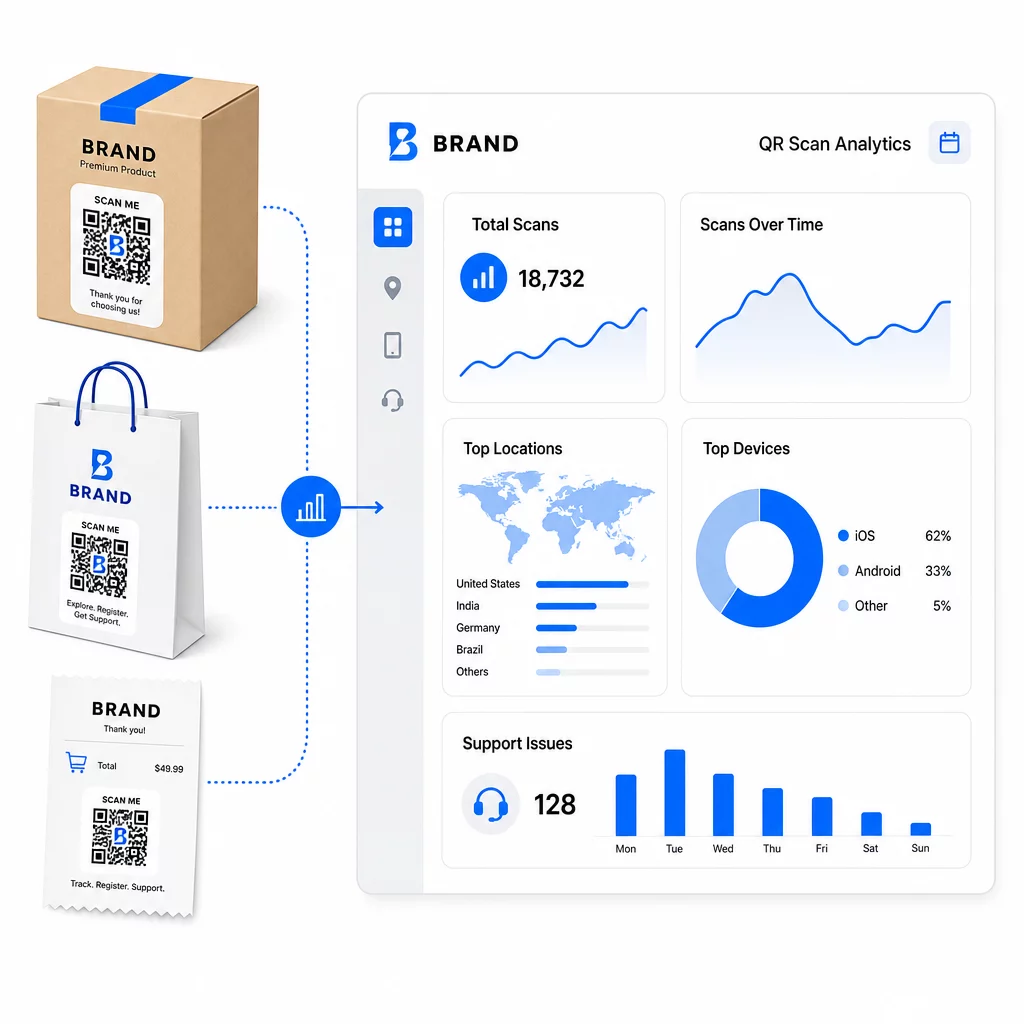
Support-Links aktuell halten ohne Neudruck Nutzen Sie Pageloots QR-Code-Generator dynamische Codes für Ihre Verpackungen und Beilagen erstellen – Ziele jederzeit von Ihrem Dashboard aus aktualisieren, ohne das gedruckte Material zu ändern.
Personalisierung durch QR-Codes
Eine wenig genutzte Funktion ist die Bereitstellung von Support-Inhalten, die auf den spezifischen Kunden oder das Produkt zugeschnitten sind. Mit dynamischen QR-Codes können Sie Codes so konfigurieren, dass sie unterschiedliche Inhalte bereitstellen, basierend auf:
- Produkttyp – Ein QR-Code auf einem Mixer verlinkt zur Einrichtungsanleitung und Garantie des Mixers, nicht zu einer generischen Support-Seite
- Kaufhistorie – Wiederkehrende Kunden können zu einem Treue-Hub oder einer personalisierten Nachbestellseite weitergeleitet werden
- Standort – Internationale Kunden sehen regionalspezifische Inhalte oder lokale Rücksendeanweisungen
Dieser Ansatz verwandelt einen generischen Support-Kontaktpunkt in etwas, das sich für den einzelnen Kunden maßgeschneidert anfühlt – was direkt beeinflusst, ob sie wiederkommen.
Nutzung von QR-Code-Analysen zur Verbesserung des Supports
Die aus QR-Code-Scans gesammelten Daten sind nicht nur eine Eitelkeitsmetrik – sie sind ein direktes Signal darüber, wo Kunden Schwierigkeiten haben. Ein gut strukturiertes Analyse-Setup kann Ihnen sagen:
- Welche Produkte die meisten Support-Scans generieren (mögliches Qualitäts- oder Dokumentationsproblem)
- Mit welchen Kontaktpunkten Kunden am häufigsten interagieren (Verpackung vs. E-Mail vs. Quittung)
- Wann im Zeitverlauf nach dem Kauf Kunden Hilfe suchen (unmittelbar nach der Lieferung vs. Wochen später)
- Geografische Muster, die auf regionale Erfüllungsprobleme hinweisen könnten
Plattformen, die anbieten QR-Code-Tracking und -Analysen bieten Ihnen eine Echtzeit-Feedbackschleife, die sonst manuelle Kundenbefragungen oder die Analyse von Support-Tickets erfordern würde. Gut genutzt, ermöglichen Ihnen diese Daten, proaktive statt reaktiver Verbesserungen vorzunehmen.
Praktische Tipps zur Implementierung
Bevor Sie QR-Codes für den Kundensupport einführen, bewahren Sie einige Richtlinien vor häufigen Problemen:
- Testen Sie Codes, bevor Sie sie in großem Maßstab drucken. Scannen Sie jeden Code auf mehreren Geräten und Betriebssystemen, um zu bestätigen, dass er korrekt aufgelöst wird.
- Halten Sie Landing Pages mobiloptimiert. Kunden, die einen QR-Code scannen, nutzen ihre Telefone. Eine Seite, die langsam lädt oder auf Mobilgeräten nicht korrekt angezeigt wird, untergräbt das gesamte Erlebnis.
- Passen Sie die Größe der Codes der Oberfläche an. Codes auf kleinen Produktetiketten müssen groß genug sein, um zuverlässig gescannt werden zu können. Überprüfen Sie Best Practices für die Benutzerfreundlichkeit von QR-Codes für spezifische Größenrichtlinien basierend auf der Betrachtungsentfernung.
- Fügen Sie einen kurzen Call-to-Action in der Nähe des Codes ein. “Scannen für Einrichtungsanleitung” oder “Scannen, um eine Rücksendung zu starten” beseitigt Unklarheiten und erhöht die Scanraten.
- Verwenden Sie gebrandete, wiedererkennbare Designs. Kunden vertrauen und scannen eher einen Code, der visuell zu Ihrer Marke passt. Codes mit Logos und Markenfarben funktionieren besser als generische Schwarz-Weiß-Quadrate.
- Verwenden Sie dynamische Codes, wann immer sich Inhalte ändern könnten. Wenn die Ziel-URL möglicherweise aktualisiert werden muss, beginnen Sie mit einem dynamischen Code.
Vor- und Nachteile auf einen Blick
| Faktor | QR-Code-Unterstützung | Traditionelle digitale Unterstützung |
|---|---|---|
| Zugriffsgeschwindigkeit | Sofort per Scan | Erfordert Navigation oder Suche |
| 24/7 Verfügbarkeit | Ja | Variiert |
| Personalisierung | Hoch (dynamische Codes) | Mäßig |
| Wartung | Niedrig (dynamische Updates) | Mäßig |
| ANALYSE | Integriert | Erfordert separate Einrichtung |
| Zugänglichkeit | Erfordert Smartphone | Funktioniert geräteübergreifend |
| Druckabhängigkeit | Benötigt physische Platzierung | Nur digital |
Die größte Einschränkung ist die digitale Kluft: Kunden ohne Smartphones oder zuverlässigen Internetzugang können keinen QR-basierten Support nutzen. Für diese Kunden sollten Sie einen parallelen Supportweg anbieten – eine Telefonnummer oder gedruckte Anweisungen –, damit niemand ohne Hilfe bleibt.
Auch die Sicherheit ist ein wichtiger Punkt. Verwenden Sie HTTPS-Links, halten Sie Marken-Designs konsistent und überlegen Sie, Kunden im Voraus (über Verpackungstexte oder Bestell-E-Mails) mitzuteilen, wohin Ihre QR-Codes führen und welche Daten gesammelt werden. Transparenz schafft Vertrauen, das Kunden zum Scannen motiviert.
Zusammenführung
QR-Codes funktionieren am besten für den Kundensupport, wenn sie in Momenten platziert werden, in denen Kunden am dringendsten Hilfe benötigen – beim Auspacken, Verfolgen einer Sendung oder Initiieren einer Rücksendung – und wenn sie auf wirklich nützliche Ressourcen verlinken, anstatt nur auf eine Homepage. Dynamische Codes machen es nachhaltig: Sie können Support-Inhalte aktualisieren, ohne etwas neu drucken zu müssen, und die Analysen fließen direkt in Ihr Verständnis ein, wo die Customer Experience Schwachstellen aufweist.
Die Fallstudien zu QR-Codes im E-Commerce zeigen messbare Ergebnisse, wenn die Implementierung gezielt erfolgt. Beginnen Sie mit ein oder zwei Reibungspunkten – Rücksendungen und Sendungsverfolgung sind gute Kandidaten – und erweitern Sie von dort aus, wenn Sie lernen, was Kunden tatsächlich scannen.
Beginnen Sie mit der Erstellung Ihrer Support-QR-Codes Pageloots QR-Code-Generator ermöglicht Ihnen die Erstellung dynamischer, gebrandeter Codes für jede Phase der Post-Purchase-Journey – verfolgen Sie Scans, aktualisieren Sie Ziele und bieten Sie ein besseres Support-Erlebnis ohne Neudruck.
Häufig gestellte Fragen
Die effektivsten Anwendungen sind Links zu Bestellverfolgungsseiten, Rücksendeformularen, produktspezifischen Fehlerbehebungsanleitungen, Einrichtungsvideos, Garantieregistrierungen und Live-Chats. Inhalte, die Kunden schnell und auf einem mobilen Gerät benötigen, passen natürlich gut. PDF-Handbücher, Google Forms für Feedback und direkte Support-Kontaktseiten funktionieren ebenfalls gut, wenn sie über einen PDF-QR-Code oder einen linkbasierten Code verknüpft sind.
Verwenden Sie dynamische QR-Codes, mit denen Sie die Ziel-URL von einem Dashboard aus ändern können, ohne den gedruckten Code selbst zu verändern. Das bedeutet, Sie können Rückgaberichtlinien aktualisieren, Fehlerbehebungsanleitungen austauschen oder Kunden jederzeit zu einem neuen Support-Portal umleiten – ohne Verpackungen, Beilagen oder Etiketten neu drucken zu müssen.
QR-Code-Analysen zeigen Ihnen Scan-Volumen, Scan-Zeitpunkt, geografischen Standort und Gerätetyp für jeden Code. Wenn Sie hohe Scan-Raten bei einem bestimmten Fehlerbehebungsleitfaden feststellen, ist das ein Signal für ein wiederkehrendes Produktproblem. Niedrige Scan-Raten bei einem Rücksende-Code könnten auf eine schlechte Platzierung oder unklare Anweisungen rund um den Code hindeuten. Nutzen Sie diese Daten, um sowohl die Platzierung als auch den Zielinhalt im Laufe der Zeit zu optimieren.