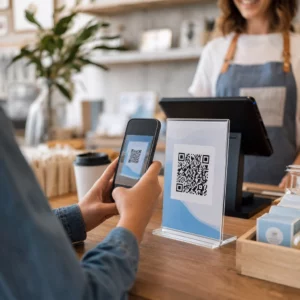
Hebben uw klanten moeite om hulp te vinden na een aankoop? Slechte ondersteuning na aankoop is een van de snelste manieren om een terugkerende koper te verliezen – en 52% van de consumenten zegt dat slechte service de belangrijkste reden is waarom ze niet opnieuw zullen kopen. Deze gids legt praktische manieren uit om QR-codes te gebruiken om ondersteuning, retouren en order tracking sneller en gemakkelijker te maken voor uw klanten.
Waarom ondersteuning na aankoop belangrijker is dan ooit
De verwachtingen van klanten zijn verschoven. Snelle verzending, real-time tracking en wrijvingsloze retouren zijn geen extraatjes meer – het zijn basisvereisten. Overweeg wat er op het spel staat:
- 88% van de klanten is eerder geneigd een nieuwe aankoop te doen na een geweldige service-ervaring
- 70% van de shoppers zegt dat een eenvoudig, transparant retourproces hun loyaliteit aan een e-commerce retailer vergroot
- 73% van de consumenten wil hun bestellingen volgen gedurende de levering, en wanneer tracking beschikbaar is, gebruikt 96% van hen het
De uitdaging voor de meeste e-commerce merken is dat ondersteuningscontactpunten verspreid zijn: klanten moeten zoeken naar contactpagina's, door retourportalen navigeren of e-mailbevestigingen doorzoeken om orderdetails te vinden. QR-codes lossen dit op door ondersteuning rechtstreeks te bieden waar klanten al zijn – op het pakket in hun handen, de bon in hun inbox of het etiket op het product.
Waar QR-codes te plaatsen in de post-aankoopreis
De meest effectieve QR-codestrategie koppelt elke code aan een specifiek moment in de klantervaring. Hier zijn de meest impactvolle plaatsingen:
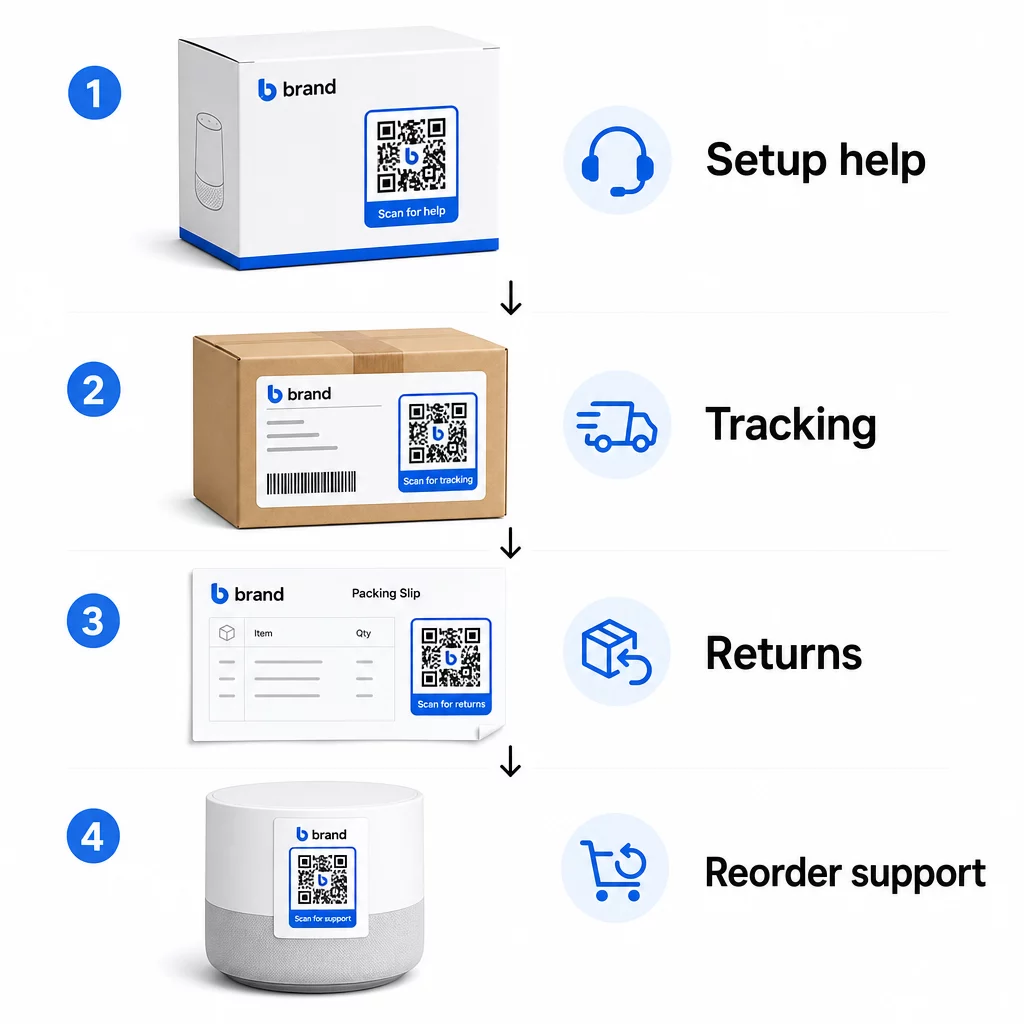
Productverpakking. Een QR-code op de doos of het etiket geeft klanten direct toegang tot installatiegidsen, garantiedetails en hulp bij probleemoplossing, direct bij het uitpakken. Voor duurzame goederen zoals apparaten of gereedschap, een QR-code toevoegen aan productverpakkingen kan ook linken naar instructievideo's, productregistratie of handleidingen voor vervangende onderdelen – nuttig maanden na aankoop.
Verzendlabels en trackingpagina's. 88% van de online shoppers zegt dat real-time leveringstracking cruciaal is voor een positieve ervaring, en 43% controleert hun gevolgde bestellingen elke dag tot aan de levering. Een QR-code op het verzendlabel die rechtstreeks linkt naar een live trackingpagina, verwijdert de frictie van het inloggen op accounts of het zoeken naar bevestigingsmails.
Orderbevestiging en verzendmelding e-mails. Dit zijn e-mails die klanten daadwerkelijk openen. Het insluiten van een QR-code die linkt naar een orderspecifieke ondersteuningshub – met tracking, veelgestelde vragen en retourinstructies – houdt alles in één scan.
Bonnen en pakbonnen. Een QR-code op de pakbon kan linken naar een retourportaal, een feedbackformulier of een productbeoordelingspagina. Dit is een plaatsing met weinig moeite en hoge waarde die een document dat klanten al lezen, verandert in een ondersteuningsgateway.
Productetiketten. Voor verbruiksartikelen of items die herhaaldelijk worden gebruikt, biedt een QR-code op het etiket voortdurende toegang tot bijgewerkte instructies, veiligheidsinformatie of nabestellingslinks, lang na de oorspronkelijke aankoop.
Maak uw ondersteuningscontactpunten traceerbaar Gebruik de Link QR-codegenerator om scanbare codes te maken voor verpakkingen, e-mails en verzendmaterialen – en vervolgens precies te volgen welke ondersteuningsbronnen klanten gebruiken.
Belangrijke ondersteuningsgebruiksscenario's voor e-commerce
QR-codes zijn flexibel genoeg om verschillende afzonderlijke ondersteuningsfuncties te vervullen. De meest voorkomende die de moeite waard zijn om in uw workflow op te nemen:
Zelfservice probleemoplossing. Link QR-codes naar productspecifieke FAQ-pagina's of video-tutorials. Klanten krijgen 24/7 hulp zonder te wachten op een ondersteuningsmedewerker, en u vermindert het aantal inkomende tickets.
Retouren en ruilingen. Retailers schatten dat 15,8% van de totale jaarlijkse omzet in 2025 zal worden geretourneerd – bijna $850 miljard. Het vereenvoudigen van het initiatieproces is belangrijk. Een QR-code die een vooraf ingevuld retourformulier opent, een verzendlabel genereert of stapsgewijze instructies biedt, verwijdert het grootste knelpunt in de retourervaring. Merken zoals IKEA zijn al overgestapt op QR-gebaseerde retourworkflows, waarbij codes per e-mail of sms worden verzonden zodra een retour is geregistreerd.
Live chat en direct contact. In plaats van klanten te vragen een chatwidget op uw website te zoeken, kan een QR-code op de verpakking of een bon een chatvenster openen dat vooraf is geladen met de orderdetails van de klant – wat de oplostijd aan beide kanten versnelt.
Garantieregistratie en productregistratie. Een QR-code op de verpakking die rechtstreeks linkt naar een registratieformulier vermindert de stappen tussen aankoop en registratie, wat zowel de voltooiingspercentages als uw vermogen om op te volgen met relevante ondersteuning verbetert.
Feedback en recensies. EEN QR-code voor klantfeedback geplaatst op bonnen, verpakkingen of follow-up e-mails maakt het gemakkelijk voor klanten om hun ervaring te delen. Een Google review QR-code stuurt ze met één scan direct naar uw recensiepagina. Het proactief verzamelen van deze feedback helpt u ook om product- of leveringsproblemen op te vangen voordat ze escaleren.
Meertalige ondersteuning. Dynamische QR-codes kunnen de locatie van een klant detecteren en inhoud in de juiste taal aanbieden – handig voor internationale verkopers die diverse doelgroepen moeten ondersteunen zonder afzonderlijk gedrukt materiaal voor elke regio te maken.
Verzamel feedback zonder extra frictie Gebruik de Google Forms QR code maken om een scanbare feedbacklink te maken voor e-mails na aankoop of pakbonnen en begin met het verzamelen van bruikbare inzichten uit elke bestelling.
Waarom dynamische QR-codes de juiste keuze zijn voor ondersteuning
EEN dynamische QR-code is er een waarbij de bestemmings-URL kan worden bewerkt nadat de code al is afgedrukt – zonder de code zelf te wijzigen. Voor klantenondersteuning is dit onderscheid belangrijker dan het lijkt.
Ondersteuningsbronnen veranderen regelmatig. Retourbeleid wordt bijgewerkt, probleemoplossingsgidsen worden herzien en contactmethoden veranderen. Met een statische QR-code betekent elke update het opnieuw afdrukken van al uw verpakkingen, inserts of labels. Met een dynamische code werkt u de bestemming bij in uw dashboard en elke bestaande code weerspiegelt onmiddellijk de wijziging.
Dynamische QR-codes maken ook analyses mogelijk. U kunt bijhouden hoe vaak een code is gescand, vanaf welke locaties, op welke apparaattypen en op welke tijden. Deze gegevens onthullen welke ondersteuningsbronnen klanten daadwerkelijk gebruiken – en welke contactpunten de meeste verzoeken genereren. Een piek in scans op een probleemoplossingsgids kan bijvoorbeeld duiden op een terugkerend productprobleem dat stroomopwaarts moet worden aangepakt. U kunt verkennen hoe QR-codes e-commerce leveringen en ondersteuning verbeteren om te zien hoe andere merken deze aanpak toepassen.
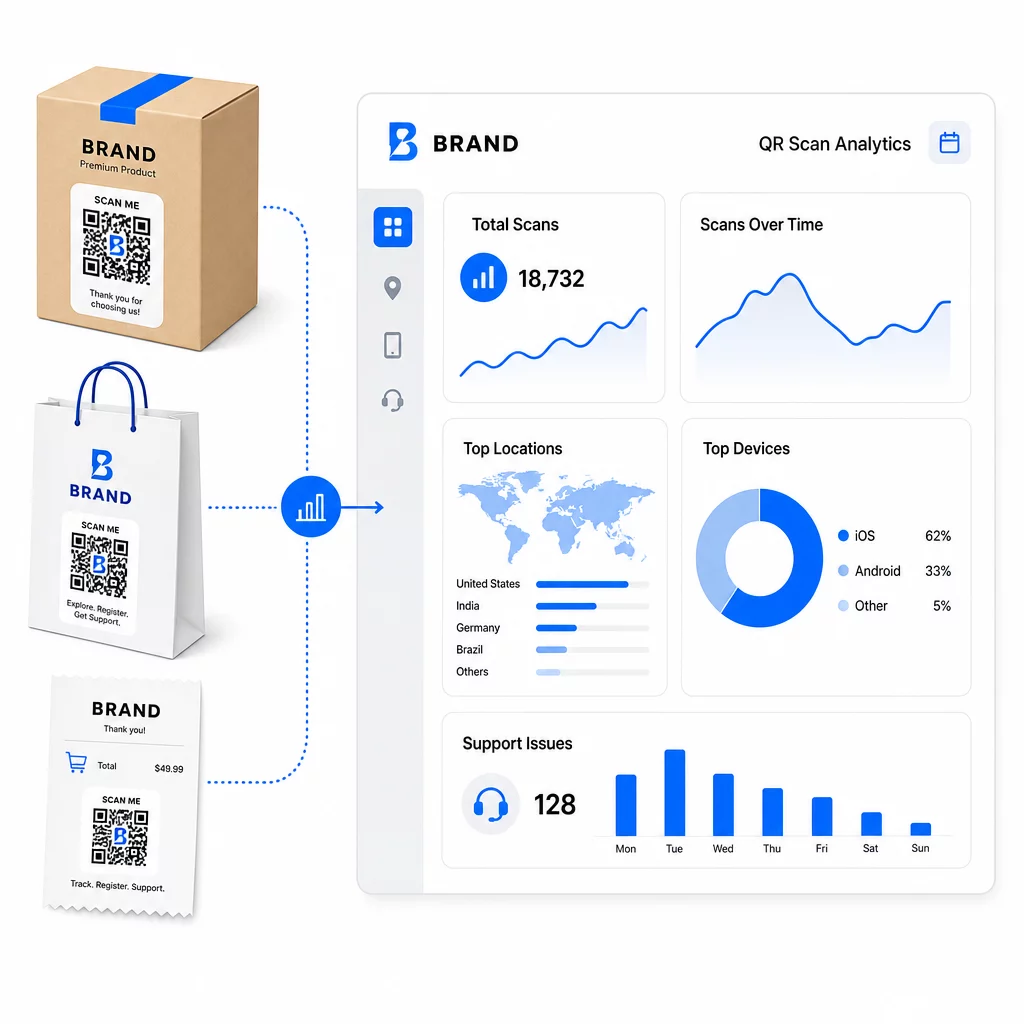
Houd ondersteuningslinks up-to-date zonder opnieuw te printen Gebruik Pageloot's QR-codegenerator om dynamische codes te creëren voor uw verpakkingen en bijlagen – update bestemmingen op elk moment vanuit uw dashboard zonder het gedrukte materiaal aan te raken.
Personalisatie via QR-codes
Een onderbenutte mogelijkheid is het leveren van ondersteunende inhoud die is afgestemd op de specifieke klant of het product. Met dynamische QR-codes kunt u codes configureren om verschillende inhoud te tonen op basis van:
- Producttype – Een QR-code op een blender linkt naar de installatiehandleiding en garantie van de blender, niet naar een algemene ondersteuningspagina
- Aankoopgeschiedenis – Terugkerende klanten kunnen worden doorgestuurd naar een loyaliteitshub of een gepersonaliseerde herbestelpagina
- Locatie – Internationale klanten zien regiospecifieke inhoud of lokale retourinstructies
Deze aanpak verandert een generiek ondersteuningscontactpunt in iets dat is ontworpen voor de individuele klant – wat direct van invloed is op de vraag of ze terugkomen.
QR-code analyses gebruiken om ondersteuning te verbeteren
De gegevens die worden verzameld uit QR-codescans zijn niet zomaar een ijdelheidsmetriek – het is een direct signaal over waar klanten moeite mee hebben. Een goed gestructureerde analyse-opzet kan u vertellen:
- Welke producten de meeste ondersteuningsscans genereren (mogelijk kwaliteits- of documentatieprobleem)
- Met welke contactpunten klanten het meest interacteren (verpakking vs. e-mail vs. bon)
- Wanneer in de post-aankooptijdlijn klanten hulp zoeken (direct na levering vs. weken later)
- Geografische patronen die regionale leveringsproblemen kunnen aangeven
Platforms die bieden QR-code tracking en analyses geven u een real-time feedbackloop die anders handmatige klantenenquêtes of analyse van supporttickets zou vereisen. Goed gebruikt, stelt deze data u in staat om proactieve verbeteringen aan te brengen in plaats van reactieve.
Praktische tips voor implementatie
Voordat u QR-codes voor klantenondersteuning uitrolt, zullen enkele richtlijnen u behoeden voor veelvoorkomende problemen:
- Test codes voordat u op grote schaal print. Scan elke code op meerdere apparaten en besturingssystemen om te bevestigen dat deze correct werkt.
- Houd landingspagina's mobiel-geoptimaliseerd. Klanten die een QR-code scannen, gebruiken hun telefoon. Een pagina die langzaam laadt of niet correct wordt weergegeven op mobiel, zal de hele ervaring ondermijnen.
- Pas de grootte van codes aan de ondergrond aan. Codes op kleine productlabels moeten groot genoeg zijn om betrouwbaar te scannen. Bekijk best practices voor de bruikbaarheid van QR-codes voor specifieke richtlijnen voor de grootte op basis van de kijkafstand.
- Voeg een korte call-to-action toe bij de code. “Scan voor installatiehandleiding” of “Scan om een retour te starten” verwijdert dubbelzinnigheid en verhoogt het aantal scans.
- Gebruik herkenbare ontwerpen met branding. Klanten zullen eerder een code vertrouwen en scannen die visueel overeenkomt met uw merk. Codes met logo's en merkkleuren presteren beter dan generieke zwart-witte vierkanten.
- Gebruik dynamische codes wanneer de inhoud kan veranderen. Als er een kans is dat de bestemmings-URL moet worden bijgewerkt, begin dan met een dynamische code.
Voor- en nadelen in één oogopslag
| Factor | QR-code ondersteuning | Traditionele digitale ondersteuning |
|---|---|---|
| Toegangssnelheid | Direct via scan | Vereist navigatie of zoeken |
| 24/7 beschikbaarheid | Ja | Varieert |
| Personalisatie | Hoog (dynamische codes) | Matig |
| Onderhoud | Laag (dynamische updates) | Matig |
| ANALYSE | Ingebouwd | Vereist aparte installatie |
| Toegankelijkheid | Vereist smartphone | Werkt op verschillende apparaten |
| Printafhankelijkheid | Vereist fysieke plaatsing | Alleen digitaal |
De belangrijkste beperking is de digitale kloof: klanten zonder smartphones of betrouwbare internettoegang kunnen geen QR-gebaseerde ondersteuning gebruiken. Voor die klanten wilt u een parallel ondersteuningspad – een telefoonnummer of gedrukte instructies – zodat niemand zonder hulp blijft.
Beveiliging is ook het overwegen waard. Gebruik HTTPS-links, houd merkgebonden ontwerpen consistent en overweeg klanten van tevoren (via verpakkingstekst of bestel-e-mails) te vertellen waar uw QR-codes naartoe leiden en welke gegevens worden verzameld. Transparantie bouwt het vertrouwen op dat klanten bereid maakt om te scannen.
Alles samenbrengen
QR-codes werken het beste voor klantenondersteuning wanneer ze worden geplaatst op de momenten dat klanten de meeste hulp nodig hebben – uitpakken, een zending volgen of een retour starten – en wanneer ze linken naar bronnen die echt nuttig zijn in plaats van alleen een startpagina. Dynamische codes maken het duurzaam: u kunt ondersteuningsinhoud bijwerken zonder iets opnieuw af te drukken, en de analyses dragen direct bij aan uw begrip van waar de klantervaring hapert.
De casestudies van QR-codes in e-commerce laten meetbare resultaten zien wanneer de implementatie weloverwogen is. Begin met één of twee knelpunten – retouren en order tracking zijn goede kandidaten – en breid van daaruit uit naarmate u leert wat klanten daadwerkelijk scannen.
Begin met het bouwen van uw ondersteunende QR-codes Pageloot's QR-codegenerator stelt u in staat dynamische, merkgebonden codes te creëren voor elke fase van de post-aankoopreis – volg scans, update bestemmingen en lever een betere ondersteuningservaring zonder opnieuw af te drukken.
Veelgestelde vragen
De meest effectieve toepassingen zijn links naar pagina's voor orderstatus, formulieren voor het initiëren van retouren, productspecifieke probleemoplossingsgidsen, installatievideo's, garantieregistratie en livechat. Inhoud die klanten snel en op een mobiel apparaat nodig hebben, past daar natuurlijk bij. PDF-handleidingen, Google Forms voor feedback en directe contactpagina's voor ondersteuning werken ook goed wanneer ze gekoppeld zijn via een PDF QR-code of een linkgebaseerde code.
Gebruik dynamische QR-codes, waarmee u de bestemmings-URL vanaf een dashboard kunt wijzigen zonder de geprinte code zelf aan te passen. Dit betekent dat u op elk moment retourbeleid kunt bijwerken, handleidingen voor probleemoplossing kunt uitwisselen of klanten kunt omleiden naar een nieuw ondersteuningsportaal – zonder verpakkingen, bijlagen of etiketten opnieuw af te drukken.
QR-codeanalyses tonen u het scanvolume, de scantijd, de geografische locatie en het apparaattype voor elke code. Als u hoge scanpercentages ziet op een specifieke probleemoplossingsgids, is dat een signaal van een terugkerend productprobleem. Lage scanpercentages op een retourcode kunnen duiden op een slechte plaatsing of onduidelijke instructies rond de code. Gebruik deze gegevens om zowel de plaatsing als de bestemmingsinhoud in de loop van de tijd te verfijnen.