Har dina kunder svårt att hitta hjälp efter ett köp? Dålig support efter köpet är ett av de snabbaste sätten att förlora en återkommande köpare – och 52% av konsumenterna säger att dålig service är den främsta anledningen till att de inte kommer att köpa igen. Denna guide förklarar praktiska sätt att använda QR-koder för att göra support, returer och orderhantering snabbare och enklare för dina kunder.
Varför support efter köpet är viktigare än någonsin
Kundernas förväntningar har förändrats. Snabb leverans, spårning i realtid och friktionsfria returer är inte längre förmåner – de är grundläggande krav. Tänk på vad som står på spel:
- 88% av kunderna är mer benägna att göra ett nytt köp efter en bra serviceupplevelse
- 70% av shoppare säger att en enkel, transparent returprocess ökar deras lojalitet till en e-handlare
- 73% av konsumenterna vill spåra sina beställningar under hela leveransen, och när spårning är tillgänglig använder 96% av dem den
Utmaningen för de flesta e-handelsvarumärken är att supportkontaktpunkterna är spridda: kunder måste leta efter kontaktsidor, navigera i returportaler eller gräva igenom e-postbekräftelser för att hitta orderdetaljer. QR-koder löser detta genom att föra supporten direkt dit kunderna redan är – på paketet i deras händer, kvittot i deras inkorg eller etiketten på produkten.
Var du ska placera QR-koder under resan efter köpet
Den mest effektiva QR-kodstrategin kopplar varje kod till ett specifikt ögonblick i kundupplevelsen. Här är de mest effektiva placeringarna:
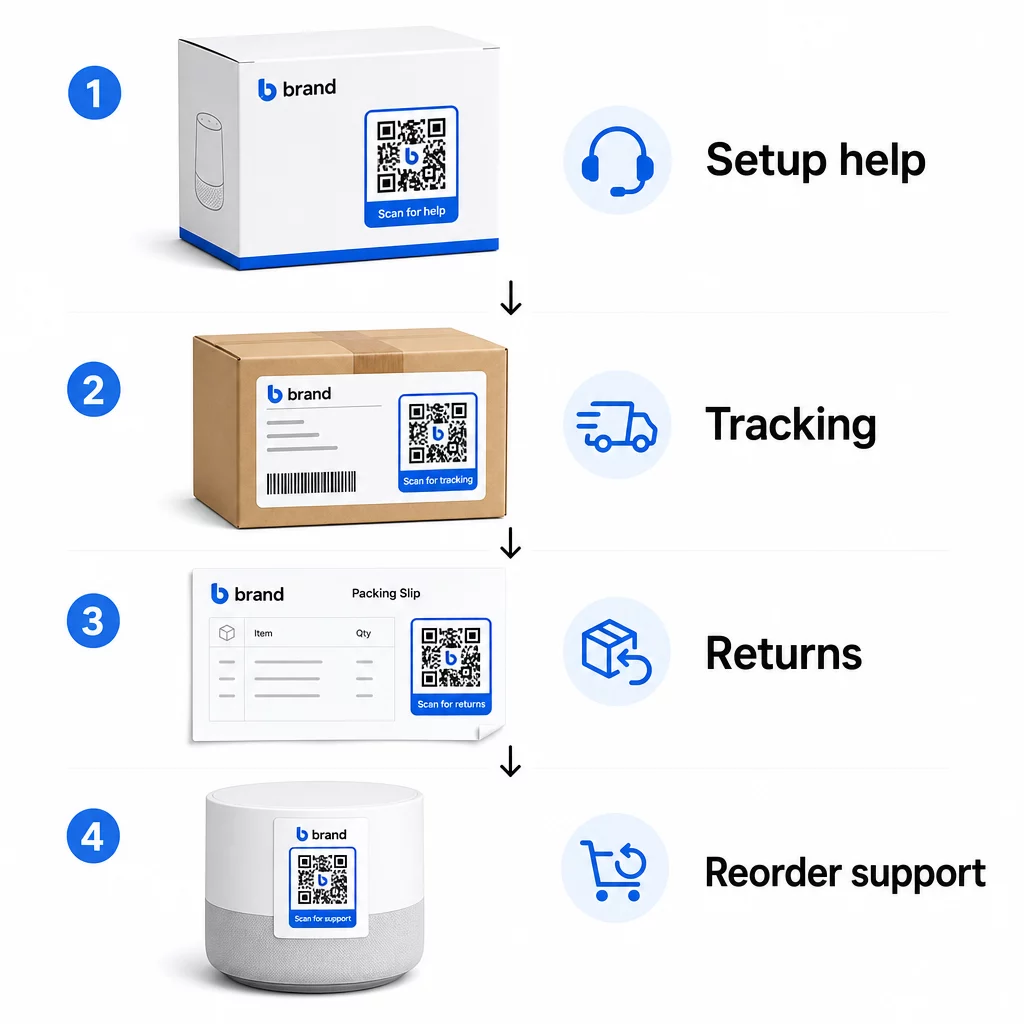
Produktförpackning. En QR-kod på lådan eller etiketten ger kunderna omedelbar tillgång till installationsguider, garantidetaljer och felsökningshjälp direkt vid uppackning. För hållbara varor som vitvaror eller verktyg, att lägga till en QR-kod på produktförpackningen kan också länka till instruktionsvideor, produktregistrering eller guider för reservdelar – användbart månader efter köpet.
Fraktetiketter och spårningssidor. 88% av online-shoppare säger att spårning av leveranser i realtid är avgörande för en positiv upplevelse, och 43% kontrollerar sina spårade beställningar varje dag fram till leverans. En QR-kod på fraktetiketten som länkar direkt till en live-spårningssida tar bort friktionen med att logga in på konton eller söka efter bekräftelsemejl.
Orderbekräftelse och e-postmeddelanden om leveransavisering. Dessa är e-postmeddelanden som kunder faktiskt öppnar. Att bädda in en QR-kod som länkar till en orderspecifik supportportal – med spårning, vanliga frågor och returinstruktioner – håller allt samlat i en enda skanning.
Kvitton och följesedlar. En QR-kod på följesedeln kan länka till en returportal, ett feedbackformulär eller en produktsida för recensioner. Detta är en placering med låg ansträngning och högt värde som förvandlar ett dokument som kunder redan läser till en supportingång.
Produktetiketter. För förbrukningsvaror eller föremål som används upprepade gånger ger en QR-kod på etiketten kontinuerlig tillgång till uppdaterade instruktioner, säkerhetsinformation eller länkar för ombeställning långt efter det ursprungliga köpet.
Gör dina supportkontaktpunkter spårbara Använd Länk QR-kodgenerator att skapa skanningsbara koder för förpackningar, e-postmeddelanden och fraktmaterial – och sedan spåra exakt vilka supportresurser kunderna använder.
Viktiga supportanvändningsfall för e-handel
QR-koder är tillräckligt flexibla för att tjäna flera distinkta supportfunktioner. De vanligaste som är värda att bygga in i ditt arbetsflöde:
Felsökning via självbetjäning. Länka QR-koder till produktspecifika FAQ-sidor eller videohandledningar. Kunder får hjälp dygnet runt utan att vänta på en supportagent, och du minskar volymen av inkommande ärenden.
Returer och byten. Återförsäljare uppskattar att 15.8% av den totala årliga försäljningen kommer att returneras under 2025 – nästan $850 miljarder. Att förenkla initieringsprocessen är viktigt. En QR-kod som öppnar ett förifyllt returformulär, genererar en fraktetikett eller ger steg-för-steg-instruktioner tar bort den största friktionspunkten i returupplevelsen. Varumärken som IKEA har redan övergått till QR-baserade returflöden, genom att skicka koder via e-post eller SMS när en retur har registrerats.
Livechatt och direktkontakt. Istället för att kräva att kunder hittar en chattwidget på din webbplats kan en QR-kod på förpackningen eller ett kvitto öppna ett chattfönster förladdat med kundens orderdetaljer – vilket snabbar upp lösningstiden för båda parter.
Garantiregistrering och produktregistrering. En QR-kod på förpackningen som länkar direkt till ett registreringsformulär minskar stegen mellan köp och registrering, vilket förbättrar både slutförandegraden och din förmåga att följa upp med relevant support.
Feedback och recensioner. A QR-kod för kundfeedback placerad på kvitton, förpackningar eller uppföljningsmejl gör det enkelt för kunder att dela sin upplevelse. En QR-kod för Google-recensioner skickar dem direkt till din recensionssida med en enda skanning. Att samla in denna feedback proaktivt hjälper dig också att upptäcka produkt- eller leveransproblem innan de förvärras.
Stöd för flera språk. Dynamiska QR-koder kan upptäcka en kunds plats och visa innehåll på lämpligt språk – användbart för internationella säljare som behöver stödja olika målgrupper utan att skapa separata tryckta material för varje region.
Samla in feedback utan extra friktion Använd QR-kodgenerator för Google Formulär för att skapa en skanningsbar feedbacklänk för e-postmeddelanden efter köp eller följesedlar och börja samla in handlingsbara insikter från varje beställning.
Varför dynamiska QR-koder är rätt val för support
A dynamisk QR-kod är en där destinations-URL:en kan redigeras efter att koden redan har skrivits ut – utan att ändra själva koden. För kundsupport är denna skillnad viktigare än den kan verka.
Supportresurser ändras regelbundet. Returpolicyer uppdateras, felsökningsguider revideras och kontaktmetoder ändras. Med en statisk QR-kod innebär varje uppdatering att du måste trycka om alla dina förpackningar, inlägg eller etiketter. Med en dynamisk kod uppdaterar du destinationen i din instrumentpanel och varje befintlig kod återspeglar omedelbart ändringen.
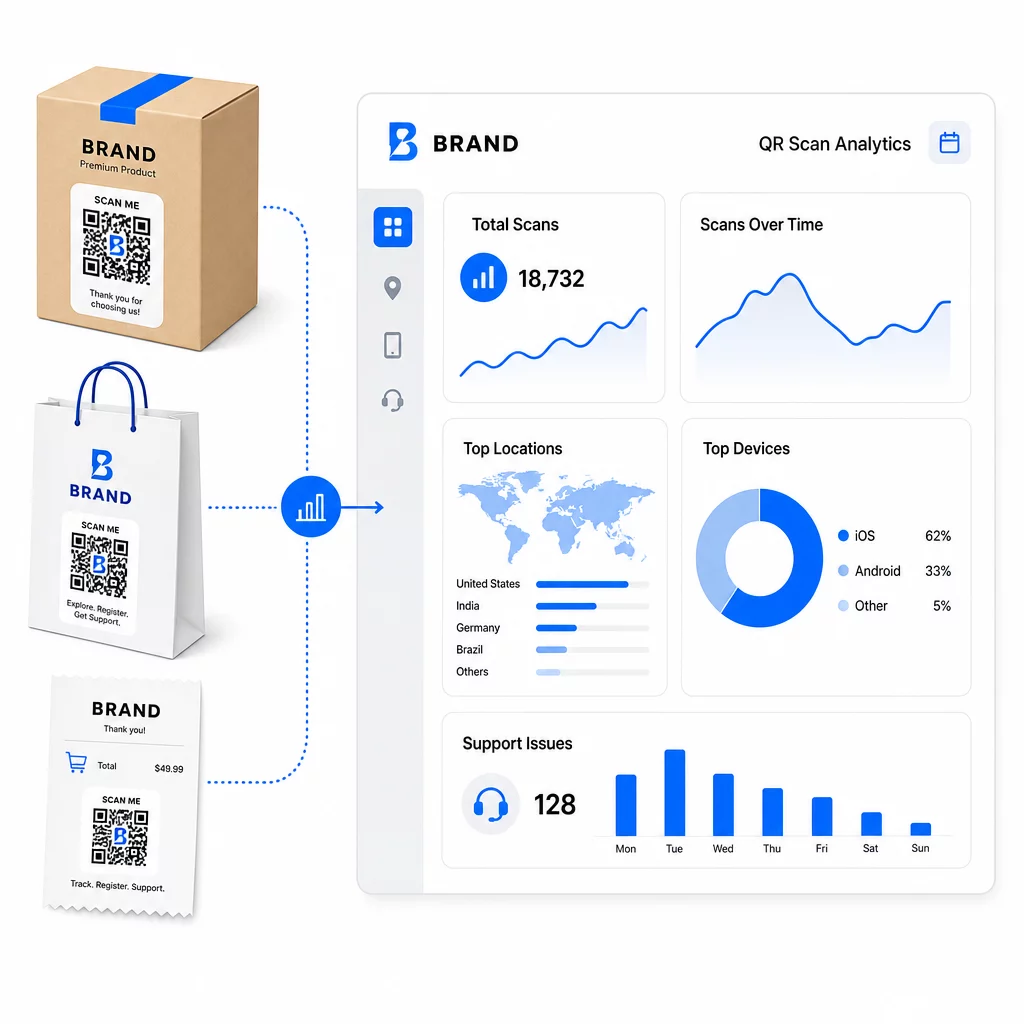
Dynamiska QR-koder möjliggör också analys. Du kan spåra hur många gånger en kod har skannats, från vilka platser, på vilka enhetstyper och vid vilka tidpunkter. Denna data avslöjar vilka supportresurser kunder faktiskt använder – och vilka kontaktpunkter som genererar flest förfrågningar. Till exempel kan en topp i skanningar på en felsökningsguide indikera ett återkommande produktproblem som är värt att åtgärda i ett tidigare skede. Du kan utforska hur QR-koder förbättrar e-handelsleveranser och support för att se hur andra varumärken tillämpar denna strategi.
Håll supportlänkar uppdaterade utan att trycka om Använd Pageloots QR-kodgenerator för att skapa dynamiska koder för din förpackning och dina inlägg – uppdatera destinationer när som helst från din instrumentpanel utan att röra det tryckta materialet.
Personalisering genom QR-koder
En underutnyttjad funktion är att leverera supportinnehåll som är skräddarsytt för den specifika kunden eller produkten. Med dynamiska QR-koder kan du konfigurera koder för att visa olika innehåll baserat på:
- Produkttyp – En QR-kod på en mixer länkar till mixerns installationsguide och garanti, inte en generisk supportsida
- Köphistorik – Återkommande kunder kan dirigeras till en lojalitetshubb eller en personlig ombeställningssida
- Plats – Internationella kunder ser regionspecifikt innehåll eller lokala returinstruktioner
Detta tillvägagångssätt förvandlar en generisk supportkontaktpunkt till något som känns designat för den enskilda kunden – vilket direkt påverkar om de kommer tillbaka.
Använda QR-kodanalys för att förbättra supporten
Datan som samlas in från QR-kodskanningar är inte bara en fåfänga-metrik – det är en direkt signal om var kunderna kämpar. En välstrukturerad analysinställning kan berätta för dig:
- Vilka produkter som genererar flest supportskanningar (möjligt kvalitets- eller dokumentationsproblem)
- Vilka kontaktpunkter kunder engagerar sig mest med (förpackning vs. e-post vs. kvitto)
- När i tidslinjen efter köpet kunder söker hjälp (omedelbart efter leverans vs. veckor senare)
- Geografiska mönster som kan indikera regionala leveransproblem
Plattformar som erbjuder QR-kodspårning och analys ger dig en återkopplingsslinga i realtid som annars skulle kräva manuella kundundersökningar eller analys av supportärenden. Används denna data väl, låter den dig göra proaktiva förbättringar snarare än reaktiva.
Praktiska tips för implementering
Innan du rullar ut QR-koder för kundsupport, kommer några riktlinjer att rädda dig från vanliga problem:
- Testa koder innan massutskrift. Skanna varje kod på flera enheter och operativsystem för att bekräfta att den fungerar korrekt.
- Håll landningssidor mobiloptimerade. Kunder som skannar en QR-kod använder sina telefoner. En sida som laddar långsamt eller inte visas korrekt på mobilen kommer att underminera hela upplevelsen.
- Anpassa kodstorleken efter ytan. Koder på små produktetiketter måste vara tillräckligt stora för att skannas pålitligt. Granska bästa praxis för användbarhet av QR-koder för specifik storleksvägledning baserad på visningsavstånd.
- Inkludera en kort uppmaning till handling nära koden. “Skanna för installationsguide” eller “Skanna för att starta en retur” tar bort tvetydighet och ökar skanningsfrekvensen.
- Använd varumärkesanpassade, igenkännbara designer. Kunder är mer benägna att lita på och skanna en kod som visuellt matchar ditt varumärke. Koder med logotyper och varumärkesfärger presterar bättre än generiska svartvita rutor.
- Använd dynamiska koder när innehållet kan komma att ändras. Om det finns någon chans att destinations-URL:en behöver uppdateras, börja med en dynamisk kod.
Fördelar och nackdelar i korthet
| Faktor | Stöd för QR-koder | Traditionellt digitalt stöd |
|---|---|---|
| Åtkomsthastighet | Omedelbart via skanning | Kräver navigering eller sökning |
| Tillgänglighet dygnet runt | Ja | Varierar |
| Personalisering | Hög (dynamiska koder) | Moderat |
| Underhåll | Låg (dynamiska uppdateringar) | Moderat |
| STATISTIK | Inbyggt | Kräver separat installation |
| Tillgänglighet | Kräver smartphone | Fungerar på olika enheter |
| Beroende av utskrift | Kräver fysisk placering | Endast digitalt |
Den största begränsningen är den digitala klyftan: kunder utan smartphones eller pålitlig internetåtkomst kan inte använda QR-baserad support. För dessa kunder vill du ha en parallell supportväg – ett telefonnummer eller tryckta instruktioner – så att ingen lämnas utan hjälp.
Säkerhet är också värt att ta upp. Använd HTTPS-länkar, håll varumärkesdesignen konsekvent och överväg att i förväg informera kunder (via förpackningstext eller orderbekräftelse via e-post) vart dina QR-koder leder och vilken data som samlas in. Transparens bygger det förtroende som gör kunder villiga att skanna.
Sammanfattning
QR-koder fungerar bäst för kundsupport när de placeras vid de tillfällen kunder mest behöver hjälp – vid uppackning, spårning av en försändelse eller initiering av en retur – och när de länkar till resurser som är genuint användbara snarare än bara en startsida. Dynamiska koder gör det hållbart: du kan uppdatera supportinnehåll utan att trycka om något, och analysen ger direkt insikt i var kundupplevelsen brister.
De fallstudier av QR-koder inom e-handel visar mätbara resultat när implementeringen är genomtänkt. Börja med en eller två kontaktpunkter med hög friktion – returer och orderspårning är bra kandidater – och expandera därifrån när du lär dig vad kunderna faktiskt skannar.
Börja bygga dina support-QR-koder Pageloots QR-kodgenerator låter dig skapa dynamiska, varumärkesanpassade koder för varje steg i efterköpsresan – spåra skanningar, uppdatera destinationer och leverera en bättre supportupplevelse utan att trycka om.
Vanliga frågor
De mest effektiva användningsområdena är länkar till sidor för orderspårning, formulär för att initiera returer, produktspecifika felsökningsguider, installationsvideor, garantiregistrering och livechatt. Innehåll som kunder behöver snabbt och på en mobil enhet passar naturligt. PDF-manualer, Google-formulär för feedback och direkta kontaktsidor för support fungerar också bra när de länkas via en PDF QR-kod eller en länkbaserad kod.
Använd dynamiska QR-koder, som låter dig ändra destinations-URL:en från en kontrollpanel utan att ändra själva den tryckta koden. Detta innebär att du kan uppdatera returpolicyer, byta ut felsökningsguider eller omdirigera kunder till en ny supportportal när som helst – utan att trycka om förpackningar, inlägg eller etiketter.
QR-kodanalys visar dig skanningsvolym, skanningstidpunkt, geografisk plats och enhetstyp för varje kod. Om du ser höga skanningsfrekvenser på en specifik felsökningsguide är det en signal om ett återkommande produktproblem. Låga skanningsfrekvenser på en returkod kan betyda dålig placering eller otydliga instruktioner kring koden. Använd denna data för att förfina både placeringen och destinationsinnehållet över tid.