Чи ваші клієнти мають труднощі з пошуком допомоги після покупки? Погана післяпродажна підтримка – один із найшвидших способів втратити постійного покупця – і 52% споживачів кажуть, що погане обслуговування є основною причиною, чому вони не купуватимуть знову. Цей посібник пояснює практичні способи використання QR-кодів, щоб зробити підтримку, повернення та відстеження замовлень швидшими та легшими для ваших клієнтів.
Чому післяпродажна підтримка важлива як ніколи
Очікування клієнтів змінилися. Швидка доставка, відстеження в реальному часі та безпроблемне повернення – це вже не переваги, а базові вимоги. Розгляньте, що стоїть на кону:
- 88% клієнтів частіше роблять повторну покупку після чудового досвіду обслуговування
- 70% покупців кажуть, що легкий і прозорий процес повернення підвищує їхню лояльність до роздрібного продавця електронної комерції
- 73% споживачів хочуть відстежувати свої замовлення протягом усієї доставки, і коли відстеження доступне, 96% з них використовують його
Виклик для більшості брендів електронної комерції полягає в тому, що точки контакту підтримки розкидані: клієнтам доводиться шукати контактні сторінки, переходити на портали повернення або переглядати підтвердження електронною поштою, щоб знайти деталі замовлення. QR-коди вирішують цю проблему, надаючи підтримку безпосередньо там, де клієнти вже знаходяться – на упаковці в їхніх руках, квитанції в їхній поштовій скриньці або етикетці на продукті.
Де розміщувати QR-коди на етапі після покупки
Найефективніша стратегія QR-кодів прив'язує кожен код до певного моменту в досвіді клієнта. Ось місця з найбільшим впливом:
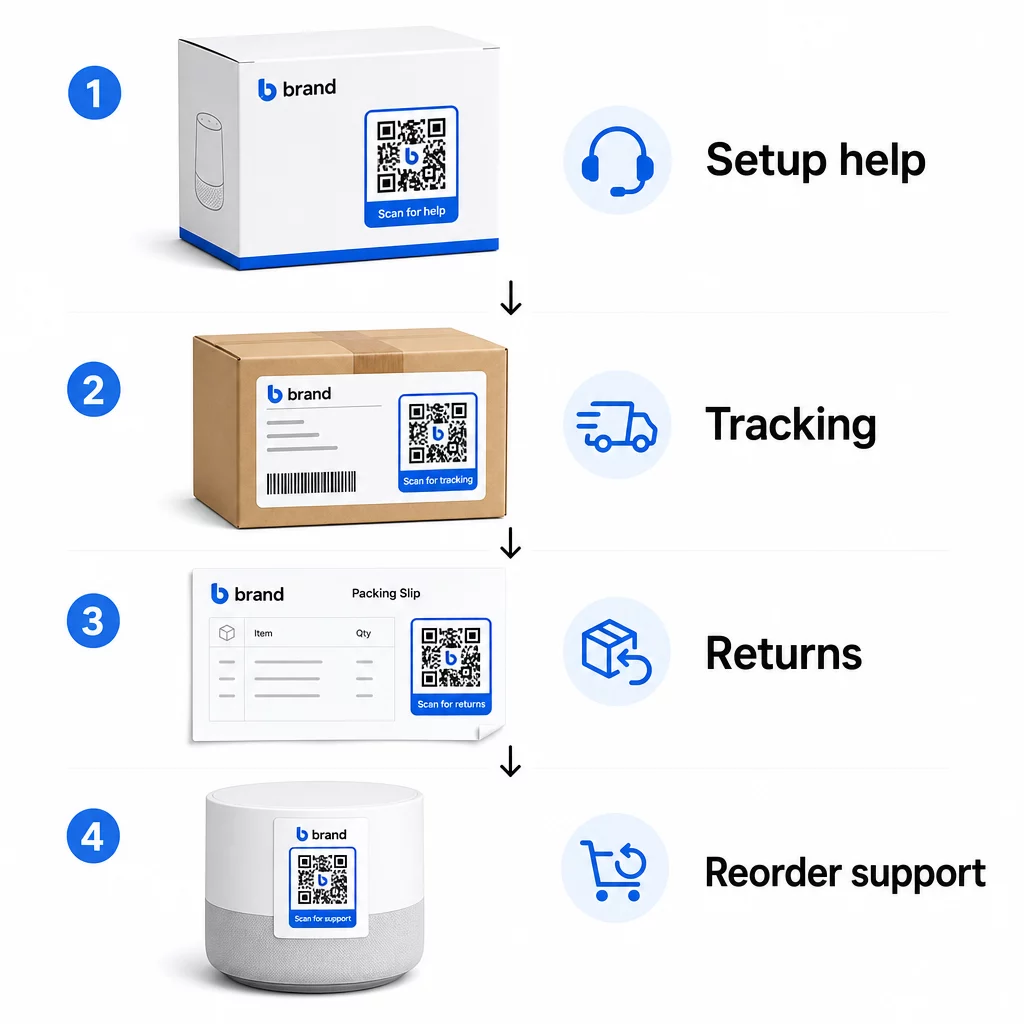
Упаковка продукту. QR-код на коробці або етикетці надає клієнтам негайний доступ до посібників з налаштування, деталей гарантії та допомоги з усунення несправностей одразу після розпакування. Для довговічних товарів, таких як побутова техніка або інструменти, додавання QR-коду до упаковки продукту також може посилатися на відеоінструкції, реєстрацію продукту або посібники із заміни деталей – корисно через місяці після покупки.
Етикетки доставки та сторінки відстеження. 88% онлайн-покупців кажуть, що відстеження доставки в реальному часі є критично важливим для позитивного досвіду, а 43% перевіряють свої відстежувані замовлення щодня до доставки. QR-код на етикетці доставки, який посилається безпосередньо на сторінку відстеження в реальному часі, усуває труднощі з входом в облікові записи або пошуком електронних листів з підтвердженням.
Електронні листи з підтвердженням замовлення та сповіщенням про відправлення. Це електронні листи, які клієнти дійсно відкривають. Вбудовування QR-коду, що посилається на центр підтримки, специфічний для замовлення – з відстеженням, поширеними запитаннями та інструкціями щодо повернення – зберігає все в одному скануванні.
Квитанції та пакувальні листи. QR-код на пакувальному листі може посилатися на портал повернень, форму зворотного зв'язку або сторінку відгуків про товар. Це розміщення з низькими зусиллями та високою цінністю, яке перетворює документ, який клієнти вже читають, на шлюз підтримки.
Етикетки товарів. Для витратних матеріалів або предметів, що використовуються багаторазово, QR-код на етикетці забезпечує постійний доступ до оновлених інструкцій, інформації про безпеку або посилань для повторного замовлення ще довго після початкової покупки.
Зробіть Ваші Точки Контакту Підтримки Відстежуваними Використовувати Генератор QR-кодів для посилань для створення сканованих кодів для упаковки, електронних листів та матеріалів для відправлення – а потім точно відстежувати, які ресурси підтримки використовують клієнти.
Ключові Сценарії Використання Підтримки для Електронної Комерції
QR-коди є достатньо гнучкими, щоб виконувати кілька різних функцій підтримки. Найпоширеніші з них, які варто вбудувати у ваш робочий процес:
Самостійне усунення несправностей. Посилайте QR-коди на сторінки поширених запитань, специфічні для продукту, або відеоуроки. Клієнти отримують цілодобову допомогу без очікування агента підтримки, а ви зменшуєте обсяг вхідних запитів.
Повернення та обмін. Роздрібні продавці оцінюють, що 15.8% від загального річного обсягу продажів буде повернуто у 2025 році – майже $850 мільярдів. Спрощення процесу ініціації має значення. QR-код, який відкриває попередньо заповнену форму повернення, генерує транспортну етикетку або надає покрокові інструкції, усуває найбільшу точку тертя у досвіді повернення. Такі бренди, як IKEA, вже перейшли на робочі процеси повернення на основі QR-кодів, надсилаючи коди електронною поштою або SMS після реєстрації повернення.
Живий чат та прямий контакт. Замість того, щоб вимагати від клієнтів знаходити віджет чату на вашому веб-сайті, QR-код на упаковці або квитанції може відкрити вікно чату, попередньо завантажене деталями замовлення клієнта – прискорюючи час вирішення з обох сторін.
Гарантійна реєстрація та реєстрація продукту. QR-код на упаковці, який посилається безпосередньо на реєстраційну форму, зменшує кількість кроків між покупкою та реєстрацією, що покращує як показники завершення, так і вашу здатність надавати відповідну підтримку.
Відгуки та огляди. A QR-код для відгуків клієнтів розміщений на чеках, упаковці або в подальших електронних листах, дозволяє клієнтам легко ділитися своїм досвідом. А QR-коду відгуків Google надсилає їх безпосередньо на вашу сторінку відгуків за одне сканування. Проактивний збір цих відгуків також допомагає виявити проблеми з продуктом або виконанням замовлення до того, як вони погіршаться.
Багатомовна підтримка. Динамічні QR-коди можуть визначати місцезнаходження клієнта та надавати контент відповідною мовою – це корисно для міжнародних продавців, яким потрібно підтримувати різноманітну аудиторію без створення окремих друкованих матеріалів для кожного регіону.
Збирайте відгуки без зайвих перешкод Використовувати Google Form QR: генератор для Google Форм щоб створити скановане посилання для відгуків для електронних листів після покупки або пакувальних листів і почати збирати корисні дані з кожного замовлення.
Чому динамічні QR-коди є правильним вибором для підтримки
A динамічний QR-код це той, де цільовий URL-адресу можна редагувати після того, як код вже був надрукований – без зміни самого коду. Для підтримки клієнтів ця відмінність має більше значення, ніж може здатися.
Ресурси підтримки регулярно змінюються. Політики повернення оновлюються, посібники з усунення несправностей переглядаються, а методи зв'язку змінюються. Зі статичним QR-кодом будь-яке оновлення означає передрук усієї вашої упаковки, вкладишів або етикеток. З динамічним кодом ви оновлюєте цільовий об'єкт на своїй панелі керування, і кожен існуючий код миттєво відображає зміну.
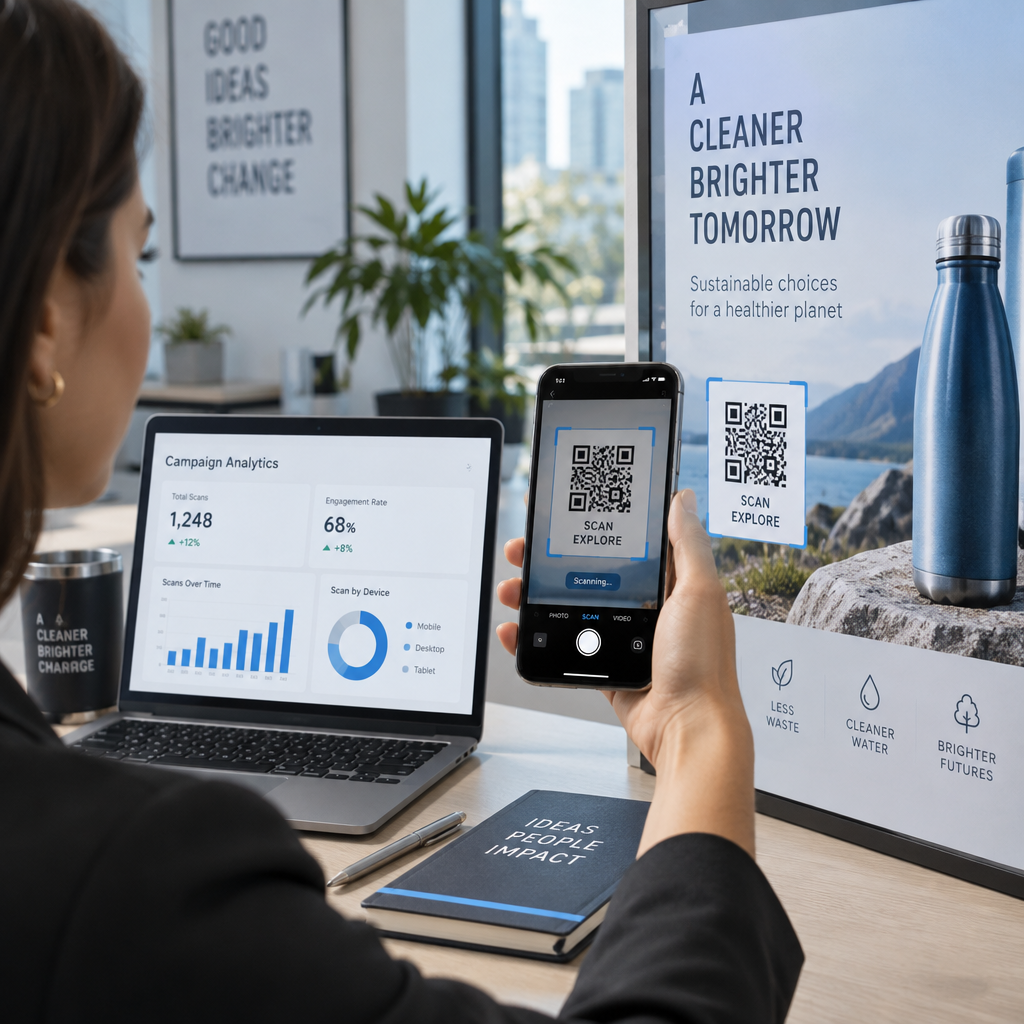
Динамічні QR-коди також дозволяють використовувати аналітику. Ви можете відстежувати, скільки разів код був відсканований, з яких місць, на яких типах пристроїв і в який час. Ці дані показують, які ресурси підтримки клієнти дійсно використовують – і які точки контакту генерують найбільше запитів. Наприклад, сплеск сканувань посібника з усунення несправностей може вказувати на повторювану проблему з продуктом, яку варто вирішити на ранній стадії. Ви можете дослідити як QR-коди покращують доставку та підтримку в електронній комерції щоб побачити, як інші бренди застосовують цей підхід.
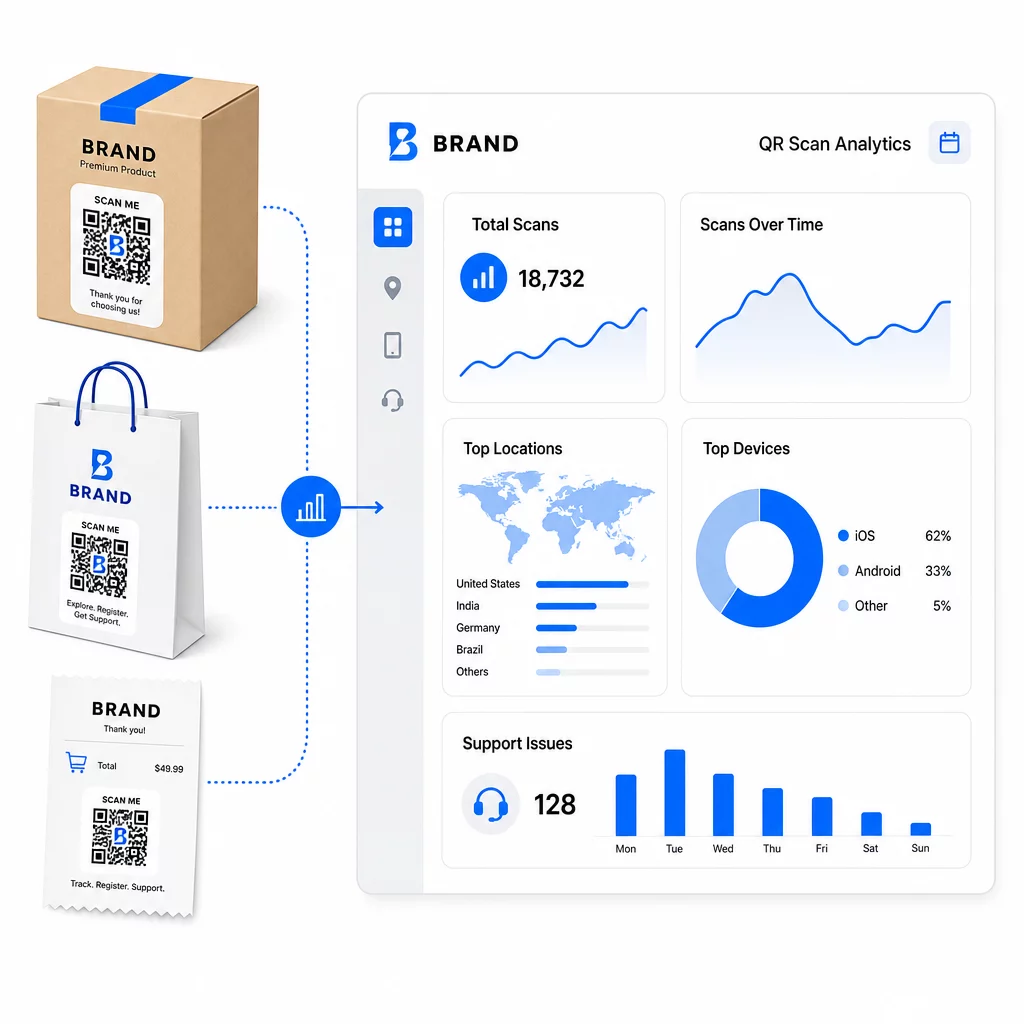
Тримайте посилання на підтримку актуальними без передруку Використовуйте Pageloot’s Генератор QR-кодів для створення динамічних кодів для вашої упаковки та вкладишів – оновлюйте призначення в будь-який час зі своєї інформаційної панелі, не торкаючись друкованого матеріалу.
Персоналізація за допомогою QR-кодів
Однією з недостатньо використовуваних можливостей є надання контенту підтримки, який адаптований до конкретного клієнта або продукту. За допомогою динамічних QR-кодів ви можете налаштувати коди для відображення різного контенту на основі:
- Тип продукту – QR-код на блендері посилається на посібник з налаштування та гарантію блендера, а не на загальну сторінку підтримки
- Історія покупок – Постійні клієнти можуть бути перенаправлені до центру лояльності або на персоналізовану сторінку повторного замовлення
- Місцезнаходження – Міжнародні клієнти бачать регіональний контент або місцеві інструкції щодо повернення
Такий підхід перетворює загальну точку контакту підтримки на щось, що відчувається розробленим для індивідуального клієнта – що безпосередньо впливає на те, чи повернуться вони.
Використання аналітики QR-кодів для покращення підтримки
Дані, зібрані зі сканувань QR-кодів, це не просто показник марнославства – це прямий сигнал про те, де клієнти стикаються з труднощами. Добре структурована аналітична система може розповісти вам:
- Які продукти генерують найбільше сканувань підтримки (можлива проблема з якістю або документацією)
- З якими точками контакту клієнти взаємодіють найбільше (упаковка проти електронної пошти проти квитанції)
- Коли в часовій шкалі після покупки клієнти шукають допомоги (відразу після доставки проти тижнів пізніше)
- Географічні закономірності, які можуть вказувати на регіональні проблеми з виконанням замовлень
Платформи, які пропонують Відстеження та аналітика QR-кодів надають вам зворотний зв'язок у реальному часі, який інакше вимагав би ручних опитувань клієнтів або аналізу звернень до служби підтримки. При правильному використанні ці дані дозволяють вносити проактивні, а не реактивні покращення.
Практичні поради щодо впровадження
Перш ніж впроваджувати QR-коди для підтримки клієнтів, кілька рекомендацій вбережуть вас від поширених проблем:
- Тестуйте коди перед масовим друком. Скануйте кожен код на кількох пристроях та операційних системах, щоб переконатися, що він розпізнається правильно.
- Зберігайте цільові сторінки оптимізованими для мобільних пристроїв. Клієнти, які сканують QR-код, користуються своїми телефонами. Сторінка, яка завантажується повільно або некоректно відображається на мобільному пристрої, підірве весь досвід.
- Відповідно до розміру поверхні. Коди на невеликих етикетках продуктів повинні бути достатньо великими для надійного сканування. Перегляньте найкращих практик використання QR-кодів для конкретних рекомендацій щодо розміру залежно від відстані перегляду.
- Додайте короткий заклик до дії біля коду. “Скануйте для посібника з налаштування” або “Скануйте, щоб розпочати повернення” усуває двозначність і збільшує кількість сканувань.
- Використовуйте фірмові, впізнавані дизайни. Клієнти з більшою ймовірністю довірятимуть і скануватимуть код, який візуально відповідає вашому бренду. Коди з логотипами та фірмовими кольорами працюють краще, ніж звичайні чорно-білі квадрати.
- Використовуйте динамічні коди, коли вміст може змінюватися. Якщо є ймовірність, що цільова URL-адреса потребуватиме оновлення, почніть з динамічного коду.
Плюси та мінуси з першого погляду
| Фактор | Підтримка QR-кодів | Традиційна цифрова підтримка |
|---|---|---|
| Швидкість доступу | Миттєво через сканування | Потребує навігації або пошуку |
| Доступність 24/7 | Так. | Варіюється |
| Персоналізація | Висока (динамічні коди) | Помірний |
| Обслуговування | Низька (динамічні оновлення) | Помірний |
| АНАЛІТИКА | Вбудовано | Потребує окремого налаштування |
| Доступність | Потребує смартфона | Працює на різних пристроях |
| Залежність від друку | Потребує фізичного розміщення | Лише цифровий |
Головне обмеження – це цифровий розрив: клієнти без смартфонів або надійного доступу до інтернету не можуть використовувати підтримку на основі QR-кодів. Для таких клієнтів вам знадобиться паралельний шлях підтримки – номер телефону або друковані інструкції – щоб ніхто не залишився без допомоги.
Варто також звернути увагу на безпеку. Використовуйте HTTPS-посилання, підтримуйте послідовний фірмовий дизайн і подумайте про те, щоб заздалегідь повідомляти клієнтам (через текст на упаковці або електронні листи із замовленнями), куди ведуть ваші QR-коди та які дані збираються. Прозорість створює довіру, яка спонукає клієнтів сканувати.
Об'єднуємо все разом
QR-коди найкраще працюють для підтримки клієнтів, коли вони розміщені в моменти, коли клієнти найбільше потребують допомоги – розпакування, відстеження відправлення або ініціювання повернення – і коли вони посилаються на дійсно корисні ресурси, а не просто на домашню сторінку. Динамічні коди роблять це стійким: ви можете оновлювати вміст підтримки без повторного друку, а аналітика безпосередньо допомагає зрозуміти, де виникають проблеми в клієнтському досвіді.
Цей приклади використання QR-кодів в електронній комерції показують вимірні результати, коли впровадження є цілеспрямованим. Почніть з однієї-двох точок контакту з високим рівнем тертя – повернення та відстеження замовлень є хорошими кандидатами – і розширюйтеся звідти, коли дізнаєтеся, що саме сканують клієнти.
Почніть створювати свої QR-коди підтримки Pageloot’s Генератор QR-кодів дозволяє створювати динамічні, брендовані коди для кожного етапу післяпродажного обслуговування – відстежувати сканування, оновлювати призначення та надавати кращий досвід підтримки без повторного друку.
Поширені запитання
Найефективніші способи використання – це посилання на сторінки відстеження замовлень, форми для ініціювання повернення, посібники з усунення несправностей для конкретних продуктів, відео з налаштування, реєстрація гарантії та онлайн-чат. Контент, який клієнти потребують швидко і на мобільному пристрої, ідеально підходить. PDF-посібники, Google Форми для зворотного зв'язку та сторінки прямого контакту зі службою підтримки також добре працюють, коли посилаються через QR-код PDF або код на основі посилання.
Використовуйте динамічні QR-коди, які дозволяють змінювати цільову URL-адресу з інформаційної панелі, не змінюючи сам надрукований код. Це означає, що ви можете оновлювати політику повернення, замінювати посібники з усунення несправностей або перенаправляти клієнтів на новий портал підтримки в будь-який час – без повторного друку упаковки, вкладишів чи етикеток.
Аналітика QR-кодів показує обсяг сканувань, час сканування, географічне розташування та тип пристрою для кожного коду. Якщо ви бачите високі показники сканування на певному посібнику з усунення несправностей, це є сигналом повторюваної проблеми з продуктом. Низькі показники сканування на коді повернення можуть означати погане розміщення або нечіткі інструкції щодо коду. Використовуйте ці дані для вдосконалення як розміщення, так і цільового вмісту з часом.