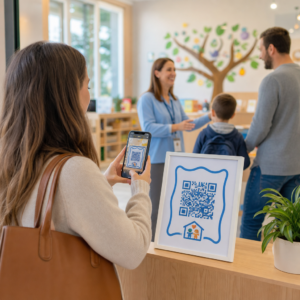
Are your event marketing materials failing to convert printed flyers into measurable online registrations? Offline event promotion often leaves organizers guessing about campaign return on investment while creating bottleneck lines at venue entrances. Implementing a structured QR code strategy bridges physical collateral to digital funnels, accelerating check-ins and delivering real-time attendee tracking.
.
Setting Clear Goals Across the Event Lifecycle
A successful QR code campaign addresses specific attendee touchpoints before, during, and after your event. Before launching your creative assets, align each code with measurable objectives by
SMART mērķu noteikšana QR kodu kampaņām.
Organize your campaign around three primary operational phases:
- Pre-Event Promotion
: Drive ticket sales and RSVPs by linking print ads, posters, and direct mailers directly to a mobile-friendly registration page using an
Pasākuma QR koda ģenerators. - On-Site Execution
: Accelerate door entry, distribute presentation slides, share venue layouts, and manage session check-ins using dedicated
QR kodi pasākumiem. - Post-Event Engagement
: Collect session feedback, share recorded content, and route qualified leads directly into your marketing workflow.
.
Defining these goals early dictates whether you need basic landing page links, dynamic routing, or integration with external databases.
.
Designing and Placing QR Codes for Scannability
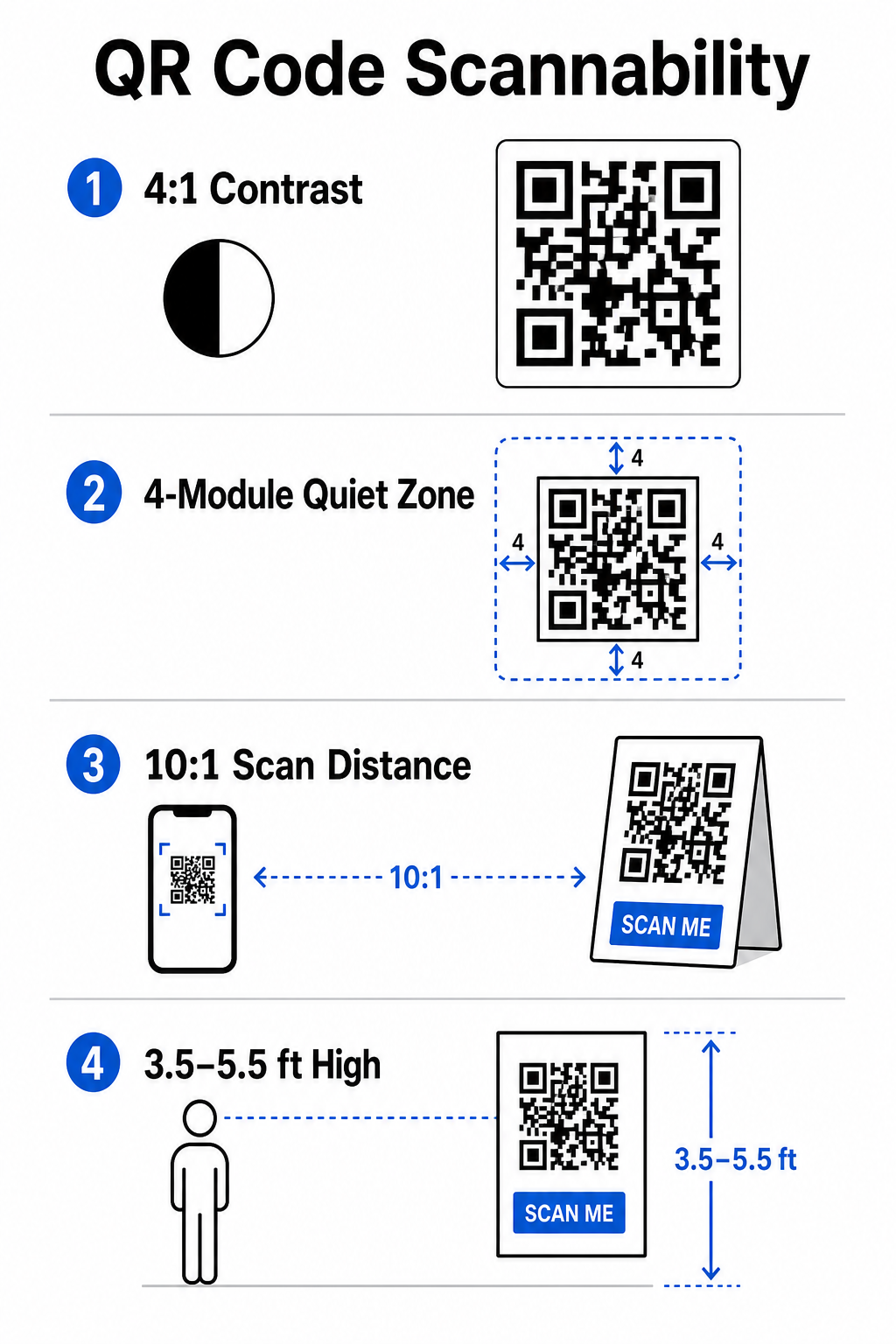
A QR code only generates conversions if smartphones can scan it quickly under real-world venue conditions. A fast, reliable scan should take no more than 3 seconds. To prevent scanning failures on printed collateral or digital displays, follow established design and placement specifications:
- Maintain Scannable Contrast
: Always use dark pattern modules on a light background, such as black or dark blue foregrounds on white or pastel backgrounds. Maintain a minimum contrast ratio of 4:1 (or 55% contrast difference) to handle low-light event spaces. - Ievērojiet kluso zonu:Reserve an empty margin around the code – known as the quiet zone – that measures at least 4 modules wide on all four sides. This border prevents surrounding graphic elements from interfering with the scanner.
Calculate Proper Sizing
Apply a 10:1 size-to-distance ratio, meaning a code scanned from 10 feet away must measure at least 1 foot wide. For hand-held print items like business cards or badges, maintain a minimum size of 2 x 2 cm (0.8 x 0.8 inches).
Position at Natural Eye Level
Position codes between 3.5 and 5.5 feet off the ground in high-traffic zones. Avoid placing codes across folds, curved surfaces, reflective materials, or bottom corners where hands cover them.
Export Vector Formats
Save artwork as high-resolution vector files like SVG or EPS (or high-quality PNG) to prevent pixelation when scaling graphics up for large event displays.
For comprehensive layout techniques on posters, booths, and digital slides, review our guide to
Streamlining On-Site Operations and Attendee Engagement
During live events, QR codes eliminate friction by connecting physical spaces to digital actions without requiring manual data entry. Mapping your strategy across pre-event print promotion, on-site fast entry, and post-event feedback forms keeps attendee interactions consistent throughout the event lifecycle.
Digital Check-In and Entry Control
Long queues at entry doors derail the attendee experience. Issuing personalized digital badges or ticket confirmation emails equipped with unique codes speeds up access control. Door staff using smartphone cameras or dedicated optical hardware can scan codes in under 2 seconds per person, reducing entrance congestion by up to 50%.
For higher-security conferences, implement dynamic ticket verification to prevent credential sharing. You can learn more about deploying encrypted credentials in our guide on
and our guide to
To log session arrivals or track room attendance effortlessly, organizers can also deploy a dedicated. - Calculate Proper Sizing: Apply a 10:1 size-to-distance ratio, meaning a code scanned from 10 feet away must measure at least 1 foot wide. For hand-held print items like business cards or badges, maintain a minimum size of 2 x 2 cm (0.8 x 0.8 inches).
- Position at Natural Eye Level: Position codes between 3.5 and 5.5 feet off the ground in high-traffic zones. Avoid placing codes across folds, curved surfaces, reflective materials, or bottom corners where hands cover them.
- Export Vector Formats: Save artwork as high-resolution vector files like SVG or EPS (or high-quality PNG) to prevent pixelation when scaling graphics up for large event displays.
For comprehensive layout techniques on posters, booths, and digital slides, review our guide to QR kodu izvietošana mārketingā.
Streamlining On-Site Operations and Attendee Engagement
During live events, QR codes eliminate friction by connecting physical spaces to digital actions without requiring manual data entry. Mapping your strategy across pre-event print promotion, on-site fast entry, and post-event feedback forms keeps attendee interactions consistent throughout the event lifecycle.
Digital Check-In and Entry Control
Long queues at entry doors derail the attendee experience. Issuing personalized digital badges or ticket confirmation emails equipped with unique codes speeds up access control. Door staff using smartphone cameras or dedicated optical hardware can scan codes in under 2 seconds per person, reducing entrance congestion by up to 50%.

For higher-security conferences, implement dynamic ticket verification to prevent credential sharing. You can learn more about deploying encrypted credentials in our guide on kā izveidot drošas QR kodu pasākumu biļetes and our guide to QR kodus pasākumu reģistrācijai.
To log session arrivals or track room attendance effortlessly, organizers can also deploy a dedicated apmeklējuma QR koda system displayed at room entrances.
.
Streamline Your Event Access and Management
Want to eliminate registration lines and update event schedules dynamically without reprinting materials? Build custom, trackable event codes using the
Pasākuma QR koda ģenerators.
Venue Navigation and Networking
Large convention centers and multi-track venues present complex spatial navigation challenges. Displaying a
Google Maps QR kodu ģenerators link on welcome signs or badges instantly opens exact pin locations, floor plans, or driving directions on an attendee’s default navigation application.
.
For exhibitors and networking sessions, digital contact exchange removes the hassle of physical business cards. Booth teams can show contact codes to capture lead details straight into CRM systems – a strategy detailed in our playbook on how to
turn event handshakes into leads with QR codes
.
Tracking Analytics and Post-Event Follow-Up
Measuring offline event marketing requires dynamic QR codes. Unlike static codes – which hardcode destination links permanently – dynamic codes store a short redirection URL that can be updated post-print while collecting full scan performance metrics.
.
To trace digital conversion paths back to specific physical items, append custom UTM parameters (`utm
source`, `utm
medium`, `utm
campaign`) to your destination URLs, such as `https://example.com/register?utm
`source=event`poster&utm
medium=print&utm
campaign=annual
summit_2026`. By assigning distinct UTM parameters to individual flyers, badge lanyards, and presentation slides, you can compare placement performance inside Google Analytics or your event dashboard.
.
| Metrika | Business Insight Provided |
Strategic Action Item |
|---|---|---|
| KOPĒJIE SKENĒJUMI | Mēra kopējo kampaņas materiālu ģenerēto datplūsmas apjomu. | Nosakiet kopējo zīmola redzamību bezsaistes atrašanās vietās. |
| Unikālas skenēšanas reizes | Izseko faktiskos individuālos dalībniekus, kas mijiedarbojas ar kodu. | Novērtējiet patieso auditorijas sasniedzamību, salīdzinot ar dublētām mijiedarbībām. |
| Skenēšanas laiks un diena | Identificē maksimālās mijiedarbības stundas sesiju grafiku laikā. | Attiecīgi pielāgojiet darbinieku izvietojumu un tiešraides paziņojumus. |
| Ģeogrāfiskie dati | Izceļ pilsētas vai konkrētas norises vietu zonas, kur veiktas skenēšanas. | Precizējiet fizisko izkārtņu izvietojumu turpmākajiem izkārtojumiem. |
| Ierīces operētājsistēma | Atklāj sadalījumu starp iOS un Android lietotājiem. | Optimizējiet mobilās galvenās lapas mērķa operētājsistēmām. |
Tūlītēja saziņa pēc sesijām palielina konversiju skaitu pēc pasākuma. Google Form QR koda ģenerators Saite izejas ekrānos vai pasākumu programmās mudina dalībniekus nekavējoties sniegt atsauksmes par sesiju, kamēr viņu iespaidi saglabājas svaigi.
Lai iegūtu detalizētu informāciju par skenēšanas datu un kampaņu veiktspējas mērīšanu, skatiet mūsu pilnīgo ceļvedi par QR kodu izsekošana un izpētiet 5 labākie rīki QR koda notikumu izsekošanai.
Pirms palaišanas testēšanas veikšana
Pirms failu nosūtīšanas komerciālajām tipogrāfijām vai digitālo slaidu publicēšanas veiciet rūpīgu testēšanu reālajā pasaulē:
- Testēšana vairākās operētājsistēmāsSkenējiet mākslas darbus, izmantojot vecākas un jaunākas ierīces, kurās darbojas gan iOS, gan Android iebūvētās kameras lietotnes.
- Pārbaudīt mērķa videsPārbaudiet drukātos korektūras attēlus vājā apgaismojumā, mākslīgā prožektoru apgaismojumā un netiešā saules gaismā, lai pārliecinātos, ka kontrasta attiecība 4:1 ir atbilstoša.
- Apstiprināt pāradresācijas ātrumuPārliecinieties, vai dinamiskā īsā saite novirza uz pilnībā atsaucīgu, mobilajām ierīcēm optimizētu galveno lapu mazāk nekā 3 sekundēs, izmantojot mobilo datu tīklus.
- Audita datu galamērķa saitesPārbaudiet, vai iegultie UTM parametri tiek pareizi aizpildīti analītikas informācijas paneļos pēc veidlapas iesniegšanas.
Jūsu pasākuma QR koda kampaņas uzsākšana
Apvienojot stingrus skenēšanas standartus, dinamisko saišu pārvaldību un pilnīgu veiktspējas analīzi, statiskie drukātie materiāli tiek pārveidoti par izsekojamiem pasākumu konversijas kanāliem. Strukturējot savu kampaņu ap saskares punktiem pirms pasākuma, uz vietas un pēc pasākuma, jūs novēršat darbības traucējumus, vienlaikus apkopojot noderīgus apmeklētāju datus.
Lai nodrošinātu jūsu nākamā pasākuma nevainojamu norisi, izveidojiet pielāgotus, rediģējamus QR kodus ar iebūvētu izsekošanas funkciju jau šodien, izmantojot Pageloot pasākuma QR koda ģenerators.
Biežāk uzdotie jautājumi
Dinamiskie QR kodi ir ļoti ieteicami pasākumu kampaņām, jo tie ļauj atjaunināt galamērķa URL pēc drukāšanas un apkopot detalizētu skenēšanas analītiku, tostarp skenēšanas skaitu, atrašanās vietas un ierīču veidus. Statiskos kodus nevar rediģēt pēc drukāšanas, un tie neatbalsta analītikas izsekošanu.
Tuvdarbības drukas materiāliem, piemēram, vizītkartēm, nozīmītēm vai galda norādēm, koda izmēram jābūt vismaz 2 x 2 cm (0,8 x 0,8 collas). Plakātiem un baneriem, kas tiek skenēti no attāluma, ievērojiet attiecību 10:1, kur koda platums ir vienāds ar 1 vienību uz katrām 10 skenēšanas attāluma vienībām.
Pievienojiet standarta UTM izsekošanas parametrus (piemēram, utmsource, utmmedium un utm_campaign) savas galvenās lapas URL pirms tā pārveidošanas dinamiskā QR kodā. Kad apmeklētāji skenē kodu, jūsu tīmekļa analīzes rīks automātiski reģistrē trafika avotu un sekojošās veidlapu konversijas.