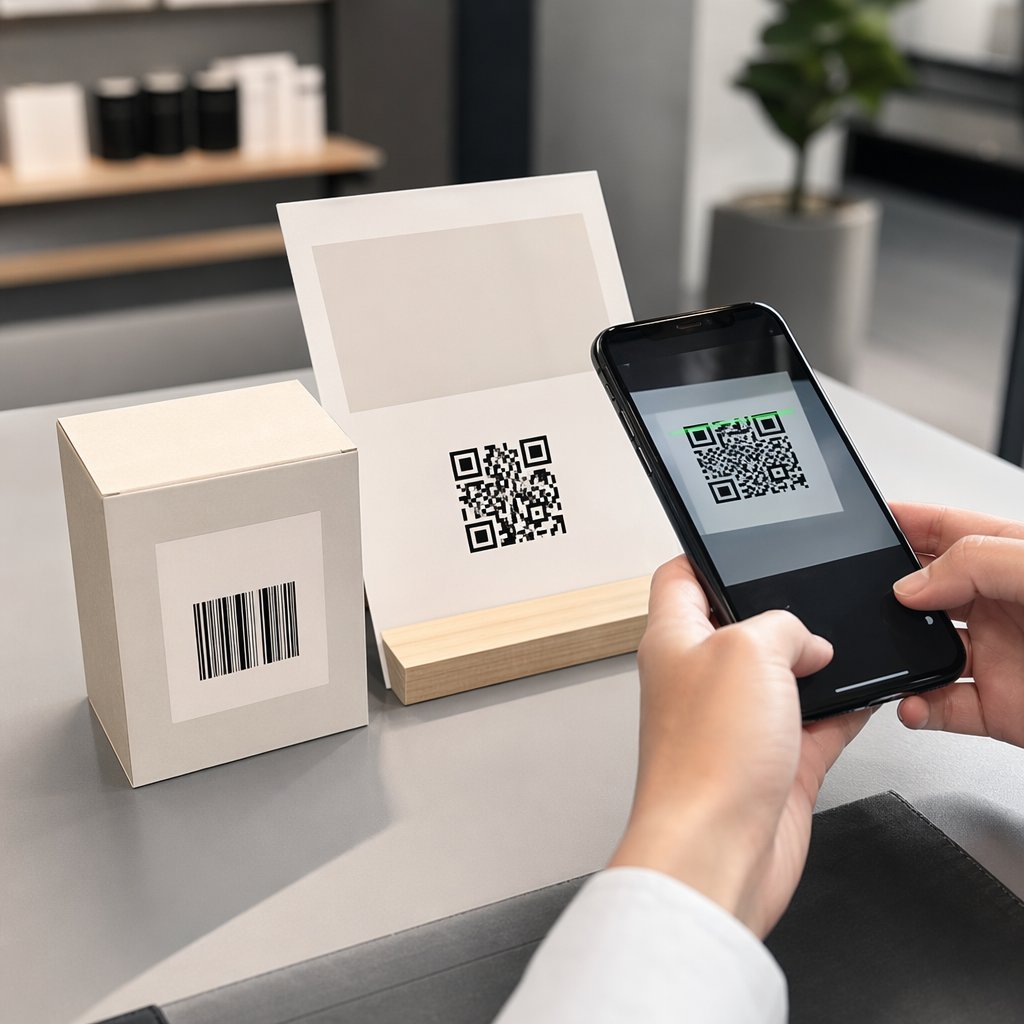
Are your event marketing materials failing to convert printed flyers into measurable online registrations? Offline event promotion often leaves organizers guessing about campaign return on investment while creating bottleneck lines at venue entrances. Implementing a structured QR code strategy bridges physical collateral to digital funnels, accelerating check-ins and delivering real-time attendee tracking.
2. Setting Clear Goals Across the Event Lifecycle
3. A successful QR code campaign addresses specific attendee touchpoints before, during, and after your event. Before launching your creative assets, align each code with measurable objectives by
4. Organize your campaign around three primary operational phases:
5. Pre-Event Promotion
6. : Drive ticket sales and RSVPs by linking print ads, posters, and direct mailers directly to a mobile-friendly registration page using an
7. On-Site Execution
8. : Accelerate door entry, distribute presentation slides, share venue layouts, and manage session check-ins using dedicated
9. Post-Event Engagement
10. : Collect session feedback, share recorded content, and route qualified leads directly into your marketing workflow.
11. Defining these goals early dictates whether you need basic landing page links, dynamic routing, or integration with external databases.
12. Designing and Placing QR Codes for Scannability
13. A QR code only generates conversions if smartphones can scan it quickly under real-world venue conditions. A fast, reliable scan should take no more than 3 seconds. To prevent scanning failures on printed collateral or digital displays, follow established design and placement specifications:
14. Maintain Scannable Contrast
15. : Always use dark pattern modules on a light background, such as black or dark blue foregrounds on white or pastel backgrounds. Maintain a minimum contrast ratio of 4:1 (or 55% contrast difference) to handle low-light event spaces.
Setting Clear Goals Across the Event Lifecycle
A successful QR code campaign addresses specific attendee touchpoints before, during, and after your event. Before launching your creative assets, align each code with measurable objectives by postavljate SMART cilje za kampanje s QR kodami.
Organize your campaign around three primary operational phases:
- Pre-Event Promotion: Drive ticket sales and RSVPs by linking print ads, posters, and direct mailers directly to a mobile-friendly registration page using an Generator QR kode za dogodke.
- On-Site Execution: Accelerate door entry, distribute presentation slides, share venue layouts, and manage session check-ins using dedicated QR kode za dogodke.
- Post-Event Engagement: Collect session feedback, share recorded content, and route qualified leads directly into your marketing workflow.
Defining these goals early dictates whether you need basic landing page links, dynamic routing, or integration with external databases.
Designing and Placing QR Codes for Scannability
A QR code only generates conversions if smartphones can scan it quickly under real-world venue conditions. A fast, reliable scan should take no more than 3 seconds. To prevent scanning failures on printed collateral or digital displays, follow established design and placement specifications:
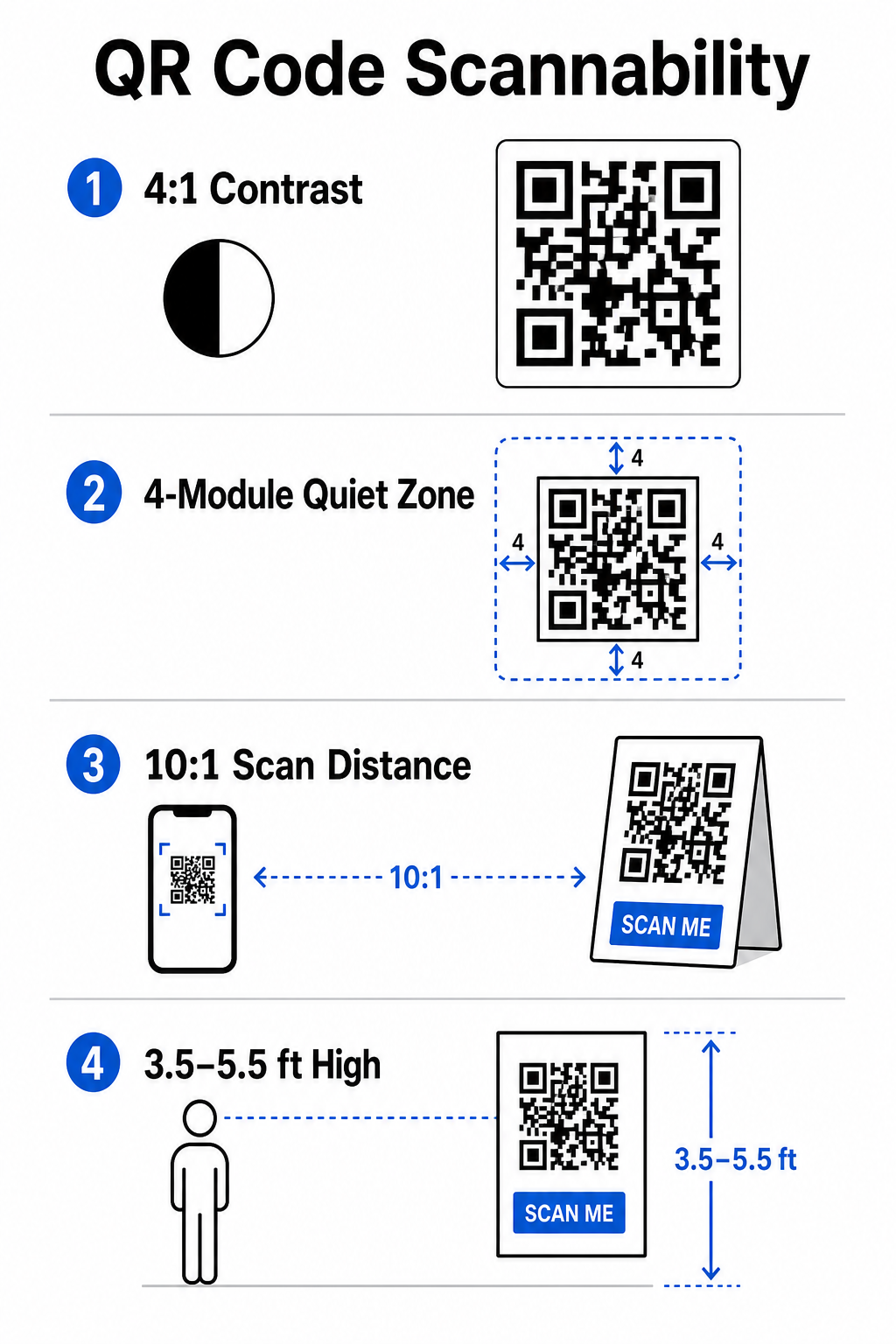
- Maintain Scannable Contrast: Always use dark pattern modules on a light background, such as black or dark blue foregrounds on white or pastel backgrounds. Maintain a minimum contrast ratio of 4:1 (or 55% contrast difference) to handle low-light event spaces.
- Spoštujte tiho območje: Okrog kode pustite prazen rob – znan kot tihi pas – ki meri vsaj 4 module širine na vseh štirih straneh. Ta rob preprečuje, da bi okoliški grafični elementi motili optični bralnik.
2. Izračunajte pravilno velikost
3. : Uporabite razmerje med velikostjo in razdaljo 10:1, kar pomeni, da mora biti koda, skenirana z razdalje 10 čevljev, široka vsaj 1 čevelj. Pri ročnih tiskanih predmetih, kot so vizitke ali značke, ohranite najmanjšo velikost 2 x 2 cm (0,8 x 0,8 palca).
4. Postavite na naravno višino oči
5. : Kode postavite med 3,5 in 5,5 čevljev od tal na območjih z velikim prometom. Izogibajte se postavljanju kod čez gube, ukrivljene površine, odsevne materiale ali spodnje vogale, kjer jih prekrivajo roke.
6. Izvozite vektorske formate
7. : Shranite grafiko kot visokoločljivostne vektorske datoteke, kot so SVG ali EPS (ali visokokakovostni PNG), da preprečite pikselizacijo pri povečevanju grafike za velike prireditvene zaslone.
8. Za celovite tehnike postavitve na plakatih, stojnicah in digitalnih diapozitivih si oglejte naš vodnik o
9. Poenostavitvi operacij na kraju dogodka in sodelovanju udeležencev
10. Med dogodki v živo kode QR odpravljajo trenje s povezovanjem fizičnih prostorov z digitalnimi dejanji brez potrebe po ročnem vnosu podatkov. Načrtovanje strategije prek preddogodkovnega tiskanega oglaševanja, hitrega vstopa na kraju dogodka in povratnih obrazcev po dogodku zagotavlja dosledne interakcije udeležencev skozi celoten življenjski cikel dogodka.
11. Digitalna prijava in nadzor vstopa
12. Dolge vrste na vhodnih vratih poslabšajo izkušnjo udeležencev. Izdajanje personaliziranih digitalnih značk ali potrditvenih e-poštnih sporočil z vstopnicami, opremljenih z edinstvenimi kodami, pospeši nadzor dostopa. Osebje na vratih, ki uporablja pametne telefone ali namensko optično strojno opremo, lahko skenira kode v manj kot 2 sekundah na osebo, kar zmanjša zastoje na vhodu do 50%.
13. Za konference z višjo stopnjo varnosti uvedite dinamično preverjanje vstopnic, da preprečite deljenje poverilnic. Več o uvajanju šifriranih poverilnic lahko izveste v našem vodniku o
14. in našem vodniku o
15. Za beleženje prihodov na seje ali sledenje prisotnosti v prostoru brez napora lahko organizatorji uvedejo tudi namensko. - Calculate Proper Sizing: Apply a 10:1 size-to-distance ratio, meaning a code scanned from 10 feet away must measure at least 1 foot wide. For hand-held print items like business cards or badges, maintain a minimum size of 2 x 2 cm (0.8 x 0.8 inches).
- Position at Natural Eye Level: Position codes between 3.5 and 5.5 feet off the ground in high-traffic zones. Avoid placing codes across folds, curved surfaces, reflective materials, or bottom corners where hands cover them.
- Export Vector Formats: Save artwork as high-resolution vector files like SVG or EPS (or high-quality PNG) to prevent pixelation when scaling graphics up for large event displays.
For comprehensive layout techniques on posters, booths, and digital slides, review our guide to umestitev QR kode v marketingu.
Streamlining On-Site Operations and Attendee Engagement
During live events, QR codes eliminate friction by connecting physical spaces to digital actions without requiring manual data entry. Mapping your strategy across pre-event print promotion, on-site fast entry, and post-event feedback forms keeps attendee interactions consistent throughout the event lifecycle.
Digital Check-In and Entry Control
Long queues at entry doors derail the attendee experience. Issuing personalized digital badges or ticket confirmation emails equipped with unique codes speeds up access control. Door staff using smartphone cameras or dedicated optical hardware can scan codes in under 2 seconds per person, reducing entrance congestion by up to 50%.

For higher-security conferences, implement dynamic ticket verification to prevent credential sharing. You can learn more about deploying encrypted credentials in our guide on kako ustvariti varne QR kode za vstopnice za dogodke and our guide to QR kod za prijavo na dogodke.
To log session arrivals or track room attendance effortlessly, organizers can also deploy a dedicated QR kode za udeležbo system displayed at room entrances.
.
Streamline Your Event Access and Management
Want to eliminate registration lines and update event schedules dynamically without reprinting materials? Build custom, trackable event codes using the
Generator QR kode za dogodke.
Venue Navigation and Networking
Large convention centers and multi-track venues present complex spatial navigation challenges. Displaying a
Generator QR kode za Google Maps link on welcome signs or badges instantly opens exact pin locations, floor plans, or driving directions on an attendee’s default navigation application.
.
For exhibitors and networking sessions, digital contact exchange removes the hassle of physical business cards. Booth teams can show contact codes to capture lead details straight into CRM systems – a strategy detailed in our playbook on how to
turn event handshakes into leads with QR codes
.
Tracking Analytics and Post-Event Follow-Up
Measuring offline event marketing requires dynamic QR codes. Unlike static codes – which hardcode destination links permanently – dynamic codes store a short redirection URL that can be updated post-print while collecting full scan performance metrics.
.
To trace digital conversion paths back to specific physical items, append custom UTM parameters (`utm
source`, `utm
medium`, `utm
campaign`) to your destination URLs, such as `https://example.com/register?utm
source=eventposter&utm
medium=print&utm
campaign=annual
summit_2026`. By assigning distinct UTM parameters to individual flyers, badge lanyards, and presentation slides, you can compare placement performance inside Google Analytics or your event dashboard.
.
| Metrika | Business Insight Provided |
Strategic Action Item |
|---|---|---|
| SKUPNO SKENIRANJ | Meri skupni obseg prometa, ki ga ustvarijo gradiva kampanje. | Določite skupno prepoznavnost blagovne znamke na vseh lokacijah brez povezave. |
| Edinstvena skeniranja | Spremlja dejanske posamezne udeležence, ki komunicirajo s kodo. | Ocenite doseg dejanskega občinstva v primerjavi s podvojenimi interakcijami. |
| Čas in dan skeniranja | Prepozna ure največje interakcije med urniki sej. | Ustrezno prilagodite razporeditev osebja in objave v živo. |
| Geografski podatki | Označi mesta ali določena območja prizorišč, kjer izvirajo skeni. | Izboljšajte postavitev fizične signalizacije za prihodnje postavitve. |
| Operacijski sistem naprave | Razkriva porazdelitev med uporabniki iOS in Android. | Optimizirajte mobilne ciljne strani za ciljne operacijske sisteme. |
Takojšnje nadaljnje ukrepanje po sejah poveča konverzije po dogodku. Prikazovanje Generator QR kod za Google obrazec Povezava na izhodnih zaslonih ali v programih dogodkov udeležence spodbudi, da pustijo takojšnje povratne informacije o seji, dokler so njihovi vtisi še sveži.
Za podrobnejšo razčlenitev merjenja podatkov skeniranja in uspešnosti kampanj si oglejte naš celoten vodnik o sledenje QR kodam in raziščite 5 najboljših orodij za sledenje dogodkov s QR kodo.
Izvajanje testiranja pred lansiranjem
Preden pošljete datoteke komercialnim tiskarjem ali objavite digitalne diapozitive, izvedite strogo testiranje v resničnem okolju:
- Testiranje v več operacijskih sistemih: Skenirajte umetniška dela s starejšimi in novejšimi napravami, ki imajo nameščene izvorne aplikacije za kamero za iOS in Android.
- Preverjanje ciljnih okolijNatisnjene poskusne odtise preizkusite pri šibki svetlobi, umetni osvetlitvi s reflektorji in posredni sončni svetlobi, da potrdite, da kontrastno razmerje 4:1 drži.
- Potrdi hitrost preusmeritvePreverite, ali dinamična kratka povezava v manj kot 3 sekundah prek mobilnih podatkovnih omrežij vodi do popolnoma odzivne ciljne strani, optimizirane za mobilne naprave.
- Povezave do ciljev podatkov revizijePreverite, ali se vdelani parametri UTM pravilno izpolnijo v analitičnih nadzornih ploščah ob oddaji obrazca.
Začetek kampanje s QR kodami za vaš dogodek
Združevanje strogih standardov preglednosti, dinamičnega upravljanja povezav in celovite analitike učinkovitosti preoblikuje statične tiskane materiale v sledljive kanale za konverzijo dogodkov. S strukturiranjem kampanje okoli stičnih točk pred dogodkom, na kraju samem in po dogodku odpravite operativna ozka grla, hkrati pa zbirate uporabne podatke o udeležencih.
Da bo vaš naslednji dogodek potekal nemoteno, ustvarite prilagojene, urejevalne QR kode z vgrajenim sledenjem še danes z uporabo Generator QR kod za dogodke Pageloot.
Pogosta vprašanja
Dinamične QR kode so močno priporočljive za dogodkovne kampanje, ker vam omogočajo posodabljanje ciljnih URL-jev po tiskanju in zbiranje podrobne analitike skeniranja, vključno s številom skeniranj, lokacijami in vrstami naprav. Statičnih kod ni mogoče urejati po tiskanju in ne podpirajo sledenja analitike.
Za tiskovine za ogled od blizu, kot so vizitke, značke ali namizne stojne kartice, mora biti koda velika vsaj 2 x 2 cm (0,8 x 0,8 palca). Za plakate in transparente, ki se skenirajo z večje razdalje, upoštevajte razmerje 10:1, pri čemer je širina kode enaka 1 enoti na vsakih 10 enot razdalje skeniranja.
Dodaj standardne parametre sledenja UTM (kot so utmsource, utmmedium in utm_campaign) URL-ju vaše vstopne strani, preden ga pretvorite v dinamično QR kodo. Ko udeleženci skenirajo kodo, vaše orodje za spletno analitiko samodejno zabeleži vir prometa in kasnejše pretvorbe obrazcev.