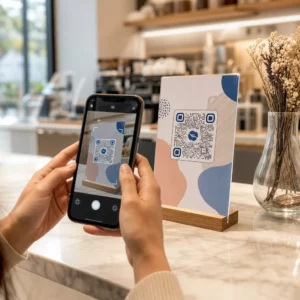
Are your event marketing materials failing to convert printed flyers into measurable online registrations? Offline event promotion often leaves organizers guessing about campaign return on investment while creating bottleneck lines at venue entrances. Implementing a structured QR code strategy bridges physical collateral to digital funnels, accelerating check-ins and delivering real-time attendee tracking.
2. Setting Clear Goals Across the Event Lifecycle
3. A successful QR code campaign addresses specific attendee touchpoints before, during, and after your event. Before launching your creative assets, align each code with measurable objectives by
4. Organize your campaign around three primary operational phases:
5. Pre-Event Promotion
6. : Drive ticket sales and RSVPs by linking print ads, posters, and direct mailers directly to a mobile-friendly registration page using an
7. On-Site Execution
8. : Accelerate door entry, distribute presentation slides, share venue layouts, and manage session check-ins using dedicated
9. Post-Event Engagement
10. : Collect session feedback, share recorded content, and route qualified leads directly into your marketing workflow.
11. Defining these goals early dictates whether you need basic landing page links, dynamic routing, or integration with external databases.
12. Designing and Placing QR Codes for Scannability
13. A QR code only generates conversions if smartphones can scan it quickly under real-world venue conditions. A fast, reliable scan should take no more than 3 seconds. To prevent scanning failures on printed collateral or digital displays, follow established design and placement specifications:
14. Maintain Scannable Contrast
15. : Always use dark pattern modules on a light background, such as black or dark blue foregrounds on white or pastel backgrounds. Maintain a minimum contrast ratio of 4:1 (or 55% contrast difference) to handle low-light event spaces.
Setting Clear Goals Across the Event Lifecycle
A successful QR code campaign addresses specific attendee touchpoints before, during, and after your event. Before launching your creative assets, align each code with measurable objectives by SMART célok kitűzése QR-kód kampányokhoz.
Organize your campaign around three primary operational phases:
- Pre-Event Promotion: Drive ticket sales and RSVPs by linking print ads, posters, and direct mailers directly to a mobile-friendly registration page using an Esemény QR kód generátor.
- On-Site Execution: Accelerate door entry, distribute presentation slides, share venue layouts, and manage session check-ins using dedicated QR-kódok eseményekhez.
- Post-Event Engagement: Collect session feedback, share recorded content, and route qualified leads directly into your marketing workflow.
Defining these goals early dictates whether you need basic landing page links, dynamic routing, or integration with external databases.
Designing and Placing QR Codes for Scannability
A QR code only generates conversions if smartphones can scan it quickly under real-world venue conditions. A fast, reliable scan should take no more than 3 seconds. To prevent scanning failures on printed collateral or digital displays, follow established design and placement specifications:
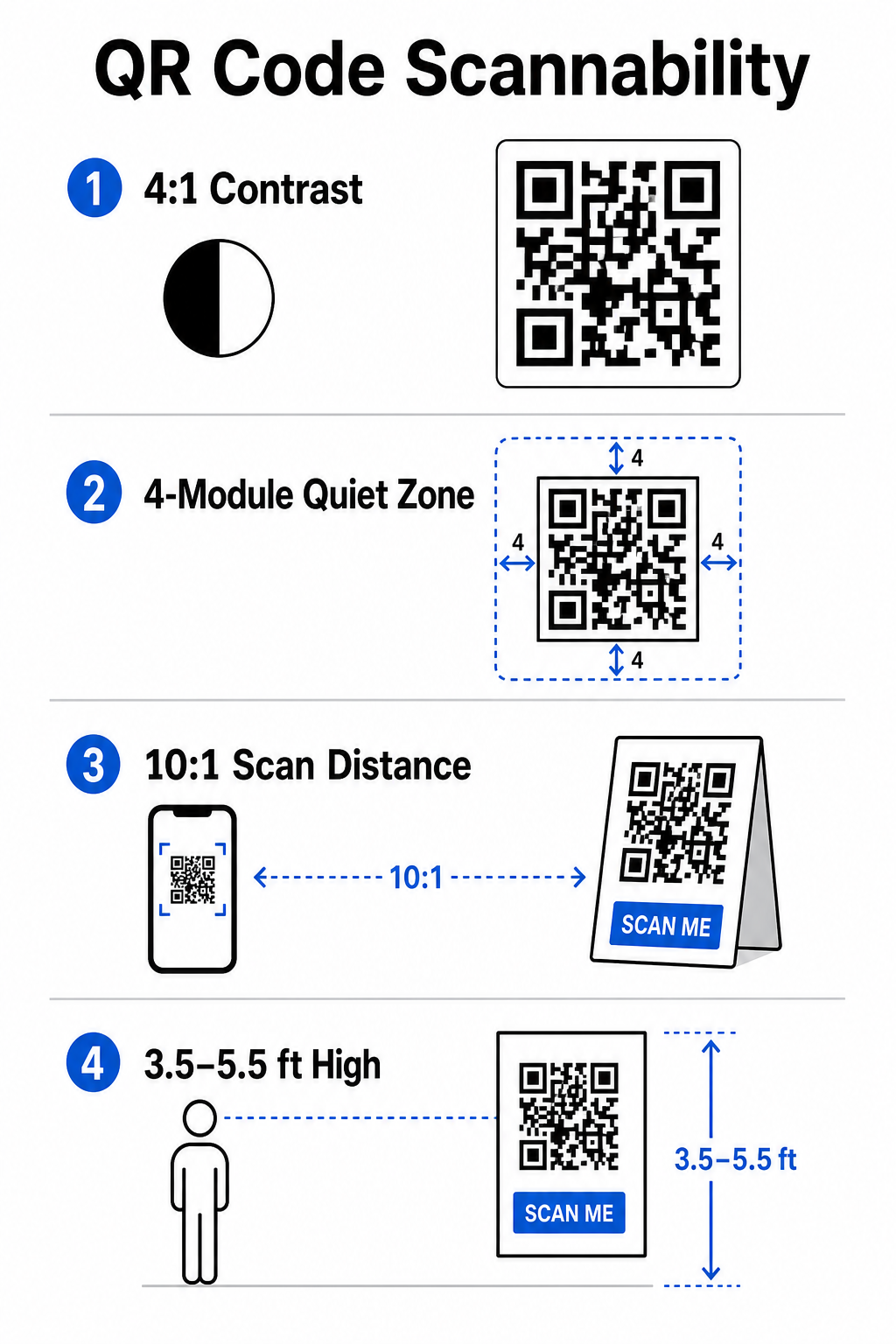
- Maintain Scannable Contrast: Always use dark pattern modules on a light background, such as black or dark blue foregrounds on white or pastel backgrounds. Maintain a minimum contrast ratio of 4:1 (or 55% contrast difference) to handle low-light event spaces.
- Tisztelje a csendes zónát: : Reserve an empty margin around the code – known as the quiet zone – that measures at least 4 modules wide on all four sides. This border prevents surrounding graphic elements from interfering with the scanner.
2. Calculate Proper Sizing
3. : Apply a 10:1 size-to-distance ratio, meaning a code scanned from 10 feet away must measure at least 1 foot wide. For hand-held print items like business cards or badges, maintain a minimum size of 2 x 2 cm (0.8 x 0.8 inches).
4. Position at Natural Eye Level
5. : Position codes between 3.5 and 5.5 feet off the ground in high-traffic zones. Avoid placing codes across folds, curved surfaces, reflective materials, or bottom corners where hands cover them.
6. Export Vector Formats
7. : Save artwork as high-resolution vector files like SVG or EPS (or high-quality PNG) to prevent pixelation when scaling graphics up for large event displays.
8. For comprehensive layout techniques on posters, booths, and digital slides, review our guide to
9. Streamlining On-Site Operations and Attendee Engagement
10. During live events, QR codes eliminate friction by connecting physical spaces to digital actions without requiring manual data entry. Mapping your strategy across pre-event print promotion, on-site fast entry, and post-event feedback forms keeps attendee interactions consistent throughout the event lifecycle.
11. Digital Check-In and Entry Control
12. Long queues at entry doors derail the attendee experience. Issuing personalized digital badges or ticket confirmation emails equipped with unique codes speeds up access control. Door staff using smartphone cameras or dedicated optical hardware can scan codes in under 2 seconds per person, reducing entrance congestion by up to 50%.
13. For higher-security conferences, implement dynamic ticket verification to prevent credential sharing. You can learn more about deploying encrypted credentials in our guide on
14. and our guide to
15. To log session arrivals or track room attendance effortlessly, organizers can also deploy a dedicated. - Calculate Proper Sizing: Apply a 10:1 size-to-distance ratio, meaning a code scanned from 10 feet away must measure at least 1 foot wide. For hand-held print items like business cards or badges, maintain a minimum size of 2 x 2 cm (0.8 x 0.8 inches).
- Position at Natural Eye Level: Position codes between 3.5 and 5.5 feet off the ground in high-traffic zones. Avoid placing codes across folds, curved surfaces, reflective materials, or bottom corners where hands cover them.
- Export Vector Formats: Save artwork as high-resolution vector files like SVG or EPS (or high-quality PNG) to prevent pixelation when scaling graphics up for large event displays.
For comprehensive layout techniques on posters, booths, and digital slides, review our guide to QR-kód elhelyezése a marketingben.
Streamlining On-Site Operations and Attendee Engagement
During live events, QR codes eliminate friction by connecting physical spaces to digital actions without requiring manual data entry. Mapping your strategy across pre-event print promotion, on-site fast entry, and post-event feedback forms keeps attendee interactions consistent throughout the event lifecycle.
Digital Check-In and Entry Control
Long queues at entry doors derail the attendee experience. Issuing personalized digital badges or ticket confirmation emails equipped with unique codes speeds up access control. Door staff using smartphone cameras or dedicated optical hardware can scan codes in under 2 seconds per person, reducing entrance congestion by up to 50%.

For higher-security conferences, implement dynamic ticket verification to prevent credential sharing. You can learn more about deploying encrypted credentials in our guide on hogyan készítsünk biztonságos QR-kódos rendezvényjegyeket and our guide to QR-kódok az események bejelentkezéséhez.
To log session arrivals or track room attendance effortlessly, organizers can also deploy a dedicated részvételi QR-kód system displayed at room entrances.
.
Streamline Your Event Access and Management
Want to eliminate registration lines and update event schedules dynamically without reprinting materials? Build custom, trackable event codes using the
Esemény QR kód generátor.
Venue Navigation and Networking
Large convention centers and multi-track venues present complex spatial navigation challenges. Displaying a
Google Térkép QR-kód generátor link on welcome signs or badges instantly opens exact pin locations, floor plans, or driving directions on an attendee’s default navigation application.
.
For exhibitors and networking sessions, digital contact exchange removes the hassle of physical business cards. Booth teams can show contact codes to capture lead details straight into CRM systems – a strategy detailed in our playbook on how to
turn event handshakes into leads with QR codes
.
Tracking Analytics and Post-Event Follow-Up
Measuring offline event marketing requires dynamic QR codes. Unlike static codes – which hardcode destination links permanently – dynamic codes store a short redirection URL that can be updated post-print while collecting full scan performance metrics.
.
To trace digital conversion paths back to specific physical items, append custom UTM parameters (`utm
source`, `utm
medium`, `utm
campaign`) to your destination URLs, such as `https://example.com/register?utm
source=eventposter&utm
medium=print&utm
campaign=annual
summit_2026`. By assigning distinct UTM parameters to individual flyers, badge lanyards, and presentation slides, you can compare placement performance inside Google Analytics or your event dashboard.
.
| Metrika | Business Insight Provided |
Strategic Action Item |
|---|---|---|
| ÖSSZES BEOLVASÁS | A kampányanyagok által generált teljes forgalmi volument méri. | Határozza meg a márka teljes láthatóságát offline helyszíneken. |
| Egyedi szkennelések | Követi a tényleges egyéni résztvevők kóddal való interakcióját. | Értékelje a valódi közönségelérést a duplikált interakciókkal szemben. |
| Szkennelési idő és nap | Azonosítja a csúcsidőszakokat az ülések ütemtervei alatt. | Ennek megfelelően igazítsa a személyzet elhelyezését és az élő bejelentéseket. |
| Földrajzi adatok | Kiemeli a városokat vagy a helyszínzónákat, ahonnan a szkennelések származnak. | Finomítsa a fizikai jelzések elhelyezését a jövőbeli elrendezésekhez. |
| Eszköz operációs rendszere | Feltárja az iOS és Android felhasználók közötti eloszlást. | Optimalizálja a mobil landing oldalakat a célzott operációs rendszerekre. |
A munkamenetek utáni azonnali utánkövetés növeli az esemény utáni konverziókat. Google Forms kérdőív QR kód generátor A kilépési képernyőkön vagy az eseményprogramokban található link arra ösztönzi a résztvevőket, hogy azonnal visszajelzést adjanak az előadásról, miközben a benyomásaik frissek maradnak.
A szkennelési adatok és a kampányteljesítmény mérésének részletes ismertetéséhez tekintse meg teljes körű útmutatónkat a következő címen: QR-kódok követése és fedezze fel a 5 legjobb eszköz QR-kódos események követéséhez.
Indítás előtti tesztelés végrehajtása
Mielőtt fájlokat küldene nyomdába, vagy digitális diákat publikálna, végezzen szigorú valós tesztelést:
- Tesztelés több operációs rendszeren: Szkenneljen grafikákat régebbi és újabb eszközökkel, amelyeken iOS és Android natív kameraalkalmazások is futnak.
- Célkörnyezetek ellenőrzése: A kinyomtatott próbanyomatokat gyenge megvilágítás, mesterséges reflektorfény és közvetett napfény alatt tesztelje, hogy a 4:1-es kontrasztarány megfelelő-e.
- Átirányítási sebesség megerősítése: Ellenőrizze, hogy a dinamikus rövid link egy teljesen reszponzív, mobilra optimalizált céloldalra irányít-e 3 másodpercen belül mobil adatátviteli hálózaton keresztül.
- Adatcélhivatkozások naplózása: Ellenőrizze, hogy a beágyazott UTM-paraméterek megfelelően jelennek-e meg az analitikai irányítópultokon az űrlap beküldésekor.
Esemény QR-kód kampányának indítása
A szigorú szkennelési szabványok, a dinamikus linkkezelés és a teljes körű teljesítményelemzés kombinációja a statikus nyomtatott anyagokat nyomon követhető eseménykonverziós csatornákká alakítja. A kampány esemény előtti, helyszíni és utáni kapcsolódási pontok köré strukturálásával kiküszöbölheti a működési szűk keresztmetszeteket, miközben hasznosítható résztvevői adatokat gyűjthet.
Annak érdekében, hogy a következő eseményed zökkenőmentesen menjen, hozz létre egyéni, szerkeszthető QR-kódokat beépített követéssel még ma a következő segítségével: Pageloot esemény QR-kód generátor.
Gyakori kérdések
A dinamikus QR-kódok erősen ajánlottak rendezvénykampányokhoz, mert lehetővé teszik a cél URL-ek frissítését nyomtatás után, és részletes beolvasási elemzések gyűjtését, beleértve a beolvasások számát, helyszíneit és az eszköz típusait. A statikus kódok nyomtatás után nem szerkeszthetők, és nem támogatják az elemzési nyomon követést.
Közeli nyomtatott anyagok, például névjegykártyák, kitűzők vagy asztali névtáblák esetén a kód legalább 2 x 2 cm (0,8 x 0,8 hüvelyk) legyen. Távolról beolvasott poszterek és bannerek esetén kövesse a 10:1 arányt, ahol a kód szélessége 1 egység minden 10 egységnyi beolvasási távolságra.
Adjon hozzá szabványos UTM-követési paramétereket (például utmsource, utmmedium és utm_campaign) a céloldal URL-jéhez, mielőtt dinamikus QR-kóddá alakítaná. Amikor a résztvevők beolvassák a kódot, a webanalitikai eszköz automatikusan rögzíti a forgalom forrását és az azt követő űrlapkonverziókat.