Etkinlik pazarlama materyalleriniz, basılı broşürleri ölçülebilir çevrimiçi kayıtlara dönüştürmekte başarısız mı oluyor? Çevrimdışı etkinlik tanıtımı, organizatörleri genellikle kampanya yatırım getirisi hakkında tahmin yürütmeye zorlarken, mekan girişlerinde darboğaz kuyrukları oluşturur. Yapılandırılmış bir QR kod stratejisi uygulamak, fiziksel materyalleri dijital hunilere bağlayarak girişleri hızlandırır ve gerçek zamanlı katılımcı takibi sağlar.
Etkinlik Yaşam Döngüsü Boyunca Net Hedefler Belirleme
Başarılı bir QR kod kampanyası, etkinliğinizden önce, etkinlik sırasında ve sonrasında belirli katılımcı temas noktalarını ele alır. Yaratıcı varlıklarınızı başlatmadan önce, her kodu ölçülebilir hedeflerle uyumlu hale getirin: QR Kod Kampanyaları İçin SMART Hedefler Belirleme.
Kampanyanızı üç ana operasyonel aşama etrafında düzenleyin:
- Etkinlik Öncesi Tanıtım: Basılı reklamları, posterleri ve doğrudan posta gönderilerini, bir Etkinlik QR Kod Oluşturucu.
- kullanarak doğrudan mobil uyumlu bir kayıt sayfasına bağlayarak bilet satışlarını ve RSVP'leri artırın.Mekanda Uygulama Etkinlikler için QR kodları.
- : Kapı girişini hızlandırmak, sunum slaytlarını dağıtmak, mekan düzenlerini paylaşmak ve oturum girişlerini yönetmek için özelkodlar kullanın.
Etkinlik Sonrası Katılım.
: Oturum geri bildirimlerini toplayın, kaydedilmiş içerikleri paylaşın ve nitelikli potansiyel müşterileri doğrudan pazarlama iş akışınıza yönlendirin.
Bu hedefleri erken tanımlamak, temel açılış sayfası bağlantılarına, dinamik yönlendirmeye veya harici veritabanlarıyla entegrasyona ihtiyacınız olup olmadığını belirler.
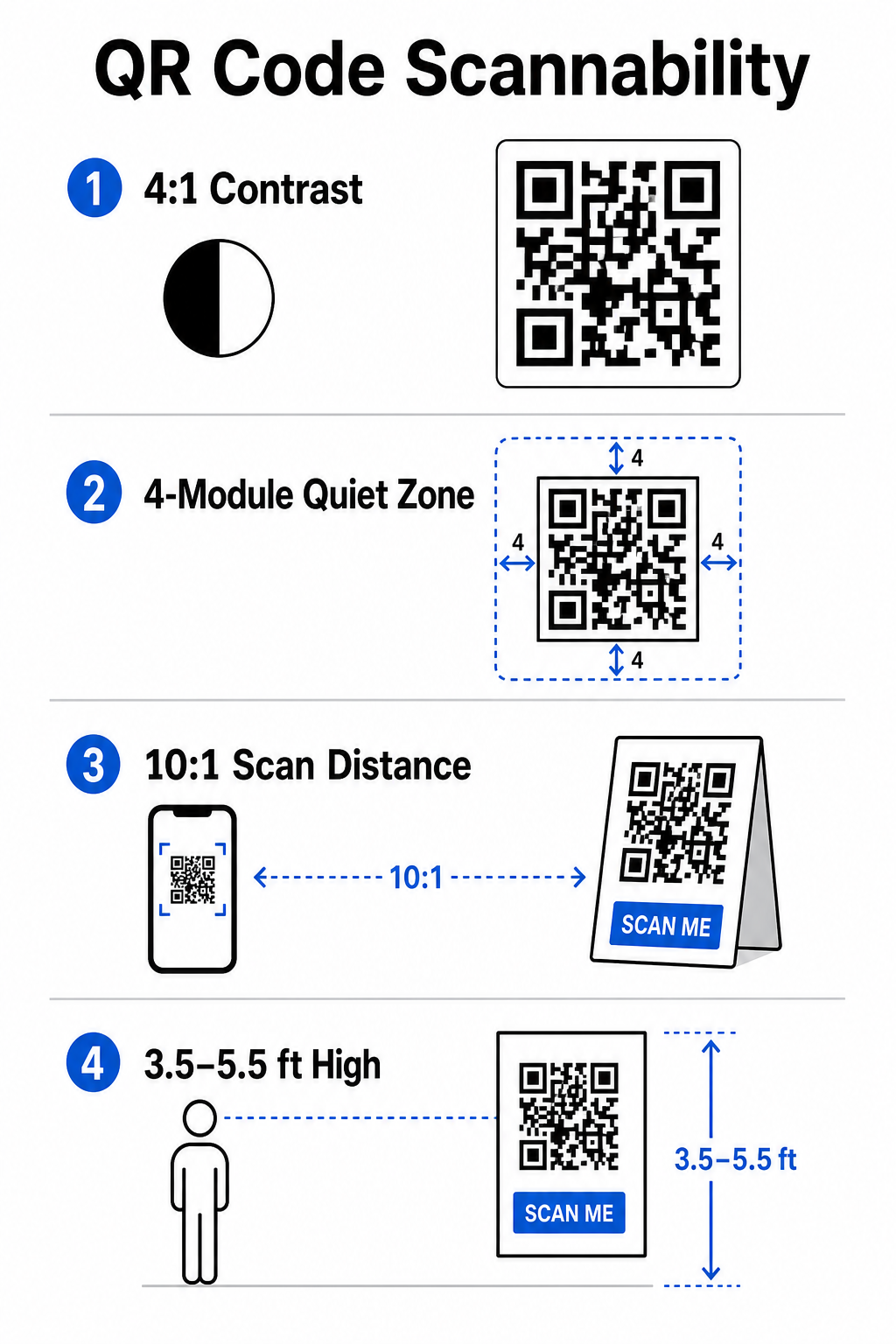
- QR Kodlarını Okunabilirlik İçin Tasarlama ve YerleştirmeBir QR kodu, yalnızca akıllı telefonlar onu gerçek mekan koşullarında hızlıca tarayabiliyorsa dönüşüm sağlar. Hızlı ve güvenilir bir tarama 3 saniyeden fazla sürmemelidir. Basılı materyaller veya dijital ekranlarda tarama hatalarını önlemek için belirlenmiş tasarım ve yerleştirme özelliklerini izleyin:.
- Sessiz Bölgeye SaygıOkunabilir Kontrastı Koruyun.
- : Beyaz veya pastel arka planlar üzerinde siyah veya koyu mavi ön plan gibi her zaman açık bir arka plan üzerinde koyu desen modülleri kullanın. Düşük ışıklı etkinlik alanlarını idare etmek için minimum 4:1 kontrast oranı (veya 55% kontrast farkı) sağlayın.: Kodun etrafında – sessiz bölge olarak bilinen – dört tarafta da en az 4 modül genişliğinde boş bir kenar boşluğu bırakın. Bu kenar, çevredeki grafik öğelerinin tarayıcıya müdahale etmesini önler.
- Doğru Boyutlandırmayı Hesaplayın: 10:1 boyut-mesafe oranı uygulayın; yani 10 fit (yaklaşık 3 metre) uzaktan taranan bir kod en az 1 fit (yaklaşık 30 cm) genişliğinde olmalıdır. Kartvizit veya rozet gibi elde taşınan basılı öğeler için minimum 2 x 2 cm (0,8 x 0,8 inç) boyutunu koruyun.
- Doğal Göz Hizasına Yerleştirin: Kodları, yoğun trafikli bölgelerde yerden 3,5 ila 5,5 fit (yaklaşık 1-1,7 metre) yüksekliğe konumlandırın. Kodları katlama yerlerine, kavisli yüzeylere, yansıtıcı malzemelere veya ellerin kapattığı alt köşelere yerleştirmekten kaçının.
Vektör Formatlarında Dışa Aktarın pazarlamada QR kodu yerleşimi.
: Grafikleri büyük etkinlik ekranları için ölçeklerken pikselleşmeyi önlemek amacıyla sanat eserlerini SVG veya EPS (veya yüksek kaliteli PNG) gibi yüksek çözünürlüklü vektör dosyaları olarak kaydedin.
Posterler, stantlar ve dijital slaytlar için kapsamlı düzen teknikleri için.
kılavuzumuzu inceleyin.
Mekan Operasyonlarını ve Katılımcı Katılımını Kolaylaştırma.

Canlı etkinlikler sırasında QR kodları, manuel veri girişi gerektirmeden fiziksel alanları dijital eylemlere bağlayarak sürtünmeyi ortadan kaldırır. Stratejinizi etkinlik öncesi basılı tanıtım, mekanda hızlı giriş ve etkinlik sonrası geri bildirim formları arasında haritalamak, katılımcı etkileşimlerini etkinlik yaşam döngüsü boyunca tutarlı tutar. Güvenli QR Kodlu Etkinlik Bileti Nasıl Oluşturulur Dijital Giriş ve Giriş Kontrolü etkinlik check-in'leri için QR kodları.
Giriş kapılarındaki uzun kuyruklar katılımcı deneyimini bozar. Benzersiz kodlarla donatılmış kişiselleştirilmiş dijital rozetler veya bilet onay e-postaları vermek, erişim kontrolünü hızlandırır. Kapı personeli, akıllı telefon kameraları veya özel optik donanım kullanarak kodları kişi başına 2 saniyeden kısa sürede tarayarak giriş sıkışıklığını 'ye kadar azaltabilir. katılım QR kodu Daha yüksek güvenlikli konferanslar için, kimlik bilgisi paylaşımını önlemek amacıyla dinamik bilet doğrulama uygulayın. Şifrelenmiş kimlik bilgilerini dağıtma hakkında daha fazla bilgiyi.
kılavuzumuzda ve kılavuzumuzda bulabilirsiniz. Etkinlik QR Kod Oluşturucu.
Oturum varışlarını kaydetmek veya oda katılımını zahmetsizce takip etmek için organizatörler ayrıca oda girişlerinde görüntülenen özel bir
sistem de kullanabilir. Google Maps QR Kod Oluşturucu Etkinlik Erişiminizi ve Yönetiminizi Kolaylaştırın.
Kayıt kuyruklarını ortadan kaldırmak ve materyalleri yeniden basmadan etkinlik programlarını dinamik olarak güncellemek mi istiyorsunuz? aracını kullanarak özel, takip edilebilir etkinlik kodları oluşturun..
Mekan Navigasyonu ve Ağ Kurma
Büyük kongre merkezleri ve çoklu parkur mekanları, karmaşık mekansal navigasyon zorlukları sunar. Karşılama tabelalarında veya rozetlerde bir.
bağlantısı görüntülemek, bir katılımcının varsayılan navigasyon uygulamasında tam konum işaretlerini, kat planlarını veya yol tariflerini anında açar.Katılımcılar ve ağ kurma oturumları için dijital iletişim değişimi, fiziksel kartvizit zahmetini ortadan kaldırır. Stant ekipleri, potansiyel müşteri ayrıntılarını doğrudan CRM sistemlerine yakalamak için iletişim kodları gösterebilir – bu strateji,etkinlik tokalaşmalarını QR kodlarıyla potansiyel müşterilere dönüştürmeoyun kitabımızda detaylandırılmıştır.`source=event`Analitikleri ve Etkinlik Sonrası Takibi İzlemeÇevrimdışı etkinlik pazarlamasını ölçmek, dinamik QR kodları gerektirir. Hedef bağlantıları kalıcı olarak sabit kodlayan statik kodların aksine, dinamik kodlar, tam tarama performans metriklerini toplarken baskı sonrası güncellenebilen kısa bir yönlendirme URL'si depolar.Dijital dönüşüm yollarını belirli fiziksel öğelere kadar izlemek için, hedef URL'lerinize özel UTM parametreleri (`utmsource`, `utm.
| Metrik | medium`, `utm | campaign`) ekleyin; örneğin: `https://example.com/register?utm |
|---|---|---|
| TOPLAM TARAMA | Kampanya materyallerinin oluşturduğu toplam trafik hacmini ölçer. | Çevrimdışı satış noktalarındaki toplam marka görünürlüğünü belirleyin. |
| Benzersiz Taramalar | Kodla etkileşime giren gerçek katılımcıları takip eder. | Gerçek hedef kitleye ulaşımı, mükerrer etkileşimlerle karşılaştırarak değerlendirin. |
| Tarama Saati ve Günü | Oturum programları sırasında en yoğun etkileşim saatlerini belirler. | Personel görevlendirmesini ve canlı duyuruları buna göre ayarlayın. |
| Coğrafi Veriler | Tarama işlemlerinin yapıldığı şehirleri veya belirli mekan bölgelerini vurgular. | Gelecek düzenlemeler için fiziksel tabela yerleşimini iyileştirin. |
| Aygıt İşletim Sistemi | iOS ve Android kullanıcıları arasındaki dağılımı ortaya koyuyor. | Hedef işletim sistemleri için mobil açılış sayfalarını optimize edin. |
Oturumların hemen ardından geri dönüş yapmak, etkinlik sonrası dönüşümleri artırır. Bir geri bildirim göstermek... Google Form QR Kod Oluşturucu Çıkış ekranlarında veya etkinlik programlarında yer alan bağlantı, katılımcıları izlenimleri henüz tazeyken anında oturum geri bildirimi bırakmaya teşvik eder.
Tarama verilerinin ve kampanya performansının ölçülmesine ilişkin ayrıntılı bilgi için, kapsamlı kılavuzumuza başvurabilirsiniz. QR kodlarını izleme ve keşfedin QR kodlu etkinlik takibi için en iyi 5 araç.
Lansman Öncesi Testlerin Yürütülmesi
Dosyaları ticari matbaalara göndermeden veya dijital slaytları yayınlamadan önce, kapsamlı gerçek dünya testleri gerçekleştirin:
- Birden Çok İşletim Sisteminde Test EdinHem iOS hem de Android işletim sistemlerinin yerleşik kamera uygulamalarını kullanan eski ve yeni cihazlarla sanat eserlerini tarayın.
- Hedef Ortamları DoğrulayınDüşük ışık altında, yapay spot ışığı altında ve dolaylı güneş ışığı altında test baskıları yapılarak 4:1 kontrast oranının korunup korunmadığı teyit edilmiştir.
- Yönlendirme Hızını OnaylaDinamik kısa bağlantının, hücresel veri ağları üzerinden 3 saniyeden kısa sürede tamamen duyarlı, mobil cihazlar için optimize edilmiş bir açılış sayfasına yönlendirildiğini doğrulayın.
- Denetim Verisi Hedef BağlantılarıForm gönderimi sonrasında gömülü UTM parametrelerinin analiz panolarında doğru şekilde görüntülendiğini kontrol edin.
Etkinliğinizin QR Kod Kampanyasını Başlatma
Sıkı tarama standartları, dinamik bağlantı yönetimi ve uçtan uca performans analizini bir araya getirerek, statik basılı materyalleri izlenebilir etkinlik dönüşüm kanallarına dönüştürüyoruz. Kampanyanızı etkinlik öncesi, etkinlik içi ve etkinlik sonrası temas noktaları etrafında yapılandırarak, operasyonel darboğazları ortadan kaldırırken, eyleme geçirilebilir katılımcı verileri topluyorsunuz.
Bir sonraki etkinliğinizin sorunsuz geçmesini sağlamak için, bugün yerleşik izleme özelliğine sahip özel, düzenlenebilir QR kodları oluşturun. Pageloot'un Etkinlik QR Kod Oluşturucusu.
Sıkça sorulan sorular
Dinamik QR kodları, etkinlik kampanyaları için şiddetle tavsiye edilir çünkü yazdırdıktan sonra hedef URL'leri güncellemenize ve tarama sayıları, konumlar ve cihaz türleri dahil olmak üzere ayrıntılı tarama analizleri toplamanıza olanak tanır. Statik kodlar yazdırıldıktan sonra düzenlenemez ve analiz takibini desteklemez.
Kartvizit, rozet veya masa kartı gibi yakın mesafeden okutulan basılı ürünler için kod en az 2 x 2 cm (0,8 x 0,8 inç) olmalıdır. Uzaktan taranan poster ve pankartlar için, kod genişliğinin her 10 birim tarama mesafesi için 1 birime eşit olduğu 10:1 oranını izleyin.
Hedef sayfa URL'nize dinamik bir QR koda dönüştürmeden önce standart UTM izleme parametrelerini (utmsource, utmmedium ve utm_campaign gibi) ekleyin. Katılımcılar kodu taradığında, web analiz aracınız trafik kaynağını ve ardından gelen form dönüşümlerini otomatik olarak kaydeder.