Are your event marketing materials failing to convert printed flyers into measurable online registrations? Offline event promotion often leaves organizers guessing about campaign return on investment while creating bottleneck lines at venue entrances. Implementing a structured QR code strategy bridges physical collateral to digital funnels, accelerating check-ins and delivering real-time attendee tracking.
.
Setting Clear Goals Across the Event Lifecycle
A successful QR code campaign addresses specific attendee touchpoints before, during, and after your event. Before launching your creative assets, align each code with measurable objectives by
SMART-eesmärkide seadmine QR-koodi kampaaniatele.
Organize your campaign around three primary operational phases:
- Pre-Event Promotion
: Drive ticket sales and RSVPs by linking print ads, posters, and direct mailers directly to a mobile-friendly registration page using an
Ürituse QR koodi loomine. - On-Site Execution
: Accelerate door entry, distribute presentation slides, share venue layouts, and manage session check-ins using dedicated
QR-koodid sündmuste jaoks. - Post-Event Engagement
: Collect session feedback, share recorded content, and route qualified leads directly into your marketing workflow.
.
Defining these goals early dictates whether you need basic landing page links, dynamic routing, or integration with external databases.
.
Designing and Placing QR Codes for Scannability
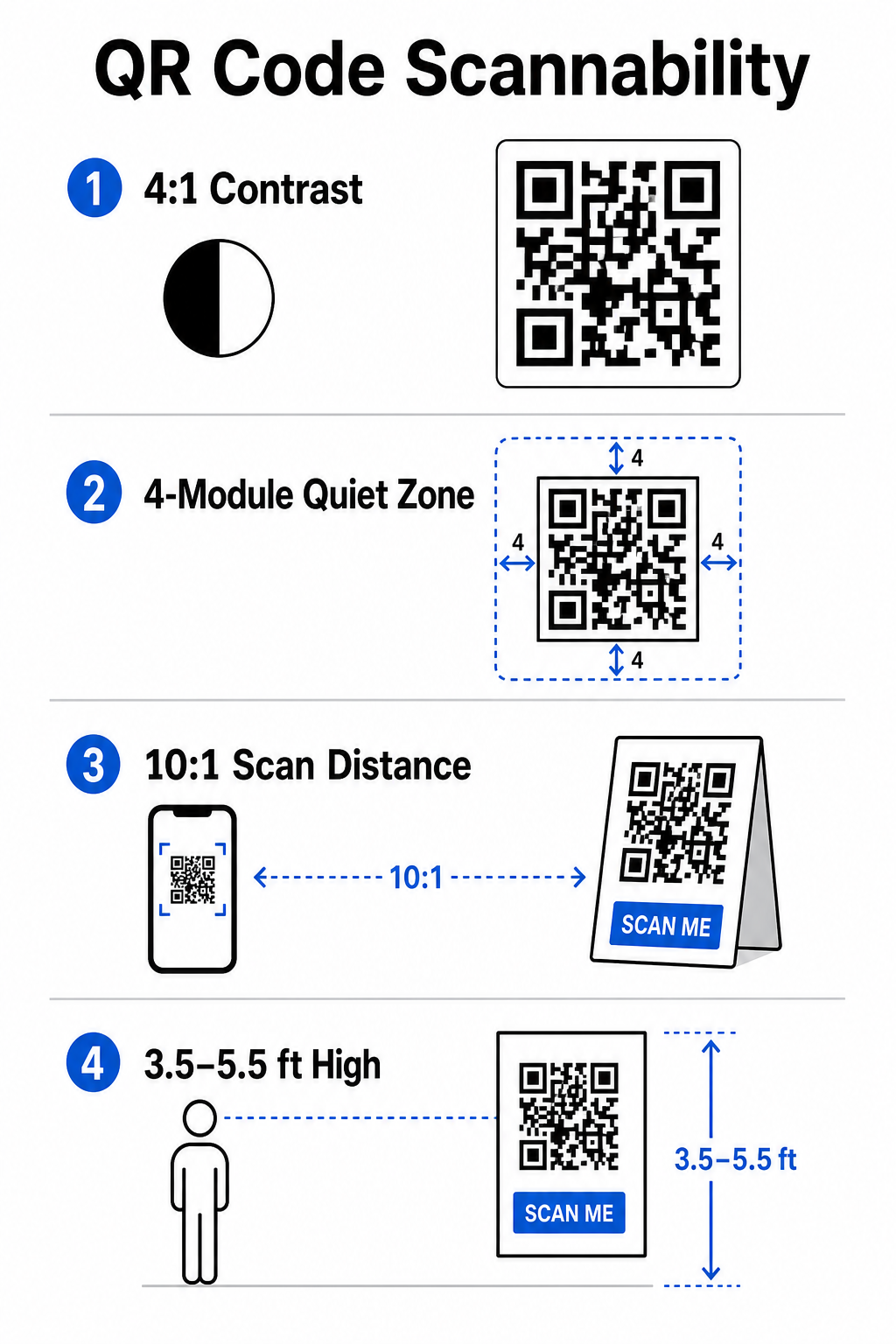
A QR code only generates conversions if smartphones can scan it quickly under real-world venue conditions. A fast, reliable scan should take no more than 3 seconds. To prevent scanning failures on printed collateral or digital displays, follow established design and placement specifications:
- Maintain Scannable Contrast
: Always use dark pattern modules on a light background, such as black or dark blue foregrounds on white or pastel backgrounds. Maintain a minimum contrast ratio of 4:1 (or 55% contrast difference) to handle low-light event spaces.
. - Austage vaikse tsooni: Reserve an empty margin around the code – known as the quiet zone – that measures at least 4 modules wide on all four sides. This border prevents surrounding graphic elements from interfering with the scanner.
. - Calculate Proper Sizing
: Apply a 10:1 size-to-distance ratio, meaning a code scanned from 10 feet away must measure at least 1 foot wide. For hand-held print items like business cards or badges, maintain a minimum size of 2 x 2 cm (0.8 x 0.8 inches).
. - Position at Natural Eye Level
: Position codes between 3.5 and 5.5 feet off the ground in high-traffic zones. Avoid placing codes across folds, curved surfaces, reflective materials, or bottom corners where hands cover them.
. - Export Vector Formats
: Save artwork as high-resolution vector files like SVG or EPS (or high-quality PNG) to prevent pixelation when scaling graphics up for large event displays.
.
For comprehensive layout techniques on posters, booths, and digital slides, review our guide to
QR-koodide paigutus turunduses.
Streamlining On-Site Operations and Attendee Engagement
During live events, QR codes eliminate friction by connecting physical spaces to digital actions without requiring manual data entry. Mapping your strategy across pre-event print promotion, on-site fast entry, and post-event feedback forms keeps attendee interactions consistent throughout the event lifecycle.
.
Digital Check-In and Entry Control
Long queues at entry doors derail the attendee experience. Issuing personalized digital badges or ticket confirmation emails equipped with unique codes speeds up access control. Door staff using smartphone cameras or dedicated optical hardware can scan codes in under 2 seconds per person, reducing entrance congestion by up to 50%.
.

For higher-security conferences, implement dynamic ticket verification to prevent credential sharing. You can learn more about deploying encrypted credentials in our guide on
kuidas luua turvalisi QR-koodiga üritusepileteid and our guide to
QR-koode üritusele registreerimiseks.
To log session arrivals or track room attendance effortlessly, organizers can also deploy a dedicated
osaluse QR-koodi system displayed at room entrances.
.
Streamline Your Event Access and Management
Want to eliminate registration lines and update event schedules dynamically without reprinting materials? Build custom, trackable event codes using the
Ürituse QR koodi loomine.
Venue Navigation and Networking
Large convention centers and multi-track venues present complex spatial navigation challenges. Displaying a
Google Maps QR-koodi loomine link on welcome signs or badges instantly opens exact pin locations, floor plans, or driving directions on an attendee’s default navigation application.
.
For exhibitors and networking sessions, digital contact exchange removes the hassle of physical business cards. Booth teams can show contact codes to capture lead details straight into CRM systems – a strategy detailed in our playbook on how to
turn event handshakes into leads with QR codes
.
Tracking Analytics and Post-Event Follow-Up
Measuring offline event marketing requires dynamic QR codes. Unlike static codes – which hardcode destination links permanently – dynamic codes store a short redirection URL that can be updated post-print while collecting full scan performance metrics.
.
To trace digital conversion paths back to specific physical items, append custom UTM parameters (`utm
source`, `utm
medium`, `utm
campaign`) to your destination URLs, such as `https://example.com/register?utm
source=eventposter&utm
medium=print&utm
campaign=annual
summit_2026`. By assigning distinct UTM parameters to individual flyers, badge lanyards, and presentation slides, you can compare placement performance inside Google Analytics or your event dashboard.
.
| Mõõdik | Business Insight Provided |
Strateegiline tegevuspunkt |
|---|---|---|
| SKANEERINGUID KOKKU | Mõõdab kampaaniamaterjalide genereeritud liikluse kogumahtu. | Määrake brändi nähtavus tervikuna kõikides võrguühenduseta asukohtades. |
| Unikaalsed skaneeringud | Jälgib üksikute osalejate tegelikku suhtlust koodiga. | Hinnake tegeliku sihtrühma ulatust võrreldes dubleerivate interaktsioonidega. |
| Skannimise kellaaeg ja päev | Tuvastab seansigraafikute ajal kõige aktiivsemad suhtlusajad. | Kohandage vastavalt töötajate paigutust ja otseteateid. |
| Geograafilised andmed | Tõstab esile linnu või konkreetseid toimumiskohti, kust skaneeringud pärinevad. | Täpsustage tulevaste paigutuste jaoks füüsiliste siltide paigutust. |
| Seadme operatsioonisüsteem | Paljastab jaotuse iOS-i ja Androidi kasutajate vahel. | Optimeeri mobiilseid maandumislehti sihtotstarbeliste operatsioonisüsteemide jaoks. |
Sessioonide järgne kiire järeltegevus suurendab konversioonide arvu pärast sündmust. Google vorm: QR-koodi generaator Väljumisekraanidel või ürituste programmides olev link ajendab osalejaid kohe sessioonile tagasisidet andma, kuni nende muljed püsivad värsked.
Põhjalikuma ülevaate skannimisandmete ja kampaaniate toimivuse mõõtmisest leiate meie täielikust juhendist. QR-koodide jälgimine ja uurige 5 parimat tööriista QR-koodi sündmuste jälgimiseks.
Eelkäivituse testimine
Enne failide saatmist kommertstrükikodadesse või digitaalsete slaidide avaldamist tehke põhjalikud reaalmaailma testid:
- Testimine mitmes operatsioonisüsteemis: Skannige kunstiteoseid vanemate ja uuemate seadmetega, millel on nii iOS-i kui ka Androidi natiivsed kaamerarakendused.
- Sihtkeskkondade kontrollimineKontrollige prinditud proovitrükke hämaras valguses, kunstliku prožektorivalguse ja kaudse päikesevalguse käes, et veenduda 4:1 kontrastsuse suhte püsimises.
- Kinnita ümbersuunamise kiirusVeenduge, et dünaamiline lühike link suunab mobiilsidevõrgu kaudu täielikult reageerivale ja mobiilile optimeeritud maandumislehele vähem kui 3 sekundiga.
- Auditi andmete sihtkoha lingidKontrollige, et manustatud UTM-parameetrid ilmuksid vormi esitamisel analüüsi armatuurlaudadele õigesti.
Ürituse QR-koodi kampaania käivitamine
Rangete skannimisstandardite, dünaamilise linkide haldamise ja tervikliku tulemuslikkuse analüüsi kombineerimine muudab staatilised trükimaterjalid jälgitavateks ürituste konversioonikanaliteks. Struktureerides oma kampaania ürituseeelsete, kohapealsete ja üritusejärgsete kokkupuutepunktide ümber, kõrvaldate tegevusalased kitsaskohad ja kogute samal ajal praktilisi osalejate andmeid.
Et teie järgmine üritus sujuks sujuvalt, looge juba täna kohandatud, muudetavaid QR-koode sisseehitatud jälgimisega, kasutades järgmist: Pagelooti ürituse QR-koodi generaator.
Korduma kippuvad küsimused
Dünaamilisi QR-koode soovitatakse tungivalt ürituste kampaaniate jaoks, sest need võimaldavad teil pärast printimist sihtkoha URL-e uuendada ja koguda üksikasjalikku skaneerimisanalüütikat, sealhulgas skaneerimiste arvu, asukohti ja seadmetüüpe. Staatilisi koode ei saa pärast printimist muuta ja need ei toeta analüütika jälgimist.
Lähiprintimise esemete, nagu visiitkaardid, rinnamärgid või lauateatrid, puhul peaks kood olema vähemalt 2 x 2 cm (0,8 x 0,8 tolli). Plakatite ja bännerite puhul, mida skannitakse kaugemalt, järgige suhet 10:1, kus koodi laius võrdub 1 ühik iga 10 ühiku skannimiskauguse kohta.
Lisa standardsed UTM-i jälgimisparameetrid (nagu utmsource, utmmedium ja utm_campaign) oma maandumislehe URL-ile enne selle dünaamiliseks QR-koodiks muutmist. Kui osalejad koodi skannivad, salvestab teie veebianalüütika tööriist automaatselt liikluse allika ja hilisemad vormitäitmised.