> 가이드 > How to Add a Scannable QR Code to a Car Magnet
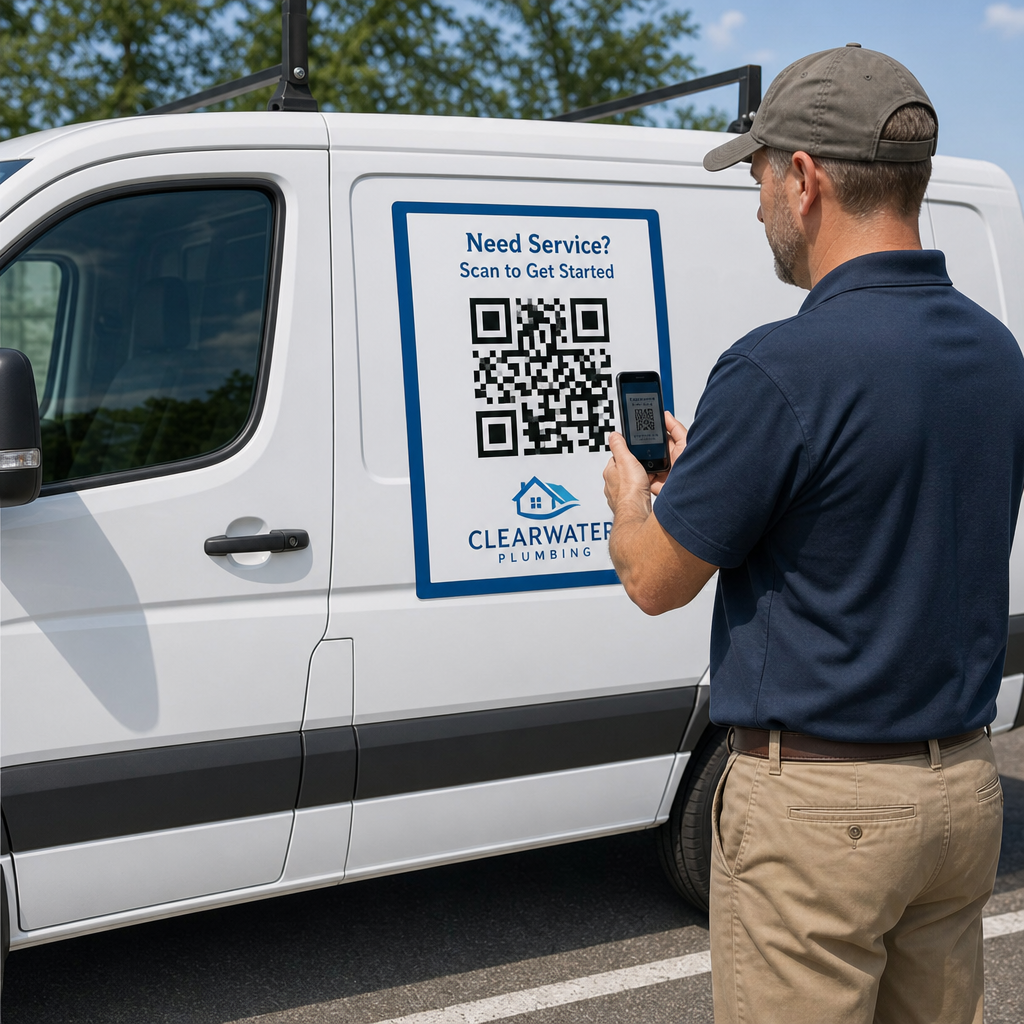
Scanning parked vehicle magnet

How to Add a Scannable QR Code to a Car Magnet

Learn how to create scannable QR codes for car magnets. Calculate sizing, optimize contrast, select vector formats, and safely apply magnets to vehicles.
Updated on 7월 27, 2026
목차

Have you ever printed a car magnet only to find that smartphone cameras fail to scan it from a few feet away? Unscannable codes waste printing costs and lose valuable customer leads on the road. Here is how to calculate dimensions, optimize contrast, and apply a scannable vehicle magnet for your business.

Calculating Code Size for Viewing Distances

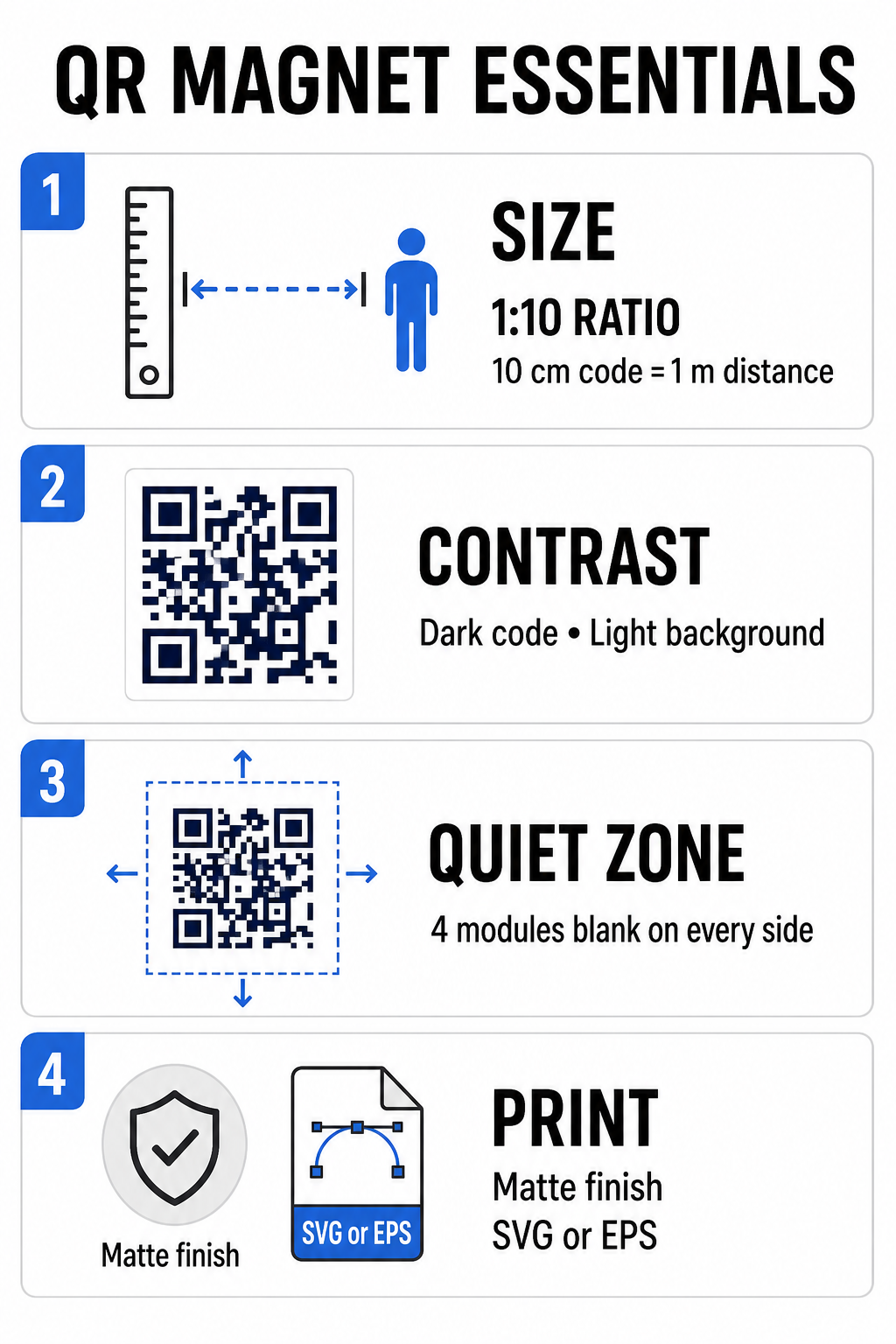
A car magnet requires a much larger QR code than a business card or flyer because viewers interact with it from a distance. Standard smartphone cameras rely on a 1:10 ratio between code size and scanning distance. If potential customers stand 1 meter (about 3.3 feet) away from your parked vehicle, the square QR code pattern must measure at least 10 cm (4 inches) wide.

Data density directly affects how easily a camera sensor locks onto your artwork from far away. Packing full web addresses into a static pattern creates tiny, crowded modules that lenses struggle to resolve. Using a 링크 QR 코드 생성기 to build a dynamic code keeps the payload short and the module structure sparse. A lower matrix density speeds up camera autofocus and improves scan reliability. Reviewing a detailed QR 코드 크기 가이드 will help you select exact dimensions based on your targeted parking spots and vehicle door sizes.

Create Trackable Dynamic QR Codes for Your Vehicles Want a clean, low-density code that you can update anytime without reprinting your magnet? Use the 무료 QR 코드 생성기 to design editable codes and track campaign performance.

Designing High-Contrast Outdoor Artwork

Outdoor lighting conditions shift throughout the day, making color selection critical for mobile scannability. Scanners detect codes by measuring light reflected from contrasting modules. You should always use a dark foreground pattern printed on a solid, light background, such as black or navy on matte white.

QR magnet design essentials

Low-contrast pairings like yellow on white or light blue on gray fail under direct sunlight or heavy shade. You can review established QR 코드 색상 대비 모범 사례 to ensure your palette meets reliable reading thresholds.

  • Maintain the quiet zone: Keep a clear, blank space at least four modules wide around all four sides of the QR code pattern. Never allow vehicle photos, background textures, or border lines to enter this margin.
  • Avoid reflective or glossy laminates: High-gloss vinyl overlays create sun glare that blinds smartphone cameras. Opt for a matte finish on your magnetic vinyl sheet to diffuse direct sunlight.
  • Export in vector file formats: Print shops require high-resolution artwork to prevent soft edges. Always export your code as a vector format like SVG 또는 EPS so the pattern scales without pixelation. Learn more about 인쇄 기술이 QR 코드 스캔 가능성에 미치는 영향.
Design Element Best Practice Common Mistake to Avoid
색상 조합 Solid dark code on a matte light background Dark gray code on patterned or dark vehicle paint
Quiet Zone Margin At least 4 modules of empty space on all sides Placing text or artwork inside the blank border
파일 형식 EPS or SVG vector graphics Low-resolution PNG or JPG images scaled up
Magnet Surface Finish Matte, non-glare UV protective coating High-gloss or metallic overlays reflecting sunlight

Adding Call-to-Action Text and Logos

A plain square pattern offers prospective customers no incentive to open their camera apps. Combining your QR code with concise call-to-action (CTA) text explains the exact benefit of scanning. Direct instructions like “Scan for 15% Off,” “Scan for Free Estimate,” or “Scan to View Menu” significantly improve scan rates.

Placing a company logo inside the center of your code strengthens visual branding and builds trust. When adding custom central artwork, select a 로고가 있는 QR 코드 생성기 options and set the error-correction level to Level Q (25%) 또는 레벨 H (30%). Higher error correction adds redundant data blocks to the pattern, allowing phone cameras to decode the target link even if your logo covers up to 30% of the center area. Be careful never to obscure or distort the three large square finder patterns located in the corners of the code.

For additional guidance on arranging marketing graphics, consult our 마케팅에서 QR 코드 배치에 대한 궁극적인 가이드.

Installing and Maintaining Car Magnets Safely

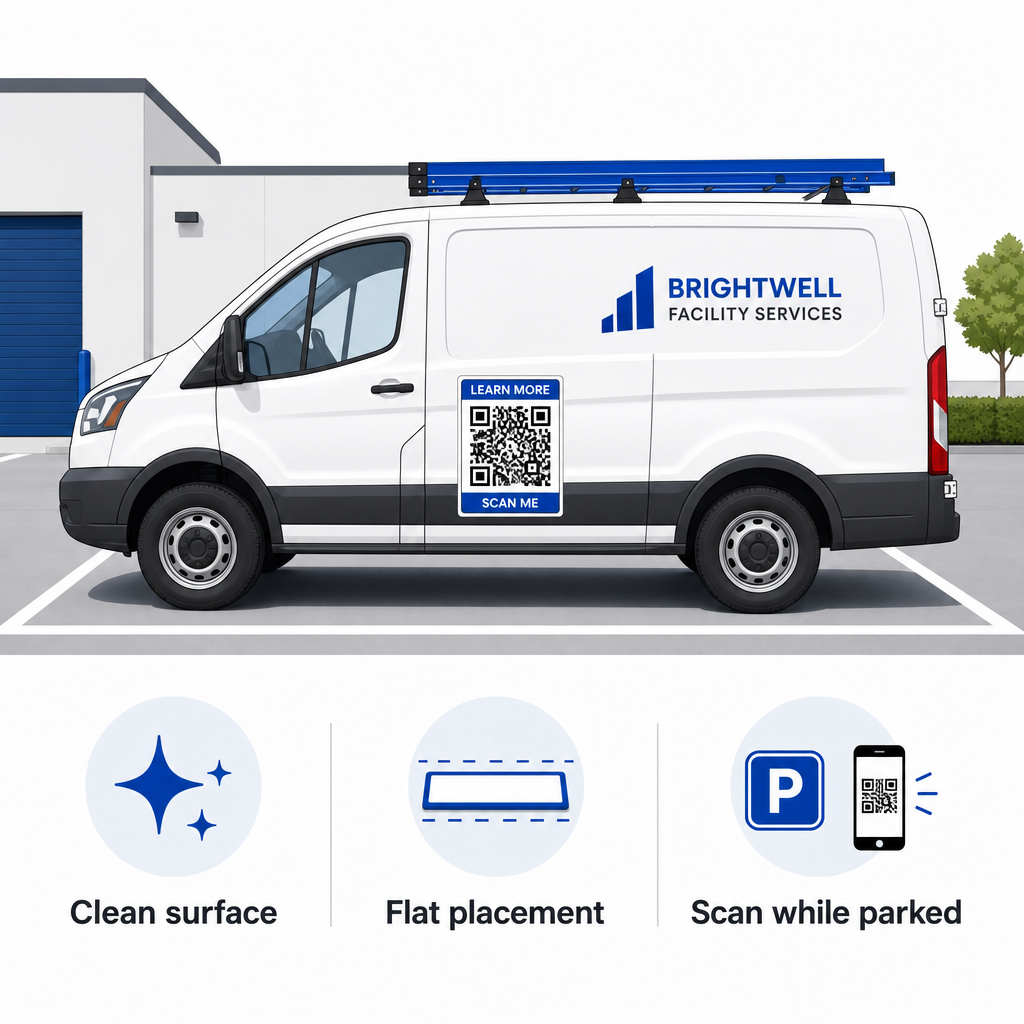
Where you position a car magnet determines whether viewers can interact with it safely. Drive-by scanning on moving vehicles is ineffective due to motion blur and creates severe traffic hazards. Design your campaign around parked scenarios, such as service vehicles stationed at job sites, delivery vans in staging areas, or personal cars parked in commercial lots.

Safe car magnet placement
  • Attach to flat metal panels: Position magnets on flat side doors, smooth side panels, or flat tailgates. Avoid body contours, trim moldings, handles, and sharp curves. Magnets will not stick to fiberglass, aluminum panels, plastic bumpers, or areas with body filler.
  • Clean the application surface: Dirt, dust, and wax buildup weaken magnetic hold and trap grit that scratches vehicle paint. Wash and dry both the vehicle panel and the magnetic backing with a mild soap solution before applying.
  • Apply the sheet completely flat: Align one edge of the magnet against the panel and let the rest attach naturally. Press firmly across the surface to eliminate air pockets, bubbles, or lifted edges that could catch wind during driving.
  • Maintain regular cleaning routines: Remove the magnet at least once a week to wipe away trapped moisture and road dust. Store unused vehicle magnets flat in a cool, dry place to prevent warping or corner curling.

Detailed installation tips for commercial fleets are available in our guide on 차량의 QR 코드.

Testing Scannability in Real Outdoor Conditions

Before deploying your vehicle magnet across active service routes, you must validate scannability across multiple real-world environments. A pattern that decodes easily under office lighting might fail when exposed to harsh outdoor glare or deep shadows.

Test your printed magnet across three critical conditions:

  • Step back to the realistic viewing distance your customers will use and confirm camera autofocus locks on quickly.
  • Check scanning performance under bright midday sun, overcast skies, and partial shade.
  • Scan the magnet using multiple iOS and Android smartphones, including budget devices with lower camera resolutions.

You can also test your destination link with an online QR 코드 스캐너 to ensure the landing page opens rapidly over cellular networks. Following established QR 코드 가독성을 위한 모범 사례 ensures your mobile marketing magnets consistently convert offline vehicle visibility into trackable online engagement.

To start building your own high-converting vehicle ad, select your target link, apply dynamic formatting with high contrast, and generate vector artwork ready for professional printing.

자주 묻는 질문

How big should a QR code be on a car magnet?

Recommended size depends on scanning distance using a 1:10 ratio. If viewers scan your magnet from 3 feet away while parked, the QR code pattern should be at least 3.6 to 4 inches (9 to 10 cm) wide. For longer viewing distances, scale the code larger and keep encoded data minimal.

Can phone cameras scan QR codes on moving vehicles?

No. Motion blur, vehicle speed, and camera autofocus delays make scanning moving vehicles unsafe and unreliable. Always design vehicle QR campaigns for situations where the vehicle is parked in accessible spots, such as job sites, parking lots, or loading areas.

What file format should I send to the magnet printing shop?

Always supply vector file formats such as SVG, EPS, or high-resolution vector PDF. Vector files maintain sharp edges at any print size, ensuring the QR code modules remain distinct without pixelation or blurriness during large-format magnet printing.

작성자 정보

시임 코스타비는 페이지루트의 콘텐츠 책임자입니다. 그는 페이지루트의 혁신적인 QR 코드 생성 서비스에 대한 글을 쓰고 있습니다. 5년 이상 QR 코드 분야에서 쌓아온 깊이 있는 전문 지식을 바탕으로, 시임은 이 분야의 전문가로 인정받고 있습니다. 그는 QR 기술을 활용하여 디지털 상호작용을 간소화하고 향상시키는 데 크게 기여하고 있습니다.

범주
에 대해 자세히 알아보기
인스타그램 QR 코드 스캔
QR 코드 만들기 인스 타 그램

온라인으로 QR 코드를 생성해야하는 경우 QR 코드 만들기 무료로 여기!
Pageloot는 #1 Go-To 솔루션 QR 코드를 만들고 스캔합니다.

BL-0319

블로그 세대

20,000개 이상의 브랜드로부터 신뢰를 받아 더 많은 매출, 리뷰, 팔로워를 확보했습니다.

클라이언트 로고
최고 브랜드의 신뢰
5 중 4.8 평가

4.86 / 5 별점

휴고 로랑
휴고 로랑
레스토랑 주인
가장 쉽고 안정적인 QR 코드 생성기. PDF 파일을 즉시 업로드할 수 있습니다. 이제 레스토랑 메뉴가 디지털화되었습니다.
루카스 얀센
루카스 얀센
부동산 개발사
이것은 훌륭한 도구이며 QR 코드를 사용하면 원하는 곳으로 이동할 수 있습니다. 우리는 위치 QR 코드만 사용하지만 유용한 기능이 너무 많습니다.
엠마 모레티
엠마 모레티
소매 제품
사용하기 쉽고 빠릅니다. 그것은 훌륭하게 작동하고 완벽한 이미지를 생성하므로 직원들이 내 vCard를 다운로드할 수 있습니다.
휴고 로랑
휴고 로랑
레스토랑 주인
가장 쉽고 안정적인 QR 코드 생성기. PDF 파일을 즉시 업로드할 수 있습니다. 이제 레스토랑 메뉴가 디지털화되었습니다.
루카스 얀센
루카스 얀센
부동산 개발사
이것은 훌륭한 도구이며 QR 코드를 사용하면 원하는 곳으로 이동할 수 있습니다. 우리는 위치 QR 코드만 사용하지만 유용한 기능이 너무 많습니다.
엠마 모레티
엠마 모레티
소매 제품
사용하기 쉽고 빠릅니다. 그것은 훌륭하게 작동하고 완벽한 이미지를 생성하므로 직원들이 내 vCard를 다운로드할 수 있습니다.
더 많은 QR 코드보기
QR 코드 유형 선택
사용하는 방법 동적 QR 코드
Scanning podcast QR code
QR 코드 팟캐스트
무엇이든 디지털 경험으로 전환하세요 3분 이내에.

14일 무료 체험.

신용카드는 필요 없습니다.

첫 구매 시 30% 할인

코드를 사용하세요:

MP3 파일 공유

PDF QR 코드를 생성하려면 가입하세요

필요한 모든 것을 업로드하고 표시합니다.

  • 오디오 파일
  • 팟캐스트
  • 음악

가입 시 14일 무료 체험.
체험 기간 후 QR 코드 만료.

오디오 mp3 QR 코드를 생성하려면 가입하세요

프레임으로 더 많은 스캔 확보

QR 코드에 더 많은 프레임을 추가하려면 가입하세요

클릭 유도 문안 프레임은 고객이 QR 코드와 쉽게 상호 작용할 수 있도록 도와줍니다. 사용해 보세요!

가입 시 14일 무료 체험.
체험 기간 후 QR 코드 만료.

QR 코드에 더 많은 프레임을 추가하려면 가입하세요

도형으로 더 많은 스타일 추가

더 많은 도형을 만들려면 가입하세요

QR 코드는 정사각형일 필요가 없습니다. 브랜드 이미지에 맞게 전환해 보세요.

가입 시 14일 무료 체험.
체험 기간 후 QR 코드 만료.

더 많은 도형을 만들려면 가입하세요

QR 코드에 로고 추가

QR 코드에 로고를 추가하려면 가입하세요

로고와 브랜드를 추가하여 QR 코드를 돋보이게 만드세요.

가입 시 14일 무료 체험.
체험 기간 후 QR 코드 만료.

QR 코드에 로고를 추가하려면 가입하세요

스마트 앱 스토어 리디렉션

앱 스토어 QR 코드를 생성하려면 가입하세요

스마트 앱 스토어 QR 코드에 앱 링크를 추가하세요. 사용자는 장치에 따라 리디렉션됩니다.

가입 시 14일 무료 체험.
체험 기간 후 QR 코드 만료.

앱 스토어 QR 코드를 생성하려면 가입하세요

QR 코드에 이미지 업로드

이미지 QR 코드를 생성하려면 가입하세요

이미지를 쉽게 공유하세요. 몇 초 안에 동적으로 이미지를 변경하십시오.

가입 시 14일 무료 체험.
체험 기간 후 QR 코드 만료.

이미지 QR 코드를 생성하려면 가입하세요

PDF 파일 공유

PDF QR 코드를 생성하려면 가입하세요

필요한 모든 것을 업로드하고 표시합니다.

  • 메뉴 및 가격표
  • 명령
  • 모든 문서

가입 시 14일 무료 체험.
체험 기간 후 QR 코드 만료.

PDF QR 코드를 생성하려면 가입하세요

인쇄 없이 나중에 편집

다시 인쇄하지 않고 QR 코드를 편집하려면 가입하세요

동적 QR 코드를 사용하면 새 QR 코드를 인쇄하지 않고도 QR 코드의 내용을 변경할 수 있습니다.

가입 시 14일 무료 체험.
체험 기간 후 QR 코드 만료.

다시 인쇄하지 않고 QR 코드를 편집하려면 가입하세요

언제? 어디서? QR 코드 스캔 추적

QR 코드를 추적하려면 가입하세요

어떤 QR 코드가 가장 많이 스캔되고 무엇이 고객을 가장 흥분시키는지 알아보십시오.

가입 시 14일 무료 체험.
체험 기간 후 QR 코드 만료.

QR 코드를 추적하려면 가입하세요

인쇄 준비 파일 제공

PDF 및 SVG와 같은 벡터 QR 코드를 생성하려면 가입하세요.

.EPS, .PDF, .SVG

HD 해상도로 QR 코드를 다운로드하고 싶으신가요? 인쇄할 준비가 된 벡터 또는 픽셀 형식을 가져옵니다.

가입 시 14일 무료 체험.
체험 기간 후 QR 코드 만료.

PDF 및 SVG와 같은 벡터 QR 코드를 생성하려면 가입하세요.

기다리세요. 귀하의 QR 코드는 로드 중... 로드 중...

나만의 것으로 만들기

나중을 위해 QR 코드를 저장하려면 가입하세요.

다양한 색상, 로고 및 클릭 유도문안 프레임으로 멋진 QR 코드를 만들어 더 많은 스캔을 받으세요.

가입 시 14일 무료 체험.
체험 기간 후 QR 코드 만료.

나중을 위해 QR 코드를 저장하려면 가입하세요.