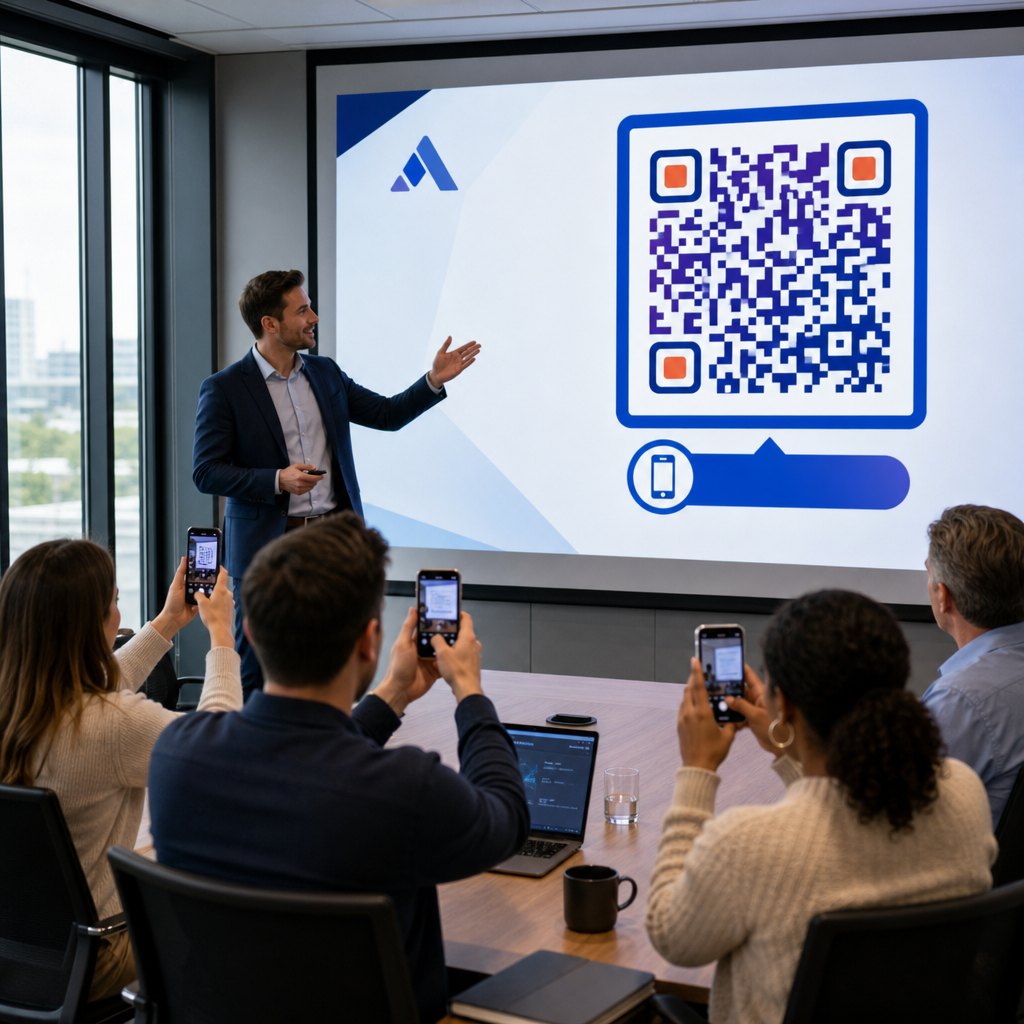
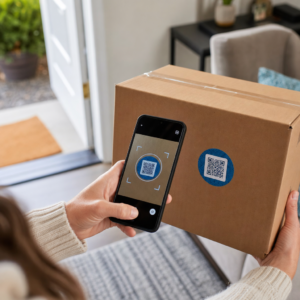
Elhagyja a kiállításokat egy halom névjegykártyával és egy világos utánkövetési terv nélkül? A manuális adatgyűjtés lelassítja, és a leadek gyorsan kihűlnek. Ez az útmutató megmutatja, hogyan használhatja a QR-kódokat az eseményekről származó leadek automatikus rögzítésére, rendszerezésére és utánkövetésére – így minden kézfogás nyomon követhető kapcsolattá válik.
Miért elégtelen a hagyományos esemény-leadgyűjtés
A legtöbb konferencián és kiállításon a szakemberek névjegykártyák cseréjével vagy jegyzetek firkálásával gyűjtenek elérhetőségeket. A probléma: a kártyák többsége az asztalon végzi, soha nem kerül be egy CRM-be. Még ha be is kerülnek, a manuális adatbevitel lassú, hibalehetőségekkel teli, és nincs szinkronban a modern értékesítési utánkövetés tempójával.
Az esemény-leadre való reagálás ablaka rövid. A kiállítás utáni utánkövetést széles körben úgy írják le, mint azt az időszakot, amikor az esemény ROI-ja eldől – a meleg leadek gyorsan kihűlnek, és egy késleltetett vagy általános első érintkezés megölhet egy egyébként ígéretes beszélgetést. Olyan rendszerre van szüksége, amely azonnal rögzíti az adatokat, a megfelelő helyre irányítja, és elindítja az utánkövetést anélkül, hogy manuálisan kellene elvégeznie.
A QR-kódok áthidalják ezt a szakadékot azáltal, hogy egy fizikai interakciót – valakinek kártyát adni, egy bannert megmutatni vagy egy kódot az asztalra helyezni – egy automatikusan futó digitális munkafolyamattal kapcsolnak össze.
Mi tesz egy QR-kódot hatékonnyá a leadgyűjtésben
Nem minden QR-kód egyformán hasznos az esemény-leadgeneráláshoz. Egy statikus QR-kód egy fix célra mutat, és nem ad adatot arról, hogy ki, mikor és hol szkennelte be. Egy dinamikus QR-kód, ezzel szemben egy rövid átirányítási linket használ, amely bármikor frissíthető, és naplózza a szkennelési tevékenységet, beleértve az időt, az eszköz típusát és a helyet.
Az esemény-leadgyűjtéshez a dinamikus kódok három okból is elengedhetetlenek:
- A cél URL-t nyomtatás után is megváltoztathatja – ez hasznos, ha több eseményen vesz részt egyetlen adag nyomtatott anyaggal
- Valós idejű elemzéseket kap a szkennelési mennyiségről és a közönség viselkedéséről
- Integrálhatja a célt a CRM-jével vagy automatizálási platformjával anélkül, hogy a nyomtatott kódot módosítaná
A Dinamikus QR-kód generátor a Pageloot-tól lehetővé teszi szerkeszthető kódok létrehozását, a célok frissítését az események között, és a teljesítmény nyomon követését egy központi irányítópultról.
Állítson be nyomon követhető eseménykódokat a következő kiállítás előtt Használja a Dinamikus QR-kód generátor szerkeszthető, elemzésre kész QR-kódok létrehozásához, amelyek közvetlenül a leadgyűjtési munkafolyamatába irányítják a résztvevőket.
1. lépés: Tervezzen egy névjegykártyát, amelyet leadgyűjtésre építettek
Névjegykártyája a teljes digitális munkafolyamat fizikai kiváltója. Ahhoz, hogy működjön, magának a kártyának érdemesnek kell lennie megtartásra – és a QR-kódnak azonnal szkennelhetőnek kell lennie.
Gyakorlati szempontok:
- Használjon prémium anyagokat: A tartós kártyákat (műanyag vagy karton) kisebb valószínűséggel dobják ki, mint a vékony papíralternatívákat. A kártya érzékelt értéke visszatükrözi márkáját.
- Helyezze el a QR-kódot feltűnő helyen: A kártya hátoldala jól működik. Kövesse a Pageloot minimális méretre vonatkozó ajánlását: 0,8 × 0,8 hüvelyk névjegykártya QR-kódokhoz a megbízható szkennelés biztosításához az eszközök típusától függetlenül.
- Tegyen bele egyértelmű cselekvésre ösztönzést: Az olyan szövegek, mint a “Szkennelje be ingyenes konzultációjáért” vagy “Szkennelje be a kapcsolattartáshoz”, pontosan megmondják a címzettnek, miért érdemes szkennelnie, és mit kap cserébe.
- Márkázza a kódot: Logója és márkaszínei hozzáadása a QR-kódhoz növeli a bizalmat és a szkennelési arányt. Az általános fekete-fehér kódok személytelennek tűnnek; a márkázott kódok szándékosnak hatnak.
Ha közvetlenül a kódba szeretne elérhetőségeket beilleszteni – hogy a résztvevők űrlap kitöltése nélkül menthessék el adatait – egy vCard QR-kód lehetővé teszi nevének, telefonszámának, e-mail címének és weboldalának beágyazását olyan formátumban, amely azonnal átkerül az okostelefon névjegyalkalmazásába.
2. lépés: Hozzon létre egy eseményre szabott céloldalt
A cél, ahová a QR-kódja mutat, legalább annyira fontos, mint maga a kód. Egy általános kezdőlap kihagyott lehetőség. Egy célorientált landing oldal amely a konkrét eseményre hivatkozik, azonnali relevanciát teremt és növeli az űrlapkitöltési arányt.
Egy jól strukturált esemény landing oldal a következőket tartalmazza:
- Személyre szabott üdvözlés (“Örülök, hogy találkoztunk a [Esemény neve] rendezvényen – íme, amit ígértem”)
- Egy rövid űrlap, amely csak alapvető információkat kér: név, e-mail és egy minősítő kérdés, amely releváns az ajánlatához
- Világos ösztönző a beküldéshez – exkluzív tartalom, ingyenes konzultációs lehetőség, hozzáférés egy közösséghez vagy letölthető forrás
Az űrlapot mobilra optimalizáltan tartsa. Szinte minden szkennelés egy eseményen okostelefonon történik, így egy zsúfolt vagy lassan betöltődő űrlap már azelőtt megöli a konverziókat, mielőtt azok elkezdődnének. A Google Forms kérdőív QR kód generátor gyors módot kínál egy mobilbarát űrlap QR-kódhoz való kapcsolására, a válaszok pedig közvetlenül a Google Táblázatokba kerülnek az egyszerű áttekintés érdekében.
Az űrlap beküldése után irányítsa át a résztvevőket egy köszönőoldalra, másodlagos cselekvésre ösztönző felhívással – iratkozzon fel hírlevélre, csatlakozzon egy közösséghez, nézzen meg egy releváns videót. Ez kiterjeszti az interakciót a kezdeti szkennelésen túlra.
3. lépés: Kapcsolja össze űrlapját egy automatizált munkafolyamattal
Az érdeklődők gyűjtése csak akkor teremt értéket, ha az adatok azonnal hasznos helyre kerülnek. Az esemény után manuálisan letöltött táblázat és a két héttel későbbi e-mailezés nem egy nyomon követési stratégia – ez egy elszalasztott lehetőség.
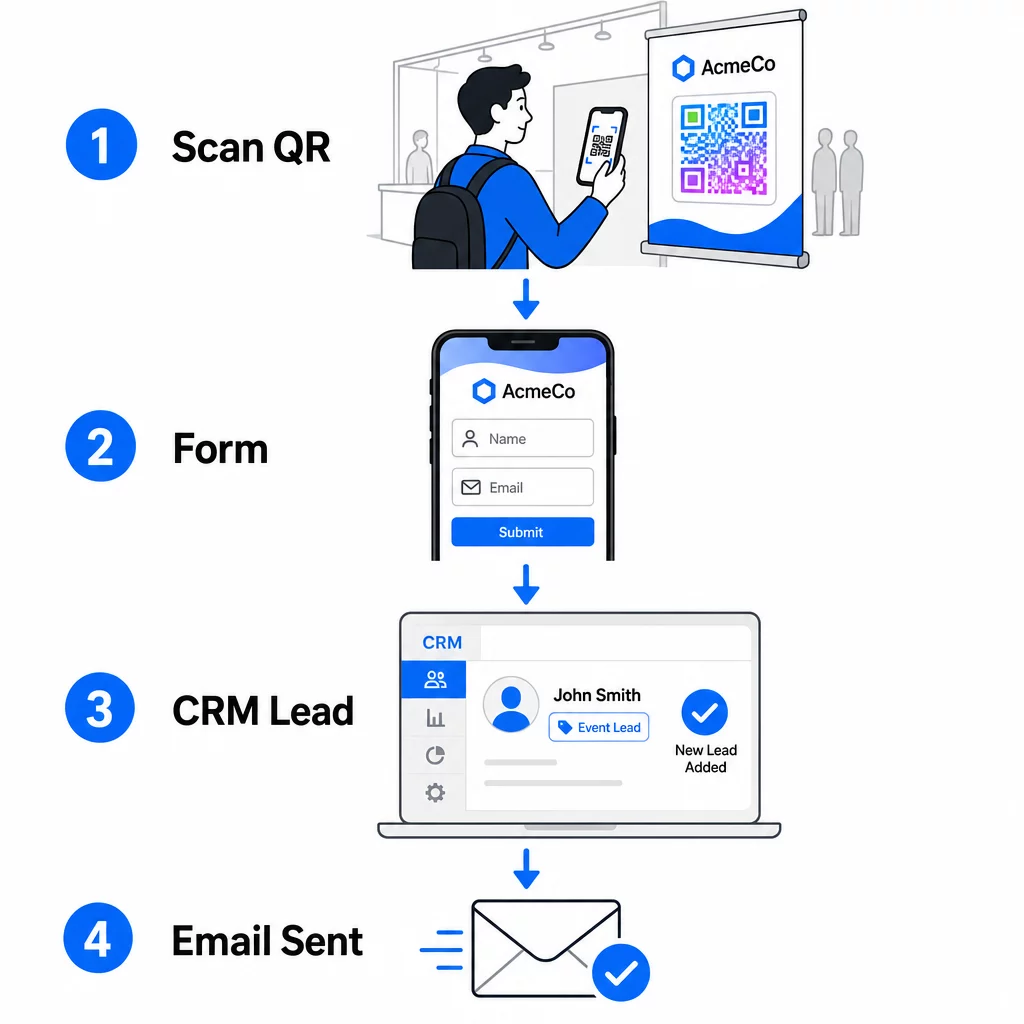
Állítsa be a munkafolyamatot, mielőtt megérkezik az eseményre:
- CRM integráció: Irányítson minden űrlapbeküldést közvetlenül a CRM-jébe, az esemény nevével és dátumával megjelölve a későbbi szegmentálás érdekében
- Azonnali nyomon követő e-mail: Indítson el egy automatizált e-mailt abban a pillanatban, amikor valaki beküldi az űrlapot – köszönje meg nekik, küldje el az ígért forrást, és állítsa be a következő lépésekre vonatkozó elvárásokat
- Lead pontozás vagy útválasztás: Ha CRM-et használ lead pontozással, konfigurálja az eseménycímkét, hogy a sales csapat prioritásként kezelje a nyomon követést
- Táblázat exportálás: Nyereményjátékokhoz vagy részvételkövetéshez automatikusan exportálja a beküldött adatokat egy Google Táblázatba, amelyet valós időben áttekinthet
A dinamikus QR-kódok CRM munkafolyamatokhoz való csatlakoztatásának mélyebb megismeréséhez az útmutató a dinamikus QR-kódok építéséről CRM bejelentkezésekhez részletesen bemutatja az URL-kódolást, az egyesítési mezőket és a webhook beállítását. Felfedezheti továbbá a QR-kód szkennelési munkafolyamat automatizálása lépésről lépésre útmutatót a szkennelési események Zapierhez vagy Make-hez hasonló platformokhoz való csatlakoztatásához.
Automatizálja esemény lead munkafolyamatát Csatlakoztassa a Esemény QR kód generátor CRM-jéhez és e-mail platformjához, hogy minden szkennelés azonnali, személyre szabott nyomon követést indítson el – kézi erőfeszítés nélkül.
4. lépés: Ösztönözze a szkennelést
Egy kiállításon vagy konferencián a résztvevőket több tucat stand és kapcsolat bombázza ajánlatokkal. Egy QR-kód önmagában nem kényszerít cselekvésre – az mögötte rejlő érték igen.
Az esemény lead rögzítésének hatékony ösztönzői a következők:
- Nyereményjátékban való részvétel (ingyenes konzultáció, termékminta vagy szolgáltatási kredit, amelyet az esemény végén sorsolnak ki)
- Azonnali hozzáférés exkluzív tartalomhoz – útmutató, ellenőrzőlista vagy sablon, amely releváns a közönség számára
- Tagok egy privát közösségben vagy korai hozzáférés egy termékhez vagy erőforráshoz
- Személyre szabott audit, értékelés vagy ajánlás, amelyet az esemény után szállítanak
Az ösztönzőnek elég specifikusnak kell lennie ahhoz, hogy értékesnek tűnjön, és elég alacsony súrlódásúnak ahhoz, hogy valaki cselekedjen rá a beszélgetés közepén. “Szkenneljen ide, hogy részt vegyen egy 60 perces stratégiai ülés megnyeréséért” meggyőzőbb, mint “szkenneljen, hogy többet tudjon meg.”
5. lépés: Több esemény kezelése egy kártyacsomaggal
A dinamikus QR-kódok egyik legpraktikusabb előnye, hogy nem kell minden eseményhez újra nyomtatni az anyagokat. Mivel a cél URL egy átirányításban van tárolva – nem magában a kódmintában –, frissítheti, hová küldi a kód a résztvevőket anélkül, hogy hozzáérne a nyomtatott kártyához.
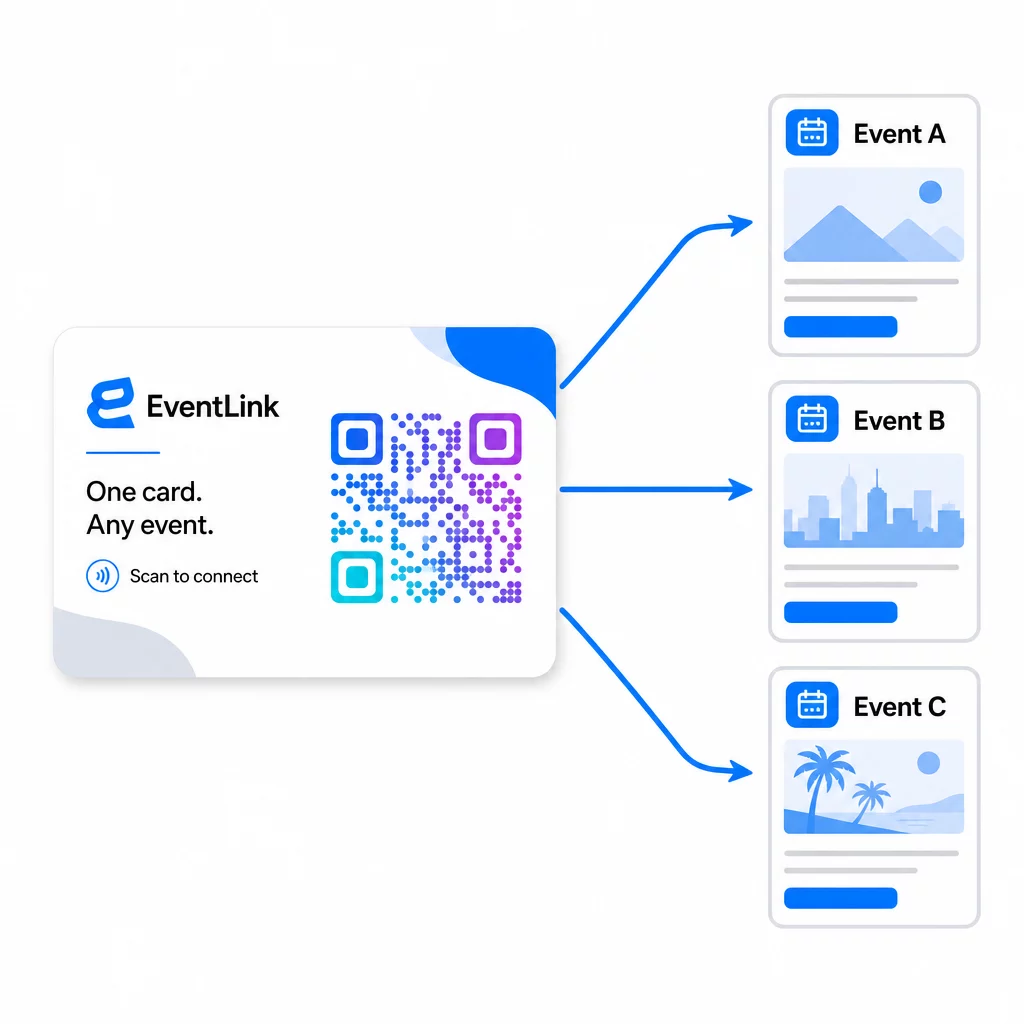
Ez azt jelenti:
- Minden esemény előtt frissítse a céloldalát, hogy az adott esemény nevére és közönségére hivatkozzon
- Az események között irányítsa át a kódot a fő webhelyére, egy univerzális lead mágnesre vagy a kapcsolatfelvételi oldalára
- Ha egy ajánlat lejár, vagy egy céloldal leáll, azonnal javítsa a műszerfaláról – nincs újra nyomtatás, nincsenek halott linkek, amelyek valós embereket érnek el
Ez a rugalmasság vonatkozik a standkiállításokra, szórólapokra és nyomtatott táblákra is. Egyetlen nyomtatott banner QR-kóddal több eseményt is kiszolgálhat különböző ajánlatokkal, közönségekkel és nyomon követési sorozatokkal, feltéve, hogy az alapul szolgáló kód dinamikus.
6. lépés: Teljesítmény nyomon követése és finomítása
Egy nem mért QR-kód kampány nem javítható. A dinamikus QR-kódok szkennelési szintű adatokat biztosítanak, beleértve az összes szkennelést, egyedi szkenneléseket, eszköz típusokat, földrajzi helyet és napszakbeli mintákat. Ezek az adatok megmondják, hogy a kártya elhelyezése működik-e, mely események generálják a legelkötelezettebb leadeket, és hogy a céloldala konvertál-e.
Használja ezeket az adatokat gyakorlati kérdések megválaszolására minden esemény után:
- Azoknak az embereknek hány százaléka, akik megkapták a kártyáját, ténylegesen beszkennelte azt?
- A szkennelések az esemény alatt vagy az azt követő napokban történtek – ami késleltetett nyomon követési viselkedésre utal?
- Mely eszköz típusok domináltak, és a céloldala teljesen optimalizálva volt-e számukra?
- Hogyan viszonyultak az űrlap konverziós arányai a különböző ösztönzőkkel rendelkező események között?
Útmutató a QR-kódos eseménykövető eszközökhöz bemutatja, hogyan értékelhetők és értelmezhetők a szkennelési elemzések egy esemény kontextusában.
Megjegyzés a hozzájárulásról és a megfelelőségről
Az eseményeken történő kapcsolattartási adatok gyűjtése azt jelenti, hogy Önre vonatkoznak az alkalmazandó adatvédelmi törvények. Az Egyesült Államokban nincs egységes szövetségi adatvédelmi törvény, de számos szabály vonatkozik az esemény utáni marketingre:
- A CAN-SPAM törvény előírja, hogy minden elküldött kereskedelmi e-mailnek tartalmaznia kell egy egyértelmű módot a címzettek számára a leiratkozásra, és ezeket a leiratkozási kérelmeket 10 munkanapon belül teljesítenie kell.
- Ha kaliforniai lakosoktól gyűjt adatokat, a Kaliforniai Adatvédelmi Jogokról szóló Törvény előírja, hogy tájékoztassa a fogyasztókat arról, hogyan gyűjtik és használják fel adataikat, és lehetővé kell tennie számukra az adatokhoz való hozzáférést, azok javítását vagy törlését.
- A Az FCC hozzájárulási szabályai a telemarketing és az SMS marketing esetében külön, specifikus hozzájárulást igényelnek minden egyes feladótól – egyetlen űrlapon keresztül szerzett általános, több félre vonatkozó hozzájárulás nem elegendő.
A legbiztonságosabb megközelítés: tegye egyértelművé az űrlap hozzájárulási nyelvezetét. Egyértelműen tüntesse fel, ki fogja felvenni velük a kapcsolatot, milyen célból, és hogyan iratkozhatnak le. Az RSVP és eseményregisztrációs folyamatok, az űrlap biztonságos HTTPS oldalon történő elhelyezése és az átlátható adatfelhasználási nyilatkozatok szerepeltetése jogi alapkövetelmény és bizalmi jel is egyben.
QR-kód vs. Névjegykártya: Gyakorlati Összehasonlítás
| Megközelítés | Adatbevitel | CRM integráció | Újrafelhasználhatóság | ELEMZÉS |
|---|---|---|---|---|
| Papír alapú névjegykártya | Kézikönyv | Manuális bevitelt igényel | Egyszeri esemény | Nincs |
| NFC kártya | Automatikus | Apptól függ | Újrafelhasználható | Korlátozott |
| QR-kód (statikus) | Űrlap alapú | Űrlap eszközön keresztül | Újrafelhasználható | Nincs |
| QR-kód (dinamikus) | Űrlap alapú | Automatizált webhookon keresztül | Újrafelhasználható, frissíthető | Teljes szkennelési analitika |
A dinamikus QR-kódok egy gyakorlati aggályt is kezelnek, amely gyakran felmerül az NFC kártyákkal kapcsolatban: az NFC megköveteli, hogy a fogadó eszköz közel legyen, és bizonyos konfigurációkban rendszer szintű hozzáférést kér. Egy QR-kód semmit sem igényel a címzett eszközétől egy kamerán kívül – nincs alkalmazás, nincs beállításmódosítás, nincs azonnal megadott engedély.
Gyakori kérdések
Nem, ha dinamikus QR-kódot használ. A dinamikus kód egy átirányítási URL-re mutat, amelyet bármikor frissíthet a műszerfaláról, így minden esemény előtt megváltoztathatja a céloldalt anélkül, hogy újra kellene nyomtatnia kártyáit vagy anyagaiat.
Legyen fókuszált és mobilbarát. Tartalmazzon személyre szabott üdvözlést, amely utal az eseményre, egy rövid űrlapot, legfeljebb három-négy mezővel, és egy konkrét ösztönzőt a beküldésért – például egy ingyenes konzultációs részvételt vagy egy letölthető forrást. Kerülje a hosszú szövegeket vagy a több, egymással versengő cselekvésre ösztönző felhívást ugyanazon az oldalon.
Tegye egyértelművé a hozzájárulási nyelvezetet az űrlapon. Egyértelműen tüntesse fel, hogy ki fogja felvenni a kapcsolatot az illetővel, milyen célból, és hogyan tud leiratkozni. Győződjön meg arról, hogy a céloldala HTTPS-en fut, haladéktalanul teljesítse a leiratkozási kérelmeket a CAN-SPAM törvény előírásai szerint, és tekintse át az alkalmazandó állami törvényeket – mint például a Kaliforniai Adatvédelmi Jogokról szóló törvényt –, ha a közönsége ezen államok lakosait is magában foglalja.