Ovatko lukukelvottomat kulkukorttien QR-koodit hidastamassa tapahtuman sisäänkirjautumisjonoja ja turhauttamassa näytteilleasettajia? Skannaamattomat koodit luovat rekisteröinnin pullonkauloja, aiheuttavat kadonnutta liididataa ja pilaavat osallistujakokemuksen. Tämä opas selittää, miten suunnitella, tulostaa ja toteuttaa skannattavia QR-koodeja konferenssikortteihin nopeaa pääsynhallintaa, liidien keräämistä ja verkostoitumista varten.
Kulkukorttien QR-koodien keskeiset käyttötapaukset
Konferenssikortit palvelevat useita operatiivisia tarkoituksia tapahtuman aikana. Skannattavan QR-koodin lisääminen muuttaa staattisen nimilapun digitaaliseksi avaimeksi osallistujille, henkilökunnalle ja sponsoreille.
- Tapahtumapaikan kulunvalvonta ja tapahtuman sisäänkirjautuminen: Osallistujan kulkukortin skannaaminen rekisteröintipisteillä tai istuntosalien ovilla varmistaa välittömästi lipun tilan. Toteuttamalla osallistumisen QR-koodi työnkulun nopeuttaa sisäänpääsyä ja tarjoaa järjestäjille reaaliaikaisen huonekapasiteetin seurannan.
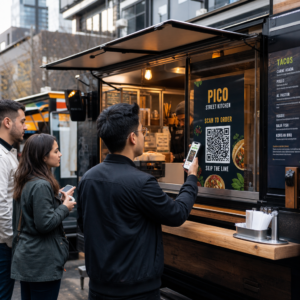
- Näytteilleasettajien liidien keruu: Osaston henkilökunta skannaa osallistujien kulkukortit kerätäkseen yhteystietoja ilman fyysisten käyntikorttien vaihtoa. Tämä mahdollistaa sponsoreille pätevien liidien kirjaamisen suoraan heidän asiakassuhdehallintajärjestelmiinsä messujen aikana.
- Vertaisverkostoituminen: Osallistujat vaihtavat yhteystietoja välittömästi skannaamalla toistensa kulkukortteja. Kulkukortin koodin linkittäminen digitaaliseen käyntikorttiin käyttämällä vCard QR-koodi: tee ilmainen yhteystieto-QR-koodi mahdollistaa vastaanottajien tallentaa nimet, puhelinnumerot ja sähköpostiosoitteet suoraan älypuhelimiensa osoitekirjoihin.
Varmistaaksesi nopean skannauksen kaikissa kolmessa käyttötapauksessa, minimoi raakadatamuisti QR-koodin kuviossa. Korkea datatiheys luo pienempiä, tiukempia neliökuvioita (moduuleja), joita mobiilikameroiden on vaikeampi käsitellä nopeasti. Käyttämällä Dynaaminen QR-koodi generaattori voit koodata lyhyen uudelleenohjauslinkin tai ainutlaatuisen tunnistejonon, mikä pitää visuaalisen kuvion harvana ja helppolukuisena.
Luo mukautettuja tapahtuma-QR-koodeja minuuteissa Yksinkertaista osallistujien rekisteröintiä ja kulkukorttien skannausta suunnittelemalla mukautettavia tapahtumakoodeja Tapahtuman QR-koodi generaattori tänään.
Tekniset ohjeet kulkukorttien skannattavuudelle
Skannaamatta jäävä rintamerkkikoodi aiheuttaa pitkiä odotusaikoja ja tarkkojen tietojen katoamista. Noudata näitä teknisiä suunnittelustandardeja varmistaaksesi, että jokainen rintamerkki skannautuu luotettavasti ensimmäisellä yrityksellä.

| Ominaisuusstandardi | Tekninen vaatimus | Toiminnallinen syy |
|---|---|---|
| Minimitulostuskoko | 1 × 1 tuuma (2,5 × 2,5 cm) | Takaa selkeän tarkennuksen käsiskannereille käsivarren etäisyydellä (10–25 tuumaa). |
| Hiljaisen vyöhykkeen marginaali | Vähintään 4 moduulia leveä | Estää ympäröivää tekstiä, logoja tai rintamerkkien reunuksia häiritsemästä lukijaa. |
| Värikontrasti | Vähintään 4:1 kontrastisuhde | Varmistaa, että optiset anturit erottavat tummat etualan moduulit taustapaperista. |
| Kuvan tarkkuus | Vektorimuoto (SVG/EPS) tai 300 DPI | Poistaa epäselvät tai pikselöityneet reunat skaalattaessa rintamerkkigrafiikkaa tulostuskierroksia varten. |
Värikontrasti ja visuaalinen tyyli
Tulosta aina tummat QR-kuviot vaaleille taustoille. Mustat moduulit valkoisella taustalla tarjoavat korkeimman luettavuuspisteet ja standardin 21:1 kontrastisuhteen. Vaikka mukautettuja brändivärejä voidaan käyttää, säilytä vähintään 4:1 kontrastisuhde erilaisten tapahtumapaikkojen valotasojen huomioimiseksi. Vältä käänteisiä malleja, joissa on vaaleita kuvioita tummilla taustoilla, koska monet natiivit älypuhelinten kameranlukijat eivät pysty käsittelemään käänteisiä koodeja. Yksityiskohtaiset värivalintasäännöt löydät oppaastamme aiheesta QR-koodin värikontrastin parhaita käytäntöjä.
Hiljaisen alueen vaatimukset
Hiljainen vyöhyke on selkeä marginaali, joka ympäröi QR-koodin kaikkia neljää sivua. Standardit edellyttävät hiljaisen vyöhykkeen leveyttä, joka on vähintään neljä kertaa yhden yksittäisen moduulin (neliölohkon) leveys. Älä koskaan sijoita nimiä, titteleitä, sponsoreiden logoja tai taustagrafiikkaa tähän marginaaliin, sillä se estää skanneria paikantamasta koodin rajoja.
Rintamerkkimateriaalit ja tulostustekniikat
Rintamerkin fyysinen alusta ja pintakäsittely vaikuttavat merkittävästi siihen, miten valo heijastuu skannauslinssiin.
Alustojen ja viimeistelyjen valinta
Valitse mattapintainen tai päällystämätön kartonki aina kun mahdollista. Kiiltävät muoviset nimikyltit, kiiltävät läpinäkyvät päällysteet ja paksut vinyylipussit heijastavat yläpuolista tapahtumapaikan valaistusta suoraan kameran linsseihin, mikä aiheuttaa ylivalottumista ja skannausvirheitä. Jos läpinäkyvät muoviset nimikylttipidikkeet tai kiiltävä laminointi ovat välttämättömiä tapahtumapaikkasi järjestelyissä:
- Suurenna tulostetun koodin kokoa 15–20 % antaaksesi kamerasensoreille suuremman kohteen.
- Ohjeista kameran käyttäjiä tai osaston henkilökuntaa pitämään skannauslaitteita hieman vinossa ohittaaksesi suoran valon heijastuksen.
- Vältä kuvioitua synteettistä kartonkia, joka häiritsee tulostettujen moduulien suoria geometrisia reunoja.
Tiedostojen vienti tuotantoa varten
Älä koskaan vie nimikylttien kuvitusta matalaresoluutioisina JPEG- tai PNG-tiedostoina. Bittikarttakuvien koon muuttaminen aiheuttaa pikselien sumentumista, mikä pyöristää moduulien teräviä kulmia. Vie kuvitus vektorimuodoissa, kuten SVG tai EPS, tai vie korkearesoluutioisia PDF-tiedostoja, jotka on asetettu 300 DPI:hin täydessä tulostuskoossa. Kattavan yleiskatsauksen siitä, miten alustan valinnat ja musteen levitys vaikuttavat skannattavuuteen, löydät artikkelistamme aiheesta miten tulostustekniikat vaikuttavat QR-koodin skannattavuuteen.
Nimikylttien sijoittelusäännöt
Aseta QR-koodi nimikyltin etupuolelle, mieluiten keskelle tai alimpaan kolmannekseen, jossa kaulanauhat tai pidikkeet eivät estä sitä. Koodin sijoittaminen lähelle ensisijaista lukureittiä varmistaa nopean visuaalisen kohdistuksen sisäänkirjautumisen aikana. Tutustu suosituksiimme kohdassa opas QR-koodien sijoitteluun markkinoinnissa, ja tarkastele todellisia toteutuksia meidän tapaustutkimuksessamme tieteellisistä konferensseista. Tarkat kokotiedot fyysisen skannausetäisyyden perusteella löydät omistetusta QR-koodin kokooppaastamme.

Tietosuoja ja operatiiviset skannausprosessit
Nimikylttien QR-koodien käyttöönotto edellyttää nopeiden operatiivisten työnkulkujen ja osallistujatietojen suojauksen tasapainottamista.
Osallistujatietojen suojaaminen
Koko henkilökohtaisten tietojen – kuten puhelinnumeroiden, katuosoitteiden ja sähköpostiosoitteiden – koodaaminen suoraan staattiseen viivakoodiin altistaa osallistujien tiedot kaikille, jotka skannaavat nimikyltin kaupallisella kamerasovelluksella.
Sen sijaan koodaa salattu, yksilöllinen aakkosnumeerinen tunniste (kuten `ID-88302`). Kun valtuutettu tapahtumahenkilöstö skannaa rintakkeen yritystyökalulla tai verkossa QR-koodin lukija, taustajärjestelmä varmentaa tunnisteen turvallisesti tulostamatta arkaluonteisia henkilötietoja fyysisen rintakkeen sisältöön.
Suostumuksen hankkiminen liidien keräämiseen
Tietosuojasäännösten noudattamiseksi:
- Erilliset käyttötapaukset: Käsittele tapahtuman sisäänkirjautumisskannausta erillisenä näytteilleasettajien liidien keräämisestä. Sisäänkirjautuminen tapahtumapaikkaan ei automaattisesti anna kolmansille osapuolille luvan tallentaa yhteystietoja.
- Anna selkeä ilmoitus: Ilmoita osallistujille rekisteröitymisen yhteydessä, että näytteilleasettajalle annettu lupa skannata heidän rintakeensä on nimenomainen valinta jakaa yhteystietonsa kyseisen sponsoroijan kanssa.
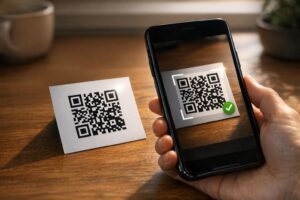
- Käytä nimenomaisia skannauksia: Varmista, että osaston hakusovellukset näyttävät visuaalisen onnistumisvahvistuksen (kuten vihreän vahvistusbannerin), jotta osallistujat tietävät, milloin liidiskannaus tapahtuu.
Tapahtuman onnistumisen toiminnallinen tarkistuslista
Ennen kuin tulostat kaikki konferenssirintamerkkisi, suorita tämä laadunvarmistuksen tarkistuslista:
- Tarkista kontrasti: Testaa tausta- ja etualan yhdistelmiä digitaalisella kontrastin tarkistajalla varmistaaksesi yli 4:1-suhteen.
- Ylläpidä hiljaisia alueita: Varmista, että lopullisessa asettelumallissa jokaisen rintamerkkikoodin ympärillä on 4 moduulin tyhjä reuna.
- Tulosta fyysiset vedokset: Älä koskaan luota pelkästään näytön esikatseluihin. Tulosta todelliset fyysiset rintamerkkivedokset valitulle rintamerkkipaperille tai kartongille.
- Testaa eri laitteiden välillä: Skannaa fyysiset vedokset realistisessa tapahtumapaikan valaistuksessa käyttäen useita älypuhelinmalleja (sekä iOS että Android) ja erillisiä kädessä pidettäviä skannereita.
- Vahvista datareitit: Tarkista, että dynaamiset QR-linkit ohjautuvat oikeille laskeutumissivuille tai sisäänkirjautumisjärjestelmien tietokantoihin rikkoutumatta.
Tehosta seuraavaa tapahtumaasi skannattavilla rintamerkeillä
Näiden suunnittelu-, materiaali- ja datastandardien noudattaminen varmistaa, että tapahtumarannekkeesi mahdollistavat vaivattoman sisäänkirjautumisen ja luotettavan liidien keräämisen. Rannekkeiden suunnittelu oikealla kontrastilla, riittävillä tyhjillä alueilla, mattapinnoilla ja kevyillä dynaamisilla tiedoilla poistaa rekisteröinnin pullonkaulat ja suojaa osallistujien yksityisyyttä.
Aloittaaksesi korkeakontrastisten, skaalautuvien QR-koodien luomisen tuleviin tapahtumamateriaaleihisi, tutustu parhaita käytäntöjä QR-koodin luettavuudelle ja testaa rannekkeesi ulkoasua jo tänään.
Usein kysytyt kysymykset
Tulosta rannekkeen QR-koodit vähintään 1 × 1 tuuman (2,5 × 2,5 cm) tai vähintään 2 × 2 cm kokoisina. Tämä koko mahdollistaa tyypilliset käsivarren mitan skannausetäisyydet, 10–25 tuumaa, käytettäessä tavallisia älypuhelinkameroita.
Dynaamiset QR-koodit koodaavat lyhyen ohjauslinkin eivätkä tiivistä raakatekstiä, pitäen visuaalisen kuvion yksinkertaisena ja nopeana skannata. Ne myös sallivat järjestäjien muokata kohde-URL-osoitteita tai hallita käyttöoikeusasetuksia tulostuksen jälkeen ilman fyysisten kulkukorttien uudelleenmyöntämistä.
Käytä heijastamatonta mattapintaista nimikemateriaalia aina kun mahdollista. Jos läpinäkyviä vinyylipusseja tarvitaan, suurenna QR-koodin kokoa 15–20 % ja ohjeista henkilökuntaa tai näytteilleasettajia pitämään skannauslaitteita 45 asteen kulmassa suorien yläpuolisten valoheijastusten välttämiseksi.