Kas teie standardsed mustvalged QR-koodid ei suuda teie kliente kaasata? Üldised koodid sulanduvad sageli kiiretesse ümbrustesse, põhjustades turundusvõimaluste möödahiilimise ja pettumust valmistava skannimismäära. Õppige, kuidas ühendada visuaalse tehisintellekti vihjeid funktsionaalsete disainistandarditega, et luua kaubamärgiga koode, mis näevad välja eristuvad ja skannivad usaldusväärselt iga kord.
Miks visuaalne disain suurendab kaasatust
Aastaid vaadeldi QR-koode rangelt kui funktsionaalseid vöötkoode, kuid läbimõeldud esteetika mõjutab otseselt kasutaja interaktsiooni. Logodega kaubamärgiga koodid võivad suurendada skaneerimismäärasid 30% kuni 70% võrreldes üldiste disainidega, sest tarbijad seostavad visuaalset lihvi usaldusväärsuse ja brändi turvalisusega. Kaubamärgiga QR-koodi loomisel on oluline kasutada tehisintellekti logo loojat saab aidata arendada järjepidevat logo, mis sobib loomulikult koodi visuaalsesse identiteeti. Kui kood näeb välja nagu teie visuaalse identiteedi tahtlik osa, tunnevad kasutajad end kindlalt oma telefonikaamerat sellele suunates.
Lisaks põhilisele esteetilisele veetlusele pakub tehisintellekti kasutamine koodide stiliseerimiseks konkreetseid operatiivseid eeliseid. Uuringud näitavad, kuidas tehisintellekt täiustab QR-koodide turundust tasakaalustades kunstilisi modifikatsioone mustrite rekonstrueerimisega, mis võib suurendada skannimise täpsust umbes 25% võrra. Läbimõeldud paletivalikute rakendamine tasub samuti ära, kuna õiged QR-koodi värvikontrast ja kohandatud värvid võivad suurendada kasutajate kaasamist kuni 18%.
Tehnilised reeglid skaneeritavate tehisintellekti koodide jaoks
QR-koodi stiliseerimine hõlmab üksikute pikslite ja moodulite kujundite muutmist, mis tekitab lugemisvigu, kui tehnilisi piire ignoreeritakse. Skannerid sõltuvad selgetest geomeetrilistest markeritest, et dekodeerida manustatud sihtkoht. Tunnustatud ISO standarditele vastamine tagab, et teie kunstilised valikud ei riku funktsionaalsust:
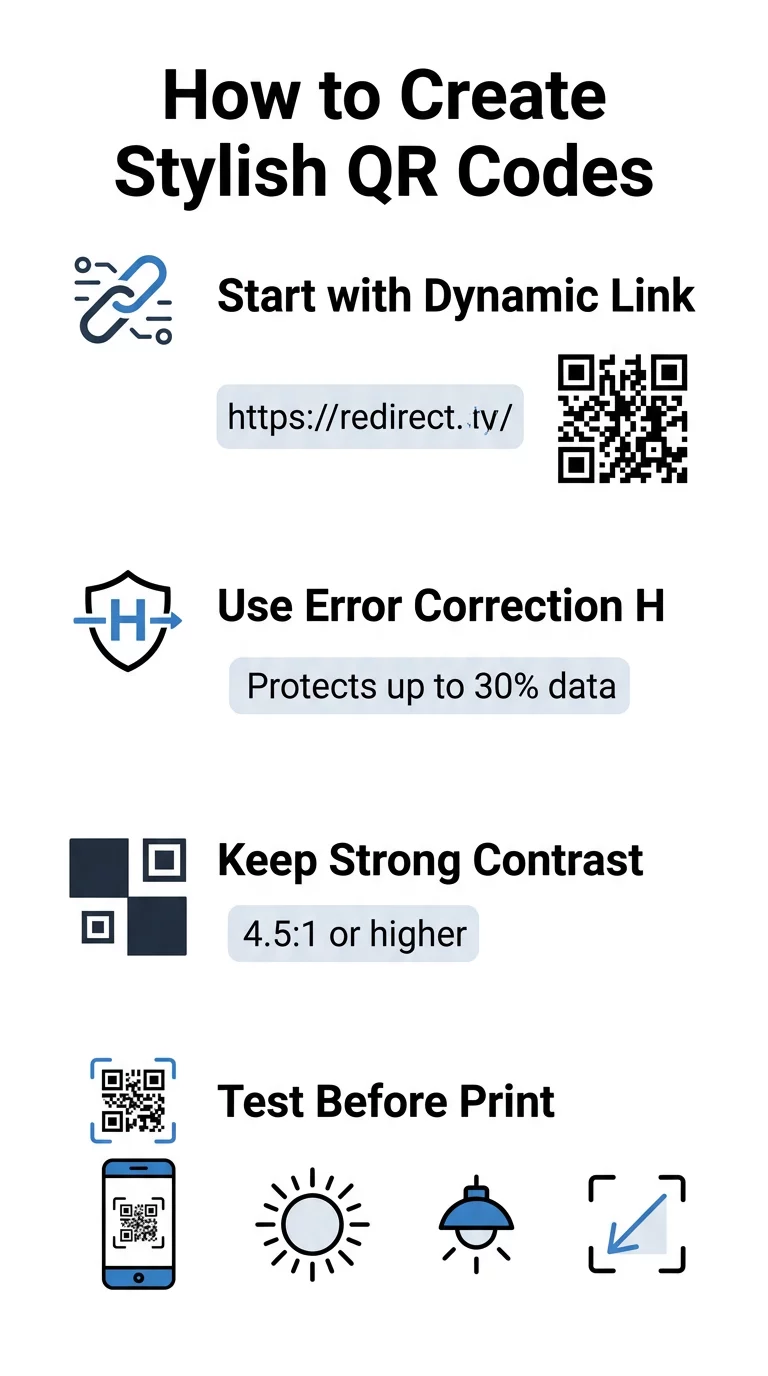
- Määra veaparandus tasemele H: Mõistmine kuidas veaparandus töötab on kunstiliste kujunduste jaoks hädavajalik. Tase H (kõrge) võimaldab koodil taastada kuni 30% puuduvatest või varjatud andmetest, pakkudes vajalikku puhvrit tehisintellekti tekstuuride segamiseks või logode ülekandmiseks.
- Kaitske leidjamustreid: Kolm nurgas asuvat asendi tuvastamise ruutu kasutavad selget laiussuhet 1:1:3:1:1. Skannerid toetuvad nendele markeritele, et tuvastada orientatsiooni mis tahes nurga alt, seega peavad need jääma selgelt määratletuks ja varjamatuks.
- Säilitage tugev värvikontrast: QR-lugerid mõõdavad valguse peegelduvuse erinevust tumedate moodulite ja heledate alade vahel. Püüdke saavutada kontrastsussuhe vähemalt 4.5:1, hoides tumedaid mustreid selgetel, heledatel taustadel, vältides samal ajal pööratud värvipalette.
- Säilitage vaikne tsoon: Hoidke alati koodi kõigil neljal küljel takistamatu, vähemalt nelja mooduli laiune serv. See tühi piir eraldab andmemaatriksi lähedalasuvast tekstist, kunstiteostest või pakendigraafikast.
- Järgige suuruse valemeid: Käes hoitavate esemete, nagu flaierid või visiitkaardid, puhul hoidke koodid vähemalt 0.8 x 0.8 tolli (2 x 2 cm). Nagu on esile tõstetud meie QR-koodi disaininõuanded, peaksite lisama umbes 0.3 tolli mõõtmele iga jala kohta kaugust kasutaja ja koodi vahel.
Uuendage oma brändi visuaale koheselt Kas soovite ühendada loomingulise elegantsi usaldusväärse skaneerimisvõimega? Kasutage Pagelooti logoga QR-koodi generaatorit värvide kohandamiseks, oma brändiikooni lisamiseks ja dünaamiliste jälgimisvahendite kasutamiseks juba täna.
Praktiline töövoog tehisintellekti ja QR-koodide segamiseks
Stiilse, masinloetava vara loomine nõuab samm-sammult liikumist toorandmetest kunstilise genereerimiseni. Otse pildifiltrite juurde hüppamine ilma alusmaatriksit ette valmistamata toob sageli kaasa loetamatu kunstiteose.
- Looge puhas baaskood: Alustage standardse QR-koodi generaator sees, et sisestada oma URL ja valida H-taseme veaparandus. Selle puhta digitaalse maatriksi genereerimine loob täpse ruudustiku, mida teie tehisintellekti mudel stiliseerib.
- Koostage täpsed AI viiped: Sisestage oma baaskood pildigeneraatori mudelisse, kasutades kirjeldavaid viipaparameetreid. Määrake selged teemad, arhitektuuristiilid, valgustingimused või värvipaletid ja vältige abstraktseid viipeid, mis segavad tumedaid ja heledaid mooduleid kokku.
- Säilitage kriitilised ankrud: hoidke viipajuhiste kaalu tasakaalus, et tööriist ei muudaks kolme nurgaotsija mustrit ega moonutaks moodulvõrku äratundmatult.
- Integreerige tsentreeritud kaubamärgid: lisage disaini keskele ikoon või kaubamärk, tagades, et see hõivab mitte rohkem kui 20% kuni 30% kogu pindalast, järgides standardseid kohandatud QR-kood juhiseid.
- Lisage välimine üleskutse raam: ümbritsege oma valmis kunstiteos kindla piirjoone ja tegevusfraasiga, näiteks “Skaneeri, et avastada”, et kasutajad mõistaksid kohe, kuhu kood viib.
Miks dünaamilised QR-koodid toetavad paremaid visuaale
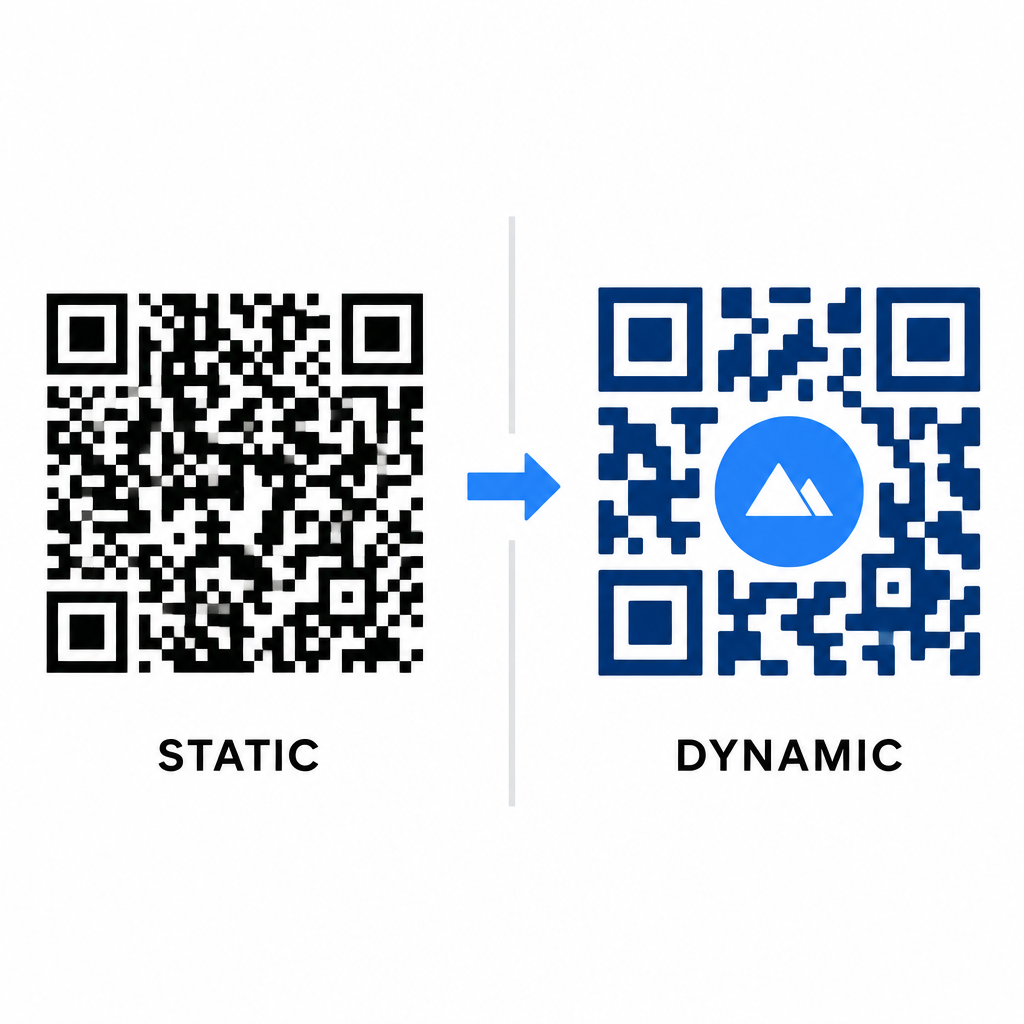
Andmete tihedus mõjutab otseselt teie kunstilist vabadust. Staatilised QR-koodid kodeerivad kogu sihtkoha URL-i füüsilisse mustrisse. Kui teie link on pikk, peab generaator looma tiheda pisikeste moodulite maatriksi, jättes väga vähe ruumi tehisintellekti illustratsioonidele või logo integreerimiseks, ilma et see põhjustaks skaneerimisvigu.
Dünaamilised koodid ületavad selle kitsaskoha, salvestades lühikese ümbersuunamis-URL-i kesksesse serverisse. See hoiab füüsilise võrgu avarana ja moodulid suurtena, muutes stiliseeritud kujundite lugemise kaameraobjektiivide jaoks palju lihtsamaks. Pärismaailma uurimine bränditud QR-koodide näited näitab, et dünaamilised seadistused võimaldavad teil pärast printimist sihtkohti värskendada, samal ajal kui teil on juurdepääs täielikule QR-koodi funktsioonid nagu seadme jälgimine, skaneerimiskohad ja kaasamisanalüütika.
Oma kujunduste testimine ja valideerimine
Ärge kunagi saatke tehisintellekti abil stiliseeritud QR-koodi printimisse, ilma et oleksite seda valideerinud erinevate riistvara- ja keskkonnaseadete kaudu. Tehisintellekti mudelid võivad tekitada peeneid artefakte, mis läbivad ühe esmaklassilise kaamera, kuid ebaõnnestuvad standardseadmetes.
- Testige mitmeid mobiilseadmeid: skaneerige koodi nii iOS-i kui ka Androidi natiivsete kaamerarakendustega, samuti vanemate kolmandate osapoolte skaneerimisrakendustega, et kinnitada universaalne ühilduvus.
- Hinnake erinevaid valgustingimusi: kontrollige loetavust terava otsese päikesevalguse käes, siseruumide kontorilampide all ja hämarates keskkondades, et varjud ei rikuks kontrasti.
- Skannige loomulikest nurkadest: suunake oma seade 45-kraadise nurga alt ja tavalistelt tarbija kaugustelt, selle asemel et testida ainult tasapinnalisi, otse skaneeringuid.
- Kinnitage trükimaterjalid: testige füüsilisi näidiseid planeeritud paberivarul, kuna läikivad laminaadid, tekstureeritud kartongid või kangad võivad tekitada peegeldusi, mis moonutavad tehisintellekti kunstiteoseid.
Funktsionaalse kunsti rakendamine teie brändile
Geneeriliste koodide muutmine stiilseteks brändivaradeks võimaldab teil püüda klientide tähelepanu, ohverdamata samal ajal kasulikkust. Alustades dünaamiliste lühilinkide loomisest, kindlustades H-taseme veaparanduse, säilitades vaikse tsooni ja hoides ranget kontrastsussuhet, loote visuaalselt pilkupüüdvaid kujundusi, mis dekodeeritakse vaevata.
Alustage oma digitaalsete puutepunktide kohandamist juba täna, kasutades Pageloot’i genereerimis- ja jälgimiskomplekti, et pakkuda meeldejäävaid, skannimisvalmis elamusi kõigis oma turunduskampaaniates.
Korduma kippuvad küsimused
Vältige pööratud värviskeeme, sest paljud nutitelefoni sensorid ei suuda dekodeerida valguse mustreid tumedatel pindadel. Püsige tumedate esiplaanimoodulite juures, mis on paigutatud valgele või heledale taustale, et tagada järjepidev skannimine.
Tase H võimaldab QR-koodil taastada kuni 30% kaotatud või varjatud andmetest. See sisseehitatud üleliigsus pakub ohvripuhvrit, mis on vajalik tehisintellekti tekstuuride segamiseks või tsentreeritud logode manustamiseks andmete terviklikkust kaotamata.
Need skaneerivad usaldusväärselt tänapäevastes nutitelefonides, kui hoiate nurgas olevad positsioneerimismustrid eristuvad, säilitate vaikse tsooni ja tagate tugeva kontrasti. Testige oma kunstiteoseid alati mitmete telefonimudelitega enne kampaania käivitamist.