Sie sind sich nicht sicher, wie Sie QR-Codes in Ihrem Fitnessstudio oder Ihrer Sporteinrichtung über einen einfachen Website-Link hinaus tatsächlich nutzen können? Fitnessunternehmen, die QR-Codes strategisch einsetzen, reduzieren den administrativen Aufwand, binden Mitglieder stärker ein und wandeln mehr Laufkundschaft in zahlende Kunden um. Dieser Leitfaden behandelt praktische, sofort umsetzbare Ideen, die danach geordnet sind, wie sie in Ihren täglichen Betrieb passen.
Warum Fitnessunternehmen QR-Codes einführen
Die Fitnessbranche hat einen dauerhaften Wandel hin zu digitalen Berührungspunkten vollzogen. Mitglieder erwarten schnellen Self-Service-Zugang zu Kursplänen, Trainingsanleitungen und Kontoverwaltung – und das alles auf ihren Telefonen. QR-Codes überbrücken die Lücke zwischen der physischen Fitnessstudio-Umgebung und den digitalen Inhalten, die Mitglieder wünschen, ohne dass das Personal jede Interaktion manuell bearbeiten muss.
Dynamische QR-Codes eignen sich besonders gut für Fitnessunternehmen. Im Gegensatz zu statischen Codes, bei denen die Ziel-URL dauerhaft kodiert ist, ermöglichen dynamische Codes die Aktualisierung des verknüpften Inhalts jederzeit, ohne den physischen Code neu drucken zu müssen. Das bedeutet, Sie können eine saisonale Aktion austauschen, einen Kursplan aktualisieren oder ein Trainingsvideo wechseln – und der Code an Ihrer Wand funktioniert weiterhin. Dynamische Codes unterstützen auch die Scan-Verfolgung, sodass Sie überwachen können, wie oft ein Code gescannt wurde, von welchem Standort, auf welchem Gerät und zu welcher Zeit.
Für einen Überblick, wie QR-Codes speziell im Fitnessstudio-Betrieb eingesetzt werden, siehe QR-Codes für Fitnessstudios und Wellnessunternehmen.
Mitglieder-Check-in und Zugangskontrolle
Das Ersetzen physischer Mitgliedskarten oder Anwesenheitslisten durch QR-basierten Check-in ist eine der operativ wirkungsvollsten Anwendungen. Mitglieder scannen einen Code am Eingang, um ihre Anwesenheit zu erfassen oder ein Drehkreuz zu entriegeln, wodurch Warteschlangen entfallen und die Arbeitsbelastung am Empfang reduziert wird.
Sie können ein einfaches Anwesenheitsverfolgungssystem mit einem Link-QR-Code das mit einem Formular oder einer Check-in-Seite verbunden ist. Dynamische Codes sind hier die bessere Wahl, da Sie den Code auf eine neue Check-in-URL umleiten können, falls sich Ihre Plattform ändert, ohne die gedruckte Beschilderung anfassen zu müssen.
Wo Check-in-Codes platziert werden sollten:
- Fitnessstudio-Eingang oder Drehkreuz
- Empfangstheke
- Türen einzelner Studios oder Kursräume
Neumitglieder-Anmeldung und Onboarding

Ein QR-Code an einem Fenster, auf einem Flyer oder einem Empfangsdisplay kann ein potenzielles Mitglied direkt zu einem Anmeldeformular, einer Verzichtserklärung oder einer Probekursanmeldung führen – ohne dass ein Mitarbeiter assistieren muss. Dies ist besonders nützlich außerhalb der Geschäftszeiten oder zu Stoßzeiten, wenn das Empfangspersonal beschäftigt ist.
Verwenden Sie eine Google Formular QR-Code um Interessenten sofortigen Zugriff auf Anfragen, Mitgliedschaftsregistrierungen oder Verzichtserklärungen von ihrem eigenen Gerät aus zu ermöglichen. Für das Onboarding bestehender neuer Mitglieder kann ein einziger PDF QR-Code Ihren Verhaltenskodex, den Kursplan und einen Trainingsplan für Einsteiger in einem scanbaren Dokument bündeln.
Neue Mitgliederregistrierung optimieren Erstellen Sie ein scanbares Anmeldeformular, das potenzielle Mitglieder auf ihren eigenen Telefonen ausfüllen können. Verwenden Sie den Google Forms QR-Code erstellen um direkt zu Ihrem Registrierungs- oder Verzichtserklärungsformular zu verlinken – kein Papier, keine manuelle Dateneingabe.
Geräte-Tutorials und Trainingsanleitungen
Das Anbringen eines QR-Codes direkt an einem Gerät ist einer der größten Vorteile für die Mitgliedererfahrung. Mitglieder scannen den Code und erhalten sofort Zugang zu einem kurzen Anleitungsvideo, einer Demonstration der richtigen Ausführung oder Sicherheitshinweisen für diese spezielle Maschine. Dies reduziert das Verletzungsrisiko und die Häufigkeit, mit der Trainer jemanden durch die grundlegende Gerätenutzung führen müssen.
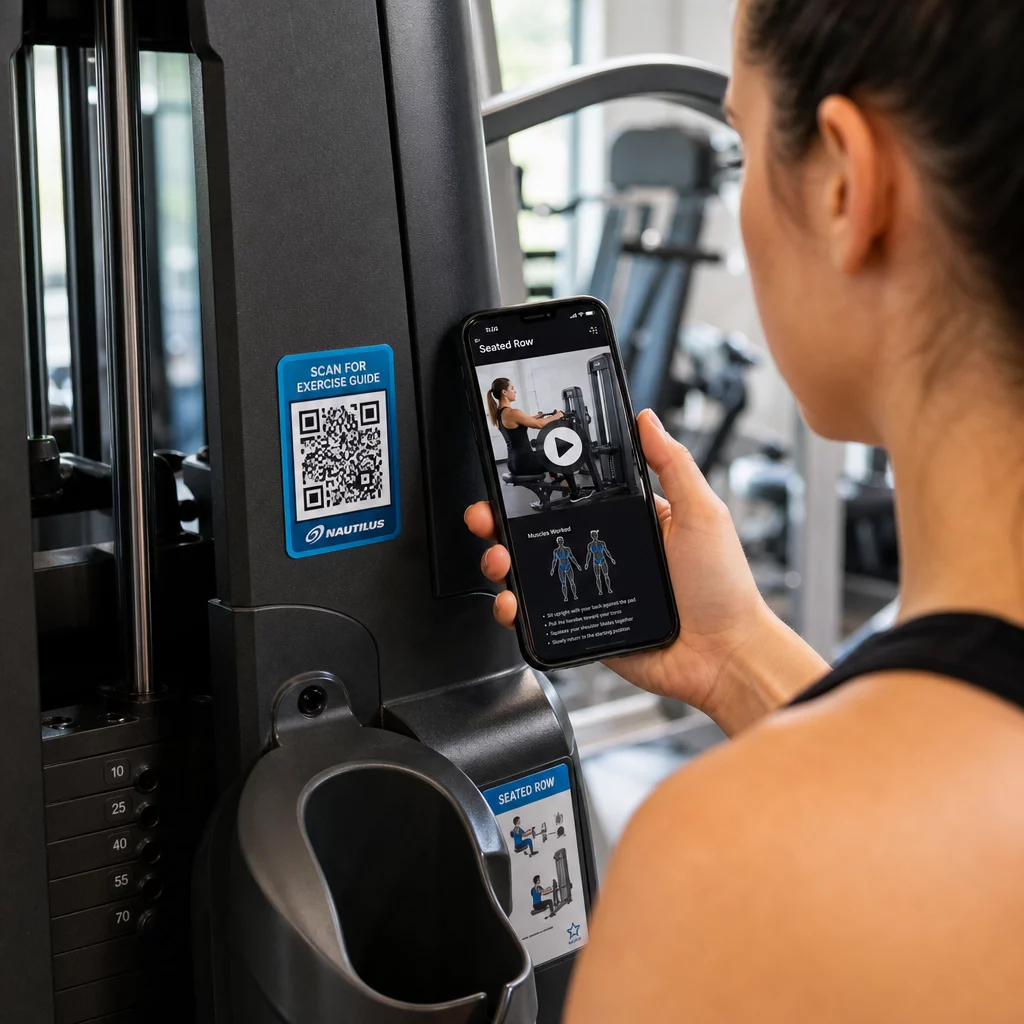
Verwenden Sie dynamische Codes für Geräteetiketten. Wenn Sie Ihre Videoinhalte aktualisieren oder die Plattform wechseln, aktualisieren Sie einfach das Ziel – kein Nachdrucken und Neukennzeichnen jeder Maschine in Ihrer Einrichtung erforderlich.
Personal Trainer können auch PDF-QR-Codes verwenden, um personalisierte Trainingspläne zu liefern. Drucken Sie den Code auf eine Karte für jeden Kunden und aktualisieren Sie den verlinkten Plan, während das Programm fortschreitet.
Kurspläne und Buchungen
Ein QR-Code, der in der Nähe Ihres Kursstudios, auf einem Lobby-Display oder auf einem Flyer angebracht ist, ermöglicht Mitgliedern den sofortigen Zugriff auf Ihren aktuellen Kursplan und Ihre Buchungsseite. Dies funktioniert besonders gut für Studios, die mehrere Kursarten oder Instruktoren anbieten, bei denen sich die Pläne wöchentlich ändern.
Da dynamische Codes Inhaltsaktualisierungen ohne Neudruck ermöglichen, können Sie denselben gedruckten Code das ganze Jahr über an Ihrer Wand behalten und einfach den verlinkten Zeitplan jede Woche aktualisieren. Lesen Sie mehr darüber, wie Sie dies in der Praxis anwenden können in wie QR-Codes das Fitnessstudio-Marketing ankurbeln.
Aktionen und zeitlich begrenzte Angebote
QR-Codes auf Flyern, Plakaten und Social-Media-Beiträgen können direkt zu einem Mitgliedschaftsangebot, einer Probestundenanmeldung oder einer Gutscheinseite verlinken. Wenn die Aktion endet, aktualisieren Sie das Ziel, anstatt die Materialien neu zu drucken.
Einige praktische Platzierungen:
- Fensteraufkleber mit dem Hinweis “Scannen Sie für einen 7-Tage-Gratispass”
- Handzettel bei lokalen Veranstaltungen oder Gesundheitsmessen
- Plakate nahe dem Eingang während der Hauptanmeldezeiten
Dynamische Codes sind die empfohlene Wahl für Werbeaktionen, da sich die Angebots-URL ändert, das gedruckte Material jedoch nicht. Für Anleitungen, wo und wie diese Codes für maximale Sichtbarkeit platziert werden sollten, siehe die Leitfaden zur Platzierung von QR-Codes im Marketing.
Mitglieder-Feedback und Google-Bewertungen
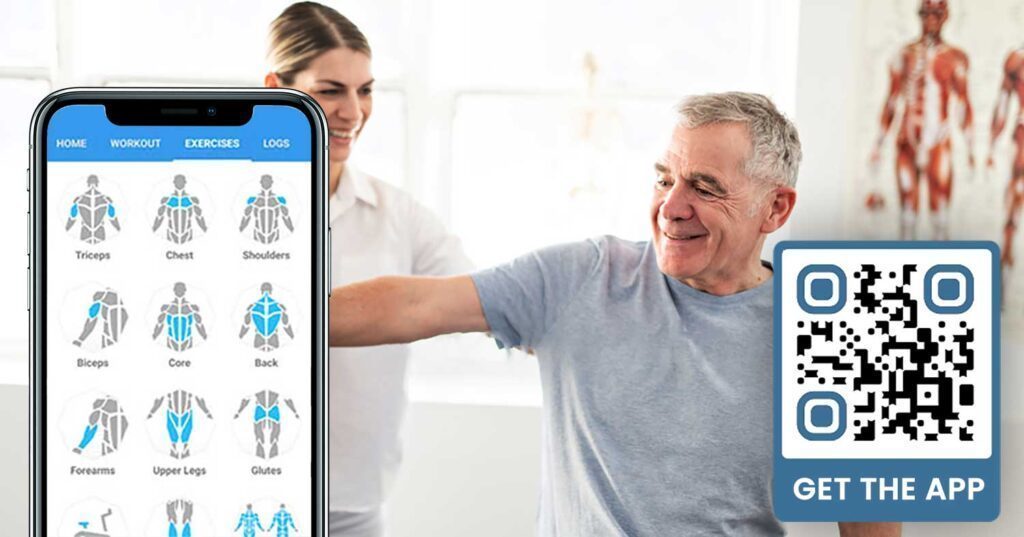
Konsistentes Sammeln von Feedback ist schwierig, wenn Mitglieder herein- und heraushetzen. Ein QR-Code, der nahe dem Ausgang, in der Umkleidekabine oder an der Saftbar platziert ist, bietet Mitgliedern eine reibungslose Möglichkeit, eine schnelle Bewertung abzugeben oder eine Zufriedenheitsumfrage auszufüllen.
EIN Google-Bewertungs-QR-Code in stark frequentierten Bereichen platziert, leitet Mitglieder direkt zu Ihrer Google My Business Bewertungsseite – kein Suchen erforderlich. Mehr Bewertungen verbessern Ihr lokales Suchranking und geben potenziellen Mitgliedern den sozialen Beweis, den sie benötigen, um Ihr Fitnessstudio zu wählen.
Für Feedback-Umfragen, ein Google Formular QR-Code ermöglicht es Ihnen, strukturierten Input zu Kursen, Geräten, Personal und Einrichtungen zu sammeln.
Sammeln Sie mehr Google-Bewertungen automatisch Platzieren Sie einen QR-Code an Ihrem Ausgang oder in der Umkleidekabine und beobachten Sie, wie Ihre Bewertungen wachsen. Nutzen Sie die QR-Code für Google Bewertung erstellen um einen gebrandeten Code zu erstellen, der Mitglieder direkt zu Ihrer Bewertungsseite führt.
WLAN-Zugang für Mitglieder und Gäste
WLAN-Angebot wird in den meisten modernen Fitnessstudios erwartet. Ein WLAN-QR-Code, der an der Rezeption, nahe der Saftbar oder an den Wänden der Umkleidekabinen angezeigt wird, lässt Mitglieder sofort durch Scannen verbinden – kein Suchen nach Passwörtern oder manuelle Eingabe erforderlich. Diese kleine Annehmlichkeit trägt zum gesamten Mitgliedererlebnis bei, ohne jeglichen Personalaufwand.
Social-Media-Engagement
QR-Codes, die in stark frequentierten Bereichen platziert sind – Spiegel, Wasserstationen, die Lobby – können direkt zu Ihrem Instagram, YouTube-Kanal oder sozialen Profil verlinken. Mitglieder, die bereits mit Ihrem Raum interagieren, folgen und teilen am ehesten. Dies funktioniert gut in Verbindung mit Fitness-Challenges oder Veranstaltungen, bei denen Sie die Online-Teilnahme der Community fördern möchten.
Fitness-Herausforderungen und -Veranstaltungen
QR-Codes erleichtern es, Mitglieder zur Teilnahme an strukturierten Herausforderungen, Workshops oder Veranstaltungen im Fitnessstudio einzuladen. Platzieren Sie einen Code auf einem Poster oder einer Anzeigetafel, der zu einem Anmeldeformular oder einer Seite mit Veranstaltungsdetails führt. Aktualisieren Sie das verknüpfte Ziel, wenn sich Veranstaltungen im Laufe des Jahres ändern – ohne das Poster neu drucken zu müssen.
Platzierungstipps, die für alle Anwendungsfälle gelten
Die Qualität der Platzierung wirkt sich direkt darauf aus, wie viele Scans Sie erhalten. Ein gut gestalteter Code am falschen Ort wird schlechter abschneiden als ein einfacherer Code, der dort platziert ist, wo Mitglieder natürlich innehalten.
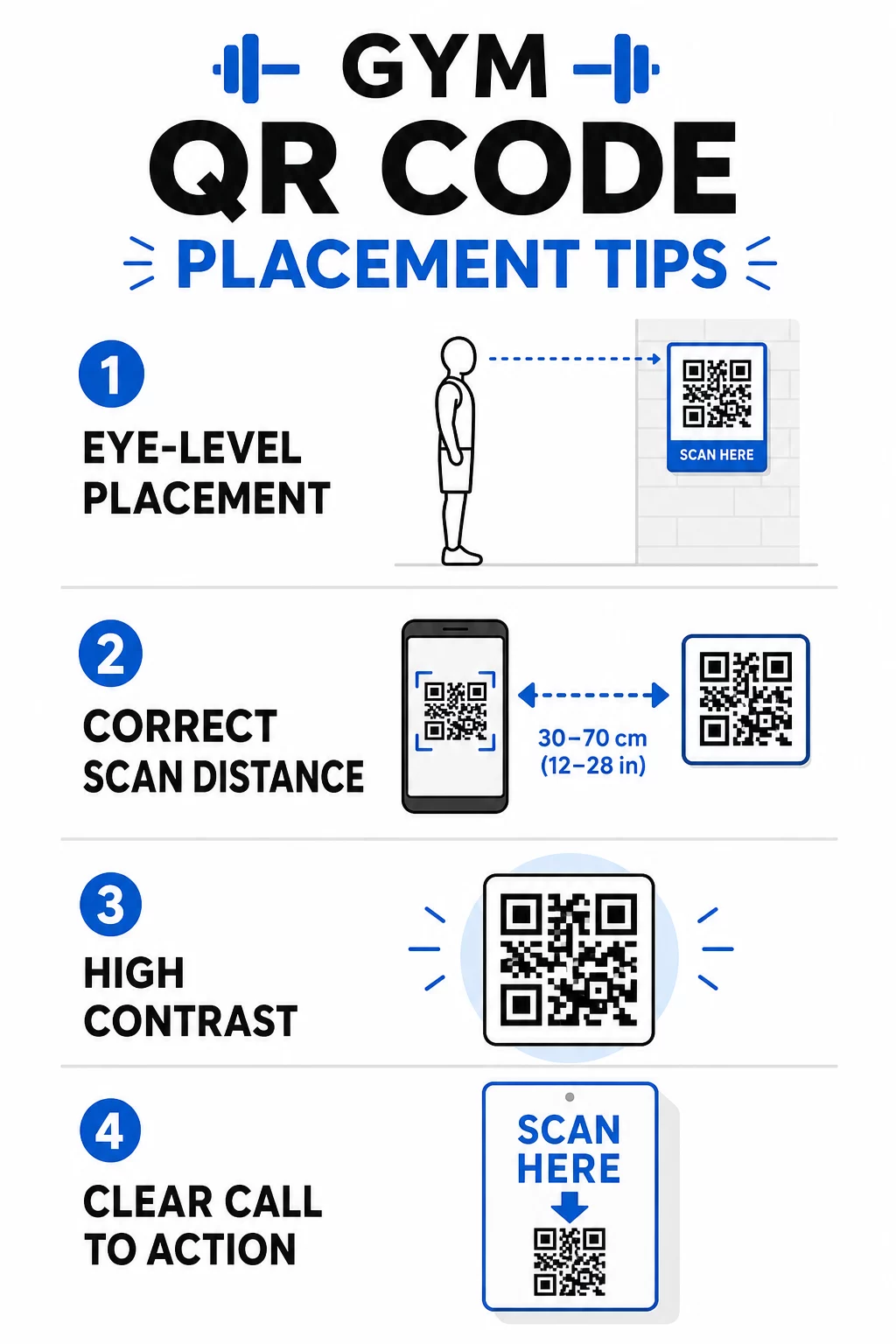
- Codes auf Augenhöhe positionieren, ungefähr zwischen 1,07 und 1,68 Metern über dem Boden
- Die 10:1-Größenregel anwenden: für alle 10 Zoll erwarteter Scan-Entfernung sollte der Code mindestens 1 Zoll breit sein
- Hochkontrastdesign priorisieren: dunkle Muster auf hellem Hintergrund lassen sich unter den Lichtverhältnissen im Fitnessstudio zuverlässig scannen
- Fügen Sie einen klaren Call-to-Action hinzu neben jedem Code (“Scannen für Trainingstipps”, “Scannen zum Einchecken”, “Hinterlassen Sie uns eine Bewertung”)
Für detaillierte technische Anleitungen zu Größe und Lesbarkeit, siehe Best Practices für die Lesbarkeit von QR-Codes. Jeder QR-Code, den Sie in Ihrem Fitnessstudio einsetzen, ist eine Gelegenheit, die Reibung für Mitglieder zu reduzieren und den manuellen Aufwand für Ihr Team zu verringern. Beginnen Sie mit ein oder zwei wirkungsvollen Platzierungen – Check-in, Geräteanleitungen oder Google-Bewertungen – und verfolgen Sie die Ergebnisse, bevor Sie expandieren. Verwenden Sie die QR-Code-Generator um gebrandete, dynamische Codes zu erstellen, die Sie ohne Neudruck aktualisieren können, und nutzen Sie die integrierten Analysen, um zu sehen, welche Platzierungen die größte Beteiligung fördern.
Häufig gestellte Fragen
Ein statischer QR-Code kodiert die Ziel-URL dauerhaft – einmal gedruckt, können Sie nicht ändern, wohin er verweist. Ein dynamischer QR-Code speichert eine kurze Weiterleitungs-URL, sodass Sie das Ziel jederzeit aktualisieren können, ohne den Code neu drucken zu müssen. Für Fitnessunternehmen sind dynamische Codes die bessere Wahl, da Kurspläne, Werbeaktionen und Trainingsinhalte häufig wechseln, und dynamische Codes bieten auch Scan-Analysen, sodass Sie die Leistung verfolgen können.
Die effektivsten Platzierungen sind am Eingang für den Check-in, direkt an Geräten für Tutorials, in der Nähe von Ausgängen und Umkleideräumen für Bewertungen und Feedback, am Empfang für Anmeldungen und in stark frequentierten Bereichen wie Wasserstationen oder der Saftbar für soziale Medien und Werbeaktionen. Platzieren Sie Codes auf Augenhöhe (etwa 1,07 bis 1,68 Meter vom Boden) mit einem klaren Aufruf zur Aktion neben jedem.
Ja, jeder QR-Code sollte auf ein einziges, spezifisches Ziel verlinken, um die Mitgliedererfahrung klar und fokussiert zu halten. Ein Check-in-Code sollte zu Ihrer Check-in-Seite führen, ein Gerätecode sollte zum Tutorial dieser Maschine führen und ein Bewertungs-Code sollte direkt zu Ihrer Google-Bewertungsseite führen. Die Verwendung einer QR-Code-Management-Plattform ermöglicht es Ihnen, alle Ihre Codes in einem Dashboard zu organisieren, Ziele unabhängig voneinander zu aktualisieren und die Leistung jedes Codes separat zu verfolgen.