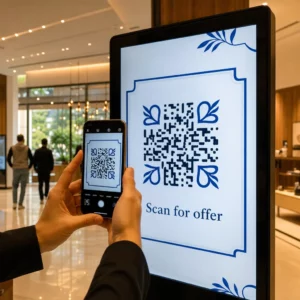
Hvordan deler du et datasett på 40 sider eller en fullstendig bibliografi med noen som står foran plakaten din i 90 sekunder? Papirutdelinger går tom, URL-er er for lange å skrive, og apper krever nedlastinger ingen ønsker. QR-koder løser alle tre problemene med en enkelt skanning – denne guiden forklarer hvordan du bruker dem effektivt på forskningsplakater og konferansepresentasjoner.
Hva du skal lenke QR-koden din til
Før du genererer en kode, bestem deg for hva den faktisk skal gjøre for personen som skanner den. De mest nyttige lenkene på vitenskapelige konferanser faller inn i noen få klare kategorier.
Forskningsmaterialer og tilleggsdata er det vanligste bruksområdet. En plakat har begrenset plass, så en QR-kode kan peke til hele artikkelen din, en referanseliste, ekstra figurer, rådatasett, eller høyoppløselige versjoner av diagrammer som er vanskelige å lese på trykk. Universitetsbibliotekguider bemerker at QR-koder er spesielt praktiske når det er for mange referanser til å liste direkte på plakaten – koden dirigerer ganske enkelt seere til en komplett online liste.
Bruk en PDF QR-kode for å hoste artikkelen din eller tilleggsfilen direkte, slik at deltakerne får umiddelbar tilgang uten å måtte søke i en database eller skrive inn en DOI.
Kontaktinformasjon er like viktig. Konferansenettverking skjer raskt, og en vCard QR-kode lar noen skanne merket eller plakaten din og lagre navn, institusjon, e-post og nettsted direkte til telefonens kontakter – ingen visittkort nødvendig og ingen transkripsjonsfeil.
Tilbakemeldinger og spørreundersøkelser utvider samtalen utover plakatøkten. Å legge inn en lenke til et kort Google-skjema lar deltakerne sende inn spørsmål eller vurdere arbeidet ditt på sekunder. En Google Form QR-kode gjør skjemaet tilgjengelig fra ethvert trykt materiale uten at noen trenger å skrive inn en URL.
Presentasjonslysbilder og multimedia fungerer bra når de er innebygd i lysbildepresentasjoner. Å plassere en QR-kode i begynnelsen eller slutten av en presentasjon lar publikum laste ned lysbildene, få tilgang til et opptak eller besøke relaterte ressurser uten å avbryte økten.
Del forskningsmaterialer umiddelbart Last opp artikkelen, plakaten eller tilleggsfilen din og generer en skannbar kode på minutter med Lag QR-kode for PDF.
Statisk vs. Dynamisk QR-koder: Hvilken du skal bruke
EN statisk QR-kode koder destinasjons-URL-en direkte inn i mønsteret. Når den er skrevet ut, kan den ikke endres – hvis den lenkede siden flyttes eller filen oppdateres, blir koden ubrukelig.
EN dynamisk QR-kode koder en kort omdirigerings-URL i stedet. Du kan oppdatere destinasjonen når som helst fra et dashbord uten å skrive ut noe på nytt. Dette er spesielt verdifullt for konferansebruk, der tidsplanendringer og filoppdateringer i siste liten er rutine. Dynamiske koder genererer også analyser: du kan se totale skanninger, unike skanninger, enhetstyper, geografiske data og tidsstempler, noe som gir deg et reelt mål på hvor mange som faktisk engasjerte seg i materialene dine.
For alt du planlegger å skrive ut på forhånd – plakater, navneskilt, konferansepublikasjoner – er dynamiske QR-koder det tryggere valget. Den Dynamisk QR-kode generator lar deg konvertere hvilken som helst URL til en dynamisk kode, redigere destinasjonen etter utskrift, og spore engasjement fra et enkelt dashbord.
Et DARPA-finansiert forskerteam ved University of California, Santa Cruz, brukte dynamiske QR-koder for å spore kvalitetskontroll på tvers av fem universiteter under produksjon av bioelektroniske enheter. Ved å overvåke skannedata identifiserte de at ett produksjonstrinn kun hadde en 59% bindingssuksessrate – et funn som ville vært vanskelig å avdekke uten innebygd sporing. Som forsker Cristian Hernandez bemerket: “QR-kode sporingssystemet har gjort det mulig for teamet vårt å fastslå at trinn 6 kun har hatt en 59% bindingssuksessrate… å ha disse dataene har identifisert årsaken til feilmodusen for den bioelektroniske enheten.”
Utforming av QR-koder for pålitelig skanning
En QR-kode som ser bra ut, men som ikke kan skannes, er verre enn ingen kode i det hele tatt. Disse designprinsippene sikrer at din fungerer under forholdene i et ekte konferansemiljø.
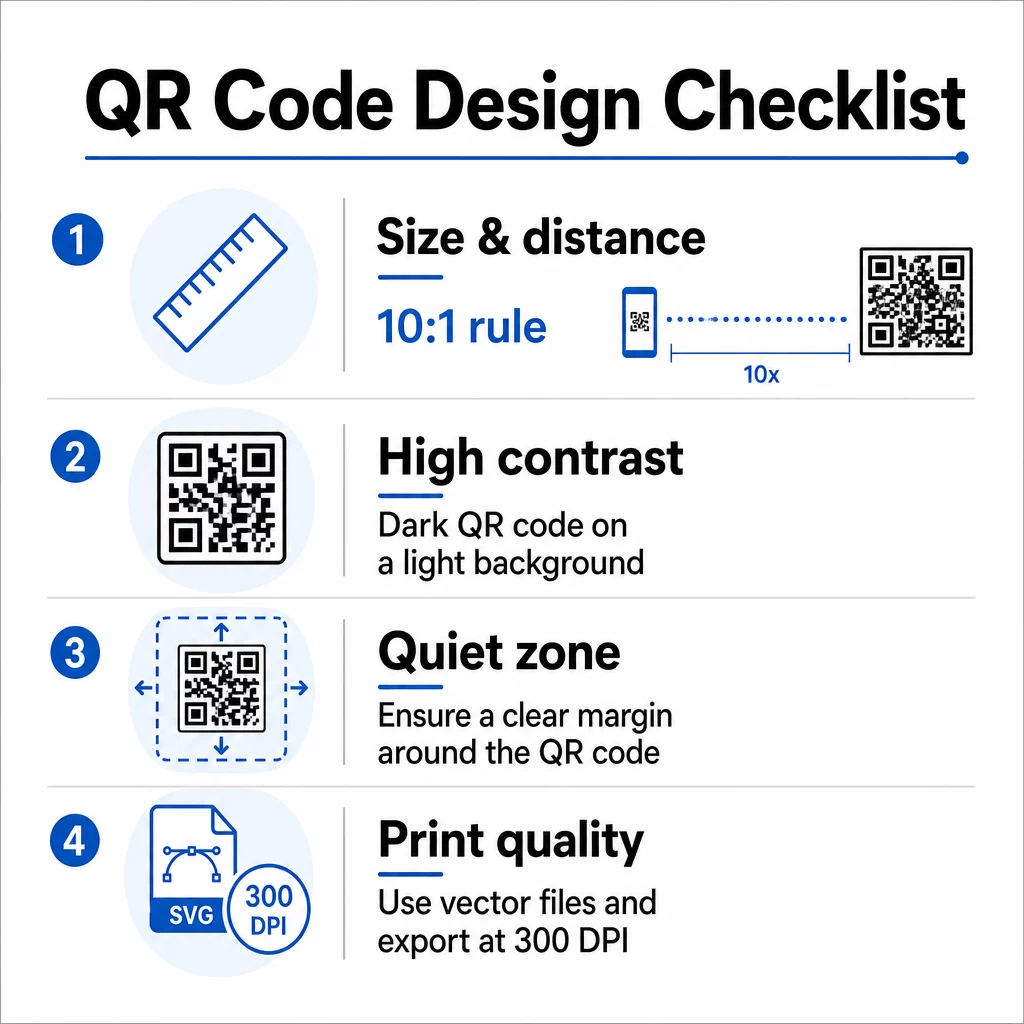
Størrelse og skanneavstand
Følg 10:1-regelen: kodens bredde bør være omtrent en tidel av den forventede skanneavstanden. For en forskningsplakat sett fra omtrent 50 cm (20 tommer) avstand, bør koden være minst 5 cm (2 tommer) bred. Pageloots størrelsesretningslinjer for trykt materiale anbefaler et minimum på 3 × 3 cm for plakater, med 6 × 6 cm som et ideelt mål. Noen universitetsguider foreslår et minimum på rundt 5 × 5 tommer for plakatkoder som må være lesbare fra stående avstand.
For presentasjonslysbilder må koden være stor nok til å skannes fra en sitteplass. Test den på den faktiske projeksjonsavstanden før økten.
Kontrast og farge
Skannere leser QR-koder ved å oppdage kontrasten mellom mørke moduler og en lys bakgrunn. Utilstrekkelig kontrast er en av hovedårsakene til skannefeil. Bruk mørke kodemønstre på en lys eller hvit bakgrunn, og sikt mot et kontrastforhold på minst 4,5:1. Unngå omvendte skjemaer (lys kode på mørk bakgrunn), gradienter eller mønstrede bakgrunner bak koden.
Hvis du vil bruke merkevare- eller institusjonsfarger, kan du det – forutsatt at kontrastforholdet forblir høyt nok. For mer detaljer om hvilke fargekombinasjoner som fungerer og hvilke som feiler, se Pageloots beste praksis for fargekontrast i QR-koder.
Rolig sone
Den stille sonen er den klare margingen rundt koden. ISO/IEC 18004 spesifiserer et minimum på fire moduler med tomrom på alle fire sider. Ikke plasser tekst, logoer, rammer eller bakgrunnsteksturer innenfor denne margingen. På en plakat betyr dette å la synlig hvitt rom være rundt koden – behandle det som en del av designet, ikke bortkastet plass.
Filformat og utskriftskvalitet
Eksporter QR-koden din som en vektorfil (SVG eller EPS) for storformatutskrift. Rasterformater som PNG kan pikselere når de skaleres opp, noe som gjør individuelle moduler vanskeligere å skille og reduserer skannbarheten. For standard utskriftsoppløsninger er 300 DPI minimum den praktiske standarden.
Få utskriftsklare QR-kodefiler Last ned koden din i SVG-, EPS- eller PDF-format for høyoppløselig plakatutskrift med QR-kodegenerator.
Plassering på plakater og lysbilder
Hvor du plasserer koden påvirker om folk faktisk skanner den. Veiledning fra vitenskapelige kommunikasjonskilder anbefaler å plassere QR-koden nær slutten av plakatens lesesti – ved konklusjonene eller hovedbudskapet – slik at den vises etter at seeren allerede er engasjert i innholdet. Dette er et logisk øyeblikk å tilby mer: “Vil du ha hele datasettet? Skann her.”
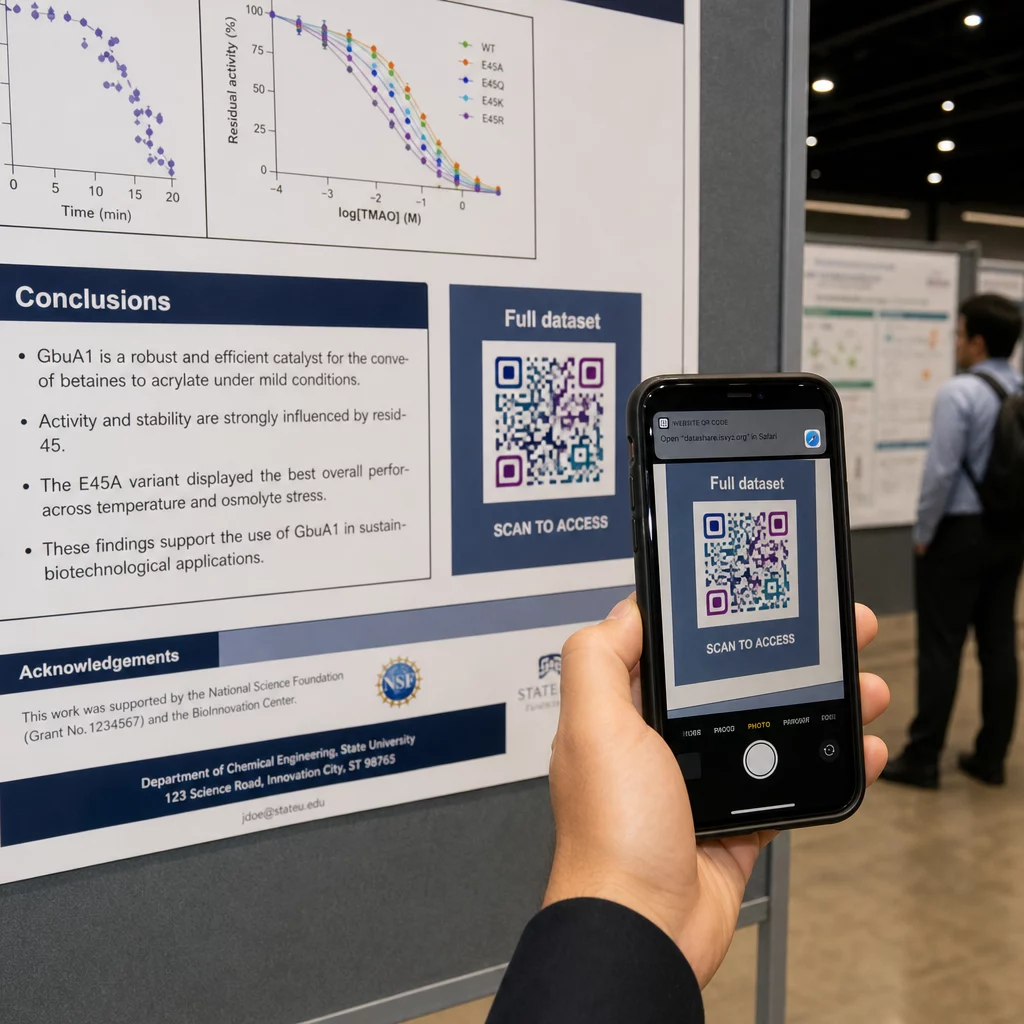
På en vertikal plakat er nederst til høyre et naturlig hvilepunkt for øyet etter lesing. På et horisontalt oppsett fungerer høyre side på samme måte. For QR-koder på plakater, plassering i øyehøyde (omtrent 3.5–5.5 fot fra gulvet) lar deltakerne skanne komfortabelt uten å bøye seg.
Kombiner alltid koden med en kort oppfordring til handling som forteller folk hva de vil få:
- “Skann for hele artikkelen”
- “Få tilgang til tilleggsdata”
- “Lagre mine kontaktdetaljer”
- “Last ned lysbildepresentasjonen”
Uten en CTA vil mange deltakere ignorere koden fullstendig – de vet ikke om den er verdt å skanne.
For presentasjonslysbilder, vis QR-koden i minst 15–20 sekunder og anerkjenn den muntlig. Å plassere den i nederste høyre hjørne av lysbildet holder den synlig uten å konkurrere med hovedinnholdet ditt. Dynamiske koder er spesielt nyttige her: hvis destinasjonen endres mellom foredrag eller konferansedatoer, oppdaterer du lenken uten å røre lysbildefilen.
For veiledning om plassering i ulike kontekster, Pageloots Veiledning for plassering av QR-kode dekker plassering i øyehøyde, bakgrunnsvalg og hvordan man matcher plassering med brukerens intensjon.
Testing før du trykker
Test koden før du sender plakaten til trykk eller ferdigstiller lysbildene dine. Spesifikt:
- Skann fra den faktiske avstanden publikum vil stå eller sitte
- Test på minst to forskjellige enheter (iOS og Android)
- Prøv under forskjellige lysforhold, inkludert de fluorescerende taklampene som er vanlige i konferansesaler
- Verifiser at den lenkede destinasjonen lastes korrekt, inkludert på en mobildataforbindelse (ikke bare Wi-Fi)
- Sjekk at PDF-er og andre filer åpnes på mobil uten å kreve en skrivebordsapp
Hvis du bruker en dynamisk kode, bekreft at omdirigeringen løses korrekt etter eventuelle destinasjonsoppdateringer. For en fullstendig sjekkliste over design- og testkriterier, se Pageloot’s beste praksis for lesbarhet av QR-koder.
Bruk av QR-koder utover plakaten
Vitenskapelige konferanser tilbyr flere berøringspunkter der QR-koder tilfører praktisk verdi utover plakatveggen.
Konferansemerker med vCard QR-koder lar enhver deltaker lagre kontaktinformasjonen din under gangprat – ingen utveksling av telefonnummer nødvendig, ingen kort som blir borte i en veske.
Sesjonsutdelinger lenket via QR-kode erstatter stabler med papir. En enkelt kode på et trykt sammendrag kan koble deltakere til hele prosessen, relaterte publikasjoner eller et tilbakemeldingsskjema etter sesjonen.
Registrering og innsjekking flyter drar nytte av QR-koder for oppmøte som verifiserer identitet og sporer deltakelse, noe som gir arrangørene sanntidsantall deltakere per sesjon.
Nettverksmaterialer kan bruke en lenke-QR-kode for å koble til en lab-nettside, Google Scholar-profil eller LinkedIn-side – noe som gir interesserte kolleger flere måter å følge opp på etter at konferansen er avsluttet.
IASCON 2022-konferansen demonstrerte hvordan dette ser ut i stor skala. Arrangørene plasserte QR-koder ved registreringsskranken, utenfor møterom og i presentasjonslysbilder, og erstattet papirplaner og utdelingsmateriell fullstendig. Deltakerne kunne få tilgang til sesjonsdetaljer, foredragsholderprofiler og presentasjonsnedlastinger ved å skanne koder på hvert sted. Et mobilt responsystem utløst av QR-koder muliggjorde live-avstemninger og spørsmål og svar uten appnedlastinger, og oppnådde deltakelsesrater som var sammenlignbare med tradisjonelle papirskjemaer. Analyser fra arrangementet avslørte høyere engasjement under morgenøktene og et målbart fall etter lunsj – data som direkte informerte fremtidige planleggingsbeslutninger.
QR-koder fungerer på konferanser av alle størrelser av samme grunn: de fjerner friksjon mellom en nysgjerrig deltaker og informasjonen de ønsker. En godt plassert, riktig størrelse, høykontrast QR-kode med en tydelig oppfordring til handling gjør noe et trykt plakat alene ikke kan – den holder samtalen i gang etter at sesjonen er avsluttet. Start med dynamiske koder slik at du beholder fleksibiliteten til å oppdatere destinasjoner, spore hvem som engasjerer seg i materialene dine, og gjøre endringer uten å skrive ut på nytt. For alle disse, er Pageloot QR-kodegenerator gir verktøyene for å opprette, tilpasse og administrere kodene dine fra ett enkelt dashbord.
Ofte stilte spørsmål
Nei. Moderne smarttelefoner på både iOS og Android kan skanne QR-koder direkte via den innebygde kameraappen, uten behov for ekstra programvare. Deltakerne åpner ganske enkelt kameraet sitt, retter det mot koden, og trykker på varslingen for å åpne det lenkede innholdet i nettleseren sin.
En statisk QR-kode koder destinasjons-URL-en direkte i mønsteret – når den er skrevet ut, kan den ikke endres. En dynamisk QR-kode koder en kort omdirigerings-URL, slik at du kan oppdatere destinasjonen når som helst fra et dashbord uten å skrive ut på nytt. Dynamiske koder gir også analyser som antall skanninger, enhetstyper og tidsstempler, noe statiske koder ikke gjør. For konferanseplakater og materialer trykt på forhånd, anbefales dynamiske koder sterkt.
Følg 10:1-regelen: kodens bredde bør være omtrent en tidel av skanneavstanden. For en plakat sett fra ca. 50 cm (20 tommer) unna, betyr det en minimumsbredde på 5 cm (2 tommer). Et praktisk mål for plakatbruk er 6 × 6 cm, noe som gir komfortabel skanneplass for de fleste deltakere. Test alltid den trykte koden fra den faktiske visningsavstanden før konferansen.