90 saniye boyunca posterinizin önünde duran biriyle 40 sayfalık bir veri setini veya tam bir bibliyografyayı nasıl paylaşırsınız? Kağıt el ilanları tükenir, URL'ler yazmak için çok uzundur ve uygulamalar kimsenin istemediği indirmeler gerektirir. QR kodları tek bir taramayla bu üç sorunu da çözer – bu kılavuz, onları araştırma posterlerinde ve konferans sunumlarında etkili bir şekilde nasıl kullanacağınızı açıklar.
QR Kodunuzu Neye Bağlamalısınız?
Bir kod oluşturmadan önce, tarayan kişi için aslında ne yapması gerektiğine karar verin. Bilimsel konferanslardaki en faydalı bağlantılar birkaç net kategoriye ayrılır.
Araştırma materyalleri ve ek veriler en yaygın kullanım durumudur. Bir posterin alanı sınırlıdır, bu nedenle bir QR kodu tam makalenize, referans listesine, ek şekillere, ham veri setlerine veya baskıda okunması zor olan grafiklerin yüksek çözünürlüklü versiyonlarına işaret edebilir. Üniversite kütüphane kılavuzları, posterde doğrudan listelenecek çok fazla referans olduğunda QR kodlarının özellikle pratik olduğunu belirtir – kod, izleyicileri basitçe eksiksiz bir çevrimiçi listeye yönlendirir.
Kullanın PDF QR kodu makalenizi veya ek dosyanızı doğrudan barındırmak için, böylece katılımcılar bir veritabanı aramak veya bir DOI yazmak zorunda kalmadan anında erişim sağlarlar.
İletişim bilgileri eşit derecede önemlidir. Konferans ağları hızlı gelişir ve bir vCard QR kodu birinin rozetinizi veya posterinizi taramasını ve adınızı, kurumunuzu, e-postanızı ve web sitenizi doğrudan telefonlarının kişilerine kaydetmesini sağlar – kartvizit gerekmez ve yazım hatası olmaz.
Geri bildirim ve anketler konuşmayı poster oturumunun ötesine taşır. Kısa bir Google Form'a bağlantı yerleştirmek, katılımcıların saniyeler içinde soru göndermesine veya çalışmanızı derecelendirmesine olanak tanır. Bir Google Form QR kodu formu, kimsenin bir URL yazmasına gerek kalmadan herhangi bir basılı materyalden erişilebilir hale getirir.
Sunum slaytları ve multimedya slayt destelerine gömüldüğünde iyi çalışır. Bir konuşmanın başına veya sonuna bir QR kodu yerleştirmek, dinleyicilerin oturumu kesintiye uğratmadan slaytları indirmesine, bir kayda erişmesine veya ilgili kaynakları ziyaret etmesine olanak tanır.
Araştırma Materyallerini Anında Paylaşın Makalenizi, posterinizi veya ek dosyanızı yükleyin ve dakikalar içinde taranabilir bir kod oluşturun. PDF QR Kod Oluşturucu.
Statik ve Dinamik QR Kodları: Hangisini Kullanmalı
Bir Statik QR kodu hedef URL'yi doğrudan desene kodlar. Bir kez basıldıktan sonra değiştirilemez – bağlantılı sayfa taşınırsa veya dosya güncellenirse, kod işe yaramaz hale gelir.
Bir dinamik QR kodu bunun yerine kısa bir yönlendirme URL'si kodlar. Hedefi bir kontrol panelinden istediğiniz zaman, hiçbir şeyi yeniden yazdırmadan güncelleyebilirsiniz. Bu, özellikle konferans kullanımı için değerlidir; burada program değişiklikleri ve son dakika dosya güncellemeleri rutin hale gelmiştir. Dinamik kodlar ayrıca analizler de üretir: toplam taramaları, benzersiz taramaları, cihaz türlerini, coğrafi verileri ve zaman damgalarını görebilirsiniz, bu da materyallerinizle kaç kişinin gerçekten etkileşim kurduğuna dair gerçek bir ölçüm sağlar.
Önceden basmayı planladığınız her şey için – posterler, yaka kartları, bildiri kitapları – dinamik QR kodları daha güvenli bir seçimdir. Dinamik QR Kod Oluşturucu herhangi bir URL'yi dinamik bir koda dönüştürmenize, yazdırdıktan sonra hedefi düzenlemenize ve tek bir kontrol panelinden etkileşimi izlemenize olanak tanır.
California Üniversitesi, Santa Cruz'daki DARPA tarafından finanse edilen bir araştırma ekibi, biyo-elektronik cihaz üretimi sırasında beş üniversitede kalite kontrolünü izlemek için dinamik QR kodları kullandı. Tarama verilerini izleyerek, bir üretim adımının yalnızca “luk bir bağlama başarı oranına sahip olduğunu belirlediler – bu, gömülü izleme olmadan ortaya çıkarılması zor olacak bir bulguydu. Araştırmacı Cristian Hernandez'in belirttiği gibi, ”QR kod takip sistemi, ekibimizin 6. adımın yalnızca 'luk bir bağlama başarı oranına sahip olduğunu belirlemesini sağladı… bu verilere sahip olmak, biyo-elektronik cihaz arıza modunun temel nedenini ortaya çıkardı.”
Güvenilir Tarama için QR Kodları Tasarlamak
İyi görünen ancak taranamayan bir QR kodu, hiç kod olmamasından daha kötüdür. Bu tasarım prensipleri, kodunuzun gerçek bir konferans ortamının koşullarında çalışmasını sağlar.
Boyut ve Tarama Mesafesi
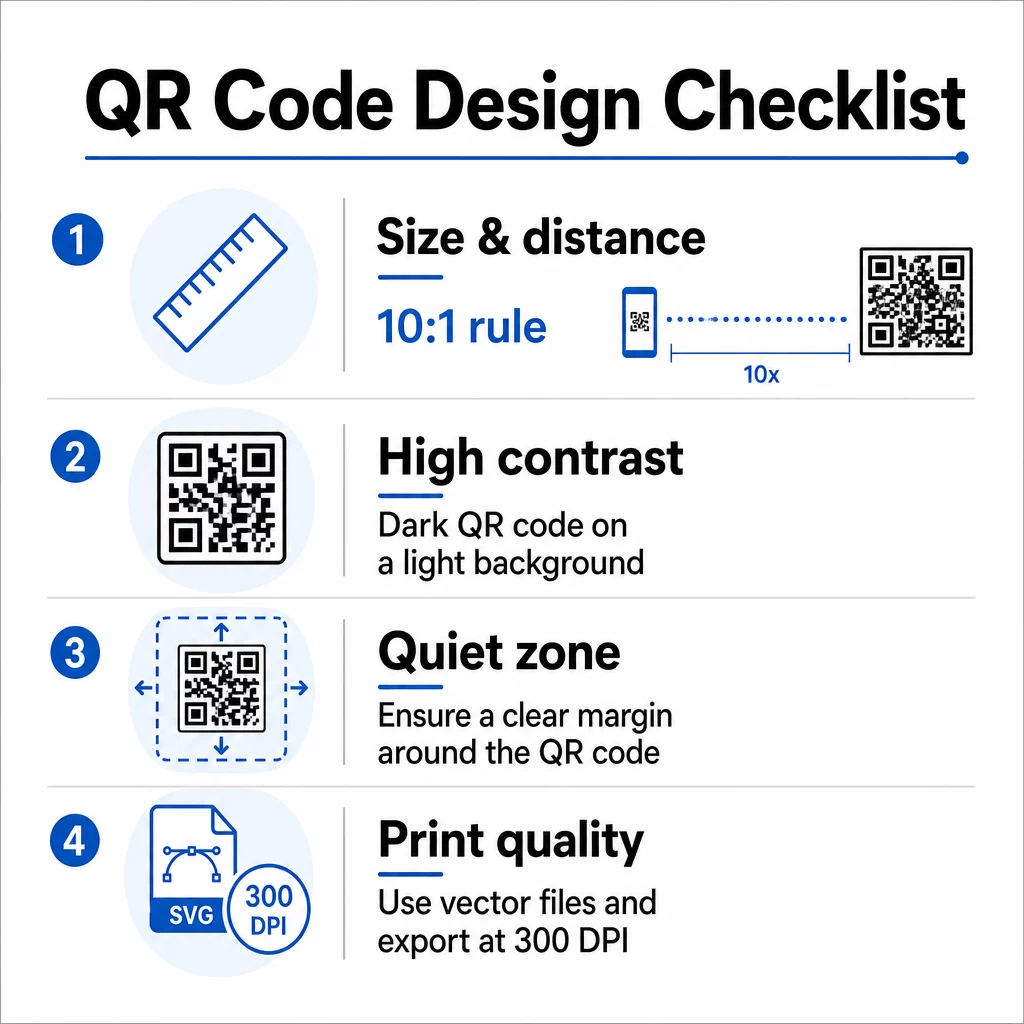
10:1 kuralına uyun: kodun genişliği, beklenen tarama mesafesinin yaklaşık onda biri olmalıdır. Yaklaşık 50 cm (20 inç) uzaktan bakılan bir araştırma posteri için kod en az 5 cm (2 inç) genişliğinde olmalıdır. Pageloot'un basılı materyaller için boyut yönergeleri posterler için minimum 3 × 3 cm, ideal hedef olarak ise 6 × 6 cm önermektedir. Bazı üniversite kılavuzları, ayakta durma mesafesinden okunabilmesi gereken poster kodları için minimum yaklaşık 5 × 5 inç önermektedir.
Sunum slaytları için kod, bir koltuktan taranabilecek kadar büyük olmalıdır. Oturumdan önce gerçek projeksiyon mesafesinde test edin.
Kontrast ve renk
Tarayıcılar, koyu modüller ile açık bir arka plan arasındaki kontrastı algılayarak QR kodlarını okur. Yetersiz kontrast, tarama başarısızlığının başlıca nedenlerinden biridir. Açık veya beyaz bir arka plan üzerinde koyu kod desenleri kullanın ve en az 4.5:1'lik bir kontrast oranı hedefleyin. Ters çevrilmiş şemaları (koyu arka plan üzerinde açık kod), gradyanları veya kodun arkasındaki desenli arka planları kullanmaktan kaçının.
Marka veya kurumsal renkleri kullanmak isterseniz, kontrast oranı yeterince yüksek kaldığı sürece kullanabilirsiniz. Hangi renk kombinasyonlarının işe yaradığı ve hangilerinin başarısız olduğu hakkında daha fazla ayrıntı için Pageloot'un QR kodu renk kontrastı en iyi uygulamaları.
Sessiz bölge
Sessiz bölge, kodu çevreleyen net kenar boşluğudur. ISO/IEC 18004, dört tarafın tamamında minimum dört modül boş alan belirtir. Bu kenar boşluğunun içine metin, logo, kenarlık veya arka plan dokuları yerleştirmeyin. Bir posterde bu, kodun etrafında görünür beyaz boşluk bırakmak anlamına gelir – bunu boşa harcanmış alan olarak değil, tasarımın bir parçası olarak ele alın.
Dosya Biçimi ve Baskı Kalitesi
QR kodunuzu büyük formatlı baskı için vektör dosyası (SVG veya EPS) olarak dışa aktarın. PNG gibi raster formatlar büyütüldüğünde piksellenebilir, bu da tek tek modüllerin ayırt edilmesini zorlaştırır ve taranabilirliği azaltır. Standart baskı çözünürlükleri için minimum 300 DPI pratik standarttır.
Baskıya Hazır QR Kod Dosyaları Alın Kodunuzu yüksek çözünürlüklü poster baskısı için SVG, EPS veya PDF formatında indirin QR Kod Oluşturucu.
Posterler ve Slaytlarda Yerleşim
Kodu nereye koyduğunuz, insanların onu gerçekten tarayıp taramayacağını etkiler. Bilimsel iletişim kaynaklarından alınan rehberlik, QR kodunu posterin okuma yolunun sonuna – sonuçların veya ana mesajın yanına – yerleştirmeyi önerir, böylece izleyici içerikle zaten etkileşim kurduktan sonra görünür. Bu, daha fazlasını sunmak için mantıklı bir andır: “Tüm veri setini mi istiyorsunuz? Burayı tarayın.”
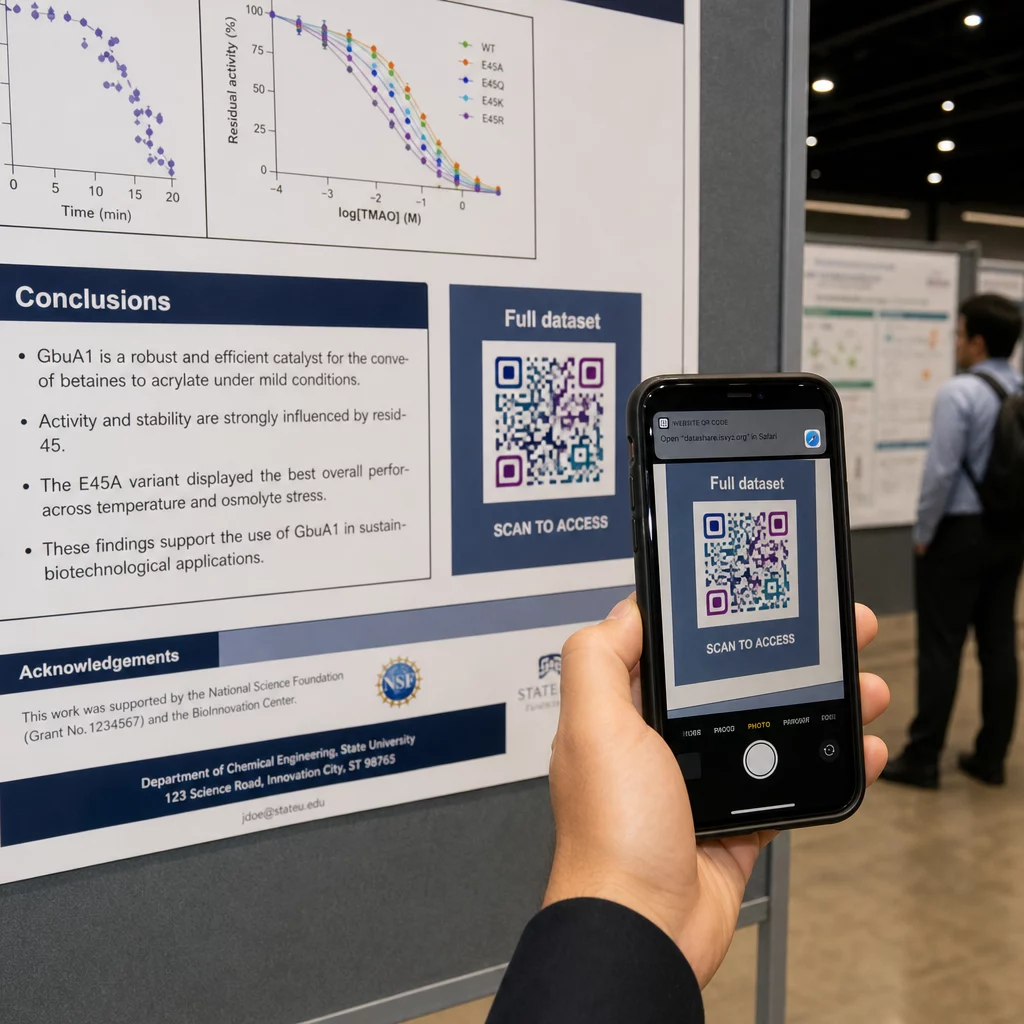
Dikey bir posterde, sağ alt alan okuduktan sonra göz için doğal bir dinlenme noktasıdır. Yatay bir düzende, sağ taraf benzer şekilde çalışır. İçin Posterlerdeki QR kodları, göz hizasında (yerden yaklaşık 3,5–5,5 fit) yerleştirme, katılımcıların eğilmeden rahatça tarama yapmasını sağlar.
Kodu her zaman insanlara ne alacaklarını söyleyen kısa bir harekete geçirici mesajla eşleştirin:
- “Makalenin tamamı için tarayın”
- “Ek verilere erişin”
- “İletişim bilgilerimi kaydedin”
- “Slayt destesini indirin”
Bir CTA olmadan, birçok katılımcı kodu tamamen görmezden gelecektir – taramaya değip değmeyeceğini bilmezler.
Sunum slaytları için, QR kodunu en az 15-20 saniye boyunca gösterin ve sözlü olarak belirtin. Slaytın sağ alt köşesine yerleştirmek, ana içeriğinizle rekabet etmeden görünür kalmasını sağlar. Dinamik kodlar burada özellikle kullanışlıdır: eğer hedef konuşmalar veya konferans tarihleri arasında değişirse, slayt dosyasına dokunmadan bağlantıyı güncellersiniz.
Farklı bağlamlardaki yerleşim konusunda rehberlik için, Pageloot'un QR kodu yerleştirme rehberi göz hizası konumlandırmayı, arka plan seçimlerini ve yerleşimi kullanıcı amacına nasıl eşleştireceğinizi kapsar.
Baskıdan Önce Test Etme
Posterinizi baskıya göndermeden veya slaytlarınızı sonlandırmadan önce kodu test edin. Özellikle:
- İzleyicilerin duracağı veya oturacağı gerçek mesafeden tarayın
- En az iki farklı cihazda (iOS ve Android) test edin
- Konferans salonlarında yaygın olan floresan tavan lambaları da dahil olmak üzere farklı aydınlatma koşullarında deneyin
- Bağlantılı hedefin hücresel bağlantı (sadece Wi-Fi değil) dahil olmak üzere doğru yüklendiğini doğrulayın
- PDF'lerin ve diğer dosyaların mobil cihazlarda masaüstü uygulaması gerektirmeden açıldığını kontrol edin
Dinamik bir kod kullanıyorsanız, herhangi bir hedef güncellemesinden sonra yönlendirmenin doğru çözüldüğünü onaylayın. Tasarım ve test kriterlerinin tam listesi için Pageloot'un sayfasına bakın QR kodu okunabilirlik en iyi uygulamaları.
QR Kodlarını Posterin Ötesinde Kullanmak
Bilimsel konferanslar, QR kodlarının poster panosunun ötesinde pratik değer kattığı birden fazla temas noktası sunar.
Konferans yaka kartları vCard QR kodları ile herhangi bir katılımcının koridor sohbetleri sırasında iletişim bilgilerinizi kaydetmesini sağlar – telefon numarası alışverişine gerek kalmaz, çantada kaybolan bir kart olmaz.
Oturum el notları QR kodu aracılığıyla bağlantılı olanlar kağıt yığınlarının yerini alır. Basılı bir özetteki tek bir kod, katılımcıları tam bildirilere, ilgili yayınlara veya oturum sonrası geri bildirim formuna bağlayabilir.
Kayıt ve giriş akışları, kimliği doğrulayan ve katılımı takip eden katılım QR kodlarından faydalanır, bu da organizatörlere oturum bazında gerçek zamanlı katılımcı sayısı sağlar.
Ağ oluşturma materyalleri kullanabilir için taramaları takip edin ve artırın bir laboratuvar web sitesine, Google Akademik profiline veya LinkedIn sayfasına bağlanmak için – ilgili meslektaşlara konferans bittikten sonra takip etmek için birden fazla yol sunar.
IASCON 2022 konferansı, bunun büyük ölçekte nasıl göründüğünü gösterdi. Organizatörler, kayıt masasına, toplantı odalarının dışına ve sunum slaytlarına QR kodları yerleştirerek kağıt programları ve el ilanlarını tamamen ortadan kaldırdı. Katılımcılar, her konumdaki kodları tarayarak oturum ayrıntılarına, konuşmacı profillerine ve sunum indirmelerine erişebiliyordu. QR kodlarıyla tetiklenen bir mobil yanıt sistemi, herhangi bir uygulama indirmeye gerek kalmadan canlı anketlere ve Soru-Cevap'a olanak tanıyarak geleneksel kağıt formlara benzer katılım oranları elde etti. Etkinlikten elde edilen analizler, sabah oturumlarında daha yüksek katılım ve öğle yemeğinden sonra ölçülebilir bir düşüş olduğunu ortaya koydu – bu veriler gelecekteki planlama kararlarını doğrudan etkiledi.
QR kodları, her büyüklükteki konferansta aynı nedenle çalışır: meraklı bir katılımcı ile istedikleri bilgi arasındaki sürtünmeyi ortadan kaldırırlar. İyi yerleştirilmiş, uygun boyutta, yüksek kontrastlı ve net bir harekete geçirici mesaj içeren bir QR kodu, basılı bir posterin tek başına yapamayacağı bir şeyi yapar – oturum bittikten sonra sohbeti devam ettirir. Hedefleri güncelleme, materyallerinizle kimlerin etkileşim kurduğunu takip etme ve yeniden baskı yapmadan değişiklik yapma esnekliğini korumak için dinamik kodlarla başlayın. Tüm bunlar için, Pageloot QR Kodu Oluşturucu kodlarınızı tek bir kontrol panelinden oluşturmak, özelleştirmek ve yönetmek için araçlar sağlar.
Sıkça sorulan sorular
Hayır. Hem iOS hem de Android işletim sistemine sahip modern akıllı telefonlar, yerleşik kamera uygulaması aracılığıyla QR kodlarını doğrudan tarayabilir ve ek bir yazılıma gerek kalmaz. Katılımcılar sadece kameralarını açar, koda doğrultur ve bağlantılı içeriği tarayıcılarında açmak için bildirime dokunur.
Statik bir QR kodu, hedef URL'yi doğrudan desene kodlar – bir kez basıldığında değiştirilemez. Dinamik bir QR kodu, kısa bir yönlendirme URL'si kodlar, böylece hedefi bir kontrol panelinden istediğiniz zaman yeniden basmaya gerek kalmadan güncelleyebilirsiniz. Dinamik kodlar ayrıca tarama sayıları, cihaz türleri ve zaman damgaları gibi statik kodların sağlamadığı analizler de sunar. Konferans posterleri ve önceden basılmış materyaller için dinamik kodlar şiddetle tavsiye edilir.
10:1 kuralına uyun: kodun genişliği, tarama mesafesinin yaklaşık onda biri olmalıdır. Yaklaşık 50 cm (20 inç) uzaktan bakılan bir poster için bu, minimum 5 cm (2 inç) genişlik anlamına gelir. Poster kullanımı için pratik bir hedef 6 × 6 cm'dir, bu da çoğu katılımcı için rahat bir tarama alanı sağlar. Konferanstan önce basılı kodu her zaman gerçek görüntüleme mesafesinden test edin.