Ako zdieľať 40-stranový súbor dát alebo kompletnú bibliografiu s niekým, kto stojí pred vaším plagátom 90 sekúnd? Papierové letáky sa minú, URL adresy sú príliš dlhé na zadávanie a aplikácie vyžadujú sťahovanie, ktoré nikto nechce. QR kódy riešia všetky tri problémy jediným skenovaním – tento sprievodca vysvetľuje, ako ich efektívne používať na výskumných plagátoch a konferenčných prezentáciách.
Na čo odkazovať váš QR kód
Predtým, ako vygenerujete kód, rozhodnite sa, čo by mal skutočne urobiť pre osobu, ktorá ho skenuje. Najužitočnejšie odkazy na vedeckých konferenciách spadajú do niekoľkých jasných kategórií.
Výskumné materiály a doplnkové údaje sú najbežnejším prípadom použitia. Plagát má obmedzený priestor, takže QR kód môže odkazovať na váš kompletný článok, zoznam referencií, dodatočné obrázky, surové súbory dát alebo verzie grafov vo vysokom rozlíšení, ktoré sú ťažko čitateľné v tlači. Sprievodcovia univerzitných knižníc poznamenávajú, že QR kódy sú obzvlášť praktické, keď je príliš veľa referencií na priame uvedenie na plagáte – kód jednoducho nasmeruje divákov na kompletný online zoznam.
Použite a Kód QR vo formáte PDF na priame hostovanie vášho článku alebo doplnkového súboru, takže účastníci získajú okamžitý prístup bez potreby vyhľadávania v databáze alebo zadávania DOI.
Kontaktné informácie sú rovnako dôležité. Sieťovanie na konferenciách prebieha rýchlo a QR kód vCard umožňuje niekomu naskenovať váš odznak alebo plagát a uložiť si vaše meno, inštitúciu, e-mail a webovú stránku priamo do kontaktov v telefóne – nie sú potrebné vizitky a nedochádza k chybám pri prepise.
Spätná väzba a prieskumy rozširujú konverzáciu za rámec posterovej sekcie. Vloženie odkazu na krátky formulár Google umožňuje účastníkom odosielať otázky alebo hodnotiť vašu prácu v priebehu niekoľkých sekúnd. Kód QR formulára Google sprístupňuje formulár z akéhokoľvek tlačeného materiálu bez toho, aby niekto musel zadávať URL adresu.
Prezentácie a multimédiá fungujú dobre, keď sú vložené do prezentácií. Umiestnenie QR kódu na začiatok alebo koniec prednášky umožňuje publiku stiahnuť si slajdy, získať prístup k nahrávke alebo navštíviť súvisiace zdroje bez prerušenia relácie.
Okamžite zdieľajte výskumné materiály Nahrajte svoj článok, plagát alebo doplnkový súbor a vygenerujte skenovateľný kód v priebehu niekoľkých minút pomocou PDF QR kód generátor.
Statické vs. Dynamické QR kódy: Ktoré použiť
A statický QR kód kóduje cieľovú URL priamo do vzoru. Po vytlačení sa nedá zmeniť – ak sa prepojená stránka presunie alebo sa súbor aktualizuje, kód sa stane nepoužiteľným.
A dynamický QR kód namiesto toho kóduje krátku presmerovaciu URL. Cieľ môžete kedykoľvek aktualizovať z ovládacieho panela bez potreby opätovnej tlače. To je obzvlášť cenné pre konferenčné použitie, kde sú zmeny v rozvrhu a aktualizácie súborov na poslednú chvíľu bežné. Dynamické kódy tiež generujú analytiku: môžete vidieť celkový počet skenov, jedinečné skeny, typy zariadení, geografické údaje a časové pečiatky, čo vám poskytuje skutočné meradlo toho, koľko ľudí sa skutočne zapojilo do vašich materiálov.
Pre čokoľvek, čo plánujete vytlačiť vopred – plagáty, odznaky, zborníky – sú dynamické QR kódy bezpečnejšou voľbou. Dynamický QR kód generátor vám umožňuje previesť akúkoľvek URL na dynamický kód, upraviť cieľ po vytlačení a sledovať zapojenie z jedného ovládacieho panela.
Výskumný tím financovaný agentúrou DARPA na Kalifornskej univerzite v Santa Cruz použil dynamické QR kódy na sledovanie kontroly kvality na piatich univerzitách počas výroby bioelektronických zariadení. Monitorovaním údajov o skenovaní zistili, že jeden výrobný krok mal iba 59% úspešnosť lepenia – zistenie, ktoré by bolo ťažké odhaliť bez zabudovaného sledovania. Ako poznamenal výskumník Cristian Hernandez: “Systém sledovania QR kódov umožnil nášmu tímu určiť, že krok 6 mal iba 59% úspešnosť lepenia… tieto údaje presne určili hlavnú príčinu režimu zlyhania bioelektronického zariadenia.”
Navrhovanie QR kódov pre spoľahlivé skenovanie
QR kód, ktorý vyzerá dobre, ale nedá sa naskenovať, je horší ako žiadny kód. Tieto princípy dizajnu zaisťujú, že váš kód bude fungovať v podmienkach skutočného konferenčného prostredia.
Veľkosť a vzdialenosť skenovania
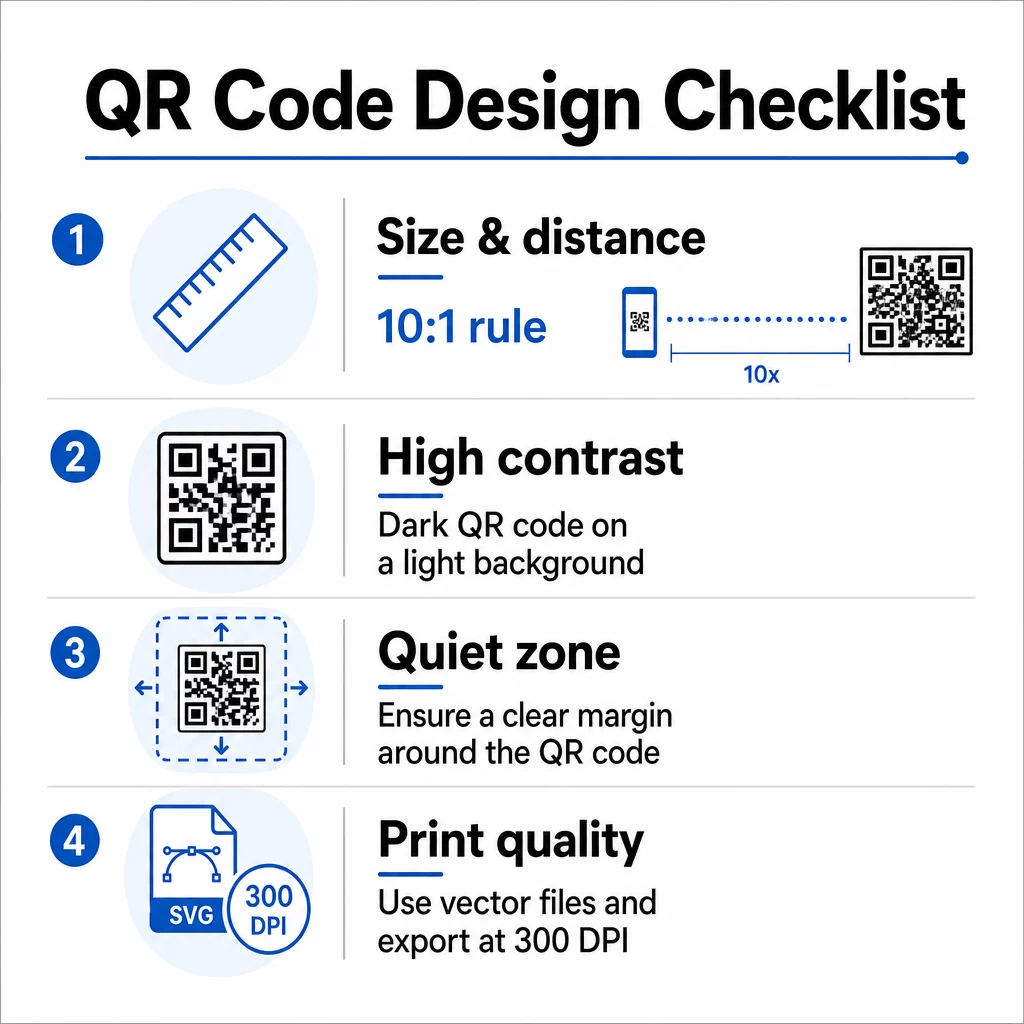
Dodržujte pravidlo 10:1: šírka kódu by mala byť približne jedna desatina očakávanej vzdialenosti skenovania. Pre výskumný plagát prezeraný zo vzdialenosti asi 50 cm (20 palcov) by mal byť kód široký aspoň 5 cm (2 palce). Pageloot’s pokyny pre veľkosť pre tlačové materiály odporúčajú minimálne 3 × 3 cm pre plagáty, pričom 6 × 6 cm je ideálny cieľ. Niektoré univerzitné príručky navrhujú minimálne približne 5 × 5 palcov pre kódy na plagátoch, ktoré musia byť čitateľné zo stojacej vzdialenosti.
Pre prezentačné snímky musí byť kód dostatočne veľký na skenovanie zo sedadla. Otestujte ho na skutočnej projekčnej vzdialenosti pred začiatkom relácie.
Kontrast a farba
Skenery čítajú QR kódy detekciou kontrastu medzi tmavými modulmi a svetlým pozadím. Nedostatočný kontrast je jednou z hlavných príčin zlyhania skenovania. Používajte tmavé vzory kódu na svetlom alebo bielom pozadí a snažte sa o kontrastný pomer aspoň 4,5:1. Vyhnite sa obráteným schémam (svetlé kódy na tmavom pozadí), prechodom alebo vzorovaným pozadiam za kódom.
Ak chcete použiť farby značky alebo inštitúcie, môžete – za predpokladu, že kontrastný pomer zostane dostatočne vysoký. Pre viac podrobností o tom, ktoré farebné kombinácie fungujú a ktoré zlyhávajú, pozrite si Pageloot’s osvedčené postupy pre farebný kontrast QR kódov.
Tichá zóna
Tichá zóna je jasný okraj obklopujúci kód. ISO/IEC 18004 špecifikuje minimálne štyri moduly prázdneho priestoru na všetkých štyroch stranách. Do tohto okraja neumiestňujte text, logá, okraje ani textúry pozadia. Na plagáte to znamená ponechať viditeľný biely priestor okolo kódu – považujte ho za súčasť dizajnu, nie za premrhaný priestor.
Formát súboru a kvalita tlače
Exportujte svoj QR kód ako vektorový súbor (SVG alebo EPS) pre veľkoformátovú tlač. Rastrové formáty ako PNG sa môžu pri zväčšení pixelovať, čo sťažuje rozlíšenie jednotlivých modulov a znižuje skenovateľnosť. Pre štandardné rozlíšenie tlače je praktickým štandardom minimálne 300 DPI.
Získajte súbory QR kódu pripravené na tlač Stiahnite si svoj kód vo formáte SVG, EPS alebo PDF pre tlač plagátov vo vysokom rozlíšení s Generátor QR kódov.
Umiestnenie na plagátoch a snímkach
Kde kód umiestnite, ovplyvňuje, či ho ľudia skutočne naskenujú. Pokyny zo zdrojov vedeckej komunikácie odporúčajú umiestniť QR kód blízko konca čítacej cesty plagátu – pri záveroch alebo hlavnej myšlienke – aby sa objavil potom, čo je divák už zaujatý obsahom. Toto je logický moment na ponúknutie viac: “Chcete kompletný súbor dát? Naskenujte tu.”
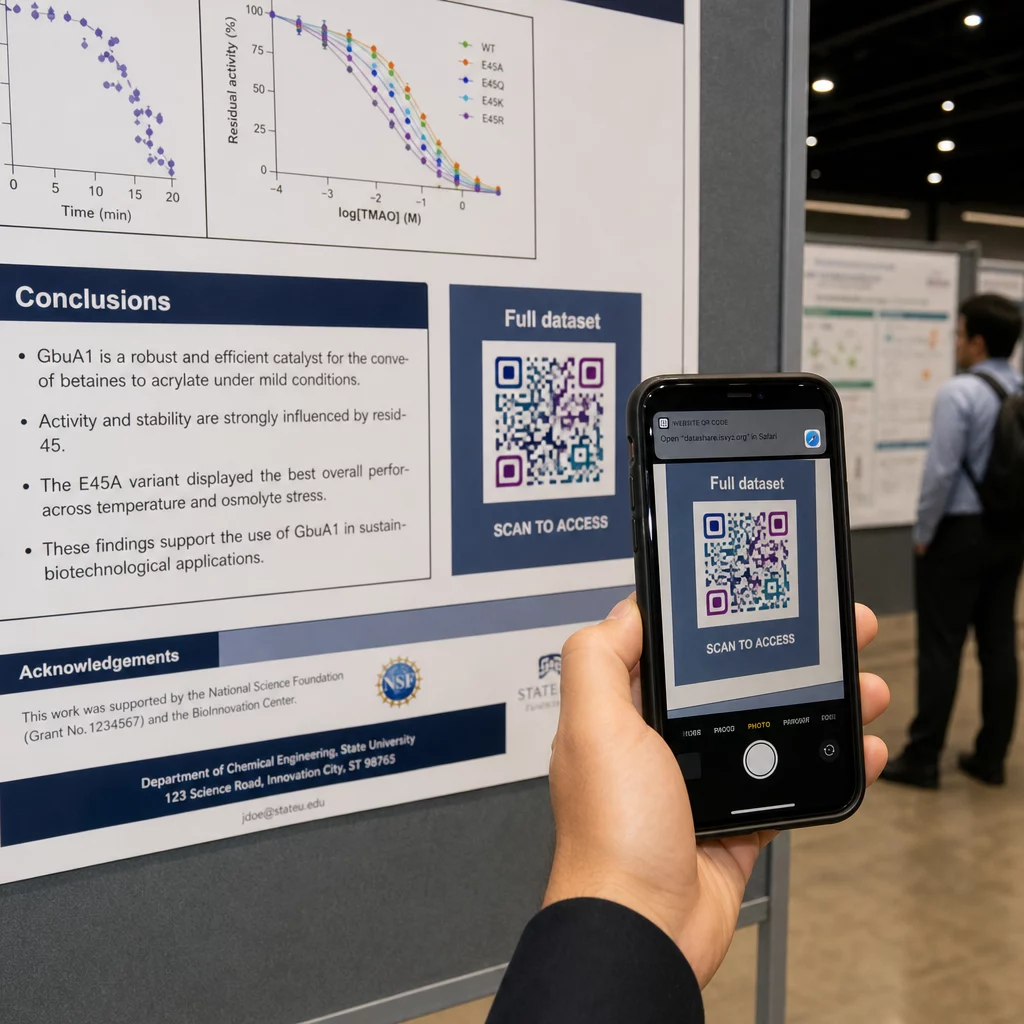
Na vertikálnom plagáte je pravá dolná oblasť prirodzeným miestom pre odpočinok oka po prečítaní. Pri horizontálnom rozložení funguje pravá strana podobne. Pre QR kódy na plagátoch, umiestnenie vo výške očí (približne 3,5–5,5 stôp od podlahy) umožňuje účastníkom pohodlne skenovať bez ohýbania.
Vždy spárujte kód s krátkou výzvou k akcii, ktorá ľuďom povie, čo získajú:
- “Naskenujte pre celý článok”
- “Prístup k doplnkovým dátam”
- “Uložte moje kontaktné údaje”
- “Stiahnite si prezentáciu”
Bez výzvy k akcii (CTA) mnohí účastníci kód úplne ignorujú – nevedia, či sa oplatí skenovať.
Pre prezentačné snímky zobrazte QR kód aspoň na 15–20 sekúnd a verbálne ho spomeňte. Umiestnenie do pravého dolného rohu snímky ho udržuje viditeľným bez toho, aby konkuroval vášmu hlavnému obsahu. Dynamické kódy sú tu obzvlášť užitočné: ak sa cieľ mení medzi prednáškami alebo dátumami konferencií, aktualizujete odkaz bez toho, aby ste sa dotkli súboru snímky.
Pre pokyny k umiestneniu v rôznych kontextoch, Pageloot’s Sprievodca umiestnením QR kódu pokrýva umiestnenie vo výške očí, výber pozadia a ako prispôsobiť umiestnenie zámeru používateľa.
Testovanie pred tlačou
Pretestujte kód predtým, ako pošlete svoj plagát do tlače alebo dokončíte svoje snímky. Konkrétne:
- Skenujte zo skutočnej vzdialenosti, z ktorej bude publikum stáť alebo sedieť
- Testujte na minimálne dvoch rôznych zariadeniach (iOS a Android)
- Vyskúšajte v rôznych svetelných podmienkach, vrátane žiarivkového osvetlenia bežného v konferenčných sálach
- Overte, či sa prepojený cieľ načíta správne, vrátane mobilného pripojenia (nielen Wi-Fi)
- Skontrolujte, či sa PDF a iné súbory otvárajú na mobile bez potreby desktopovej aplikácie
Ak používate dynamický kód, potvrďte, že presmerovanie sa správne vyrieši po akýchkoľvek aktualizáciách cieľa. Úplný kontrolný zoznam kritérií dizajnu a testovania nájdete na Pageloot’s osvedčené postupy čitateľnosti QR kódov.
Používanie QR kódov nad rámec plagátu
Vedecké konferencie ponúkajú viacero kontaktných bodov, kde QR kódy pridávajú praktickú hodnotu nad rámec plagátovej tabule.
Konferenčné odznaky s QR kódmi vCard umožňujú každému účastníkovi uložiť si vaše kontaktné údaje počas rozhovorov na chodbe – nie je potrebná výmena telefónneho čísla, žiadna karta, ktorá by sa stratila v taške.
Materiály k prednáškam prepojené cez QR kód nahrádzajú stohy papiera. Jeden kód na vytlačenom abstrakte môže spojiť účastníkov s kompletnými zborníkmi, súvisiacimi publikáciami alebo formulárom spätnej väzby po prednáške.
Registrácia a prihlásenie procesy profitujú z QR kódov pre účasť, ktoré overujú identitu a sledujú účasť, čím poskytujú organizátorom aktuálne počty účastníkov podľa prednášok.
Networkingové materiály môže použiť QR kód odkazu na pripojenie k webovej stránke laboratória, profilu Google Scholar alebo stránke LinkedIn – čo dáva zainteresovaným kolegom viacero spôsobov, ako nadviazať kontakt po skončení konferencie.
Konferencia IASCON 2022 ukázala, ako to vyzerá vo veľkom meradle. Organizátori umiestnili QR kódy na registračný pult, pred zasadacie miestnosti a do prezentačných slajdov, čím úplne nahradili papierové rozvrhy a podklady. Účastníci mali prístup k detailom relácií, profilom rečníkov a stiahnutým prezentáciám skenovaním kódov na každom mieste. Mobilný systém odozvy spustený QR kódmi umožnil živé ankety a otázky a odpovede bez akýchkoľvek stiahnutí aplikácií, čím sa dosiahla miera účasti porovnateľná s tradičnými papierovými formulármi. Analýzy z podujatia odhalili vyššiu angažovanosť počas ranných relácií a merateľný pokles po obede – údaje, ktoré priamo ovplyvnili budúce rozhodnutia o plánovaní.
QR kódy fungujú na konferenciách akejkoľvek veľkosti z rovnakého dôvodu: odstraňujú trenie medzi zvedavým účastníkom a informáciami, ktoré chce. Dobre umiestnený, správne veľký, vysoko kontrastný QR kód s jasnou výzvou k akcii robí niečo, čo samotný tlačený plagát nedokáže – udržuje konverzáciu v chode aj po skončení relácie. Začnite s dynamickými kódmi, aby ste si zachovali flexibilitu aktualizovať ciele, sledovať, kto sa zapája do vašich materiálov, a vykonávať zmeny bez opätovnej tlače. Pre všetky tieto účely, Generátor QR kódov Pageloot poskytuje nástroje na vytváranie, prispôsobovanie a správu vašich kódov z jedného ovládacieho panela.
Často kladené otázky
Nie. Moderné smartfóny na iOS aj Androide dokážu skenovať QR kódy priamo cez vstavanú aplikáciu fotoaparátu, bez potreby akéhokoľvek dodatočného softvéru. Účastníci jednoducho otvoria svoj fotoaparát, namieria ho na kód a ťuknú na upozornenie, aby otvorili prepojený obsah vo svojom prehliadači.
Statický QR kód kóduje cieľovú URL priamo vo vzore – po vytlačení ho nemožno zmeniť. Dynamický QR kód kóduje krátku presmerovaciu URL, takže cieľ môžete kedykoľvek aktualizovať z ovládacieho panela bez opätovnej tlače. Dynamické kódy tiež poskytujú analýzy, ako sú počty skenov, typy zariadení a časové pečiatky, čo statické kódy neposkytujú. Pre konferenčné plagáty a materiály vytlačené vopred sa dôrazne odporúčajú dynamické kódy.
Dodržujte pravidlo 10:1: šírka kódu by mala byť približne jedna desatina skenovacej vzdialenosti. Pre plagát prezeraný zo vzdialenosti asi 50 cm (20 palcov) to znamená minimálnu šírku 5 cm (2 palce). Praktickým cieľom pre použitie na plagátoch je 6 × 6 cm, čo poskytuje pohodlný priestor na skenovanie pre väčšinu účastníkov. Vždy otestujte vytlačený kód zo skutočnej pozorovacej vzdialenosti pred konferenciou.