Πώς μοιράζεστε ένα σύνολο δεδομένων 40 σελίδων ή μια πλήρη βιβλιογραφία με κάποιον που στέκεται μπροστά στην αφίσα σας για 90 δευτερόλεπτα; Τα έντυπα εξαντλούνται, οι διευθύνσεις URL είναι πολύ μεγάλες για να πληκτρολογηθούν και οι εφαρμογές απαιτούν λήψεις που κανείς δεν θέλει. Οι κωδικοί QR λύνουν και τα τρία προβλήματα με μία μόνο σάρωση – αυτός ο οδηγός εξηγεί πώς να τους χρησιμοποιήσετε αποτελεσματικά σε ερευνητικές αφίσες και παρουσιάσεις συνεδρίων.
Τι να συνδέσετε στον κωδικό QR σας
Πριν δημιουργήσετε έναν κωδικό, αποφασίστε τι πρέπει να κάνει στην πραγματικότητα για το άτομο που τον σαρώνει. Οι πιο χρήσιμοι σύνδεσμοι σε επιστημονικά συνέδρια εμπίπτουν σε μερικές σαφείς κατηγορίες.
Ερευνητικό υλικό και συμπληρωματικά δεδομένα είναι η πιο κοινή περίπτωση χρήσης. Μια αφίσα έχει περιορισμένο χώρο, οπότε ένας κωδικός QR μπορεί να παραπέμπει στην πλήρη εργασία σας, σε μια λίστα αναφορών, σε επιπλέον σχήματα, σε ακατέργαστα σύνολα δεδομένων ή σε εκδόσεις υψηλής ανάλυσης διαγραμμάτων που είναι δύσκολο να διαβαστούν στην εκτύπωση. Οι οδηγοί βιβλιοθηκών πανεπιστημίων σημειώνουν ότι οι κωδικοί QR είναι ιδιαίτερα πρακτικοί όταν υπάρχουν πάρα πολλές αναφορές για να αναγραφούν απευθείας στην αφίσα – ο κωδικός απλώς κατευθύνει τους θεατές σε μια πλήρη ηλεκτρονική λίστα.
Χρησιμοποίησε ένα Κωδικός QR PDF για να φιλοξενήσετε την εργασία σας ή το συμπληρωματικό αρχείο απευθείας, ώστε οι συμμετέχοντες να έχουν άμεση πρόσβαση χωρίς να χρειάζεται να αναζητήσουν σε μια βάση δεδομένων ή να πληκτρολογήσουν ένα DOI.
Στοιχεία επικοινωνίας είναι εξίσου σημαντικά. Η δικτύωση σε συνέδρια γίνεται γρήγορα, και ένας Κωδικός QR vCard επιτρέπει σε κάποιον να σαρώσει το σήμα ή την αφίσα σας και να αποθηκεύσει το όνομά σας, το ίδρυμα, το email και τον ιστότοπό σας απευθείας στις επαφές του τηλεφώνου του – χωρίς να απαιτούνται επαγγελματικές κάρτες και χωρίς σφάλματα μεταγραφής.
Ανατροφοδότηση και έρευνες επεκτείνουν τη συζήτηση πέρα από την παρουσίαση αφίσας. Η ενσωμάτωση ενός συνδέσμου σε μια σύντομη φόρμα Google επιτρέπει στους συμμετέχοντες να υποβάλουν ερωτήσεις ή να αξιολογήσουν την εργασία σας σε δευτερόλεπτα. Ένας Κωδικός QR της φόρμας Google καθιστά τη φόρμα προσβάσιμη από οποιοδήποτε έντυπο υλικό χωρίς να χρειάζεται κανείς να πληκτρολογήσει μια διεύθυνση URL.
Διαφάνειες παρουσίασης και πολυμέσα λειτουργούν καλά όταν ενσωματώνονται σε παρουσιάσεις διαφανειών. Η τοποθέτηση ενός κωδικού QR στην αρχή ή στο τέλος μιας ομιλίας επιτρέπει στο κοινό να κατεβάσει τις διαφάνειες, να αποκτήσει πρόσβαση σε μια ηχογράφηση ή να επισκεφθεί σχετικούς πόρους χωρίς να διακόψει τη συνεδρία.
Μοιραστείτε Ερευνητικό Υλικό Άμεσα Ανεβάστε την εργασία, την αφίσα ή το συμπληρωματικό σας αρχείο και δημιουργήστε έναν κωδικό με δυνατότητα σάρωσης μέσα σε λίγα λεπτά με το Δημιουργία QR code για PDF.
Στατικοί έναντι Δυναμικών Κωδικών QR: Ποιον να χρησιμοποιήσετε
ΕΝΑ στατικό κωδικό QR κωδικοποιεί τη διεύθυνση URL προορισμού απευθείας στο μοτίβο. Μόλις εκτυπωθεί, δεν μπορεί να αλλάξει – εάν η συνδεδεμένη σελίδα μετακινηθεί ή το αρχείο ενημερωθεί, ο κωδικός καθίσταται άχρηστος.
ΕΝΑ δυναμικός κωδικός QR κωδικοποιεί μια σύντομη διεύθυνση URL ανακατεύθυνσης αντ' αυτού. Μπορείτε να ενημερώσετε τον προορισμό ανά πάσα στιγμή από έναν πίνακα ελέγχου χωρίς να εκτυπώσετε ξανά τίποτα. Αυτό είναι ιδιαίτερα πολύτιμο για χρήση σε συνέδρια, όπου οι αλλαγές στο πρόγραμμα και οι ενημερώσεις αρχείων της τελευταίας στιγμής είναι συνηθισμένες. Οι δυναμικοί κωδικοί παράγουν επίσης αναλυτικά στοιχεία: μπορείτε να δείτε συνολικές σαρώσεις, μοναδικές σαρώσεις, τύπους συσκευών, γεωγραφικά δεδομένα και χρονικές σημάνσεις, δίνοντάς σας ένα πραγματικό μέτρο του πόσοι άνθρωποι ασχολήθηκαν πραγματικά με το υλικό σας.
Για οτιδήποτε σκοπεύετε να εκτυπώσετε εκ των προτέρων – αφίσες, κονκάρδες, πρακτικά – οι δυναμικοί κωδικοί QR είναι η ασφαλέστερη επιλογή. Το Δημιουργία dynamic QR code σας επιτρέπει να μετατρέψετε οποιαδήποτε διεύθυνση URL σε δυναμικό κωδικό, να επεξεργαστείτε τον προορισμό μετά την εκτύπωση και να παρακολουθήσετε την αλληλεπίδραση από έναν ενιαίο πίνακα ελέγχου.
Μια ερευνητική ομάδα χρηματοδοτούμενη από την DARPA στο Πανεπιστήμιο της Καλιφόρνια, Σάντα Κρουζ, χρησιμοποίησε δυναμικούς κωδικούς QR για να παρακολουθήσει τον ποιοτικό έλεγχο σε πέντε πανεπιστήμια κατά την παραγωγή βιοηλεκτρονικών συσκευών. Παρακολουθώντας τα δεδομένα σάρωσης, διαπίστωσαν ότι ένα βήμα παραγωγής είχε ποσοστό επιτυχίας συγκόλλησης μόνο 59% – ένα εύρημα που θα ήταν δύσκολο να αναδειχθεί χωρίς ενσωματωμένη παρακολούθηση. Όπως σημείωσε ο ερευνητής Cristian Hernandez, “Το σύστημα παρακολούθησης κωδικών QR επέτρεψε στην ομάδα μας να προσδιορίσει ότι το βήμα 6 είχε ποσοστό επιτυχίας συγκόλλησης μόνο 59%… έχοντας αυτά τα δεδομένα εντοπίστηκε η βασική αιτία του τρόπου αστοχίας της βιοηλεκτρονικής συσκευής.”
Σχεδιασμός Κωδικών QR για Αξιόπιστη Σάρωση
Ένας κωδικός QR που φαίνεται καλός αλλά αποτυγχάνει να σαρωθεί είναι χειρότερος από το να μην υπάρχει καθόλου κωδικός. Αυτές οι αρχές σχεδιασμού διασφαλίζουν ότι ο δικός σας λειτουργεί στις συνθήκες ενός πραγματικού περιβάλλοντος συνεδρίου.
Μέγεθος και Απόσταση Σάρωσης
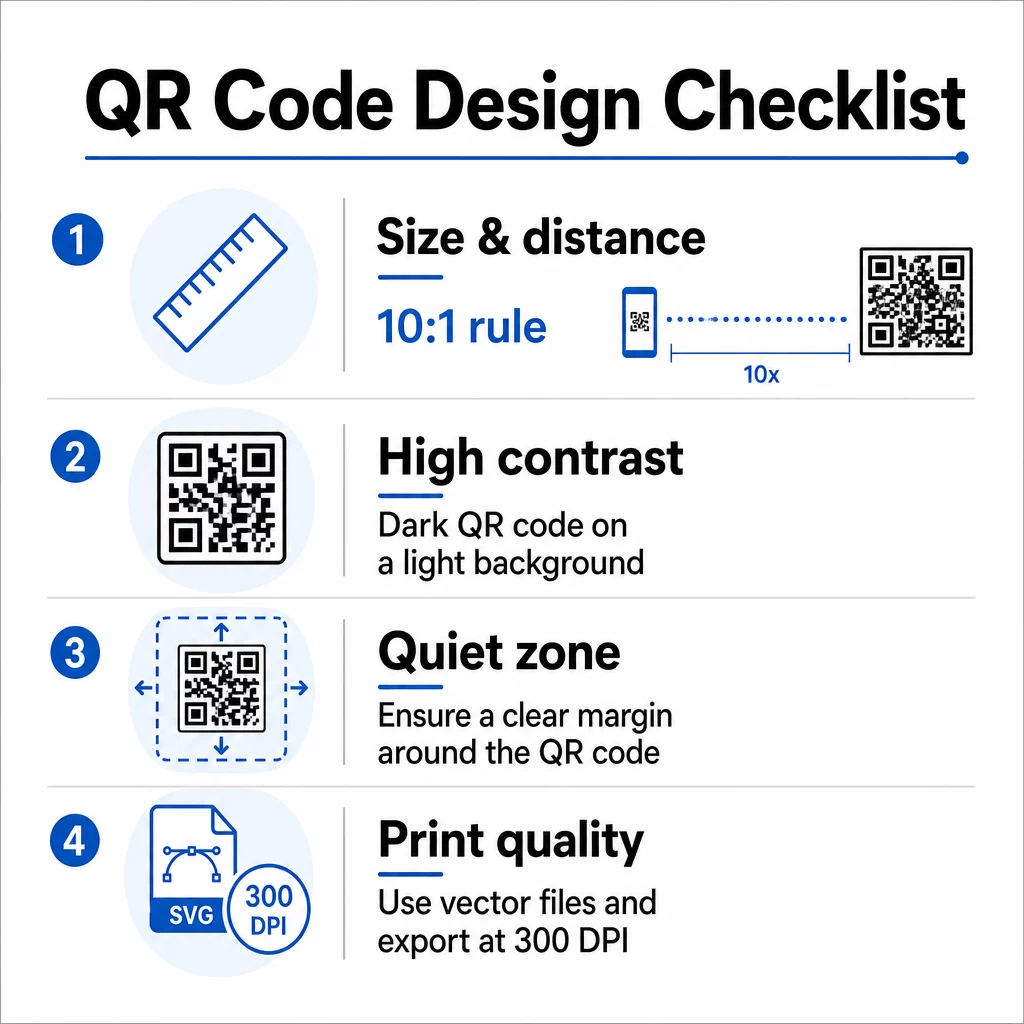
Ακολουθήστε τον κανόνα 10:1: το πλάτος του κωδικού πρέπει να είναι περίπου το ένα δέκατο της αναμενόμενης απόστασης σάρωσης. Για μια ερευνητική αφίσα που προβάλλεται από περίπου 50 cm (20 ίντσες) μακριά, ο κωδικός πρέπει να έχει πλάτος τουλάχιστον 5 cm (2 ίντσες). Το Pageloot’s οδηγίες μεγέθους για έντυπα υλικά συνιστούν ένα ελάχιστο 3 × 3 cm για αφίσες, με 6 × 6 cm ως ιδανικό στόχο. Ορισμένοι πανεπιστημιακοί οδηγοί προτείνουν ένα ελάχιστο περίπου 5 × 5 ίντσες για κωδικούς αφισών που πρέπει να είναι αναγνώσιμοι από απόσταση ορθοστασίας.
Για διαφάνειες παρουσίασης, ο κωδικός πρέπει να είναι αρκετά μεγάλος ώστε να σαρωθεί από μια θέση. Δοκιμάστε τον στην πραγματική απόσταση προβολής πριν από τη συνεδρία.
Αντίθεση και χρώμα
Οι σαρωτές διαβάζουν τους κωδικούς QR ανιχνεύοντας την αντίθεση μεταξύ σκούρων μονάδων και ανοιχτού φόντου. Η ανεπαρκής αντίθεση είναι μία από τις κύριες αιτίες αποτυχίας σάρωσης. Χρησιμοποιήστε σκούρα μοτίβα κωδικών σε ανοιχτό ή λευκό φόντο και στοχεύστε σε αναλογία αντίθεσης τουλάχιστον 4,5:1. Αποφύγετε ανεστραμμένα σχήματα (ανοιχτός κωδικός σε σκούρο φόντο), διαβαθμίσεις ή μοτίβα φόντου πίσω από τον κωδικό.
Εάν θέλετε να χρησιμοποιήσετε χρώματα επωνυμίας ή θεσμικά χρώματα, μπορείτε – υπό την προϋπόθεση ότι η αναλογία αντίθεσης παραμένει αρκετά υψηλή. Για περισσότερες λεπτομέρειες σχετικά με το ποιες χρωματικές συνδυασμοί λειτουργούν και ποιες αποτυγχάνουν, δείτε το Pageloot’s βέλτιστες πρακτικές αντίθεσης χρωμάτων κωδικών QR.
Ήσυχη ζώνη
Η ήσυχη ζώνη είναι το καθαρό περιθώριο που περιβάλλει τον κωδικό. Το ISO/IEC 18004 καθορίζει ένα ελάχιστο τεσσάρων μονάδων κενού χώρου και στις τέσσερις πλευρές. Μην τοποθετείτε κείμενο, λογότυπα, περιγράμματα ή υφές φόντου μέσα σε αυτό το περιθώριο. Σε μια αφίσα, αυτό σημαίνει να αφήνετε ορατό λευκό χώρο γύρω από τον κωδικό – αντιμετωπίστε τον ως μέρος του σχεδιασμού, όχι ως χαμένο χώρο.
Μορφή Αρχείου και Ποιότητα Εκτύπωσης
Εξάγετε τον κωδικό QR σας ως αρχείο διανυσματικής γραφικής (SVG ή EPS) για εκτύπωση μεγάλου μεγέθους. Οι μορφές ράστερ όπως το PNG μπορεί να εμφανίσουν εικονοστοιχεία όταν μεγεθύνονται, καθιστώντας τις επιμέρους μονάδες δυσδιάκριτες και μειώνοντας τη δυνατότητα σάρωσης. Για τυπικές αναλύσεις εκτύπωσης, τα 300 DPI ελάχιστο είναι το πρακτικό πρότυπο.
Λάβετε αρχεία κωδικών QR έτοιμα για εκτύπωση Κατεβάστε τον κωδικό σας σε μορφή SVG, EPS ή PDF για εκτύπωση αφίσας υψηλής ανάλυσης με το Γεννήτρια Κωδικών QR.
Τοποθέτηση σε αφίσες και διαφάνειες
Το πού τοποθετείτε τον κωδικό επηρεάζει το αν οι άνθρωποι θα τον σαρώσουν πραγματικά. Οδηγίες από πηγές επιστημονικής επικοινωνίας συνιστούν την τοποθέτηση του κωδικού QR κοντά στο τέλος της διαδρομής ανάγνωσης της αφίσας – κοντά στα συμπεράσματα ή το βασικό μήνυμα – έτσι ώστε να εμφανίζεται αφού ο θεατής έχει ήδη ασχοληθεί με το περιεχόμενο. Αυτή είναι μια λογική στιγμή για να προσφέρετε περισσότερα: “Θέλετε το πλήρες σύνολο δεδομένων; Σαρώστε εδώ.”
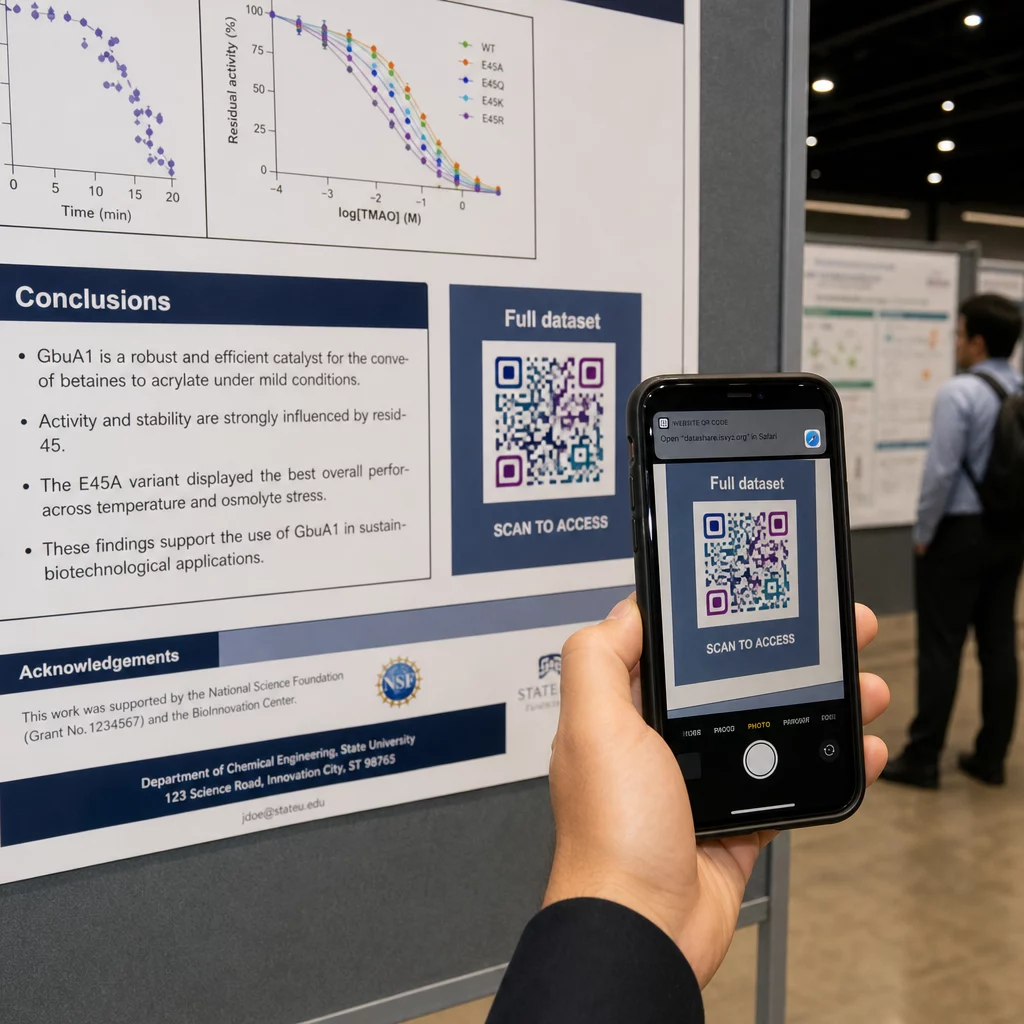
Σε μια κάθετη αφίσα, η κάτω-δεξιά περιοχή είναι ένα φυσικό σημείο ανάπαυσης για το μάτι μετά την ανάγνωση. Σε μια οριζόντια διάταξη, η δεξιά πλευρά λειτουργεί παρόμοια. Για Κωδικοί QR σε αφίσες, η τοποθέτηση στο ύψος των ματιών (περίπου 1,05–1,65 μέτρα από το πάτωμα) επιτρέπει στους παρευρισκόμενους να σαρώσουν άνετα χωρίς να σκύψουν.
Πάντα να συνδυάζετε τον κωδικό με μια σύντομη παρότρυνση για δράση που λέει στους ανθρώπους τι θα λάβουν:
- “Σαρώστε για την πλήρη εργασία”
- “Πρόσβαση σε συμπληρωματικά δεδομένα”
- “Αποθηκεύστε τα στοιχεία επικοινωνίας μου”
- “Κατεβάστε την παρουσίαση”
Χωρίς μια παρότρυνση για δράση (CTA), πολλοί παρευρισκόμενοι θα αγνοήσουν εντελώς τον κωδικό – δεν γνωρίζουν αν αξίζει να τον σαρώσουν.
Για διαφάνειες παρουσίασης, εμφανίστε τον κωδικό QR για τουλάχιστον 15–20 δευτερόλεπτα και αναγνωρίστε τον προφορικά. Η τοποθέτησή του στην κάτω-δεξιά γωνία της διαφάνειας τον διατηρεί ορατό χωρίς να ανταγωνίζεται το κύριο περιεχόμενό σας. Οι δυναμικοί κωδικοί είναι ιδιαίτερα χρήσιμοι εδώ: αν ο προορισμός αλλάζει μεταξύ ομιλιών ή ημερομηνιών συνεδρίων, ενημερώνετε τον σύνδεσμο χωρίς να αγγίξετε το αρχείο της διαφάνειας.
Για καθοδήγηση σχετικά με την τοποθέτηση σε διαφορετικά πλαίσια, το Pageloot's Οδηγός τοποθέτησης κωδικών QR καλύπτει την τοποθέτηση στο ύψος των ματιών, τις επιλογές φόντου και τον τρόπο αντιστοίχισης της τοποθέτησης με την πρόθεση του χρήστη.
Δοκιμή Πριν την Εκτύπωση
Ελέγξτε τον κώδικα πριν στείλετε την αφίσα σας για εκτύπωση ή οριστικοποιήσετε τις διαφάνειές σας. Συγκεκριμένα:
- Σαρώστε από την πραγματική απόσταση στην οποία θα στέκεται ή θα κάθεται το κοινό
- Δοκιμάστε σε τουλάχιστον δύο διαφορετικές συσκευές (iOS και Android)
- Δοκιμάστε σε διαφορετικές συνθήκες φωτισμού, συμπεριλαμβανομένων των φθοριζόντων φώτων οροφής που είναι κοινά στις αίθουσες συνεδρίων
- Επαληθεύστε ότι ο συνδεδεμένος προορισμός φορτώνει σωστά, συμπεριλαμβανομένης της σύνδεσης κινητής τηλεφωνίας (όχι μόνο Wi-Fi)
- Ελέγξτε ότι τα PDF και άλλα αρχεία ανοίγουν σε κινητό χωρίς να απαιτείται εφαρμογή επιτραπέζιου υπολογιστή
Εάν χρησιμοποιείτε δυναμικό κώδικα, επιβεβαιώστε ότι η ανακατεύθυνση επιλύεται σωστά μετά από τυχόν ενημερώσεις προορισμού. Για μια πλήρη λίστα ελέγχου κριτηρίων σχεδιασμού και δοκιμών, δείτε το Pageloot’s βέλτιστες πρακτικές αναγνωσιμότητας κωδικών QR.
Χρήση κωδικών QR πέρα από την αφίσα
Τα επιστημονικά συνέδρια προσφέρουν πολλαπλά σημεία επαφής όπου οι κωδικοί QR προσθέτουν πρακτική αξία πέρα από τον πίνακα αφισών.
Κάρτες συνεδρίου με κωδικούς QR vCard επιτρέπουν σε οποιονδήποτε συμμετέχοντα να αποθηκεύσει τα στοιχεία επικοινωνίας σας κατά τη διάρκεια συζητήσεων στους διαδρόμους – δεν χρειάζεται ανταλλαγή αριθμού τηλεφώνου, ούτε κάρτα που χάνεται σε μια τσάντα.
Έντυπα συνεδρίας που συνδέονται μέσω κωδικού QR αντικαθιστούν στοίβες χαρτιού. Ένας μόνο κωδικός σε μια τυπωμένη περίληψη μπορεί να συνδέσει τους συμμετέχοντες με τα πλήρη πρακτικά, σχετικές δημοσιεύσεις ή μια φόρμα ανατροφοδότησης μετά τη συνεδρία.
Εγγραφή και check-in οι ροές επωφελούνται από τους κωδικούς QR παρακολούθησης που επαληθεύουν την ταυτότητα και παρακολουθούν τη συμμετοχή, δίνοντας στους διοργανωτές πραγματικό χρόνο καταμέτρησης ανά συνεδρία.
Υλικά δικτύωσης μπορεί να χρησιμοποιήσει ένα QR code συνδέσμου για να συνδεθεί με έναν ιστότοπο εργαστηρίου, ένα προφίλ στο Google Scholar ή μια σελίδα στο LinkedIn – δίνοντας στους ενδιαφερόμενους συναδέλφους πολλούς τρόπους να επικοινωνήσουν μετά το τέλος του συνεδρίου.
Το συνέδριο IASCON 2022 έδειξε πώς μοιάζει αυτό σε μεγάλη κλίμακα. Οι διοργανωτές τοποθέτησαν κωδικούς QR στο γραφείο εγγραφών, έξω από τις αίθουσες συσκέψεων και στις διαφάνειες παρουσιάσεων, αντικαθιστώντας πλήρως τα έντυπα προγράμματα και τα φυλλάδια. Οι συμμετέχοντες μπορούσαν να έχουν πρόσβαση σε λεπτομέρειες συνεδριών, προφίλ ομιλητών και λήψεις παρουσιάσεων σαρώνοντας τους κωδικούς σε κάθε τοποθεσία. Ένα σύστημα κινητής απόκρισης που ενεργοποιείται από κωδικούς QR επέτρεψε ζωντανές δημοσκοπήσεις και ερωτήσεις-απαντήσεις χωρίς λήψεις εφαρμογών, επιτυγχάνοντας ποσοστά συμμετοχής συγκρίσιμα με τις παραδοσιακές έντυπες φόρμες. Τα αναλυτικά στοιχεία από την εκδήλωση αποκάλυψαν υψηλότερη συμμετοχή κατά τις πρωινές συνεδρίες και μια μετρήσιμη πτώση μετά το μεσημεριανό γεύμα – δεδομένα που ενημέρωσαν άμεσα τις μελλοντικές αποφάσεις προγραμματισμού.
Οι κωδικοί QR λειτουργούν σε συνέδρια οποιουδήποτε μεγέθους για τον ίδιο λόγο: αφαιρούν την τριβή μεταξύ ενός περίεργου συμμετέχοντα και των πληροφοριών που θέλει. Ένας καλά τοποθετημένος, σωστού μεγέθους, υψηλής αντίθεσης κωδικός QR με σαφή παρότρυνση για δράση κάνει κάτι που μια έντυπη αφίσα μόνη της δεν μπορεί – διατηρεί τη συζήτηση ζωντανή μετά το τέλος της συνεδρίας. Ξεκινήστε με δυναμικούς κωδικούς, ώστε να διατηρήσετε την ευελιξία να ενημερώνετε προορισμούς, να παρακολουθείτε ποιος αλληλεπιδρά με το υλικό σας και να κάνετε αλλαγές χωρίς επανεκτύπωση. Για όλα αυτά, το Δημιουργία κώδικα Pageloot QR παρέχει τα εργαλεία για να δημιουργήσετε, να προσαρμόσετε και να διαχειριστείτε τους κωδικούς σας από έναν ενιαίο πίνακα ελέγχου.
Συχνές ερωτήσεις
Όχι. Τα σύγχρονα smartphones σε iOS και Android μπορούν να σαρώνουν κωδικούς QR απευθείας μέσω της ενσωματωμένης εφαρμογής κάμερας, χωρίς να απαιτείται πρόσθετο λογισμικό. Οι παρευρισκόμενοι απλώς ανοίγουν την κάμερά τους, την στρέφουν στον κωδικό, και πατούν την ειδοποίηση για να ανοίξουν το συνδεδεμένο περιεχόμενο στο πρόγραμμα περιήγησής τους.
Ένας στατικός κωδικός QR κωδικοποιεί τη διεύθυνση URL προορισμού απευθείας στο μοτίβο – μόλις εκτυπωθεί, δεν μπορεί να αλλάξει. Ένας δυναμικός κωδικός QR κωδικοποιεί μια σύντομη διεύθυνση URL ανακατεύθυνσης, ώστε να μπορείτε να ενημερώσετε τον προορισμό ανά πάσα στιγμή από έναν πίνακα ελέγχου χωρίς επανεκτύπωση. Οι δυναμικοί κωδικοί παρέχουν επίσης αναλυτικά στοιχεία όπως αριθμό σαρώσεων, τύπους συσκευών και χρονικές σημάνσεις, κάτι που οι στατικοί κωδικοί δεν παρέχουν. Για αφίσες συνεδρίων και υλικά που εκτυπώνονται εκ των προτέρων, οι δυναμικοί κωδικοί συνιστώνται ανεπιφύλακτα.
Ακολουθήστε τον κανόνα 10:1: το πλάτος του κωδικού πρέπει να είναι περίπου το ένα δέκατο της απόστασης σάρωσης. Για μια αφίσα που προβάλλεται από περίπου 50 cm (20 ίντσες) μακριά, αυτό σημαίνει ελάχιστο πλάτος 5 cm (2 ίντσες). Ένας πρακτικός στόχος για χρήση σε αφίσα είναι 6 × 6 cm, το οποίο παρέχει άνετο χώρο σάρωσης για τους περισσότερους συμμετέχοντες. Πάντα να δοκιμάζετε τον εκτυπωμένο κωδικό από την πραγματική απόσταση θέασης πριν από το συνέδριο.