Är du trött på att skriva ut separata QR-koder för iPhone- och Android-användare på ditt marknadsföringsmaterial? Att visa flera koder förvirrar potentiella kunder och slösar värdefullt utrymme på fysiska förpackningar, banderoller och flygblad. Att skapa en enda dynamisk QR-kod dirigerar automatiskt varje skanner till rätt appbutik för deras specifika enhet.
Hur QR-koder för flera butiker dirigerar skannrar automatiskt
När en smarttelefonkamera skannar en QR-kod, avkodar operativsystemet mönstret till en URL och öppnar den i mobilwebbläsaren. En QR-kod för flera butiker förlitar sig på en dynamisk dirigeringslänk istället för att ansluta direkt till en fast butiks webbadress.
Vid mottagande av skanningsförfrågan inspekterar dirigeringsservern webbläsarsignaler och operativsystemrubriker för att identifiera den skannande enheten:
- iOS-dirigering: Dirigerar Apple-användare till din applista i App Store med hjälp av din app’s unika numeriska identifierare.
- Android-dirigering: Dirigerar Android-användare till din Google Play Store-sida med hjälp av ditt appmanifests paketnamn.
- Fallback-dirigering: Skickar icke-mobila eller stationära skannrar till en universell webblandningssida eller kampanjsida.
Att använda enhetsdetektering inom en enda dynamisk länk tar bort teknisk friktion för kunder, skyddar din fysiska layout från visuell röra och säkerställer höga konverteringsgrader över alla kanaler.
Skapa din plattformsoberoende app-QR-kod Effektivisera ditt onboarding-flöde genom att dirigera iOS- och Android-användare till rätt butik med en enda skanning. Starta QR-kodgenerator för App Store för att bygga och varumärka din dynamiska kod idag.
Så här ställer du in en QR-kod för appnedladdning
Att generera en enhetlig nedladdningskod kräver att du samlar dina officiella plattforms-URL:er och konfigurerar dina inställningar för smarta länkar. Följ dessa steg för att generera en utskriftsklar kod:
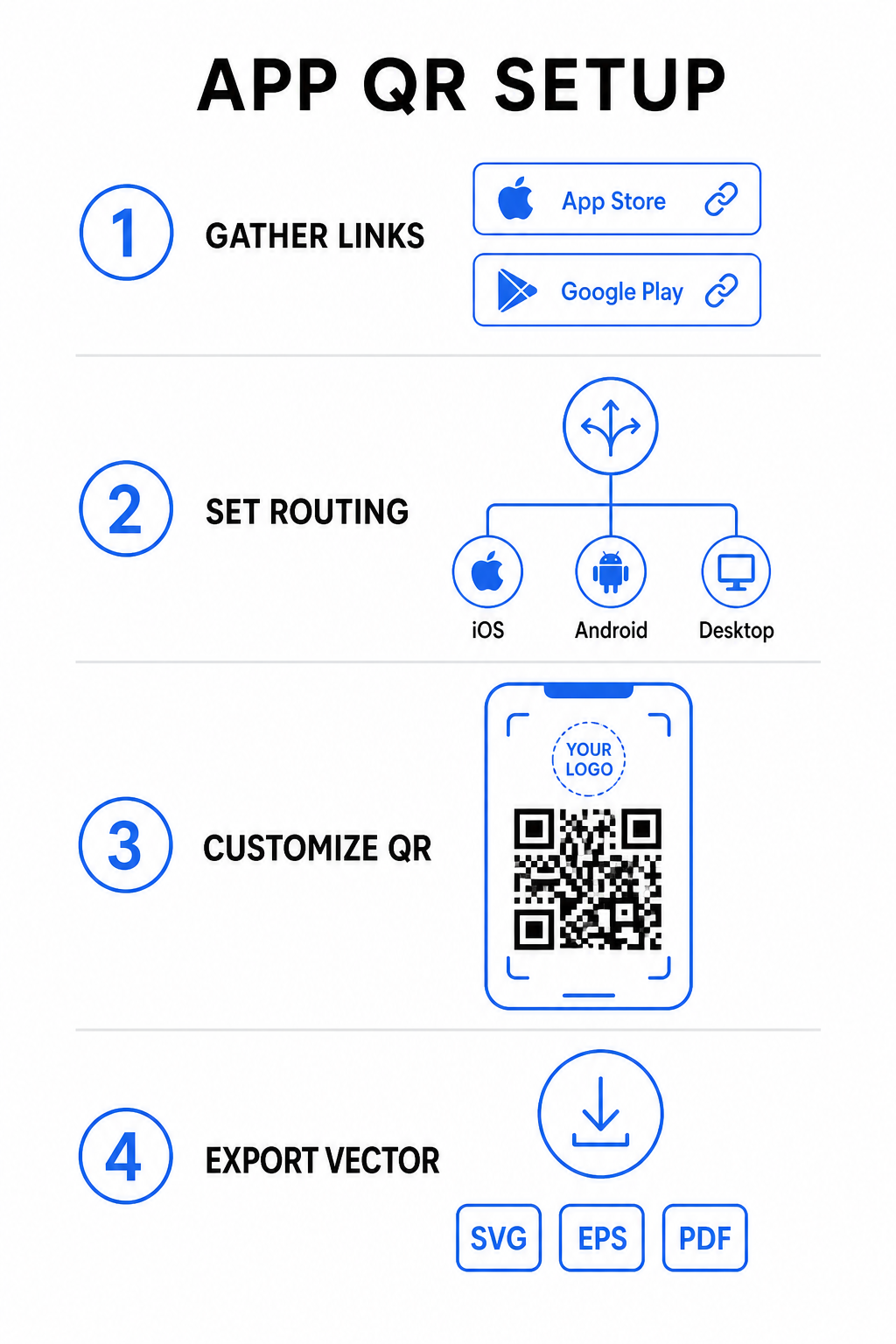
- Samla officiella butiks-URL:er: Leta reda på din Apple App Store-sökväg som innehåller din app’s numeriska ID och din Google Play URL som innehåller ditt paketnamnidentifierare.
- Mata in butikslänkar i generatorn: Ange din iOS-länk i fältet för App Store och din Android-länk i fältet för Google Play i skapande-redigeraren.
- Ange en universell reservdestination: Ange en standard-URL för webbplatsens målsida för att omdirigera stationära användare eller operativsystem som inte stöds.
- Anpassa din kods utseende: Justera modulens färger, bakgrundsskuggning, ramstilar och uppmaningar, och bädda sedan in din varumärkeslogotyp i mitten.
- Exportera tryckfärdiga vektorfiler: Ladda ner din färdiga design i högupplösta vektorformat som SVG, EPS eller PDF för skarpa utskrifter.
Om dina butiks-URL:er ändras i framtiden, låter användningen av en Dynamisk QR-kodgenerator dig uppdatera destinationslänkar direkt från din kontrollpanel utan att trycka om fysiskt material.
Tekniska specifikationer för optimal skanningsbarhet
Att följa ISO/IEC 18004-specifikationerna för streckkoder säkerställer att din utskrivna QR-kod skannas enkelt över olika mobila enheter, ljusförhållanden och vinklar.
| Designelement | Teknisk standard | Praktiskt syfte |
|---|---|---|
| Tyst zon | Minst 4 moduler bred | Bevarar en otryckt marginal runt alla fyra sidor så att kamerasensorer isolerar kodmatrisen från bakgrundsgrafik. |
| Storleksförhållande | 1:10 (Storlek till Avstånd) | Bibehåller pålitlig läsbarhet; en 1-tums (2,5 cm) kod stöder ett skanningsavstånd på ungefär 10 tum (25 cm). |
| Färgkontrast | Hög kontrast (Mörk på ljus) | Använder mörka moduler på en ljus bakgrund för att maximera ljusabsorptionskontrasten för bildsensorer. |
| Felkorrigering | Nivå Q (25%) eller Nivå H (30%) | Återställer saknade eller dolda datablock, vilket gör att koden fungerar även när en anpassad logotyp täcker mitten. |
Mät din kampanjprestanda Vill du se vilka marknadsföringskanaler som genererar flest appinstallationer? Använd vår plattform för spåra QR-koder att analysera skanningsstatistik, platser och operativsystem i realtid.
Rutiner för kvalitetssäkring före tryckning
Innan du bestämmer dig för en stor utskrift för förpackningar, affischer eller butiksskyltar, utvärdera noggrant din kods prestanda i verkliga scenarier.
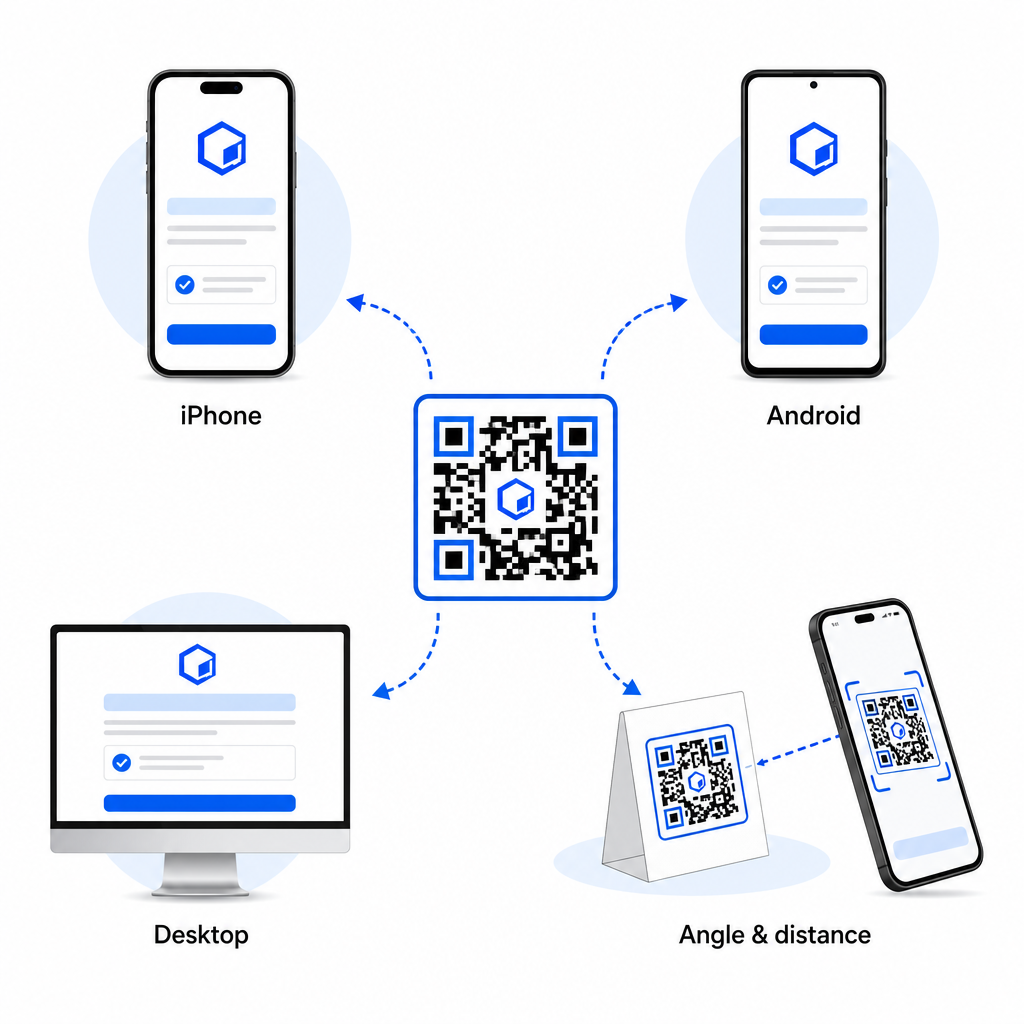
- Verifiera nativ plattformsrutning: Skanna koden med standardkameraapplikationer på fysiska iOS- och Android-enheter för att säkerställa korrekt butiksomdirigering.
- Bekräfta beteendet för skrivbordsåterställning: Klicka eller skanna länken från en webbläsare på en dator för att kontrollera att trafik som inte är mobil hamnar på din angivna reservwebbsida.
- Utför inspektionsprotokollet med tre avstånd: Testa skanning på avsett visningsavstånd, upprepa 50% längre bort och testa i en 30 till 45-graders vinkel.
- Utvärdera nätverkets laddningshastighet: Säkerställ att den dynamiska omdirigeringen bearbetas snabbt över olika mobildata- och Wi-Fi-nätverk.
För ytterligare detaljer om hur smartphones behandlar kodförfrågningar, se våra guider om hur användare skannar QR-koder med smartphones och hur konsumenter laddar ner en app med en QR-kod.
Vanliga frågor
Nej. En dynamisk QR-kod för appbutiker upptäcker användarens mobila operativsystem vid skanning och dirigerar automatiskt iOS-användare till Apple App Store och Android-användare till Google Play.
Den dynamiska dirigeringsmotorn identifierar icke-mobila enheter och skickar besökaren till din utsedda reserv-URL, såsom din huvudsakliga webbplats eller en kampanjsida.
Ja. Dynamiska QR-koder gör att du kan ändra dina destinationslänkar för Apple, Android eller reservdestinationer när som helst i din hanteringspanel utan att behöva trycka om utskriften.
Att kombinera dina nedladdningslänkar för iOS- och Android-appar till en enda dynamisk QR-kod eliminerar friktion vid nedladdning, sparar utrymme på tryckt media och ger en enhetlig mobilupplevelse. Genom att använda hög kontrast, robust felkorrigering och iögonfallande ramar omvandlas fysiska förpackningar och marknadsföringsdisplayer till direkta appinstallationer.
Ta full kontroll över dina plattformsoberoende kampanjer genom att använda länk-QR-kodgenerator för att skapa dynamiska, spårbara nedladdningslänkar för dina marknadsföringskampanjer.