Sind Sie es leid, separate QR-Codes für iPhone- und Android-Nutzer auf Ihren Marketingmaterialien zu drucken? Das Anzeigen mehrerer Codes verwirrt potenzielle Kunden und verschwendet wertvollen Platz auf physischen Verpackungen, Bannern und Flyern. Das Erstellen eines einzigen dynamischen QR-Codes leitet jeden Scanner automatisch zum richtigen App Store für sein spezifisches Gerät.
Wie Multi-Store-QR-Codes Scanner automatisch weiterleiten
Wenn eine Smartphone-Kamera einen QR-Code scannt, dekodiert das Betriebssystem das Muster in eine URL und öffnet diese im mobilen Browser. Ein Multi-Store-QR-Code verwendet einen dynamischen Weiterleitungslink, anstatt sich direkt mit einer festen Webadresse des Stores zu verbinden.
Nach Empfang der Scan-Anfrage prüft der Routing-Server Browsersignale und Betriebssystem-Header, um das scannende Gerät zu identifizieren:
- iOS-Weiterleitung: Leitet Apple-Nutzer mithilfe der eindeutigen numerischen Kennung Ihrer App zu Ihrem App-Eintrag im App Store.
- Android-Weiterleitung: Leitet Android-Nutzer mithilfe des Paketnamens Ihres App-Manifests zu Ihrer Google Play Store-Seite.
- Fallback-Weiterleitung: Leitet nicht-mobile oder Desktop-Scanner zu einer universellen Web-Landingpage oder einer Werbeseite.
Die Nutzung der Geräteerkennung innerhalb eines einzigen dynamischen Links reduziert technische Reibung für Kunden, schützt Ihr physisches Layout vor visueller Unordnung und gewährleistet hohe Konversionsraten über alle Kanäle hinweg.
Erstellen Sie Ihren Cross-Plattform-App-QR-Code Optimieren Sie Ihren Onboarding-Prozess, indem Sie iOS- und Android-Nutzer mit einem einzigen Scan zum richtigen Store leiten. Starten Sie den App Store QR-Code-Generator , um Ihren dynamischen Code noch heute zu erstellen und zu branden.
So richten Sie einen App-Download-QR-Code ein
Das Generieren eines einheitlichen Download-Codes erfordert das Sammeln Ihrer offiziellen Plattform-URLs und die Konfiguration Ihrer Smart-Link-Einstellungen. Befolgen Sie diese Schritte, um einen druckfertigen Code zu generieren:
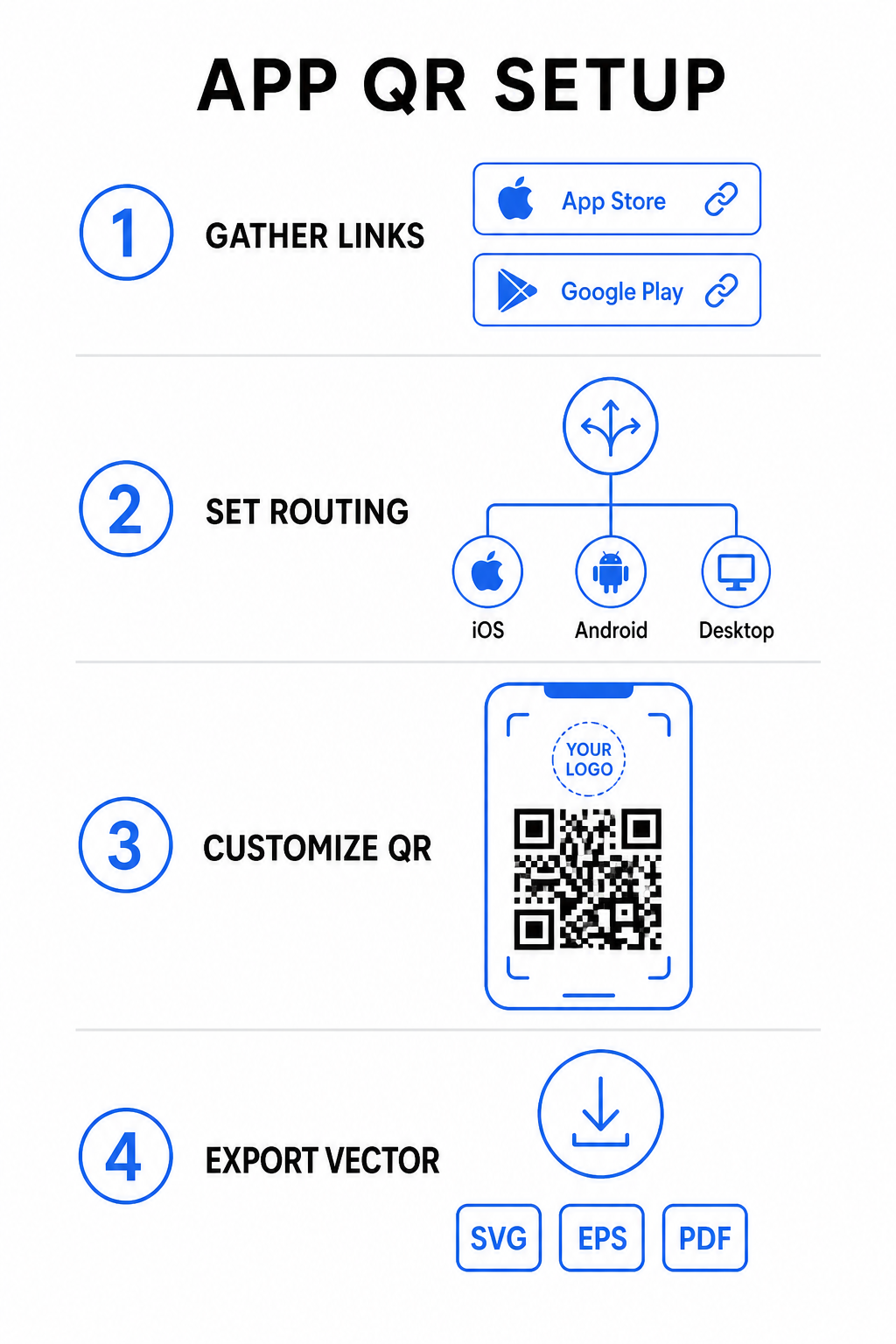
- Offizielle Store-URLs sammeln: Suchen Sie Ihren Apple App Store-Pfad, der die numerische ID Ihrer App enthält, und Ihre Google Play URL, die Ihren Paketnamen-Bezeichner enthält.
- Store-Links in den Generator eingeben: Geben Sie Ihren iOS-Link in das App Store-Feld und Ihren Android-Link in das Google Play-Feld im Erstellungseditor ein.
- Ein universelles Fallback-Ziel festlegen: Geben Sie eine Standard-URL für eine Website-Landingpage ein, um Desktop-Benutzer oder nicht unterstützte Betriebssysteme umzuleiten.
- Anpassen des Code-Aussehens: Passen Sie Modulfarben, Hintergrundschattierungen, Rahmenstile und Call-to-Action-Aufforderungen an und betten Sie dann Ihr Markenlogo in die Mitte ein.
- Druckfertige Vektordateien exportieren: Laden Sie Ihr fertiges Design in hochauflösenden Vektorformaten wie SVG, EPS oder PDF für einen gestochen scharfen Druck herunter.
Wenn sich Ihre Store-URLs in Zukunft ändern, können Sie mit einem Dynamischer QR-Code Generator Ziel-Links direkt von Ihrem Dashboard aus aktualisieren, ohne physische Materialien neu drucken zu müssen.
Technische Spezifikationen für optimale Scannbarkeit
Die Einhaltung der Barcode-Spezifikationen ISO/IEC 18004 stellt sicher, dass Ihr gedruckter QR-Code auf verschiedenen Mobilgeräten, unter unterschiedlichen Lichtverhältnissen und aus verschiedenen Blickwinkeln problemlos gescannt werden kann.
| Gestaltungselement | Technischer Standard | Praktischer Zweck |
|---|---|---|
| Ruhige Zone | Mindestens 4 Module breit | Bewahrt einen unbedruckten Rand an allen vier Seiten, sodass Kamerasensoren die Code-Matrix von Hintergrundgrafiken isolieren können. |
| Größenverhältnis | 1:10 (Größe zu Entfernung) | Bewahrt eine zuverlässige Lesbarkeit; ein 1 Zoll (2,5 cm) großer Code unterstützt eine Scann-Entfernung von etwa 10 Zoll (25 cm). |
| Farbkontrast | Hoher Kontrast (Dunkel auf Hell) | Verwendet dunkle Module auf hellem Hintergrund, um den Lichtabsorptionskontrast für Bildsensoren zu maximieren. |
| Fehlerkorrektur | Stufe Q (25%) oder Stufe H (30%) | Stellt fehlende oder verdeckte Datenblöcke wieder her, wodurch der Code auch dann funktioniert, wenn ein benutzerdefiniertes Logo die Mitte bedeckt. |
Messen Sie Ihre Kampagnenleistung Möchten Sie sehen, welche Marketingkanäle die meisten App-Installationen generieren? Nutzen Sie unsere Plattform für Verfolgung von QR-Codes um Echtzeit-Scan-Metriken, Standorte und Betriebssysteme zu analysieren.
Qualitätssicherung vor dem Druck
Bevor Sie sich zu einem großen Druckauftrag für Verpackungen, Plakate oder Einzelhandelswerbung verpflichten, bewerten Sie die Leistung Ihres Codes in realen Szenarien gründlich.
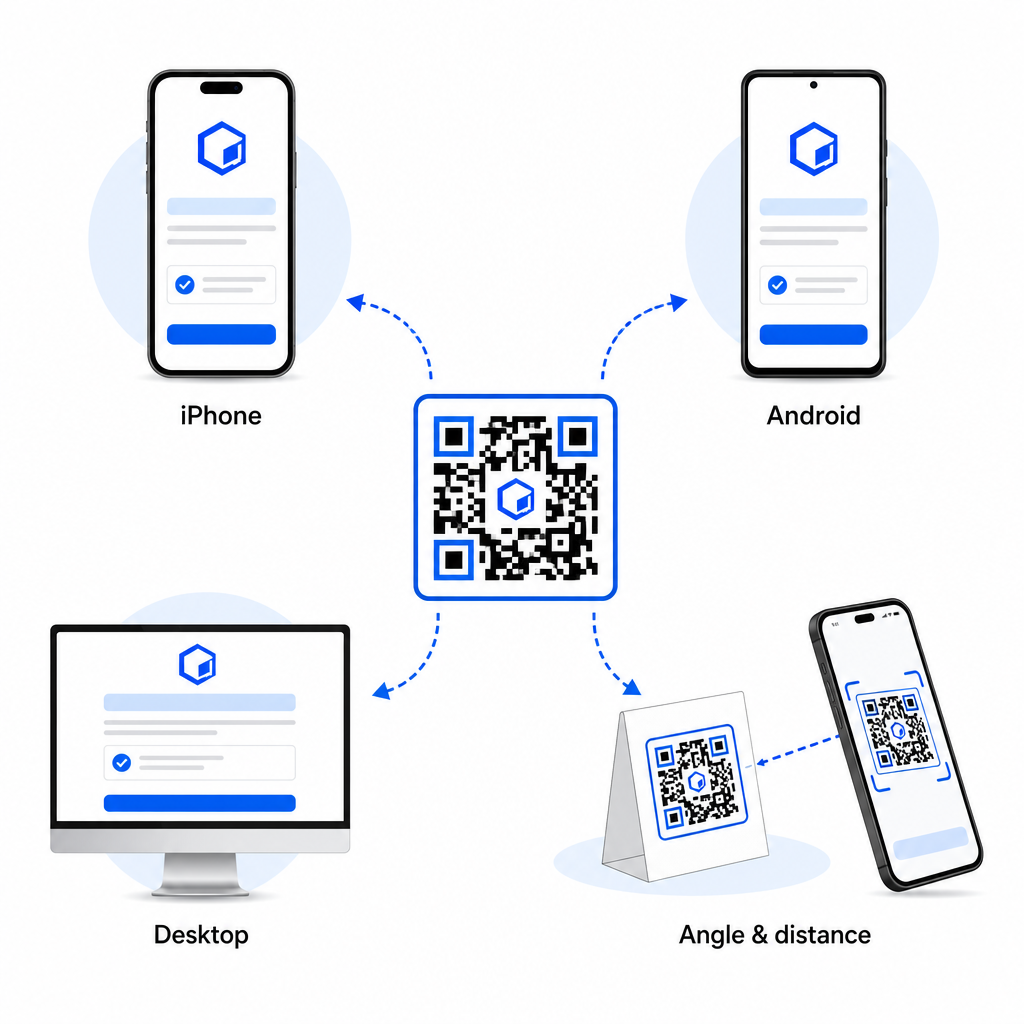
- Native Plattform-Weiterleitung überprüfen: Scannen Sie den Code mit den Standardkamera-Apps auf physischen iOS- und Android-Geräten, um eine korrekte Shop-Weiterleitung sicherzustellen.
- Desktop-Fallback-Verhalten bestätigen: Klicken oder scannen Sie den Link von einem Desktop-Webbrowser aus, um zu überprüfen, ob nicht-mobiler Traffic auf Ihrer vorgesehenen Fallback-Webseite landet.
- Das Drei-Entfernungs-Inspektionsprotokoll durchführen: Testen Sie das Scannen in der beabsichtigten Betrachtungsentfernung, wiederholen Sie dies in 50 % größerer Entfernung und testen Sie in einem Winkel von 30 bis 45 Grad.
- Netzwerklade-Geschwindigkeit bewerten: Stellen Sie sicher, dass die dynamische Weiterleitung über verschiedene mobile Daten- und Wi-Fi-Netzwerke schnell verarbeitet wird.
Weitere Informationen dazu, wie Smartphones Code-Anfragen verarbeiten, finden Sie in unseren Anleitungen, wie Benutzer QR-Codes mit Smartphones scannt und wie Verbraucher eine App mit einem QR-Code herunterladen.
Häufig gestellte Fragen
Nein. Ein dynamischer App Store QR-Code erkennt beim Scannen das mobile Betriebssystem des Benutzers und leitet iOS-Benutzer automatisch zum Apple App Store und Android-Benutzer zu Google Play weiter.
Die dynamische Routing-Engine erkennt nicht-mobile Geräte und leitet den Besucher an Ihre festgelegte Fallback-URL weiter, wie Ihre Hauptwebsite oder eine Werbe-Landingpage.
Ja. Dynamische QR-Codes ermöglichen es Ihnen, Ihre Apple-, Android- oder Fallback-Ziellinks jederzeit in Ihrem Management-Dashboard zu ändern, ohne die Grafik neu drucken zu müssen.
Die Kombination Ihrer iOS- und Android-App-Download-Links in einem einzigen dynamischen QR-Code eliminiert Download-Reibung, spart Layout-Platz auf Printmedien und bietet ein einheitliches mobiles Erlebnis. Die Anwendung von hohem Kontrast, robuster Fehlerkorrektur und auffälligen Rahmen wandelt physische Verpackungen und Marketingdisplays in direkte App-Installationen um.
Übernehmen Sie die volle Kontrolle über Ihre plattformübergreifenden Werbeaktionen, indem Sie den Link-QR-Code-Generator verwenden, um dynamische, verfolgbare Download-Links für Ihre Marketingkampagnen zu erstellen.