בית > מדריכים > How to Create a Single QR Code for App Downloads
Scanning app download code

How to Create a Single QR Code for App Downloads

Learn how to create a single dynamic QR code for app store downloads. Automatically route iOS and Android users to the correct store with one scan.
Updated on אוגוסט 29, 2026
תוכן העניינים

Are you tired of printing separate QR codes for iPhone and Android users on your marketing materials? Displaying multiple codes confuses potential customers and wastes valuable space on physical packaging, banners, and flyers. Creating a single dynamic QR code automatically routes each scanner to the correct app store for their specific device.

How Multi-Store QR Codes Route Scanners Automatically

When a smartphone camera scans a QR code, the operating system decodes the pattern into a URL and opens it in the mobile browser. A multi-store QR code relies on a dynamic routing link rather than connecting directly to a fixed store web address.

Upon receiving the scan request, the routing server inspects browser signals and operating system headers to identify the scanning device:

  • iOS routing: Directs Apple users to your app listing on the App Store using your app’s unique numeric identifier.
  • Android routing: Directs Android users to your Google Play Store page using your app manifest package name.
  • Fallback routing: Sends non-mobile or desktop scanners to a universal web landing page or promotional site.

Using device detection inside a single dynamic link removes technical friction for customers, protects your physical layout from visual clutter, and ensures high conversion rates across every channel.

Create Your Cross-Platform App QR Code Streamline your onboarding flow by directing iOS and Android users to the correct store with a single scan. Launch the מחולל קוד QR של App Store to build and brand your dynamic code today.

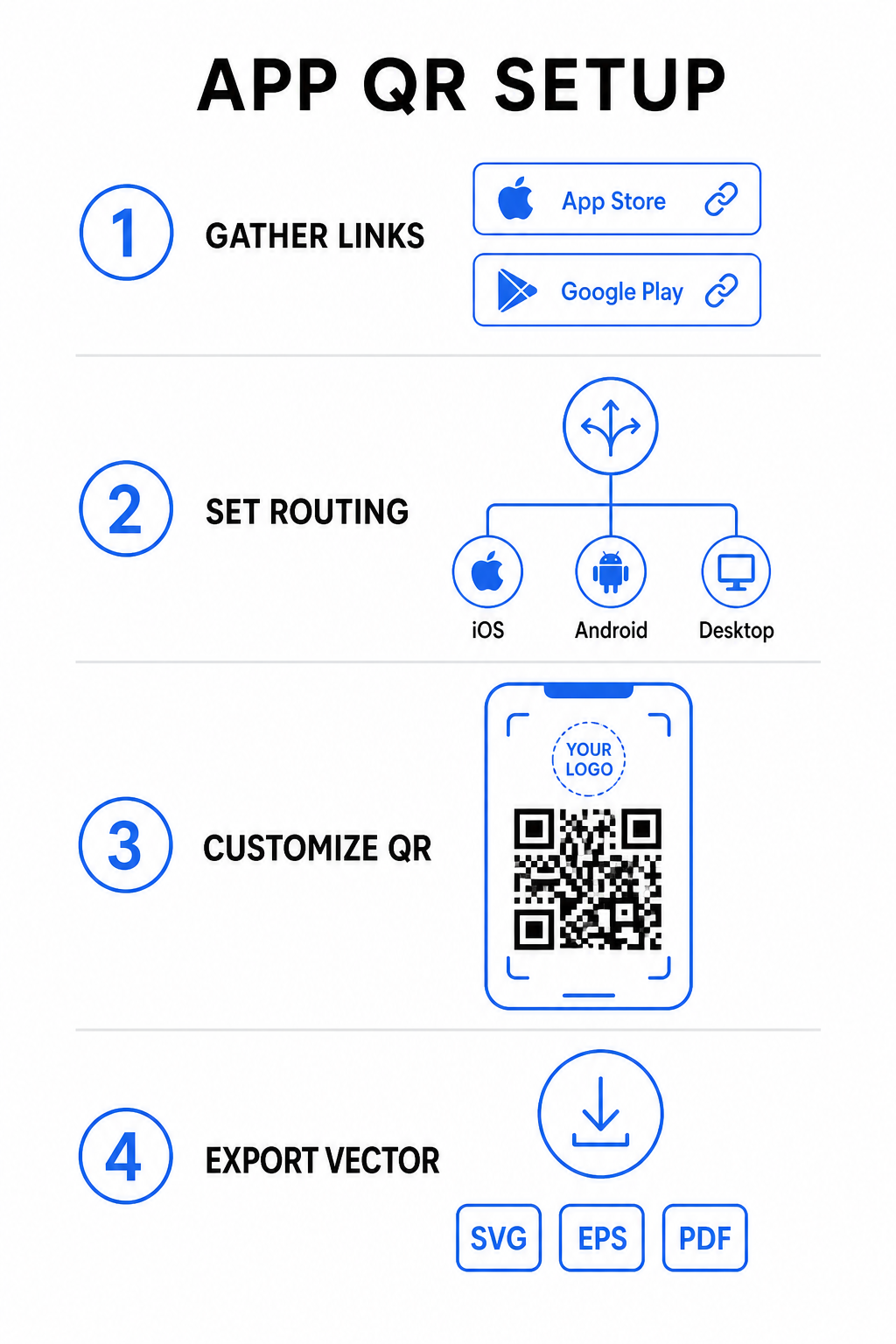
How to Set Up an App Download QR Code

Generating a unified download code requires gathering your official platform URLs and configuring your smart link settings. Follow these steps to generate a print-ready code:

App QR setup steps
  • Gather official store URLs: Locate your Apple App Store path containing your app’s numeric ID and your Google Play URL containing your package name identifier.
  • Input store links into the generator: Enter your iOS link into the App Store field and your Android link into the Google Play field within the creation editor.
  • Set a universal fallback destination: Enter a standard website landing page URL to redirect desktop users or unsupported operating systems.
  • Customize your code appearance: Adjust module colors, background shading, frame styles, and call-to-action prompts, then embed your brand logo in the center.
  • Export print-ready vector files: Download your finished design in high-resolution vector formats such as SVG, EPS, or PDF for crisp printing.

If your store URLs change in the future, using a מחולל קודי QR דינמיים lets you update destination links directly from your dashboard without reprinting physical materials.

Technical Specifications for Optimal Scannability

Adhering to ISO/IEC 18004 barcode specifications ensures your printed QR code scans easily across different mobile devices, lighting conditions, and angles.

Design Element Technical Standard Practical Purpose
אזור שקט Minimum 4 modules wide Preserves an unprinted margin around all four sides so camera sensors isolate the code matrix from background graphics.
Sizing Ratio 1:10 (גודל למרחק) Maintains reliable readability; a 1-inch (2.5 cm) code supports a scanning distance of roughly 10 inches (25 cm).
ניגודיות צבע High contrast (Dark on Light) Uses dark modules on a light background to maximize light absorption contrast for image sensors.
תיקון שגיאות Level Q (25%) or Level H (30%) Restores missing or obscured data blocks, allowing the code to function even when a custom logo covers the center.

Measure Your Campaign Performance Want to see which marketing channels generate the most app installs? Use our platform for מעקב אחר קודי QR to analyze real-time scan metrics, locations, and operating systems.

Quality Assurance Practices Before Printing

Before committing to a large print run for packaging, posters, or retail signs, thoroughly evaluate your code’s performance in real-world scenarios.

Testing QR code routing
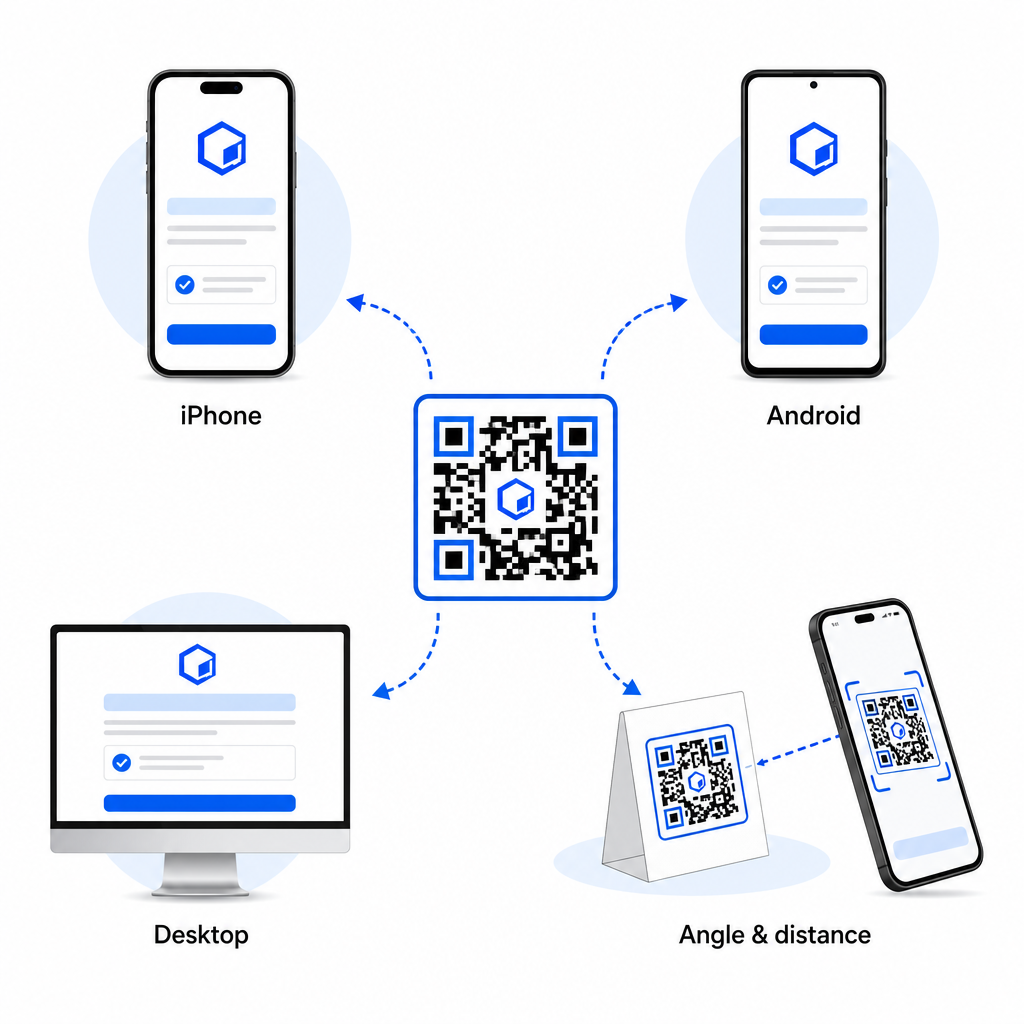
  • Verify native platform routing: Scan the code with default camera applications on physical iOS and Android devices to ensure proper store redirection.
  • Confirm desktop fallback behavior: Click or scan the link from a desktop web browser to check that non-mobile traffic lands on your designated fallback web page.
  • Perform the three-distance inspection protocol: Test scanning at the intended viewing distance, repeat at 50% farther away, and test at a 30 to 45-degree angle.
  • Evaluate network load speed: Ensure the dynamic redirect processes rapidly across various mobile data and Wi-Fi networks.

For additional details on how smartphones process code requests, review our guides on how users לסרוק קודי QR עם סמארטפונים and how consumers download an app with a QR code.

שאלות נפוצות

Do I need separate QR codes for iPhone and Android users?

No. A dynamic app store QR code detects the user’s mobile operating system upon scanning and automatically routes iOS users to the Apple App Store and Android users to Google Play.

What happens if someone scans an app QR code from a desktop computer?

The dynamic routing engine identifies non-mobile devices and sends the visitor to your designated fallback URL, such as your main website or promotional landing page.

Can I edit my app store links after printing the QR code?

Yes. Dynamic QR codes allow you to modify your Apple, Android, or fallback destination links anytime in your management dashboard without reprinting artwork.

Combining your iOS and Android app download links into a single dynamic QR code eliminates download friction, saves layout space on print media, and provides a unified mobile experience. Applying high contrast, robust error correction, and eye-catching frames converts physical packaging and marketing displays into direct app installations.

Take full control of your cross-platform promotions by using the מחולל קוד QR לקישור to build dynamic, trackable download links for your marketing campaigns.

על הסופר

סים קוסטבי הוא ראש התוכן ב-Pageloot. הוא כותב על שירותי יצירת קודי QR החדשניים שלנו. עם מומחיות מעמיקה המשתרעת על פני יותר מחצי עשור בקודי QR, סים הוא מומחה בתחום. הוא עושה צעדים משמעותיים במינוף טכנולוגיית QR כדי לפשט ולשפר אינטראקציות דיגיטליות.

קטגוריה
למידע נוסף על
Marketing QR code scan
איך קודי QR הגבירו את השיווק שלכם
✅ הפתרון #1 עבור קודי QR

אם אתה צריך ליצור קודי QR באופן מקוון, אתה יכול הכינו קוד QR ממש כאן בחינם!
Pageloot הוא פתרון Go-To #1 ליצור ולסרוק קודי QR.

BL-0358

בלוג-מחולל

מהימנים על ידי למעלה מ-20,000 מותגים כדי להשיג יותר מכירות, ביקורות ועוקבים.

לוגו של לקוחות
מהימנים על ידי המותגים המובילים
דורג 4.8 מתוך 5

דירוג 4.86 / 5 כוכבים

הוגו לורן
הוגו לורן
בעל מסעדה
מחולל קוד QR הקל והאמין ביותר אי פעם. ניתן להעלות קבצי PDF באופן מיידי. תפריטי המסעדה שלנו עכשיו דיגיטליים.
לוקאס יאנסן
לוקאס יאנסן
יזם נדל"ן
זהו כלי מצוין וקודי ה-QR לוקחים אותך בדיוק לאן שאתה רוצה. אנחנו משתמשים רק בקוד QR של המיקום אבל יש כל כך הרבה תכונות שימושיות.
אמה מורטי
אמה מורטי
מוצרים קמעונאיים
קל לשימוש ומהיר. זה עובד נהדר ויוצר תמונה מושלמת, כך שהעובדים יכולים להוריד את ה-vCard שלי.
הוגו לורן
הוגו לורן
בעל מסעדה
מחולל קוד QR הקל והאמין ביותר אי פעם. ניתן להעלות קבצי PDF באופן מיידי. תפריטי המסעדה שלנו עכשיו דיגיטליים.
לוקאס יאנסן
לוקאס יאנסן
יזם נדל"ן
זהו כלי מצוין וקודי ה-QR לוקחים אותך בדיוק לאן שאתה רוצה. אנחנו משתמשים רק בקוד QR של המיקום אבל יש כל כך הרבה תכונות שימושיות.
אמה מורטי
אמה מורטי
מוצרים קמעונאיים
קל לשימוש ומהיר. זה עובד נהדר ויוצר תמונה מושלמת, כך שהעובדים יכולים להוריד את ה-vCard שלי.
ראה קודי QR נוספים
בחירת סוג קוד QR
איך להישתמש קודי QR דינמיים
סריקת קוד QR של אפליקציה
איך ל הורד אפליקציות
להפוך כל דבר לחוויה דיגיטלית בפחות מ-3 דקות.

ניסיון חינם למשך 14 יום.

אין צורך בכרטיס אשראי.

קבל 30% הנחה על הרכישה הראשונה שלך

השתמש בקוד:

שתף את קבצי ה-MP3 שלך

הירשם ליצירת קודי QR של PDF

העלה והצג את כל מה שאתה צריך:

  • קבצי שמע
  • פודקאסטים
  • מוּסִיקָה

ניסיון חינם למשך 14 יום עם הרשמה.
קודי QR יפוגו לאחר תקופת הניסיון.

הירשם כדי ליצור קוד אודיו mp3 QR

קבל יותר סריקות עם מסגרות

הירשם כדי להוסיף עוד מסגרות לקודי ה-QR שלך

מסגרות קריאה לפעולה עוזרות ללקוחות שלך ליצור אינטראקציה עם קוד ה-QR בקלות. נסה אותם!

ניסיון חינם למשך 14 יום עם הרשמה.
קודי QR יפוגו לאחר תקופת הניסיון.

הירשם כדי להוסיף עוד מסגרות לקודי ה-QR שלך

הוסף עוד סגנון עם צורות

הירשם כדי ליצור צורות נוספות

קודי QR לא חייבים להיות מרובעים. נסה לשנות אותו כך שיתאים לתדמית המותג שלך.

ניסיון חינם למשך 14 יום עם הרשמה.
קודי QR יפוגו לאחר תקופת הניסיון.

הירשם כדי ליצור צורות נוספות

הוסף לוגו לקוד ה-QR שלך

הירשם כדי להוסיף את הלוגו שלך לקודי QR

הפוך את קוד ה-QR שלך לבלוט על ידי הוספת הלוגו והמותג שלך אליו.

ניסיון חינם למשך 14 יום עם הרשמה.
קודי QR יפוגו לאחר תקופת הניסיון.

הירשם כדי להוסיף את הלוגו שלך לקודי QR

הפניות חכמות לחנויות אפליקציות

הירשם כדי ליצור קוד QR של חנות אפליקציות

הוסף את קישורי האפליקציה שלך לקוד QR החכם של App Store. המשתמשים מופנים מחדש על סמך המכשיר שלהם.

ניסיון חינם למשך 14 יום עם הרשמה.
קודי QR יפוגו לאחר תקופת הניסיון.

הירשם כדי ליצור קוד QR של חנות אפליקציות

העלה תמונה לקוד QR

הירשם כדי ליצור קודי QR לתמונה

שתף את התמונות שלך בקלות. שנה כל תמונה באופן דינמי תוך שניות.

ניסיון חינם למשך 14 יום עם הרשמה.
קודי QR יפוגו לאחר תקופת הניסיון.

הירשם כדי ליצור קודי QR לתמונה

שתף את קבצי ה-PDF שלך

הירשם ליצירת קודי QR של PDF

העלה והצג את כל מה שאתה צריך:

  • תפריטים ומחירונים
  • הוראות
  • כל המסמכים

ניסיון חינם למשך 14 יום עם הרשמה.
קודי QR יפוגו לאחר תקופת הניסיון.

הירשם ליצירת קודי QR של PDF

ערוך מאוחר יותר ללא הדפסה

הירשם כדי לערוך את קודי ה-QR שלך מבלי להדפיס שוב

קודי QR דינמיים מאפשרים לך לשנות את התוכן של קוד ה-QR שלך מבלי להדפיס חדשים.

ניסיון חינם למשך 14 יום עם הרשמה.
קודי QR יפוגו לאחר תקופת הניסיון.

הירשם כדי לערוך את קודי ה-QR שלך מבלי להדפיס שוב

מתי? איפה? עקוב אחר סריקות קוד ה-QR שלך

הירשם כדי לעקוב אחר קודי ה-QR שלך

גלה אילו מקודי ה-QR שלך מקבלים הכי הרבה סריקות ומה הכי מרגש את הלקוחות שלך.

ניסיון חינם למשך 14 יום עם הרשמה.
קודי QR יפוגו לאחר תקופת הניסיון.

הירשם כדי לעקוב אחר קודי ה-QR שלך

קבצים מוכנים להדפסה זמינים

הירשם כדי ליצור קודי QR וקטורים כמו PDF ו-SVG

.EPS, .PDF, .SVG

רוצה להוריד את קודי ה-QR שלך ברזולוציית HD? קבל פורמטים וקטוריים או פיקסלים שמוכנים להדפסה.

ניסיון חינם למשך 14 יום עם הרשמה.
קודי QR יפוגו לאחר תקופת הניסיון.

הירשם כדי ליצור קודי QR וקטורים כמו PDF ו-SVG

המתן בבקשה. קוד ה-QR שלך הוא טוען... טוען...

הפוך אותו לשלך

הירשם כדי לשמור את קוד ה-QR שלך למועד מאוחר יותר

קבל סריקות נוספות על ידי יצירת קודי QR מדהימים עם צבעים שונים, לוגואים ומסגרות קריאה לפעולה.

ניסיון חינם למשך 14 יום עם הרשמה.
קודי QR יפוגו לאחר תקופת הניסיון.

הירשם כדי לשמור את קוד ה-QR שלך למועד מאוחר יותר