Потерявшиеся посетители и переполненные стойки информации создают проблемы на вашей площадке? Путаница в навигации приводит к пропущенным сессиям, разочарованию гостей и перегрузке персонала мероприятия. Внедрение QR-навигации дает посетителям мгновенный мобильный доступ к интерактивным картам и навигации по месту проведения прямо на их смартфонах.
Почему мобильные QR-коды улучшают навигацию по площадке
Крупные конгресс-центры, многоуровневые фестивали и обширные выставочные залы часто перегружают посетителей. Традиционные планы этажей, напечатанные на статических входных стендах, как правило, собирают плотные толпы, вызывая серьезные заторы в основных коридорах. Кроме того, если во время мероприятия меняется расположение стенда или расписание комнаты, физические карты быстро устаревают и вводят в заблуждение.
Использование QR-кодов для навигации по площадке превращает физические указатели в интерактивные цифровые порталы. Размещение кодов в ключевых точках принятия решений создает локализованные станции «Вы здесь» по всей вашей территории. При сканировании эти коды немедленно загружают удобные для мобильных устройств карты, пошаговые инструкции по навигации внутри помещений или страницы расписания в реальном времени.
Поскольку динамические QR-коды позволяют редактировать ссылки назначения после печати, вы можете мгновенно обновлять планы этажей или перенаправлять потоки движения, не заменяя физические указатели. Интеграция цифровых планов этажей со специальной QR коды для регистрации на мероприятие оптимизирует общее управление толпой, обеспечивая немедленную ясность для посетителей.
Практические способы внедрения QR-навигации
Развертывание QR-навигации по вашей площадке требует стратегического размещения в соответствии с конкретными потребностями посетителей. Вот четыре практических применения для навигации по мероприятию:
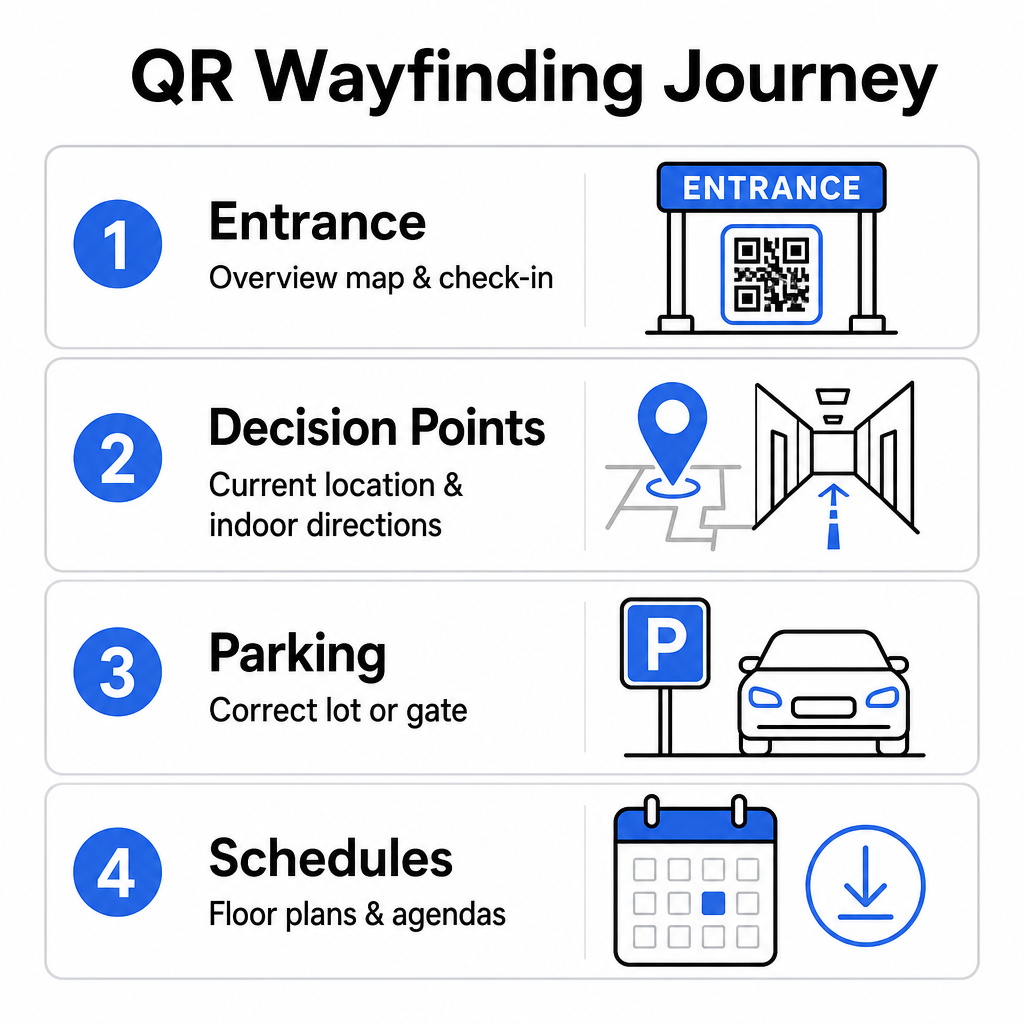
- Входы и центры регистрации: Размещайте заметные коды рядом со входными воротами и стойками регистрации, чтобы предоставить прибывающим гостям немедленный обзор карты объекта вместе с инструкциями по регистрации. Интеграция цифровой навигации в точках входа дополняет современные системы регистрации на мероприятия.
- Локализованные точки принятия решений «Вы здесь»: QR-коды для конкретных станций на основных перекрестках коридоров, в вестибюлях лифтов, у входов на лестницы и в обеденных зонах. Привяжите каждый код к открытию цифровой карты, предварительно настроенной для отображения точного текущего местоположения пользователя внутри здания.
- Направления к месту проведения и парковке: Направляйте посетителей к правильной парковке или входу в здание до того, как они прибудут пешком. Включение QR код на карте Google Maps ссылки в подтверждениях цифровых билетов или на наружных баннерах у входа направляет водителей прямо к обозначенным воротам прибытия.
- Расписания и планы этажей для скачивания: Предоставьте офлайн-доступные карты для мест с плохим сотовым покрытием. Использование QR код на пдф файл позволяет гостям сохранять планы этажей высокого разрешения и руководства по программе непосредственно на свои мобильные устройства.
Упростите навигацию по месту проведения сегодня Нужно создать пользовательские, удобные для мобильных устройств ссылки на карты для вашего предстоящего мероприятия? Используйте QR коды для регистрации на мероприятие для создания динамических, отслеживаемых кодов за считанные минуты.
Рекомендации по размещению и доступности указателей
Система навигации эффективна только в том случае, если посетители могут легко найти и отсканировать физические указатели. Продуманное размещение гарантирует, что навигационные инструменты останутся функциональными и доступными для каждого посетителя.
Оптимальное физическое размещение
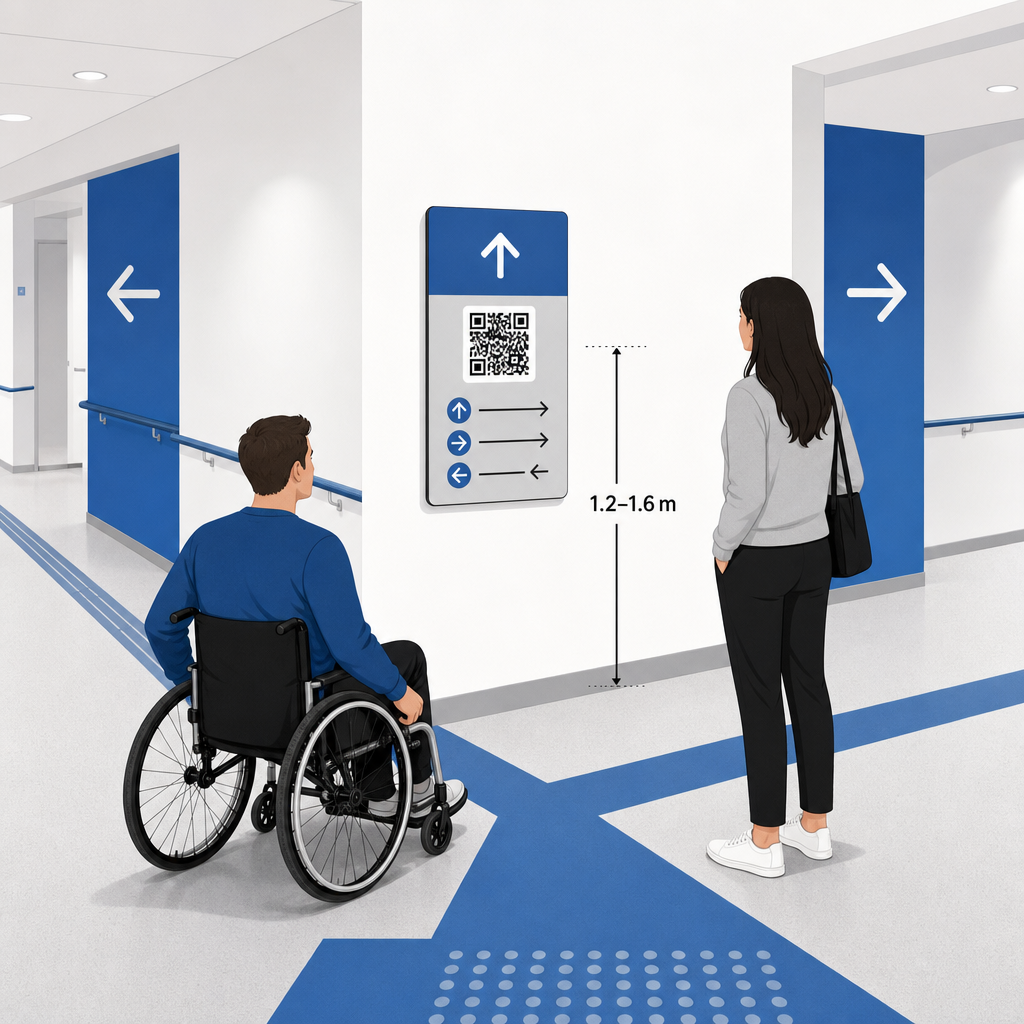
Размещайте указатели там, где посетители естественно останавливаются, чтобы принять решение о маршруте, например, на пересечениях коридоров, в зонах отдыха, фуд-кортах и у лифтовых групп. Устанавливайте печатные коды на доступной высоте глаз – обычно между 1.2–1.6 метра (3.5–5.5 фута) над полом – чтобы они оставались легко доступными как для стоящих посетителей, так и для пользователей инвалидных колясок.
Соответствие ADA и требованиям доступности
Официальные стандарты доступности в соответствии с Законом об американцах с ограниченными возможностями (ADA) требуют, чтобы указатели следовали четким визуальным правилам, включая высокий контраст от темного к светлому, матовое покрытие и определенные пропорции визуальных символов. Цифровые инструменты, такие как QR-коды, служат дополнением, а не заменой стандартных доступных физических указателей.
Для обеспечения полного соответствия и доступности:
- Поддерживайте видимый альтернативный текст, напечатанные текстовые указания или помощь персонала рядом с каждым кодом.
- Соединяйте коды с четкими описательными метками, которые указывают, к какой информации пользователь получит доступ при сканировании.
- Создавайте мобильные целевые страницы, которые поддерживают программы чтения с экрана и включают описательный альтернативный текст для графики карты.
Четкие призывы к действию
Немаркированный QR-код заставляет посетителей гадать о его назначении. Всегда сопоставляйте каждый код с четкой рамкой или текстовой меткой с призывом к действию (CTA), например, “Сканируйте для интерактивного плана этажей“ или “Найдите свой путь – сканируйте для карты“. Соблюдение проверенных рекомендаций по размещению QR-кода на плакатах значительно увеличивает вовлеченность и количество сканирований.
Технические рекомендации по созданию сканируемых указателей
Обеспечение быстрого и надежного сканирования на сотнях различных моделей смартфонов требует строгого соблюдения основных графических стандартов.
| Фактор | Технический стандарт | Практическое назначение |
|---|---|---|
| Минимальный размер печати | минимум 3 x 3 см (1.2 x 1.2 дюйма); 2 x 2 см для объектов, расположенных вблизи | Предотвращает сбои фокусировки камеры на плотных модулях данных. |
| Соотношение расстояния сканирования | Соотношение 10:1 (1 единица ширины кода на 10 единиц расстояния) | Гарантирует, что коды на больших висячих баннерах остаются сканируемыми издалека. |
| Цветовой контраст | Минимальный коэффициент контрастности 4:1 (темные модули на светлом фоне) | Помогает датчикам камеры телефона мгновенно отличать модули от фона. |
| Буфер тихой зоны | Не менее 4 модулей в ширину (приблизительно 0.25 дюйма поля) | Предотвращает помехи от окружающих графических элементов и текста при декодировании сканером. |
| Формат файла | Векторные форматы (SVG, EPS, PDF) | Сохраняет четкие края без пикселизации при печати на крупноформатных указателях. |
При печати навигационных плакатов и настенных вывесок выбирайте матовые, небликующие материалы вместо глянцевых покрытий. Матовые поверхности устраняют резкие отражения от верхнего освещения, которые являются одной из основных причин сбоев сканирования мобильными камерами. Подробные рекомендации по размерам см. в нашем исчерпывающем руководстве по размеру QR-кода and review essential рекомендациях по читаемости QR-кодов.
Направляйте посетителей прямо к вашему месту проведения Убедитесь, что гости прибывают к правильному входу или парковочным воротам без путаницы. Генерируйте точно привязанные к местоположению метки, используя QR код на карте Google Maps.
Тестирование и обновление вашей системы навигации для мероприятий
Тщательная проверка перед открытием дверей предотвращает технические сбои в часы пиковой посещаемости.
Предсобытийная проверка
- Тестирование на нескольких устройствах: Отсканируйте каждый опубликованный код с помощью устройств Apple iOS и Android, используя стандартные встроенные приложения камер.
- Оценка окружающего освещения: Осмотрите печатные указатели при реальном освещении места проведения, чтобы выявить потенциальные блики или тени, отбрасываемые светильниками зала.
- Проверка углов и расстояний сканирования: Попробуйте сканировать с реалистичных позиций стоя и под боковыми углами, подтверждая, что код декодируется за 3 секунды или менее.
- Проверка скорости загрузки сети: Проверьте время отклика целевой страницы карты через сотовые сети и гостевой Wi-Fi, чтобы подтвердить быструю загрузку при сетевой нагрузке.
Управление текущими обновлениями с помощью динамических QR-кодов
Даже тщательно спланированные макеты мероприятий сталкиваются с изменениями расписания или перемещениями стендов в последнюю минуту. Используя динамические QR-коды, вы сохраняете полный контроль над целевыми страницами. Если меняется комната для презентации или требуется выделить маршрут аварийного выхода, просто обновите URL назначения в вашей панели управления. Напечатанный код на стене остается прежним, но посетители мгновенно перенаправляются на обновленную карту.
Более того, встроенная аналитика позволяет в реальном времени отслеживать объем сканирований в различных зонах мероприятия. Большое количество сканирований в определенных точках принятия решений указывает на то, где посетители чаще всего ищут направления, предоставляя полезные данные для размещения дополнительного персонала или дополнительных указателей там, где это наиболее необходимо. Для продвинутых стратегий позиционирования ознакомьтесь с нашей полной руководству по размещению QR-кодов.
Часто задаваемые вопросы
Нет. Правила доступности требуют, чтобы физические указатели соответствовали определенным визуальным стандартам, тактильным требованиям или правилам высокой контрастности независимо. QR-коды служат полезным цифровым дополнением для ориентации посетителей, но не должны заменять основные физические указатели или доступные текстовые альтернативы.
Всегда экспортируйте ваш QR-код в масштабируемых векторных форматах, таких как SVG, EPS или PDF. Векторные файлы масштабируются до любого размера на баннерах или настенных отпечатках без потери четких краев модулей, обеспечивая надежное сканирование.
Динамические QR-коды отделяют напечатанное изображение от целевого контента. Если стенд перемещается или меняется помещение для семинара, вы обновляете целевую веб-ссылку в вашей панели управления без необходимости перепечатывать или заменять физические вывески, расположенные на площадке мероприятия.
Превращение сложной навигации по объекту в цифровой опыт самообслуживания снижает разочарование посетителей и обеспечивает бесперебойную работу мероприятия. Выбирая стратегические точки принятия решений, применяя визуальные стандарты с высокой контрастностью и связывая коды с адаптивными целевыми страницами карт, вы даете гостям возможность самостоятельно найти дорогу. Начните проектировать свою систему навигации по объекту сегодня, используя динамические инструменты Pageloot, чтобы обеспечить доступ к картам в режиме реального времени по всему вашему объекту.